Initialize TOYOTA PRIUS 2018 Owners Manual (in English)
[x] Cancel search | Manufacturer: TOYOTA, Model Year: 2018, Model line: PRIUS, Model: TOYOTA PRIUS 2018Pages: 820, PDF Size: 15.63 MB
Page 7 of 820
7
1
9 8
7
6 4 3
2
PRIUS_OM_OM47B89U_(U)
10
5
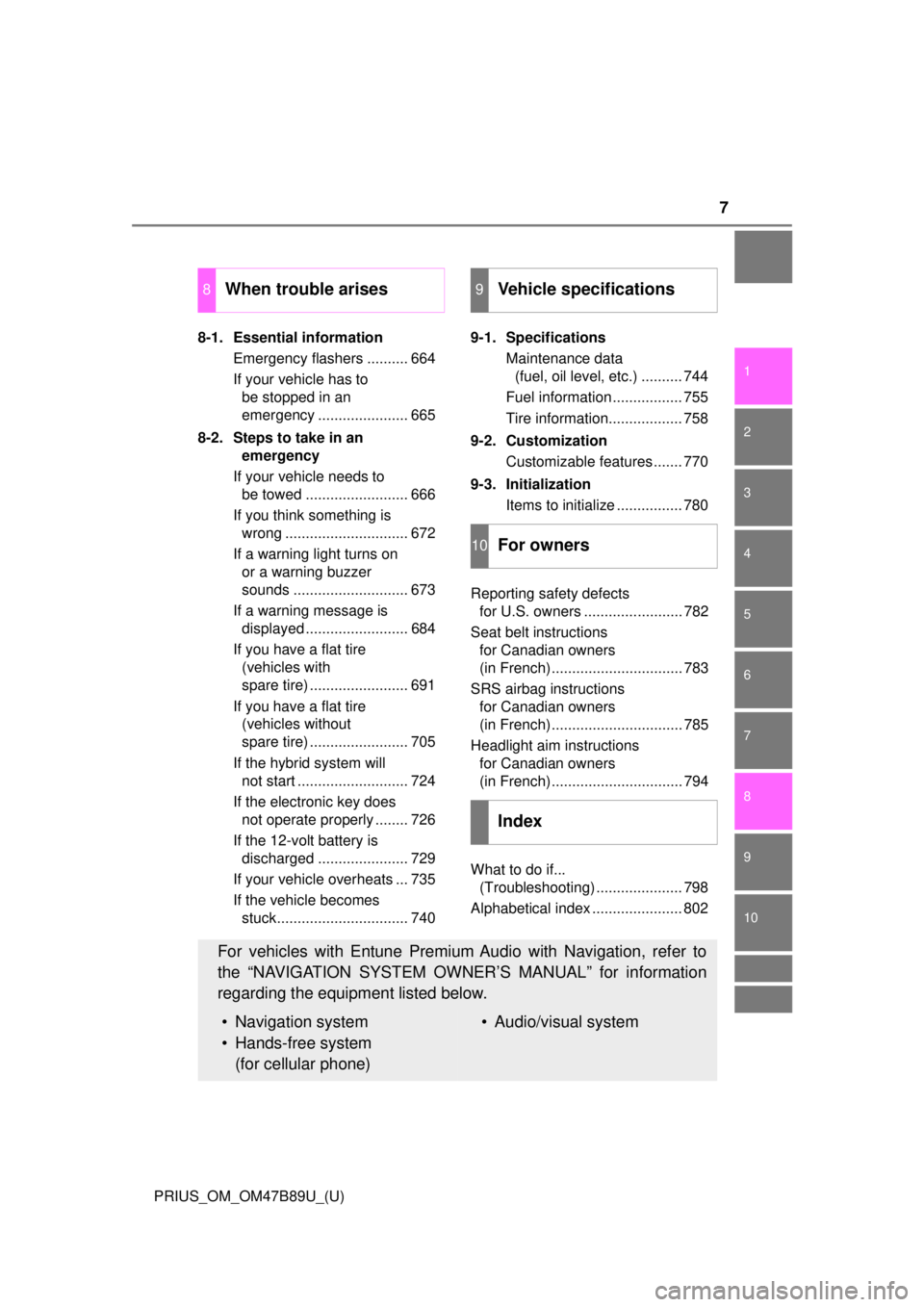
8-1. Essential informationEmergency flashers .......... 664
If your vehicle has to be stopped in an
emergency ...................... 665
8-2. Steps to take in an emergency
If your vehicle needs to be towed ......................... 666
If you think something is wrong .............................. 672
If a warning light turns on or a warning buzzer
sounds ............................ 673
If a warning message is displayed ......................... 684
If you have a flat tire (vehicles with
spare tire) ........................ 691
If you have a flat tire (vehicles without
spare tire) ........................ 705
If the hybrid system will not start ........................... 724
If the electronic key does not operate properly ........ 726
If the 12-volt battery is discharged ...................... 729
If your vehicle overheats ... 735
If the vehicle becomes stuck................................ 740 9-1. Specifications
Maintenance data (fuel, oil level, etc.) .......... 744
Fuel information ................. 755
Tire information.................. 758
9-2. Customization Customizable features ....... 770
9-3. Initialization Items to initialize ................ 780
Reporting safety defects for U.S. owners ........................ 782
Seat belt instructions for Canadian owners
(in French)................................ 783
SRS airbag instructions for Canadian owners
(in French)................................ 785
Headlight aim instructions for Canadian owners
(in French)................................ 794
What to do if... (Troubleshooting) ..................... 798
Alphabetical index ...................... 802
8When trouble arises9Vehicle specifications
10For owners
Index
For vehicles with Entune Premium Audio with Navigation, refer to
the “NAVIGATION SYSTEM OWNER’S MANUAL” for information
regarding the equipment listed below.
• Navigation system
• Hands-free system (for cellular phone)• Audio/visual system
Page 360 of 820

360
PRIUS_OM_OM47B89U_(U)
4-5. Using the driving support systems
●Influence from other sonic waves
• An ultrasonic wave source is nearby, such as the horn or clearance sonar
of another vehicle, a vehicle detector, a motorcycle engine or the air
brake of a large vehicle
• Electronic components (such as a backlit license plate (especially fluo- rescent types), fog lights, a fender pole or a wireless antenna) are
installed near the sensors
● Changes in the vehicle
• The vehicle is tilted a large amount
• The height of the vehicle has drastically changed due to the carried load
(the nose tilts up or down)
• The direction of the sensor has deviated due to a collision or other impact
■ Intelligent Clearance Sonar function while the Simple Advanced Parking
Guidance System is operating
→P. 365
■ When removing and installi ng the 12-volt battery
The system needs to be initialized.
The system can be initialized by driving the vehicle straight ahead for 5 sec-
onds or more at a speed of approximately 22 mph (35 km/h) or higher.
■ When “ICS Unavailable” is displayed on the multi-information display
and the ICS OFF indicator flashes
● Ice, snow, dirt, etc., may have adhered to the sensor. If this occurs, remove
the ice, snow, dirt, etc., from the sensor to return the system to normal.
Also, a warning message may be displayed at low temperatures due to ice
forming on the sensor, and the sensor may not detect obstacles. Once the
ice melts, the system will return to normal.
● If this message is shown even after removing dirt from the sensor, or shown
when the sensor was not dirty to begin with, have the vehicle inspected at
your Toyota dealer.
● System initialization may not have been performed after removal and instal-
lation of the 12-volt battery. Perform system initialization.
■ When “ICS Malfunction Visit Your Deal er” is displayed on the multi-infor-
mation display, the ICS OFF indi cator flashes and the buzzer sounds
The system may not be operating properly. Have the vehicle inspected at
your Toyota dealer.
Page 619 of 820
PRIUS_OM_OM47B89U_(U)
6197-3. Do-it-yourself maintenance
7
Maintenance and care
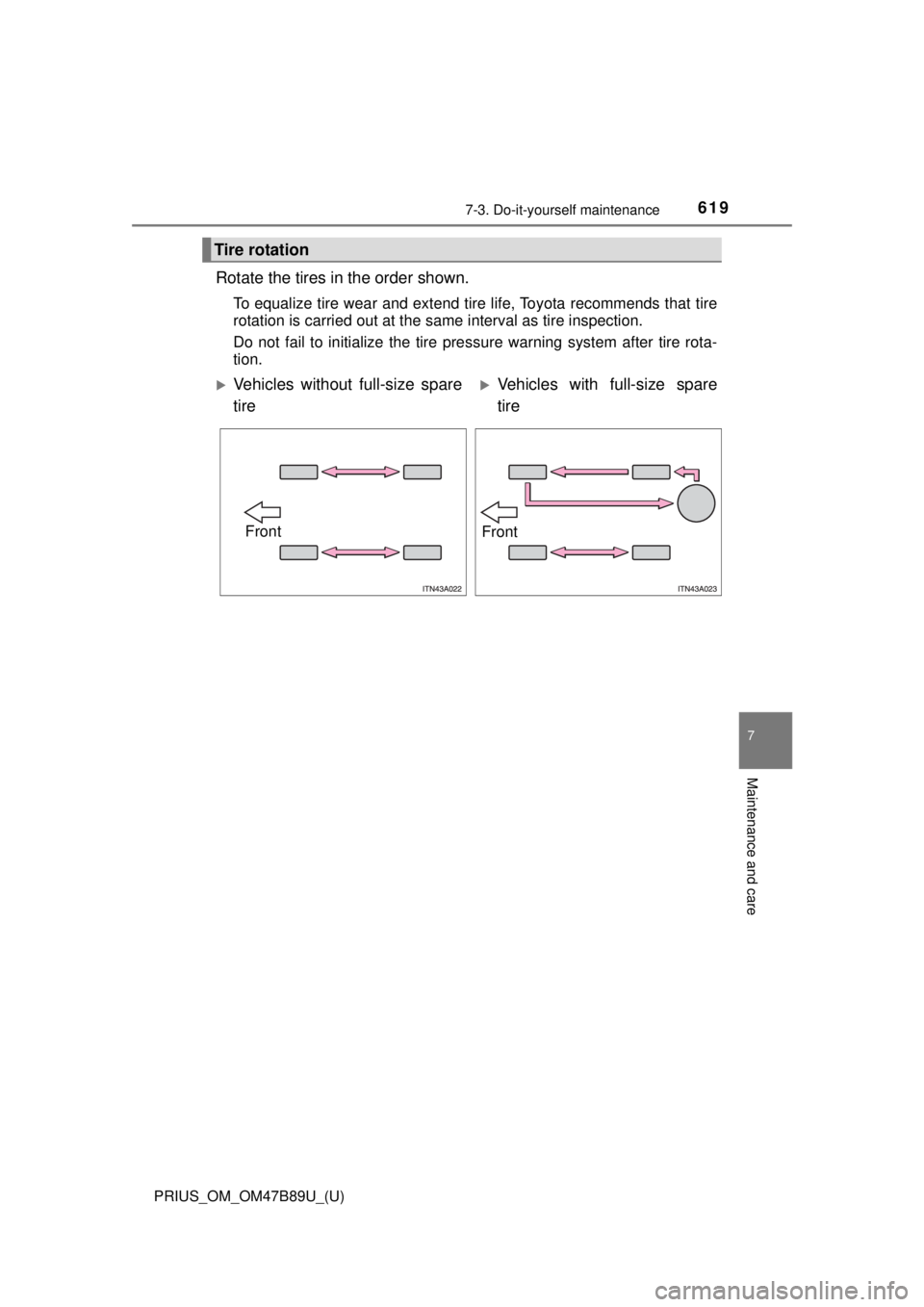
Rotate the tires in the order shown.
To equalize tire wear and extend tire life, Toyota recommends that tire
rotation is carried out at the same interval as tire inspection.
Do not fail to initialize the tire pressure warning system after tire rota-
tion.
Tire rotation
Vehicles without full-size spare
tireVehicles with full-size spare
tire
FrontFront
Page 620 of 820

620
PRIUS_OM_OM47B89U_(U)
7-3. Do-it-yourself maintenance
Your vehicle is equipped with a tire pressure warning system that uses
tire pressure warning valves and tr ansmitters to detect low tire infla-
tion pressure before serious problems arise.
If the tire pressure drops below a predetermined level, the driver is
warned by a warning light. ( →P. 676)
The compact spare tire is not equip ped with a tire pressure warning
valve and transmitter.
◆Installing tire pressure warning valves and transmitters
When replacing tires or wheels, tire pressure warning valves and
transmitters must also be installed.
When new tire pressure warning valves and transmitters are
installed, new ID codes must be registered in the tire pressure
warning computer and the tire pr essure warning system must be
initialized. Have tire pressure warning valve and transmitter ID
codes registered by your Toyota dealer. ( →P. 621)
◆Initializing the tire pressure warning system
■The tire pressure warning system must be initialized when the
tire inflation pressure is cha nged such as when changing trav-
elling speed or load weight.
When the tire pressure warning system is initialized, the current tire
inflation pressure is set as the benchmark pressure.
Tire pressure warning system
Page 621 of 820
PRIUS_OM_OM47B89U_(U)
6217-3. Do-it-yourself maintenance
7
Maintenance and care
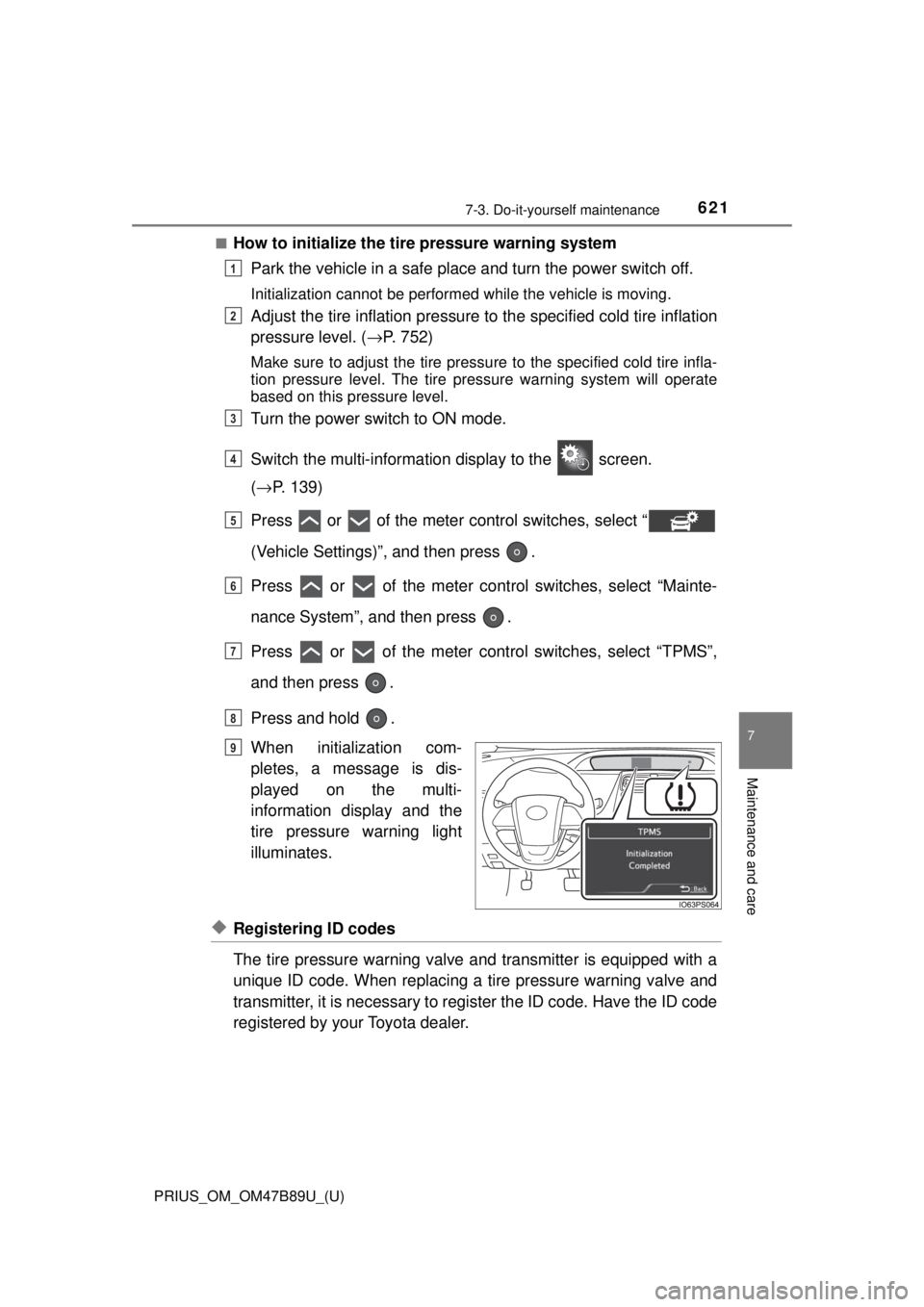
■How to initialize the tire pressure warning systemPark the vehicle in a safe place and turn the power switch off.
Initialization cannot be performed while the vehicle is moving.
Adjust the tire inflation pressure to the specified cold tire inflation
pressure level. ( →P. 752)
Make sure to adjust the tire pressu re to the specified cold tire infla-
tion pressure level. The tire pressure warning system will operate
based on this pressure level.
Turn the power switch to ON mode.
Switch the multi-informatio n display to the screen.
( → P. 139)
Press or of the meter control switches, select “
(Vehicle Settings)”, and then press .
Press or of the meter cont rol switches, select “Mainte-
nance System”, and then press .
Press or of the meter cont rol switches, select “TPMS”,
and then press .
Press and hold .
When initialization com-
pletes, a message is dis-
played on the multi-
information display and the
tire pressure warning light
illuminates.
◆Registering ID codes
The tire pressure warning valve and transmitter is equipped with a
unique ID code. When replacing a tire pressure warning valve and
transmitter, it is necessary to register the ID code. Have the ID code
registered by your Toyota dealer.
1
2
3
4
5
6
7
8
Until Complete
9
Page 626 of 820

626
PRIUS_OM_OM47B89U_(U)
7-3. Do-it-yourself maintenance
WARNING
■When inspecting or replacing tires
Observe the following precautions to prevent accidents.
Failure to do so may cause damage to parts of the drive train as well as
dangerous handling characteristics, which may lead to an accident
resulting in death or serious injury.
●Do not mix tires of different makes, models or tread patterns.
Also, do not mix tires of remarkably different treadwear.
●Do not use tire sizes other than those recommended by Toyota.
●Do not mix differently constructed tires (radial, bias-belted or bias-ply
tires).
●Do not mix summer, all season and snow tires.
●Do not use tires that have been used on another vehicle.
Do not use tires if you do not know how they were used previously.
■When initializing the tire pressure warning system
Do not initialize the tire pressure wa rning system without first adjusting
the tire inflation pressure to the spec ified level. Otherwise, the tire pres-
sure warning light may not come on even if the tire inflation pressure is
low, or it may come on when the tire inflation pressure is actually nor-
mal.
Page 743 of 820

743
PRIUS_OM_OM47B89U_(U)
9Vehicle specifications
9-1. SpecificationsMaintenance data (fuel, oil level, etc.) .......... 744
Fuel information ................ 755
Tire information ................. 758
9-2. Customization Customizable features ...... 770
9-3. Initialization Items to initialize ............... 780
Page 780 of 820
780
PRIUS_OM_OM47B89U_(U)
9-3. Initialization
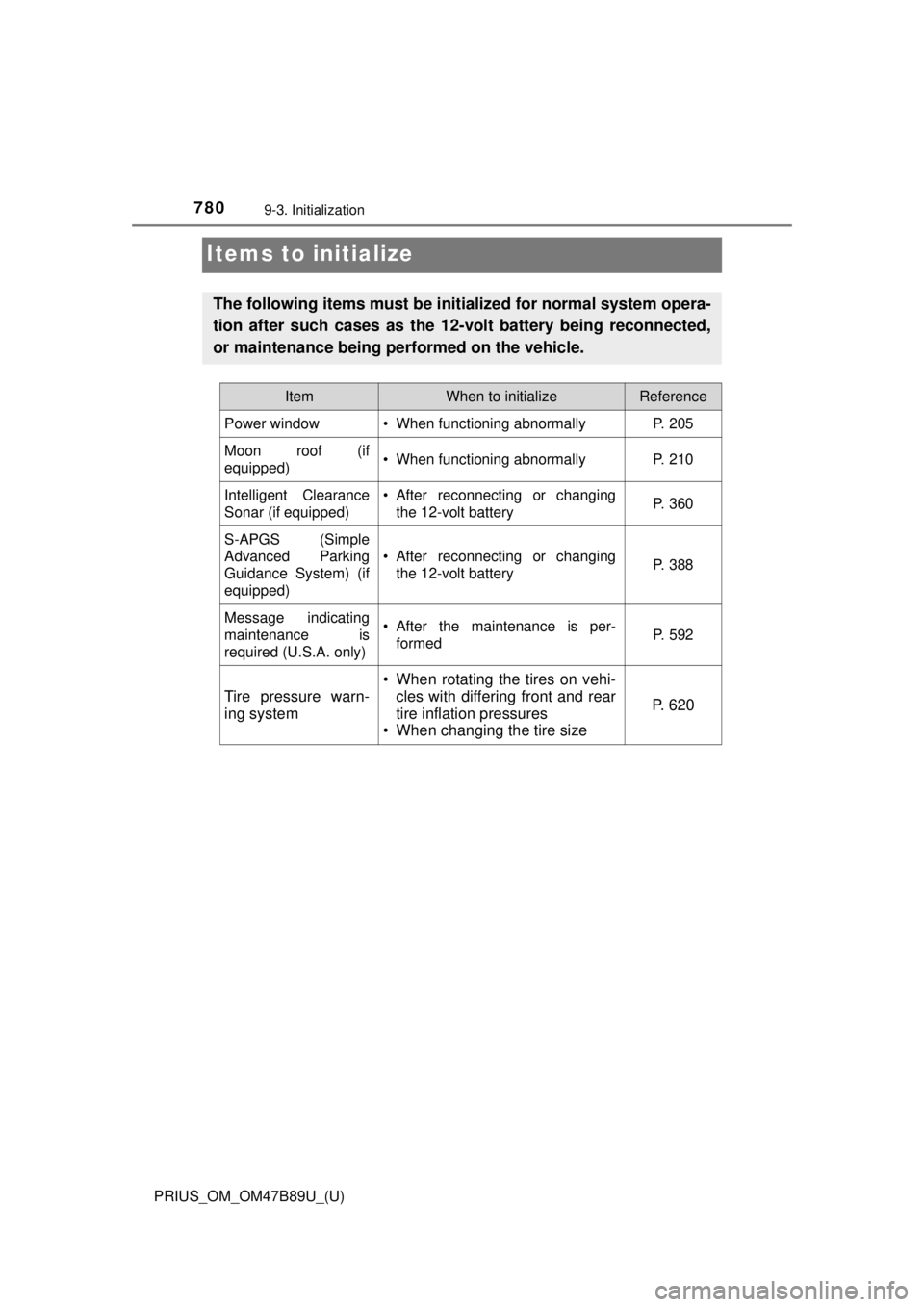
Items to initialize
The following items must be initialized for normal system opera-
tion after such cases as the 12-volt battery being reconnected,
or maintenance being performed on the vehicle.
ItemWhen to initializeReference
Power window• When functioning abnormallyP. 205
Moon roof (if
equipped)• When functioning abnormallyP. 210
Intelligent Clearance
Sonar (if equipped)• After reconnecting or changing the 12-volt batteryP. 360
S-APGS (Simple
Advanced Parking
Guidance System) (if
equipped)
• After reconnecting or changingthe 12-volt batteryP. 388
Message indicating
maintenance is
required (U.S.A. only)• After the maintenance is per-formedP. 592
Tire pressure warn-
ing system
• When rotating the tires on vehi-cles with differing front and rear
tire inflation pressures
• When changing the tire size
P. 6 2 0
Page 809 of 820

809Alphabetical index
PRIUS_OM_OM47B89U_(U)
I/M test ...................................... 597
IdentificationEngine................................... 746
Vehicle .................................. 745
Ignition switch
(Power switch) ....................... 231 Auto power off function ......... 233
Changing the power switch modes...................... 233
If your vehicle has to be stopped in an
emergency.......................... 665
Starting the hybrid system .... 231
Illuminated entry system ........ 540
Immobilizer system ................... 89
Indicators ................................. 100
Initialization
Intelligent Clearance Sonar .................................. 360
Items to initialize ................... 780
Maintenance data ................. 592
Moon roof.............................. 210
Power windows ..................... 205
S-APGS (Simple Advanced
Parking Guidance
System) .............................. 388
Tire pressure warning
system ......... ....................... 621
Inside rear view mirror ............ 200
Instrument cluster light control ...................................... 94
Intelligent Clearance Sonar .... 350
Interior lights............................ 538 Switch ........................... 539, 540
Wattage ................................ 754
Intuitive parking assist............ 339 Jack
Positioning a floor jack.......... 603
Vehicle-equipped
jack ............................. 692, 707
Jack handle ...................... 692, 707
Jam protection function
Moon roof ............................. 209
Power windows..................... 205
Keyless entry Smart key system ................. 182
Wireless remote control ........ 166
Keys .......................................... 166
Electronic key ....................... 166
Engine switch ....................... 231
If the electronic key does not operate properly ........... 726
If you lose your keys ..... 167, 170
Key number plate ................. 166
Keyless entry ........................ 166
Keys...................................... 166
Mechanical key ..................... 166
Power switch ........................ 231
Replacing the battery............ 646
Warning buzzer .................... 183
Wireless remote control key...................................... 166
Knee airbags .............................. 36
IJ
K