CD player TOYOTA PRIUS 2019 Accessories, Audio & Navigation (in English)
[x] Cancel search | Manufacturer: TOYOTA, Model Year: 2019, Model line: PRIUS, Model: TOYOTA PRIUS 2019Pages: 294, PDF Size: 5.31 MB
Page 13 of 294
13
1. BASIC FUNCTION
PRIUS_Navi_OM47C47U_(U)
18.10.10 12:01
QUICK GUIDE
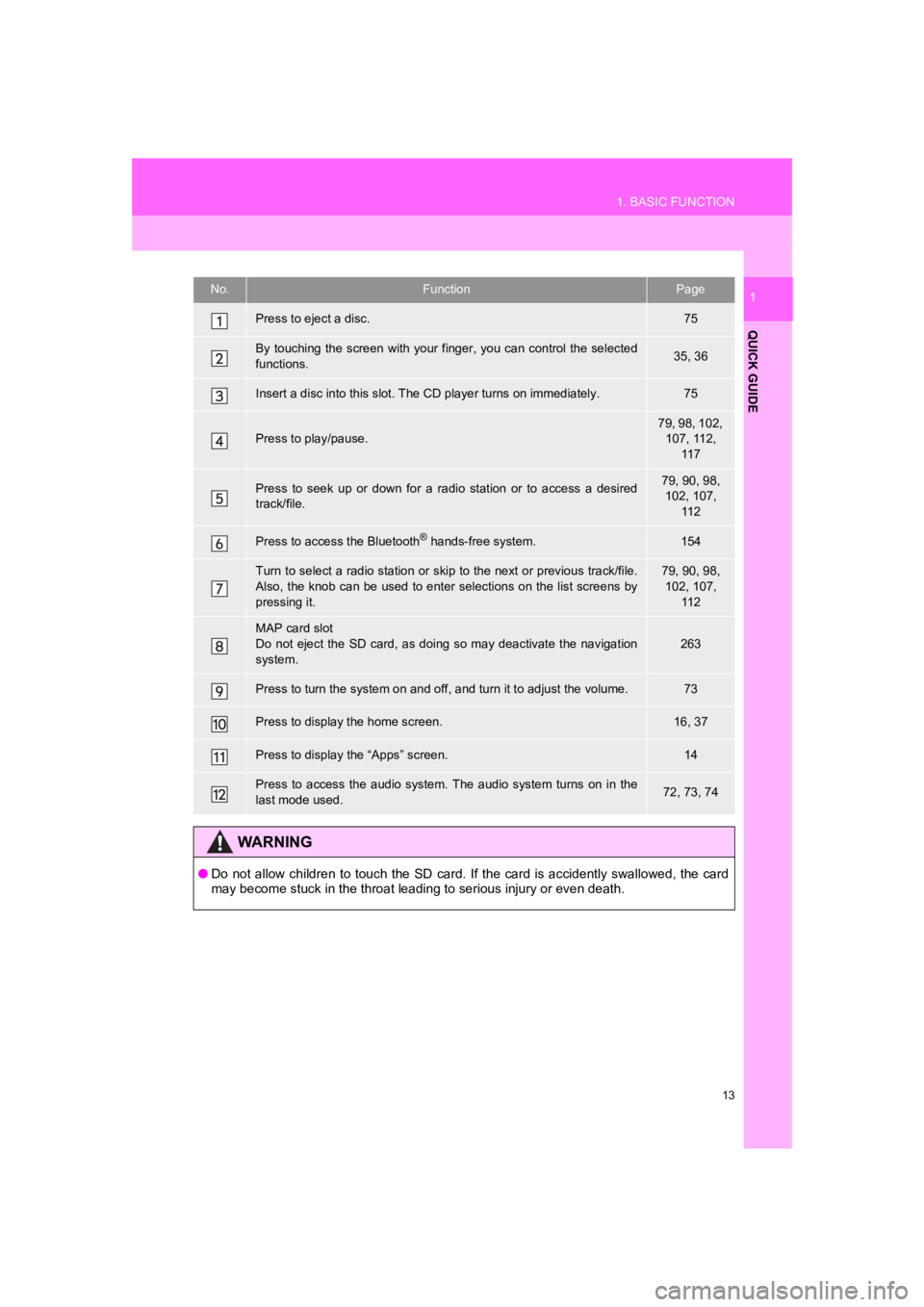
1No.FunctionPage
Press to eject a disc.75
By touching the screen with your finger, you can control the selected
functions.35, 36
Insert a disc into this slot. The CD player turns on immediatel y.75
Press to play/pause.
79, 98, 102,
107, 112, 11 7
Press to seek up or down for a radio station or to access a des ired
track/file.79, 90, 98, 102, 107,
11 2
Press to access the Bluetooth® hands-free system.154
Turn to select a radio station or skip to the next or previous track/file.
Also, the knob can be used to enter selections on the list scre ens by
pressing it.79, 90, 98, 102, 107, 11 2
MAP card slot
Do not eject the SD card, as doing so may deactivate the naviga tion
system.
263
Press to turn the system on and off, and turn it to adjust the volume.73
Press to display the home screen.16, 37
Press to display the “Apps” screen.14
Press to access the audio system. The audio system turns on in the
last mode used.72, 73, 74
WA R N I N G
● Do not allow children to touch the SD card. If the card is acci dently swallowed, the card
may become stuck in the throat leading to serious injury or eve n death.
Page 31 of 294
2
31
PRIUS_Navi_OM47C47U_(U)
18.10.10 12:01
1
2
3
4
5
6
7
8
1. REGISTERING/CONNECTING Bluetooth® DEVICE .................... 44
REGISTERING A Bluetooth® PHONE
FOR THE FIRST TIME ....................... 44
REGISTERING A Bluetooth
® AUDIO
PLAYER FOR THE FIRST TIME ........ 45
PROFILES ............................................. 46
CERTIFICATION ................................... 48
2. SETTING Bluetooth® DETAILS .... 50
“Bluetooth* Setup” SCREEN ................. 50
REGISTERING A Bluetooth®
DEVICE ............................................... 51
DELETING A Bluetooth
® DEVICE......... 52
CONNECTING A Bluetooth®
DEVICE ............................................... 53
EDITING THE Bluetooth
® DEVICE
INFORMATION ................................... 55
“System Settings” SCREEN .................. 56
1. GENERAL SETTINGS .................. 58
GENERAL SETTINGS SCREEN ........... 58
2. VOICE SETTINGS ......................... 64
VOICE SETTINGS SCREEN ................. 64
3. DRIVER SETTINGS ...................... 65
MANUALLY SELECT LINKED SETTINGS .......................................... 65
4. MAINTENANCE ............................ 66
2Bluetooth® SETTINGS3OTHER SETTINGS
BASIC FUNCTION
*: Bluetooth is a registered trademark of Bluetooth SIG, Inc.
Page 45 of 294
45
2. Bluetooth® SETTINGS
PRIUS_Navi_OM47C47U_(U)
18.10.10 12:02
BASIC FUNCTION
2
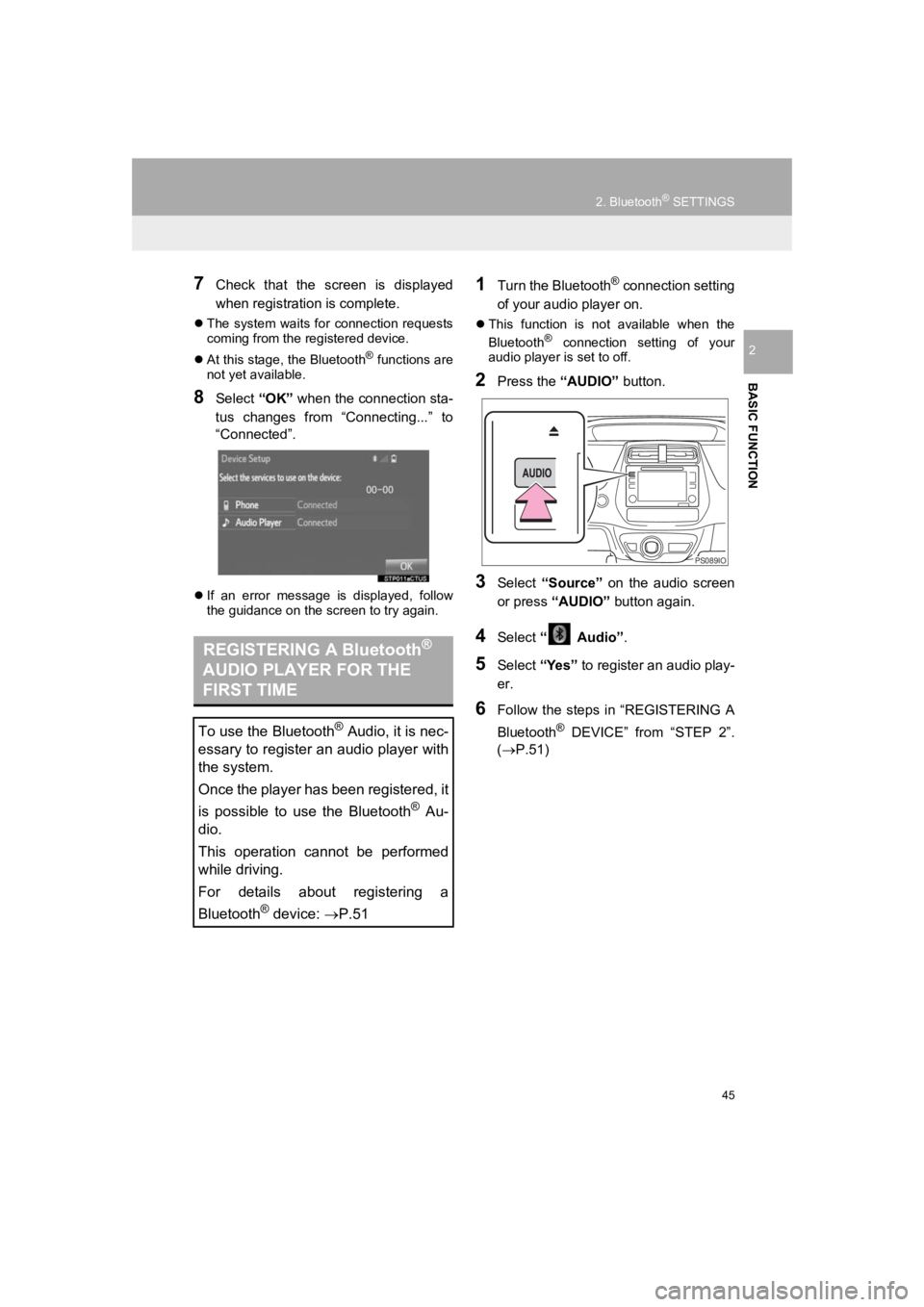
7Check that the screen is displayed
when registration is complete.
The system waits for connection requests
coming from the registered device.
At this stage, the Bluetooth
® functions are
not yet available.
8Select “OK” when the connection sta-
tus changes from “Connecting...” to
“Connected”.
If an error message is displayed, follow
the guidance on the screen to try again.
1Turn the Bluetooth® connection setting
of your audio player on.
This function is not available when the
Bluetooth® connection setting of your
audio player is set to off.
2Press the “AUDIO” button.
3Select “Source” on the audio screen
or press “AUDIO” button again.
4Select “ Audio” .
5Select “Yes” to register an audio play-
er.
6Follow the steps in “REGISTERING A
Bluetooth
® DEVICE” from “STEP 2”.
(P.51)
REGISTERING A Bluetooth®
AUDIO PLAYER FOR THE
FIRST TIME
To use the Bluetooth® Audio, it is nec-
essary to register an audio player with
the system.
Once the player has been registered, it
is possible to use the Bluetooth
® Au-
dio.
This operation cannot be performed
while driving.
For details about registering a
Bluetooth
® device: P.51
PS089IO
Page 46 of 294
46
2. Bluetooth® SETTINGS
PRIUS_Navi_OM47C47U_(U)
18.10.10 12:02
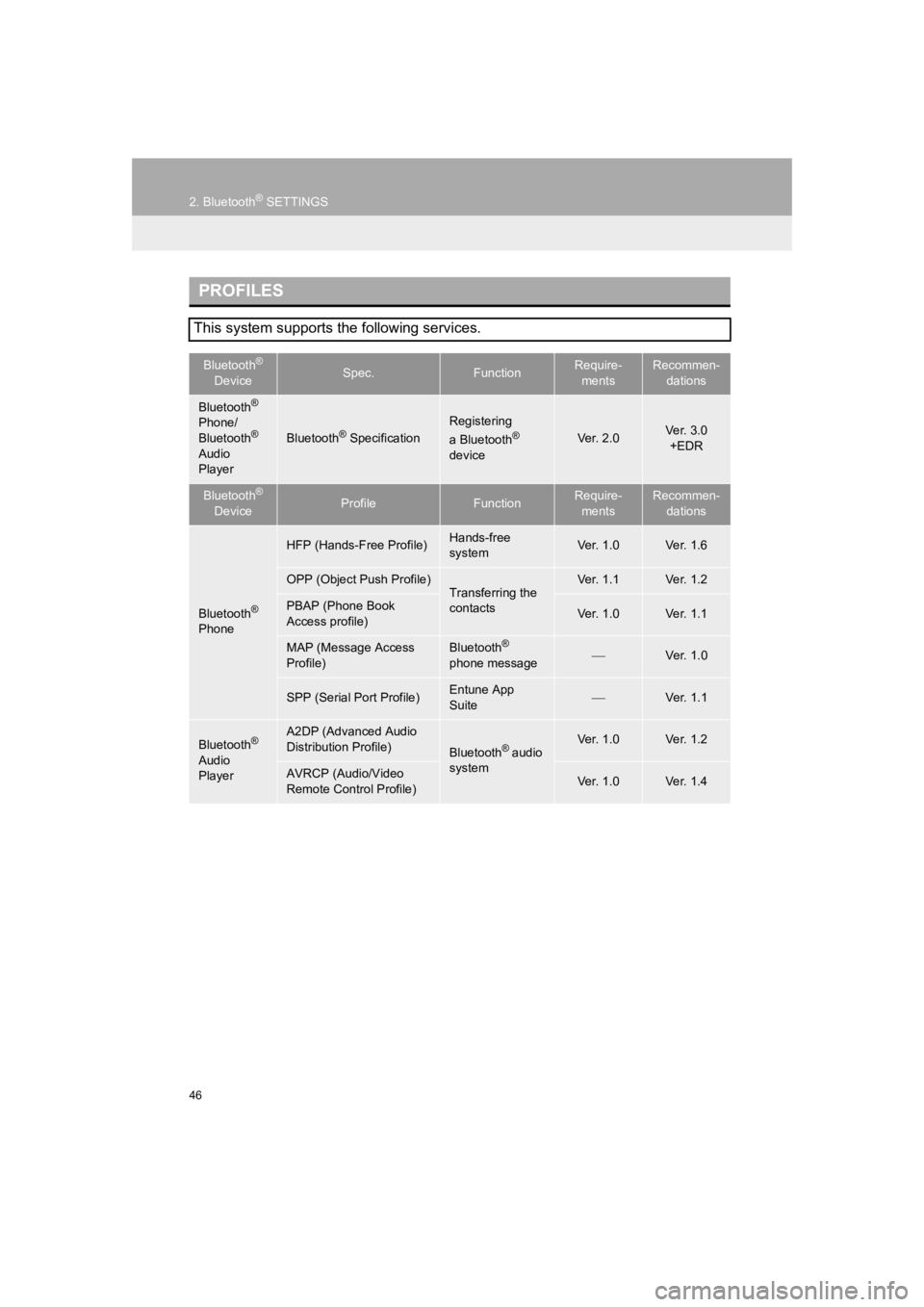
PROFILES
This system supports the following services.
Bluetooth®
DeviceSpec.FunctionRequire- mentsRecommen- dations
Bluetooth®
Phone/
Bluetooth®
Audio
Player
Bluetooth® Specification
Registering
a Bluetooth®
deviceVer. 2.0Ver. 3.0 +EDR
Bluetooth®
DeviceProfileFunctionRequire- mentsRecommen- dations
Bluetooth®
Phone
HFP (Hands-Free Profile)Hands-free
systemVer. 1.0Ver. 1.6
OPP (Object Push Profile)Transferring the
contactsVer. 1.1Ver. 1.2
PBAP (Phone Book
Access profile)Ver. 1.0Ver. 1.1
MAP (Message Access
Profile)Bluetooth®
phone messageVer. 1.0
SPP (Serial Port Profile)Entune App
SuiteVer. 1.1
Bluetooth®
Audio
Player
A2DP (Advanced Audio
Distribution Profile)
Bluetooth® audio
systemVer. 1.0Ver. 1.2
AVRCP (Audio/Video
Remote Control Profile)Ver. 1.0Ver. 1.4
Page 51 of 294
51
2. Bluetooth® SETTINGS
PRIUS_Navi_OM47C47U_(U)
18.10.10 12:02
BASIC FUNCTION
2From the phone/message settings
screen
1Press the “APPS” button.
2Select “Setup” .
3Select “Phone” .
4Select “Connect Phone” .
From the status display
1Select status display area on the
screen.
1Display the “Bluetooth* Setup” screen.
(P.50)
2Select “Add”.
When another Bluetooth
® device is con-
nected
To disconnect the Bluetooth® device,
select “Yes”.
When 5 Bluetooth® devices have al-
ready been registered
A registered device needs to be replaced.
Select “Yes”, and select the device to be
replaced.
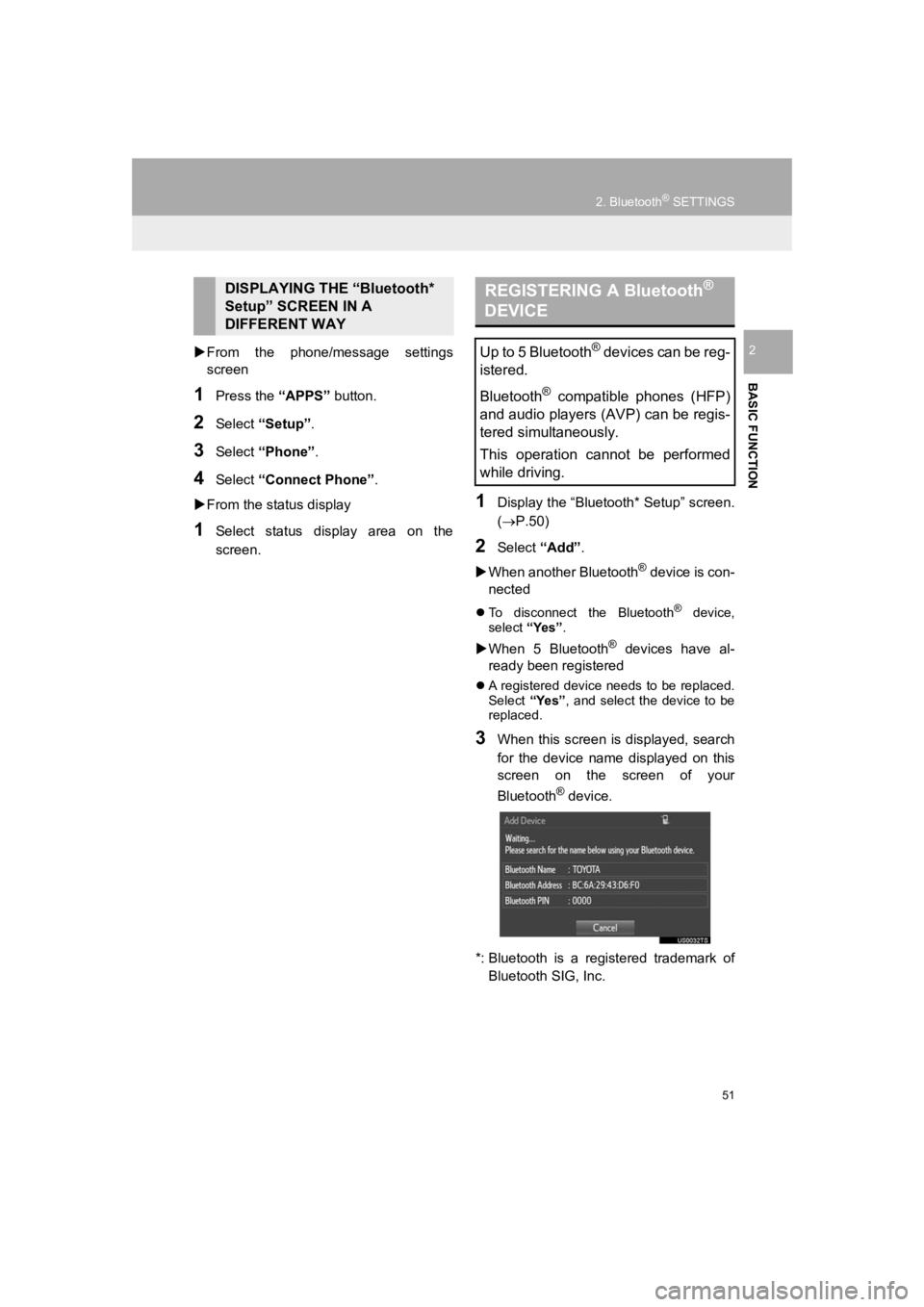
3When this screen is displayed, search
for the device name displayed on this
screen on the screen of your
Bluetooth
® device.
*: Bluetooth is a registered trademark of Bluetooth SIG, Inc.
DISPLAYING THE “Bluetooth*
Setup” SCREEN IN A
DIFFERENT WAY REGISTERING A Bluetooth®
DEVICE
Up to 5 Bluetooth® devices can be reg-
istered.
Bluetooth
® compatible phones (HFP)
and audio players (AVP) can be regis-
tered simultaneously.
This operation cannot be performed
while driving.
Page 53 of 294
53
2. Bluetooth® SETTINGS
PRIUS_Navi_OM47C47U_(U)
18.10.10 12:02
BASIC FUNCTION
2
1Display the “Bluetooth* Setup” screen.
(P.50)
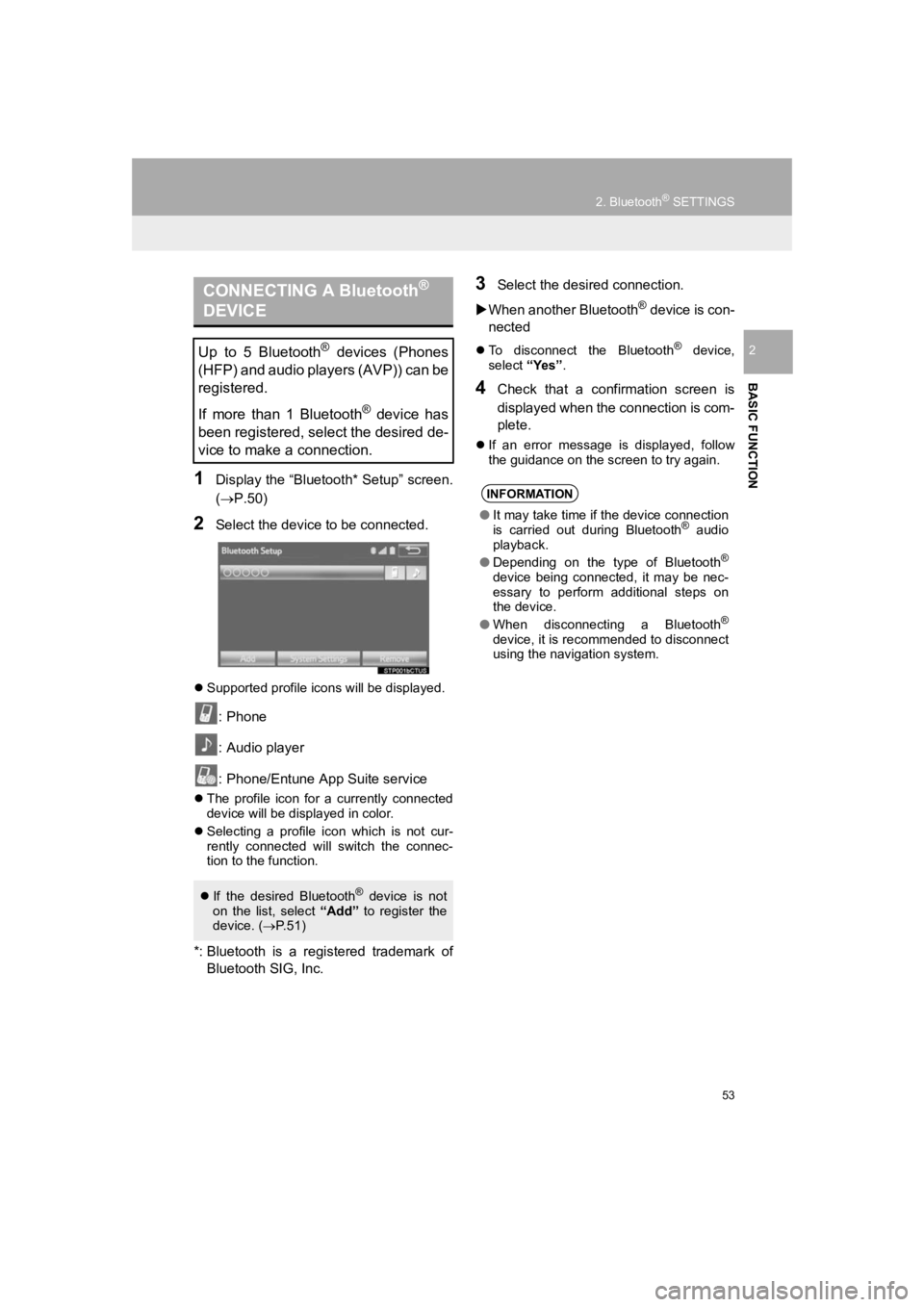
2Select the device to be connected.
Supported profile icons will be displayed.
: Phone
: Audio player
: Phone/Entune App Suite service
The profile icon for a currently connected
device will be displayed in color.
Selecting a profile icon which is not cur-
rently connected will switch the connec-
tion to the function.
*: Bluetooth is a registered trademark of
Bluetooth SIG, Inc.
3Select the desired connection.
When another Bluetooth
® device is con-
nected
To disconnect the Bluetooth® device,
select “Yes”.
4Check that a confirmation screen is
displayed when the connection is com-
plete.
If an error message is displayed, follow
the guidance on the screen to try again.
CONNECTING A Bluetooth®
DEVICE
Up to 5 Bluetooth® devices (Phones
(HFP) and audio players (AVP)) can be
registered.
If more than 1 Bluetooth
® device has
been registered, select the desired de-
vice to make a connection.
If the desired Bluetooth® device is not
on the list, select “Add” to register the
device. ( P.51)
INFORMATION
● It may take time if the device connection
is carried out during Bluetooth® audio
playback.
● Depending on the type of Bluetooth
®
device being connected, it may be nec-
essary to perform additional steps on
the device.
● When disconnecting a Bluetooth
®
device, it is recommended to disconnect
using the navigation system.
Page 55 of 294
55
2. Bluetooth® SETTINGS
PRIUS_Navi_OM47C47U_(U)
18.10.10 12:02
BASIC FUNCTION
2
1Display the “Bluetooth* Setup” screen.
(P.50)
2Select the desired device to be edited.
3Select “Device Info” .
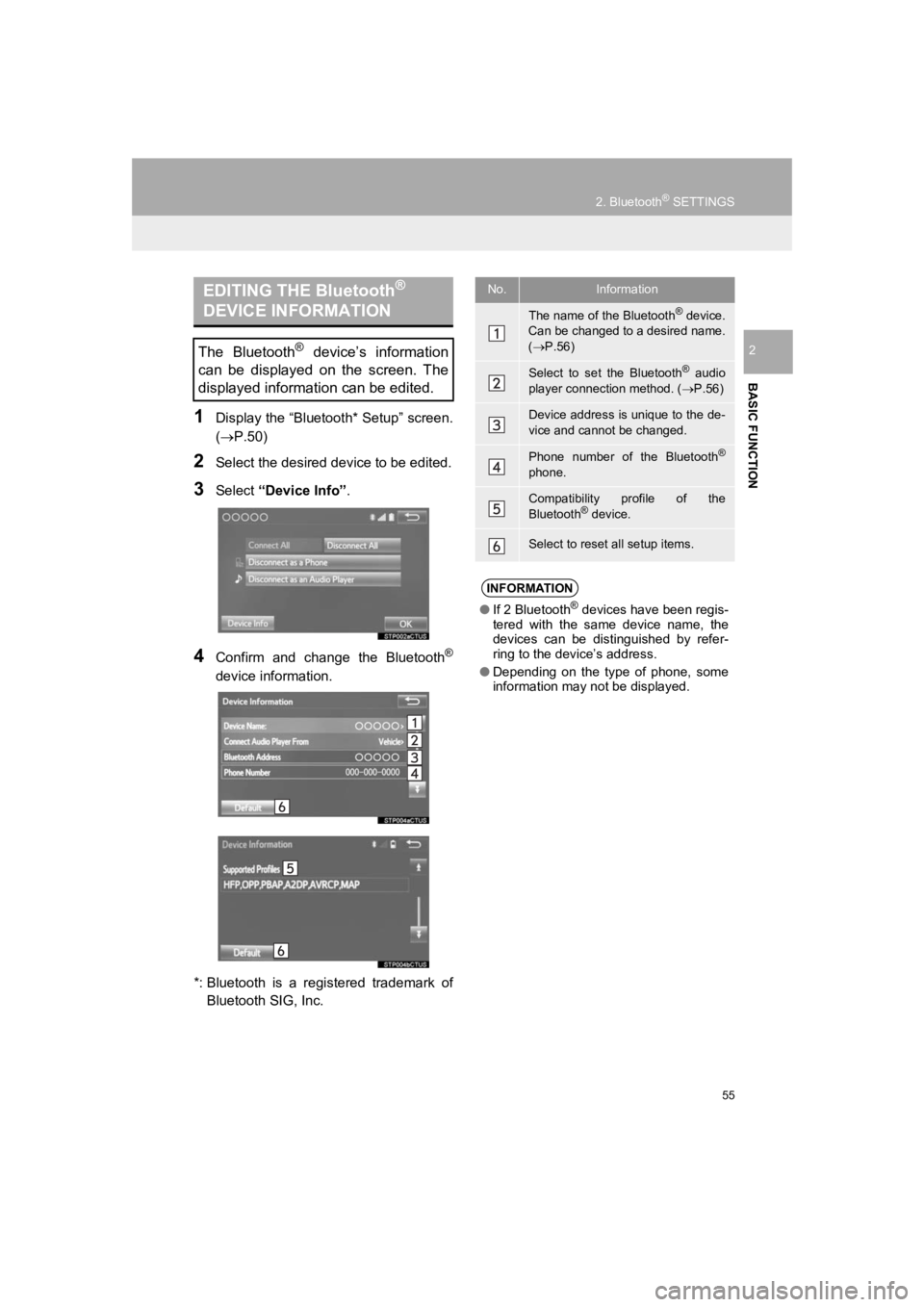
4Confirm and change the Bluetooth®
device information.
*: Bluetooth is a registered trademark of Bluetooth SIG, Inc.
EDITING THE Bluetooth®
DEVICE INFORMATION
The Bluetooth® device’s information
can be displayed on the screen. The
displayed information can be edited.
No.Information
The name of the Bluetooth® device.
Can be changed to a desired name.
( P.56)
Select to set the Bluetooth® audio
player connection method. ( P.56)
Device address is unique to the de-
vice and cannot be changed.
Phone number of the Bluetooth®
phone.
Compatibility profile of the
Bluetooth® device.
Select to reset all setup items.
INFORMATION
● If 2 Bluetooth® devices have been regis-
tered with the same device name, the
devices can be distinguished by refer-
ring to the device’s address.
● Depending on the type of phone, some
information may not be displayed.
Page 56 of 294
56
2. Bluetooth® SETTINGS
PRIUS_Navi_OM47C47U_(U)
18.10.10 12:02
1Select “Device Name” .
2Enter the name and select “OK”.
1Select “Connect Audio Player
From” .
2Select the desired connection method.
“Vehicle” : Select to connect the audio
system to the audio player.
“Device” : Select to connect the audio
player to the audio system.
Depending on the audio player, the “Vehi-
cle” or “Device” connection method may
be best. As such, refer to the manual that
comes with the audio player.
To reset the connection method, select
“Default”.
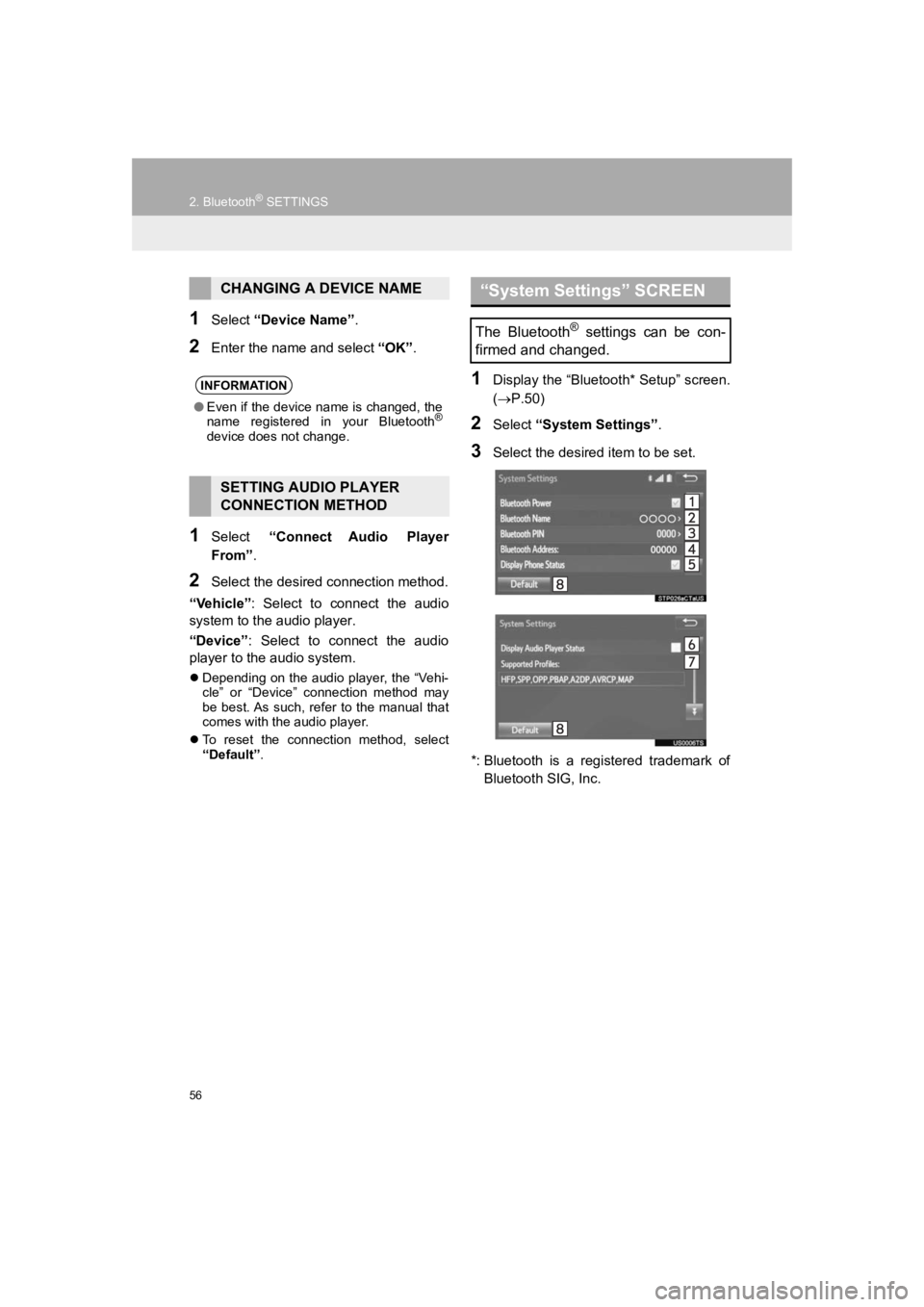
1Display the “Bluetooth* Setup” screen.
( P.50)
2Select “System Settings” .
3Select the desired item to be set.
*: Bluetooth is a registered trademark of Bluetooth SIG, Inc.
CHANGING A DEVICE NAME
INFORMATION
● Even if the device name is changed, the
name registered in your Bluetooth®
device does not change.
SETTING AUDIO PLAYER
CONNECTION METHOD
“System Settings” SCREEN
The Bluetooth® settings can be con-
firmed and changed.
Page 57 of 294
57
2. Bluetooth® SETTINGS
PRIUS_Navi_OM47C47U_(U)
18.10.10 12:02
BASIC FUNCTION
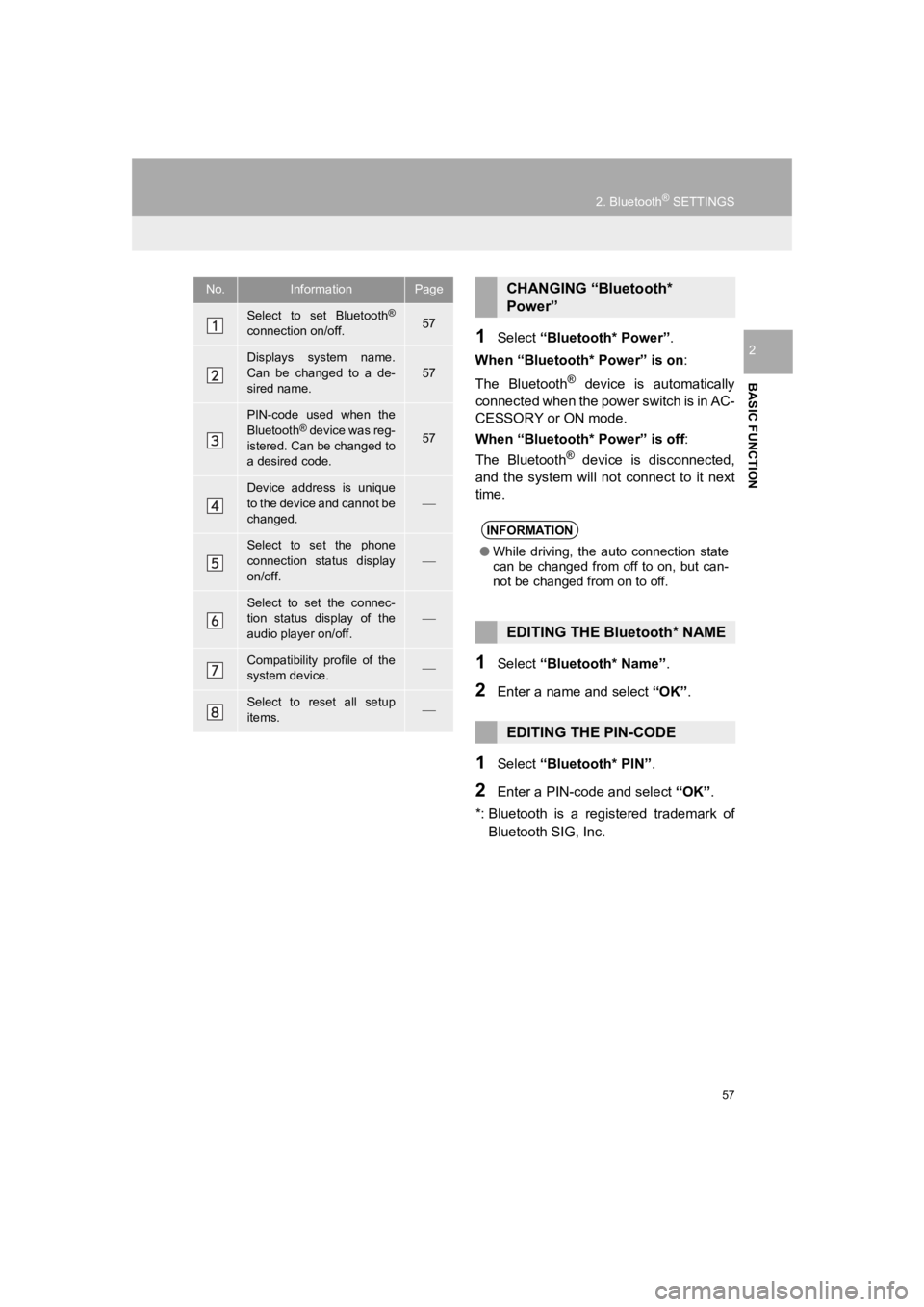
21Select “Bluetooth* Power” .
When “Bluetooth* Power” is on:
The Bluetooth
® device is automatically
connected when the power switch is in AC-
CESSORY or ON mode.
When “Bluetooth* Power” is off :
The Bluetooth
® device is disconnected,
and the system will not connect to it next
time.
1Select “Bluetooth* Name” .
2Enter a name and select “OK”.
1Select “Bluetooth* PIN” .
2Enter a PIN-code and select “OK”.
*: Bluetooth is a registered trademark of Bluetooth SIG, Inc.
No.InformationPage
Select to set Bluetooth®
connection on/off.57
Displays system name.
Can be changed to a de-
sired name.57
PIN-code used when the
Bluetooth® device was reg-
istered. Can be changed to
a desired code.57
Device address is unique
to the device and cannot be
changed.
Select to set the phone
connection status display
on/off.
Select to set the connec-
tion status display of the
audio player on/off.
Compatibility profile of the
system device.
Select to reset all setup
items.
CHANGING “Bluetooth*
Power”
INFORMATION
● While driving, the auto connection state
can be changed from off to on, but can-
not be changed from on to off.
EDITING THE Bluetooth* NAME
EDITING THE PIN-CODE
Page 71 of 294
3
71
PRIUS_Navi_OM47C47U_(U)
18.10.10 12:02
1
2
3
4
5
6
7
8
1. CD .................................................. 98
OVERVIEW ........................................... 98
PLAYING AN AUDIO CD .................... 101
PLAYING AN MP3/WMA/AAC DISC ... 101
2. USB MEMORY ............................. 102
OVERVIEW ......................................... 102
PLAYING A USB AUDIO ..................... 106
3. iPod .............................................. 107
OVERVIEW ......................................... 107
iPod AUDIO ......................................... 111
iPod VIDEO ......................................... 111
4. Bluetooth® AUDIO ...................... 112
OVERVIEW ......................................... 112
CONNECTING A Bluetooth®
DEVICE ............................................. 116
LISTENING TO Bluetooth
® AUDIO ..... 116
5. AUX .............................................. 117
OVERVIEW ......................................... 117
1. STEERING SWITCHES............... 120
1. AUDIO SETTINGS ...................... 122
AUDIO SETTINGS SCREEN............... 122
1. OPERATING INFORMATION ..... 124
RADIO.................................................. 124
CD PLAYER AND DISC ...................... 125
iPod ...................................................... 127
FILE INFORMATION ........................... 128
TERMS ................................................ 131
ERROR MESSAGES ........................... 132
3MEDIA OPERATION4AUDIO REMOTE CONTROLS
5SETUP
6TIPS FOR OPERATING THE
AUDIO SYSTEM
AUDIO SYSTEM