fuel TOYOTA PRIUS 2019 (in English) User Guide
[x] Cancel search | Manufacturer: TOYOTA, Model Year: 2019, Model line: PRIUS, Model: TOYOTA PRIUS 2019Pages: 828, PDF Size: 16.9 MB
Page 89 of 828
891-4. Hybrid system
PRIUS_OM_OM47C35U_(U)
1
For safety and security
■If a warning light comes on, a warning message is displayed, or the
12-volt battery is disconnected
The hybrid system may not start. In this case, try to start the system again. If
the “READY” indicator does not come on, contact your Toyota dea ler.
■ Running out of fuel
When the vehicle has run out of fuel and the hybrid system cann ot be started,
refuel the vehicle with at least enough gasoline to make the lo w fuel level
warning light ( P. 684) go off. If there is only a small amount of fuel, the
hybrid system may not be able to start. (The standard amount of fuel is about
2.0 gal. [7.5 L, 1.7 Imp.gal.], when the vehicle is on a level surface. This value
may vary when the vehicle is on a slope. Add extra fuel when th e vehicle is
inclined.)
■ Electromagnetic waves
●High voltage parts and cables on hybrid vehicles incorporate el ectromag-
netic shielding, and therefore emit approximately the same amount of elec-
tromagnetic waves as conventional gasoline powered vehicles or home
electronic appliances.
● Your vehicle may cause sound interference in some third party-p roduced
radio parts.
■ Hybrid battery ( traction battery)
The hybrid battery (traction battery) has a limited service life. The lifespan of
the hybrid battery (traction battery) can change in accordance with driving
style and driving conditions.
■ Starting the hybrid system in a n extremely cold environment
When the hybrid battery (traction battery) is extremely cold (b elow approxi-
mately -22°F [-30°C]) under the influence of the outside temper ature, it may
not be possible to start the hybrid system. In this case, try to start the hybrid
system again after the temperature of the hybrid battery increases due to the
outside temperature increase etc.
Page 91 of 828
911-4. Hybrid system
PRIUS_OM_OM47C35U_(U)
1
For safety and security
WARNING
■Road accident cautions
Observe the following precautions to reduce the risk of death o r serious
injury:
● Pull your vehicle off the road, apply the parking brake, shift the shift posi-
tion to P, and turn the hybrid system off.
● Do not touch the high voltage parts, cables and connectors.
● If electric wires are exposed inside or outside your vehicle, an electric
shock may occur. Never touch exposed electric wires.
● If a fire occurs in the hybrid vehicle, leave the vehicle as soon as possible.
Never use a fire extinguisher that is not meant for electric fires. Using even
a small amount of water may be dangerous.
● If your vehicle needs to be towed, do so with front wheels (2WD models)
or four wheels (AWD models) raised. If the wheels connected to the elec-
tric motor (traction motor) are on the ground when towing, the motor may
continue to generate electricity. This may cause a fire. ( P. 674)
● Carefully inspect the ground under the vehicle. If you find that liquid has
leaked onto the ground, the fuel system may have been damaged. Leave
the vehicle as soon as possible.
AWD models
● If a fluid leak occurs, do not touch the fluid as it may be strong alkaline
electrolyte from the hybrid battery (traction battery). If it comes into contact
with your skin or eyes, wash it off immediately with a large amount of water
or, if possible, boric acid solution. Seek immediate medical attention.
2WD models
● Do not touch the battery if liquid is leaking from or adhering to it.
If electrolyte (carbonic-based organic electrolyte) from the hy brid battery
(traction battery) comes into contact with the eyes or skin, it could cause
blindness or skin wounds. In the unlikely event that it comes into contact
with the eyes or skin, wash it off immediately with a large amount of water,
and seek immediate medical attention.
● If electrolyte is leaking from the hybrid battery (traction bat tery), do not
approach the vehicle.
Even in the unlikely event that the hybrid battery (traction ba ttery) is dam-
aged, the internal construction of the battery will prevent a l arge amount of
electrolyte from leaking out. However, any electrolyte that doe s leak out
will give off a vapor. This vapor is an irritant to skin and eyes and could
cause acute poisoning if inhaled.
● Do not bring burning or high-tem perature items close to the electrolyte.
The electrolyte may ignite and cause a fire.
Page 98 of 828
98
PRIUS_OM_OM47C35U_(U)
2. Instrument cluster
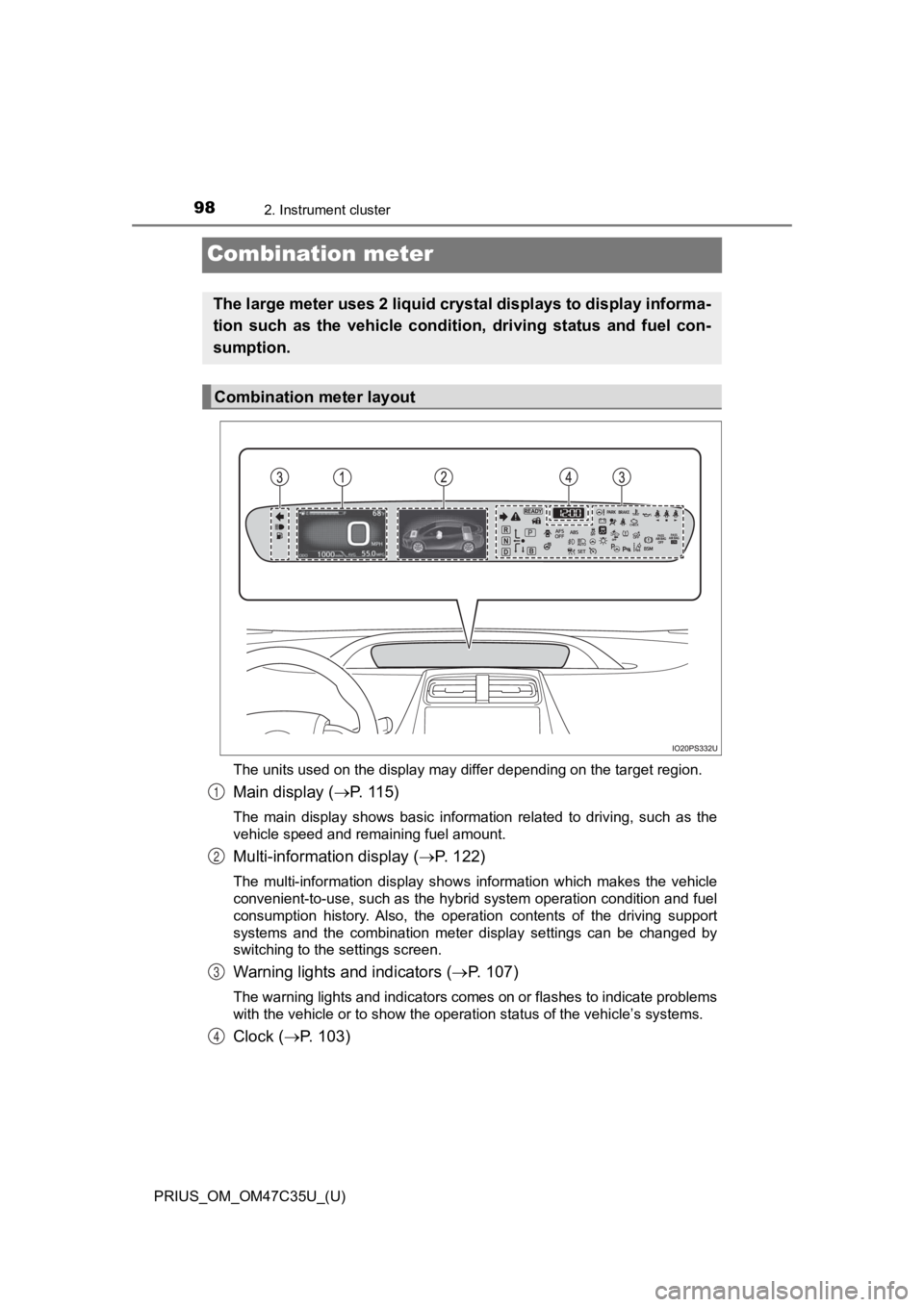
Combination meter
The units used on the display may differ depending on the target region.
Main display (P. 115)
The main display shows basic information related to driving, su ch as the
vehicle speed and remaining fuel amount.
Multi-information display ( P. 122)
The multi-information display shows information which makes the vehicle
convenient-to-use, such as the hybrid system operation conditio n and fuel
consumption history. Also, the operation contents of the drivin g support
systems and the combination meter display settings can be chang ed by
switching to the settings screen.
Warning lights and indicators ( P. 1 0 7 )
The warning lights and indicators comes on or flashes to indicate problems
with the vehicle or to show the operation status of the vehicle ’s systems.
Clock (P. 103)
The large meter uses 2 liquid crystal displays to display infor ma-
tion such as the vehicle conditi on, driving status and fuel con-
sumption.
Combination meter layout
1
2
3
4
Page 99 of 828
PRIUS_OM_OM47C35U_(U)
992. Instrument cluster
2
Instrument cluster
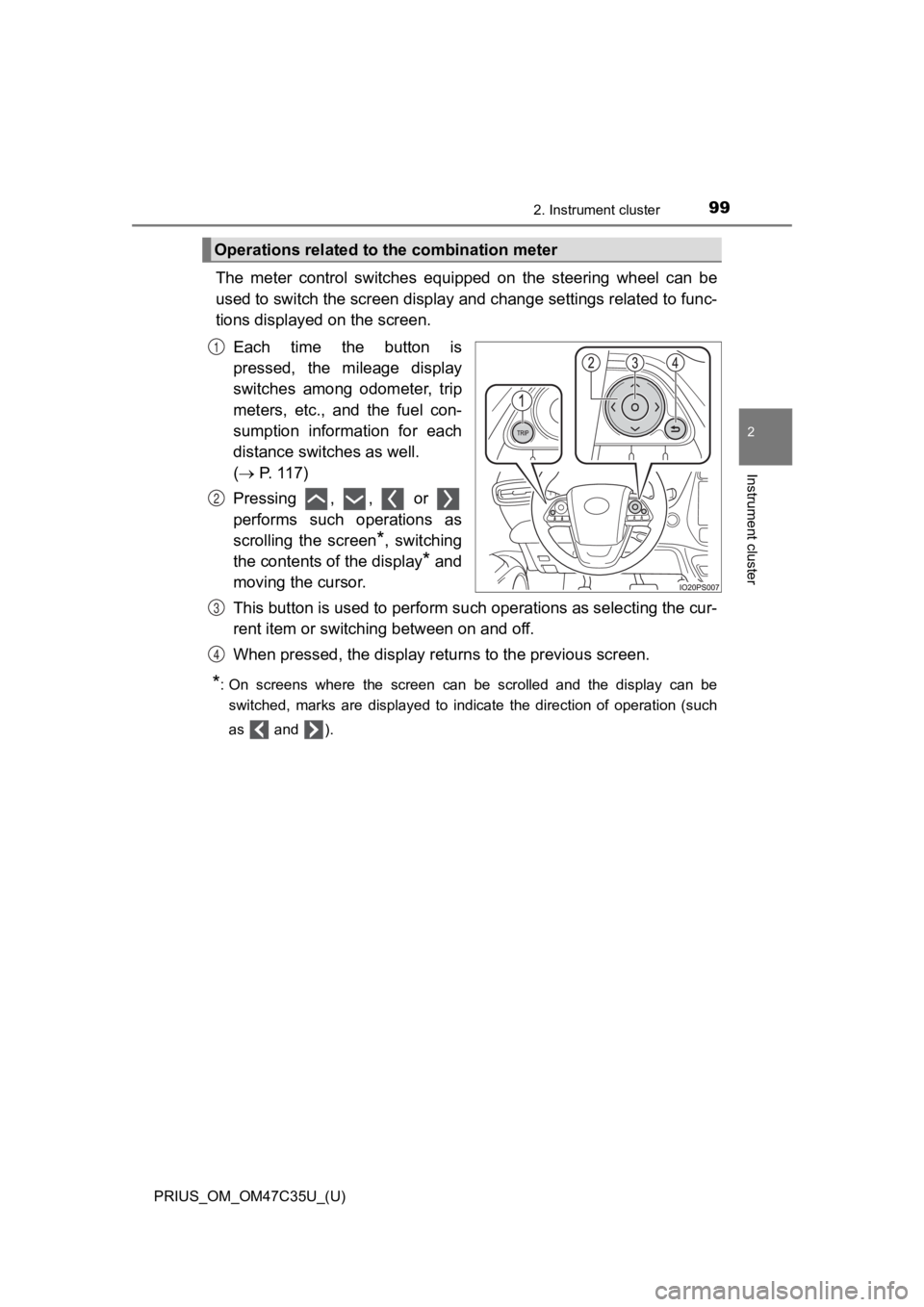
The meter control switches equipped on the steering wheel can be
used to switch the screen displa y and change settings related to func-
tions displayed on the screen.
Each time the button is
pressed, the mileage display
switches among odometer, trip
meters, etc., and the fuel con-
sumption information for each
distance switches as well.
( P. 117)
Pressing , , or
performs such operations as
scrolling the screen
*, switching
the contents of the display
* and
moving the cursor.
This button is used to perform s uch operations as selecting the cur-
rent item or switching between on and off.
When pressed, the display returns to the previous screen.
*: On screens where the screen can be scrolled and the display ca n be
switched, marks are displayed to indicate the direction of oper ation (such
as and ).
Operations related to the combination meter
1
2
3
4
Page 101 of 828
PRIUS_OM_OM47C35U_(U)
1012. Instrument cluster
2
Instrument cluster
Some information will be displayed automatically according to power
switch operation, vehicle condition, etc.
■When starting the hybrid system
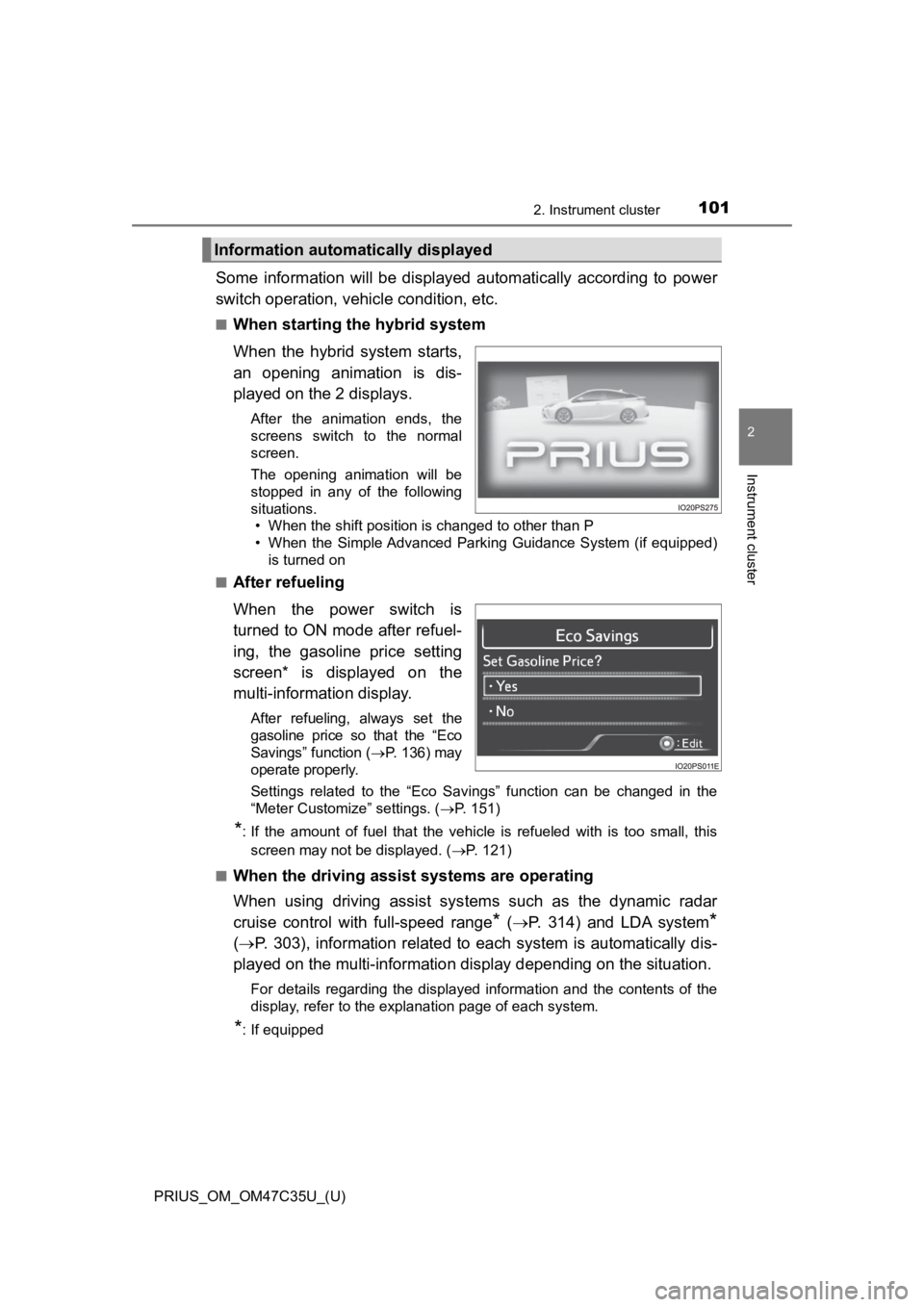
When the hybrid system starts,
an opening animation is dis-
played on the 2 displays.
After the animation ends, the
screens switch to the normal
screen.
The opening animation will be
stopped in any of the following
situations. • When the shift position is changed to other than P
• When the Simple Advanced Parking Guidance System (if equipped)
is turned on
■
After refueling
When the power switch is
turned to ON mode after refuel-
ing, the gasoline price setting
screen* is displayed on the
multi-information display.
After refueling, always set the
gasoline price so that the “Eco
Savings” function ( P. 136) may
operate properly.
Settings related to the “Eco Savings” function can be changed i n the
“Meter Customize” settings. ( P. 151)
*: If the amount of fuel that the vehicle is refueled with is too small, this
screen may not be displayed. ( P. 121)
■
When the driving assist systems are operating
When using driving assist systems such as the dynamic radar
cruise control with full-speed range
* ( P. 314) and LDA system*
( P. 303), information related to each system is automatically di s-
played on the multi-information display depending on the situat ion.
For details regarding the displayed information and the contents of the
display, refer to the explanation page of each system.
*: If equipped
Information automatically displayed
Page 102 of 828
102
PRIUS_OM_OM47C35U_(U)
2. Instrument cluster
■When there is information to be notified about the vehicle
When a shift position is mistakenly selected or a problem occurs in
a vehicle system, a warning me ssage (or image) is displayed on
the multi-inform ation display.
When a warning message is displayed, follow the instructions displayed
on the display. ( P. 693)
■
When stopping the hybrid system
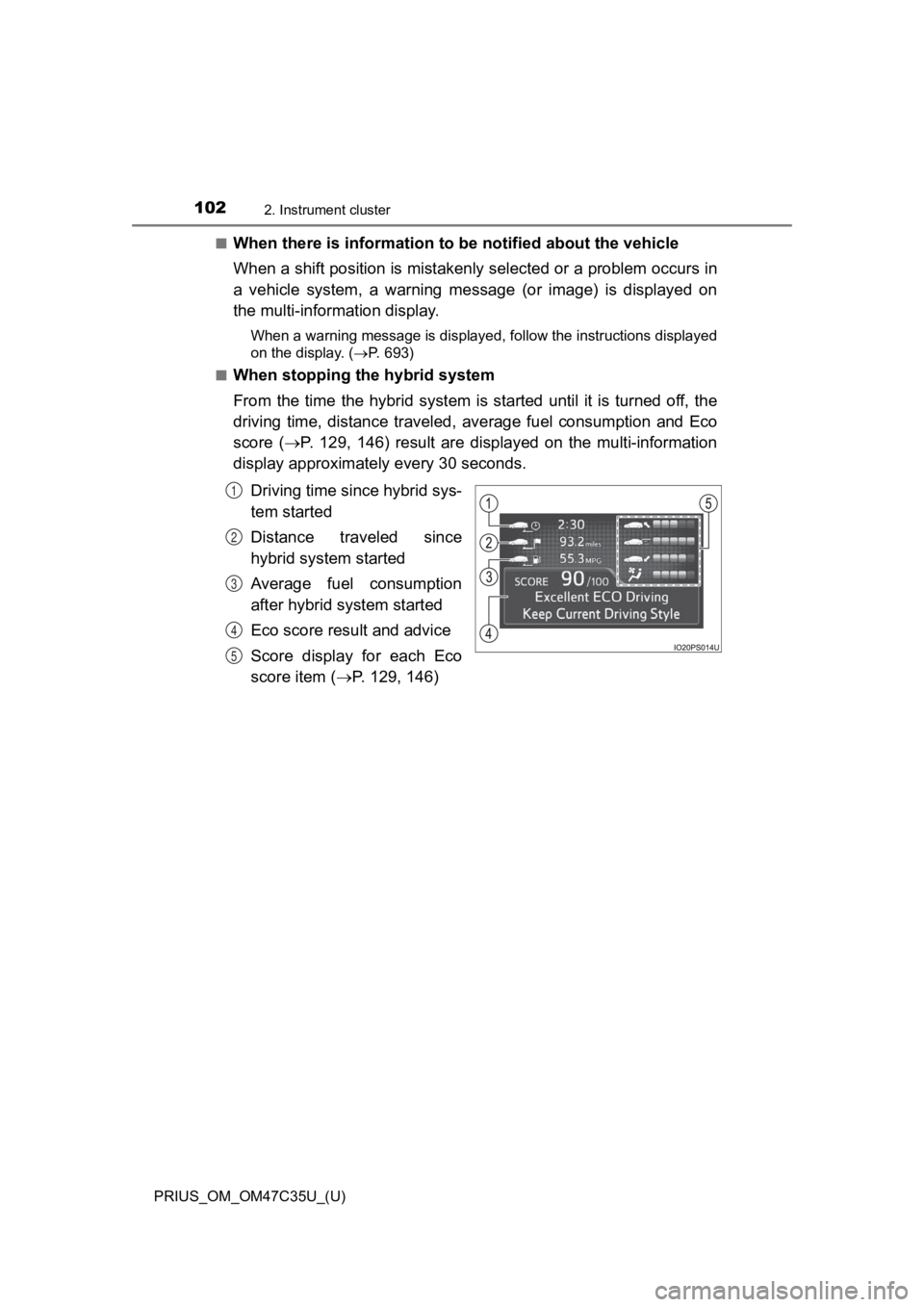
From the time the hybrid system is started until it is turned off, the
driving time, distance traveled, average fuel consumption and Eco
score ( P. 129, 146) result are displayed on the multi-information
display approximately every 30 seconds.
Driving time since hybrid sys-
tem started
Distance traveled since
hybrid system started
Average fuel consumption
after hybrid system started
Eco score result and advice
Score display for each Eco
score item ( P. 129, 146)
1
2
3
4
5
Page 105 of 828
PRIUS_OM_OM47C35U_(U)
1052. Instrument cluster
2
Instrument cluster
■When disconnecting and reconnecting 12-volt battery terminals
The settings of the clock will be reset.
■ Calendar settings
●Until the calendar settings are set, the check screen is displa yed every time
the power switch is turned to ON mode.
● After the calendar information is set, it can be changed in the “Meter Cus-
tomize” settings. ( P. 151)
■ When the menu screen on the navi gation system is operated (vehicles
with 11.6-inch display)
■ Liquid crystal display
Small spots or light spots may appear on the display. This phen omenon is
characteristic of liquid crystal displays, and there is no prob lem continuing to
use the display.
■ Pop-up display
Some functions, such as the driving mode select switch and air conditioning
system, are operation-linked and display pop-up screens on the multi-infor-
mation display. If the pop-up screens of these functions are not desired, they
can be turned off in the “Meter Customize” settings. ( P. 151)
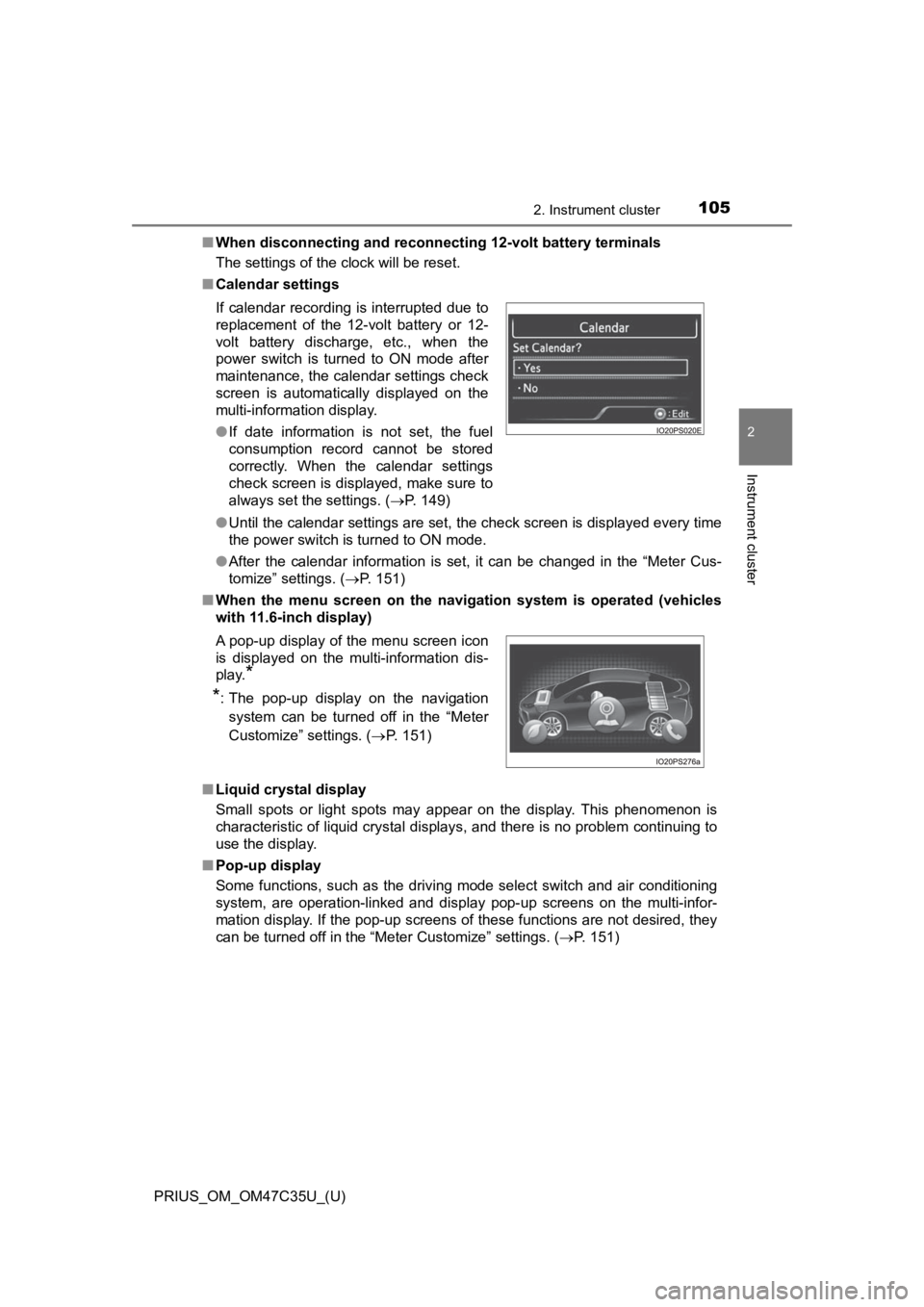
If calendar recording is interrupted due to
replacement of the 12-volt battery or 12-
volt battery discharge, etc., when the
power switch is turned to ON mode after
maintenance, the calendar settings check
screen is automatically displayed on the
multi-information display.
●
If date information is not set, the fuel
consumption record cannot be stored
correctly. When the calendar settings
check screen is displayed, make sure to
always set the settings. ( P. 149)
A pop-up display of the menu screen icon
is displayed on the multi-information dis-
play.
*
*
: The pop-up display on the navigation
system can be turned off in the “Meter
Customize” settings. ( P. 151)
Page 109 of 828
PRIUS_OM_OM47C35U_(U)
1092. Instrument cluster
2
Instrument cluster
*1: These lights turn on when the power switch is turned to ON mode to indi-
cate that a system check is being performed. They will turn off after the
hybrid system is on, or after a few seconds. There may be a malfunction in
a system if a light does not come on, or turn off. Have the veh icle
inspected by your Toyota dealer.
*2: The light flashes or illuminates to indicate a malfunction.
*3: The light flashes to indicate a malfunction.
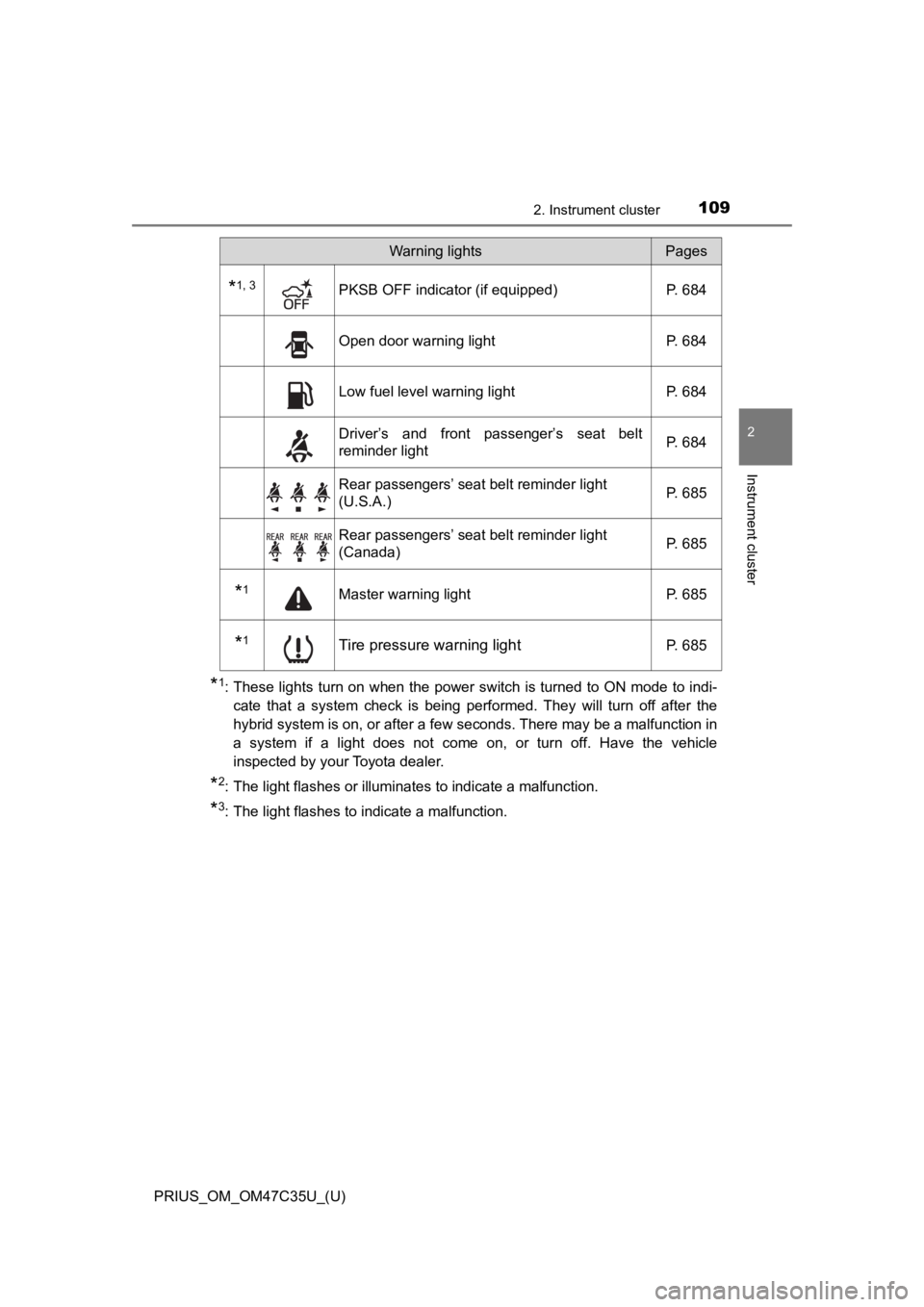
*1, 3PKSB OFF indicator (if equipped) P. 684
Open door warning light P. 684
Low fuel level warning lightP. 684
Driver’s and front passenger’s seat belt
reminder light P. 684
Rear passengers’ seat belt reminder light
(U.S.A.)
P. 685
Rear passengers’ seat belt reminder light
(Canada)P. 685
*1Master warning light
P. 685
*1Tire pressure warning lightP. 685
Warning lightsPages
Page 115 of 828
115
PRIUS_OM_OM47C35U_(U)
2. Instrument cluster
2
Instrument cluster
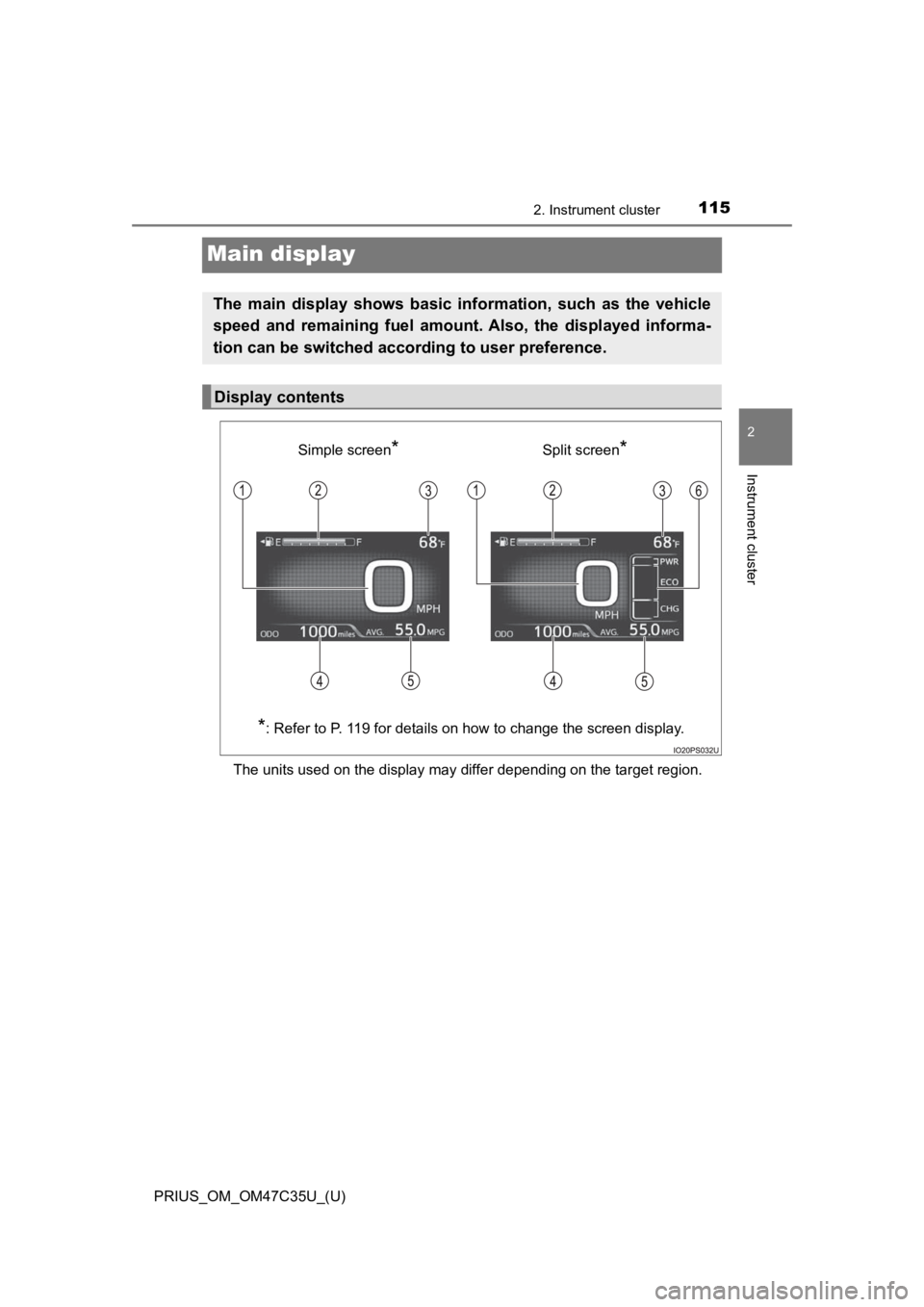
Main display
The units used on the display may differ depending on the target region.
The main display shows basic information, such as the vehicle
speed and remaining fuel amount. Also, the displayed informa-
tion can be switched according to user preference.
Display contents
Simple screen*Split screen*
*
: Refer to P. 119 for details on how to change the screen displa y.
Page 116 of 828

116
PRIUS_OM_OM47C35U_(U)
2. Instrument cluster
Speedometer
Displays the vehicle speed
Fuel gauge
Displays the quantity of fuel remaining in the tank
Outside temperature
Displays the outside temperature within the range of -40°F (-40°C) to
122°F (50°C).
The temperature display flashes for approximately 10 seconds wh en the
outside temperature drops to approximately 37 F (3 C) or less, and then
stops flashing.
Mileage display (odometer/tr ip meters/driving range)
The possible driving range estimated from the mileage and current remain-
ing fuel amount can be displayed. ( P. 117)
Average fuel consumption display
The average fuel consumption that is linked with the contents o f the mile-
age display can be displayed. ( P. 117)
Sub-screen
When split screen is selected for the main display, information such as the
Hybrid System Indicator and current fuel consumption can be dis played.
( P. 119)
1
2
3
4
5
6