AUX TOYOTA PRIUS 2019 Owners Manual (in English)
[x] Cancel search | Manufacturer: TOYOTA, Model Year: 2019, Model line: PRIUS, Model: TOYOTA PRIUS 2019Pages: 828, PDF Size: 16.9 MB
Page 4 of 828

TABLE OF CONTENTS4
PRIUS_OM_OM47C35U_(U)5-1. Basic Operations
Audio system types .......... 434
Audio system .................... 435
Using the steering wheel audio switches ................ 438
AUX Port/USB Port........... 439
Basic audio operations ..... 440
5-2. Setup Setup menu ...................... 442
General settings ............... 443
Audio settings ................... 445
Display settings ................ 446
Voice settings ................... 447
5-3. Using the Multimedia
system
Selecting the audio source ............................. 448
List screen operation ........ 449
Optimal use of the audio system ............................ 451
5-4. Using the radio Radio operation ................ 452 5-5.
Playing an audio CD and
MP3/WMA/AAC discs
CD player operation .......... 454
5-6. Using an external device iPod player operation ........ 460
USB memory device player operation .............. 465
Using the AUX .................. 470
5-7. Connecting Bluetooth
®
Preparations to use wireless
communication ................ 471
Registering a Bluetooth
®
audio player for the
first time .......................... 474
Registering a Bluetooth
®
phone for the first time .... 475
Registering a Bluetooth
® device ........... 476
Connecting a Bluetooth
® device ........... 478
Displaying a Bluetooth®
device details .................. 480
Detailed Bluetooth
®
settings ........................... 481
5-8. Bluetooth
® Audio
Listening to Bluetooth®
Audio............................... 482
5Audio system
Page 5 of 828
5
1
9 8
7
6 4 3
2
PRIUS_OM_OM47C35U_(U)
10
5
5-9. Bluetooth® phone
Using a Bluetooth®
Phone ............................. 484
Making a call..................... 487
Receiving a call ................ 490
Speaking on the phone..... 491
Bluetooth
® phone
message function ........... 494
Using the steering wheel switches.......................... 498
Bluetooth
® phone
settings ........................... 499
Contact/Call History Settings .......................... 500
What to do if... (Troubleshooting) ........... 509
5-10. Bluetooth
®
Bluetooth®........................ 513
5-11. Using the voice command system
Voice c ommand
system ............................ 519 6-1. Using the air conditioning
system and defogger
Automatic air c onditioning
system (vehicles without
11.6-inch display) ............ 526
Automatic air conditioning system (vehicles with
11.6-inch display) ............ 536
Heated steering wheel/ seat heaters..................... 546
6-2. Using the interior lights Interior lights list................. 548• Front interior light .......... 549
• Front personal lights ...... 549
• Rear interior light ........... 550
6-3. Using the storage features
List of storage features ...... 551 • Glove box ...................... 552
• Console box .................. 552
• Cup holders/bottle holders/
door pockets.................. 553
• Auxiliary boxes .............. 555
• Seat back pockets ......... 556
Luggage compartment features ........................... 557
6Interior features
Page 432 of 828
432
PRIUS_OM_OM47C35U_(U)
5-1. Basic OperationsAudio system types .......... 434
Audio system .................... 435
Using the steering wheel audio switches ................ 438
AUX Port/USB Port .......... 439
Basic audio operations ..... 440
5-2. Setup Setup menu ...................... 442
General settings ............... 443
Audio settings ................... 445
Display settings ................ 446
Voice settings ................... 447
5-3. Using the Multimedia
system
Selecting the audio source............................. 448
List screen operation ........ 449
Optimal use of the audio system ............................ 451
5-4. Using the radio Radio operation ................ 452
5Audio system
Page 433 of 828
433
PRIUS_OM_OM47C35U_(U)
5Audio system
5-5. Playing an audio CD andMP3/WMA/AAC discs
CD player operation.......... 454
5-6. Using an external device iPod player operation........ 460
USB memory device player operation.............. 465
Using the AUX .................. 470
5-7. Connecting Bluetooth
®
Preparations to use wireless
communication ............... 471
Registering a Bluetooth
®
audio player for the
first time .......................... 474
Registering a Bluetooth
®
phone for the first time.... 475
Registering a Bluetooth
® device ........... 476
Connecting a Bluetooth
® device ........... 478
Displaying a Bluetooth®
device details.................. 480
Detailed Bluetooth
®
settings ........................... 481
5-8. Bluetooth
® Audio
Listening to Bluetooth®
Audio .............................. 482 5-9. Bluetooth
® phone
Using a Bluetooth®
Phone ............................. 484
Making a call .................... 487
Receiving a call ................ 490
Speaking on the phone .... 491
Bluetooth
® phone
message function ........... 494
Using the steering wheel switches.......................... 498
Bluetooth
® phone
settings ........................... 499
Contact/Call History Settings .......................... 500
What to do if... (Troubleshooting) ........... 509
5-10. Bluetooth
®
Bluetooth®........................ 513
5-11. Using the voice command system
Voice command system ............................ 519
Page 439 of 828
439
PRIUS_OM_OM47C35U_(U)
5-1. Basic Operations
5
Audio system
AUX Por t/USB Por t
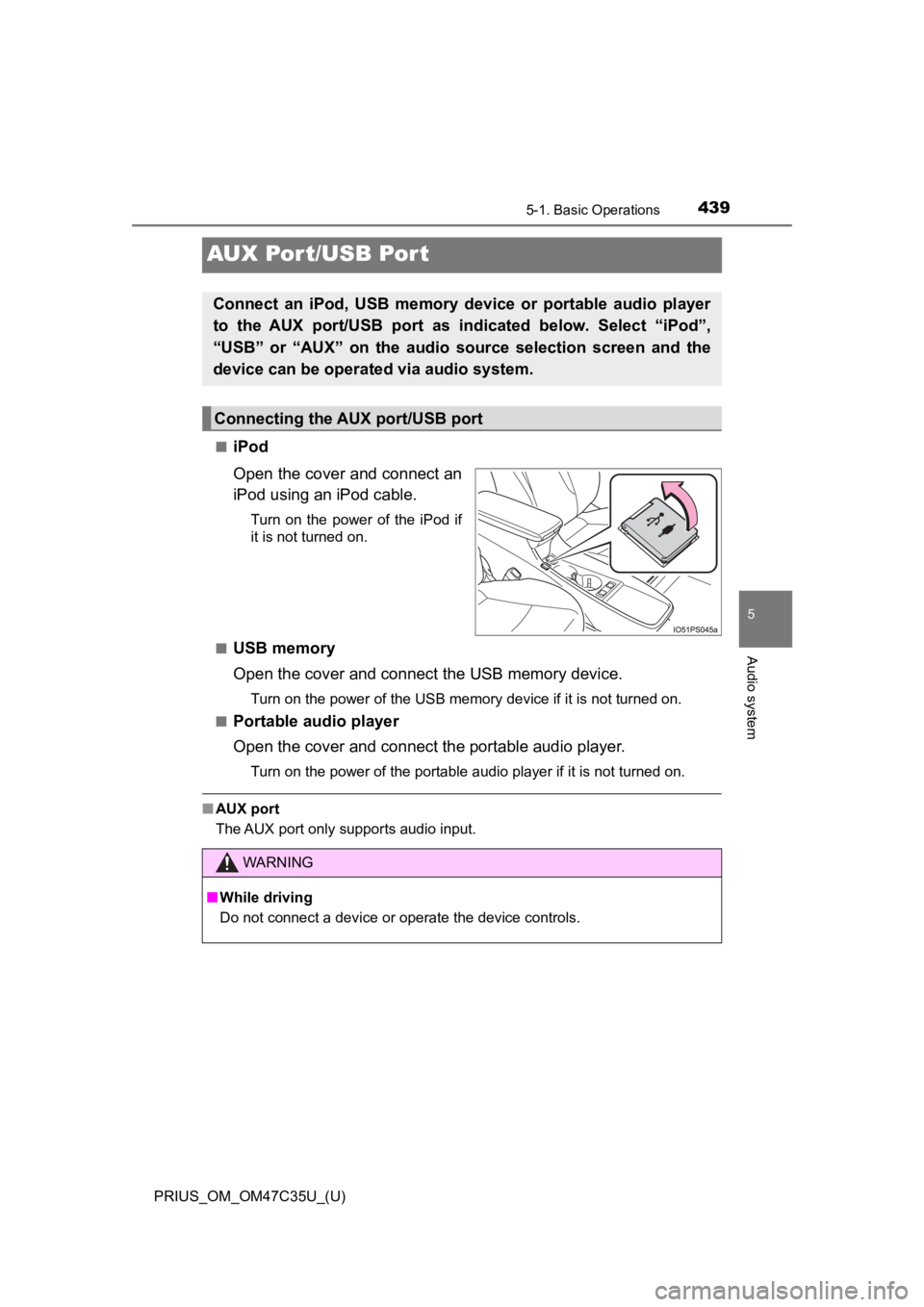
■iPod
Open the cover and connect an
iPod using an iPod cable.
Turn on the power of the iPod if
it is not turned on.
■
USB memory
Open the cover and connec t the USB memory device.
Turn on the power of the USB memory device if it is not turned on.
■
Portable audio player
Open the cover and connect the portable audio player.
Turn on the power of the portable audio player if it is not tur ned on.
■AUX port
The AUX port only supports audio input.
Connect an iPod, USB memory device or portable audio player
to the AUX port/USB port as indi cated below. Select “iPod”,
“USB” or “AUX” on the audio source selection screen and the
device can be operated via audio system.
Connecting the AUX port/USB port
WARNING
■ While driving
Do not connect a device or operate the device controls.
Page 470 of 828
470
PRIUS_OM_OM47C35U_(U)
5-6. Using an external device
Using the AUX
P. 4 3 9
■Operating portable audio players connected to the audio system
The volume can be adjusted using the vehicle’s audio controls. All other
adjustments must be made on the portable audio player itself.
■ When using a portable audio player connected to the power outle t
Noise may occur during playback. Use the power source of the po rtable
audio player.
To use the AUX port, connect a portable player, press the
“AUDIO” button, then select “AUX” to display the audio control
screen.
Connecting a portable audio player
WARNING
■ While driving
Do not connect a portable audio player or operate the device co ntrols.
Page 525 of 828
525
PRIUS_OM_OM47C35U_(U)
6Interior features
6-1. Using the air conditioning system and defogger
Automatic air conditioning system (vehicles without
11.6-inch display) ............ 526
Automatic air conditioning system (vehicles with
11.6-inch display) ............ 536
Heated steering wheel/ seat heaters .................... 546 6-2. Using the interior lights
Interior lights list ................ 548• Front interior light .......... 549
• Front personal lights ..... 549
• Rear interior light .......... 550
6-3. Using the storage features
List of storage features ..... 551 • Glove box...................... 552
• Console box .................. 552
• Cup holders/bottle holders/
door pockets ................. 553
• Auxiliary boxes.............. 555
• Seat back pockets ........ 556
Luggage compartment features ........................... 557
6-4. Using the other interior features
Other interior features ....... 563 • Sun visors ..................... 563
• Vanity mirrors................ 563
• Power outlets ................ 564
• USB charging ports....... 565
• Wireless charger ........... 567
• Armrest ......................... 576
• Coat hooks.................... 576
• Assist grips ................... 577
Garage door opener.......... 578
Page 551 of 828
551
PRIUS_OM_OM47C35U_(U)
6-3. Using the storage features
6
Interior features
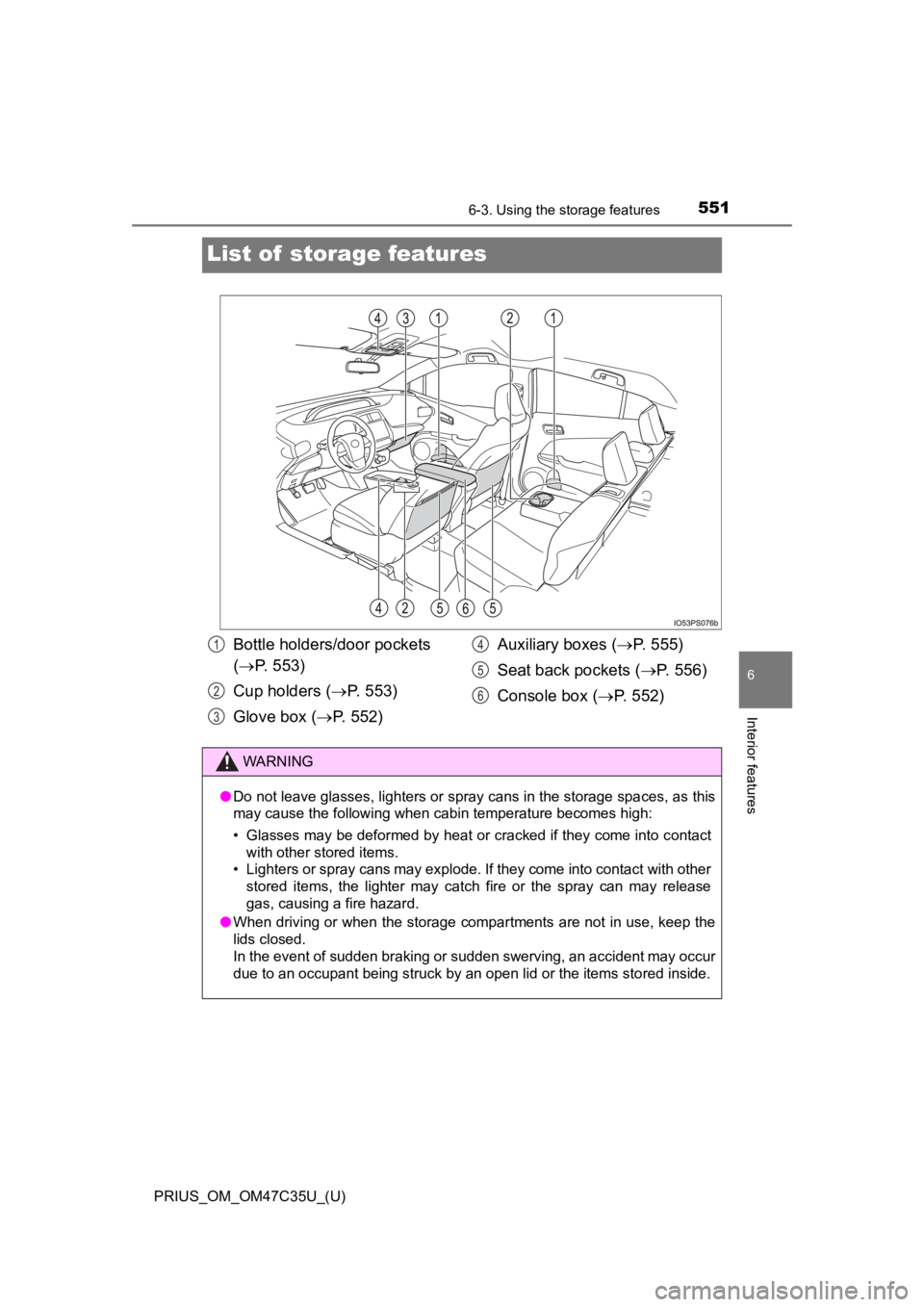
List of storage features
Bottle holders/door pockets
( P. 553)
Cup holders ( P. 553)
Glove box ( P. 552) Auxiliary boxes (
P. 555)
Seat back pockets (P. 556)
Console box ( P. 552)1
2
3
4
5
6
WARNING
●Do not leave glasses, lighters or spray cans in the storage spaces, as this
may cause the following when cabin temperature becomes high:
• Glasses may be deformed by heat or cracked if they come into c ontact
with other stored items.
• Lighters or spray cans may explode. If they come into contact with other
stored items, the lighter may catch fire or the spray can may r elease
gas, causing a fire hazard.
● When driving or when the storage compartments are not in use, k eep the
lids closed.
In the event of sudden braking or sudden swerving, an accident may occur
due to an occupant being struck by an open lid or the items stored inside.
Page 555 of 828
PRIUS_OM_OM47C35U_(U)
5556-3. Using the storage features
6
Interior features
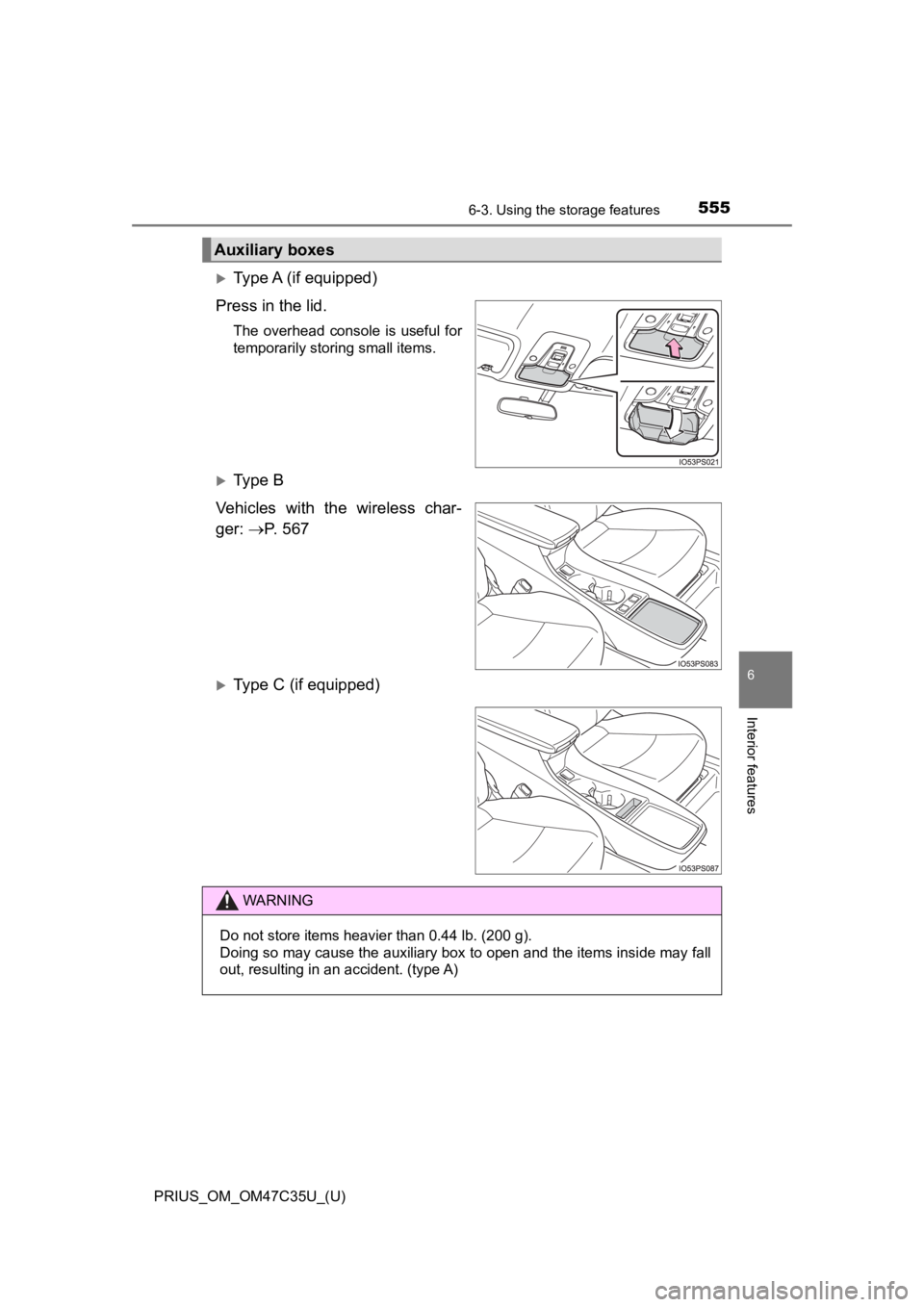
Type A (if equipped)
Press in the lid.
The overhead console is useful for
temporarily storing small items.
Ty p e B
Vehicles with the wireless char-
ger: P. 5 6 7
Type C (if equipped)
Auxiliary boxes
WARNING
Do not store items heavier than 0.44 lb. (200 g).
Doing so may cause the auxiliary box to open and the items inside may fall
out, resulting in an accident. (type A)
Page 557 of 828
557
PRIUS_OM_OM47C35U_(U)
6-3. Using the storage features
6
Interior features
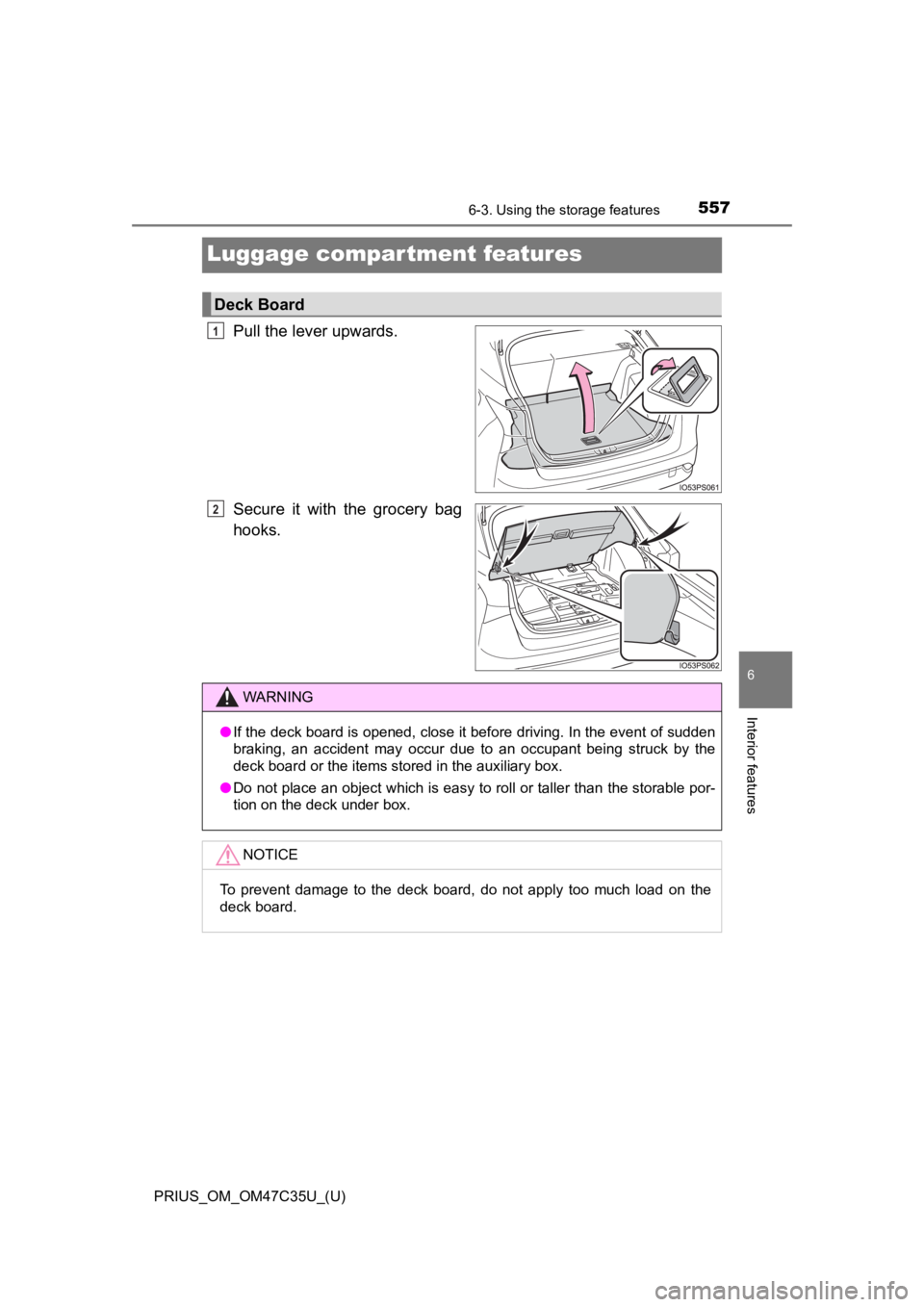
Luggage compartment features
Pull the lever upwards.
Secure it with the grocery bag
hooks.
Deck Board
1
2
WARNING
●If the deck board is opened, close it before driving. In the ev ent of sudden
braking, an accident may occur due to an occupant being struck by the
deck board or the items stored in the auxiliary box.
● Do not place an object which is easy to roll or taller than the storable por-
tion on the deck under box.
NOTICE
To prevent damage to the deck board, do not apply too much load on the
deck board.