remote start TOYOTA PRIUS 2019 Owners Manual (in English)
[x] Cancel search | Manufacturer: TOYOTA, Model Year: 2019, Model line: PRIUS, Model: TOYOTA PRIUS 2019Pages: 828, PDF Size: 16.9 MB
Page 12 of 828

12
PRIUS_OM_OM47C35U_(U)The SRS airbag and seat belt pretensioner devices in your Toyota contain
explosive chemicals. If the vehicle is scrapped with the airbags and seat belt
pretensioners left as they are, this may cause an accident such
as fire. Be
sure to have the systems of the SRS airbag and seat belt preten sioner
removed and disposed of by a qualified service shop or by your Toyota dealer
before you scrap your vehicle.
Special handling may apply,
See www.dtsc.ca.gov/hazardouswaste/perchlorate.
Your vehicle has components that may contain perchlorate. These compo-
nents may include airbag, seat belt pretensioners, and wireless remote con-
trol batteries.
Scrapping of your Toyota
Perchlorate Material
WARNING
■ General precautions while driving
Driving under the influence: Never drive your vehicle when under the influ-
ence of alcohol or drugs that have impaired your ability to operate your vehi-
cle. Alcohol and certain drugs delay reaction time, impair judg ment and
reduce coordination, which could lead to an accident that could result in
death or serious injury.
Defensive driving: Always drive defensively. Anticipate mistake s that other
drivers or pedestrians might make and be ready to avoid accidents.
Driver distraction: Always give your full attention to driving. Anything that
distracts the driver, such as adjusting controls, talking on a cellular phone or
reading can result in a collision with resulting death or serious injury to you,
your occupants or others.
■ General precaution regarding children’s safety
Never leave children unattended in the vehicle, and never allow children to
have or use the key.
Children may be able to start the vehicle or shift the vehicle into neutral.
There is also a danger that children may injure themselves by playing with
the windows, the moon roof, or other features of the vehicle. In addition,
heat build-up or extremely cold temperatures inside the vehicle can be fatal
to children.
Page 195 of 828

PRIUS_OM_OM47C35U_(U)
1953-2. Opening, closing and locking the doors
3
Operation of each component
■Note for the entry function
●Even when the electronic key is within the effective range (det ection areas),
the system may not operate properly in the following cases:
• The electronic key is too close to the window or outside door handle, near
the ground, or in a high place when the doors are locked or unl ocked.
• The electronic key is on the instrument panel, floor, or in th e door pockets
or glove box when the hybrid system is started or power switch modes
are changed.
● Do not leave the electronic key on top of the instrument panel or near the
door pockets when exiting the vehicle. Depending on the radio w ave recep-
tion conditions, it may be detected by the antenna outside the cabin and the
door will become lockable from the outside, possibly trapping the electronic
key inside the vehicle.
● As long as the electronic key is within the effective range, th e doors may be
unlocked or locked by anyone.
● Even if the electronic key is not inside the vehicle, it may be possible to start
the hybrid system if the electronic key is near the window.
● The doors may unlock if a large amount of water splashes on the door han-
dle, such as in the rain or in a car wash when the electronic k ey is within the
effective range. (The door will automatically be locked after a pproximately
60 seconds if the doors are not opened and closed.)
● If the wireless remote control is used to lock the doors when t he electronic
key is near the vehicle, there is a possibility that the door m ay not be
unlocked by the entry function. (Use the wireless remote contro l to unlock
the doors.)
● Touching the door lock sensor while wearing gloves may delay or prevent
lock operation. Remove the gloves and touch the lock sensor aga in.
● When the lock operation is performed using the lock sensor, rec ognition sig-
nals will be shown up to two consecutive times. After this, no recognition
signals will be given.
● If the door handle becomes wet while the electronic key is with in the effec-
tive range, the door may lock and unlock repeatedly. In this ca se, follow the
following correction procedures to wash the vehicle.
• Place the electronic key in a location 6 ft. (2 m) or more awa y from the
vehicle. (Take care to ensure that the key is not stolen.)
• Set electronic key to battery-saving mode to disable the smart key sys-
tem. ( P. 194)
● If the electronic key is inside the vehicle and a door handle b ecomes wet
during a car wash, a message may be shown on the multi-informat ion dis-
play and a buzzer will sound outside the vehicle. To turn off t he alarm, lock
all the doors.
Page 196 of 828

196
PRIUS_OM_OM47C35U_(U)
3-2. Opening, closing and locking the doors
●The lock sensor may not work properly if it comes into contact with ice,
snow, mud, etc. Clean the lock sensor and attempt to operate it again.
● A sudden approach to the effective range or door handle may prevent the
doors from being unlocked. In this case, return the door handle to the origi-
nal position and check that the doors unlock before pulling the door handle
again.
● If there is another electronic key in the detection area, it ma y take slightly
longer to unlock the doors after the door handle is gripped.
■ When the vehicle is not driven for extended periods
●To prevent theft of the vehicle, do not leave the electronic ke y within 6 ft.
(2 m) of the vehicle.
● The smart key system can be deactivated in advance. ( P. 780)
■ To operate the system properly
Make sure to carry the electronic key when operating the system. Do not get
the electronic key too close to the vehicle when operating the system from the
outside of the vehicle.
Depending on the position and holding condition of the electron ic key, the key
may not be detected correctly and the system may not operate pr operly. (The
alarm may go off accidentally, or the door lock prevention may not operate.)
■ If the smart key system does not operate properly
●Locking and unlocking the doors: Use the mechanical key. ( P. 737)
● Starting the hybrid system: P. 738
■ Customization
Settings (e.g. smart key system) can be changed.
(Customizable features: P. 780)
■ If the smart key system has been d eactivated in a customized setting
● Unlocking and locking the doors:
Use the wireless remote control or mechanical key. ( P. 182, 737)
● Starting the hybrid system and changing power switch modes: P. 738
● Stopping the hybrid system: P. 242
Page 615 of 828
PRIUS_OM_OM47C35U_(U)
6157-3. Do-it-yourself maintenance
7
Maintenance and care
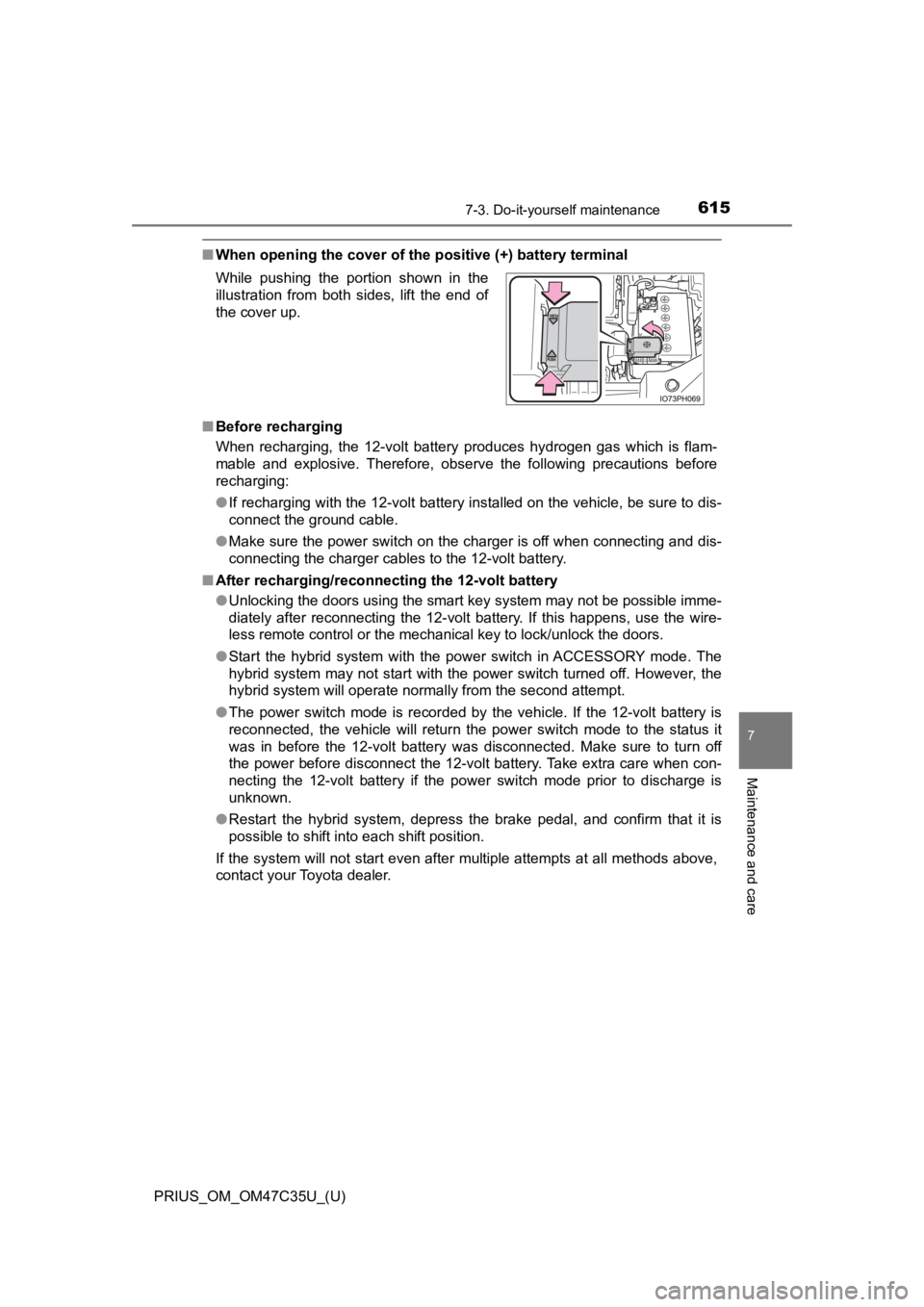
■When opening the cover of the positive (+) battery terminal
■ Before recharging
When recharging, the 12-volt battery produces hydrogen gas which is flam-
mable and explosive. Therefore, observe the following precautio ns before
recharging:
● If recharging with the 12-volt battery installed on the vehicle , be sure to dis-
connect the ground cable.
● Make sure the power switch on the charger is off when connectin g and dis-
connecting the charger cables to the 12-volt battery.
■ After recharging/reconnecting the 12-volt battery
●Unlocking the doors using the smart key system may not be possi ble imme-
diately after reconnecting the 12-volt battery. If this happens, use the wire-
less remote control or the mechanical key to lock/unlock the do ors.
● Start the hybrid system with the power switch in ACCESSORY mode . The
hybrid system may not start with the power switch turned off. However, the
hybrid system will operate normally from the second attempt.
● The power switch mode is recorded by the vehicle. If the 12-vol t battery is
reconnected, the vehicle will return the power switch mode to t he status it
was in before the 12-volt battery was disconnected. Make sure t o turn off
the power before disconnect the 12-volt battery. Take extra car e when con-
necting the 12-volt battery if the power switch mode prior to d ischarge is
unknown.
● Restart the hybrid system, depress the brake pedal, and confirm that it is
possible to shift into each shift position.
If the system will not start even after multiple attempts at al l methods above,
contact your Toyota dealer. While pushing the portion shown in the
illustration from both sides, lift the end of
the cover up.
Page 737 of 828
737
PRIUS_OM_OM47C35U_(U)
8
When trouble arises
8-2. Steps to take in an emergency
If the electronic key does not operate
properly
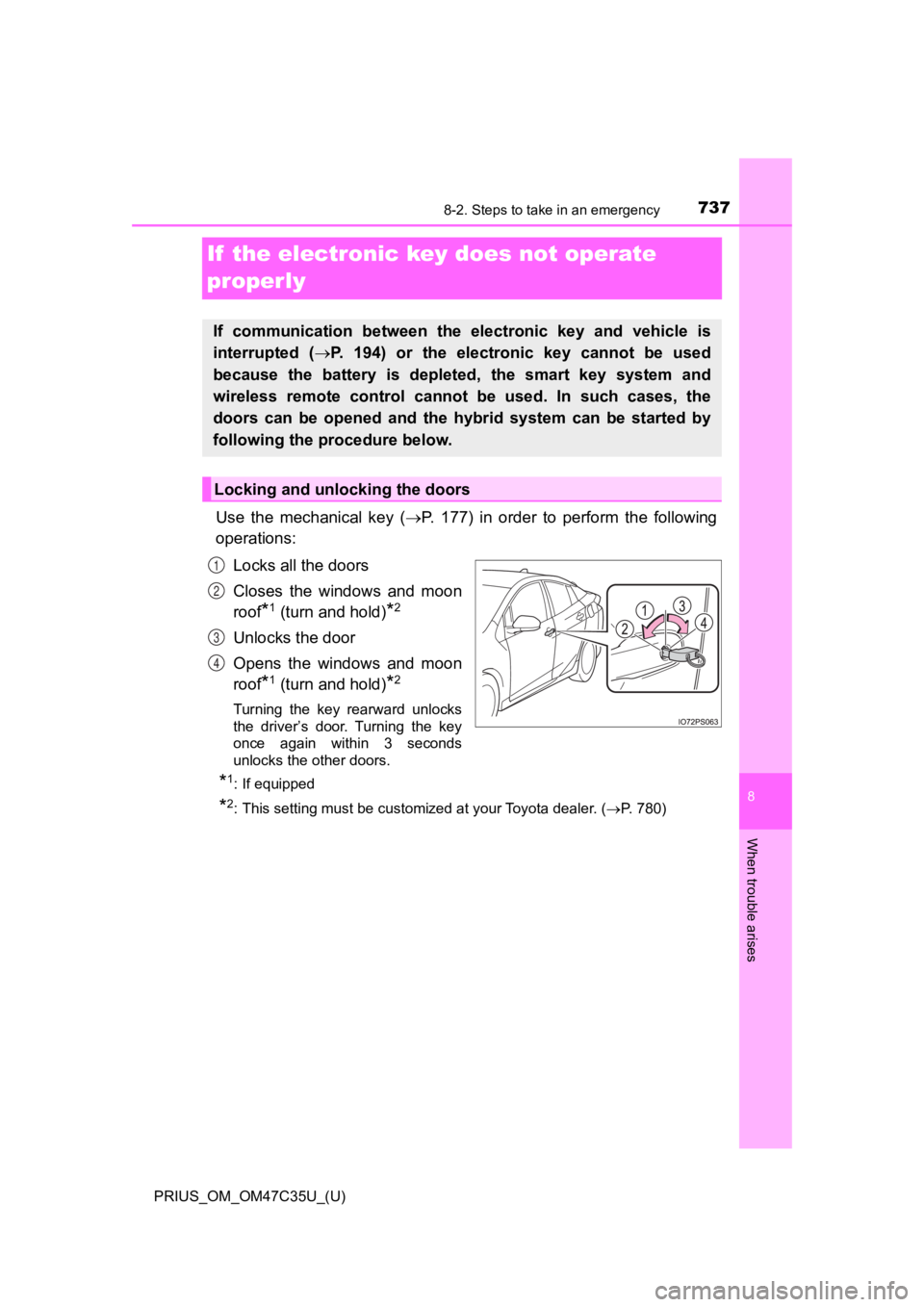
Use the mechanical key (P. 177) in order to perform the following
operations:
Locks all the doors
Closes the windows and moon
roof
*1 (turn and hold)*2
Unlocks the door
Opens the windows and moon
roof
*1 (turn and hold)*2
Turning the key rearward unlocks
the driver’s door. Turning the key
once again within 3 seconds
unlocks the other doors.
*1: If equipped
*2: This setting must be customized at your Toyota dealer. ( P. 780)
If communication between the electronic key and vehicle is
interrupted ( P. 194) or the electronic key cannot be used
because the battery is depleted, the smart key system and
wireless remote control can not be used. In such cases, the
doors can be opened and the hybrid system can be started by
following the procedure below.
Locking and unlocking the doors
1
2
3
4
Page 743 of 828

7438-2. Steps to take in an emergency
PRIUS_OM_OM47C35U_(U)
8
When trouble arises
■When recharging or replacing the 12-volt battery
●In some cases, it may not be possible to unlock the doors using the smart
key system when the 12-volt battery is discharged. Use the wire less remote
control or the mechanical key to lock or unlock the doors.
● The hybrid system may not start on the first attempt after the 12-volt battery
has recharged but will start normally after the second attempt. This is not a
malfunction.
● The power switch mode is memorized by the vehicle. When the 12- volt bat-
tery is reconnected, the system will return to the mode it was in before the
12-volt battery was discharged. Before disconnecting the 12-volt battery,
turn the power switch off.
If you are unsure what mode the power switch was in before the 12-volt bat-
tery discharged, be especially careful when reconnecting the 12 -volt battery.
● If the 12-volt battery discharges while the shift position is in P, it may not be
possible to shift the shift position to other positions. In thi s case, the vehicle
cannot be towed without lifting both front wheels because the f ront wheels
will be locked. ( P. 674)
■ When replacing the 12-volt battery
●Use a 12-volt battery that conforms to European regulations.
● Use a 12-volt battery that the case size is same as the previou s one (LN1),
20 hour rate capacity (20HR) is equivalent (45Ah) or greater, and perfor-
mance rating (CCA) is equivalent (295A) or greater.
• If the sizes differ, the 12-volt battery cannot be properly se cured.
• If the 20 hour rate capacity is low, even if the time period w here the vehi-
cle is not used is a short time, the 12-volt battery may discharge and the
hybrid system may not be able to start.
● For details, consult your Toyota dealer.
Page 819 of 828
819Alphabetical index
PRIUS_OM_OM47C35U_(U)
I/M test ...................................... 601
IdentificationEngine................................... 756
Vehicle .................................. 755
Ignition switch
(Power switch) ....................... 241 Auto power off function ......... 243
Changing the power switch modes...................... 243
If your vehicle has to be stopped in an emergency ... 671
Starting the hybrid system .... 241
Illuminated entry system ........ 550
Immobilizer system ................... 94
Indicators ................................. 107
Initialization Items to initialize ................... 790
Maintenance data ................. 596
Moon roof.............................. 221
Parking Support Brake
function ............................... 370
Power windows ..................... 215
S-APGS (Simple Advanced Parking Guidance
System) .............................. 397
Tire pressure warning system ......... ....................... 625
Inside rear view mirror ............ 210
Instrument cluster light control .................................... 100
Interior lights............................ 548 Switch ........................... 549, 550
Wattage ................................ 764
Intuitive parking assist............ 349 Jack
Positioning a floor jack.......... 607
Vehicle-equipped
jack ............................. 703, 722
Jack handle ...................... 703, 722
Jam protection function
Moon roof ............................. 220
Power windows..................... 215
Keyless entry Smart key system ................. 192
Wireless remote control ........ 176
Keys .......................................... 176
Electronic key ....................... 176
Engine switch ....................... 241
If the electronic key does not operate properly ........... 737
If you lose your keys ..... 177, 180
Key number plate ................. 176
Keyless entry ........................ 176
Mechanical key ..................... 176
Power switch ........................ 241
Replacing the battery............ 650
Warning buzzer .................... 193
Wireless remote control ........ 176
Knee airbags .............................. 36
IJ
K
Page 824 of 828

824Alphabetical index
PRIUS_OM_OM47C35U_(U)
Side mirrors ............................. 212Adjustment ............................ 212
BSM (Blind Spot Monitor) ..... 337
Folding .................................. 212
Heaters ......................... 530, 540
Side windows ........................... 214 Water-repellent coating......... 587
Simple Advanced Parking
Guidance System
(S-APGS) ................................ 373
Smart key system .................... 192
Antenna location ................... 192
Entry functions .............. 181, 187
Starting the hybrid system .... 241
Snow tires ................................ 427
“SOS” button ............................. 77
Spare tire .................................. 721 Inflation pressure .................. 762
Storage location .................... 722
Spark plug ................................ 760
Specifications .......................... 754
Speedometer ............................ 116
SRS airbags ............................... 36
Steering wheel ......................... 208
Adjustment ............................ 208
Audio switches ...................... 438
Heated steering wheel .......... 546
Meter control switches ............ 99
Telephone switches .............. 498
TRIP switch............................. 99
Stop lights Replacing light bulbs............. 667
Storage feature ........................ 551
Storage precautions ................ 551 Stuck
If the vehicle becomes
stuck ................................... 751
Sun visors ................................ 563
Sunshade Moon roof ............................. 220
Switch Audio remote control
switches ............................. 438
Automatic High Beam switch ................................. 263
Cruise control switch .... 314, 330
Door lock switches................ 183
Driving mode select switch ................................. 335
Emergency flashers switch ................................. 670
Engine switch ....................... 241
EV drive mode switch ........... 247
Fog light switch ..................... 268
Garage door opener switches ............................. 578
Heated steering wheel .......... 546
“HUD” (Head-up display)
switch ................................. 155
Ignition switch ....................... 241
LDA (Lane Departure Alert with steering control)) ......... 307
Light switch ........................... 258
Meter control switches ............ 99
Moon roof switches............... 219
Outside rear view mirror switches ............................. 212
Page 827 of 828

827Alphabetical index
PRIUS_OM_OM47C35U_(U)
Warning lights.......................... 107ABS....................................... 683
Brake Override System......... 686
Brake system ....... ................. 682
Charging system ................... 682
Drive-Start Control ................ 686
Driver’s seat belt reminder light ..................................... 684
Electronic engine control system ......... ....................... 682
Electric power steering
system ......... ....................... 683
Front passenger’s seat belt reminder light...................... 684
High coolant temperature ..... 684
Low engine oil pressure ........ 682
Low fuel level ........................ 684
Malfunction indicator lamp .... 682
Master warning light.............. 685
Open door ............................. 684
Parking Support Brake function ............................... 686
PCS ...................................... 683
PKSB OFF indicator ............. 684
Rear passengers’ seat belt
reminder light...................... 685
Seat belt reminder light ......... 684
Slip indicator ......................... 683
SRS ...................................... 683
Tire pressure......................... 685 Warning messages.................. 693
Warning reflector..................... 560
Washer
Checking............................... 620
Preparing and checking before winter ...................... 427
Switch ........................... 270, 276
Washing and waxing ............... 586
Water-repellent coating .......... 587
Weights .................................... 754 Cargo capacity...................... 238
Load limits ............................ 754
What to do if... (Troubleshooting) ................. 808
Wheels ...................................... 635 Replacing wheels ................. 721
Size....................................... 762
Window glasses ...................... 214
Window lock switch ................ 214
Windows Power windows..................... 214
Rear windowdefogger ..................... 530, 540
Washer ......................... 270, 276
Windshield wipers ................... 270 Handling the wiper arms ....... 591
Winter driving tips ................... 427
Wiper insert replacement ....... 646
Wireless charger ..................... 567
Wireless communication ........ 471
Wireless remote control ......... 176
Battery-Saving Function ....... 194
Locking/Unlocking ................ 176
Panic mode........................... 177
Replacing the battery............ 650
WMA disc ................................. 454