change time TOYOTA PRIUS 2020 (in English) User Guide
[x] Cancel search | Manufacturer: TOYOTA, Model Year: 2020, Model line: PRIUS, Model: TOYOTA PRIUS 2020Pages: 728, PDF Size: 15.79 MB
Page 195 of 728

PRIUS_OM_OM47D44U_(U)
1953-2. Opening, closing and locking the doors
3
Operation of each component
■Note for the entry function
●Even when the electronic key is within the effective range (det ection areas),
the system may not operate properly in the following cases:
• The electronic key is too close to the window or outside door handle, near
the ground, or in a high place when the doors are locked or unl ocked.
• The electronic key is on the instrument panel, floor, or in th e door pockets
or glove box when the hybrid system is started or power switch modes
are changed.
● Do not leave the electronic key on top of the instrument panel or near the
door pockets when exiting the vehicle. Depending on the radio w ave recep-
tion conditions, it may be detected by the antenna outside the cabin and the
door will become lockable from the outside, possibly trapping the electronic
key inside the vehicle.
● As long as the electronic key is within the effective range, th e doors may be
unlocked or locked by anyone.
● Even if the electronic key is not inside the vehicle, it may be possible to start
the hybrid system if the electronic key is near the window.
● The doors may unlock if a large amount of water splashes on the door han-
dle, such as in the rain or in a car wash when the electronic k ey is within the
effective range. (The door will automatically be locked after a pproximately
60 seconds if the doors are not opened and closed.)
● If the wireless remote control is used to lock the doors when t he electronic
key is near the vehicle, there is a possibility that the door m ay not be
unlocked by the entry function. (Use the wireless remote contro l to unlock
the doors.)
● Touching the door lock sensor while wearing gloves may delay or prevent
lock operation. Remove the gloves and touch the lock sensor aga in.
● When the lock operation is performed using the lock sensor, rec ognition sig-
nals will be shown up to two consecutive times. After this, no recognition
signals will be given.
● If the door handle becomes wet while the electronic key is with in the effec-
tive range, the door may lock and unlock repeatedly. In this ca se, follow the
following correction procedures to wash the vehicle.
• Place the electronic key in a location 6 ft. (2 m) or more awa y from the
vehicle. (Take care to ensure that the key is not stolen.)
• Set electronic key to battery-saving mode to disable the smart key sys-
tem. ( P. 194)
● If the electronic key is inside the vehicle and a door handle b ecomes wet
during a car wash, a message may be shown on the multi-informat ion dis-
play and a buzzer will sound outside the vehicle. To turn off t he alarm, lock
all the doors.
Page 221 of 728

PRIUS_OM_OM47D44U_(U)
2213-5. Opening and closing the windows and moon roof
3
Operation of each component
■When the moon roof does not close normally
Perform the following procedure:
Stop the vehicle.
Press and hold the “CLOSE” or “UP” switch.
*
The moon roof will tilt up, stop a little time and tilt down. T hen it will open
fully and close again, and then stop.
Check to make sure that the moon roof has completely stopped and then
release the switch.
*: If the switch is released at the incorrect time, the procedure will have to be
performed again from the beginning.
If the moon roof does not fully close even after performing the above proce-
dure correctly, have the vehicle inspected by your Toyota deale r.
■ Moon roof open reminder function
The buzzer sounds and a message is shown on the multi-informati on display
in the instrument cluster when the power switch is turned off and the driver’s
door is opened with the moon roof open.
■ Customization
Settings (e.g. linked door lock operation) can be changed.
(Customizable features: P. 678)
1
2
3
Page 243 of 728
PRIUS_OM_OM47D44U_(U)
2434-2. Driving procedures
4
Driving
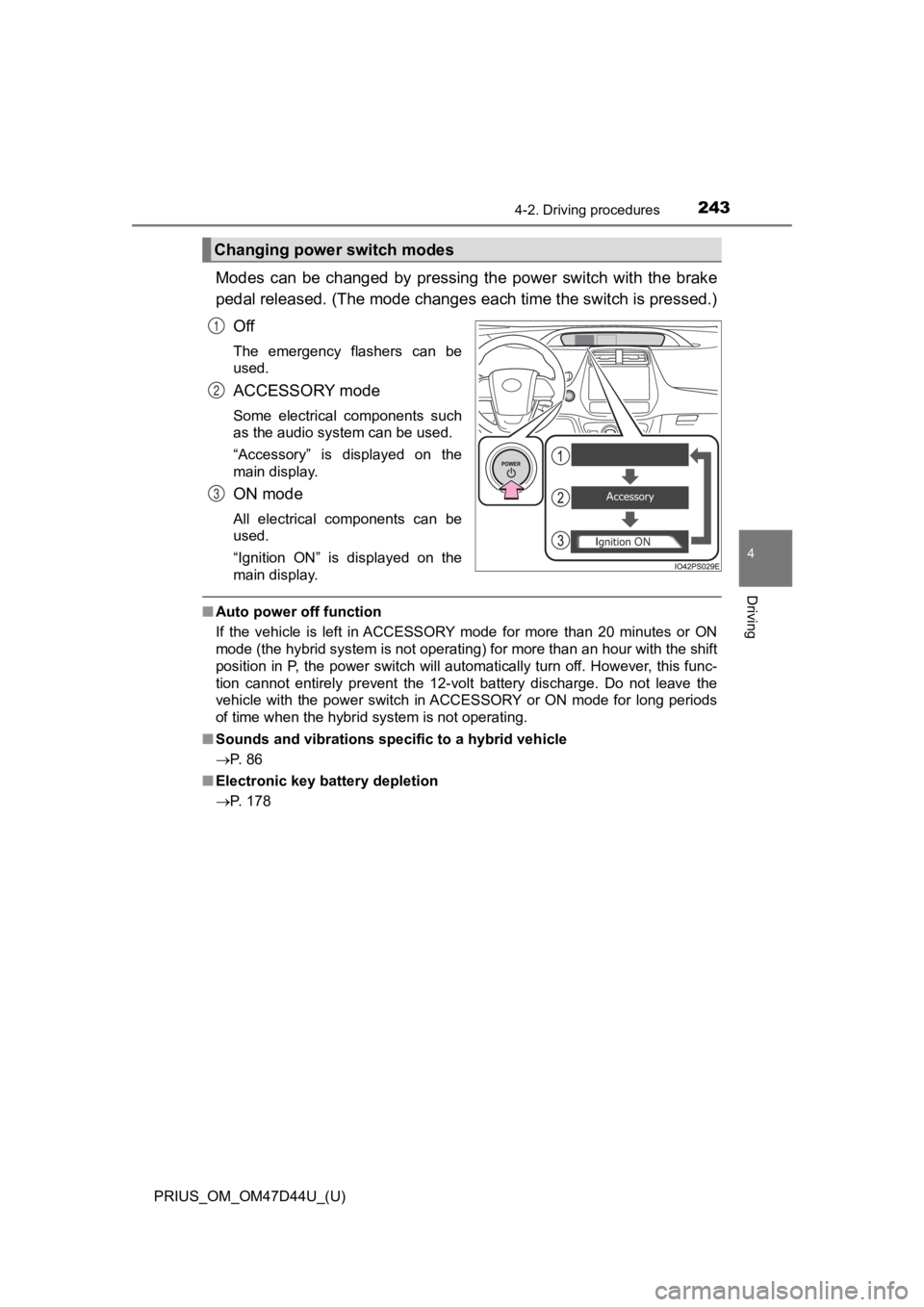
Modes can be changed by pressing the power switch with the brake
pedal released. (The mode changes each time the switch is pressed.)
Off
The emergency flashers can be
used.
ACCESSORY mode
Some electrical components such
as the audio system can be used.
“Accessory” is displayed on the
main display.
ON mode
All electrical components can be
used.
“Ignition ON” is displayed on the
main display.
■ Auto power off function
If the vehicle is left in ACCESSORY mode for more than 20 minut es or ON
mode (the hybrid system is not operating) for more than an hour with the shift
position in P, the power switch will automatically turn off. Ho wever, this func-
tion cannot entirely prevent the 12-volt battery discharge. Do not leave the
vehicle with the power switch in ACCESSORY or ON mode for long periods
of time when the hybrid system is not operating.
■ Sounds and vibrations sp ecific to a hybrid vehicle
P. 86
■ Electronic key battery depletion
P. 178
Changing power switch modes
1
2
3
Page 244 of 728

244
PRIUS_OM_OM47D44U_(U)
4-2. Driving procedures
■When the ambient temperature is low, such as during winter driv ing con-
ditions
● When starting the hybrid system, the flashing time of the “READY” indicator
may be long. Leave the vehicle as it is until the “READY” indic ator is steady
on, as steady means the vehicle is able to move.
● When the hybrid battery (traction battery) is extremely cold (b elow approxi-
mately -22°F [-30°C]) under the influence of the outside temper ature, it may
not be possible to start the hybrid system. In this case, try t o start the hybrid
system again after the temperature of the hybrid battery increa ses due to
the outside temperature increase etc.
■ Conditions affecting operation
P. 194
■ Note for the entry function
P. 195
■ If the hybrid system does not start
●The immobilizer system may not have been deactivated. ( P. 94)
Contact your Toyota dealer.
● If a message related to start-up is shown on the multi-informat ion display,
read the message and follow the instructions.
■ If the “READY” indicator does not come on
In the event that the “READY” indicator does not come on even a fter perform-
ing the proper procedures for starting the vehicle, contact you r Toyota dealer
immediately.
■ If the hybrid system is malfunctioning
P. 88
■ If the electronic key battery is depleted
P. 548
■ Operation of the power switch
●If the switch is not pressed shortly and firmly, the power switch mode may
not change or the hybrid system may not start.
● If attempting to restart the hybrid system immediately after tu rning the power
switch off, the hybrid system may not start in some cases. After turning the
power switch off, please wait a few seconds before restarting t he hybrid sys-
tem.
Page 245 of 728

PRIUS_OM_OM47D44U_(U)
2454-2. Driving procedures
4
Driving
■Automatic hybrid system shut off feature
●The vehicle is equipped with a feature that automatically shuts off the hybrid
system when the shift position is in P with the hybrid system operating for an
extended period.
● The hybrid system will automatically shut off after approximately 1 hour if it
has been left running while the shift position is in P.
● The timer for the automatic hybrid system shut off feature will reset if the
brake pedal is depressed or if the shift position is in a posit ion other than P.
● After the vehicle is parked, if the door is locked with the door lock switch
(P. 183) from the inside or the mechanical key ( P. 635) from the outside,
the automatic hybrid system shut off feature will be disabled. The timer for
the automatic hybrid system shut off feature will be re-enabled if the driver’s
door is opened.
■ Automatic P position selection function
P. 254
■ When the shift contr ol system malfunctions
When attempting to turn the power switch off while there is a m alfunction in
the shift control system, the power switch mode may change to A CCES-
SORY mode. In this case, ACCESSORY mode may be turned off by ap plying
the parking brake and pressing the power switch again. If there is a malfunc-
tion in the system, have the vehicle inspected by your Toyota d ealer immedi-
ately.
■ Meter display
When the power switch is turned off, each display will turn off as follows.
● The shift position indicator will turn off after approximately 2 seconds.
● The multi-information display, clock, etc. will turn off after approximately 30
seconds. (Each display will also turn off immediately if a door is locked
before 30 seconds has elapsed.)
■ If the smart key system has been d eactivated in a customized setting
P. 636
Page 246 of 728

246
PRIUS_OM_OM47D44U_(U)
4-2. Driving procedures
WARNING
■When starting the hybrid system
Always start the hybrid system while sitting in the driver’s seat. Do not
depress the accelerator pedal while starting the hybrid system under any
circumstances.
Doing so may cause an accident resulting in death or serious in jury.
■ Stopping the hybrid system in an emergency
● If you want to stop the hybrid system in an emergency while driving the
vehicle, press and hold the power switch for more than 2 second s, or
press it briefly 3 times or more in succession. ( P. 569)
However, do not touch the power switch while driving except in an emer-
gency. Turning the hybrid system off while driving will not cause loss of
steering or braking control, however, power assist to the steer ing will be
lost. This will make it more difficult to steer smoothly, so you should pull
over and stop the vehicle as soon as it is safe to do so.
● If the power switch is operated while the vehicle is running, a warning
message will be shown on the multi-information display and a buzzer
sounds.
● When restarting the hybrid system after an emergency shutdown w hile
driving, press the power switch. When restarting the hybrid sys tem after
stopping the vehicle, change the shift position to P and then press the
power switch.
■ When parking
Exhaust gases include harmful carbon monoxide (CO), which is co lorless
and odorless. Observe the following precautions.
Failure to do so may cause exhaust gases to enter the vehicle a nd may
lead to an accident caused by light-headedness, or may lead to death or a
serious health hazard.
● If the vehicle is in a poorly ventilated area or a closed area, such as a
garage, stop the hybrid system.
● Do not leave the vehicle with the hybrid system operating for a long time. If
such a situation cannot be avoided, park the vehicle in an open space and
ensure that exhaust fumes do not enter the vehicle interior.
● Do not leave the hybrid system operating in an area with snow build-up, or
where it is snowing. If snowbanks build up around the vehicle w hile the
hybrid system is operating, exhaust gases may collect and enter the vehi-
cle.
Page 256 of 728

256
PRIUS_OM_OM47D44U_(U)
4-2. Driving procedures
NOTICE
■Hybrid battery (traction battery) charge
If the shift position is in N, the hybrid battery (traction battery) will not be
charged. To help prevent the battery from discharging, avoid leaving the N
position selected for an extended period of time.
■ Situations where shift control system malfunctions are possible
If any of the following situations occurs, shift control system malfunctions
are possible.
Immediately stop the vehicle in a safe place on level ground, a pply the park-
ing brake, and then contact your Toyota dealer.
● When the warning message indicating the shift control system ap pears on
the multi-information display.
● The display indicates that no shift position is selected for mo re than a few
seconds.
■ Notes regarding shift lever and P position switch operation
Avoid repeatedly operating the shift lever and P position switch in quick suc-
cession.
The system protection function may activate and it will not be temporarily
possible to shift the shift position other than P. If this happens, please wait
for approximately 20 seconds before attempting to change the sh ift position
again.
Page 257 of 728
257
PRIUS_OM_OM47D44U_(U)
4-2. Driving procedures
4
Driving
Turn signal lever
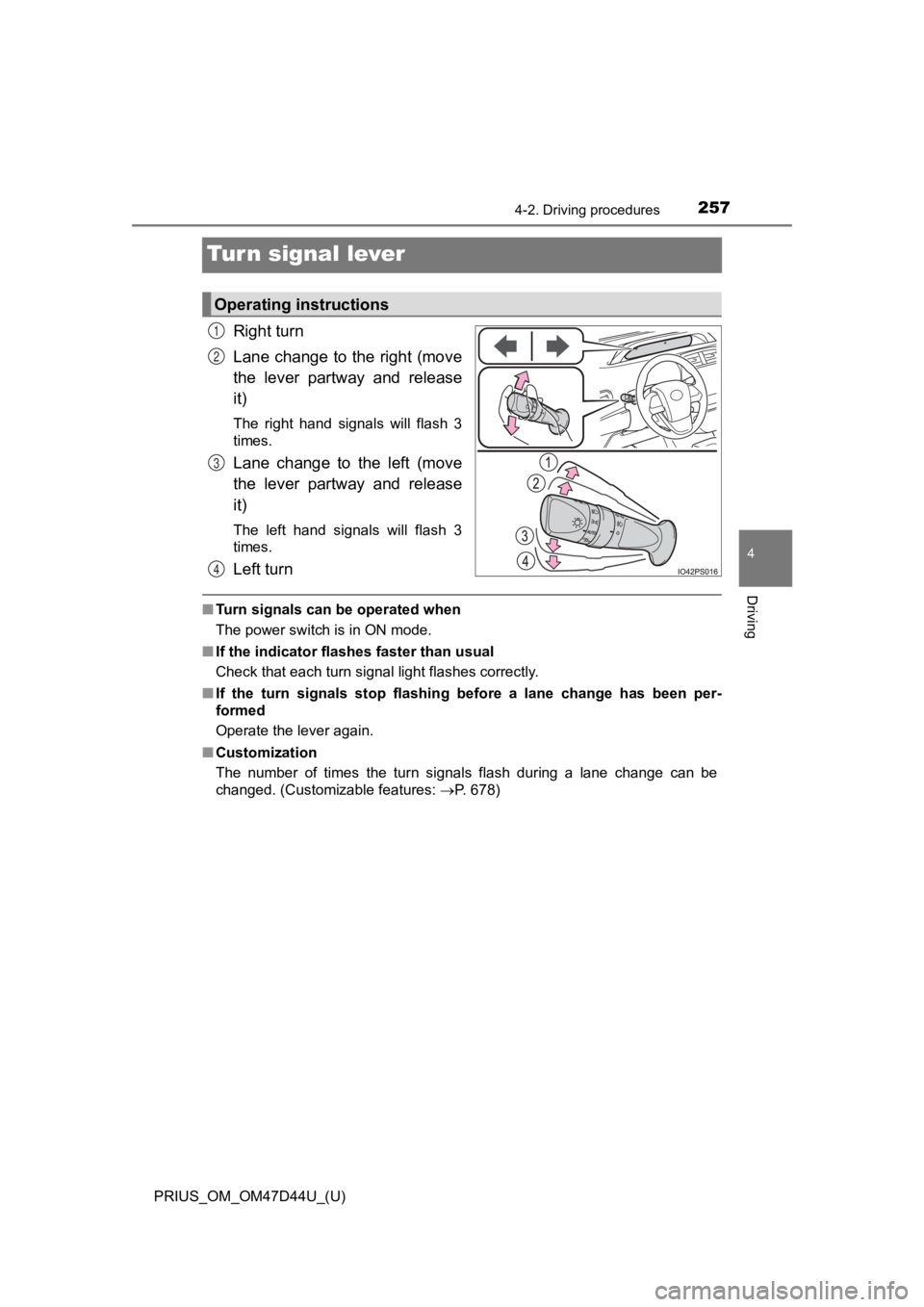
Right turn
Lane change to the right (move
the lever partway and release
it)
The right hand signals will flash 3
times.
Lane change to the left (move
the lever partway and release
it)
The left hand signals will flash 3
times.
Left turn
■Turn signals can be operated when
The power switch is in ON mode.
■ If the indicator flashes faster than usual
Check that each turn signal light flashes correctly.
■ If the turn signals stop flashing before a lane change has been per-
formed
Operate the lever again.
■ Customization
The number of times the turn signals flash during a lane change can be
changed. (Customizable features: P. 678)
Operating instructions
1
2
3
4
Page 268 of 728

268
PRIUS_OM_OM47D44U_(U)
4-3. Operating the lights and wipers
■Temporarily lowering sensor sensitivity
The sensitivity of the sensor can be temporarily lowered.
Turn the power switch off while the following conditions are me t.
• The headlight switch is in the or position.
• The headlight switch lever is in high beam position.
• Automatic High Beam switch is on.
Turn the power switch to ON mode.
Within 60 seconds after step , repeat pulling the headlight swi tch lever to
the original position then pushing it to the high beam position quickly 10
times, then leave the lever in high beam position.
If the sensitivity is changed, the Automatic High Beam indicato r is turn on
and off 3 times.
Automatic High Beam (headlights) may turn on even the vehicle i s stopped.
■ If “Headlight System Malfunction Visit Your Dealer” is displaye d on the
multi-information display
The system may be malfunctioning. Have the vehicle inspected by your Toy-
ota dealer.
1
2
32
4
Page 275 of 728
PRIUS_OM_OM47D44U_(U)
2754-3. Operating the lights and wipers
4
Driving
■The windshield wipers and washer can be operated when
The power switch is in ON mode.
■ Dripping prevention wiper sweep (vehicles with rain-sensing win dshield
wipers)
After washing and wiping operation several times, the wipers op erate one
more time after a short delay to prevent dripping. However, thi s function will
not operate while driving.
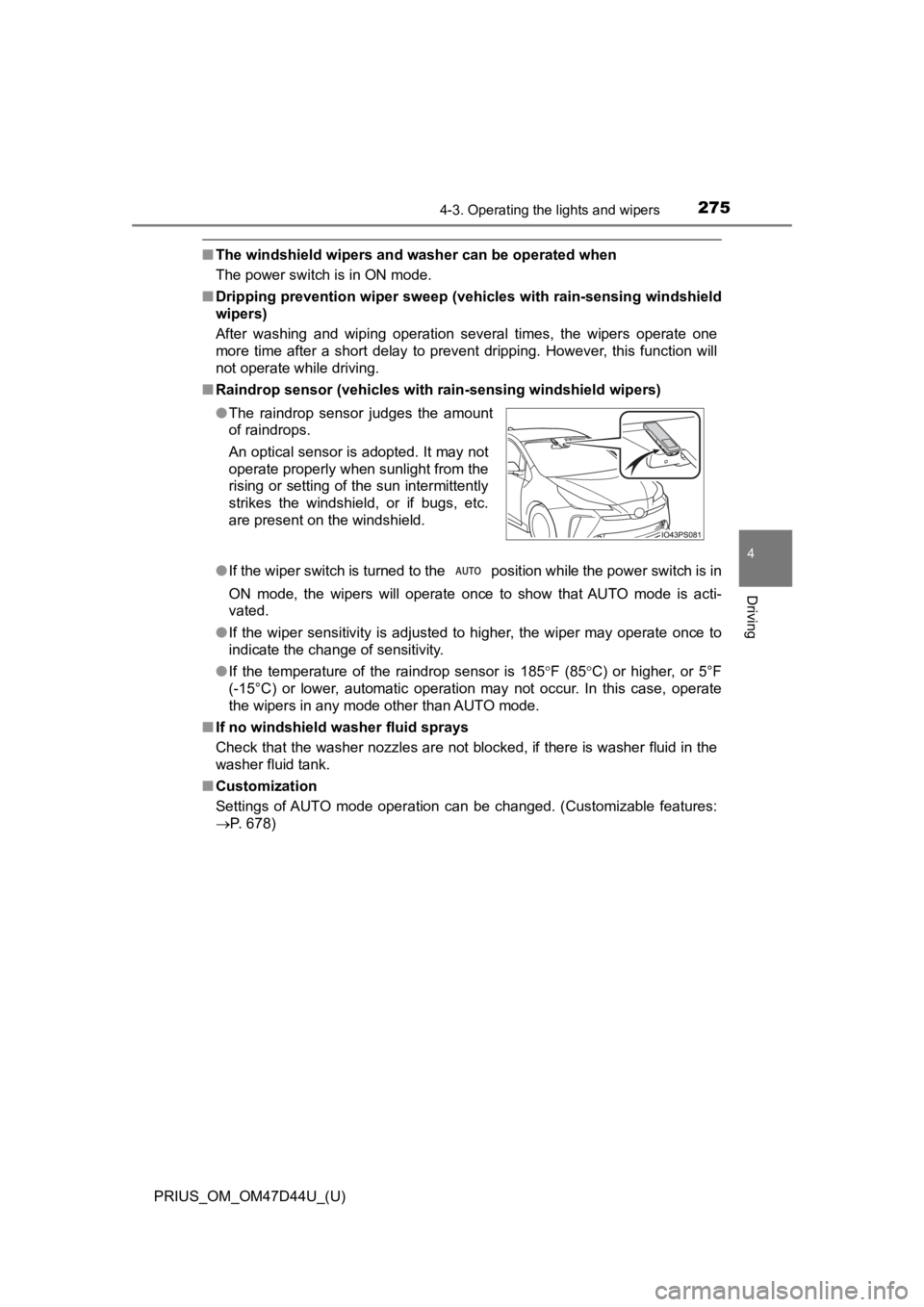
■ Raindrop sensor (vehicles with rain-sensing windshield wipers)
●If the wiper switch is turned to the position while the power switch is in
ON mode, the wipers will operate once to show that AUTO mode is acti-
vated.
● If the wiper sensitivity is adjusted to higher, the wiper may o perate once to
indicate the change of sensitivity.
● If the temperature of the raindrop sensor is 185 F (85 C) or higher, or 5°F
(-15°C) or lower, automatic operation may not occur. In this ca se, operate
the wipers in any mode other than AUTO mode.
■ If no windshield washer fluid sprays
Check that the washer nozzles are not blocked, if there is wash er fluid in the
washer fluid tank.
■ Customization
Settings of AUTO mode operation can be changed. (Customizable f eatures:
P. 678) ● The raindrop sensor judges the amount
of raindrops.
An optical sensor is adopted. It may not
operate properly when sunlight from the
rising or setting of the sun intermittently
strikes the windshield, or if bugs, etc.
are present on the windshield.