light TOYOTA PRIUS 2020 (in English) User Guide
[x] Cancel search | Manufacturer: TOYOTA, Model Year: 2020, Model line: PRIUS, Model: TOYOTA PRIUS 2020Pages: 56, PDF Size: 5.69 MB
Page 18 of 56
16
Lights & turn signals
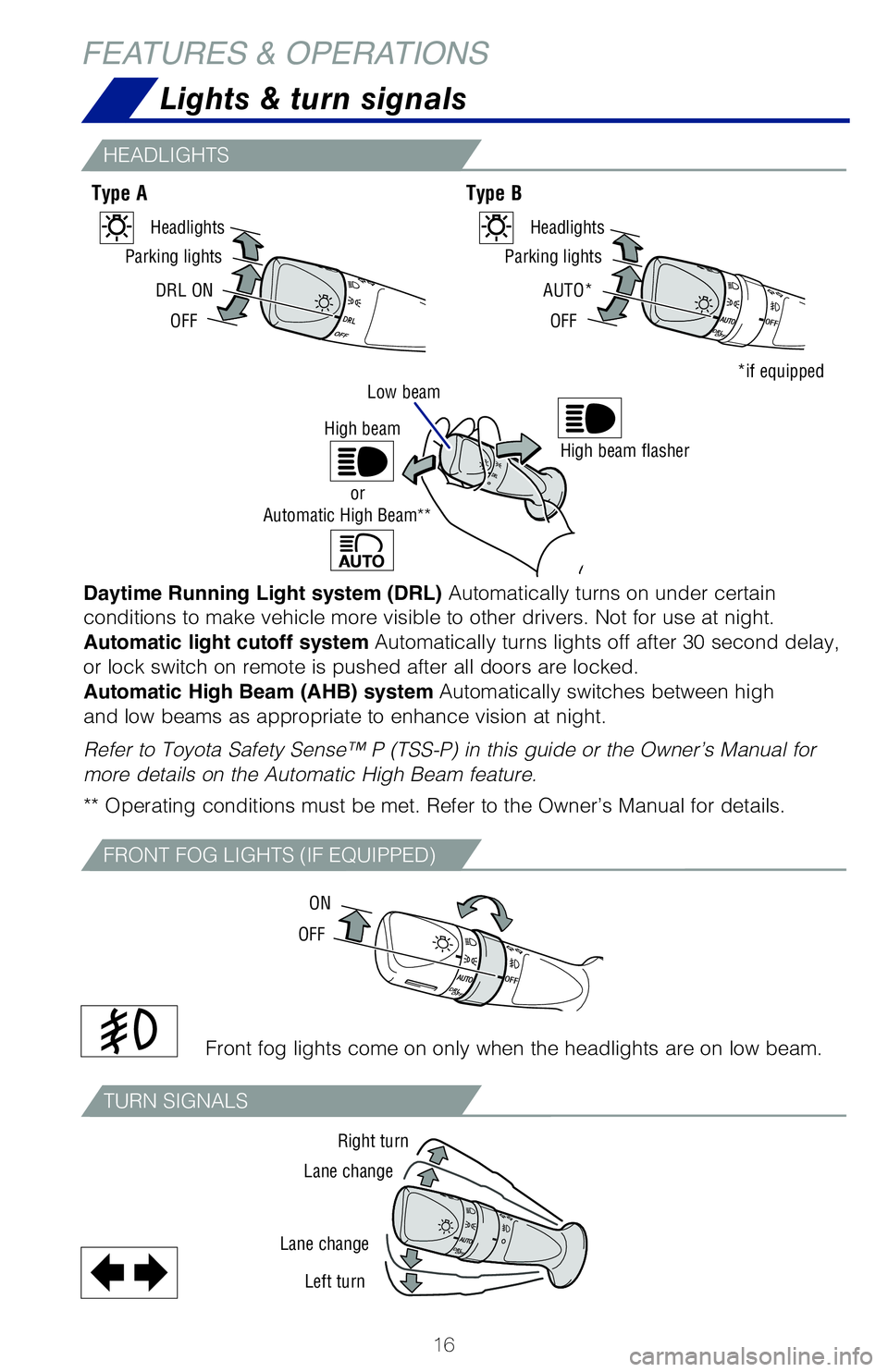
Daytime Running Light system (DRL) Automatically turns on under certain
conditions to make vehicle more visible to other drivers. Not for use at night.
Automatic light cutoff system Automatically turns lights off after 30 second delay,
or lock switch on remote is pushed after all doors are locked.
Automatic High Beam (AHB) system Automatically switches between high
and low beams as appropriate to enhance vision at night.
Refer to Toyota Safety Sense™ P (TSS-P) in this guide or the Owner’s Manual for
more details on the Automatic High Beam feature.
** Operating conditions must be met. Refer to the Owner’s Manual for details.Front fog lights come on only when the headlights are on low beam.
Type A Type B
HEADLIGHTS
FRONT FOG LIGHTS (IF EQUIPPED)
TURN SIGNALS
FEATURES & OPERATIONS
DRL ON
OFF
Parking lights
HeadlightsAUTO*
OFF
Parking lights
Headlights
*if equippedLow beam
OFF ON
Right turn
Lane change
Lane change Left turn
High beam flasherHigh beam
Automatic High Beam**or
62443_MY20_Prius_Text.indd 168/22/19 7:34 PM
Page 22 of 56
20
FEATURES & OPERATIONS
Qi wireless charger (if equipped)
Power outlet-12V DC
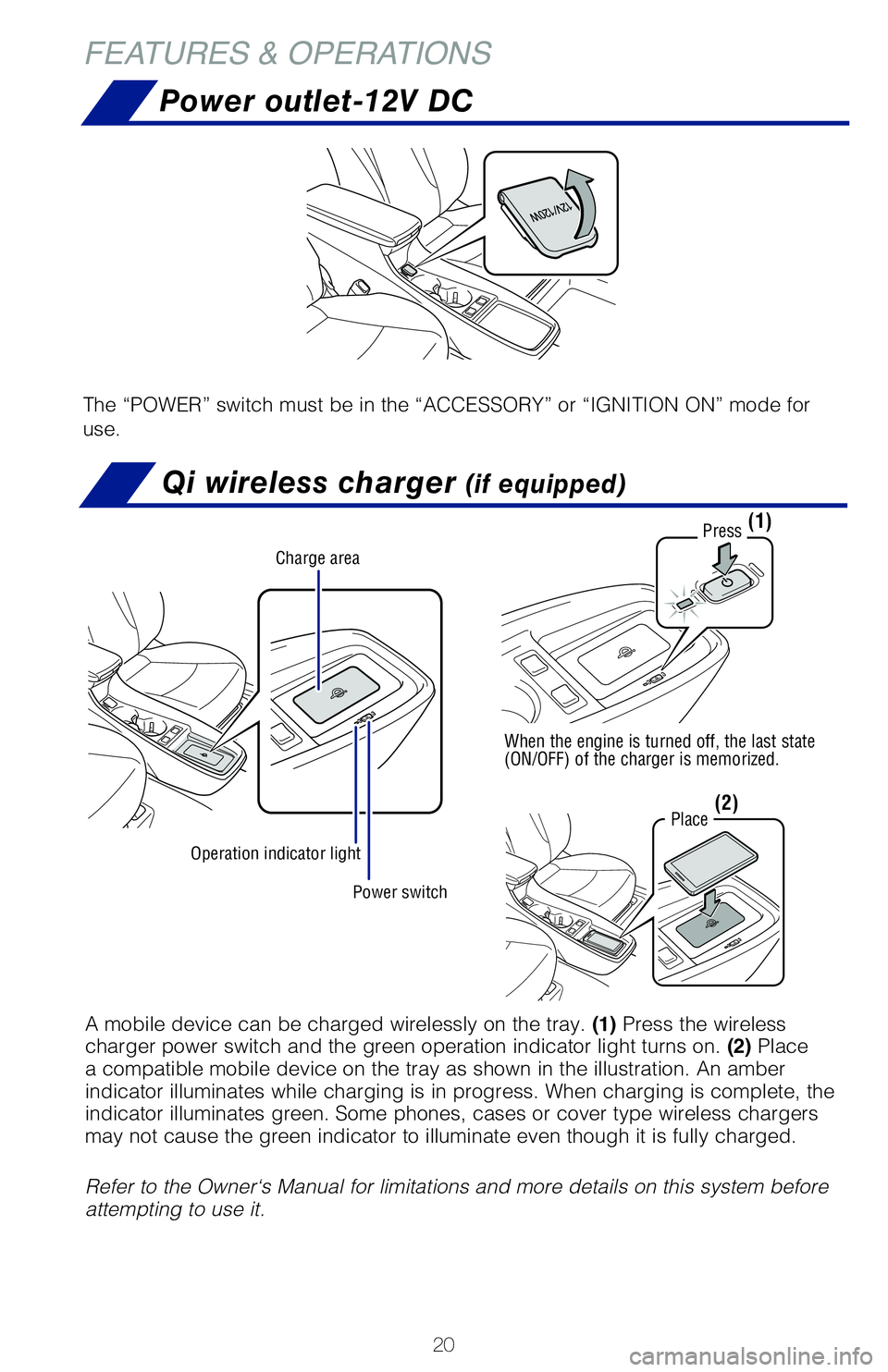
The “POWER” switch must be in the “ACCESSORY” or “IGNITION ON” mode for
use.
Power switch
Charge area
Operation indicator light
Press
When the engine is turned off, the last state
(ON/OFF) of the charger is memorized.
Place
(1)
(2)
A mobile device can be charged wirelessly on the tray. (1) Press the wireless
charger power switch and the green operation indicator light turns on. (2) Place
a compatible mobile device on the tray as shown in the illustration. An amber
indicator illuminates while charging is in progress. When charging is complete, the
indicator illuminates green. Some phones, cases or cover type wireless chargers
may not cause the green indicator to illuminate even though it is fully charged.
Refer to the Owner‘s Manual for limitations and more details on this system before
attempting to use it.
62443_MY20_Prius_Text.indd 208/22/19 7:34 PM
Page 30 of 56
28
Garage door opener (HomeLink®) (if equipped)
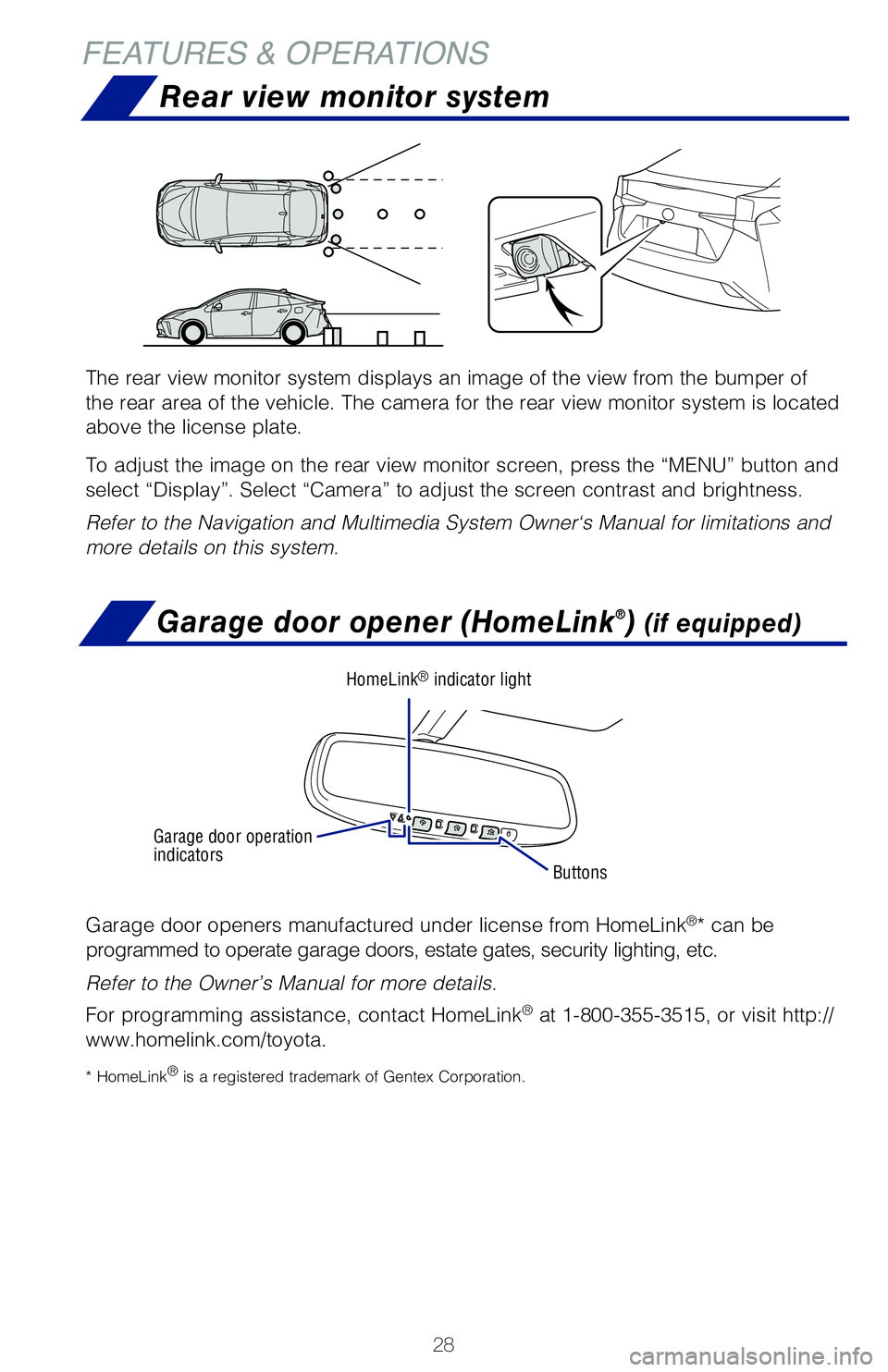
Garage door openers manufactured under license from HomeLink®* can be
programmed to operate garage doors, estate gates, security lighting, etc.
Refer to the Owner’s Manual for more details.
For programming assistance, contact HomeLink
® at 1-800-355-3515, or visit http://
www.homelink.com/toyota.
* HomeLink® is a registered trademark of Gentex Corporation.
FEATURES & OPERATIONS
Rear view monitor system
The rear view monitor system displays an image of the view from the bumper of
the rear area of the vehicle. The camera for the rear view monitor system is located
above the license plate.
To adjust the image on the rear view monitor screen, press the “MENU” button and
select “Display”. Select “Camera” to adjust the screen contrast and brightness.
Refer to the Navigation and Multimedia System Owner‘s Manual for limitations and
more details on this system.
Buttons
HomeLink® indicator light
Garage door operation
indicators
62443_MY20_Prius_Text.indd 288/22/19 7:34 PM
Page 34 of 56
32
Quick overview-Toyota Safety Sense™ P (TSS-P)
Sensors
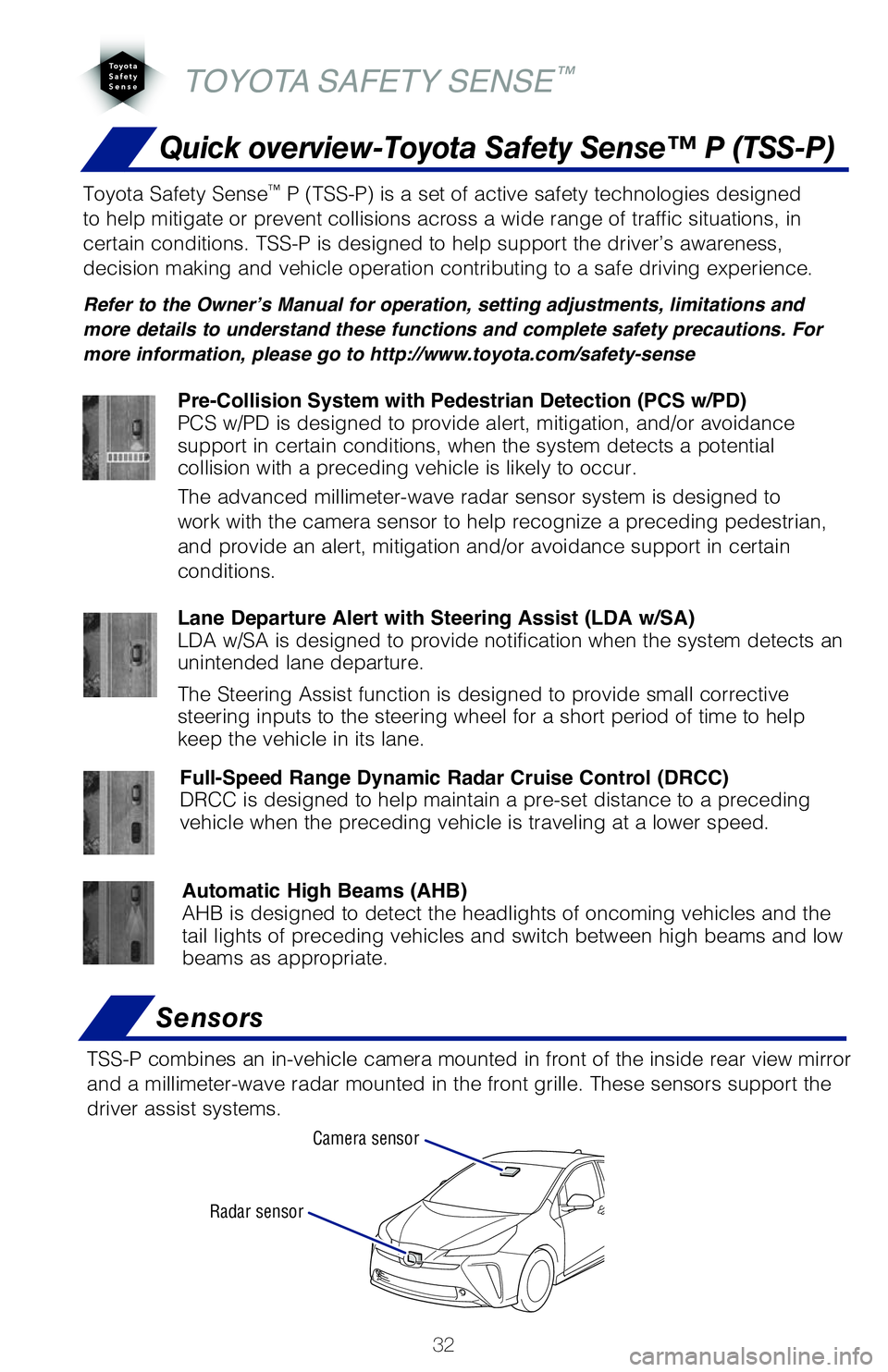
TSS-P combines an in-vehicle camera mounted in front of the inside rear view mirror
and a millimeter-wave radar mounted in the front grille. These sensors support the
driver assist systems.
Camera sensor
Radar sensor
TOYOTA SAFETY SENSE™
Toyota Safety Sense™ P (TSS-P) is a set of active safety technologies designed
to help mitigate or prevent collisions across a wide range of traffic situations, in
certain conditions. TSS-P is designed to help support the driver’s awareness,
decision making and vehicle operation contributing to a safe driving experience.
Refer to the Owner’s Manual for operation, setting adjustments, limitations and
more details to understand these functions and complete safety precautions. For
more information, please go to http://www.toyota.com/safety-sense
Lane Departure Alert with Steering Assist (LDA w/SA)
LDA w/SA is designed to provide notification when the system detects an
unintended lane departure.
The Steering Assist function is designed to provide small corrective
steering inputs to the steering wheel for a short period of time to help
keep the vehicle in its lane.
Automatic High Beams (AHB)
AHB is designed to detect the headlights of oncoming vehicles and the
tail lights of preceding vehicles and switch between high beams and low
beams as appropriate.
Pre-Collision System with Pedestrian Detection (PCS w/PD)
PCS w/PD is designed to provide alert, mitigation, and/or avoidance
support in certain conditions, when the system detects a potential
collision with a preceding vehicle is likely to occur.
The advanced millimeter-wave radar sensor system is designed to
work with the camera sensor to help recognize a preceding pedestrian,
and provide an alert, mitigation and/or avoidance support in certain
conditions.
Full-Speed Range Dynamic Radar Cruise Control (DRCC)
DRCC is designed to help maintain a pre-set distance to a preceding
vehicle when the preceding vehicle is traveling at a lower speed.
62443_MY20_Prius_Text.indd 328/22/19 7:35 PM
Page 42 of 56
40
ADJUSTING DISTANCE
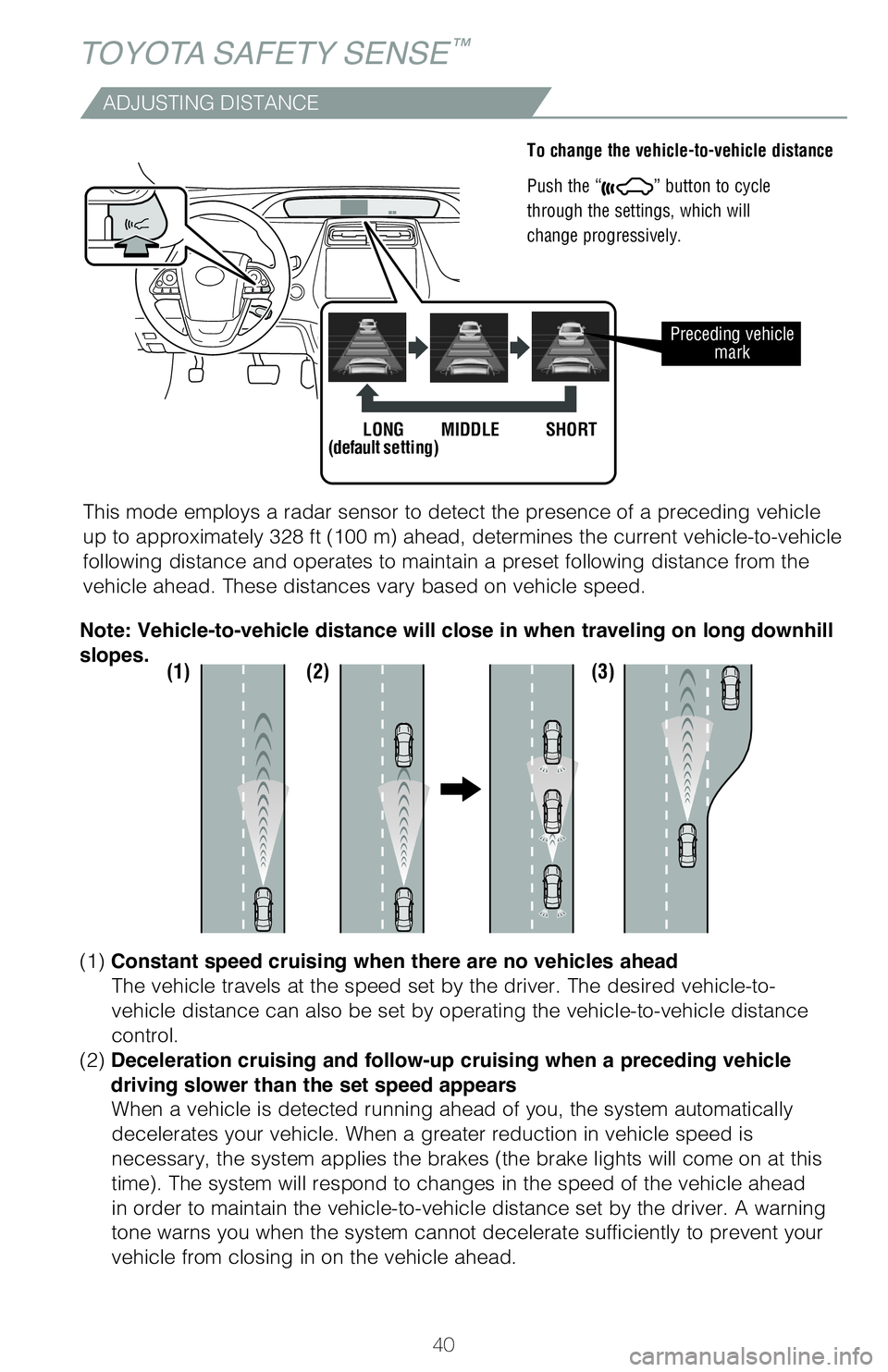
To change the vehicle-to-vehicle distance
Push the “
” button to cycle
through the settings, which will
change progressively.
This mode employs a radar sensor to detect the presence of a preceding vehicle
up to approximately 328 ft (100 m) ahead, determines the current vehicle-to-vehicle
following distance and operates to maintain a preset following distance from the
vehicle ahead. These distances vary based on vehicle speed.
Preceding vehicle mark
LONG
(default setting) MIDDLE SHORT
(1) (2) (3)
(1) Constant speed cruising when there are no vehicles ahead
The vehicle travels at the speed set by the driver. The desired vehicle-to-
vehicle distance can also be set by operating the vehicle-to-vehicle distance
control.
(2) Deceleration cruising and follow-up cruising when a preceding vehicle
driving slower than the set speed appears When a vehicle is detected running ahead of you, the system automatically
decelerates your vehicle. When a greater reduction in vehicle speed is
necessary, the system applies the brakes (the brake lights will come on at this
time). The system will respond to changes in the speed of the vehicle ahead
in order to maintain the vehicle-to-vehicle distance set by the driver. A warning
tone warns you when the system cannot decelerate sufficiently to prevent your
vehicle from closing in on the vehicle ahead.
Note: Vehicle-to-vehicle distance will close in when traveling on long downhill
slopes.
TOYOTA SAFETY SENSE™
62443_MY20_Prius_Text.indd 408/22/19 7:35 PM
Page 44 of 56
42
AHB is a safety system designed to help drivers see more of what’s ahead at
nighttime while reducing glare for oncoming drivers. When enabled, AHB uses an
in-vehicle camera to help detect the headlights of oncoming vehicles and tail lights
of preceding vehicles, then automatically switches between high and low beams
as appropriate to provide the most light possible and enhance forward visibility.
By using high beams more frequently, the system may allow earlier detection of
pedestrians and obstacles.
Refer to the Toyota Owner’s Manual for additional information on AHB operation,
settings adjustments, limitations, and precautions before attempting to use it.
Automatic High Beams (AHB)
TOYOTA SAFETY SENSE™
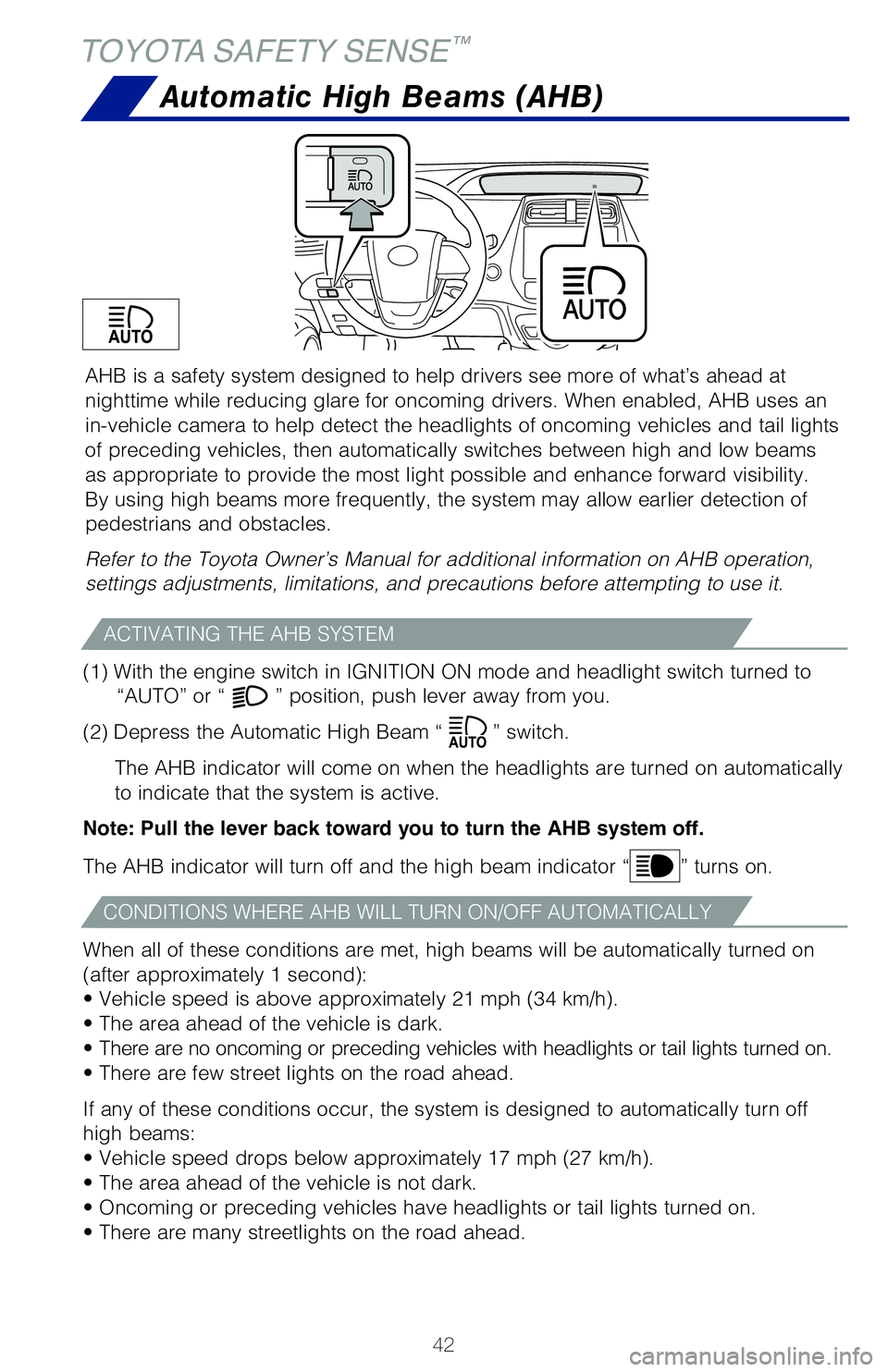
(1) With the engine switch in IGNITION ON mode and headlight switch turned to
“AUTO” or “
” position, push lever away from you.
(2) Depress the Automatic High Beam “
” switch.
The AHB indicator will come on when the headlights are turned on automatically
to indicate that the system is active.
Note: Pull the lever back toward you to turn the AHB system off.
The AHB indicator will turn off and the high beam indicator “
” turns on.
When all of these conditions are met, high beams will be automatically turned on
(after approximately 1 second):
• Vehicle speed is above approximately 21 mph (34 km/h).
• The area ahead of the vehicle is dark.
• There are no oncoming or preceding vehicles with headlights or tail lights turned on.
• There are few street lights on the road ahead.
If any of these conditions occur, the system is designed to automatically turn off
high beams:
• Vehicle speed drops below approximately 17 mph (27 km/h).
• The area ahead of the vehicle is not dark.
• Oncoming or preceding vehicles have headlights or tail lights turned on.
• There are many streetlights on the road ahead.
ACTIVATING THE AHB SYSTEM
CONDITIONS WHERE AHB WILL TURN ON/OFF AUTOMATICALLY
62443_MY20_Prius_Text.indd 428/22/19 7:35 PM
Page 45 of 56
43
OVERVIEW
FEATURES & OPERATIONS
TOYOTA SAFETY SENSE
SAFETY & EMERGENCY FEATURES
SAFETY & EMERGENCY FEATURES
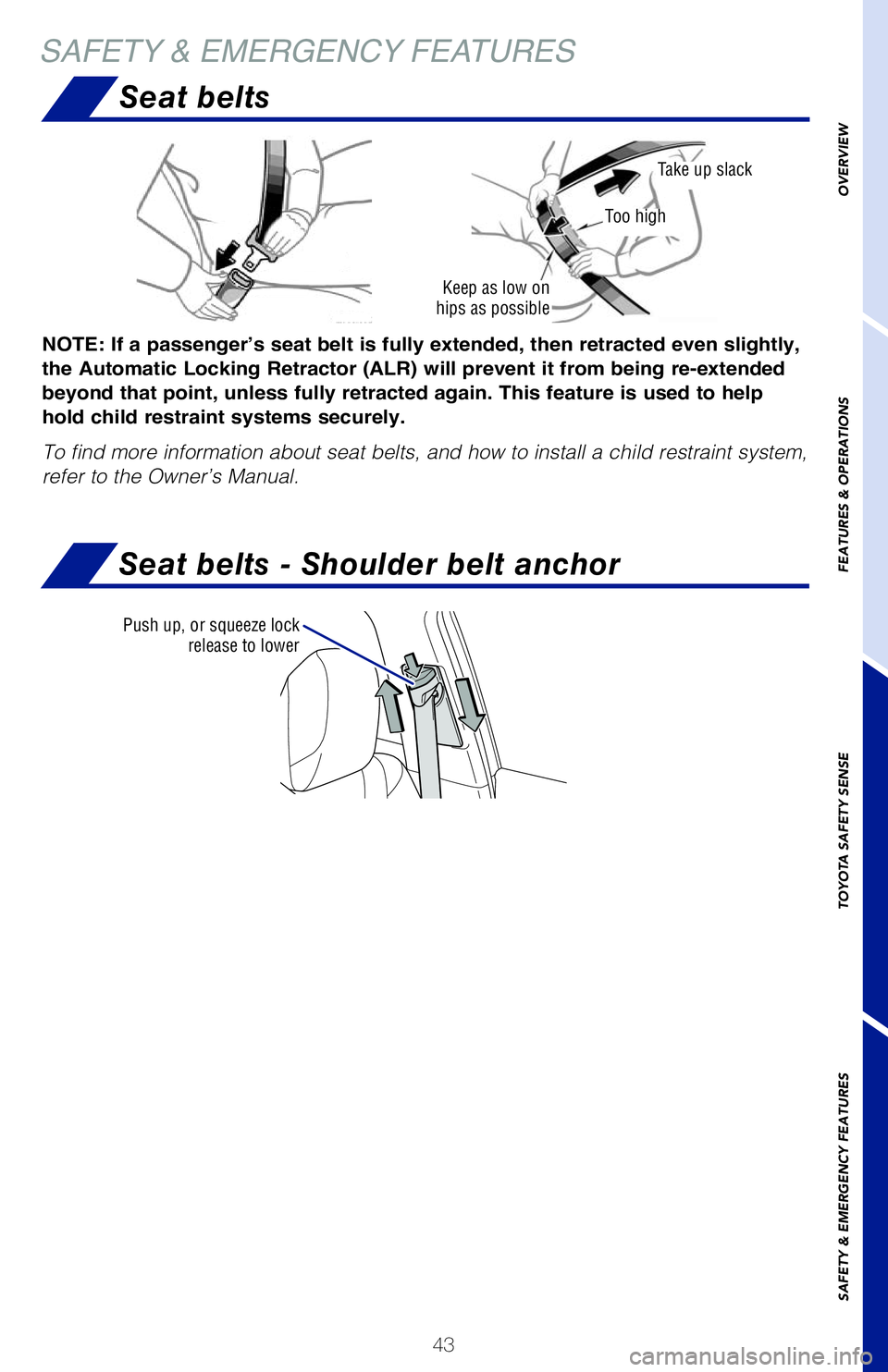
Seat belts
Seat belts - Shoulder belt anchor
NOTE: If a passenger’s seat belt is fully extended, then retracted even slightly,
the Automatic Locking Retractor (ALR) will prevent it from being re-extended
beyond that point, unless fully retracted again. This feature is used to help
hold child restraint systems securely.
To find more information about seat belts, and how to install a child restraint system,
refer to the Owner’s Manual.
Keep as low on
hips as possible
Take up slack
Too high
Push up, or squeeze lock release to lower
62443_MY20_Prius_Text.indd 438/22/19 7:35 PM
Page 46 of 56
44
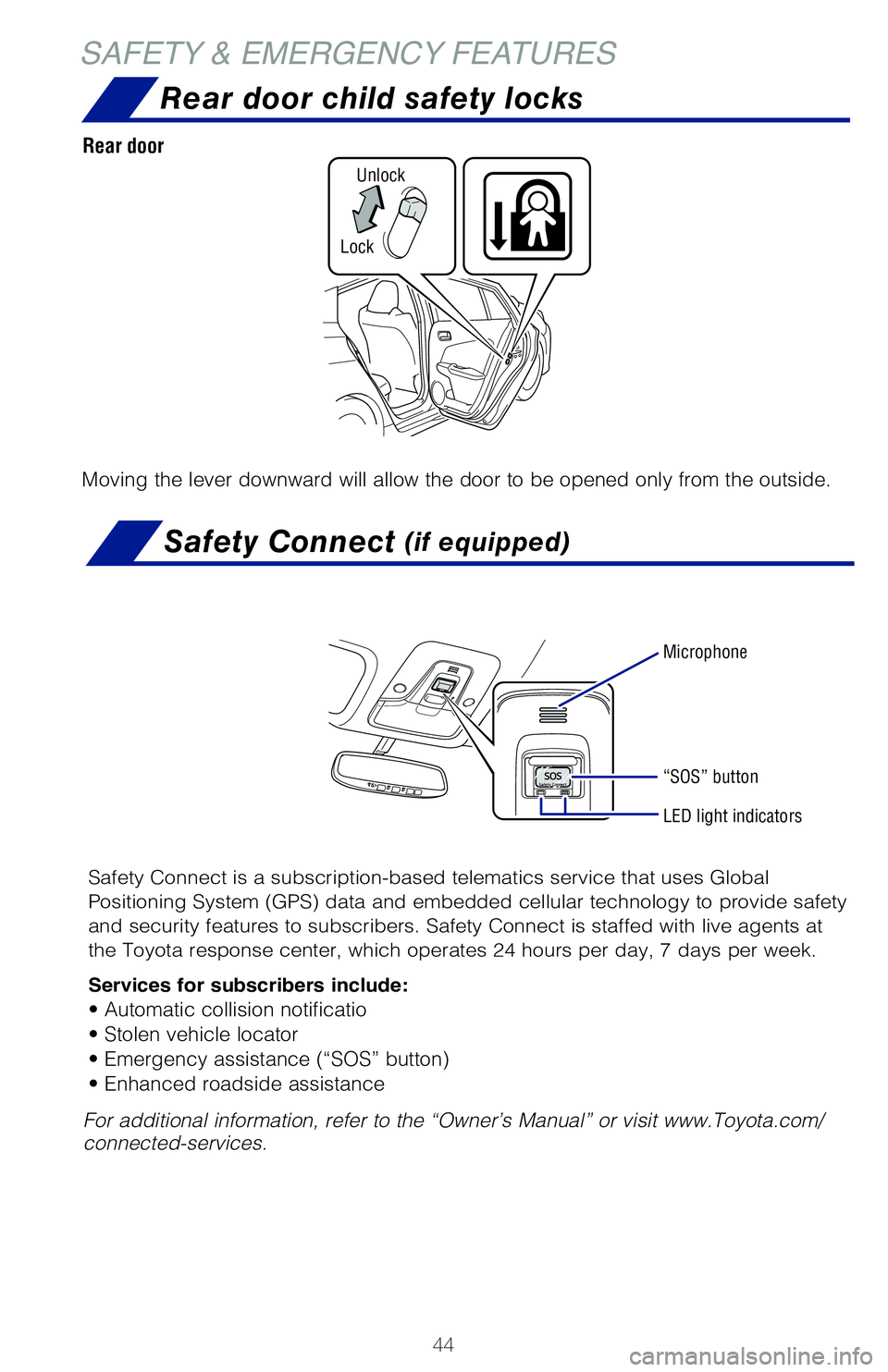
Rear door child safety locks
SAFETY & EMERGENCY FEATURESSafety Connect
(if equipped)
Safety Connect is a subscription-based telematics service that uses Global
Positioning System (GPS) data and embedded cellular technology to provide safety
and security features to subscribers. Safety Connect is staffed with live agents at
the Toyota response center, which operates 24 hours per day, 7 days per week.
Services for subscribers include:
• Automatic collision notificatio
• Stolen vehicle locator
• Emergency assistance (“SOS” button)
• Enhanced roadside assistance
Microphone
LED light indicators
“SOS” button
For additional information, refer to the “Owner’s Manual” or visit www.Toyota.com/
connected-services.
Moving the lever downward will allow the door to be opened only from the outside.
Rear door
LockUnlock
62443_MY20_Prius_Text.indd 448/22/19 7:35 PM
Page 47 of 56
45
OVERVIEW
FEATURES & OPERATIONS
TOYOTA SAFETY SENSE
SAFETY & EMERGENCY FEATURES
Tire Pressure Monitoring (warning) System (TPMS)
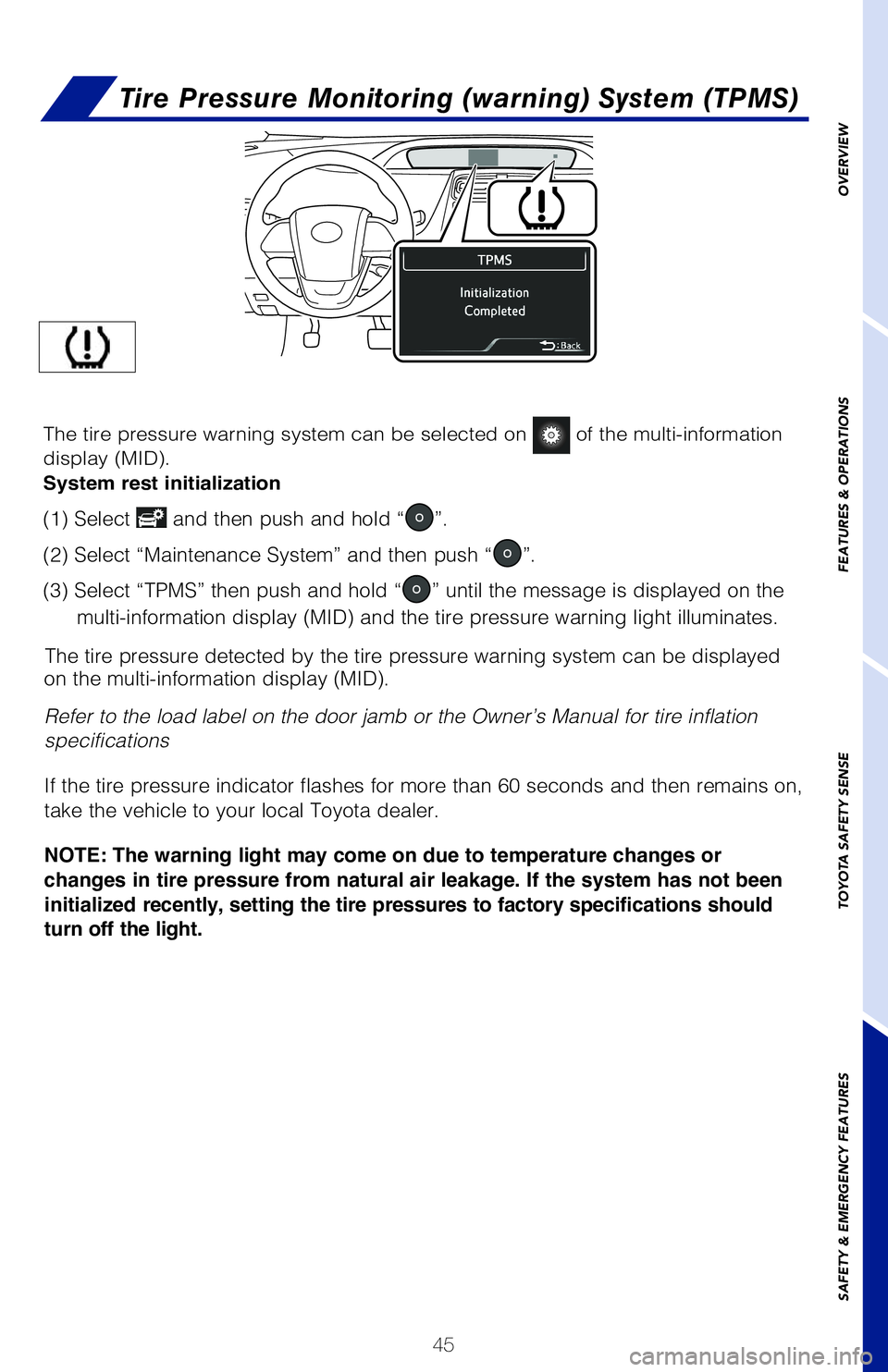
The tire pressure detected by the tire pressure warning system can be displayed
on the multi-information display (MID).
Refer to the load label on the door jamb or the Owner’s Manual for tire inflation
specifications
If the tire pressure indicator flashes for more than 60 seconds and then remains on,
take the vehicle to your local Toyota dealer.
NOTE: The warning light may come on due to temperature changes or
changes in tire pressure from natural air leakage. If the system has not been
initialized recently, setting the tire pressures to factory specifications should
turn off the light.
Until Complete
The tire pressure warning system can be selected on of the multi-information
display (MID).
System rest initialization
(1) Select and then push and hold “”.
(2) Select “Maintenance System” and then push “
”.
(3) Select “TPMS” then push and hold “
” until the message is displayed on the
multi-information display (MID) and the tire pressure warning light illuminates.
62443_MY20_Prius_Text.indd 458/22/19 7:35 PM
Page 53 of 56
51
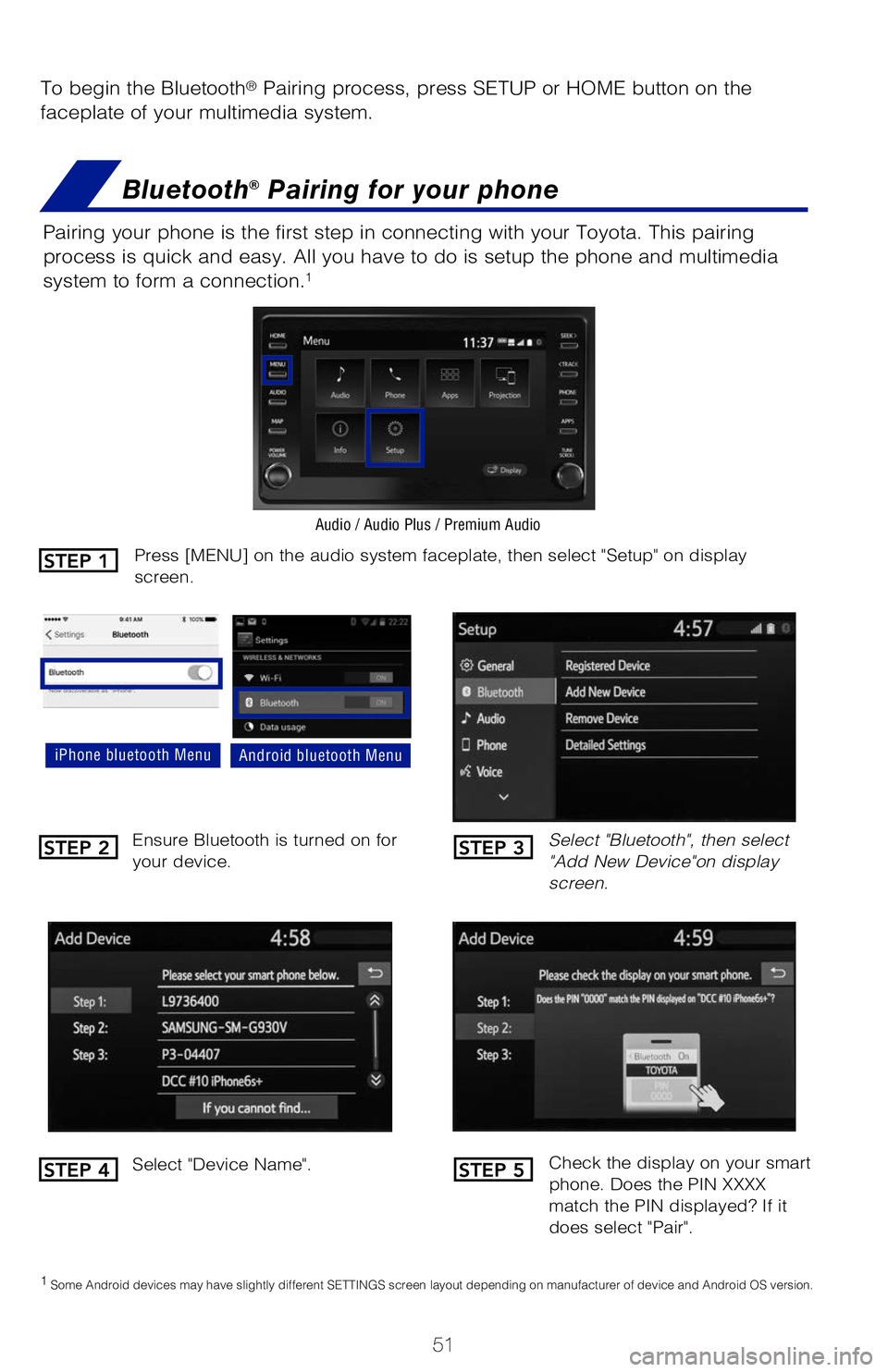
To begin the Bluetooth® Pairing process, press SETUP or HOME button on the
faceplate of your multimedia system.
Bluetooth® Pairing for your phone
Pairing your phone is the first step in connecting with your Toyota. This pairing
process is quick and easy. All you have to do is setup the phone and multimedia
system to form a connection.
1
Select "Bluetooth", then select
"Add New Device"on display
screen.
Ensure Bluetooth is turned on for
your device.
Select "Device Name".
iPhone bluetooth MenuAndroid bluetooth Menu
1
Some Android devices may have slightly different SETTINGS screen layout depending on manufacturer of device and Android OS version.
Check the display on your smart
phone. Does the PIN XXXX
match the PIN displayed? If it
does select "Pair".
Press [MENU] on the audio system faceplate, then select "Setup" on display
screen.
Audio / Audio Plus / Premium Audio
STEP 1
STEP 2
STEP 4
STEP 3
STEP 5
62443_MY20_Prius_Text.indd 518/22/19 7:35 PM