light TOYOTA PRIUS 2021 (in English) User Guide
[x] Cancel search | Manufacturer: TOYOTA, Model Year: 2021, Model line: PRIUS, Model: TOYOTA PRIUS 2021Pages: 64, PDF Size: 6.06 MB
Page 18 of 64
16
Lights & turn signals
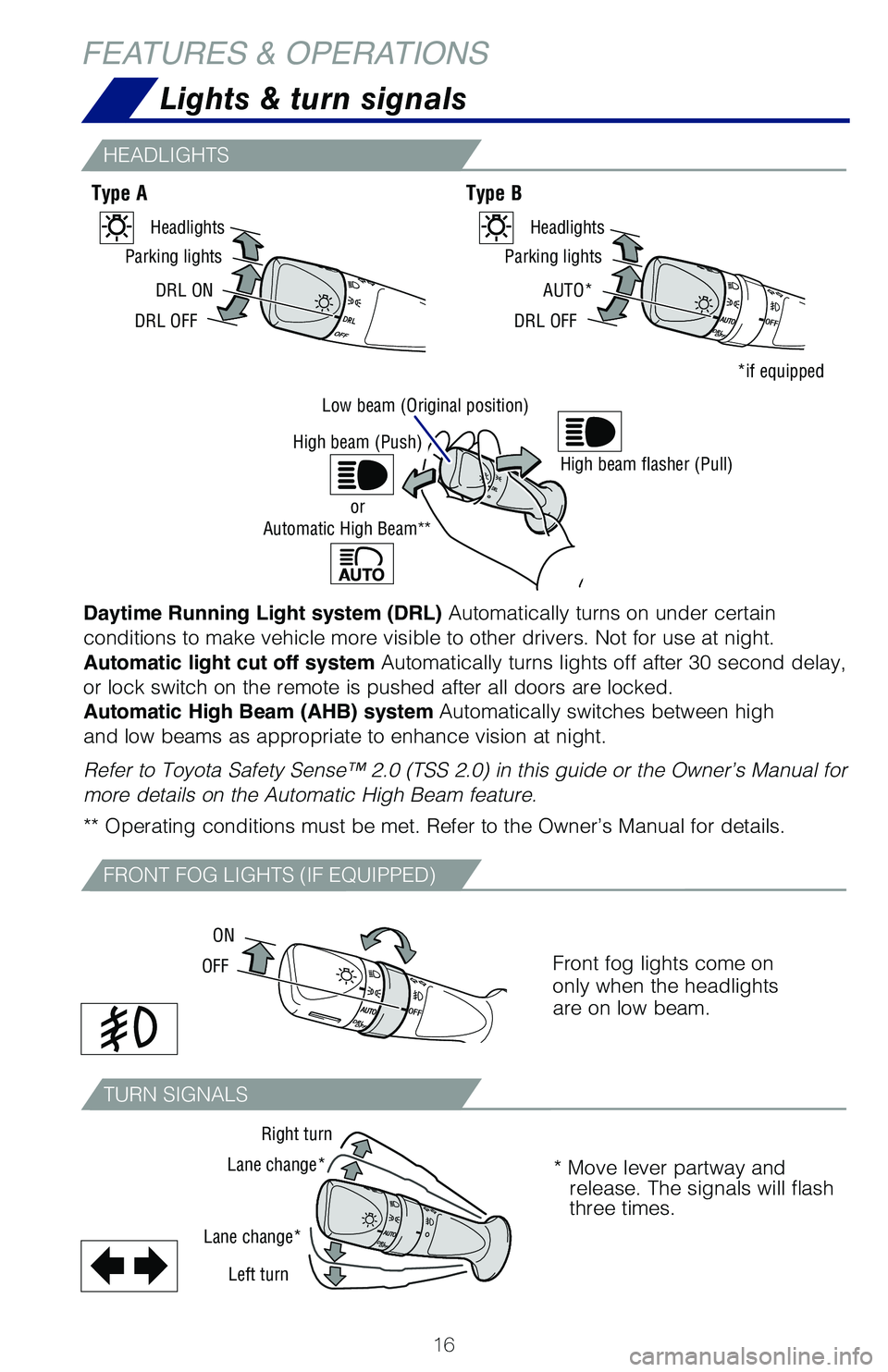
Daytime Running Light system (DRL) Automatically turns on under certain
conditions to make vehicle more visible to other drivers. Not for use at night.
Automatic light cut off system Automatically turns lights off after 30 second delay,
or lock switch on the remote is pushed after all doors are locked.
Automatic High Beam (AHB) system Automatically switches between high
and low beams as appropriate to enhance vision at night.
Refer to Toyota Safety Sense™ 2.0 (TSS 2.0) in this guide or the Owner’s Manual for
more details on the Automatic High Beam feature. ** Operating conditions must be met. Refer to the Owner’s Manual for details.
Front fog lights come on only when the headlights are on low beam.
Type AType B
HEADLIGHTS
FRONT FOG LIGHTS (IF EQUIPPED)
TURN SIGNALS
FEATURES & OPERATIONS
DRL ON
DRL OFF
Parking lights
Headlights
AUTO*
DRL OFF
Parking lights
Headlights
*if equipped
Low beam (Original position)
OFF
ON
Right turn
Lane change*
Lane change*
Left turn
High beam flasher (Pull)High beam (Push)
Automatic High Beam**or
* Move lever partway and release. The signals will flash three times.
126899_MY21_Prius_QRG_V2_ML_0614_R1.indd 16126899_MY21_Prius_QRG_V2_ML_0614_R1.indd 166/17/20 10:09 AM6/17/20 10:09 AM
Page 20 of 64
18
Audio
FEATURES & OPERATIONS
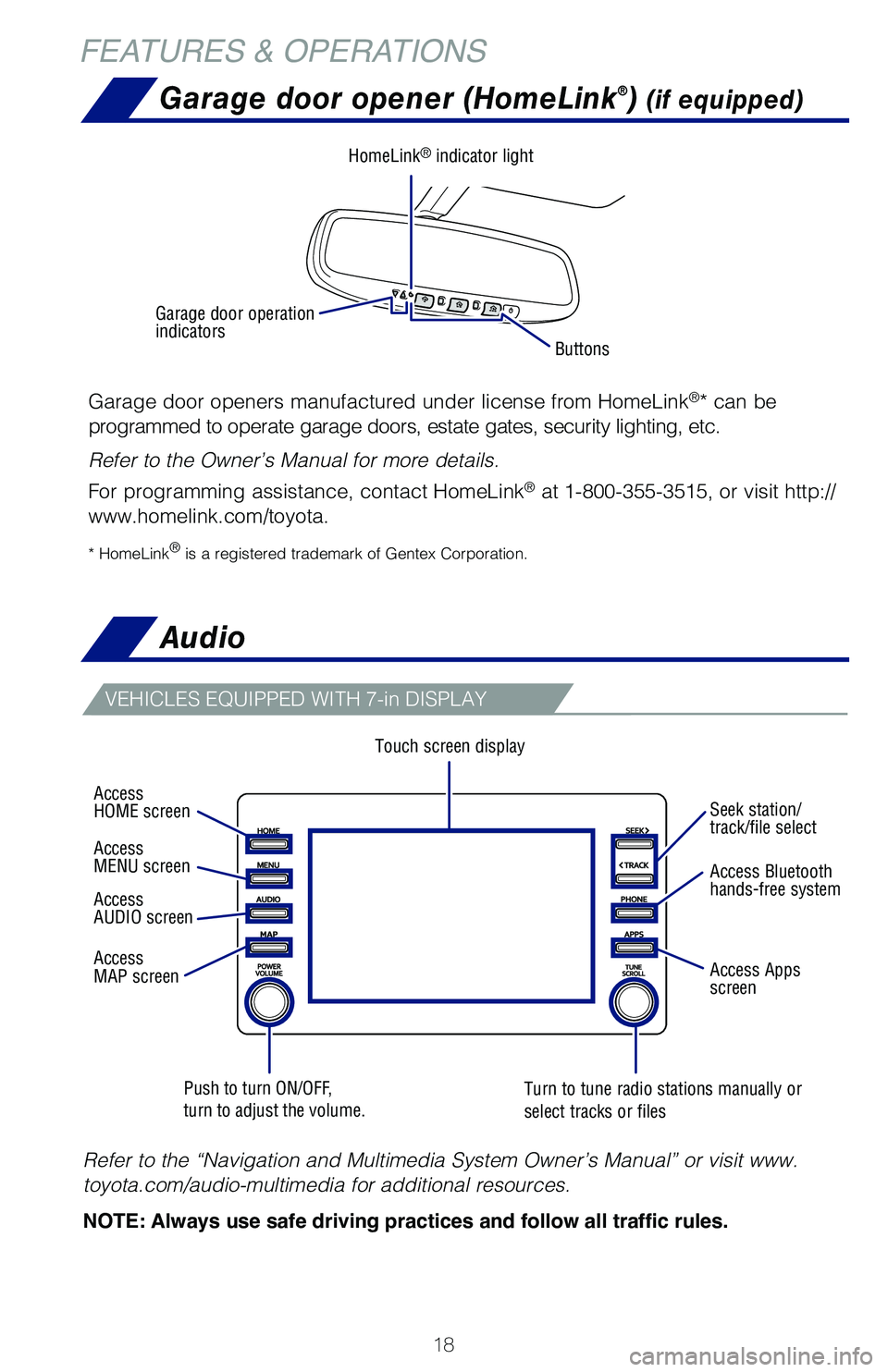
Touch screen display
Push to turn ON/OFF, turn to adjust the volume.Turn to tune radio stations manually or select tracks or files
VEHICLES EQUIPPED WITH 7-in DISPLAY
Refer to the “Navigation and Multimedia System Owner’s Manual” or visit www.
toyota.com/audio-multimedia for additional resources.
NOTE: Always use safe driving practices and follow all traffic rules.
Garage door opener (HomeLink®) (if equipped)
Garage door openers manufactured under license from HomeLink®* can be
programmed to operate garage doors, estate gates, security lighting, etc.
Refer to the Owner’s Manual for more details.
For programming assistance, contact HomeLink® at 1-800-355-3515, or visit http://
www.homelink.com/toyota.
* HomeLink® is a registered trademark of Gentex Corporation.
Buttons
HomeLink® indicator light
Garage door operation indicators
Access HOME screen
Access MENU screen
Access AUDIO screen
Access MAP screen
Seek station/track/file select
Access Bluetooth hands-free system
Access Apps screen
126899_MY21_Prius_QRG_V2_ML_0614_R1.indd 18126899_MY21_Prius_QRG_V2_ML_0614_R1.indd 186/17/20 10:09 AM6/17/20 10:09 AM
Page 22 of 64
20
FEATURES & OPERATIONS
Qi wireless charger (if equipped)
Power outlet-12V DC
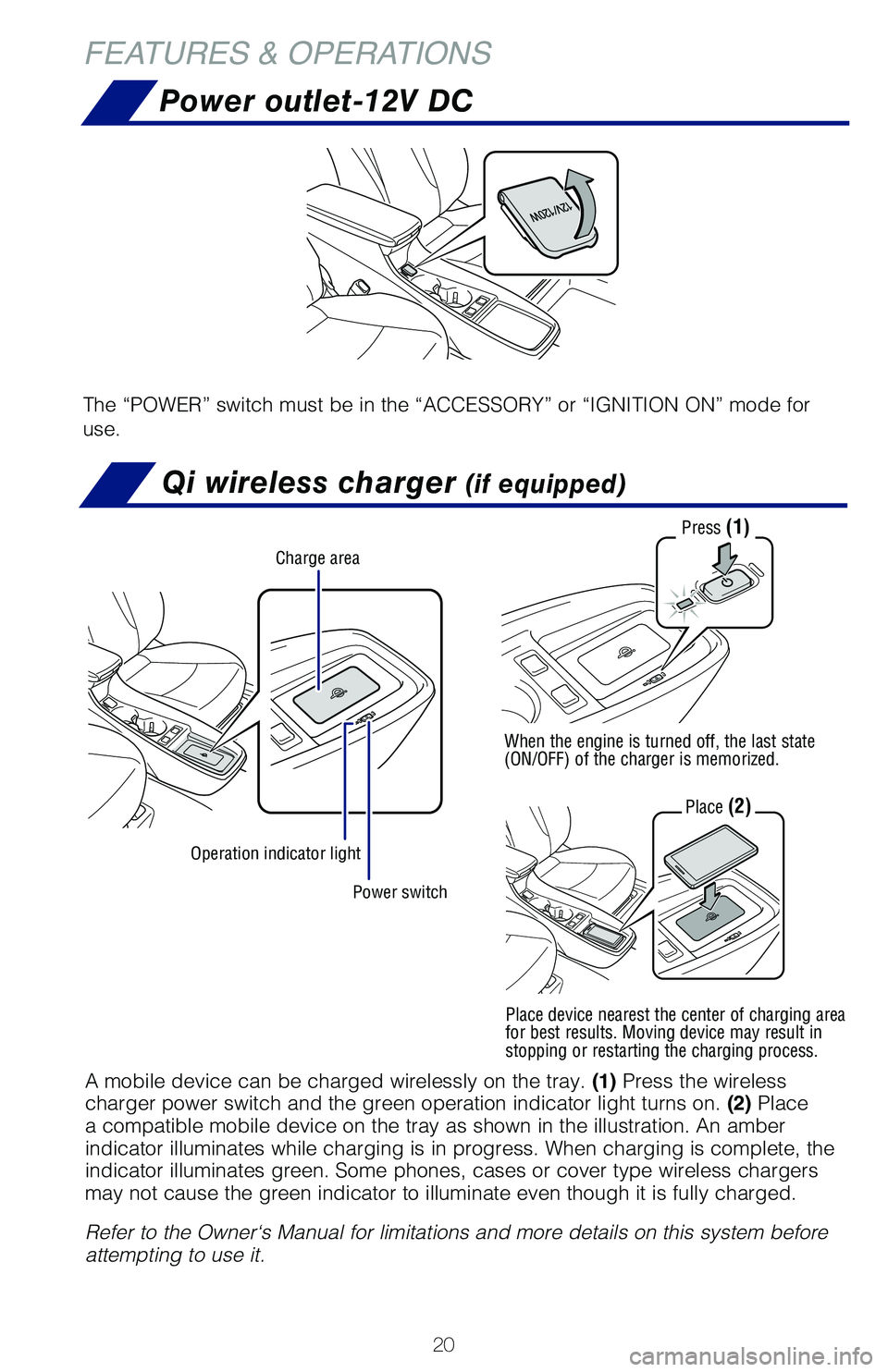
The “POWER” switch must be in the “ACCESSORY” or “IGNITION ON” mode for
use.
Power switch
Charge area
Operation indicator light
Press (1)
When the engine is turned off, the last state (ON/OFF) of the charger is memorized.
Place (2)
A mobile device can be charged wirelessly on the tray. (1) Press the wireless charger power switch and the green operation indicator light turns on. (2) Place a compatible mobile device on the tray as shown in the illustration. An amber indicator illuminates while charging is in progress. When charging is complete, the indicator illuminates green. Some phones, cases or cover type wireless chargers may not cause the green indicator to illuminate even though it is fully charged.
Refer to the Owner‘s Manual for limitations and more details on this system before attempting to use it.
Place device nearest the center of charging area for best results. Moving device may result in stopping or restarting the charging process.
126899_MY21_Prius_QRG_V2_ML_0614_R1.indd 20126899_MY21_Prius_QRG_V2_ML_0614_R1.indd 206/17/20 10:09 AM6/17/20 10:09 AM
Page 34 of 64

32
TOYOTA SAFETY SENSE™
Toyota Safety Sense™ 2.0 (TSS 2.0) is a set of active safety technologies designed
to help mitigate or prevent collisions across a wide range of traffic situations, in
certain conditions. TSS 2.0 is designed to help support the driver’s awareness,
decision making and vehicle operation contributing to a safe driving experience.
Refer to the Owner’s Manual for operation, setting adjustments, limitations and
more details to understand these functions and complete safety precautions. For
more information, please go to http://www.toyota.com/safety-sense.
Quick overview-Toyota Safety Sense™ 2.0
Automatic High Beams (AHB)AHB is designed to detect the headlights of oncoming vehicles and the tail lights of preceding vehicles and switch between high beams and low beams as appropriate.
Road Sign Assist (RSA)RSA is designed to recognize specific road signs using the forward-facing camera to provide information to the driver via the display.
Pre-Collision System with Pedestrian Detection (PCS w/PD)PCS w/PD is designed to provide alert, mitigation, and/or avoidance support in certain conditions, when the system detects a potential collision with a preceding vehicle is likely to occur.
The advanced grille-mounted radar system is designed to work with
the forward-facing camera to help recognize a preceding pedestrian or
bicyclist, and provide an alert, mitigation and/or avoidance support in
certain conditions.
Full-Speed Range Dynamic Radar Cruise Control (DRCC)Full-Speed Range DRCC is designed to help maintain a pre-set distance to a preceding vehicle when the preceding vehicle is traveling at a lower speed. The minimum set speed is approximately 20 MPH, but once activated, the operating speed range is 0-110 MPH.
Lane Tracing Assist (LTA)LTA is designed to help keep the vehicle in the center of a lane by assisting the driver in steering control when using Full-Speed Range DRCC.
Lane Departure Alert with Steering Assist (LDA w/SA)LDA w/SA is designed to provide notification when the system detects an unintended lane departure.
The Steering Assist function is designed to provide small corrective steering inputs to the steering wheel for a short period of time to help keep the vehicle in its lane. The Sway Warning function is designed to detect vehicle swaying (based on the vehicle location and steering wheel operation) and alert the driver with an audio and visual alert, urging them to take a break.
126899_MY21_Prius_QRG_V2_ML_0614_R1.indd 32126899_MY21_Prius_QRG_V2_ML_0614_R1.indd 326/17/20 10:09 AM6/17/20 10:09 AM
Page 46 of 64
44
TOYOTA SAFETY SENSE™
ADJUSTING DISTANCE
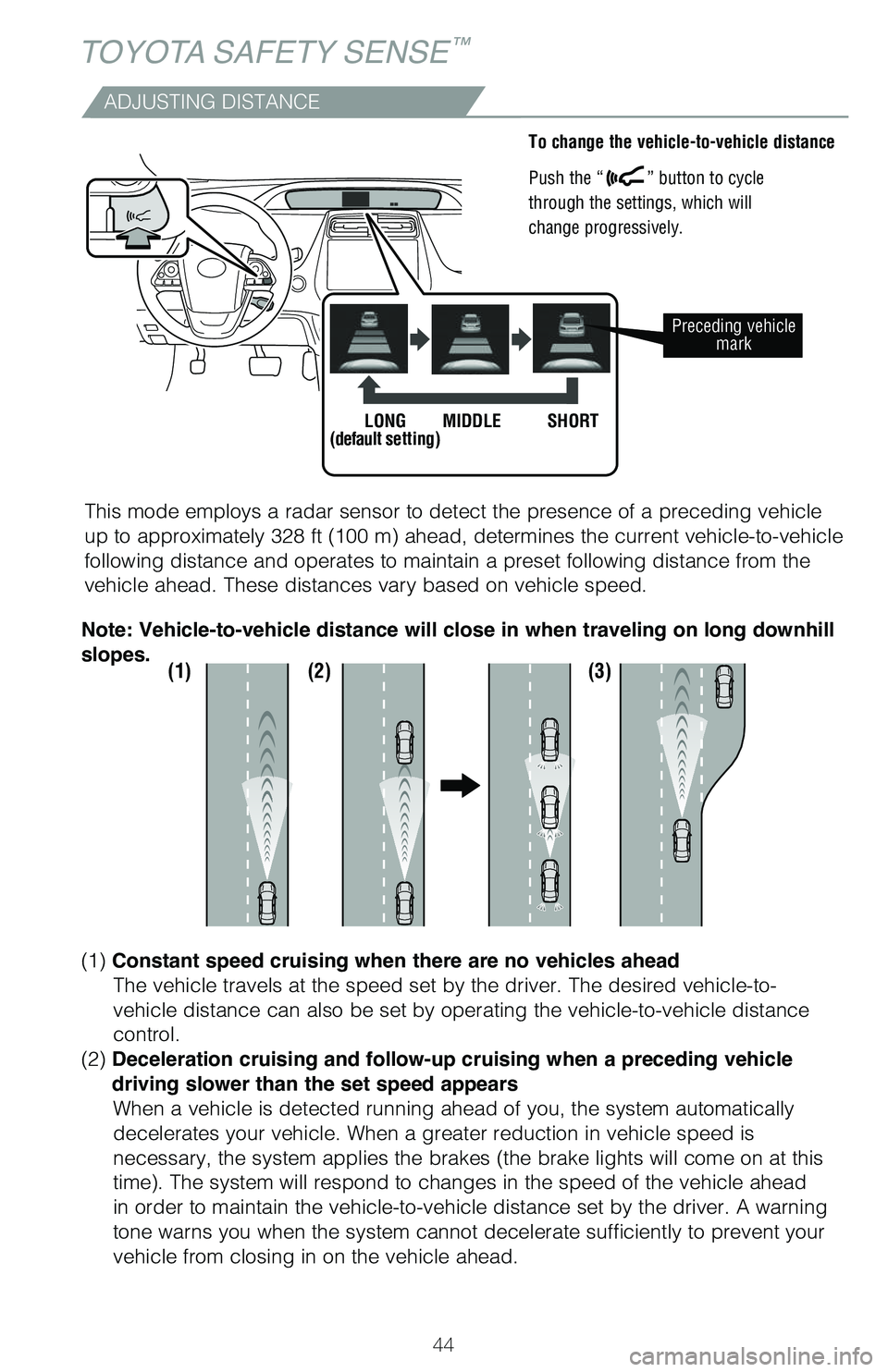
This mode employs a radar sensor to detect the presence of a preceding vehicle
up to approximately 328 ft (100 m) ahead, determines the current vehicle-to-vehicle
following distance and operates to maintain a preset following distance from the
vehicle ahead. These distances vary based on vehicle speed.
(1) (2) (3)
(1) Constant speed cruising when there are no vehicles ahead
The vehicle travels at the speed set by the driver. The desired vehicle-to-
vehicle distance can also be set by operating the vehicle-to-vehicle distance
control.
(2) Deceleration cruising and follow-up cruising when a preceding vehicle
driving slower than the set speed appears
When a vehicle is detected running ahead of you, the system automatically
decelerates your vehicle. When a greater reduction in vehicle speed is
necessary, the system applies the brakes (the brake lights will come on at this
time). The system will respond to changes in the speed of the vehicle ahead
in order to maintain the vehicle-to-vehicle distance set by the driver. A warning
tone warns you when the system cannot decelerate sufficiently to prevent your
vehicle from closing in on the vehicle ahead.
Note: Vehicle-to-vehicle distance will close in when traveling on long downhill
slopes.
To change the vehicle-to-vehicle distance
Push the “” button to cycle
through the settings, which will
change progressively.
Preceding vehicle mark
LONG(default setting)MIDDLESHORT
126899_MY21_Prius_QRG_V2_ML_0614_R1.indd 44126899_MY21_Prius_QRG_V2_ML_0614_R1.indd 446/17/20 10:09 AM6/17/20 10:09 AM
Page 48 of 64
46
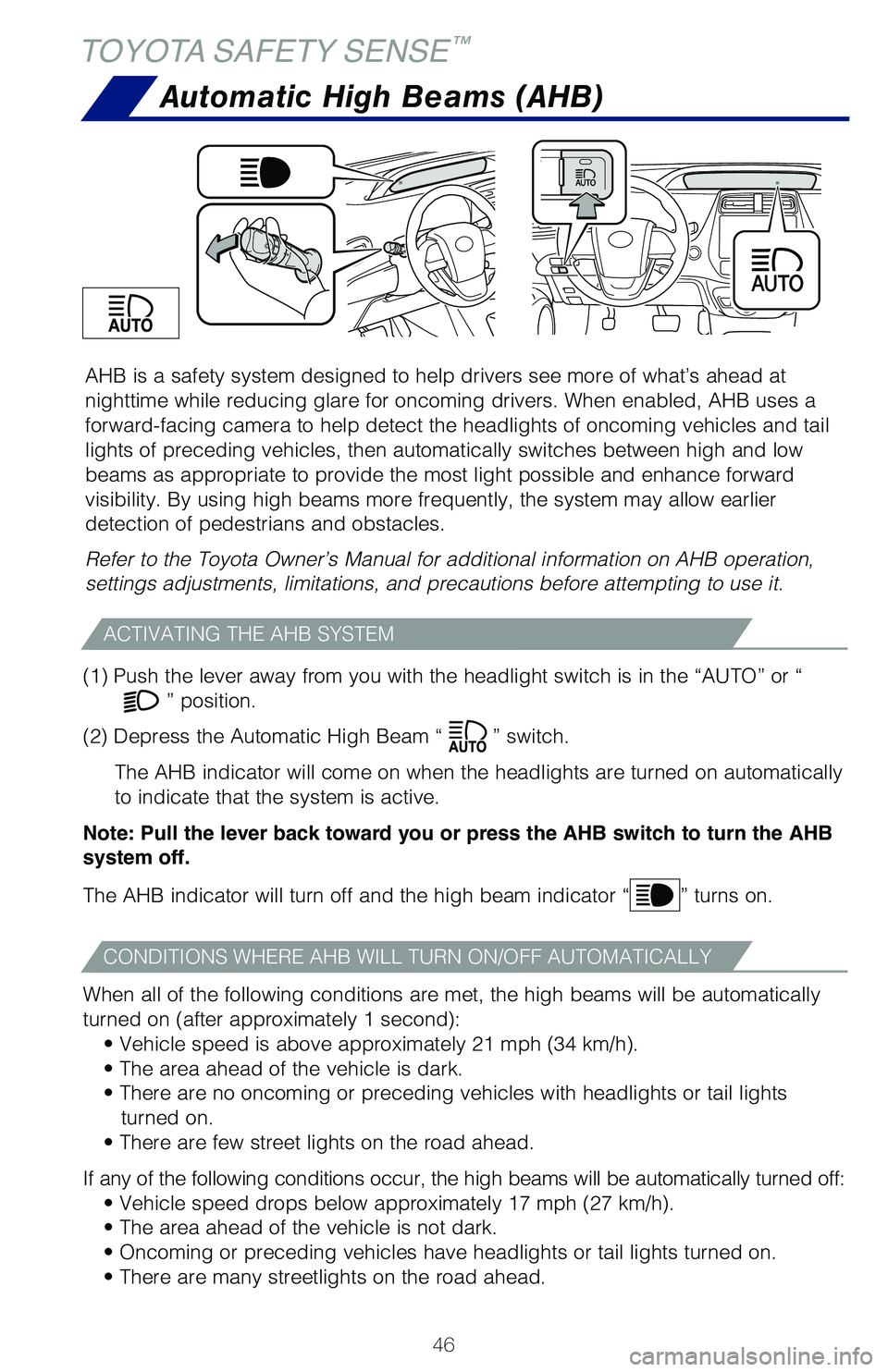
AHB is a safety system designed to help drivers see more of what’s ahead at
nighttime while reducing glare for oncoming drivers. When enabled, AHB uses a
forward-facing camera to help detect the headlights of oncoming vehicles and tail
lights of preceding vehicles, then automatically switches between high and low
beams as appropriate to provide the most light possible and enhance forward
visibility. By using high beams more frequently, the system may allow earlier
detection of pedestrians and obstacles.
Refer to the Toyota Owner’s Manual for additional information on AHB operation,
settings adjustments, limitations, and precautions before attempting to use it.
Automatic High Beams (AHB)
TOYOTA SAFETY SENSE™
(1) Push the lever away from you with the headlight switch is in the “AUTO” or “
” position.
(2) Depress the Automatic High Beam “” switch.
The AHB indicator will come on when the headlights are turned on automatically
to indicate that the system is active.
Note: Pull the lever back toward you or press the AHB switch to turn the AHB
system off.
The AHB indicator will turn off and the high beam indicator “” turns on.
When all of the following conditions are met, the high beams will be automatically
turned on (after approximately 1 second):
• Vehicle speed is above approximately 21 mph (34 km/h).
• The area ahead of the vehicle is dark.
• There are no oncoming or preceding vehicles with headlights or tail lights
turned on.
• There are few street lights on the road ahead.
If any of the following conditions occur, the high beams will be automatically turned off:
• Vehicle speed drops below approximately 17 mph (27 km/h).
• The area ahead of the vehicle is not dark.
• Oncoming or preceding vehicles have headlights or tail lights turned on.
• There are many streetlights on the road ahead.
ACTIVATING THE AHB SYSTEM
CONDITIONS WHERE AHB WILL TURN ON/OFF AUTOMATICALLY
126899_MY21_Prius_QRG_V2_ML_0614_R1.indd 46126899_MY21_Prius_QRG_V2_ML_0614_R1.indd 466/17/20 10:09 AM6/17/20 10:09 AM
Page 50 of 64
48
SAFETY & EMERGENCY FEATURES
Seat belts
Seat belts - Shoulder belt anchor
Rear door child safety locks
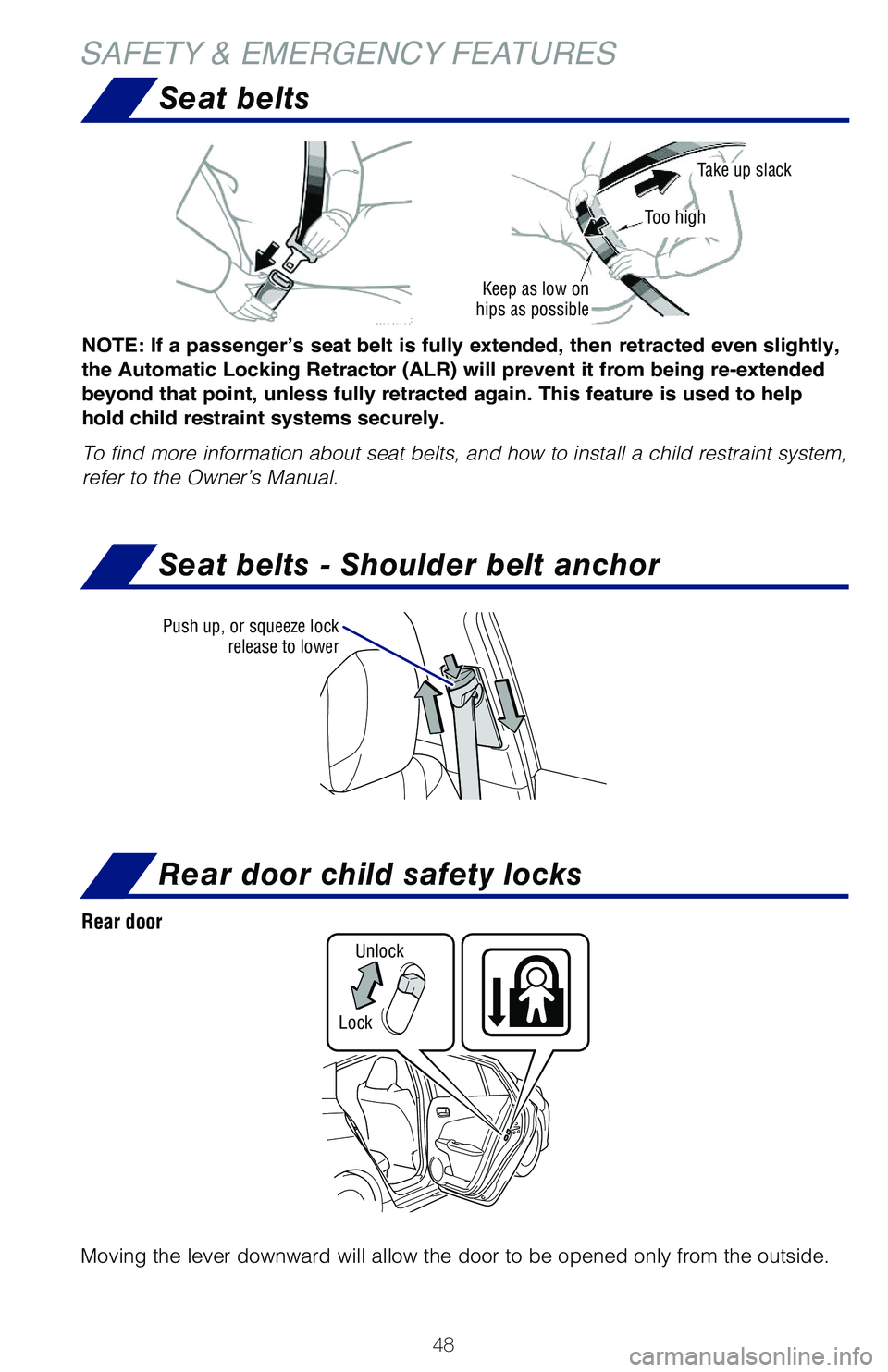
Moving the lever downward will allow the door to be opened only from the outside.
Rear door
Lock
Unlock
NOTE: If a passenger’s seat belt is fully extended, then retracted even slightly,
the Automatic Locking Retractor (ALR) will prevent it from being re-extended
beyond that point, unless fully retracted again. This feature is used to help
hold child restraint systems securely.
To find more information about seat belts, and how to install a child restraint system,
refer to the Owner’s Manual.
Keep as low on hips as possible
Take up slack
Too high
Push up, or squeeze lock release to lower
126899_MY21_Prius_QRG_V2_ML_0614_R1.indd 48126899_MY21_Prius_QRG_V2_ML_0614_R1.indd 486/17/20 10:09 AM6/17/20 10:09 AM
Page 51 of 64
49
OVERVIEW
FEATURES & OPERATIONS
TOYOTA SAFETY SENSE
SAFETY & EMERGENCY FEATURES
Safety Connect®
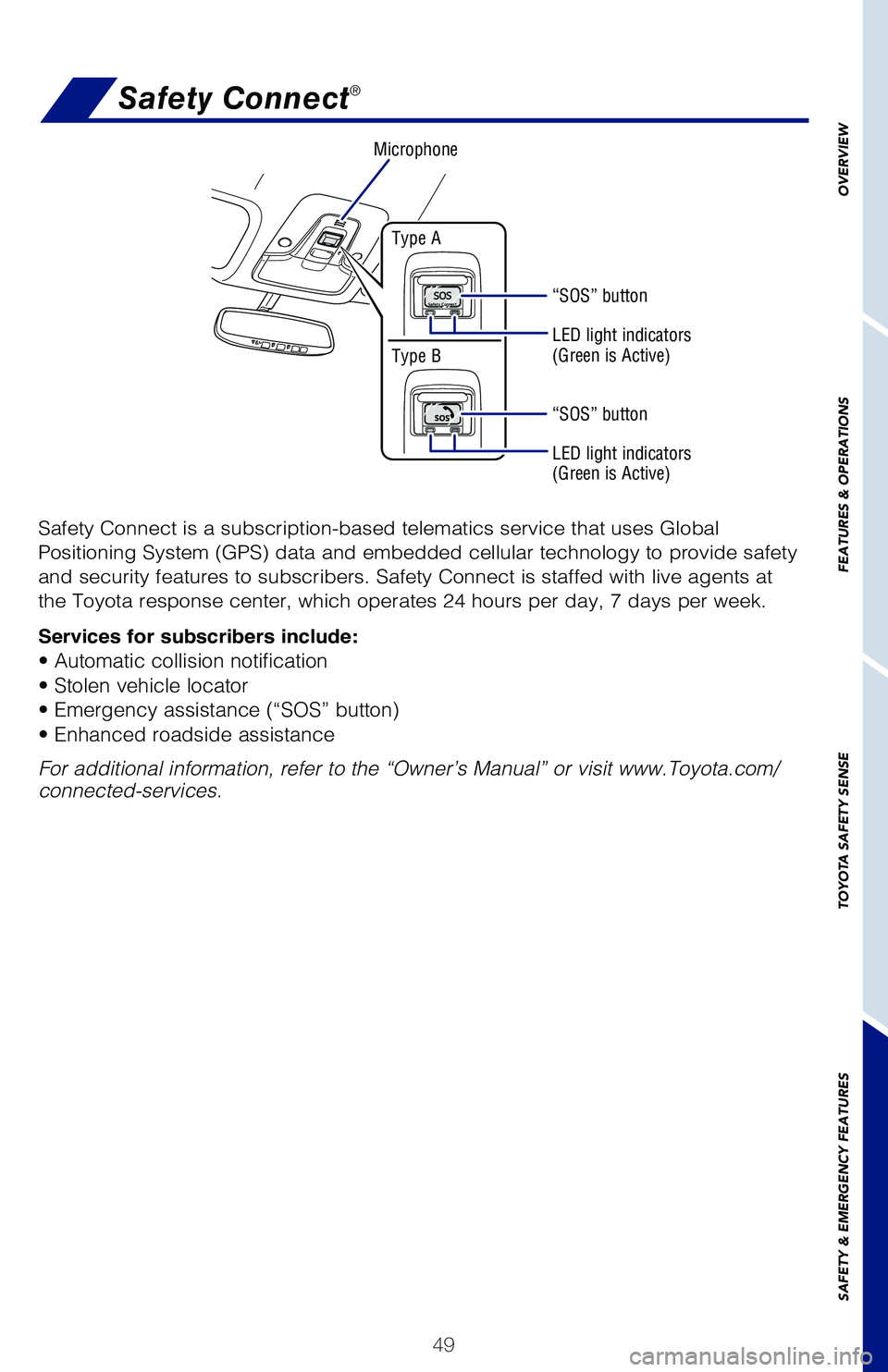
Safety Connect is a subscription-based telematics service that uses Global
Positioning System (GPS) data and embedded cellular technology to provide safety
and security features to subscribers. Safety Connect is staffed with live agents at
the Toyota response center, which operates 24 hours per day, 7 days per week.
Services for subscribers include:
• Automatic collision notification
• Stolen vehicle locator
• Emergency assistance (“SOS” button)
• Enhanced roadside assistance
For additional information, refer to the “Owner’s Manual” or visit www.Toyota.com/connected-services.
Microphone
LED light indicators (Green is Active)
LED light indicators (Green is Active)
“SOS” button
Type A
Type B
“SOS” button
126899_MY21_Prius_QRG_V2_ML_0614_R2.indd 49126899_MY21_Prius_QRG_V2_ML_0614_R2.indd 496/18/20 7:02 PM6/18/20 7:02 PM
Page 54 of 64
52
SAFETY & EMERGENCY FEATURES
Tire Pressure Monitoring (warning) System (TPMS)
The tire pressure detected by the tire pressure warning system can be displayed
on the multi-information display (MID).
Refer to the load label on the door jamb or the Owner’s Manual for tire inflation
specifications.
If the tire pressure indicator flashes for 1 minute and then remains on, take the
vehicle to your local Toyota dealer.
NOTE: The warning light may come on due to temperature changes or
changes in tire pressure from natural air leakage. If the system has not been
initialized recently, setting the tire pressures to factory specifications should
turn off the light.
Until Complete
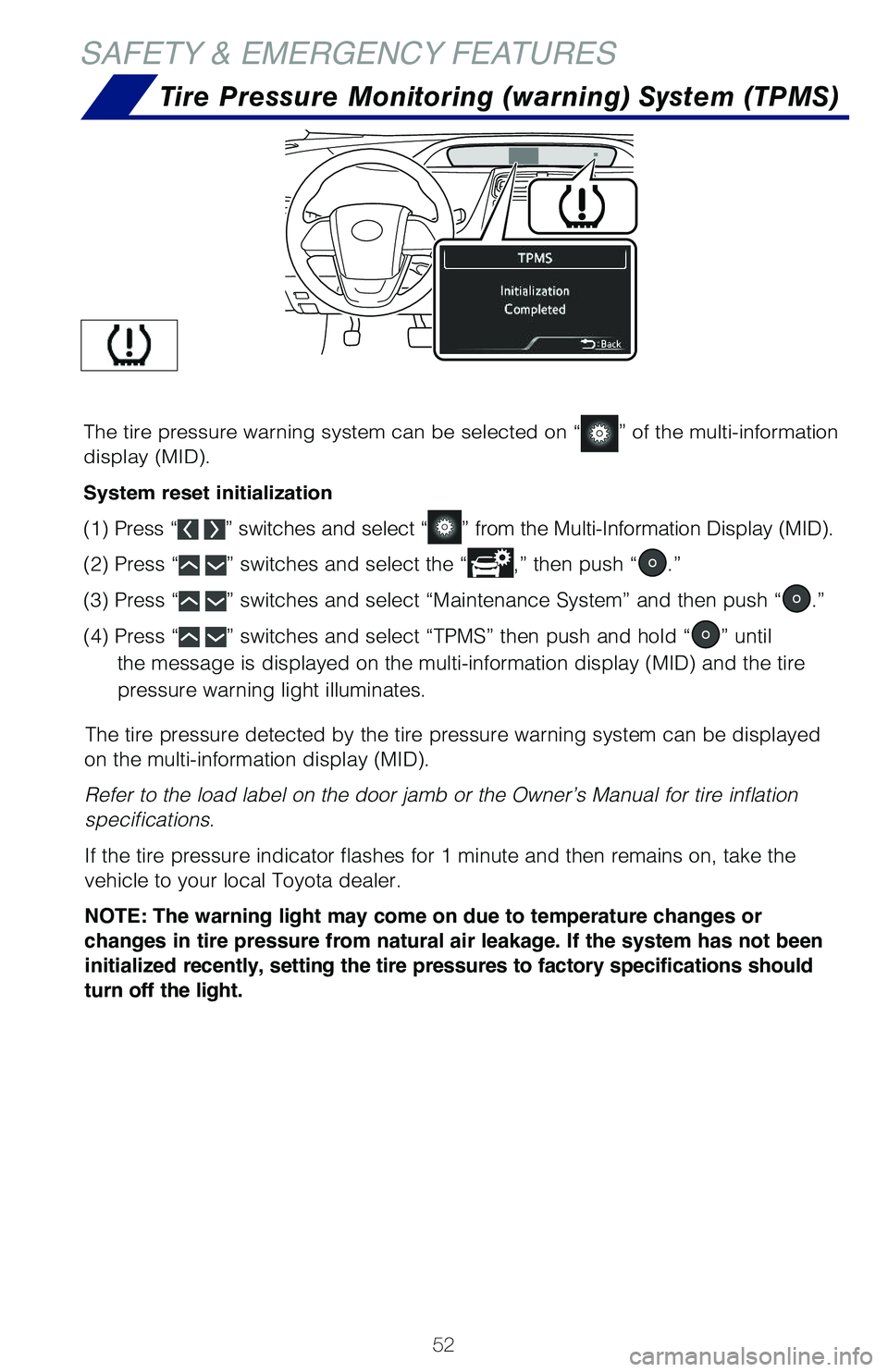
The tire pressure warning system can be selected on “” of the multi-information
display (MID).
System reset initialization
(1) Press “ ” switches and select “” from the Multi-Information Display (MID).
(2) Press “ ” switches and select the “,” then push “.”
(3) Press “ ” switches and select “Maintenance System” and then push “.”
(4) Press “ ” switches and select “TPMS” then push and hold “” until
the message is displayed on the multi-information display (MID) and the tire
pressure warning light illuminates.
126899_MY21_Prius_QRG_V2_ML_0614_R1.indd 52126899_MY21_Prius_QRG_V2_ML_0614_R1.indd 526/17/20 10:09 AM6/17/20 10:09 AM
Page 59 of 64
57
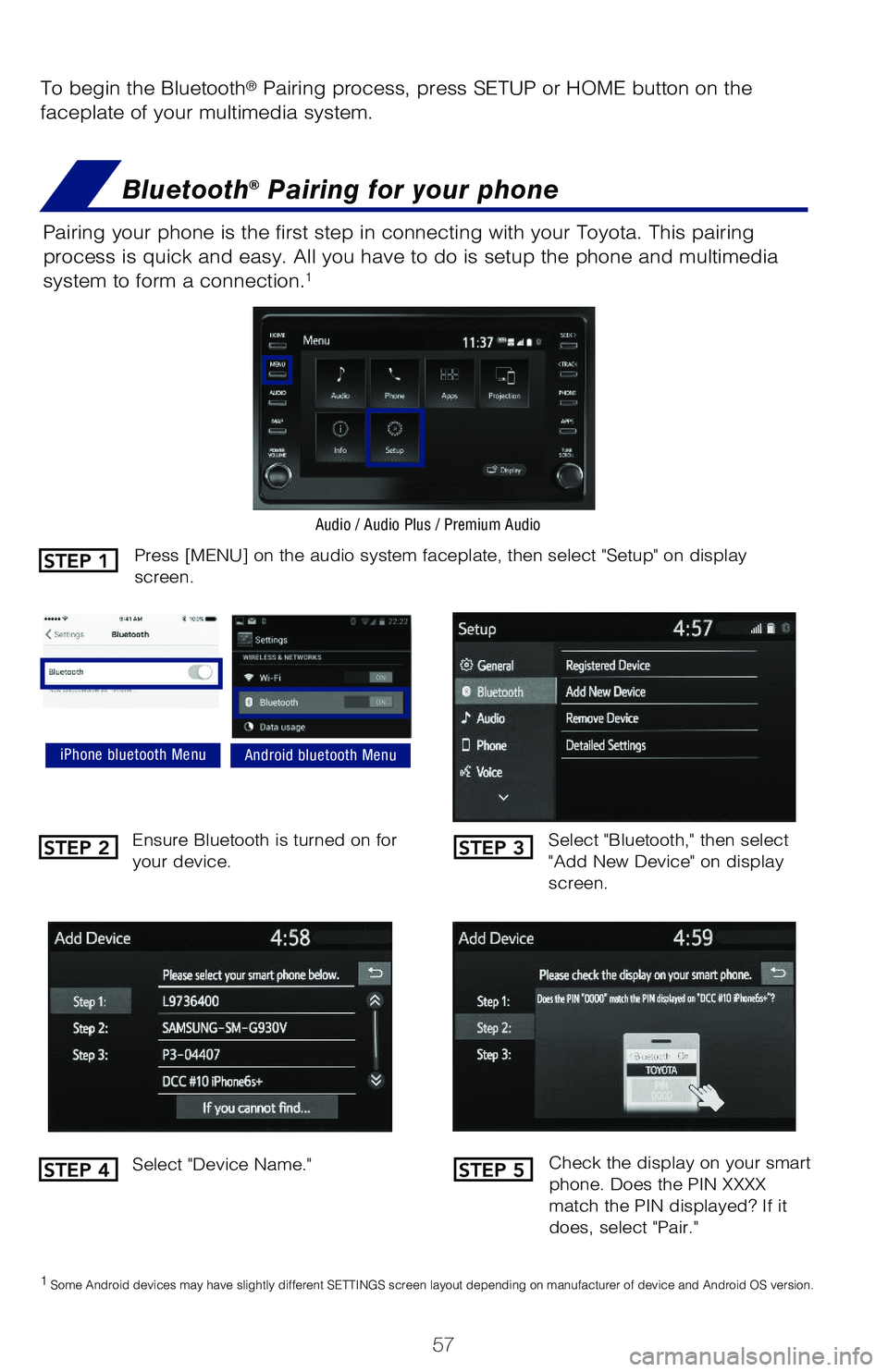
To begin the Bluetooth® Pairing process, press SETUP or HOME button on the
faceplate of your multimedia system.
Bluetooth® Pairing for your phone
Pairing your phone is the first step in connecting with your Toyota. This pairing
process is quick and easy. All you have to do is setup the phone and multimedia
system to form a connection.1
Select "Bluetooth," then select "Add New Device" on display screen.
Ensure Bluetooth is turned on for your device.
Select "Device Name."
iPhone bluetooth MenuAndroid bluetooth Menu
1 Some Android devices may have slightly different SETTINGS screen layout depending on manufacturer of device and Android OS version.
Check the display on your smart phone. Does the PIN XXXX match the PIN displayed? If it does, select "Pair."
Press [MENU] on the audio system faceplate, then select "Setup" on display screen.
Audio / Audio Plus / Premium Audio
STEP 1
STEP 2
STEP 4
STEP 3
STEP 5
126899_MY21_Prius_QRG_V2_ML_0614_R1.indd 57126899_MY21_Prius_QRG_V2_ML_0614_R1.indd 576/17/20 12:16 PM6/17/20 12:16 PM