charging TOYOTA PRIUS 2021 Owners Manual (in English)
[x] Cancel search | Manufacturer: TOYOTA, Model Year: 2021, Model line: PRIUS, Model: TOYOTA PRIUS 2021Pages: 64, PDF Size: 6.06 MB
Page 6 of 64
4
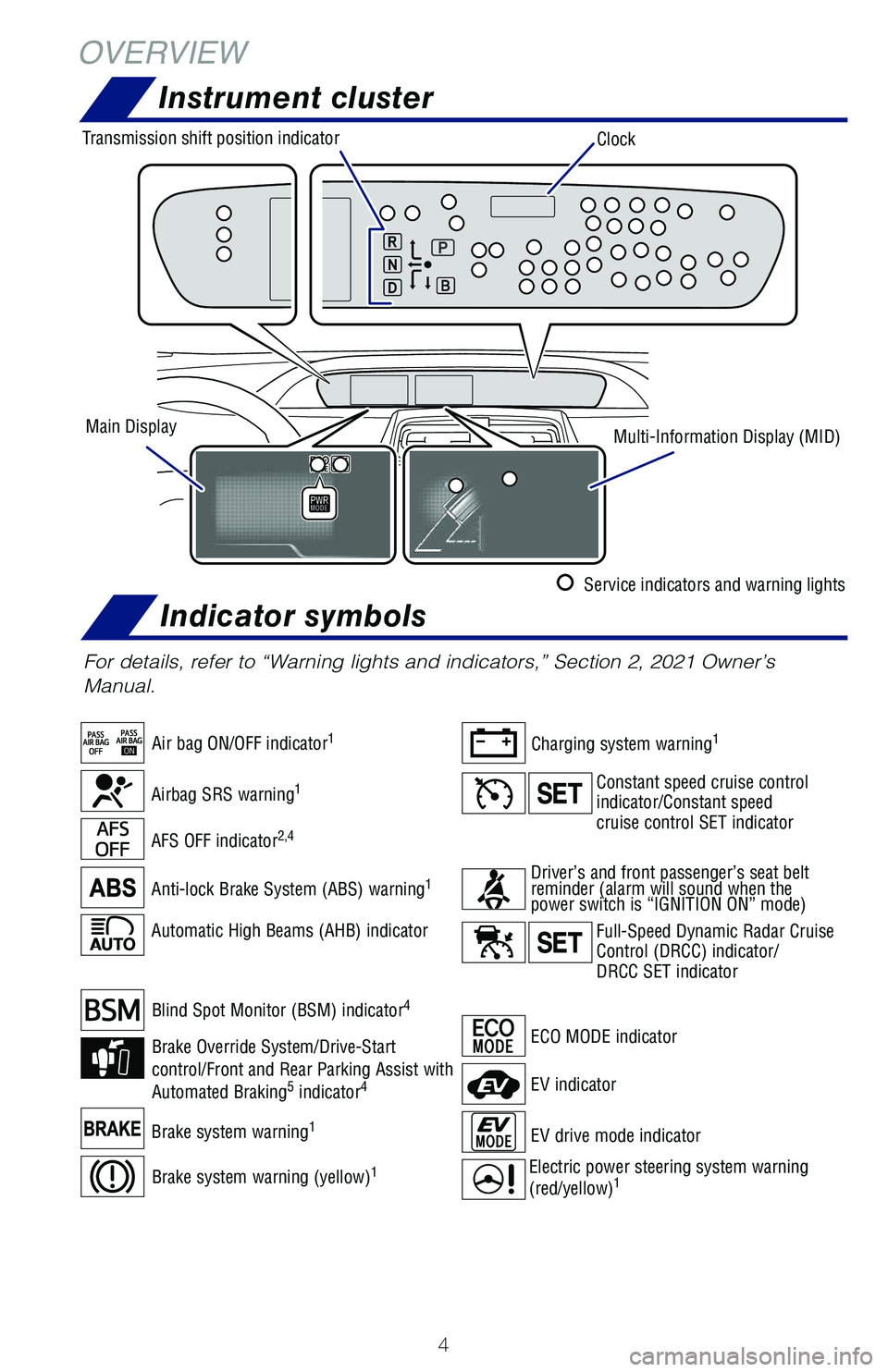
ECO MODE indicator
Automatic High Beams (AHB) indicator
For details, refer to “Warning lights and indicators,” Section 2, 2021 Owner’s
Manual.
AFS OFF indicator2,4
Anti-lock Brake System (ABS) warning1
Charging system warning1
Brake system warning1EV drive mode indicator
EV indicator
Airbag SRS warning1
OVERVIEW
Instrument cluster
Air bag ON/OFF indicator1
Blind Spot Monitor (BSM) indicator4
Constant speed cruise control indicator/Constant speedcruise control SET indicator
Full-Speed Dynamic Radar Cruise Control (DRCC) indicator/ DRCC SET indicator
Brake Override System/Drive-Start control/Front and Rear Parking Assist with Automated Braking5 indicator4
Electric power steering system warning
(red/yellow)1Brake system warning (yellow)1
Driver’s and front passenger’s seat belt reminder (alarm will sound when the power switch is “IGNITION ON” mode)
Indicator symbols
Clock
Main DisplayMulti-Information Display (MID)
Transmission shift position indicator
Service indicators and warning lights
126899_MY21_Prius_QRG_V2_ML_0614_R1.indd 4126899_MY21_Prius_QRG_V2_ML_0614_R1.indd 46/17/20 10:08 AM6/17/20 10:08 AM
Page 22 of 64
20
FEATURES & OPERATIONS
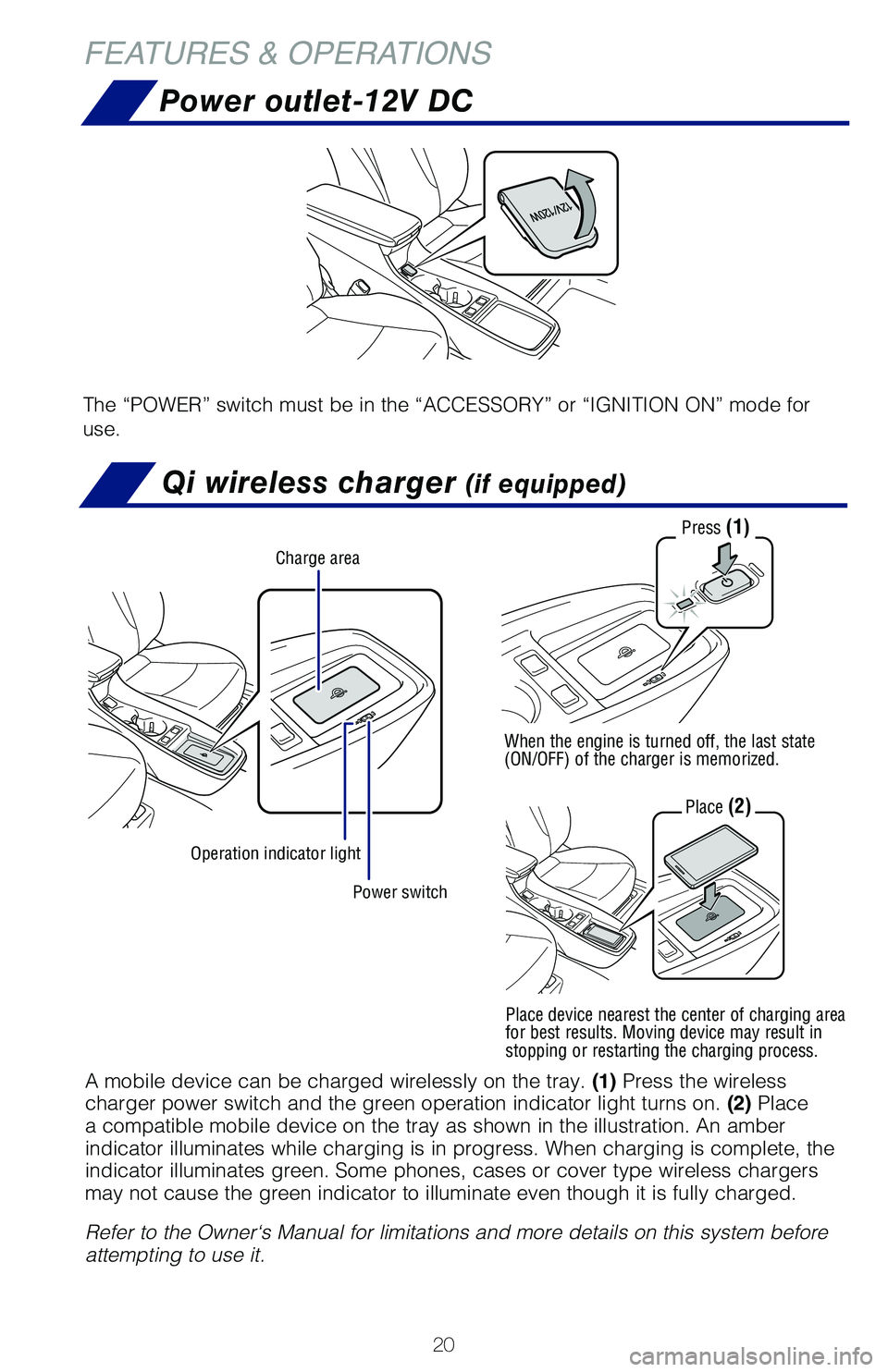
Qi wireless charger (if equipped)
Power outlet-12V DC
The “POWER” switch must be in the “ACCESSORY” or “IGNITION ON” mode for
use.
Power switch
Charge area
Operation indicator light
Press (1)
When the engine is turned off, the last state (ON/OFF) of the charger is memorized.
Place (2)
A mobile device can be charged wirelessly on the tray. (1) Press the wireless charger power switch and the green operation indicator light turns on. (2) Place a compatible mobile device on the tray as shown in the illustration. An amber indicator illuminates while charging is in progress. When charging is complete, the indicator illuminates green. Some phones, cases or cover type wireless chargers may not cause the green indicator to illuminate even though it is fully charged.
Refer to the Owner‘s Manual for limitations and more details on this system before attempting to use it.
Place device nearest the center of charging area for best results. Moving device may result in stopping or restarting the charging process.
126899_MY21_Prius_QRG_V2_ML_0614_R1.indd 20126899_MY21_Prius_QRG_V2_ML_0614_R1.indd 206/17/20 10:09 AM6/17/20 10:09 AM
Page 23 of 64
21
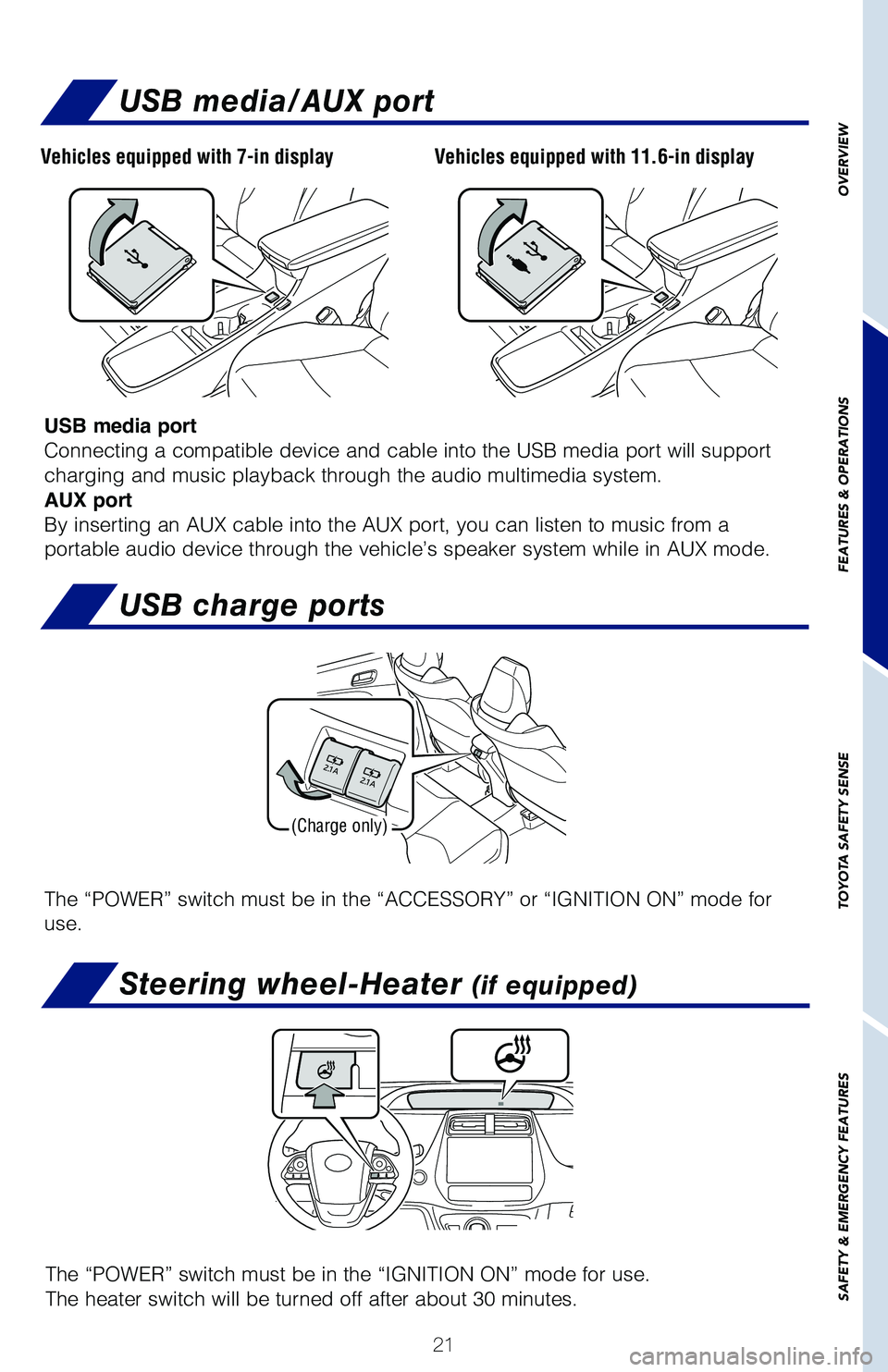
USB media/AUX port
USB media port
Connecting a compatible device and cable into the USB media port will support
charging and music playback through the audio multimedia system.
AUX port
By inserting an AUX cable into the AUX port, you can listen to music from a
portable audio device through the vehicle’s speaker system while in AUX mode.
USB charge ports
(Charge only)
The “POWER” switch must be in the “ACCESSORY” or “IGNITION ON” mode for
use.
Steering wheel-Heater (if equipped)
The “POWER” switch must be in the “IGNITION ON” mode for use.
The heater switch will be turned off after about 30 minutes.
OVERVIEW
FEATURES & OPERATIONS
TOYOTA SAFETY SENSE
SAFETY & EMERGENCY FEATURES
Vehicles equipped with 7-in displayVehicles equipped with 11.6-in display
126899_MY21_Prius_QRG_V2_ML_0614_R1.indd 21126899_MY21_Prius_QRG_V2_ML_0614_R1.indd 216/17/20 10:09 AM6/17/20 10:09 AM