navigation system TOYOTA PRIUS 2021 Owners Manual (in English)
[x] Cancel search | Manufacturer: TOYOTA, Model Year: 2021, Model line: PRIUS, Model: TOYOTA PRIUS 2021Pages: 64, PDF Size: 6.06 MB
Page 5 of 64
3
OVERVIEW
FEATURES
& OPERATIONS
TOYOTA
SAFETY
SENSE
SAFETY
& EMERGENCY
FEATURES
1 If equipped2 For details, refer to the “Navigation and Multimedia System Owner’s Manual” or visit www.toyota.com/
audio-multimedia for additional resources.
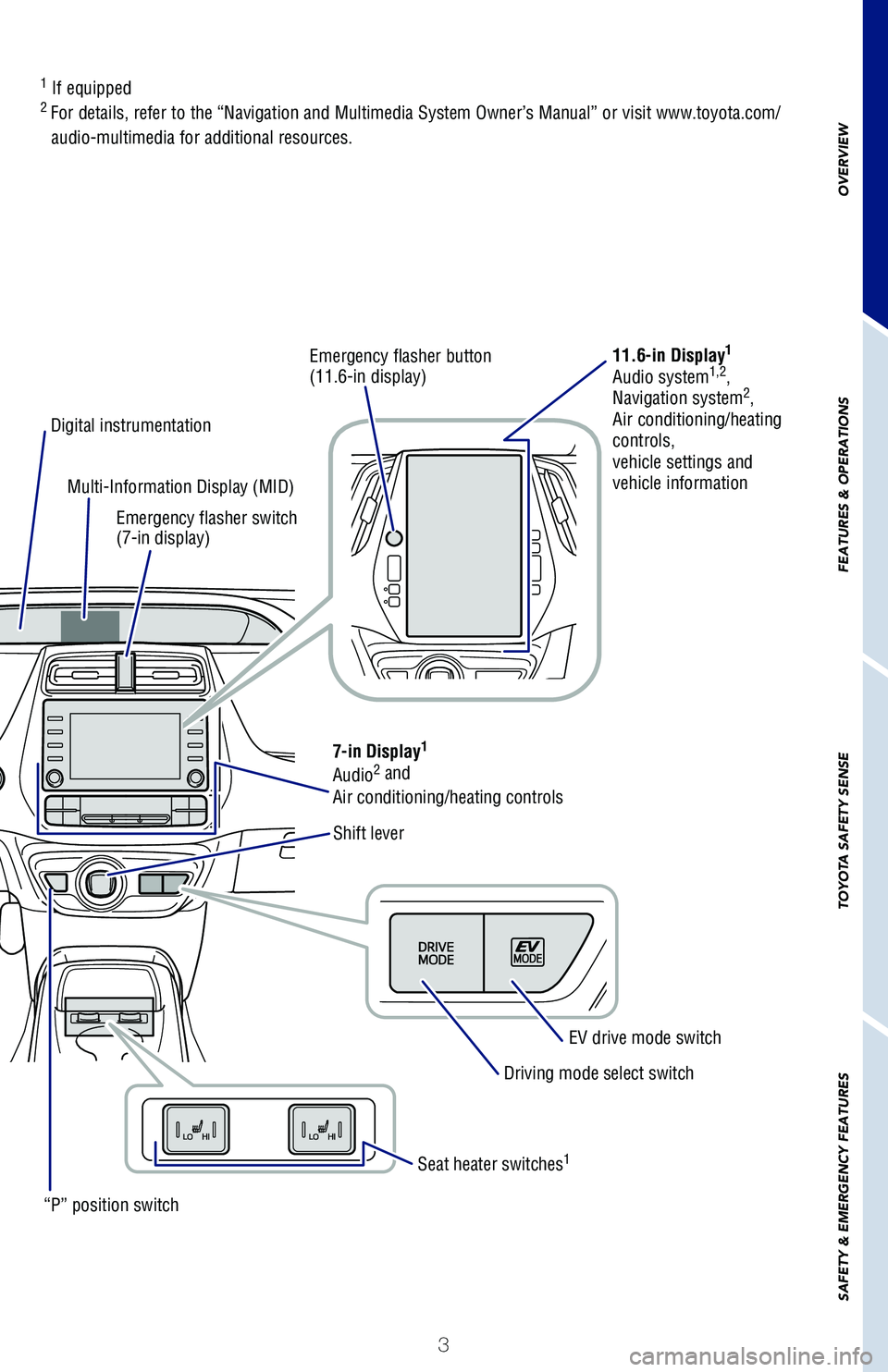
Emergency flasher button (11.6-in display)11.6-in Display1
Audio system1,2, Navigation system2,
Air conditioning/heating controls,vehicle settings and vehicle information
LTA (Lane Tracing Assist)/Lane Departure Alert with Steering Assist (LDA w/SA) switch
Digital instrumentation
“P” position switch
Multi-Information Display (MID)
Emergency flasher switch (7-in display)
Shift lever
7-in Display1
Audio2 and
Air conditioning/heating controls
EV drive mode switch
Driving mode select switch
Seat heater switches1
126899_MY21_Prius_QRG_V2_ML_0614_R1.indd 3126899_MY21_Prius_QRG_V2_ML_0614_R1.indd 36/17/20 10:08 AM6/17/20 10:08 AM
Page 12 of 64
10
TIPS FOR IMPROVED FUEL ECONOMY
DEFAULT SETTING
CUSTOMIZED SETTING
STARTING YOUR VEHICLE
The Hybrid Synergy Drive System utilizes a computer-controlled gasoline engine
and electric motor to provide the most efficient combination of power for the
vehicle. To conserve energy, when the brakes are applied the braking force
generates electricity which is then sent to the traction battery. In addition, the
engine shuts off when the vehicle is stopped. The benefits are better fuel economy
and reduced vehicle emissions.
NOTE: Fuel consumption and energy information of the Hybrid System are
shown on the Audio Multimedia System screen or the navigation system (if
equipped).
1. Ensure tire pressures are maintained at levels specified in the Owner’s Manual.
2. When possible, link trips to reduce engine cold starts.
3. Avoid driving at speeds that are higher than necessary, especially on the highway.
4. When possible, avoid sudden stops to maximize regenerative braking energy.
5. Minimize use of the air conditioning.
Hybrid Synergy Drive System
Auto lock/unlock
FEATURES & OPERATIONS
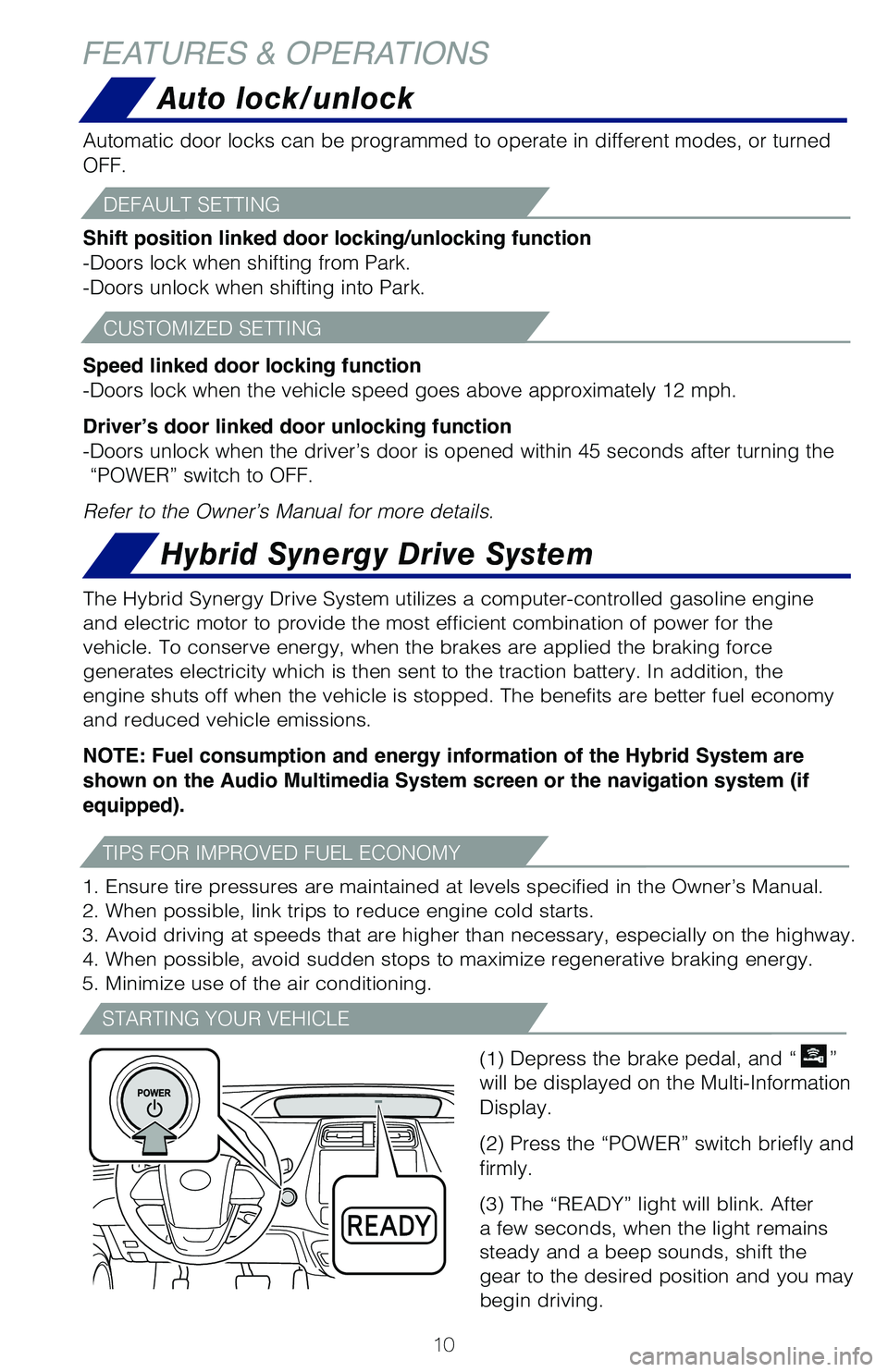
(1) Depress the brake pedal, and “”
will be displayed on the Multi-Information
Display.
(2) Press the “POWER” switch briefly and
firmly.
(3) The “READY” light will blink. After
a few seconds, when the light remains
steady and a beep sounds, shift the
gear to the desired position and you may
begin driving.
Automatic door locks can be programmed to operate in different modes, or turned
OFF.
Shift position linked door locking/unlocking function
-Doors lock when shifting from Park.
-Doors unlock when shifting into Park.
Speed linked door locking function
-Doors lock when the vehicle speed goes above approximately 12 mph.
Driver’s door linked door unlocking function
-Doors unlock when the driver’s door is opened within 45 seconds after turning the
“POWER” switch to OFF.
Refer to the Owner’s Manual for more details.
126899_MY21_Prius_QRG_V2_ML_0614_R1.indd 10126899_MY21_Prius_QRG_V2_ML_0614_R1.indd 106/17/20 10:09 AM6/17/20 10:09 AM
Page 19 of 64
17
OVERVIEW
FEATURES & OPERATIONS
TOYOTA SAFETY SENSE
SAFETY & EMERGENCY FEATURES
Steering wheel switches &
telephone controls (Bluetooth®)
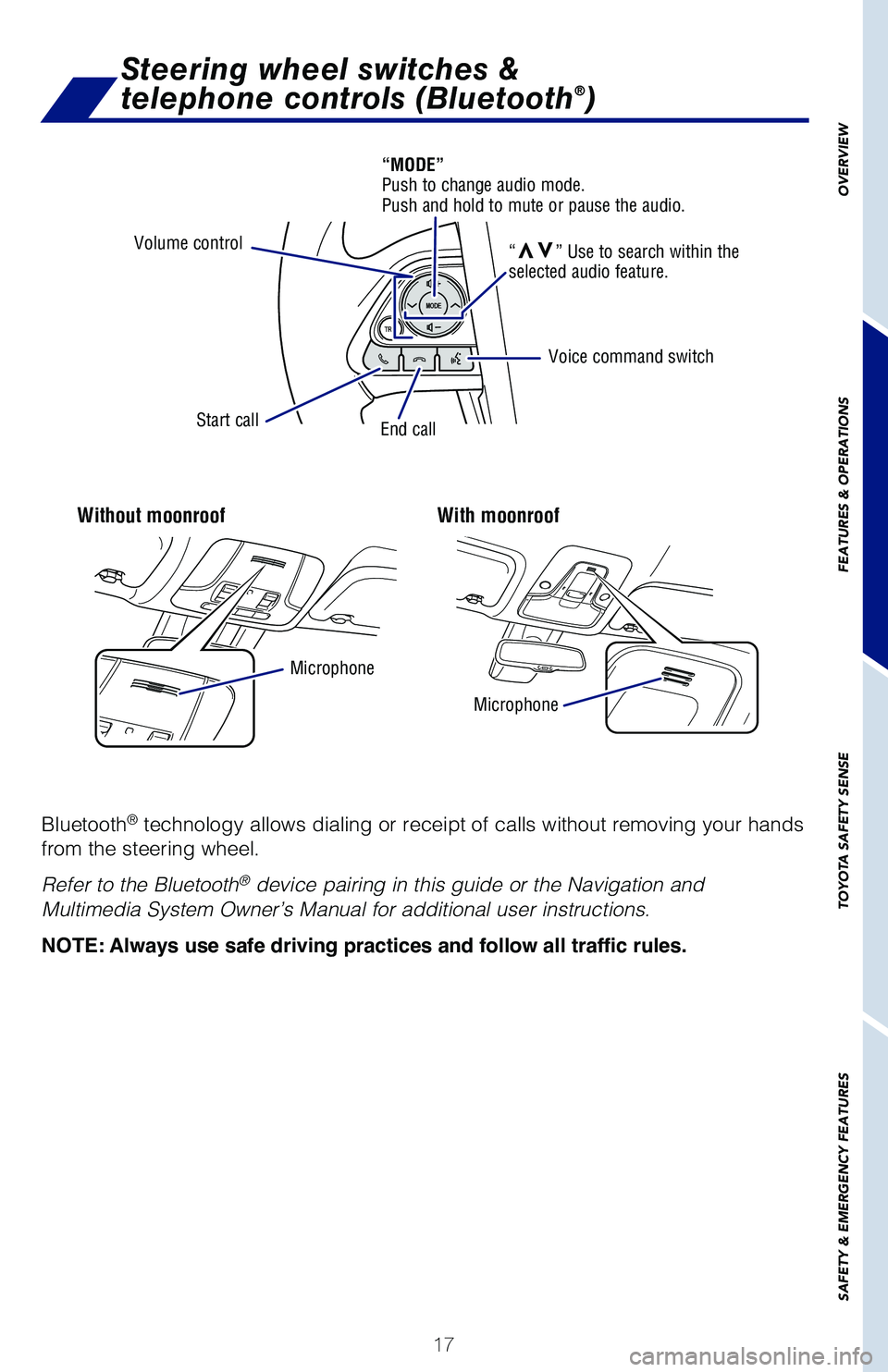
Without moonroofWith moonroof
Bluetooth® technology allows dialing or receipt of calls without removing your hands
from the steering wheel.
Refer to the Bluetooth® device pairing in this guide or the Navigation and
Multimedia System Owner’s Manual for additional user instructions.
NOTE: Always use safe driving practices and follow all traffic rules.
Volume control
Start callEnd call
Microphone
Microphone
Voice command switch
“MODE” Push to change audio mode. Push and hold to mute or pause the audio.
“vv” Use to search within the selected audio feature.
126899_MY21_Prius_QRG_V2_ML_0614_R1.indd 17126899_MY21_Prius_QRG_V2_ML_0614_R1.indd 176/17/20 10:09 AM6/17/20 10:09 AM
Page 20 of 64
18
Audio
FEATURES & OPERATIONS
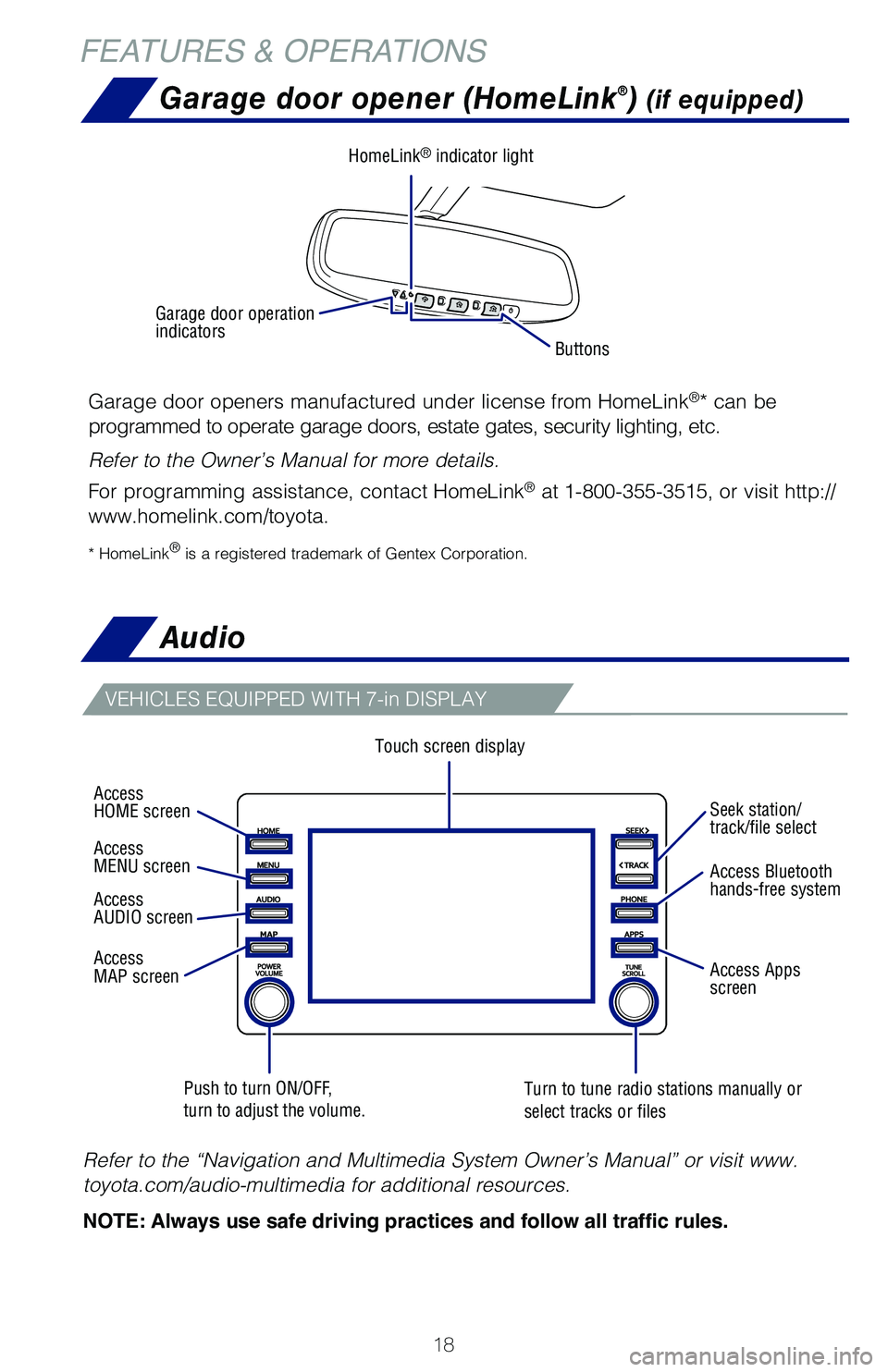
Touch screen display
Push to turn ON/OFF, turn to adjust the volume.Turn to tune radio stations manually or select tracks or files
VEHICLES EQUIPPED WITH 7-in DISPLAY
Refer to the “Navigation and Multimedia System Owner’s Manual” or visit www.
toyota.com/audio-multimedia for additional resources.
NOTE: Always use safe driving practices and follow all traffic rules.
Garage door opener (HomeLink®) (if equipped)
Garage door openers manufactured under license from HomeLink®* can be
programmed to operate garage doors, estate gates, security lighting, etc.
Refer to the Owner’s Manual for more details.
For programming assistance, contact HomeLink® at 1-800-355-3515, or visit http://
www.homelink.com/toyota.
* HomeLink® is a registered trademark of Gentex Corporation.
Buttons
HomeLink® indicator light
Garage door operation indicators
Access HOME screen
Access MENU screen
Access AUDIO screen
Access MAP screen
Seek station/track/file select
Access Bluetooth hands-free system
Access Apps screen
126899_MY21_Prius_QRG_V2_ML_0614_R1.indd 18126899_MY21_Prius_QRG_V2_ML_0614_R1.indd 186/17/20 10:09 AM6/17/20 10:09 AM
Page 21 of 64
19
OVERVIEW
FEATURES
& OPERATIONS
TOYOTA
SAFETY
SENSE
SAFETY
& EMERGENCY
FEATURES
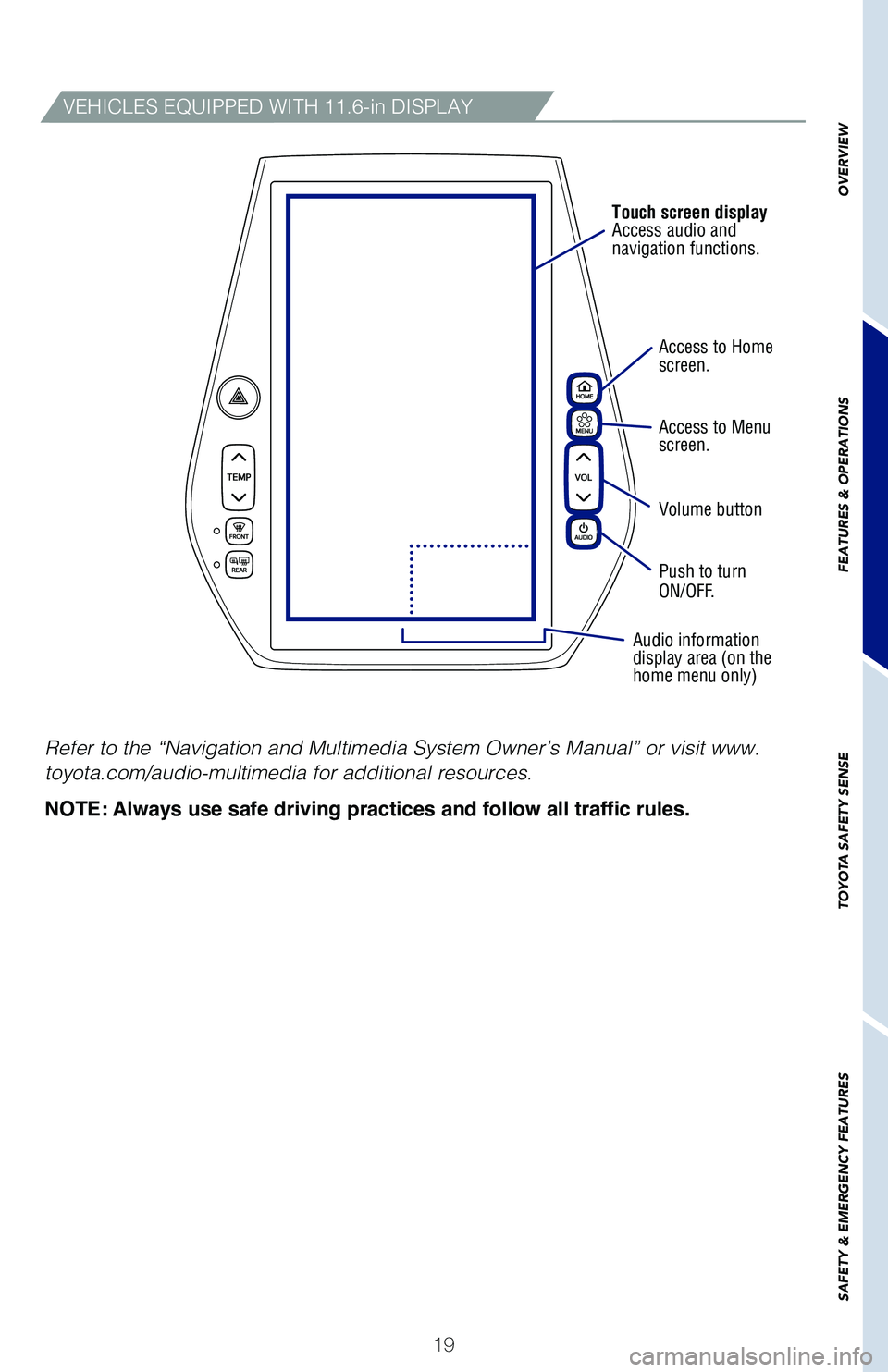
Access to Homescreen.
Access to Menuscreen.
Volume button
Push to turn ON/OFF.
Audio information display area (on the home menu only)
Touch screen displayAccess audio and navigation functions.
VEHICLES EQUIPPED WITH 11.6-in DISPLAY
Refer to the “Navigation and Multimedia System Owner’s Manual” or visit www.
toyota.com/audio-multimedia for additional resources.
NOTE: Always use safe driving practices and follow all traffic rules.
126899_MY21_Prius_QRG_V2_ML_0614_R1.indd 19126899_MY21_Prius_QRG_V2_ML_0614_R1.indd 196/17/20 10:09 AM6/17/20 10:09 AM
Page 27 of 64
25
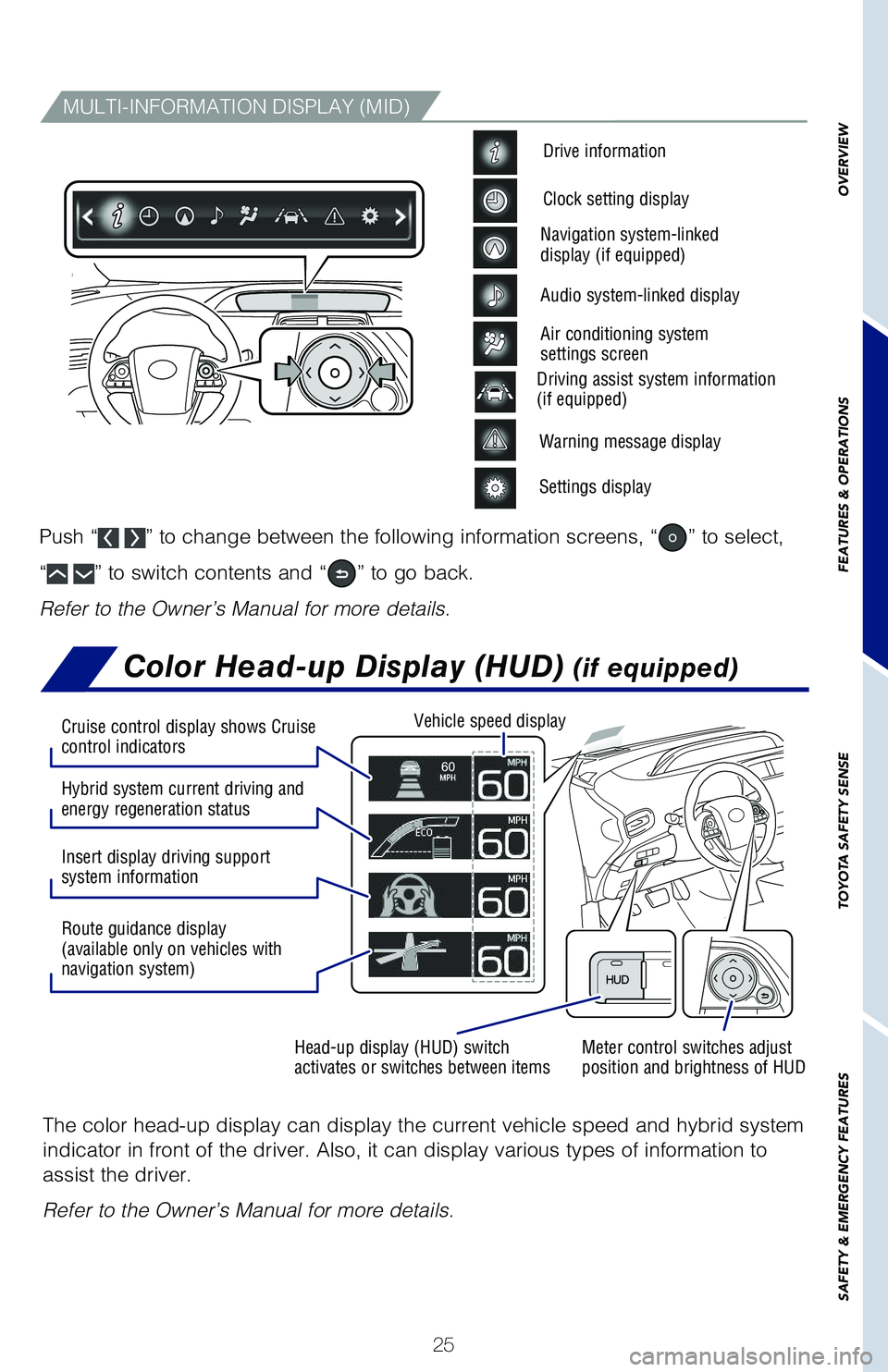
Color Head-up Display (HUD) (if equipped)
The color head-up display can display the current vehicle speed and hybrid system
indicator in front of the driver. Also, it can display various types of information to
assist the driver.
Refer to the Owner’s Manual for more details.
OVERVIEW
FEATURES & OPERATIONS
TOYOTA SAFETY SENSE
SAFETY & EMERGENCY FEATURES
MULTI-INFORMATION DISPLAY (MID)
Warning message display
Settings display
Driving assist system information(if equipped)
Drive information
Clock setting display
Navigation system-linked display (if equipped)
Audio system-linked display
Air conditioning system settings screen
Push “ ” to change between the following information screens, “” to select,
“ ” to switch contents and “” to go back.
Refer to the Owner’s Manual for more details.
Meter control switches adjust position and brightness of HUDHead-up display (HUD) switch activates or switches between items
Vehicle speed display
Hybrid system current driving and energy regeneration status
Insert display driving support system information
Route guidance display (available only on vehicles with navigation system)
Cruise control display shows Cruise control indicators
126899_MY21_Prius_QRG_V2_ML_0614_R1.indd 25126899_MY21_Prius_QRG_V2_ML_0614_R1.indd 256/17/20 10:09 AM6/17/20 10:09 AM
Page 33 of 64

31
OVERVIEW
FEATURES
& OPERATIONS
TOYOTA
SAFETY
SENSE
SAFETY
& EMERGENCY
FEATURES
Rear view monitor system
The rear view monitor system displays an image of the view from the bumper of
the rear area of the vehicle. The camera for the rear view monitor system is located
above the license plate.
To adjust the image on the rear view monitor screen, press the “MENU” button and
select “Display”. Select “Camera” to adjust the screen contrast and brightness.
Refer to the Navigation and Multimedia System Owner’s Manual for limitations and
more details on this system.
Clock
To adjust the time, use meter control switches to go to the screen on the MID.
Then, select the option to access the clock setting.
Multi-Information Display (MID)Clock display
Meter control switches
To adjust the time, press to select . Then select to access
General Settings screen. From here, select “System Time” to access clock setting.
Vehicles equipped with 11.6-in display
126899_MY21_Prius_QRG_V2_ML_0614_R1.indd 31126899_MY21_Prius_QRG_V2_ML_0614_R1.indd 316/17/20 10:09 AM6/17/20 10:09 AM
Page 49 of 64
47
OVERVIEW
FEATURES
& OPERATIONS
TOYOTA
SAFETY
SENSE
SAFETY
& EMERGENCY
FEATURES
Road Sign Assist (RSA)
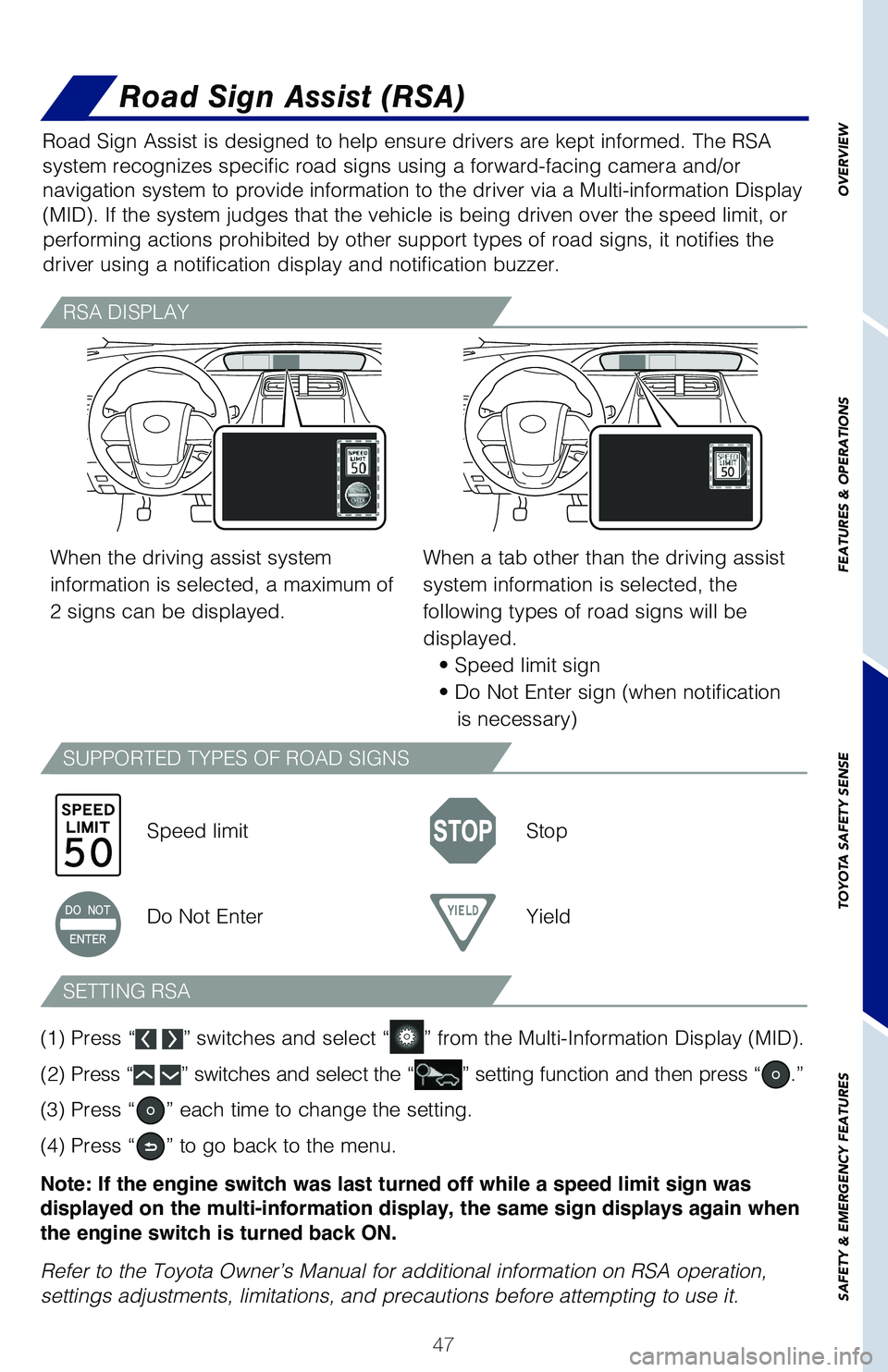
Road Sign Assist is designed to help ensure drivers are kept informed. The RSA
system recognizes specific road signs using a forward-facing camera and/or
navigation system to provide information to the driver via a Multi-information Display
(MID). If the system judges that the vehicle is being driven over the speed limit, or
performing actions prohibited by other support types of road signs, it notifies the
driver using a notification display and notification buzzer.
RSA DISPLAY
SUPPORTED TYPES OF ROAD SIGNS
SETTING RSA
When the driving assist system
information is selected, a maximum of
2 signs can be displayed.
Speed limitStop
Do Not EnterYield
When a tab other than the driving assist
system information is selected, the
following types of road signs will be
displayed.
• Speed limit sign
• Do Not Enter sign (when notification
is necessary)
(1) Press “ ” switches and select “” from the Multi-Information Display (MID).
(2) Press “ ” switches and select the “” setting function and then press “.”
(3) Press “” each time to change the setting.
(4) Press “” to go back to the menu.
Note: If the engine switch was last turned off while a speed limit sign was
displayed on the multi-information display, the same sign displays again when
the engine switch is turned back ON.
Refer to the Toyota Owner’s Manual for additional information on RSA operation,
settings adjustments, limitations, and precautions before attempting to use it.
126899_MY21_Prius_QRG_V2_ML_0614_R1.indd 47126899_MY21_Prius_QRG_V2_ML_0614_R1.indd 476/17/20 10:09 AM6/17/20 10:09 AM