lock TOYOTA PRIUS 2022 Owners Manual
[x] Cancel search | Manufacturer: TOYOTA, Model Year: 2022, Model line: PRIUS, Model: TOYOTA PRIUS 2022Pages: 744, PDF Size: 14.35 MB
Page 586 of 744
5867-2. Steps to take in an emergency
PRIUS_OM_OM47F01U_(U)
WARNING
Observe the following precautions.
Failure to do so may result in death or serious injury.
■While towing
● When towing using cables or chains, avoid sudden starts, etc. w hich place
excessive stress on the towing eyelets, cables or chains. The t owing eye-
lets, cables or chains may become damaged, broken debris may hit peo-
ple, and cause serious damage.
● Do not turn the power switch off.
This may lead to an accident as the front wheels will be locked by the
parking lock.
■ Installing towing eyelets to the vehicle
● The towing eyelets are only for the vehicle equipped with them. Do not use
the towing eyelets for another vehicle, and do not use the towi ng eyelets
for this vehicle on another vehicle.
● Make sure that towing eyelets are installed securely.
If not securely installed, towing eyelets may come loose during towing.
NOTICE
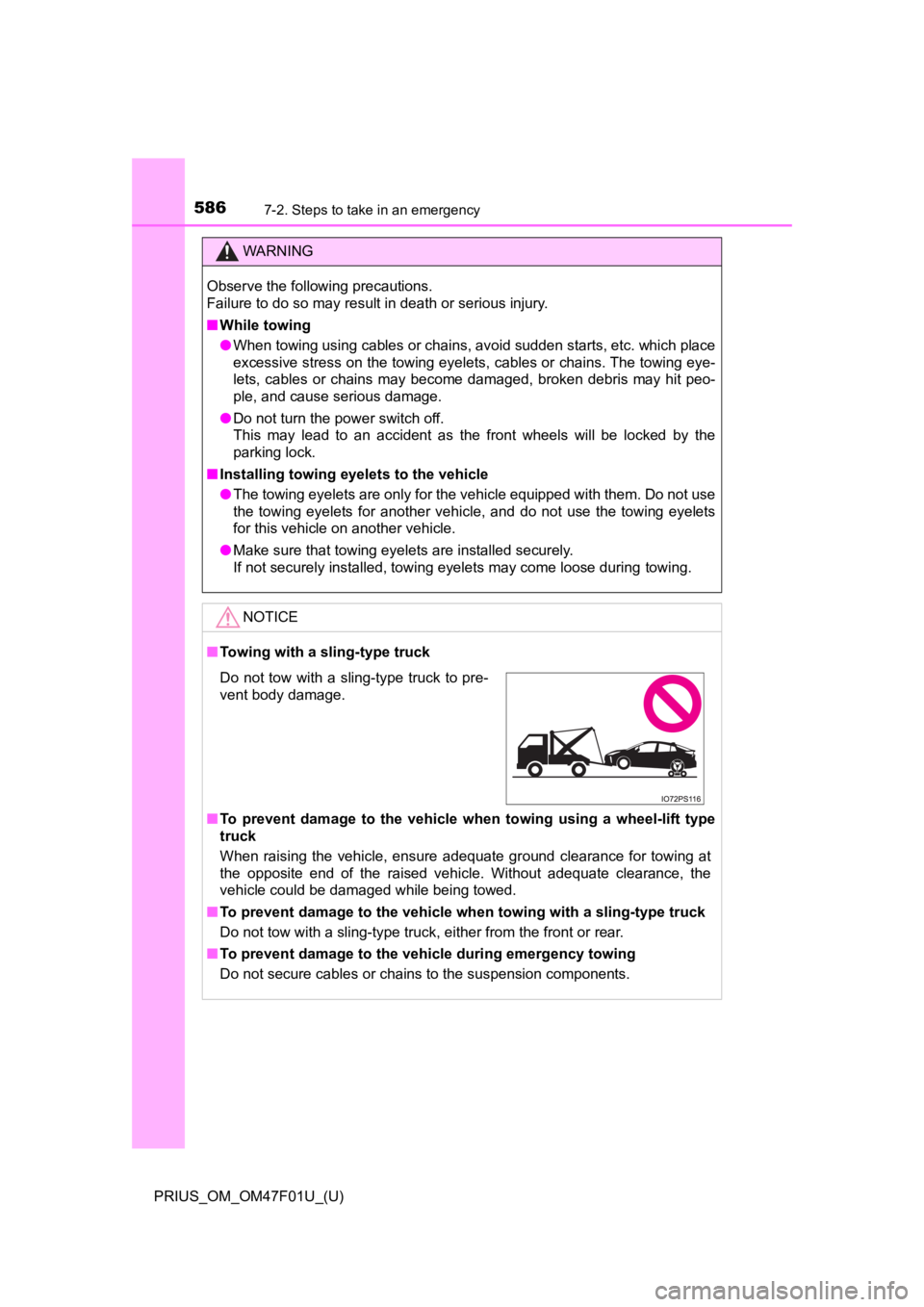
■Towing with a sling-type truck
■ To prevent damage to the vehicle when towing using a wheel-lift type
truck
When raising the vehicle, ensure adequate ground clearance for towing at
the opposite end of the raised vehicle. Without adequate clearance, the
vehicle could be damaged while being towed.
■ To prevent damage to the vehicle when towing with a sling-type truck
Do not tow with a sling-type truck, either from the front or re a r.
■ To prevent damage to the vehicle during emergency towing
Do not secure cables or chains to the suspension components.
Do not tow with a sling-type truck to pre-
vent body damage.
Page 601 of 744
6017-2. Steps to take in an emergency
PRIUS_OM_OM47F01U_(U)
7
When trouble arises
■Warning messages
The warning messages explained below may differ from the actual messages
according to operation conditions and vehicle specifications.
■ System warning lights
The master warning light does not come on or flash in the following cases.
Instead, a separate system warning light will come on along wit h a message
or image shown on the multi-information display.
● “Antilock Brake System Malfunction Visit Your Dealer”:
The ABS warning light comes on. ( P. 589)
● “Braking Power Low Visit Your Dealer”:
The brake system warning light (yellow) will come on. ( P. 588)
● Indicates that a door is not fully closed while the vehicle is stopped.:
The Open door warning light comes on. ( P. 590)
■ If “Visit Your Dealer” is shown
The system or part shown on the multi-information display is malfunctioning.
Have the vehicle inspected by your Toyota dealer.
■ If a message about an operation is shown
● If a message about an operation of the accelerator pedal or bra ke pedal is
shown
• A warning message about an operation of the brake pedal may be shown
while the driving assist systems such as PCS (Pre-Collision System) (if
equipped) or the dynamic radar cruise control with full-speed r ange (if
equipped) is operating. If a warning message is shown, be sure to decel-
erate the vehicle or follow an instruction shown on the multi-i nformation
display.
• A warning message is shown when Brake Override System operates .
( P. 223, 604)
• A warning message is shown when Drive-Start Control or Parking Sup-
port Brake function (if equipped) operates ( P. 224, 376). Follow the
instructions on the multi-information display.
● If a message about an operation of the power switch is shown
An instruction for operation of the power switch is shown when the incorrect
procedure for starting the hybrid system is performed or the power switch is
operated incorrectly. Follow the instructions shown on the mult i-information
display to operate the power switch again.
● If a message about a shift operation is shown
To prevent the shift position from being selected incorrectly o r the vehicle
from moving unexpectedly, the shift position may be changed aut omatically
( P. 251) or shift operation may be required. In this case, chang e the shift
position following the instructions on the multi-information display.
● If a message or image about an open/close state of a part or replenishment
of a consumable is shown
Confirm the part indicated by the multi-information display or a warning light,
and then perform the coping method such as closing the open doo r or
replenishing a consumable.
Page 603 of 744
6037-2. Steps to take in an emergency
PRIUS_OM_OM47F01U_(U)
7
When trouble arises
■If “Shift System Malfunction See Owner’s Manual” is shown
Indicates a malfunction in the shift control system. Immediatel y have the sys-
tem inspected by your Toyota dealer.
The system may not operate properly.
■ If “Low 12-Volt Battery Apply Parking Brake Securely While Park ing See
Owner’s Manual” is shown
Indicates that the 12-volt battery charge is insufficient. Char ge or replace the
12-volt battery.
● When the message is shown, the hybrid system may not start or t he shift
position may not be changed normally. (Coping method: P. 606)
● After charging the 12-volt battery, the message may not go off until the shift
position is changed from P.
■ If “Shifting Unavailable Low 12-Volt Battery See Owner’s Manual ” is
shown
Indicates that the shift position cannot be changed because the voltage of the
12-volt battery drops. Charge or replace the 12-volt battery.
(Coping method in the case the 12-volt battery is discharged: P. 646)
■ If “Hybrid System Overheated. Reduced Output Power.” is shown
The message may be shown when driving under severe operating co nditions.
(For example, when driving up a long steep hill or driving up a steep hill in
reverse.)
Coping method: P. 652
■ If “Maintenance Required for Traction Battery Cooling Parts See Owner’s
Manual” is shown
The filter may be clogged, the air intake vent may be blocked or there may be
a gap in the duct.
● If the air intake vent is dirty, refer to P. 546 for information on how to clean
the air intake vent.
● If the message is shown when the air intake vent is not dirty, have the vehi-
cle inspected by your Toyota dealer.
■ If “Traction Battery Needs to be Protected Refrain From the Use of
Position” is shown
This message may be displayed when the shift position is in N.
As the hybrid battery (traction battery) can not be charged when the shift
position is in N, shift the shift position to P when the vehicle is stopped.
■ If “Traction Battery Needs to be Protected Shift into to Resta rt” is
shown
This message is displayed when the hybrid battery (traction battery) charge
has become extremely low because the vehicle has been left with the N shift
position selected for a certain amount of time.
When operating the vehicle, shift to P and restart the hybrid s ystem.
Page 614 of 744
6147-2. Steps to take in an emergency
PRIUS_OM_OM47F01U_(U)
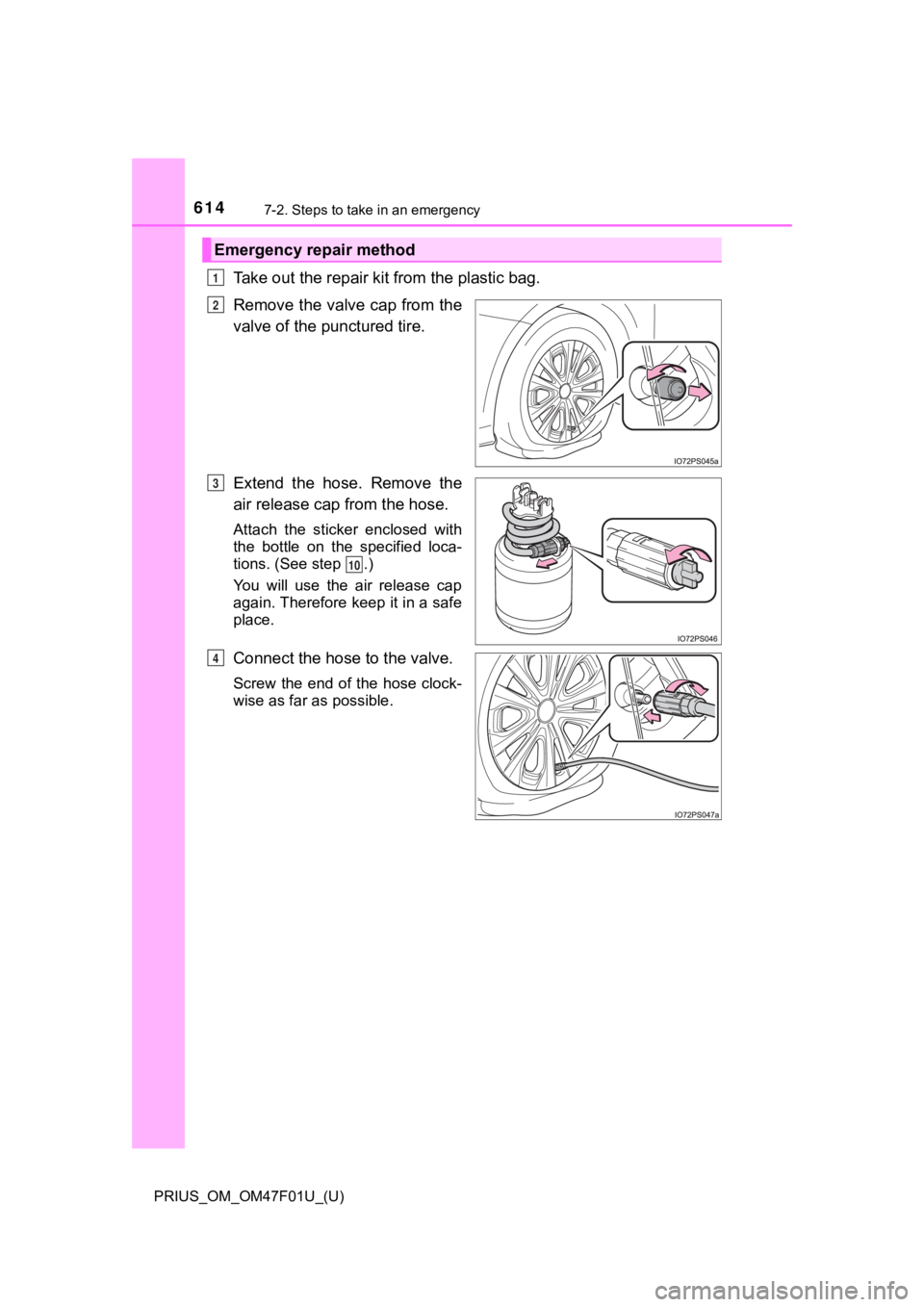
Take out the repair kit from the plastic bag.
Remove the valve cap from the
valve of the punctured tire.
Extend the hose. Remove the
air release cap from the hose.
Attach the sticker enclosed with
the bottle on the specified loca-
tions. (See step .)
You will use the air release cap
again. Therefore keep it in a safe
place.
Connect the hose to the valve.
Screw the end of the hose clock-
wise as far as possible.
Emergency repair method
1
2
3
10
4
Page 643 of 744
643
PRIUS_OM_OM47F01U_(U)
7
When trouble arises
7-2. Steps to take in an emergency
If the electronic key does not operate
properly
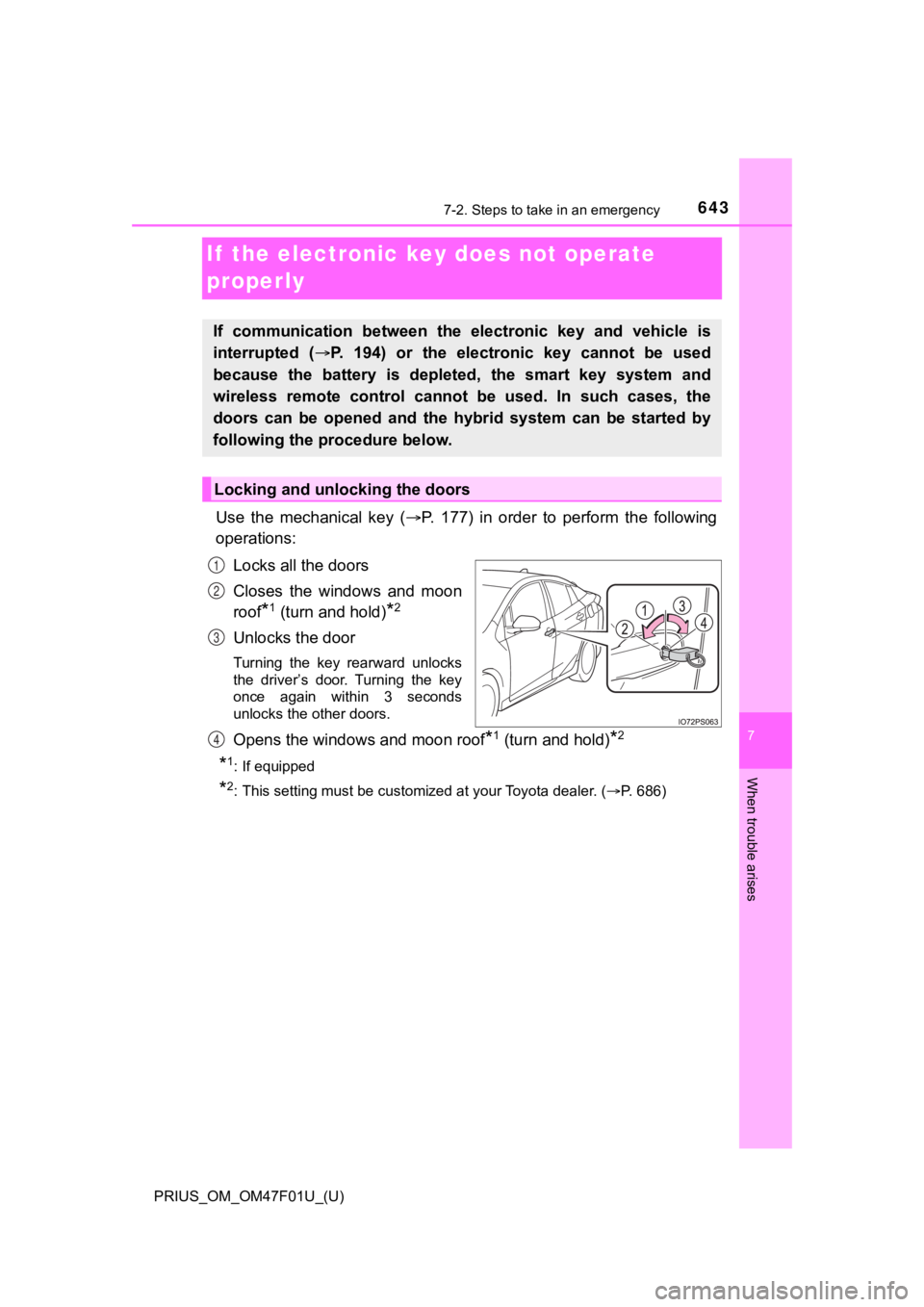
Use the mechanical key (P. 177) in order to perform the following
operations:
Locks all the doors
Closes the windows and moon
roof
*1 (turn and hold)*2
Unlocks the door
Turning the key rearward unlocks
the driver’s door. Turning the key
once again within 3 seconds
unlocks the other doors.
Opens the windows and moon roof*1 (turn and hold)*2
*1: If equipped
*2: This setting must be customized at your Toyota dealer. ( P. 686)
If communication between the electronic key and vehicle is
interrupted ( P. 194) or the electronic key cannot be used
because the battery is depleted, the smart key system and
wireless remote control can not be used. In such cases, the
doors can be opened and the hybrid system can be started by
following the procedure below.
Locking and unlocking the doors
1
2
3
4
Page 649 of 744

6497-2. Steps to take in an emergency
PRIUS_OM_OM47F01U_(U)
7
When trouble arises
■When recharging or replacing the 12-volt battery
●In some cases, it may not be possible to unlock the doors using the smart
key system when the 12-volt battery is discharged. Use the wire less remote
control or the mechanical key to lock or unlock the doors.
● The hybrid system may not start on the first attempt after the 12-volt battery
has recharged but will start normally after the second attempt. This is not a
malfunction.
● The power switch mode is memorized by the vehicle. When the 12- volt bat-
tery is reconnected, the system will return to the mode it was in before the
12-volt battery was discharged. Before disconnecting the 12-volt battery,
turn the power switch off.
If you are unsure what mode the power switch was in before the 12-volt bat-
tery discharged, be especially careful when reconnecting the 12 -volt battery.
● If the 12-volt battery discharges while the shift position is in P, it may not be
possible to shift the shift position to other positions. In thi s case, the vehicle
cannot be towed without lifting both front wheels because the f ront wheels
will be locked. ( P. 580)
■ When replacing the 12-volt battery
●Use a 12-volt battery that conforms to European regulations.
● Use a 12-volt battery that the case size is same as the previou s one (LN1),
20 hour rate capacity (20HR) is equivalent (45Ah) or greater, and perfor-
mance rating (CCA) is equivalent (295A) or greater.
• If the sizes differ, the 12-volt battery cannot be properly se cured.
• If the 20 hour rate capacity is low, even if the time period w here the vehi-
cle is not used is a short time, the 12-volt battery may discharge and the
hybrid system may not be able to start.
● For details, consult your Toyota dealer.
Page 662 of 744
662
PRIUS_OM_OM47F01U_(U)
8-1. Specifications
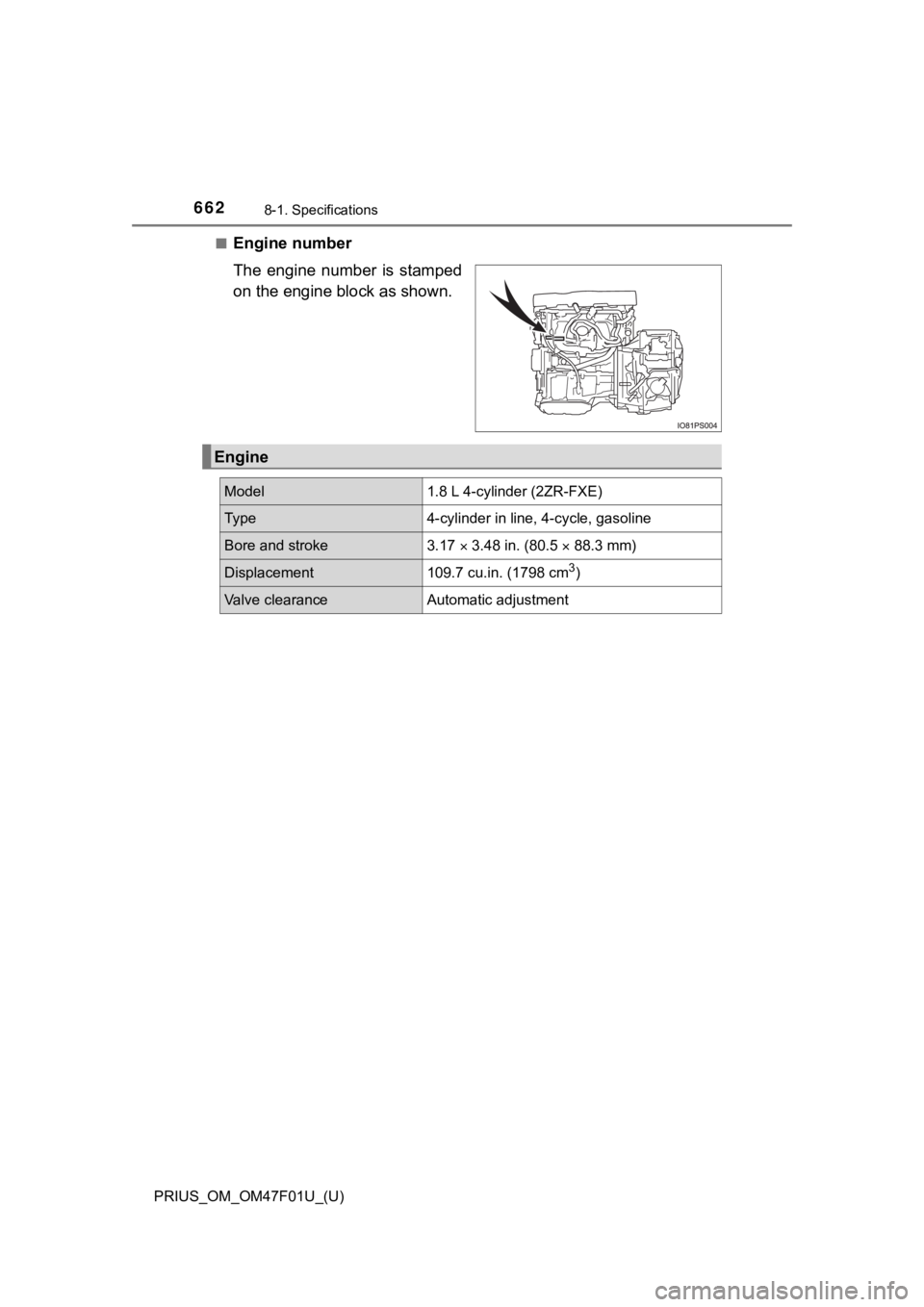
■Engine number
The engine number is stamped
on the engine block as shown.
Engine
Model1.8 L 4-cylinder (2ZR-FXE)
Ty p e4-cylinder in line, 4-cycle, gasoline
Bore and stroke3.17 3.48 in. (80.5 88.3 mm)
Displacement109.7 cu.in. (1798 cm3)
Valve clearanceAutomatic adjustment
Page 689 of 744
PRIUS_OM_OM47F01U_(U)
6898-2. Customization
8
Vehicle specifications
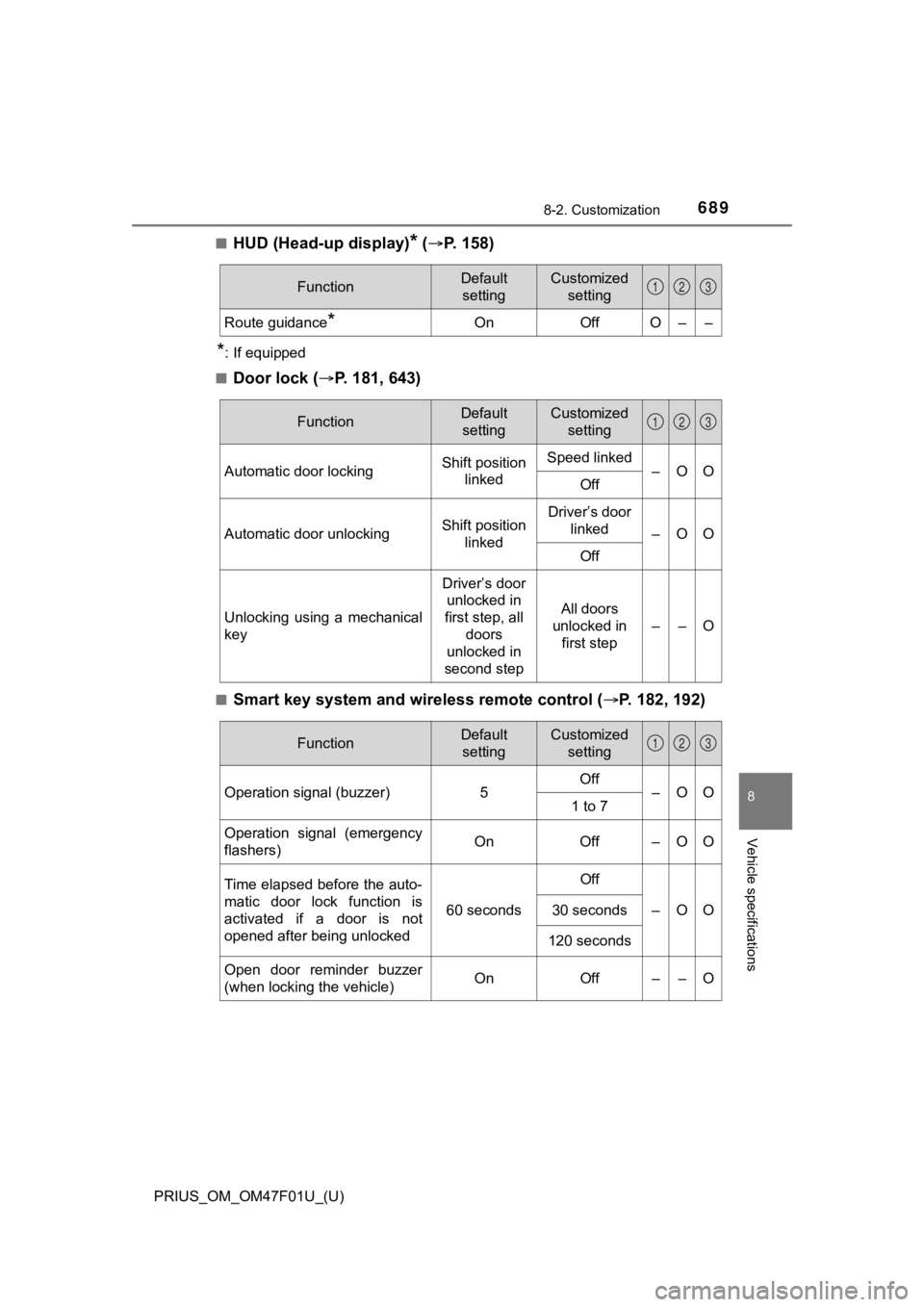
■HUD (Head-up display)* ( P. 1 5 8 )
*: If equipped
■
Door lock ( P. 181, 643)
■Smart key system and wireless remote control ( P. 182, 192)
FunctionDefault
settingCustomized setting
Route guidance*OnOffO––
123
FunctionDefault settingCustomized setting
Automatic door lockingShift position linkedSpeed linked–OOOff
Automatic door unlockingShift position linkedDriver’s door linked
–OO
Off
Unlocking using a mechanical
key
Driver’s door unlocked in
first step, all
doors
unlocked in
second step
All doors
unlocked in first step
––O
123
FunctionDefault settingCustomized setting
Operation signal (buzzer) 5Off
–OO
1 to 7
Operation signal (emergency
flashers) On
Off – O O
Time elapsed before the auto-
matic door lock function is
activated if a door is not
opened after being unlocked
60 seconds
Off
–OO30 seconds
120 seconds
Open door reminder buzzer
(when locking the vehicle)OnOff––O
123
Page 690 of 744
690
PRIUS_OM_OM47F01U_(U)
8-2. Customization
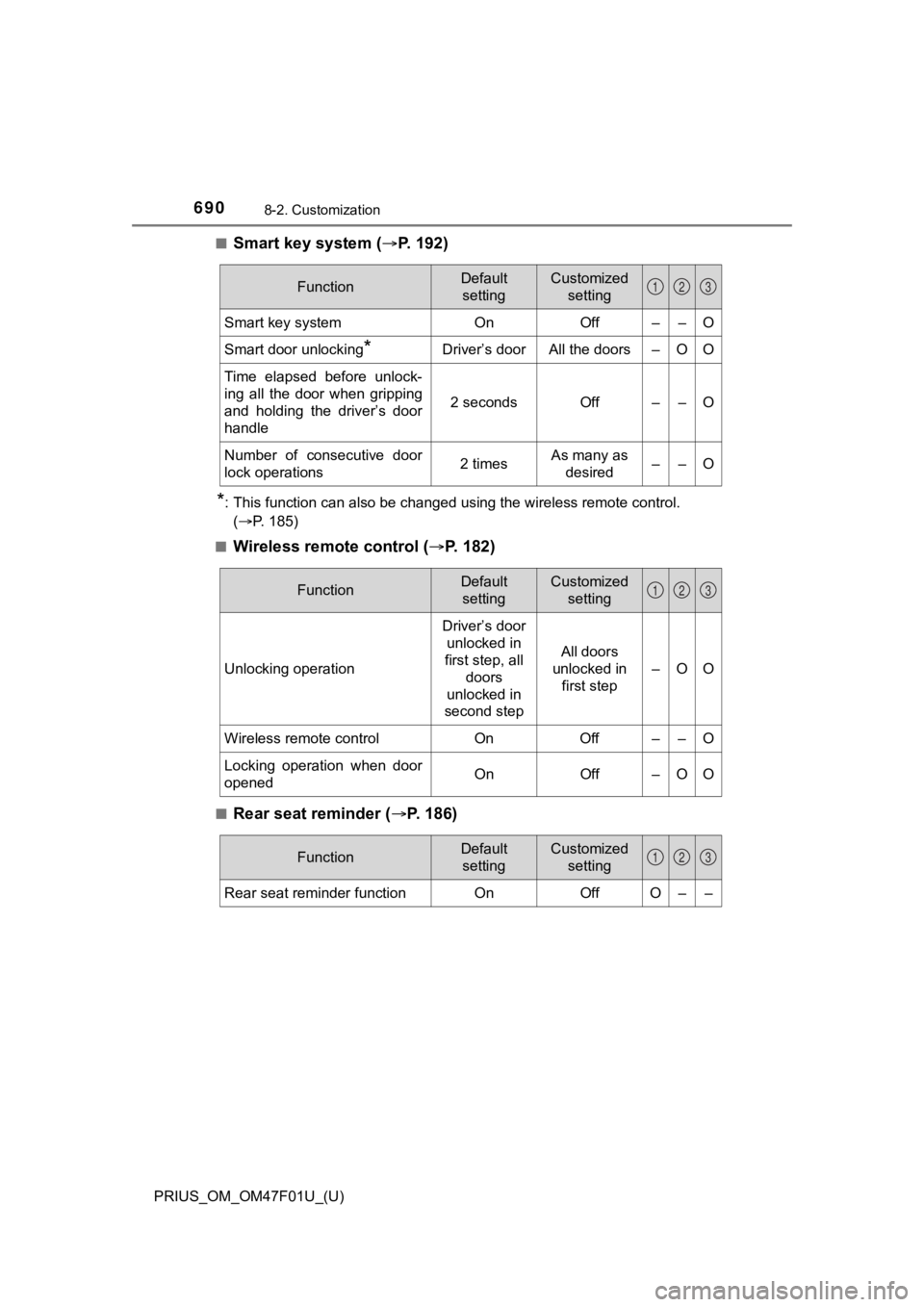
■Smart key system (P. 1 9 2 )
*: This function can also be changed using the wireless remote control.
(P. 185)
■
Wireless remote control ( P. 1 8 2 )
■Rear seat reminder ( P. 186)
FunctionDefault
settingCustomized setting
Smart key systemOnOff––O
Smart door unlocking*Driver’s doorAll the doors–OO
Time elapsed before unlock-
ing all the door when gripping
and holding the driver’s door
handle
2 secondsOff––O
Number of consecutive door
lock operations2 timesAs many as desired––O
123
FunctionDefault settingCustomized setting
Unlocking operation
Driver’s door unlocked in
first step, all doors
unlocked in
second step
All doors
unlocked in
first step
–OO
Wireless remote control On Off – – O
Locking operation when door
opened On Off – O O
123
FunctionDefault
settingCustomized setting
Rear seat reminder functionOnOffO––
123
Page 695 of 744
PRIUS_OM_OM47F01U_(U)
6958-2. Customization
8
Vehicle specifications
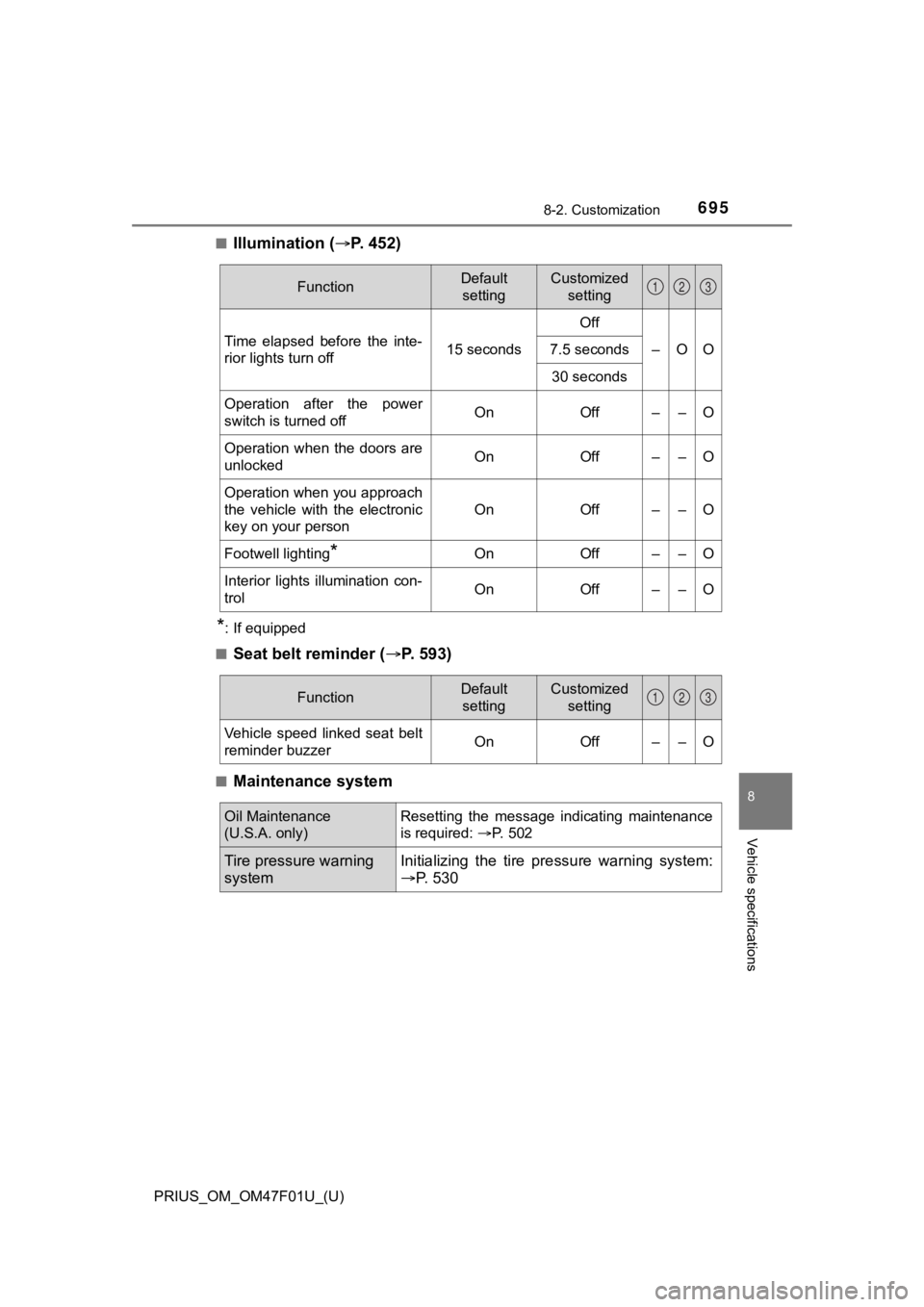
■Illumination (P. 4 5 2 )
*: If equipped
■
Seat belt reminder ( P. 593)
■Maintenance system
FunctionDefault
settingCustomized setting
Time elapsed before the inte-
rior lights turn off 15 secondsOff
–OO
7.5 seconds
30 seconds
Operation after the power
switch is turned offOnOff––O
Operation when the doors are
unlockedOnOff––O
Operation when you approach
the vehicle with the electronic
key on your person
OnOff––O
Footwell lighting*OnOff––O
Interior lights illumination con-
trolOnOff––O
123
FunctionDefault settingCustomized setting
Vehicle speed linked seat belt
reminder buzzerOnOff––O
123
Oil Maintenance
(U.S.A. only)Resetting the message indicating maintenance
is required: P. 502
Tire pressure warning
systemInitializing the tire p ressure warning system:
P. 530