brake sensor TOYOTA PRIUS 2022 User Guide
[x] Cancel search | Manufacturer: TOYOTA, Model Year: 2022, Model line: PRIUS, Model: TOYOTA PRIUS 2022Pages: 744, PDF Size: 14.35 MB
Page 377 of 744
PRIUS_OM_OM47F01U_(U)
3774-5. Using the driving support systems
4
Driving
■Sensor detection range
The detection range of the Parking Support Brake function diffe rs from the
detection range of the intuitive parking assist. ( P. 362)
Therefore, even if the intuitive parking assist detects an obst acle and pro-
vides a warning, the Parking Support Brake function may not sta rt operating.
■ System operation
When the vehicle is stopped by system operation, the Parking Support Brake
function stops and the PKSB OFF indicator illuminates.
■ System recovery
When the Parking Support Brake function is stopped by system op eration
and you would like to resume operation, either turn the Parking Support
Brake function on again ( P. 372), or turn the power switch off and then back
on. Furthermore, when the vehicle moves with an obstacle no lon ger in the
traveling direction of the vehicle, or when the traveling direc tion of the vehicle
changes (such as when switching from moving forward to backing up, and
vice versa), system operation automatically resumes.
■ Obstacles not detected by the sensors
The following obstacles may not be detected by the sensors.
●Objects such as people, cloth and snow, that are difficult for sonic waves to
reflect off of. (In particular, people may also not be detected depending on
the type of clothing they are wearing.)
● Objects not perpendicular with the ground, objects not at a rig ht angle to the
traveling direction of the vehicle, uneven objects or waving objects
● Low objects
● Thin objects such as wires, fences, ropes and signposts
● Objects that are extremely close to the bumper
■ Situations in which the syst em may not operate properly
P. 365
■ Situations in which the system may operate even if there is no possibil-
ity of a collision
P. 366
■ In the unlikely event that the Parking Support Brake function m istakenly
operates at a crossing or elsewhere
Even in the unlikely event that the Parking Support Brake funct ion mistakenly
operates at a crossing or elsewhere, brake control is canceled after approxi-
mately 2 seconds, allowing you to proceed forward and leave the area. Fur-
thermore, brake control is also canceled when the brake pedal i s depressed.
Depressing the accelerator pedal again allows you to proceed forward and
leave the area.
■ When removing and instal ling the 12-volt battery
The system needs to be initialized.
The system can be initialized by driving the vehicle straight a head for 5 sec-
onds or more at a speed of approximately 22 mph (35 km/h) or hi gher.
Page 378 of 744

378
PRIUS_OM_OM47F01U_(U)
4-5. Using the driving support systems
■When “PKSB Unavailable” is displayed on the multi-information display
and the PKSB OFF indicator flashes
●Ice, snow, dirt, etc., may have adhered to the sensor. If this occurs, remove
the ice, snow, dirt, etc., from the sensor to return the system to normal.
Also, a warning message may be displayed at low temperatures du e to ice
forming on the sensor, and the sensor may not detect obstacles. Once the
ice melts, the system will return to normal.
● If this message is shown even after removing dirt from the sensor, or shown
when the sensor was not dirty to begin with, have the vehicle inspected at
your Toyota dealer.
■ When “PKSB Malfunction Visit You r Dealer” is displayed on the multi-
information display, the PKSB OFF indicator flashes and the buz zer
sounds
The system may not be operating properly. Have the vehicle inspected at
your Toyota dealer.
WARNING
■ Cautions regarding the use of the system
Do not rely solely upon the system. Relying solely upon the system may
lead to an unexpected accident.
● Driving safely is the sole responsibility of the driver. Pay careful attention
to the surrounding conditions in order to ensure safe driving. The Parking
Support Brake function can provide support to lessen the severity of colli-
sions. However, it may not operate depending on the situation.
● The Parking Support Brake function is not a system designed to com-
pletely stop the vehicle. Furthermore, even if the Parking Support Brake
function is able to stop the vehicle, brake control is canceled after approxi-
mately 2 seconds, so depress the brake pedal immediately.
● It is extremely dangerous to check the system operations by int entionally
driving the vehicle into the direction of a wall, etc. Never at tempt such
actions.
Page 379 of 744
PRIUS_OM_OM47F01U_(U)
3794-5. Using the driving support systems
4
Driving
WARNING
■When to disable the Parking Support Brake
In the following situations, disable the Parking Support Brake as the system
may operate even though there is no possibility of a collision.
● When inspecting the vehicle using a chassis roller, chassis dynamo or free
roller
● When loading the vehicle onto a boat, truck or other transport vessel
● If the suspension has been modified or tires of a size other than specified
are installed
● If the front of the vehicle is raised or lowered due to the carried load
● When equipment that may obstruct a sensor is installed, such as a towing
eyelet, bumper protector (an additional trim strip, etc.), bicycle carrier, or
snow plow
● When using automatic car washing devices
● If the vehicle cannot be driven in a stable manner, such as when the vehi-
cle has been in an accident or is malfunctioning
● When the vehicle is driven in a sporty manner or off-road
● When the tires are not properly inflated
● When the tires are very worn
● When tire chains, compact spare tire or an emergency tire puncture repair
kit are used
■ To ensure the system can operate properly
P. 368
■ Handling the suspension
Do not modify the suspension, as changes to the height or incli ne of the
vehicle may prevent the sensors from correctly detecting obstac les, may
cause the system not operate, or may cause the system to operat e unnec-
essarily.
■ If the Parking Support Brake function (static objects) operates unnec-
essarily, such as at a railroad crossing
P. 377
■ Notes when washing the vehicle
P. 368
Page 398 of 744
398
PRIUS_OM_OM47F01U_(U)
4-5. Using the driving support systems
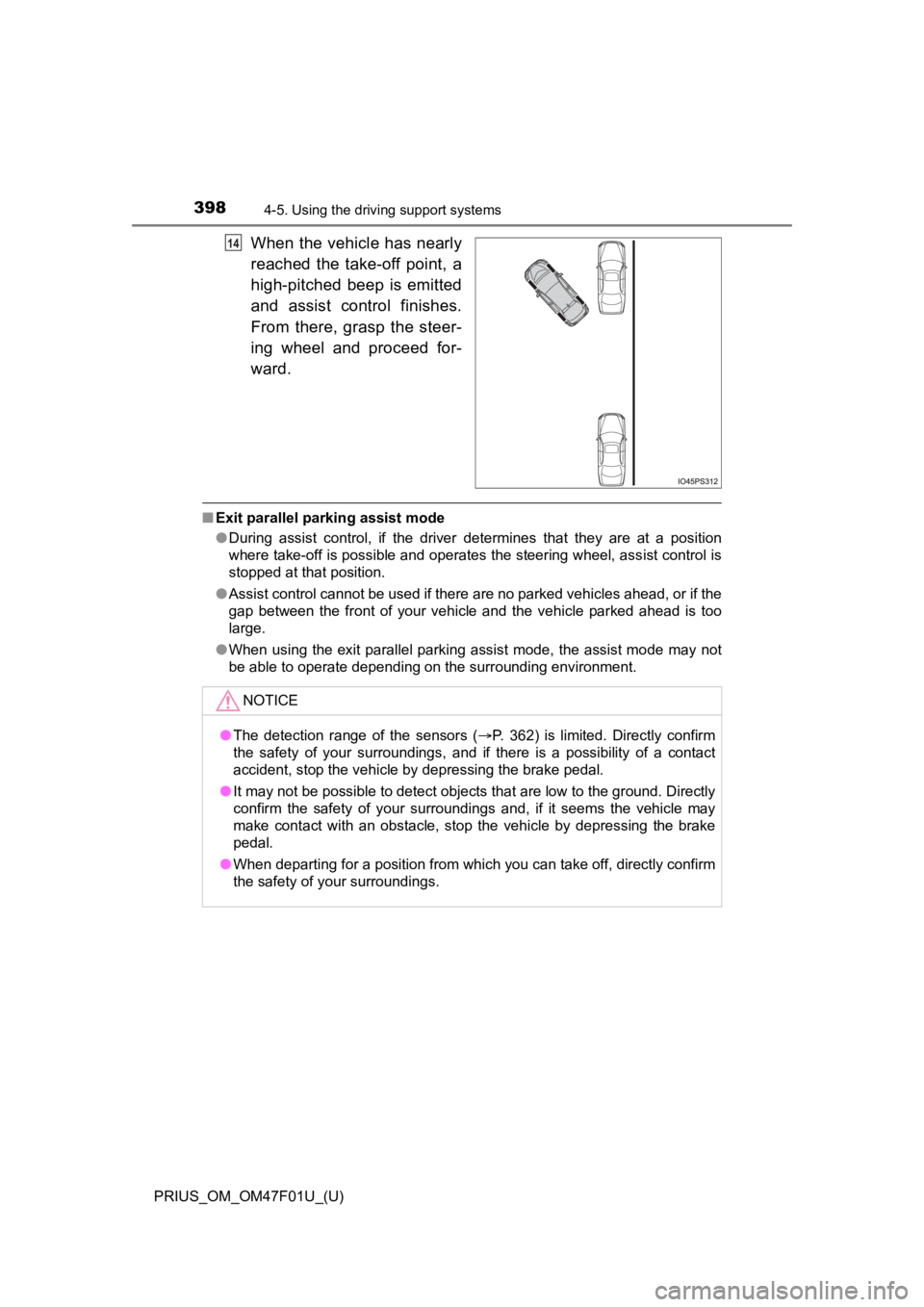
When the vehicle has nearly
reached the take-off point, a
high-pitched beep is emitted
and assist control finishes.
From there, grasp the steer-
ing wheel and proceed for-
ward.
■Exit parallel parking assist mode
●During assist control, if the driver determines that they are at a position
where take-off is possible and operates the steering wheel, assist control is
stopped at that position.
● Assist control cannot be used if there are no parked vehicles a head, or if the
gap between the front of your vehicle and the vehicle parked ahead is too
large.
● When using the exit parallel parking assist mode, the assist mo de may not
be able to operate depending on the surrounding environment.
14
NOTICE
● The detection range of the sensors ( P. 362) is limited. Directly confirm
the safety of your surroundings, and if there is a possibility of a contact
accident, stop the vehicle by depressing the brake pedal.
● It may not be possible to detect objects that are low to the ground. Directly
confirm the safety of your surroundings and, if it seems the vehicle may
make contact with an obstacle, stop the vehicle by depressing the brake
pedal.
● When departing for a position from which you can take off, directly confirm
the safety of your surroundings.
Page 403 of 744
PRIUS_OM_OM47F01U_(U)
4034-5. Using the driving support systems
4
Driving
Assume an ordinary posture for backing up, rest your hands
lightly on the steering wheel without applying any force, direc tly
confirm the safety of the area to the rear and around the vehic le
slowly back up while adjusting your speed by depressing the
brake pedal.
Depending on the condition of the parking space, steps to may
need to be repeated.
When the vehicle is almost entire ly within the target parking spot,
a high-pitched beep is emitted and the stop display is shown on
the display ( P. 385), stop the vehicle.
This completes the back-in parking assist mode.
● For safety, the buzzer sounds slightly before the vehicle is
completely entered within the target parking spot. Further-
more, at that point, system operation will also finish. Firmly
hold the steering wheel and slowly back up while adjusting
your speed by depressing the brake pedal to reach the desired
parking spot.
● Be sure to back up while checking the area to the front and
rear of the vehicle direct ly and by using the mirrors.
■Back-in parking assist m ode operating conditions
● In order to operate the function correctly, drive slowly (at a speed at which
the vehicle can be quickly stopped).
● In order to operate the function correctly, drive slowly (at a speed at which
the vehicle can be quickly stopped). Come to a full stop so tha t the center of
the parking space is nearly perpendicular to the vehicle, and t hen operate
the S-APGS switch.
● The function cannot be used when the vehicle speed is approxima tely
19 mph (30 km/h) or higher.
● The front side sensors and rear side sensors are used to detect parked
vehicles and determine the parking spot. Therefore, when detection is not
possible ( P. 414), guidance is not issued.
● If there are no parked vehicles, the parking spot cannot be det ermined.
Therefore, the back-in parking assist mode cannot be operated.
● If unable to detect the environment surrounding the parking space, the
back-in parking assist mode may not be able to operate.
11
611
12
Page 404 of 744
404
PRIUS_OM_OM47F01U_(U)
4-5. Using the driving support systems
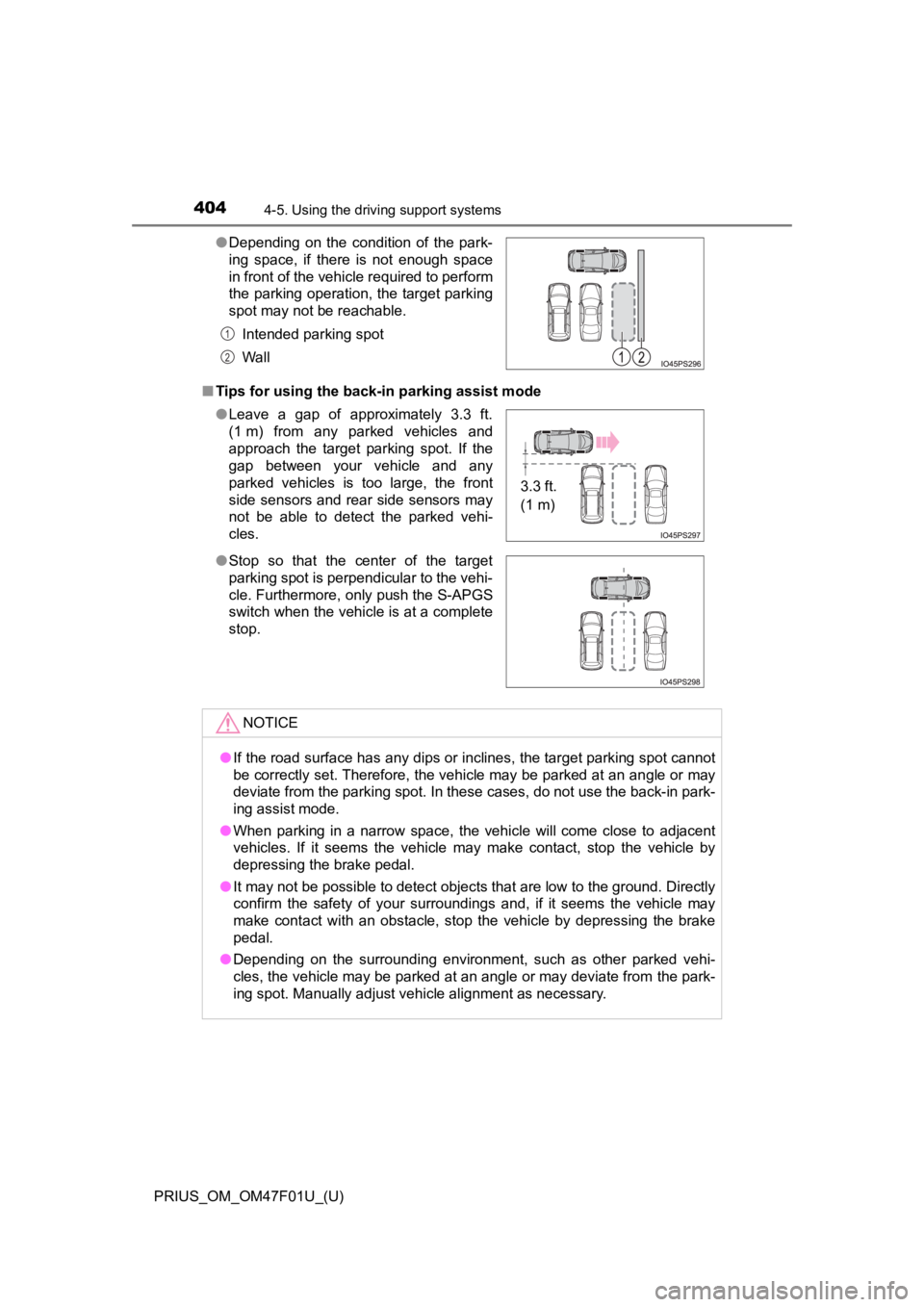
■Tips for using the back-in parking assist mode ●Depending on the condition of the park-
ing space, if there is not enough space
in front of the vehicle required to perform
the parking operation, the target parking
spot may not be reachable.
Intended parking spot
Wall
● Leave a gap of approximately 3.3 ft.
(1 m) from any parked vehicles and
approach the target parking spot. If the
gap between your vehicle and any
parked vehicles is too large, the front
side sensors and rear side sensors may
not be able to detect the parked vehi-
cles.
● Stop so that the center of the target
parking spot is perpendicular to the vehi-
cle. Furthermore, only push the S-APGS
switch when the vehicle is at a complete
stop.
NOTICE
●If the road surface has any dips or inclines, the target parking spot cannot
be correctly set. Therefore, the vehicle may be parked at an angle or may
deviate from the parking spot. In these cases, do not use the back-in park-
ing assist mode.
● When parking in a narrow space, the vehicle will come close to adjacent
vehicles. If it seems the vehicle may make contact, stop the ve hicle by
depressing the brake pedal.
● It may not be possible to detect objects that are low to the ground. Directly
confirm the safety of your surroundings and, if it seems the vehicle may
make contact with an obstacle, stop the vehicle by depressing the brake
pedal.
● Depending on the surrounding environment, such as other parked vehi-
cles, the vehicle may be parked at an angle or may deviate from the park-
ing spot. Manually adjust vehicle alignment as necessary.
1
2
3.3 ft.
(1 m)
Page 414 of 744

414
PRIUS_OM_OM47F01U_(U)
4-5. Using the driving support systems
WARNING
●Observe the following precautions, as the sensors may stop functioning
properly which may lead to an accident.
• Do not subject the sensor to strong shocks by hitting it, etc. The sen-
sors may not function properly.
• When using a high-pressure washer to wash the vehicle, do not spray
water directly on the sensors. Equipment may not function prope rly if
subjected to an impact from strong water pressure. If the vehicle
bumper strikes something, equipment may not operate properly du e to
a sensor malfunction. Have the vehicle inspected at your Toyota dealer.
● In the following situations, the sensors may not operate normally and may
lead to an accident. Drive carefully.
• Obstacles cannot be detected in the side areas until a scan of the side
areas is completed. ( P. 364)
• Even after the scan of the side areas is completed, obstacles such as other vehicles, people or animals that approach from the sides cannot
be detected.
• The sensor is frozen (if it thaws, the system returns to normal). A warning message may display at particularly low temperatures due to
the sensor freezing and it may not detect parked vehicles.
• The sensor is blocked by someone’s hand.
• The vehicle is tilted a large amount.
• The temperature is extremely hot or cold.
• The vehicle is driven on undulating roads, slopes, gravel road s, in areas
with tall grass, etc.
• An ultrasonic wave source is nearby, such as the horn or sensors of another vehicle, a motorcycle engine or the air brake of a larg e vehicle.
• Heavy rain or a water strikes the vehicle.
• The angle of the sensor may be deviated when assist control starts even if there is a parked vehicle in the target parking spot. Have the
vehicle inspected at your Toyota dealer.
• Do not install any accessories within the sensor detection ran ge.
Page 722 of 744

722Alphabetical index
PRIUS_OM_OM47F01U_(U)
Bottle holders .......................... 458
BrakeFluid ...................................... 667
Parking brake........................ 256
Regenerative braking.............. 87
Warning light ......................... 588
Brake assist ............................. 415
Brake Override System ........... 223
Break-in tips ............................. 224
Brightness control Instrument cluster light
control................................. 100
BSM (Blind Spot Monitor) ....... 344 Blind Spot Monitor
function ............................... 349
Rear Cross Traffic Alert function ............................... 352
Care................................... 492, 498 Aluminum wheels.................. 493
Exterior ................................. 492
Front camera ........................ 285
Interior................................... 498
Radar sensor ........................ 284
Seat belts .............................. 499
Water-repellent coating......... 493
Cargo capacity ......................... 236
Cargo hooks............................. 462 Catch protection function....... 213
CD player
*
Chains ...................................... 426
Child restraint system............... 56
Fixed with a LATCH
system .......... ..................... ... 69
Fixed with a seat belt .............. 63
Front passenger occupant classification syst em ............ 49
Points to remember ................ 57
Riding with children ................ 55
Types of child restraint system installation method ............... 59
Using an anchor bracket......... 72
Child safety ................................ 55 12-volt battery precautions ... 522
Airbag precautions.................. 38
Back door precautions .......... 189
Child restraint system ............. 56
How your child should wear the seat belt.......................... 31
Installing child restraints ......... 59
Moon roof precautions .......... 220
Power window lock switch .... 212
Power window precautions ... 215
Rear door child-protectors .... 184
Removed key battery precautions......................... 557
Riding with children ................ 55
Seat belt extender precautions........................... 34
Seat belt precautions .............. 68
Seat heater precautions ....... 450
Child-protectors ...................... 184
C
Page 723 of 744
723Alphabetical index
PRIUS_OM_OM47F01U_(U)
CleaningAluminum wheels.................. 493
Exterior ................................. 492
Front camera ........................ 285
Hybrid battery (traction
battery) air intake vent ........ 546
Interior................................... 498
Radar sensor ........................ 284
Seat belts .............................. 499
Water-repellent coating......... 493
Clock ........................................... 98
Adjustment ............................ 103
Coat hooks ............................... 480
Combination meter .................... 98 Clock adjustment .................. 103
Main display .......................... 115
Multi-information display ....... 124
Warning lights and indicators ............................ 107
Condenser ................................ 520
Console box ............................. 456
Consumption screen ....... 165, 170
Coolant ..................................... 518
Capacity ................................ 666
Checking ............................... 518
Preparing and checking before winter....................... 425
Cooling system ........................ 518 Engine overheating ............... 652
Hybrid system overheating ... 654
Cruise control Cruise control........................ 337
Dynamic radar cruise control with full-speed range .......... 321
Cup holders.............................. 457
Curtain shield airbags ............... 35
Customizable features ............ 686 Daytime running light
system.................................... 260
Deck board ............................... 461
Defogger Outside rear view
mirrors ........................ 434, 444
Rear window ................. 434, 444
Windshield .................... 434, 444
Dimension ................................ 660
Dinghy towing.......................... 238
Display BSM (Blind Spot Monitor) ..... 344
Drive information .................. 126
Dynamic radar cruise control with full-speed range .......... 321
Energy monitor ..... 127, 165, 170
Head-up display.................... 158
Intuitive parking assist .......... 359
LTA (Lane Tracing Assist) .... 311
Main display.......................... 115
Multi-information display ....... 124
Parking Support Brake function............................... 376
RCTA detection screen ........ 344
RSA (Road Sign Assist) ....... 318
S-APGS (Simple Advanced Parking Guidance
System) .............................. 385
Pre-collision warning ............ 292
Trip information..................... 119
Warning messages ............... 599
Do-it-yourself maintenance .... 508
Door courtesy lights ............... 452 Location ................................ 452
Wattage ................................ 670D
*: Refer to “MULTIMEDIA OWNER’S MANUAL”.
Page 729 of 744
729Alphabetical index
PRIUS_OM_OM47F01U_(U)
Multi-information display ........ 124Air conditioning system
settings screen ................... 146
Audio system-linked display ................................ 145
Display contents ................... 124
Drive information................... 126
Driving assist system information.......................... 150
Dynamic radar cruise control with full-speed range .......... 321
Energy monitor ..................... 127
Intuitive parking assist .......... 359
Language .............................. 153
LTA (Lane Tracing Assist) .... 311
Navigation system-linked display ................................ 145
Parking Support Brake function ............................... 376
Pre-collision warning............. 292
RCTA detection screen......... 344
RSA (Road Sign Assist)........ 318
S-APGS (Simple Advanced
Parking Guidance
System) .............................. 385
Settings display..................... 151
Warning message display..... 150
Navigation system
*2
Noise from under vehicle............ 8
Odometer.................................. 119
Oil Engine oil .............................. 664 Opener
Back door ............................. 187
Fuel filler door ....................... 279
Garage door ......................... 482
Hood ..................................... 511
Outside rear view mirrors ....... 210 Adjustment............................ 210
BSM (Blind Spot Monitor) ..... 344
Folding .................................. 210
Outside rear view mirror defoggers ................... 434, 444
Outside temperature display.................................... 116
Overhead console ................... 459
Overheating ............................. 652
P position switch ..................... 250
Panic mode .............................. 177
Parking assist sensors
Intuitive parking assist .......... 358
Parking Support Brake function............................... 370
S-APGS (Simple Advanced Parking Guidance
System) .............................. 381
Parking brake........................... 256
Operation .............................. 256
Parking brake engaged warning buzzer ................... 256
Parking lights........................... 257 Light switch ........................... 257
Replacing light bulbs .... 565, 572
Wattage ................................ 670
Parking lock ............................. 250
PCS (Pre-Collision System).... 291 Enabling/disabling the system .......... ...................... 295
Function ................................ 291
Warning light......................... 589
N
O
P
*1: Refer to “MULTIMEDIA OWNER’S MANUAL”.
*2: Refer to “NAVIGATION S YSTEM OWNER’S MANUAL”.