charging TOYOTA PRIUS 2022 User Guide
[x] Cancel search | Manufacturer: TOYOTA, Model Year: 2022, Model line: PRIUS, Model: TOYOTA PRIUS 2022Pages: 744, PDF Size: 14.35 MB
Page 252 of 744

252
PRIUS_OM_OM47F01U_(U)
4-2. Driving procedures
■Restraining sudden start (Drive-Start Control)
P. 224
■ Automatic P position selection function
In the following situations, the shift position is automaticall y changed to P.
● When pressing the power switch with the vehicle stopped while the power
switch is in ON mode and the shift position is in a position other than P (after
the shift position has changed to P, the power switch will turn off)
*
●If the driver’s door is opened and all of the following conditi ons are met,
while the shift position is in a position other than P
• The power switch is in ON mode.
• The driver is not wearing the seat belt.
• The brake pedal is not depressed.
To start off the vehicle after the shift position is changed to P, operate the
shift lever again.
*: When the power switch is pressed while driving at extremely slow speeds,
such as immediately before stopping the vehicle, the shift posi tion may
automatically change to P. Make sure that the vehicle is completely stopped
before pressing the power switch.
The shift position may also automatically switch to P if one of the following
conditions is detected while the vehicle is stopped by dynamic radar cruise
control with full-speed range (if equipped).
● Driver’s seat belt is not fastened
● Driver’s door is opened
● Approximately 3 minutes elapse after the vehicle stopped
■ If the shift position cannot be shifted from P
There is a possibility that the 12-volt battery is discharged. Check the 12-volt
battery in this situation. ( P. 646)
■ About engine braking
When shift position B is selected, releasing the accelerator pe dal will apply
engine braking.
● When the vehicle is driven at high speeds, compared to ordinary gasoline-
fueled vehicles, the engine braking deceleration is felt less t han that of other
vehicles.
● The vehicle can be accelerated even when shift position B is se lected.
If the vehicle is driven continuously in the B position, fuel e fficiency will
become low. Usually, select the D position.
■ After recharging/reconnecting the 12-volt battery
P. 521
Page 254 of 744
254
PRIUS_OM_OM47F01U_(U)
4-2. Driving procedures
NOTICE
■Hybrid battery (traction battery) charge
If the shift position is in N, the hybrid battery (traction battery) will not be
charged. To help prevent the battery from discharging, avoid leaving the N
position selected for an extended period of time.
■ Situations where shift control system malfunctions are possible
If any of the following situations occurs, shift control system malfunctions
are possible.
Immediately stop the vehicle in a safe place on level ground, a pply the park-
ing brake, and then contact your Toyota dealer.
● When the warning message indicating the shift control system ap pears on
the multi-information display.
● The display indicates that no shift position is selected for mo re than a few
seconds.
■ Notes regarding shift lever and P position switch operation
Avoid repeatedly operating the shift lever and P position switch in quick suc-
cession.
The system protection function may activate and it will not be temporarily
possible to shift the shift position other than P. If this happens, please wait
for approximately 20 seconds before attempting to change the sh ift position
again.
■ When exiting the vehicle (driver’s seat only)
Check that the shift position indicator shows P and that the parking brake is
set before opening the door and exiting the vehicle.
Page 261 of 744
PRIUS_OM_OM47F01U_(U)
2614-3. Operating the lights and wipers
4
Driving
■Automatic headlight leveling system (vehicles with AFS)
The level of the headlights is automatically adjusted according to the number
of passengers and the loading condition of the vehicle to ensure that the
headlights do not interfere with other road users.
■ 12-volt battery-saving function
In order to prevent the 12-volt battery of the vehicle from dis charging, if the
headlights and/or tail lights are on when the power switch is t urned off, the
12-volt battery saving function will operate and automatically turn off all the
lights after approximately 20 minutes.
When any of the following are performed, the 12-volt battery-sa ving function
is canceled once and then reactivated. All the lights will turn off automatically
20 minutes after the 12-volt battery-saving function has been reactivated:
● When the headlight switch is operated
● When a door is opened or closed
■ If “Headlight System Malfunction Visit Your Dealer” is displaye d on the
multi-information display
The system may be malfunctioning. Have the vehicle inspected by your Toy-
ota dealer.
■ If the AFS OFF indicator flashes (vehicles with AFS)
It may indicate a malfunction in the system. Contact your Toyota dealer.
■ Customization
Settings (e.g. light sensor sensitivity) can be changed.
(Customizable features: P. 686)
NOTICE
■To prevent 12-volt battery discharge
Do not leave the lights on longer than necessary when the hybrid system is
off.
Page 429 of 744
429
PRIUS_OM_OM47F01U_(U)
5Interior features
5-1. Using the air conditioning system and defogger
Automatic air conditioning system (vehicles with
7-inch display) ................. 430
Automatic air conditioning system (vehicles with
11.6-inch display) ............ 440
Heated steering wheel/ seat heaters .................... 450 5-2. Using the interior lights
Interior lights list ................ 452• Front interior light .......... 453
• Front personal lights ..... 453
• Rear interior light .......... 454
5-3. Using the storage features
List of storage features ..... 455 • Glove box...................... 456
• Console box .................. 456
• Cup holders .................. 457
• Bottle holders/
door pockets ................. 458
• Auxiliary boxes.............. 459
• Seat back pockets ........ 460
Luggage compartment features ........................... 461
5-4. Using the other interior features
Other interior features ....... 467 • Sun visors ..................... 467
• Vanity mirrors................ 467
• Power outlets ................ 468
• USB charging ports....... 469
• Wireless charger ........... 471
• Armrest ......................... 480
• Coat hooks.................... 480
• Assist grips ................... 481
Garage door opener.......... 482
Page 468 of 744
468
PRIUS_OM_OM47F01U_(U)
5-4. Using the other interior features
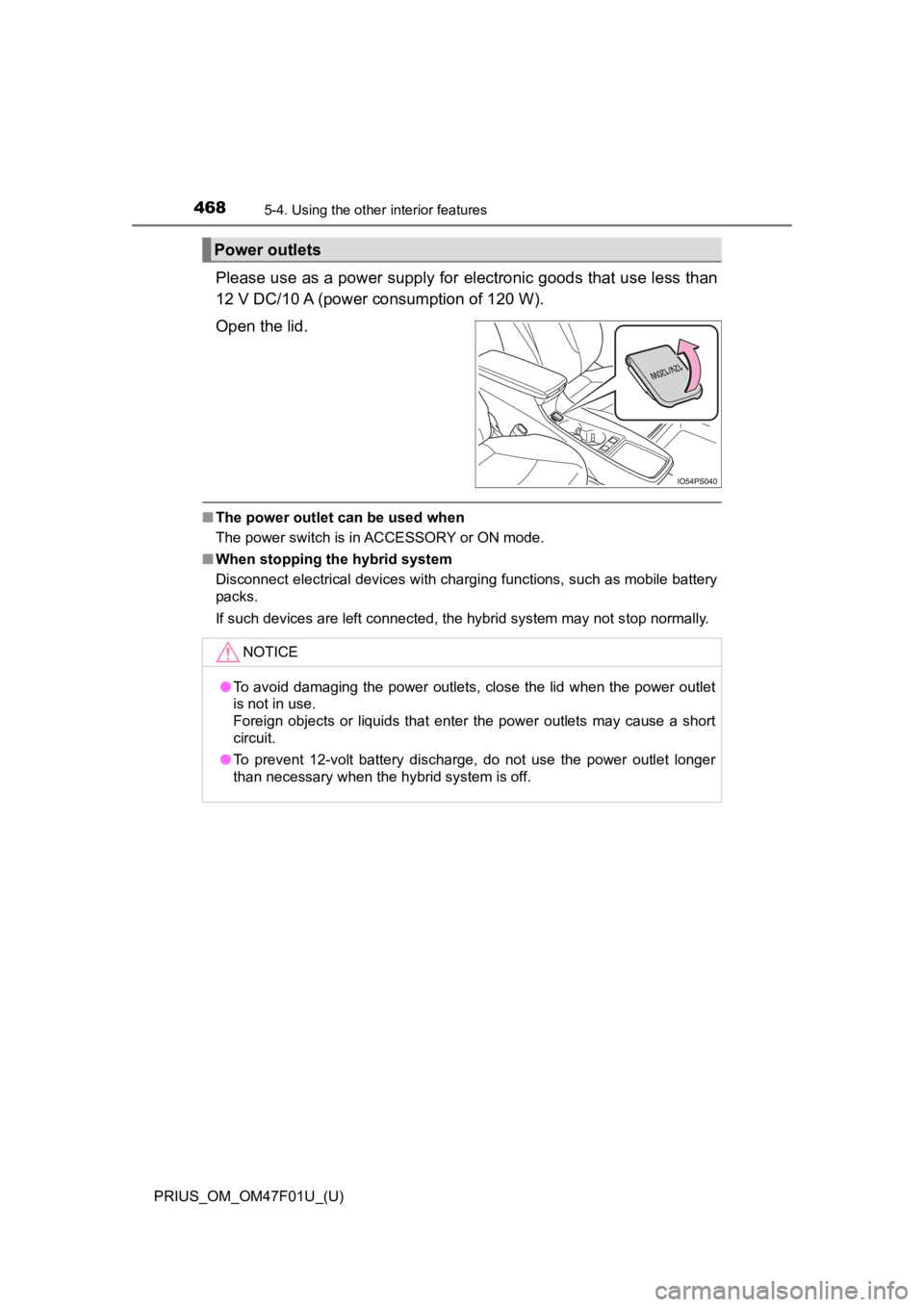
Please use as a power supply for electronic goods that use less than
12 V DC/10 A (power consumption of 120 W).
Open the lid.
■ The power outlet can be used when
The power switch is in ACCESSORY or ON mode.
■ When stopping the hybrid system
Disconnect electrical devices with charging functions, such as mobile battery
packs.
If such devices are left connected, the hybrid system may not s top normally.
Power outlets
NOTICE
●To avoid damaging the power outlets, close the lid when the power outlet
is not in use.
Foreign objects or liquids that enter the power outlets may cause a short
circuit.
● To prevent 12-volt battery discharge, do not use the power outl et longer
than necessary when the hybrid system is off.
Page 469 of 744
PRIUS_OM_OM47F01U_(U)
4695-4. Using the other interior features
5
Interior features
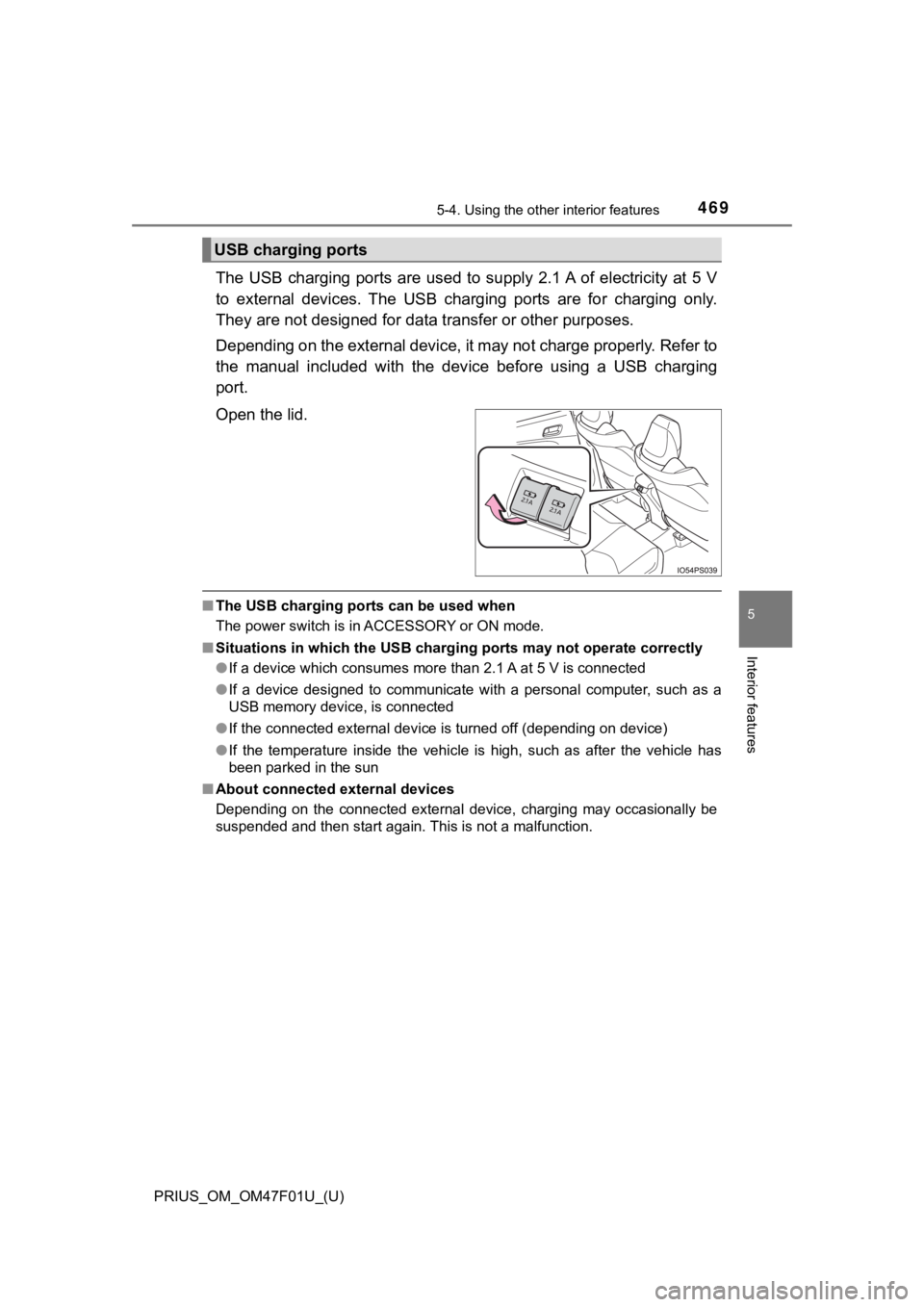
The USB charging ports are used to supply 2.1 A of electricity at 5 V
to external devices. The USB c harging ports are for charging on ly.
They are not designed for data transfer or other purposes.
Depending on the external device, it may not charge properly. R efer to
the manual included with the dev ice before using a USB charging
port.
Open the lid.
■ The USB charging ports can be used when
The power switch is in ACCESSORY or ON mode.
■ Situations in which the USB charg ing ports may not operate correctly
● If a device which consumes more than 2.1 A at 5 V is connected
● If a device designed to communicate with a personal computer, s uch as a
USB memory device, is connected
● If the connected external device is turned off (depending on de vice)
● If the temperature inside the vehicle is high, such as after the vehicle has
been parked in the sun
■ About connected external devices
Depending on the connected external device, charging may occasi onally be
suspended and then start again. This is not a malfunction.
USB charging ports
Page 470 of 744
470
PRIUS_OM_OM47F01U_(U)
5-4. Using the other interior features
NOTICE
■To prevent damage to the USB charging ports
● Do not insert foreign objects into the ports.
● Do not spill water or other liquids into the ports.
● When the USB charging ports are not in use, close the lids. If a foreign
object or liquid enters a port may cause a short circuit.
● Do not apply excessive force to or impact the USB charging ports.
● Do not disassemble or modify the USB charging ports.
■ To prevent damage to external devices
● Do not leave external devices in the vehicle. The temperature i nside the
vehicle may become high, resulting in damage to an external device.
● Do not push down on or apply unnecessary force to an external device or
the cable of an external device while it is connected.
■ To prevent 12-volt battery discharge
Do not use the USB charging ports for a long period of time with the hybrid
system stopped.
Page 471 of 744
PRIUS_OM_OM47F01U_(U)
4715-4. Using the other interior features
5
Interior features
A portable device can be charged by just placing Qi standard wireless
charge compatible portable devices according to the Wireless Po wer
Consortium, such as smart phones and mobile batteries, etc., on the
charge area.
This function cannot be used with portable devices that are lar ger
than the charging area. Also, depending on the portable device, it may
not operate as normal. Please read the operation manual for por table
devices to be used.
■The “Qi” symbol
The “Qi” symbol is a trademark of the Wireless Power Consortium .
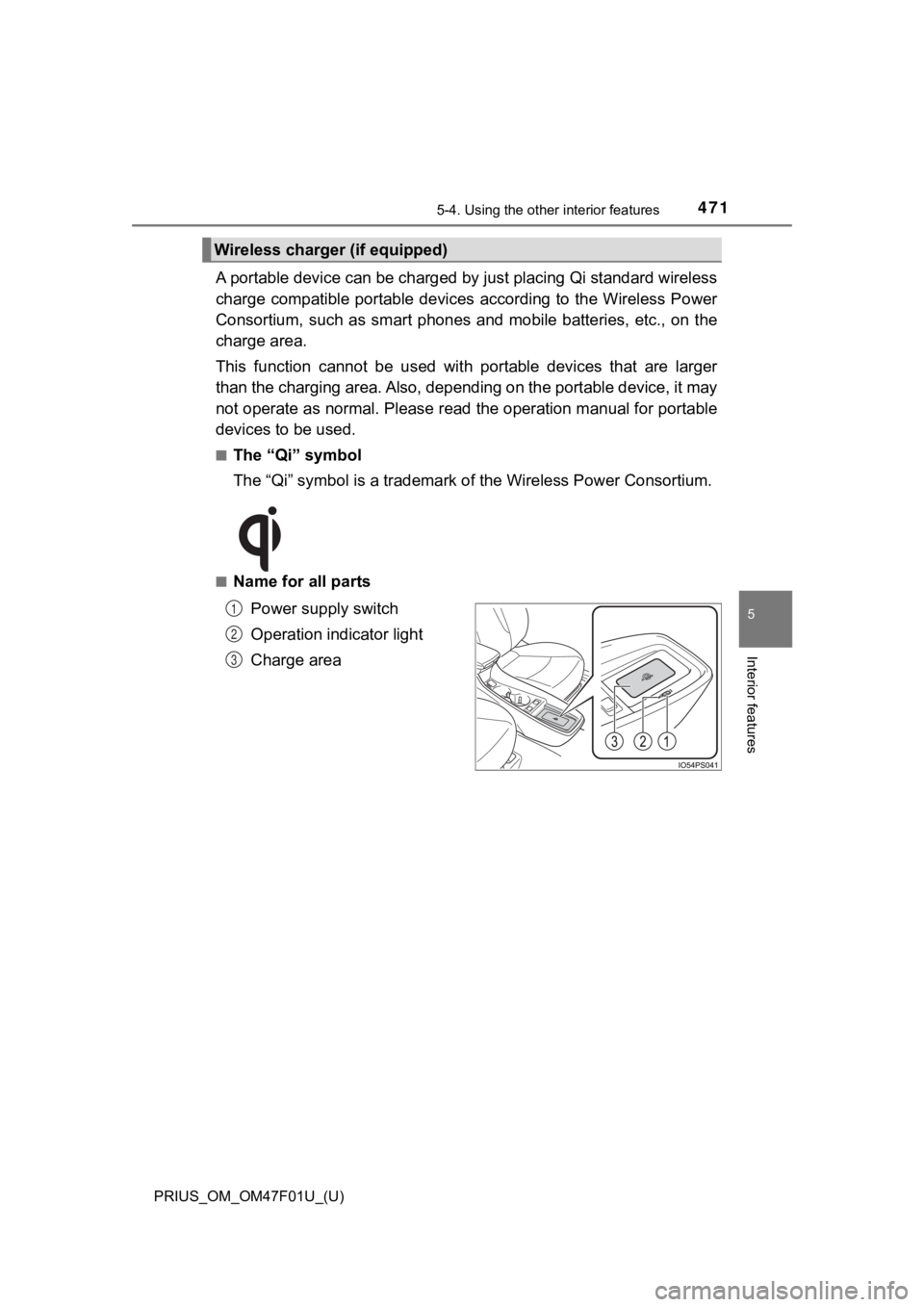
■Name for all parts
Power supply switch
Operation indicator light
Charge area
Wireless charger (if equipped)
1
2
3
Page 472 of 744
472
PRIUS_OM_OM47F01U_(U)
5-4. Using the other interior features
■Using the wireless charger
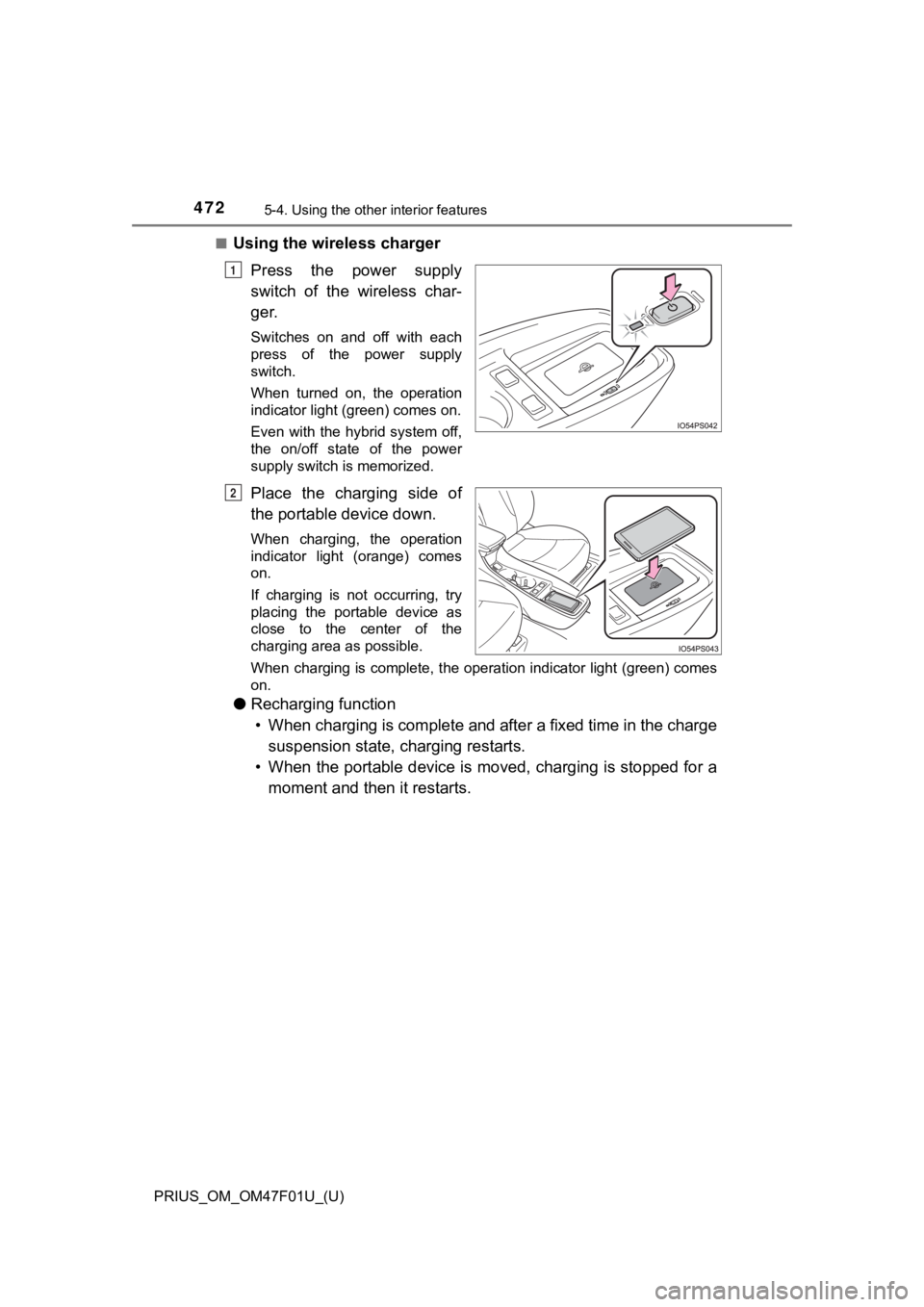
Press the power supply
switch of the wireless char-
ger.
Switches on and off with each
press of the power supply
switch.
When turned on, the operation
indicator light (green) comes on.
Even with the hybrid system off,
the on/off state of the power
supply switch is memorized.
Place the charging side of
the portable device down.
When charging, the operation
indicator light (orange) comes
on.
If charging is not occurring, try
placing the portable device as
close to the center of the
charging area as possible.
When charging is complete, the operation indicator light (green ) comes
on.
● Recharging function
• When charging is complete and after a fixed time in the charge suspension state, c harging restarts.
• When the portable device is moved, charging is stopped for a moment and then it restarts.
1
2
Page 473 of 744
PRIUS_OM_OM47F01U_(U)
4735-4. Using the other interior features
5
Interior features
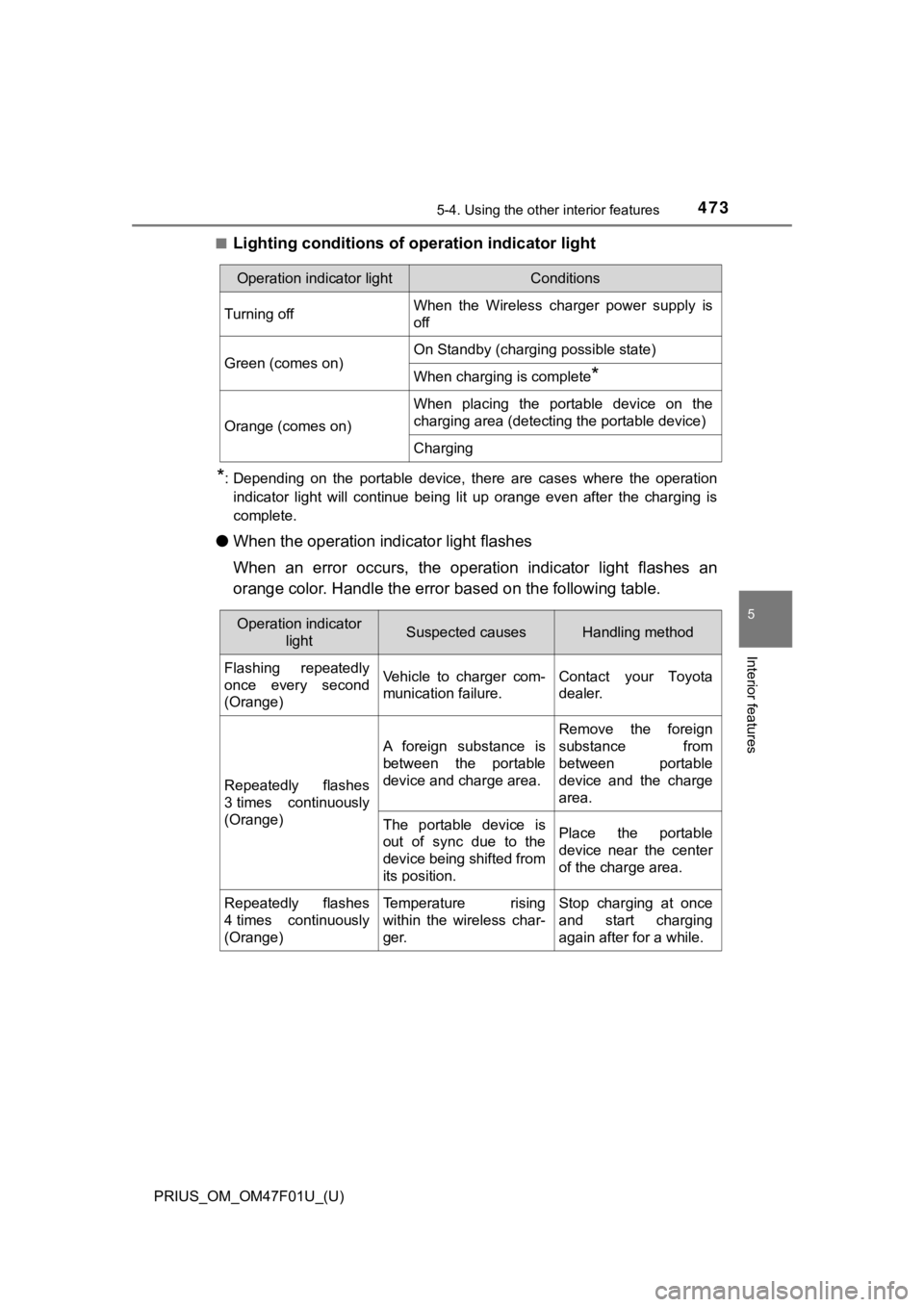
■Lighting conditions of operation indicator light
*: Depending on the portable device, there are cases where the op eration
indicator light will continue being lit up orange even after the charging is
complete.
● When the operation indi cator light flashes
When an error occurs, the operat ion indicator light flashes an
orange color. Handle the error based on the following table.
Operation indicator lightConditions
Turning offWhen the Wireless charger power supply is
off
Green (comes on)On Standby (charging possible state)
When charging is complete*
Orange (comes on)
When placing the portable device on the
charging area (detecting the portable device)
Charging
Operation indicator
lightSuspected causesHandling method
Flashing repeatedly
once every second
(Orange)Vehicle to charger com-
munication failure.Contact your Toyota
dealer.
Repeatedly flashes
3 times continuously
(Orange)
A foreign substance is
between the portable
device and charge area.
Remove the foreign
substance from
between portable
device and the charge
area.
The portable device is
out of sync due to the
device being shifted from
its position.Place the portable
device near the center
of the charge area.
Repeatedly flashes
4 times continuously
(Orange)Temperature rising
within the wireless char-
ger.Stop charging at once
and start charging
again after for a while.