fog light TOYOTA PRIUS 2022 User Guide
[x] Cancel search | Manufacturer: TOYOTA, Model Year: 2022, Model line: PRIUS, Model: TOYOTA PRIUS 2022Pages: 744, PDF Size: 14.35 MB
Page 268 of 744
268
PRIUS_OM_OM47F01U_(U)
4-3. Operating the lights and wipers
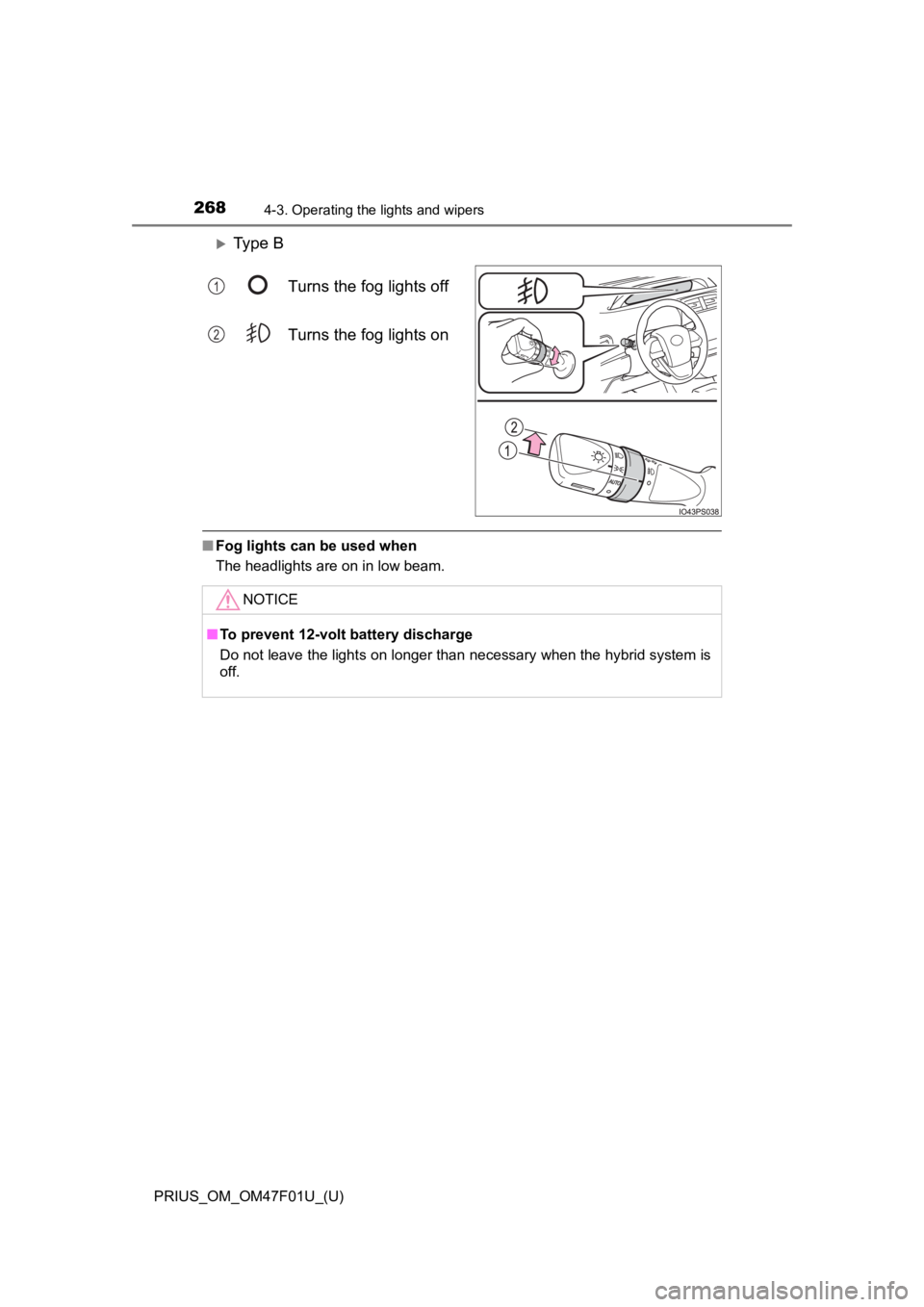
Ty p e BTurns the fog lights off
Turns the fog lights on
■Fog lights can be used when
The headlights are on in low beam.
1
2
NOTICE
■To prevent 12-volt battery discharge
Do not leave the lights on longer than necessary when the hybrid system is
off.
Page 285 of 744
PRIUS_OM_OM47F01U_(U)
2854-5. Using the driving support systems
4
Driving
WARNING
■To avoid malfunction of the front camera
Observe the following precautions.
Otherwise, the front camera may not operate properly, possibly leading to
an accident resulting in death or serious injury.
● Keep the windshield clean at all times.
• If the windshield is dirty or covered with an oily film, water droplets,
snow, etc., clean the windshield.
• If a glass coating agent is applied to the windshield, it will still be neces- sary to use the windshield wipers to remove water droplets, etc. from
the area of the windshield in front of the front camera.
• If the inner side of the windshield where the front camera is installed is
dirty, contact your Toyota dealer.
● If the part of the windshield in front of the front camera is fogged up or cov-
ered with condensation, or ice, use the windshield defogger to remove the
fog, condensation, or ice. ( P. 434, 444)
● If water droplets cannot be properly removed from the area of t he wind-
shield in front of the front camera by the windshield wipers, replace the
wiper insert or wiper blade.
● Do not attach window tint to the windshield.
● Replace the windshield if it is damaged or cracked.
After replacing the windshield, the front camera must be recali brated. Con-
tact your Toyota dealer for details.
● Do not allow liquids to contact the front camera.
● Do not allow bright lights to shine into the front camera.
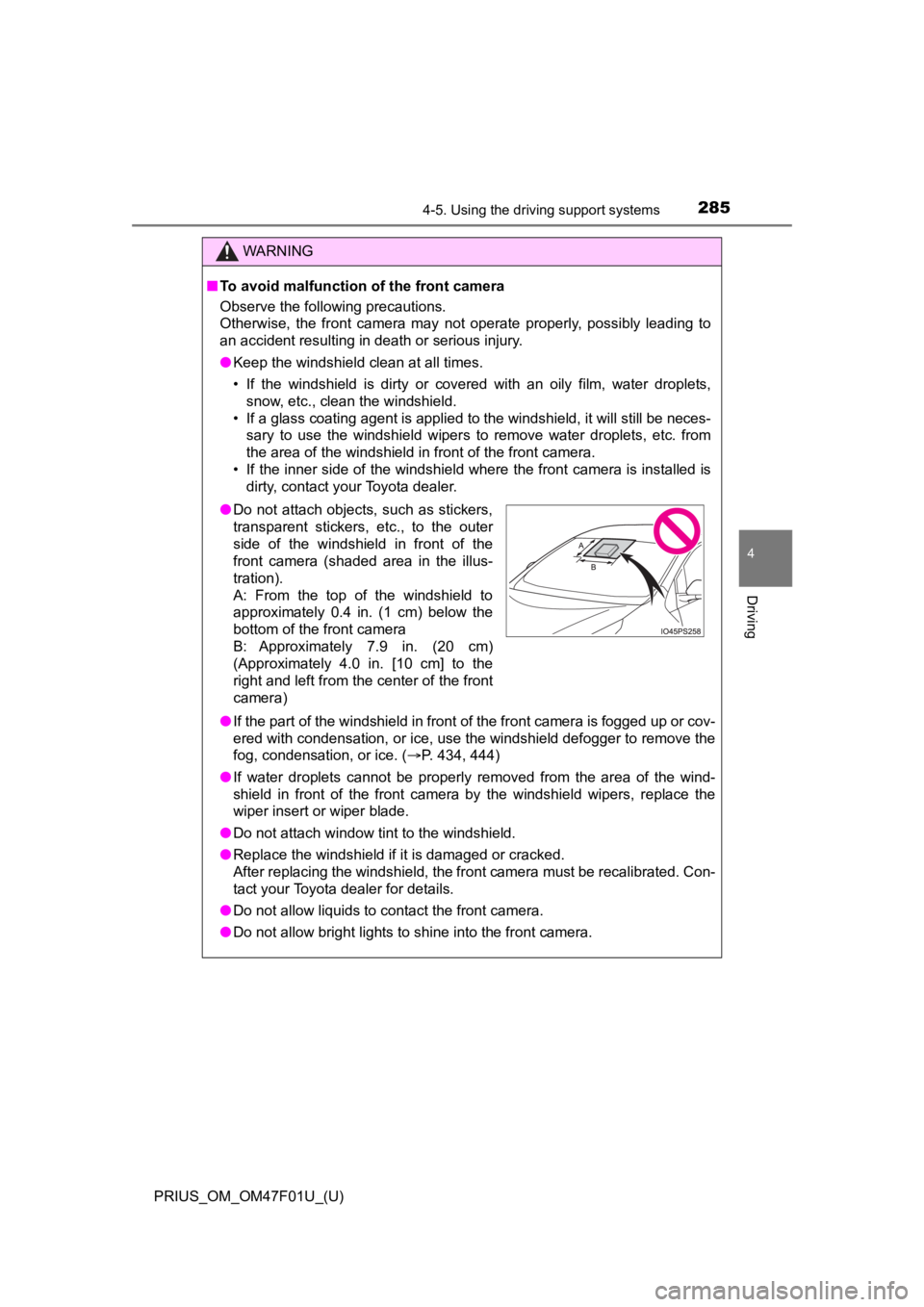
●Do not attach objects, such as stickers,
transparent stickers, etc., to the outer
side of the windshield in front of the
front camera (shaded area in the illus-
tration).
A: From the top of the windshield to
approximately 0.4 in. (1 cm) below the
bottom of the front camera
B: Approximately 7.9 in. (20 cm)
(Approximately 4.0 in. [10 cm] to the
right and left from the center of the front
camera)
Page 289 of 744
PRIUS_OM_OM47F01U_(U)
2894-5. Using the driving support systems
4
Driving
■If a warning message is displayed on the multi-information disp lay
A system may be temporarily unavailable or there may be a malfu nction in
the system.
● In the following situations, perform the actions specified in t he table. When
the normal operating conditions are detected, the message will disappear
and the system will become operational.
If the message does not disappear, contact your Toyota dealer.
SituationActions
When the area around a cam-
era is covered with dirt, mois-
ture (fogged up, covered with
condensation, ice, etc.), or
other foreign matter
Using the wiper and A/C function,
remove the dirt and other attached mat-
ter. ( P. 434, 444)
When the temperature around
the front camera is outside of
the operational range, such as
when the vehicle is in the sun or
in an extremely cold environ-
ment
If the front camera is hot, such as after
the vehicle had been parked in the sun,
use the air conditioning system to
decrease the temperature around the
front camera.
If a sunshade was used when the vehi-
cle was parked, depending on its type,
the sunlight reflected from the surface
of the sunshade may cause the tem-
perature of the front camera to become
excessively high.
If the front camera is cold, such after the
vehicle is parked in an extremely cold
environment, use the air conditioning
system to increase the temperature
around the front camera.
The area in front of the front
camera is obstructed, such as
when the hood is open or a
sticker is attached to the part of
the windshield in front of the
front camera.
Close the hood, remove the sticker, etc.
to clear the obstruction.
When “Pre-Collision System
Unavailable” is displayed.Check whether there is attached materi-
als on the radar sensor and radar sensor
cover, and if there is, remove it.
Page 290 of 744

290
PRIUS_OM_OM47F01U_(U)
4-5. Using the driving support systems
●In the following situations, if the situation has changed (or the vehicle has
been driven for some time) and the normal operating conditions are
detected, the message will disappear and the system will become opera-
tional.
If the message does not disappear, contact your Toyota dealer. • When the temperature around the radar sensor is outside of the opera-
tional range, such as when the vehicle is in the sun or in an e xtremely
cold environment
• When the front camera cannot detect objects in front of the ve hicle, such
as when driving in the dark, snow, or fog, or when bright lights are shining
into the front camera
• Depending on the conditions in the vicinity of the vehicle, th e radar may
judge the surrounding environment can not be properly recognize d. In
that case, “Pre-Collision Syst em Unavailable” is displayed.
Page 303 of 744
PRIUS_OM_OM47F01U_(U)
3034-5. Using the driving support systems
4
Driving
WARNING
■Before using LTA system
● Do not rely solely upon the LTA system. The LTA system does not auto-
matically drive the vehicle or reduce the amount of attention that must be
paid to the area in front of the vehicle. The driver must always assume full
responsibility for driving safely by paying careful attention to the surround-
ing conditions and operating the steering wheel to correct the path of the
vehicle. Also, the driver must take adequate breaks when fatigued, such
as from driving for a long period of time.
● Failure to perform appropriate driving operations and pay careful attention
may lead to an accident, resulting in death or serious injury.
● When not using the LTA system, use the LTA switch to turn the system off.
■ Situations unsuitable for LTA system
In the following situations, use the LTA switch to turn the system off. Failure
to do so may lead to an accident, resulting in death or serious injury.
● Vehicle is driven on a road surface which is slippery due to rainy weather,
fallen snow, freezing, etc.
● Vehicle is driven on a snow-covered road.
● White (yellow) lines are difficult to see due to rain, snow, fog, dust, etc.
● Vehicle is driven in a temporary lane or restricted lane due to construction
work.
● Vehicle is driven in a construction zone.
● A spare tire, tire chains, etc. are equipped.
● When the tires have been excessively worn, or when the tire inf lation pres-
sure is low.
● During emergency towing.
■ Preventing LTA system malfunctions and operations performed by
mistake
● Do not modify the headlights or place stickers, etc. on the sur face of the
lights.
● Do not modify the suspension etc. If the suspension etc. needs to be
replaced, contact your Toyota dealer.
● Do not install or place anything on the hood or grille. Also, d o not install a
grille guard (bull bars, kangaroo bar, etc.).
● If your windshield needs repairs, contact your Toyota dealer.
Page 319 of 744
PRIUS_OM_OM47F01U_(U)
3194-5. Using the driving support systems
4
Driving
In the following situations, the RSA syst em will notify the driver.
● When the vehicle speed exceeds the speed notification threshold of
the speed limit sign displayed, the sign display will be emphas ized
and a buzzer will sound.
● When the RSA system recognizes a do not enter sign and deter-
mines that your vehicle has ent ered a no-entry area, the displayed
sign will flash and a buzzer will sound.
Depending on the situation, a not ification function may not operate
properly.
■ Setting procedure
P. 151
■ Automatic turn-off of RSA sign display
In the following situations, a displayed speed limit sign and/o r do not enter
sign will stop being displayed automatically:
● No sign has been recognized for a certain distance.
● The road changes due to a left or right turn, etc.
In the following situations, stop and yield signs will stop bei ng displayed auto-
matically:
● The system determines that your vehicle has passed the sign.
● The road changes due to a left or right turn, etc.
■ Conditions in which the function may not operate or detect correctly
In the following situations, RSA does not operate normally and may not rec-
ognize signs, display the incorrect sign, etc. However, this do es not indicate a
malfunction.
● The front camera is misaligned due to a strong impact being applied to the
sensor, etc.
● Dirt, snow, stickers, etc. are on the windshield near the front camera.
● In inclement weather such as heavy rain, fog, snow or sand storms
● Light from an oncoming vehicle, the sun, etc. enters the front camera.
● The sign is dirty, faded, tilted or bent.
● The contrast of electronic sign is low.
● All or part of the sign is hidden by the leaves of a tree, a pole, etc.
● The sign is only visible to the front camera for a short amount of time.
● The driving scene (turning, lane change, etc.) is judged incorr ectly.
● If a sign not appropriate for the currently traveled lane, but the sign exists
directly after a freeway branches, or in an adjacent lane just before merging.
● Stickers are attached to the rear of the preceding vehicle.
Notification function
Page 368 of 744
368
PRIUS_OM_OM47F01U_(U)
4-5. Using the driving support systems
WARNING
■Cautions regarding the use of the system
There is a limit to the degree of recognition accuracy and cont rol perfor-
mance that this system can provide, do not overly rely on this system. The
driver is always responsible for paying attention to the vehicl e’s surround-
ings and driving safely.
■ To ensure the system can operate properly
Observe the following precautions to avoid an unexpected accident.
● Do not damage the sensors, and always keep them clean.
● Do not attach a sticker or install an electronic component, such as a backlit
license plate (especially fluorescent type), fog lights, fender pole or wire-
less antenna near a radar sensor.
● Do not subject the surrounding area of the sensor to a strong impact. If
subjected to an impact, have the vehicle inspected by your Toyota dealer.
If the front or rear bumper needs to be removed/installed or replaced, con-
tact your Toyota dealer.
● Do not modify, disassemble or paint the sensors.
● Do not attach a license plate cover.
● Keep your tires properly inflated.
■ When to disable the function
In the following situations, disable the function as it may operate even
though there is no possibility of a collision.
● Failing to observe the warnings above.
● A non-genuine Toyota suspension (lowered suspension, etc.) is installed.
■ Side sensors
In the following situations, the intuitive parking assist may n ot operate nor-
mally and may result in an unexpected accident. Drive carefully.
● Obstacles may not be detected in the side areas until the vehicle is driven
for a short time and a scan of the side areas is completed. ( P. 364)
● Even after the scan of the side areas is completed, obstacles s uch as
other vehicles, people or animals that approach from the sides cannot be
detected.
● Even after the scan of the side areas is completed, obstacles may not be
detected depending on the surrounding situation of the vehicle.
At that time, the side sensor operation displays ( P. 359) temporary turn
off.
■ Notes when washing the vehicle
● Do not apply intensive bursts of water or steam to the sensor area.
Doing so may result in the sensor malfunctioning.
● When using steam to wash the vehicle, do not direct steam too c lose to
the sensors. The sensors may not function properly if subjected to steam.
Page 429 of 744
429
PRIUS_OM_OM47F01U_(U)
5Interior features
5-1. Using the air conditioning system and defogger
Automatic air conditioning system (vehicles with
7-inch display) ................. 430
Automatic air conditioning system (vehicles with
11.6-inch display) ............ 440
Heated steering wheel/ seat heaters .................... 450 5-2. Using the interior lights
Interior lights list ................ 452• Front interior light .......... 453
• Front personal lights ..... 453
• Rear interior light .......... 454
5-3. Using the storage features
List of storage features ..... 455 • Glove box...................... 456
• Console box .................. 456
• Cup holders .................. 457
• Bottle holders/
door pockets ................. 458
• Auxiliary boxes.............. 459
• Seat back pockets ........ 460
Luggage compartment features ........................... 461
5-4. Using the other interior features
Other interior features ....... 467 • Sun visors ..................... 467
• Vanity mirrors................ 467
• Power outlets ................ 468
• USB charging ports....... 469
• Wireless charger ........... 471
• Armrest ......................... 480
• Coat hooks.................... 480
• Assist grips ................... 481
Garage door opener.......... 482
Page 451 of 744
PRIUS_OM_OM47F01U_(U)
4515-1. Using the air conditioning system and defogger
5
Interior features
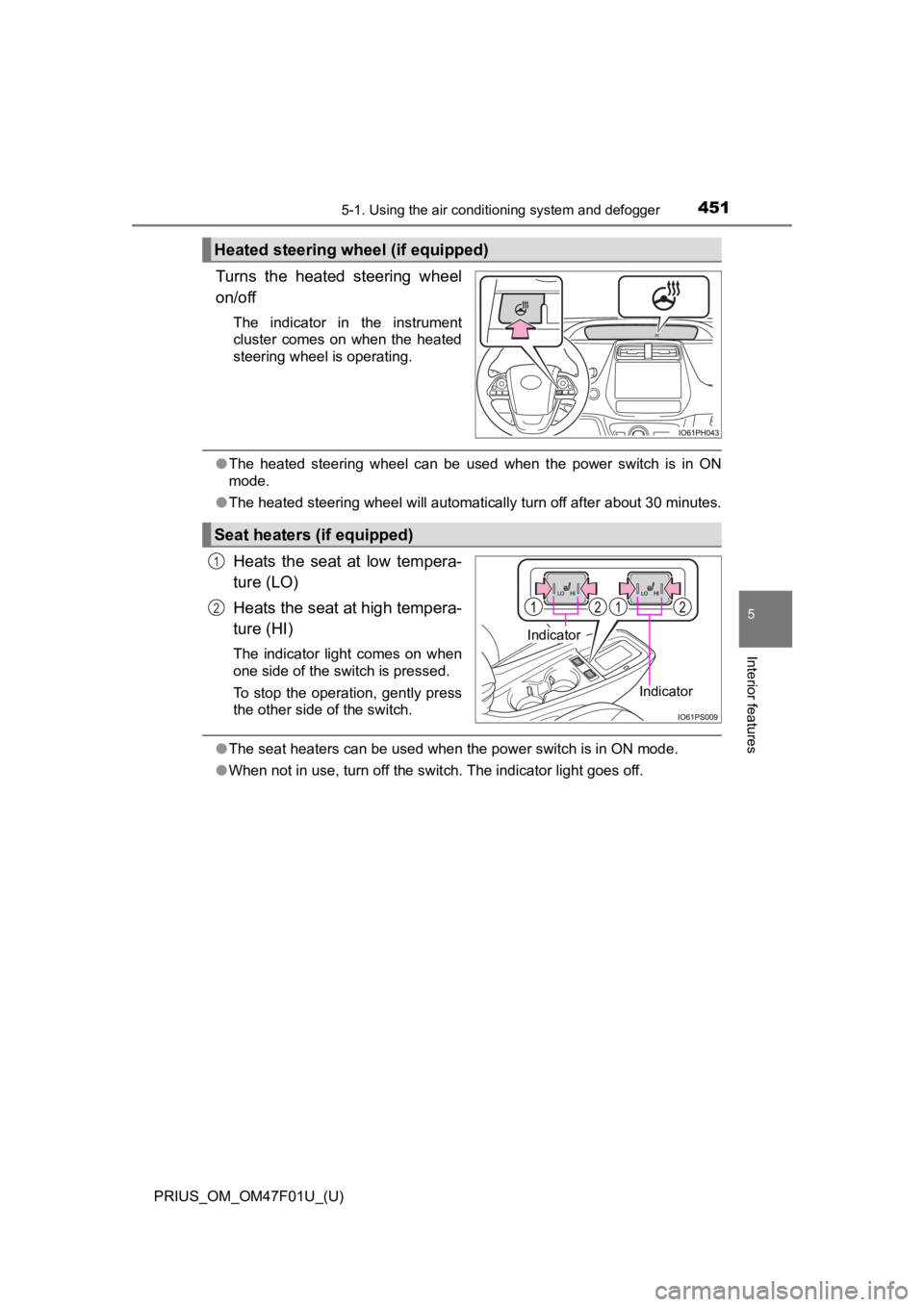
Turns the heated steering wheel
on/off
The indicator in the instrument
cluster comes on when the heated
steering wheel is operating.
●The heated steering wheel can be used when the power switch is in ON
mode.
● The heated steering wheel will automatically turn off after about 30 minutes.
Heats the seat at low tempera-
ture (LO)
Heats the seat at high tempera-
ture (HI)
The indicator light comes on when
one side of the switch is pressed.
To stop the operation, gently press
the other side of the switch.
●The seat heaters can be used when the power switch is in ON mod e.
● When not in use, turn off the switch. The indicator light goes off.
Heated steering wheel (if equipped)
Seat heaters (if equipped)
Indicator
Indicator
1
2
Page 500 of 744
500
PRIUS_OM_OM47F01U_(U)
6-1. Maintenance and care
NOTICE
■Cleaning detergents
● Do not use the following types of detergent, as they may discolor the vehi-
cle interior or cause streaks or damage to painted surfaces:
• Non-seat portions: Organic substances such as benzene or gasoline,
alkaline or acidic solutions, dye, and bleach
• Seats: Alkaline or acidic solutions, such as thinner, benzene, and alco-
hol
● Do not use polish wax or polish cleaner. The instrument panel’s or other
interior part’s painted surface may be damaged.
■ Preventing damage to leather surfaces
Observe the following precautions to avoid damage to and deterioration of
leather surfaces:
● Remove any dust or dirt from leather surfaces immediately.
● Do not expose the vehicle to direct sunlight for extended periods of time.
Park the vehicle in the shade, especially during summer.
● Do not place items made of vinyl, plastic, or containing wax on the uphol-
stery, as they may stick to the leather surface if the vehicle interior heats
up significantly.
■ Water on the floor
Do not wash the vehicle floor with water.
Vehicle systems such as the audio system may be damaged if water comes
into contact with electrical components such as the audio system above or
under the floor of the vehicle. Water may also cause the body to rust.
■ When cleaning the inside of the windshield (vehicles with Toyot a
Safety Sense 2.0)
Do not allow glass cleaner to contact the lens. Also, do not touch the lens.
( P. 283).
■ Cleaning the inside of the rear window
● Do not use glass cleaner to clean the rear window, as this may cause
damage to the rear window defogger heater wires. Use a cloth dampened
with lukewarm water to gently wipe the window clean. Wipe the w indow in
strokes running parallel to the heater wires.
● Be careful not to scratch or damage the heater wires.