reset TOYOTA PRIUS 2022 User Guide
[x] Cancel search | Manufacturer: TOYOTA, Model Year: 2022, Model line: PRIUS, Model: TOYOTA PRIUS 2022Pages: 744, PDF Size: 14.35 MB
Page 142 of 744
142
PRIUS_OM_OM47F01U_(U)
2. Instrument cluster
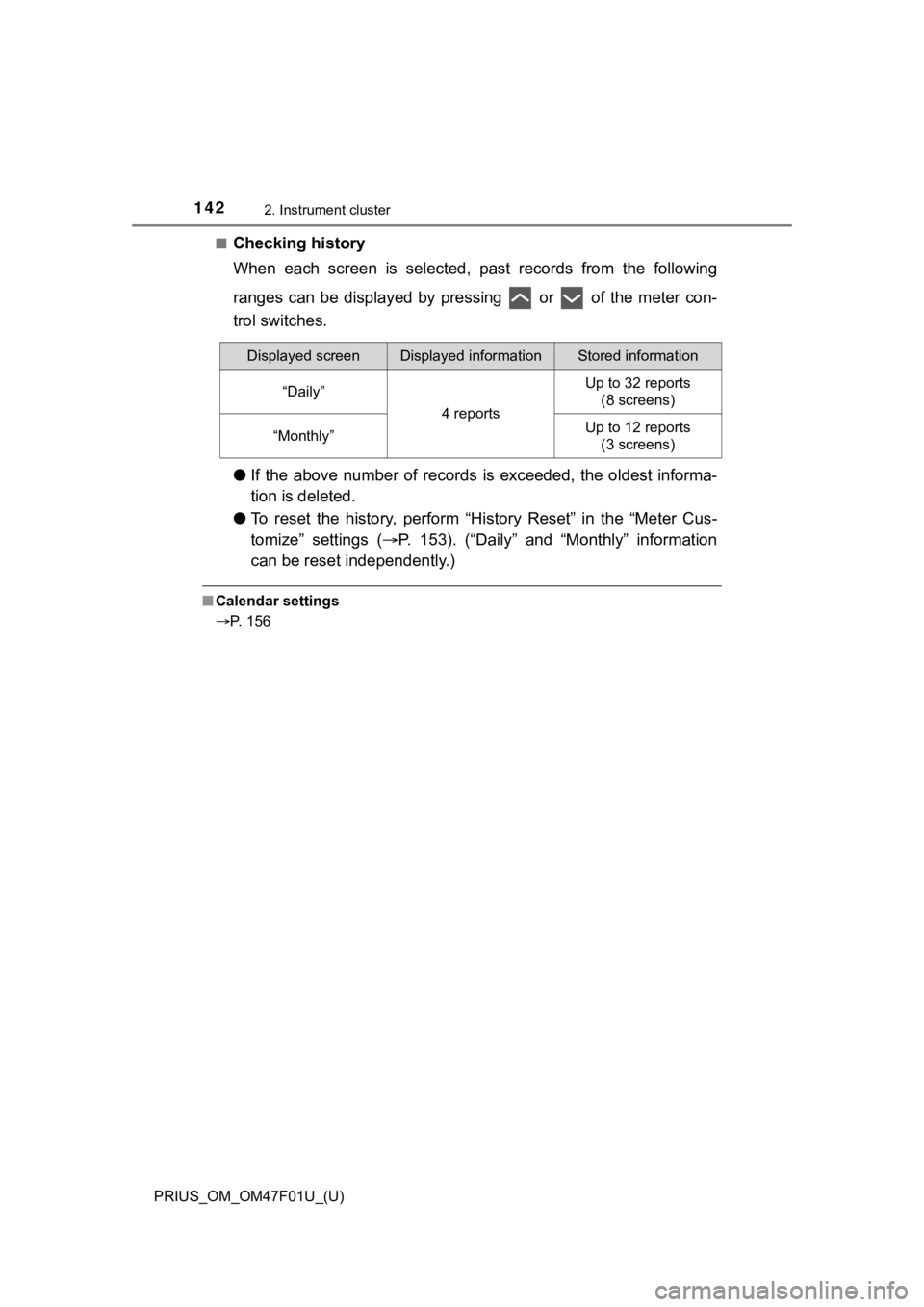
■Checking history
When each screen is selected, past records from the following
ranges can be displayed by pressing or of the meter con-
trol switches.
●If the above number of records is exceeded, the oldest informa-
tion is deleted.
● To reset the history, perform “Hi story Reset” in the “Meter Cus-
tomize” settings ( P. 153). (“Daily” and “Monthly” information
can be reset independently.)
■ Calendar settings
P. 156
Displayed screenDisplayed informationStored information
“Daily”
4 reports
Up to 32 reports
(8 screens)
“Monthly”Up to 12 reports (3 screens)
Page 155 of 744
PRIUS_OM_OM47F01U_(U)
1552. Instrument cluster
2
Instrument cluster
*1: If equipped
*2: When the screen is turned off, pressing displays the setting screen
again.
*3: U.S.A. only
*4: Except for Canada
*5: For Canada
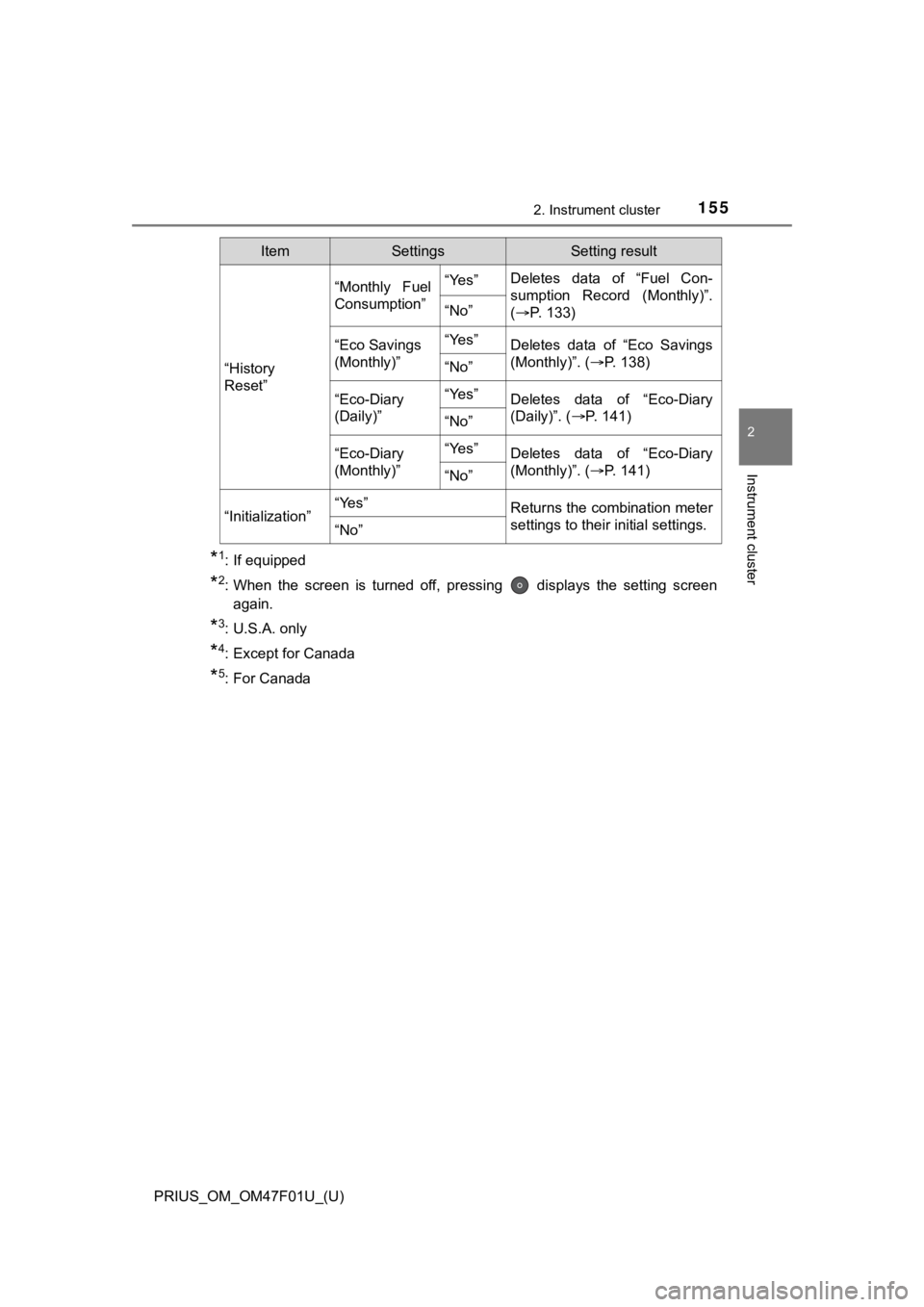
“History
Reset”
“Monthly Fuel
Consumption”“Yes”Deletes data of “Fuel Con-
sumption Record (Monthly)”.
( P. 1 3 3 )
“No”
“Eco Savings
(Monthly)”“Yes”Deletes data of “Eco Savings
(Monthly)”. (P. 138)
“No”
“Eco-Diary
(Daily)”“Yes”Deletes data of “Eco-Diary
(Daily)”. ( P. 141)
“No”
“Eco-Diary
(Monthly)”“Yes”Deletes data of “Eco-Diary
(Monthly)”. ( P. 141)
“No”
“Initialization”“Yes”Returns the combination meter
settings to their initial settings.
“No”
ItemSettingsSetting result
Page 163 of 744

PRIUS_OM_OM47F01U_(U)
1632. Instrument cluster
2
Instrument cluster
■Enabling/disabling of the head-up display
When the head-up display is turned off with the “HUD” switch, it is not dis-
played until the “HUD” switch is used to turn the head-up displ ay on again.
(Operation of the head-up display is not linked with the power switch.)
■ Display brightness
●The brightness of the head-up display is automatically adjusted according to
the operation status of the headlights (on/off) and the brightn ess of the sur-
roundings.
● When the brightness of the head-up display is adjusted to a cer tain level or
higher, the display automatically dims when the vehicle is stopped. Once the
vehicle starts off and the vehicle speed reaches approximately 3.1 mph
(5 km/h) or more, the display automatically returns to its previous bright-
ness.
■ Vehicle speed display
In extremely cold environments, the display of the speedometer and the vehi-
cle speed of the head-up display may slightly differ.
■ Head-up display
The head-up display may seem dark and hard to see when viewed t hrough
sunglasses, especially polarized sunglasses.
■ When the 12-volt battery is disconnected
The customize settings of the head-up display will be reset.
■ Route guidance display (vehicles with navigation system)
The route guidance is not displayed on both the head-up display and multi-
information display simultaneously. When the route guidance is displayed on
the head-up display, the multi-information display does not dis play the route
guidance even if the navigation system-linked display ( P. 145) is selected
on the multi-information display.
Page 168 of 744
168
PRIUS_OM_OM47F01U_(U)
2. Instrument cluster
■Display procedurePress the “MENU” button.
Select “Info” on t he “Menu” screen.
If the “Information” screen is displayed, select “ECO” on the
“Information” screen.
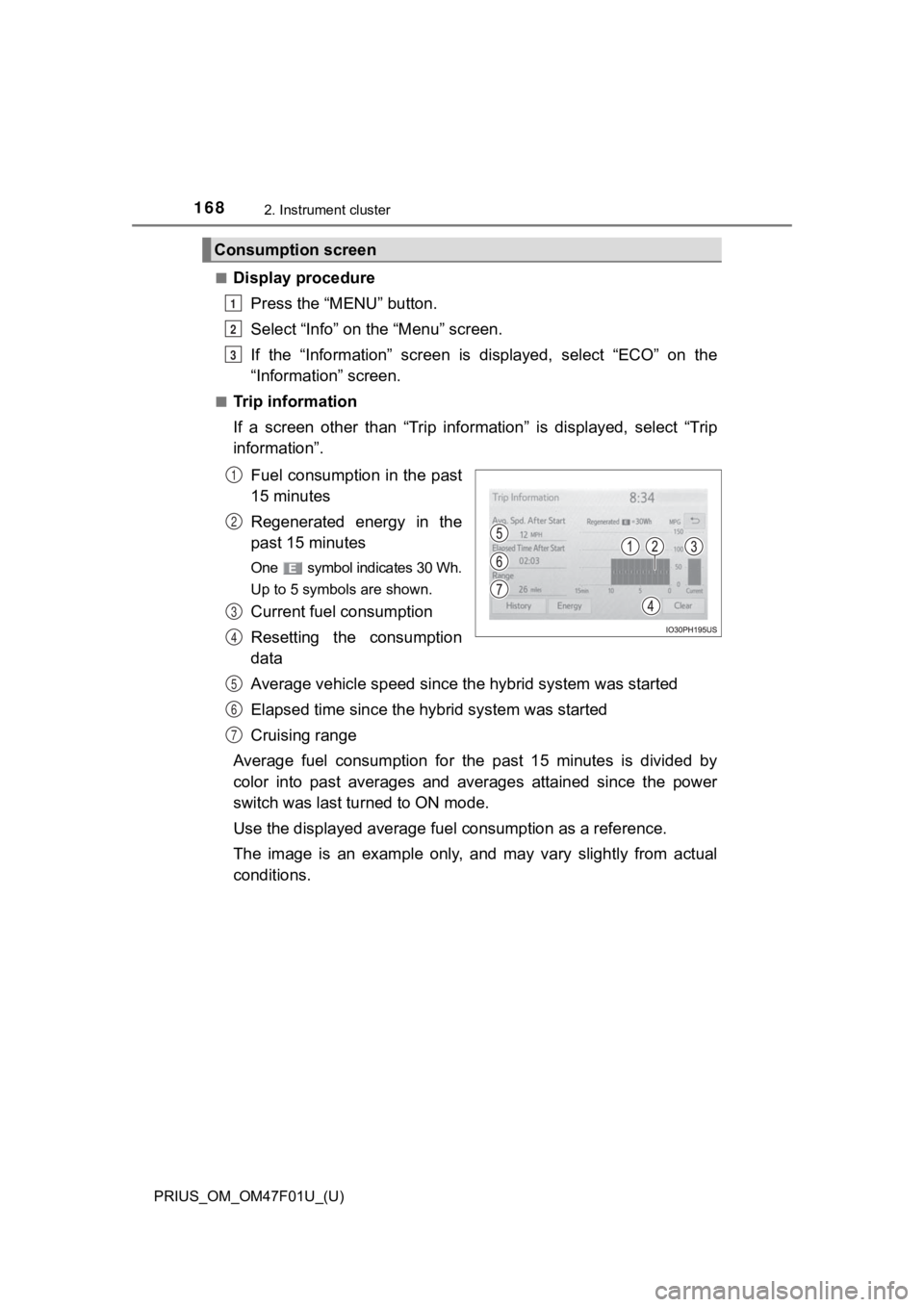
■Trip information
If a screen other than “Trip information” is displayed, select “Trip
information”.
Fuel consumption in the past
15 minutes
Regenerated energy in the
past 15 minutes
One symbol indicates 30 Wh.
Up to 5 symbols are shown.
Current fuel consumption
Resetting the consumption
data
Average vehicle speed since the hybrid system was started
Elapsed time since the hybr id system was started
Cruising range
Average fuel consumption for the past 15 minutes is divided by
color into past averages and averages attained since the power
switch was last turned to ON mode.
Use the displayed average fuel consumption as a reference.
The image is an example only, and may vary slightly from actual
conditions.
Consumption screen
1
2
3
1
2
3
4
5
6
7
Page 169 of 744
PRIUS_OM_OM47F01U_(U)
1692. Instrument cluster
2
Instrument cluster
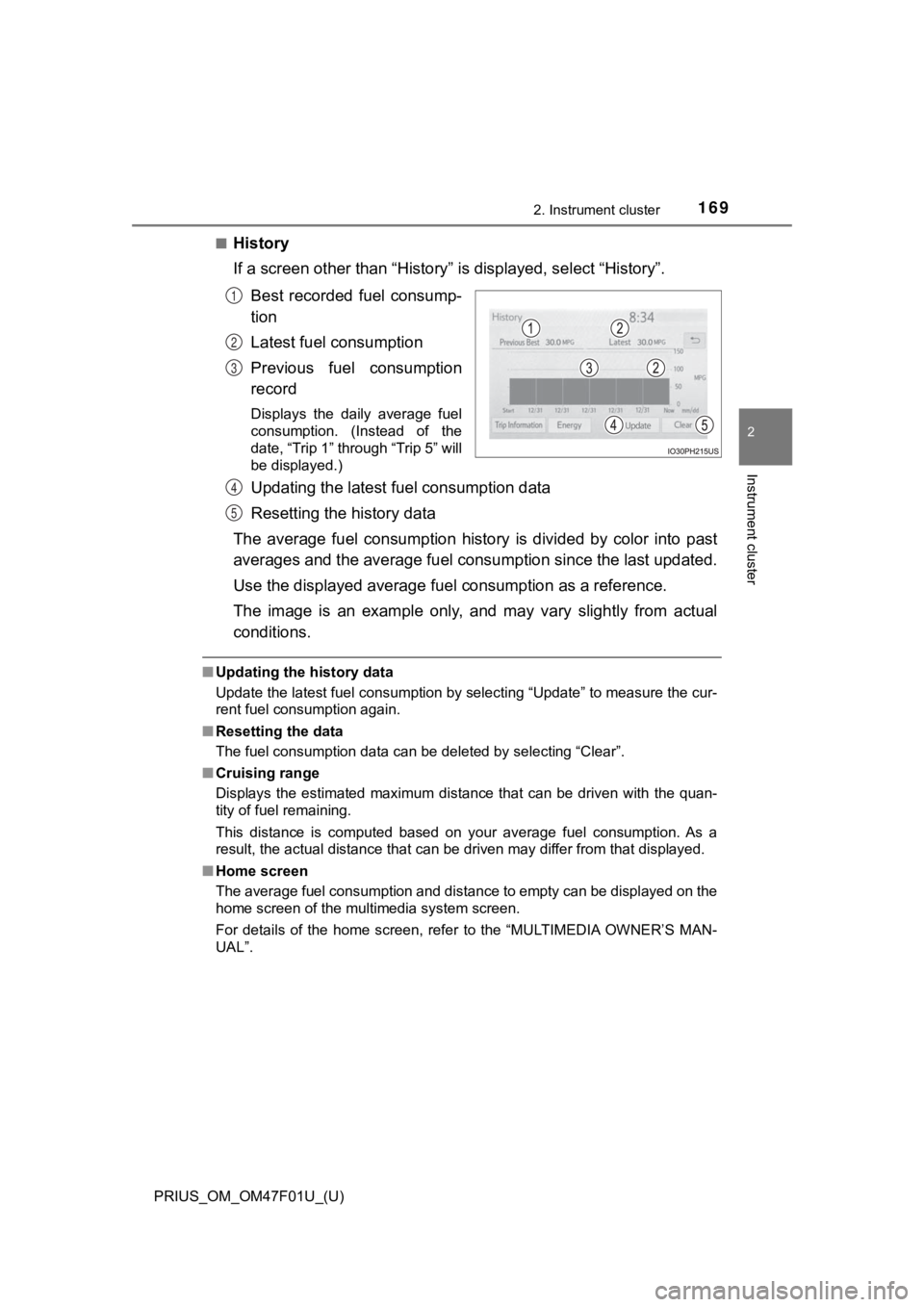
■History
If a screen other than “History” is displayed, select “History”.
Best recorded fuel consump-
tion
Latest fuel consumption
Previous fuel consumption
record
Displays the daily average fuel
consumption. (Instead of the
date, “Trip 1” through “Trip 5” will
be displayed.)
Updating the latest fuel consumption data
Resetting the history data
The average fuel consumption history is divided by color into p ast
averages and the average fuel con sumption since the last updated.
Use the displayed average fuel consumption as a reference.
The image is an example only, and may vary slightly from actual
conditions.
■ Updating the history data
Update the latest fuel consumption by selecting “Update” to mea sure the cur-
rent fuel consumption again.
■ Resetting the data
The fuel consumption data can be deleted by selecting “Clear”.
■ Cruising range
Displays the estimated maximum distance that can be driven with the quan-
tity of fuel remaining.
This distance is computed based on your average fuel consumptio n. As a
result, the actual distance that can be driven may differ from that displayed.
■ Home screen
The average fuel consumption and distance to empty can be displ ayed on the
home screen of the multimedia system screen.
For details of the home screen, refer to the “MULTIMEDIA OWNER’ S MAN-
UAL”.
1
2
3
4
5
Page 173 of 744
PRIUS_OM_OM47F01U_(U)
1732. Instrument cluster
2
Instrument cluster
■Display procedurePress the “MENU” button.
Select “Info” on the screen.
Select “Past Recor d” on the “Information” screen.
Press the “HOME” button and select “Info” on the screen. You ca n
select “Past Record”.
■
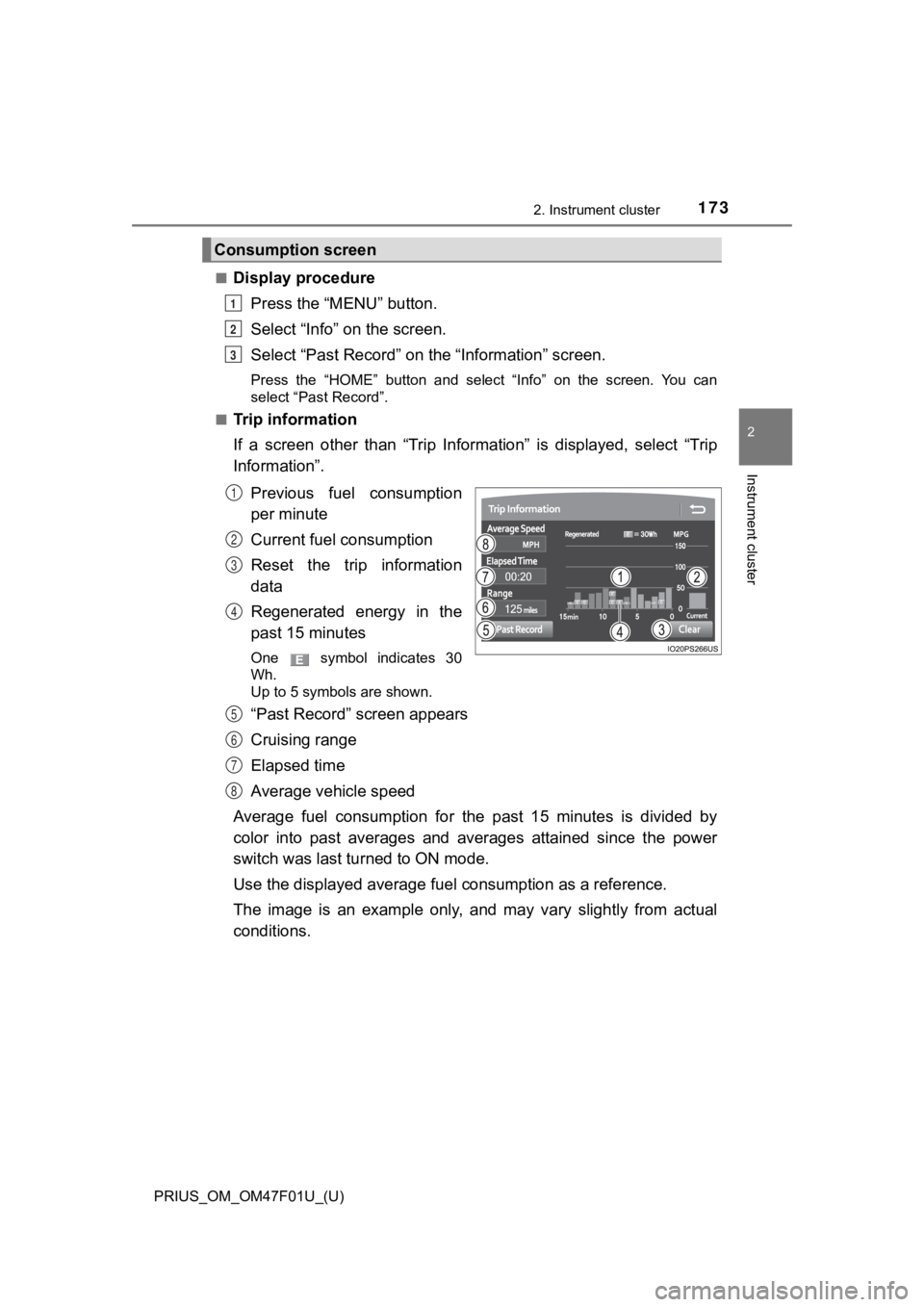
Trip information
If a screen other than “Trip Information” is displayed, select “Trip
Information”.
Previous fuel consumption
per minute
Current fuel consumption
Reset the trip information
data
Regenerated energy in the
past 15 minutes
One symbol indicates 30
Wh.
Up to 5 symbols are shown.
“Past Record” screen appears
Cruising range
Elapsed time
Average vehicle speed
Average fuel consumption for the past 15 minutes is divided by
color into past averages and averages attained since the power
switch was last turned to ON mode.
Use the displayed average fuel consumption as a reference.
The image is an example only, and may vary slightly from actual
conditions.
Consumption screen
1
2
3
1
2
3
4
5
6
7
8
Page 174 of 744
174
PRIUS_OM_OM47F01U_(U)
2. Instrument cluster
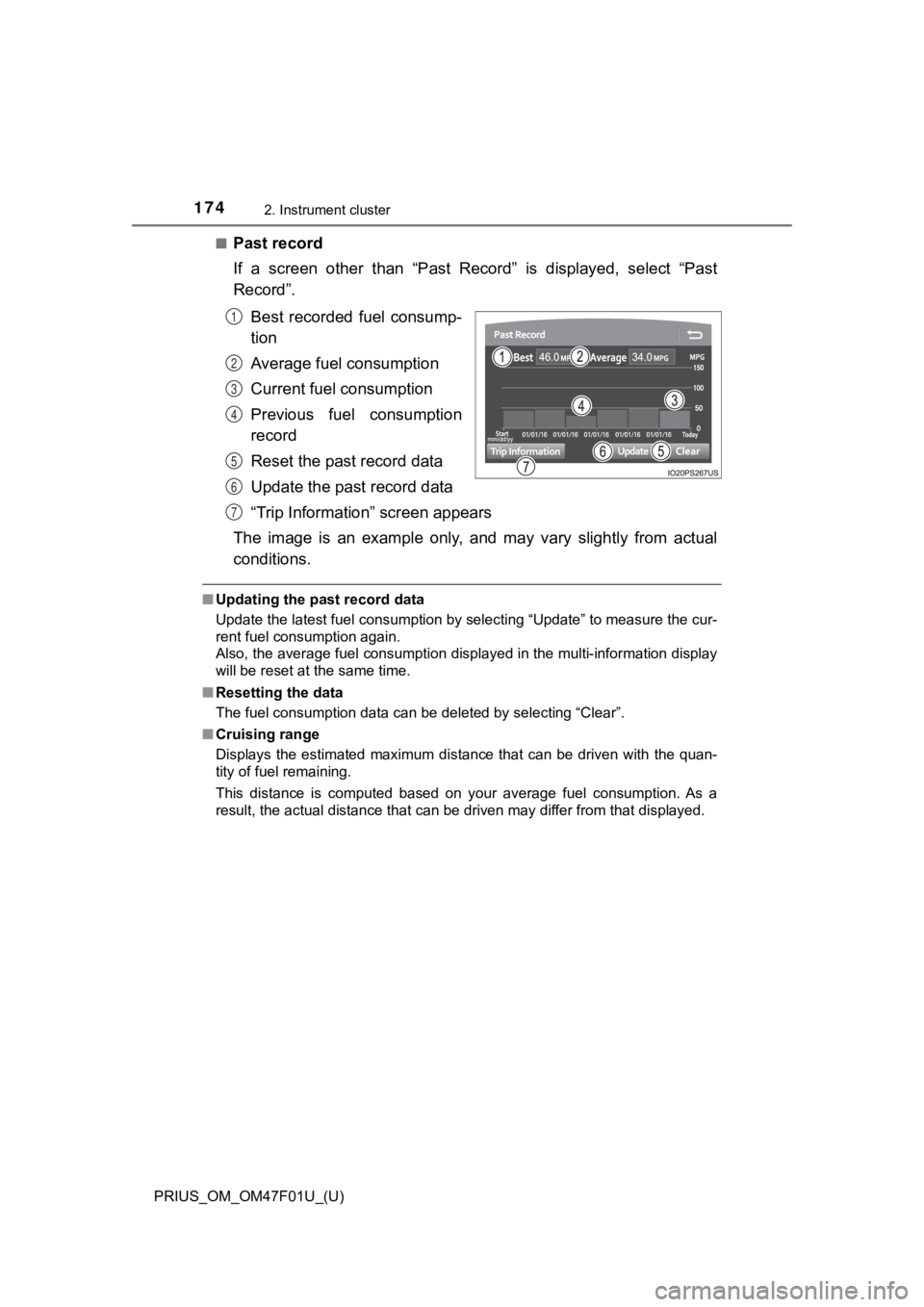
■Past record
If a screen other than “Past Record” is displayed, select “Past
Record”.Best recorded fuel consump-
tion
Average fuel consumption
Current fuel consumption
Previous fuel consumption
record
Reset the past record data
Update the past record data
“Trip Information” screen appears
The image is an example only, and may vary slightly from actual
conditions.
■ Updating the past record data
Update the latest fuel consumption by selecting “Update” to mea sure the cur-
rent fuel consumption again.
Also, the average fuel consumption displayed in the multi-infor mation display
will be reset at the same time.
■ Resetting the data
The fuel consumption data can be deleted by selecting “Clear”.
■ Cruising range
Displays the estimated maximum distance that can be driven with the quan-
tity of fuel remaining.
This distance is computed based on your average fuel consumptio n. As a
result, the actual distance that can be driven may differ from that displayed.
1
2
3
4
5
6
7
Page 243 of 744

PRIUS_OM_OM47F01U_(U)
2434-2. Driving procedures
4
Driving
■Automatic hybrid system shut off feature
●The vehicle is equipped with a feature that automatically shuts off the hybrid
system when the shift position is in P with the hybrid system operating for an
extended period.
● The hybrid system will automatically shut off after approximately 1 hour if it
has been left running while the shift position is in P.
● The timer for the automatic hybrid system shut off feature will reset if the
brake pedal is depressed or if the shift position is in a posit ion other than P.
● After the vehicle is parked, if the door is locked with the door lock switch
(P. 183) from the inside or the mechanical key ( P. 643) from the outside,
the automatic hybrid system shut off feature will be disabled. The timer for
the automatic hybrid system shut off feature will be re-enabled if the driver’s
door is opened.
■ Automatic P position selection function
P. 252
■ When the shift contr ol system malfunctions
When attempting to turn the power switch off while there is a m alfunction in
the shift control system, the power switch mode may change to A CCES-
SORY mode. In this case, ACCESSORY mode may be turned off by ap plying
the parking brake and pressing the power switch again. If there is a malfunc-
tion in the system, have the vehicle inspected by your Toyota d ealer immedi-
ately.
■ Meter display
When the power switch is turned off, each display will turn off as follows.
● The shift position indicator will turn off after approximately 2 seconds.
● The multi-information display, clock, etc. will turn off after approximately 30
seconds. (Each display will also turn off immediately if a door is locked
before 30 seconds has elapsed.)
■ If the smart key system has been d eactivated in a customized setting
P. 644
Page 502 of 744
502
PRIUS_OM_OM47F01U_(U)
6-2. Maintenance
■Repair and replacement
It is recommended that genuine Toyota parts be used for repairs to ensure
performance of each system. If non-Toyota parts are used in rep lacement or if
a repair shop other than a Toyota dealer performs repairs, conf irm the war-
ranty coverage.
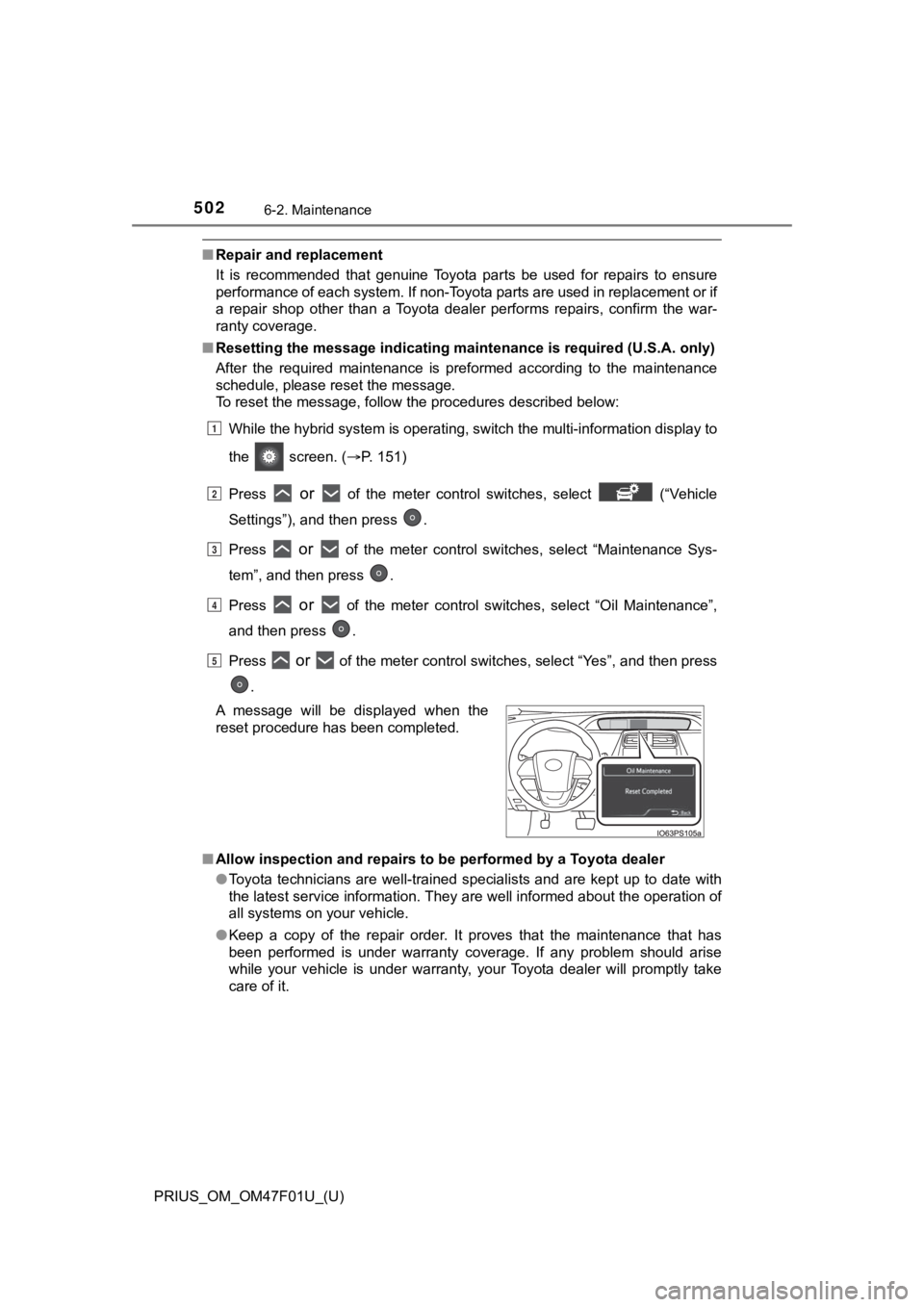
■ Resetting the message indicating ma intenance is required (U.S.A. only)
After the required maintenance is preformed according to the ma intenance
schedule, please reset the message.
To reset the message, follow the procedures described below:
While the hybrid system is operating, switch the multi-informat ion display to
the screen. ( P. 151)
Press
or of the meter control switches, select (“Vehicle
Settings”), and then press .
Press
or of the meter control switches, select “Maintenance Sys-
tem”, and then press .
Press
or of the meter control switches, select “Oil Maintenance”,
and then press .
Press
or of the meter control switches, select “Yes”, and then press
.
■ Allow inspection and repairs to be performed by a Toyota dealer
●Toyota technicians are well-trained specialists and are kept up to date with
the latest service information. They are well informed about th e operation of
all systems on your vehicle.
● Keep a copy of the repair order. It proves that the maintenance that has
been performed is under warranty coverage. If any problem should arise
while your vehicle is under warranty, your Toyota dealer will p romptly take
care of it.
A message will be displayed when the
reset procedure has been completed.
1
2
3
4
5
Page 534 of 744

534
PRIUS_OM_OM47F01U_(U)
6-3. Do-it-yourself maintenance
■Situations in which the tire pressure warning system may not oper-
ate properly
●In the following cases, the tire pressure warning system may no t operate
properly.
• If non-genuine Toyota wheels are used.
• When a replacement tire is used, the system may not operate cor-
rectly due to the structure of the replacement tire.
• A tire has been replac ed with a tire that is not of the specif ied size.
• Tire chains etc . are equipped.
• An auxiliary-supported ru n-flat tire is equipped.
• If a window tint that affects the radio wave signals is instal led.
• If there is a lot of snow or ice on the vehicle, particularly around the
wheels or wheel housings.
• If the tire inflation pressure is extremely higher than the sp ecified
level.
• If wheel without the tire pressure warning valve and transmitt er is
used.
• If the ID code on the tire pressure warning valves and transmi tters is
not registered in the tire pressure warning computer.
●Performance may be affected in the following situations.
• Near a TV tower, electric power plant, gas station, radio stat ion, large
display, airport or other facilit y that generates strong radio waves or
electrical noise
• When carrying a portable radio, cellular phone, cordless phone or
other wireless communication device
●When the vehicle is parked, the time taken for the warning to s tart or go
off could be extended.
●When tire inflation pressure declines rapidly for example when a tire has
burst, the warning may not function.
■The initialization operation
●Make sure to carry out initializ ation after adjusting the tire inflation pres-
sure.
Also, make sure the tires are co ld before carrying out initialization or tire
inflation pressure adjustment.
●If you have accidentally turned the power switch off during ini tialization,
it is not necessary to press the reset swit ch again as initialization will
restart automatically when the power switch has been turned to ON
mode for the next time.
●If you accidentally press the reset switch when initialization is not neces-
sary, adjust the tire inflation pressure to the specified level when the
tires are cold, and cond uct initialization again.