wheel TOYOTA PRIUS 2022 User Guide
[x] Cancel search | Manufacturer: TOYOTA, Model Year: 2022, Model line: PRIUS, Model: TOYOTA PRIUS 2022Pages: 744, PDF Size: 14.35 MB
Page 85 of 744
851-4. Hybrid system
PRIUS_OM_OM47F01U_(U)
1
For safety and security
◆When stopped/during start off
The gasoline engine stops
* when the vehicle is stopped. During
start off, the electric motor (traction motor) drives the vehic le. At
slow speeds or when traveling down a gentle slope, the engine i s
stopped
* and the electric motor (tr action motor) is used.
When shift position is in N, the hybrid battery (traction batte ry) is not
being charged.
*: When the hybrid battery (traction battery) requires charging o r the engine
is warming up, etc., the gasoline engine will not automatically stop.
( P. 87)
◆During normal driving
The gasoline engine is predominantly used. The electric motor
(traction motor) charges the hybr id battery (traction battery) as nec-
essary.
◆When accelerating sharply
When the accelerator pedal is depressed heavily, the power of t he
hybrid battery (traction battery) is added to that of the gasol ine
engine via the electric motor (traction motor).
◆When braking (regenerative braking)
The wheels operate the electric motor (traction motor) as a pow er
generator, and the hybrid battery (traction battery) is charged.
When driving with the gasolin e engine stopped, a sound, which
changes in accordance with the driving speed, will be played in order
to warn people nearby of the vehicle’s approach. The sound will stop
when the vehicle speed exceeds approximately 22 mph (35 km/h).
Vehicle proximity notification system
Page 93 of 744
931-4. Hybrid system
PRIUS_OM_OM47F01U_(U)
1
For safety and security
WARNING
■Road accident cautions
Observe the following precautions to reduce the risk of death o r serious
injury:
● Pull your vehicle off the road, apply the parking brake, shift the shift posi-
tion to P, and turn the hybrid system off.
● Do not touch the high voltage parts, cables and connectors.
● If electric wires are exposed inside or outside your vehicle, an electric
shock may occur. Never touch exposed electric wires.
● If a fire occurs in the hybrid vehicle, leave the vehicle as soon as possible.
Never use a fire extinguisher that is not meant for electric fires. Using even
a small amount of water may be dangerous.
● If your vehicle needs to be towed, do so with front wheels (2WD models)
or four wheels (AWD models) raised. If the wheels connected to the elec-
tric motor (traction motor) are on the ground when towing, the motor may
continue to generate electricity. This may cause a fire. ( P. 580)
● Carefully inspect the ground under the vehicle. If you find that liquid has
leaked onto the ground, the fuel system may have been damaged. Leave
the vehicle as soon as possible.
AWD models
● If a fluid leak occurs, do not touch the fluid as it may be strong alkaline
electrolyte from the hybrid battery (traction battery). If it comes into contact
with your skin or eyes, wash it off immediately with a large amount of water
or, if possible, boric acid solution. Seek immediate medical attention.
2WD models
● Do not touch the battery if liquid is leaking from or adhering to it.
If electrolyte (carbonic-based organic electrolyte) from the hy brid battery
(traction battery) comes into contact with the eyes or skin, it could cause
blindness or skin wounds. In the unlikely event that it comes into contact
with the eyes or skin, wash it off immediately with a large amount of water,
and seek immediate medical attention.
● If electrolyte is leaking from the hybrid battery (traction bat tery), do not
approach the vehicle.
Even in the unlikely event that the hybrid battery (traction ba ttery) is dam-
aged, the internal construction of the battery will prevent a l arge amount of
electrolyte from leaking out. However, any electrolyte that doe s leak out
will give off a vapor. This vapor is an irritant to skin and eyes and could
cause acute poisoning if inhaled.
● Do not bring burning or high-tem perature items close to the electrolyte.
The electrolyte may ignite and cause a fire.
Page 99 of 744
PRIUS_OM_OM47F01U_(U)
992. Instrument cluster
2
Instrument cluster
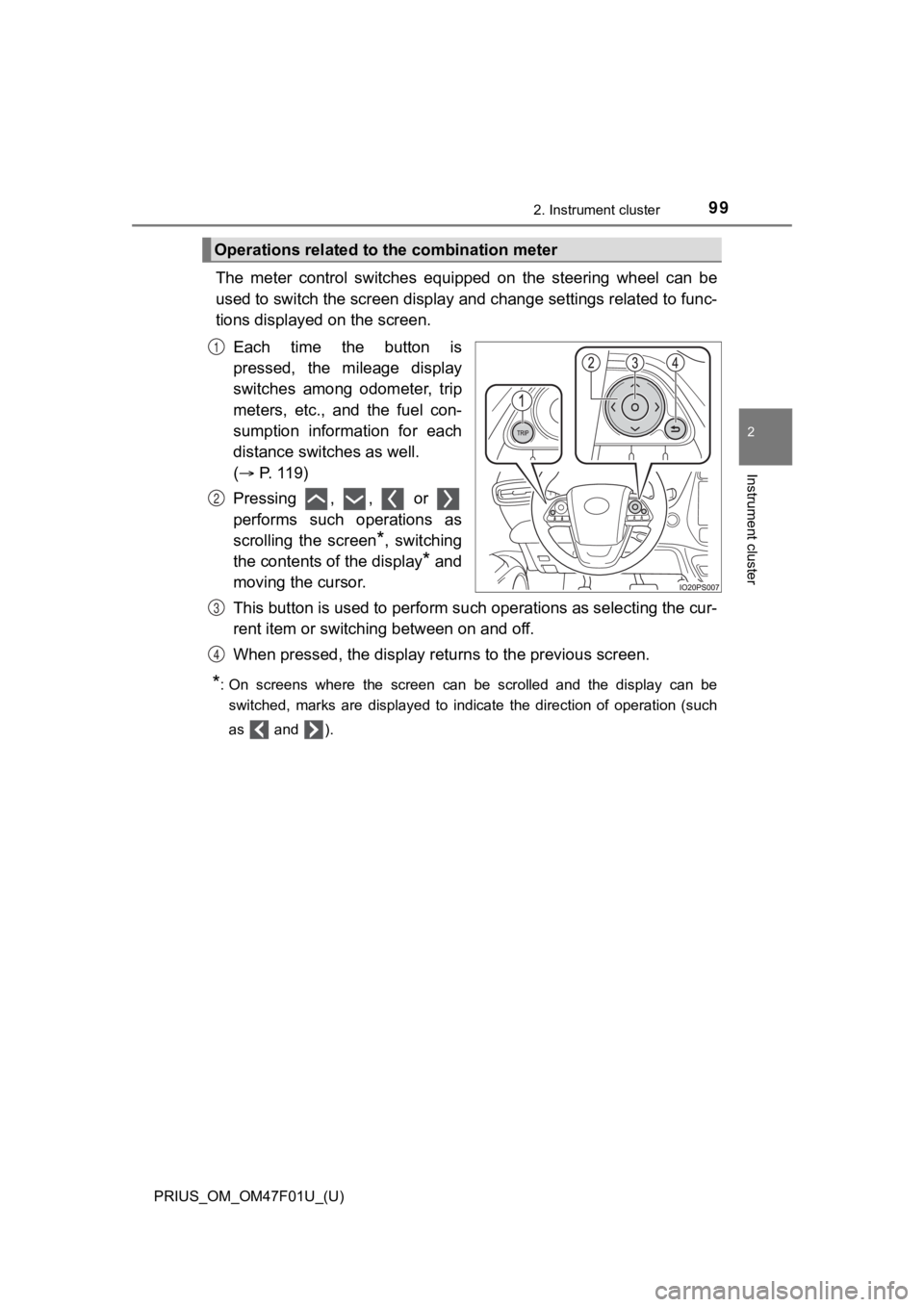
The meter control switches equipped on the steering wheel can be
used to switch the screen displa y and change settings related to func-
tions displayed on the screen.
Each time the button is
pressed, the mileage display
switches among odometer, trip
meters, etc., and the fuel con-
sumption information for each
distance switches as well.
( P. 119)
Pressing , , or
performs such operations as
scrolling the screen
*, switching
the contents of the display
* and
moving the cursor.
This button is used to perform s uch operations as selecting the cur-
rent item or switching between on and off.
When pressed, the display returns to the previous screen.
*: On screens where the screen can be scrolled and the display ca n be
switched, marks are displayed to indicate the direction of oper ation (such
as and ).
Operations related to the combination meter
1
2
3
4
Page 103 of 744
PRIUS_OM_OM47F01U_(U)
1032. Instrument cluster
2
Instrument cluster
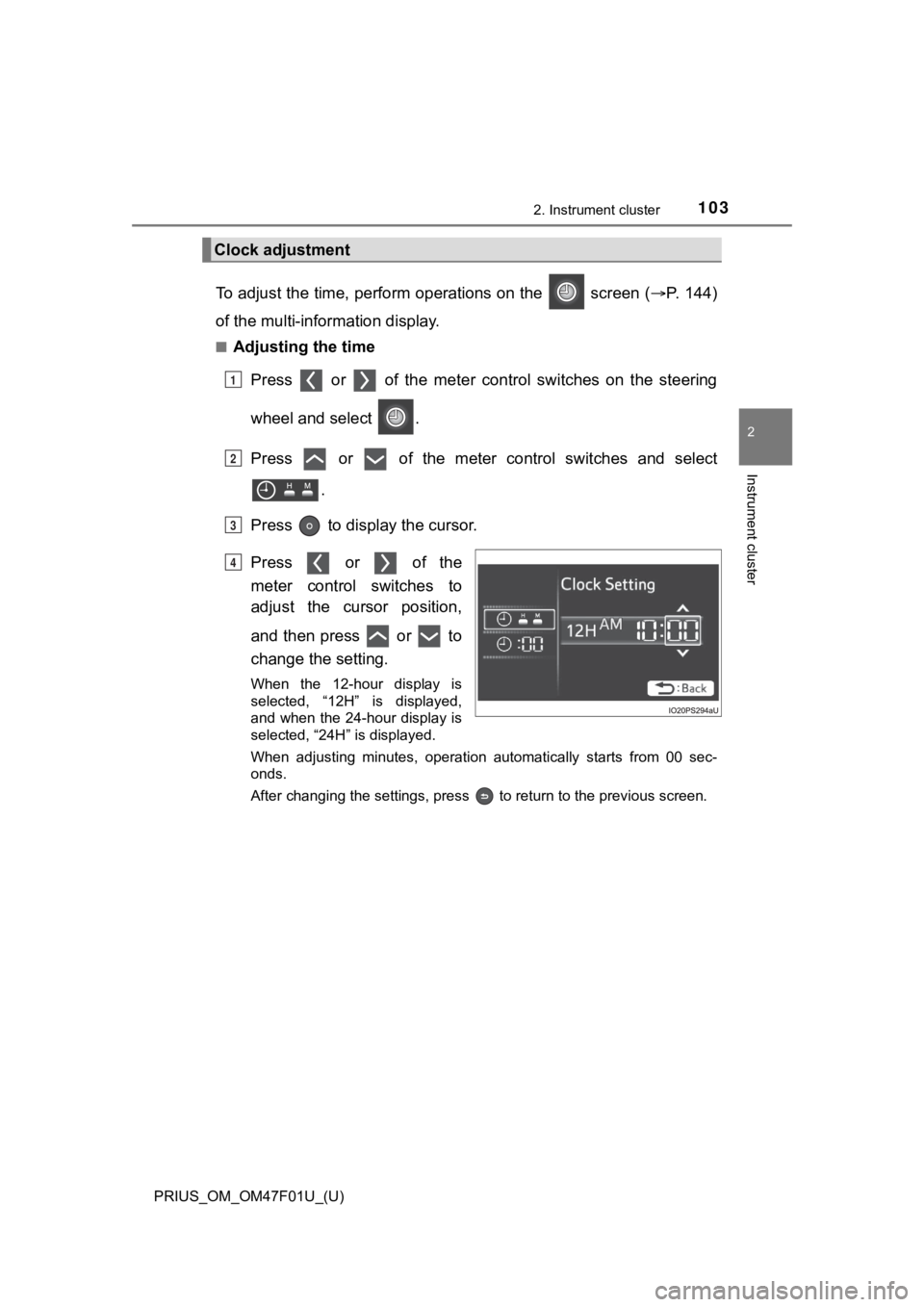
To adjust the time, perform operations on the screen (P. 1 4 4 )
of the multi-information display.
■Adjusting the time
Press or of the meter cont rol switches on the steering
wheel and select .
Press or of the meter control switches and select .
Press to display the cursor.
Press or of the
meter control switches to
adjust the cursor position,
and then press or to
change the setting.
When the 12-hour display is
selected, “12H” is displayed,
and when the 24-hour display is
selected, “24H” is displayed.
When adjusting minutes, operation automatically starts from 00 sec-
onds.
After changing the settings, press to return to the previous s creen.
Clock adjustment
1
2
3
4
Page 104 of 744
104
PRIUS_OM_OM47F01U_(U)
2. Instrument cluster
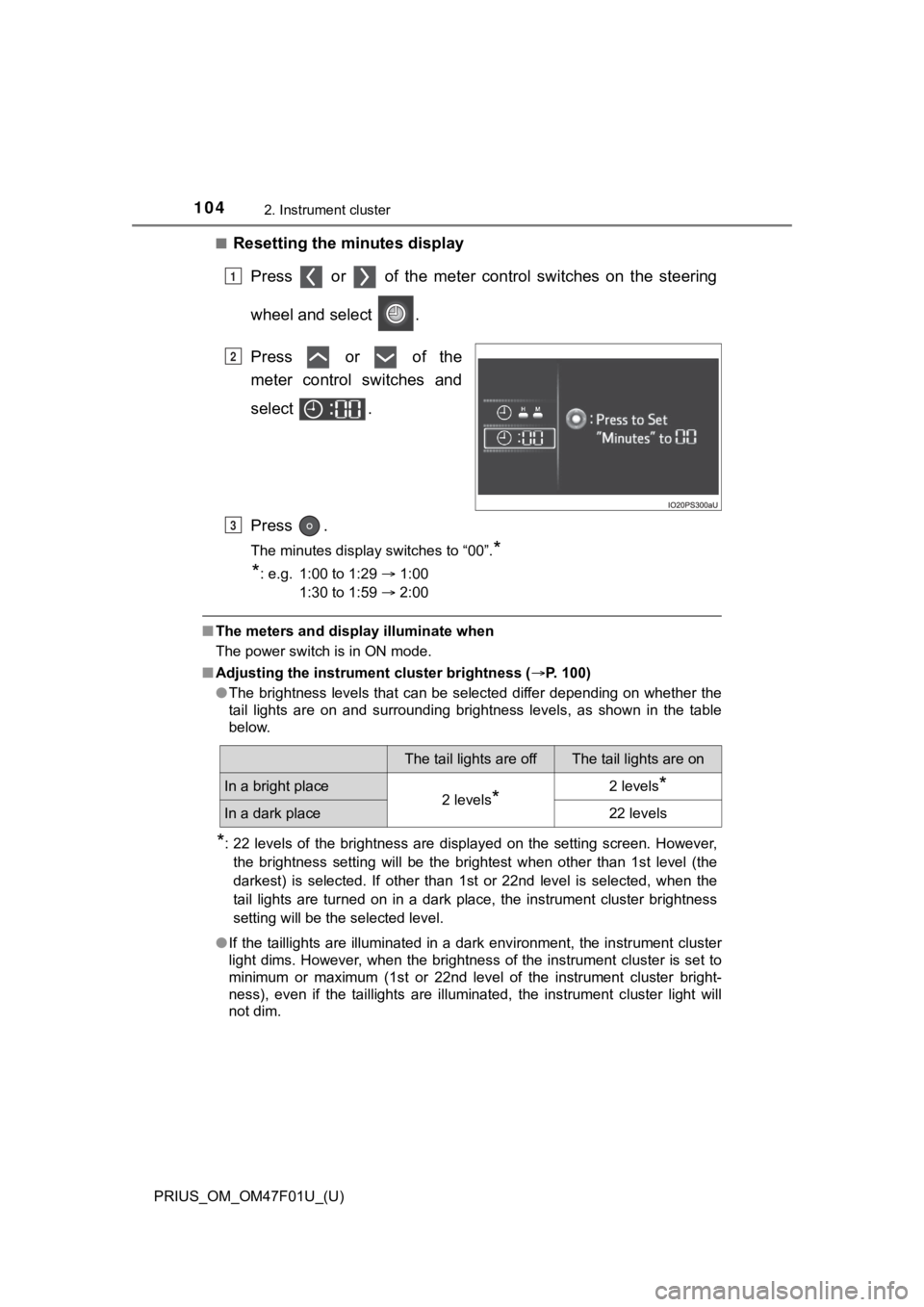
■Resetting the minutes displayPress or of the meter cont rol switches on the steering
wheel and select .
Press or of the
meter control switches and
select .
Press .
The minutes display switches to “00”.*
*
: e.g. 1:00 to 1:29 1:00
1:30 to 1:59 2:00
■The meters and display illuminate when
The power switch is in ON mode.
■ Adjusting the instrume nt cluster brightness (P. 100)
● The brightness levels that can be selected differ depending on whether the
tail lights are on and surrounding brightness levels, as shown in the table
below.
*: 22 levels of the brightness are displayed on the setting scree n. However,
the brightness setting will be the brightest when other than 1st level (the
darkest) is selected. If other than 1st or 22nd level is select ed, when the
tail lights are turned on in a dark place, the instrument clust er brightness
setting will be the selected level.
● If the taillights are illuminated in a dark environment, the in strument cluster
light dims. However, when the brightness of the instrument clus ter is set to
minimum or maximum (1st or 22nd level of the instrument cluster bright-
ness), even if the taillights are illuminated, the instrument c luster light will
not dim.
1
2
3
The tail lights are offThe tail lights are on
In a bright place2 levels*2 levels*
In a dark place22 levels
Page 106 of 744
106
PRIUS_OM_OM47F01U_(U)
2. Instrument cluster
WARNING
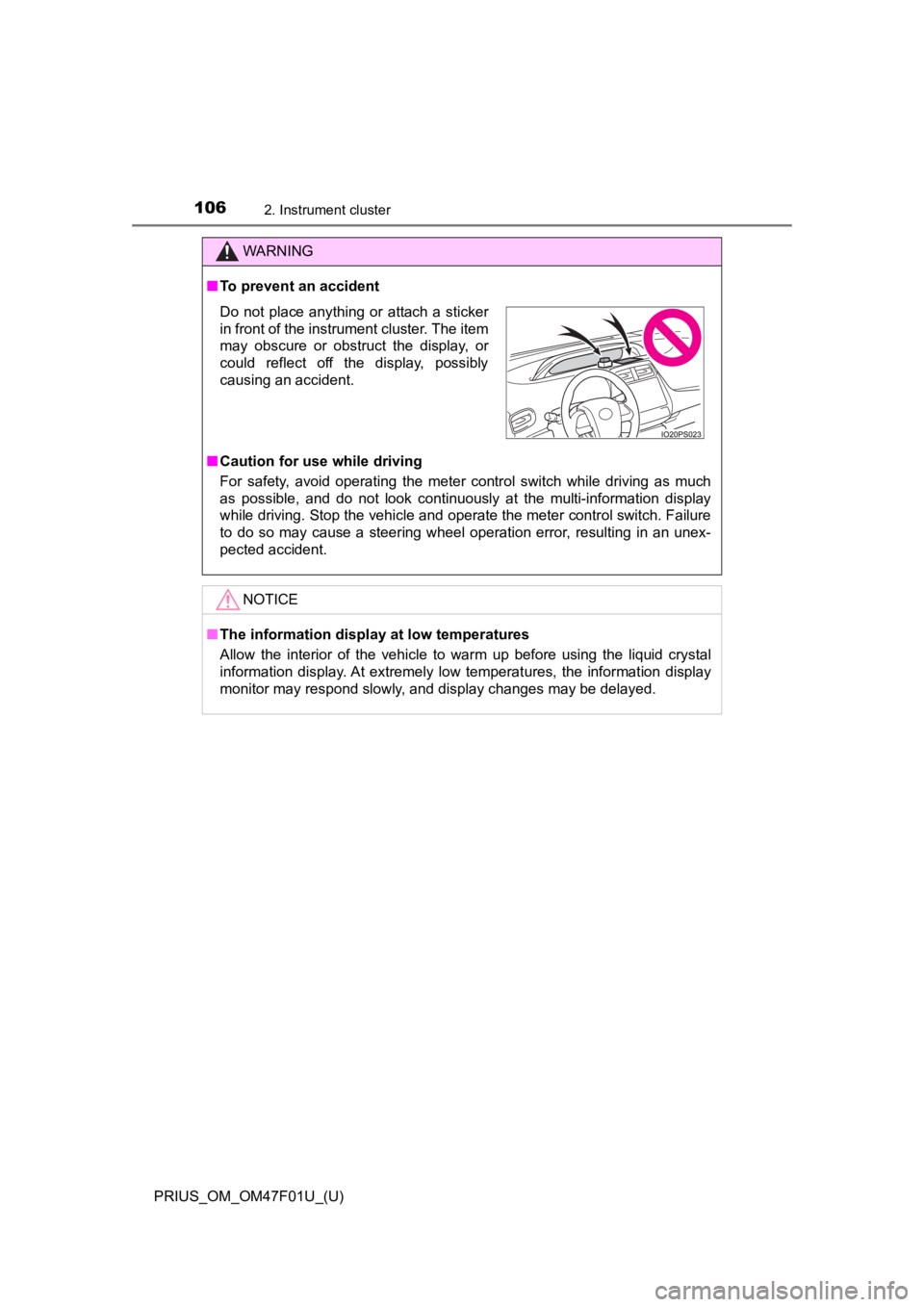
■To prevent an accident
■ Caution for use while driving
For safety, avoid operating the meter control switch while driv ing as much
as possible, and do not look continuously at the multi-informat ion display
while driving. Stop the vehicle and operate the meter control switch. Failure
to do so may cause a steering wheel operation error, resulting in an unex-
pected accident.
NOTICE
■ The information display at low temperatures
Allow the interior of the vehicle to warm up before using the liquid crystal
information display. At extremely low temperatures, the information display
monitor may respond slowly, and display changes may be delayed.
Do not place anything or attach a sticker
in front of the instrument cluster. The item
may obscure or obstruct the display, or
could reflect off the display, possibly
causing an accident.
Page 111 of 744
PRIUS_OM_OM47F01U_(U)
1112. Instrument cluster
2
Instrument cluster
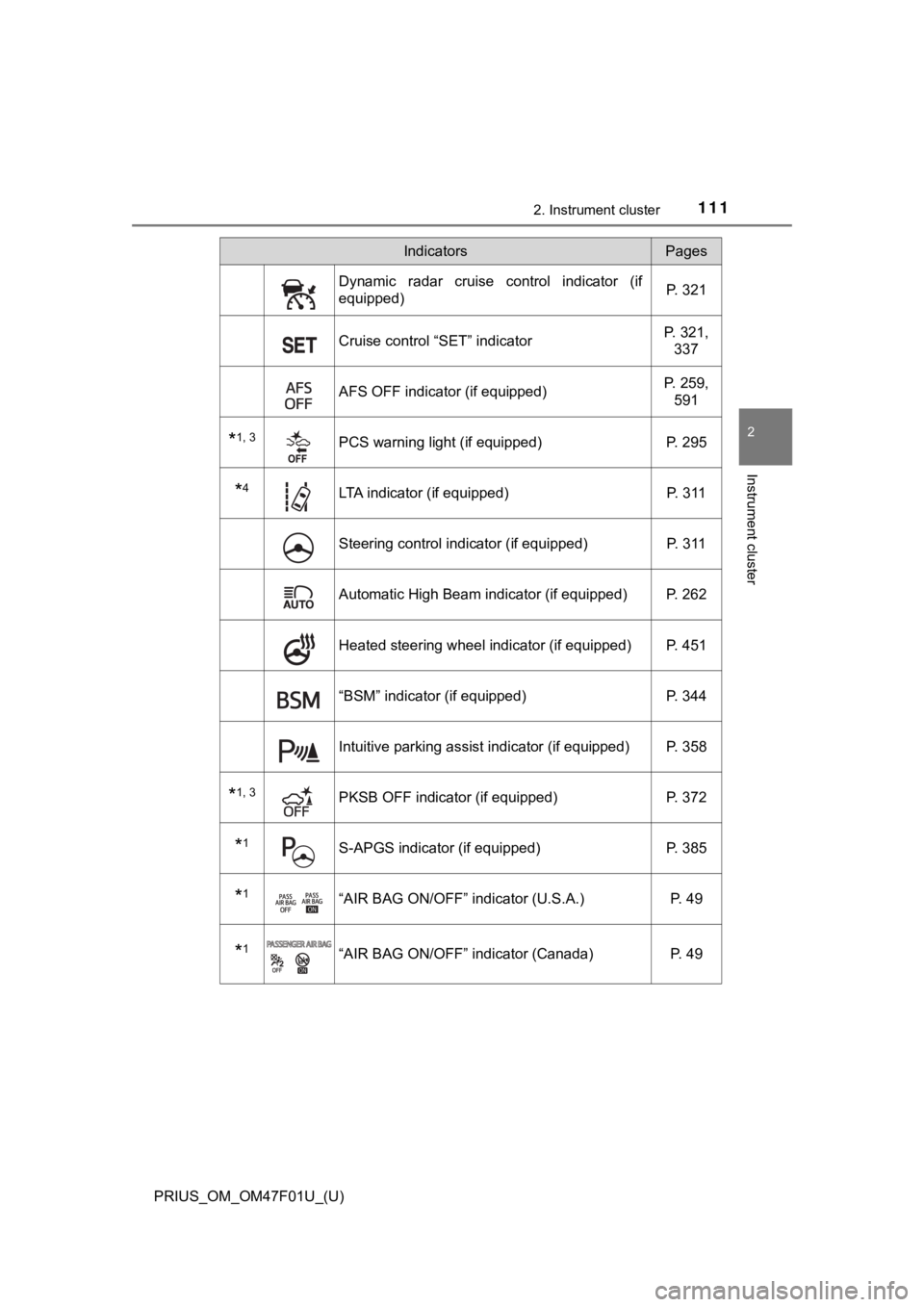
Dynamic radar cruise control indicator (if
equipped)P. 321
Cruise control “SET” indicatorP. 321,
337
AFS OFF indicator (if equipped) P. 259,
591
*1, 3PCS warning light (if equipped) P. 295
*4LTA indicator (if equipped) P. 311
Steering control indicator (if equipped)P. 311
Automatic High Beam indicator (if equipped) P. 262
Heated steering wheel indicator (if equipped) P. 451
“BSM” indicator (if equipped)P. 344
Intuitive parking assist indicator (if equipped) P. 358
*1, 3PKSB OFF indicator (if equipped)P. 372
*1S-APGS indicator (if equipped) P. 385
*1“AIR BAG ON/OFF” indicator (U.S.A.) P. 49
*1“AIR BAG ON/OFF” indicator (Canada)P. 49
IndicatorsPages
Page 143 of 744
PRIUS_OM_OM47F01U_(U)
1432. Instrument cluster
2
Instrument cluster
◆AWD display (for AWD vehicles only)
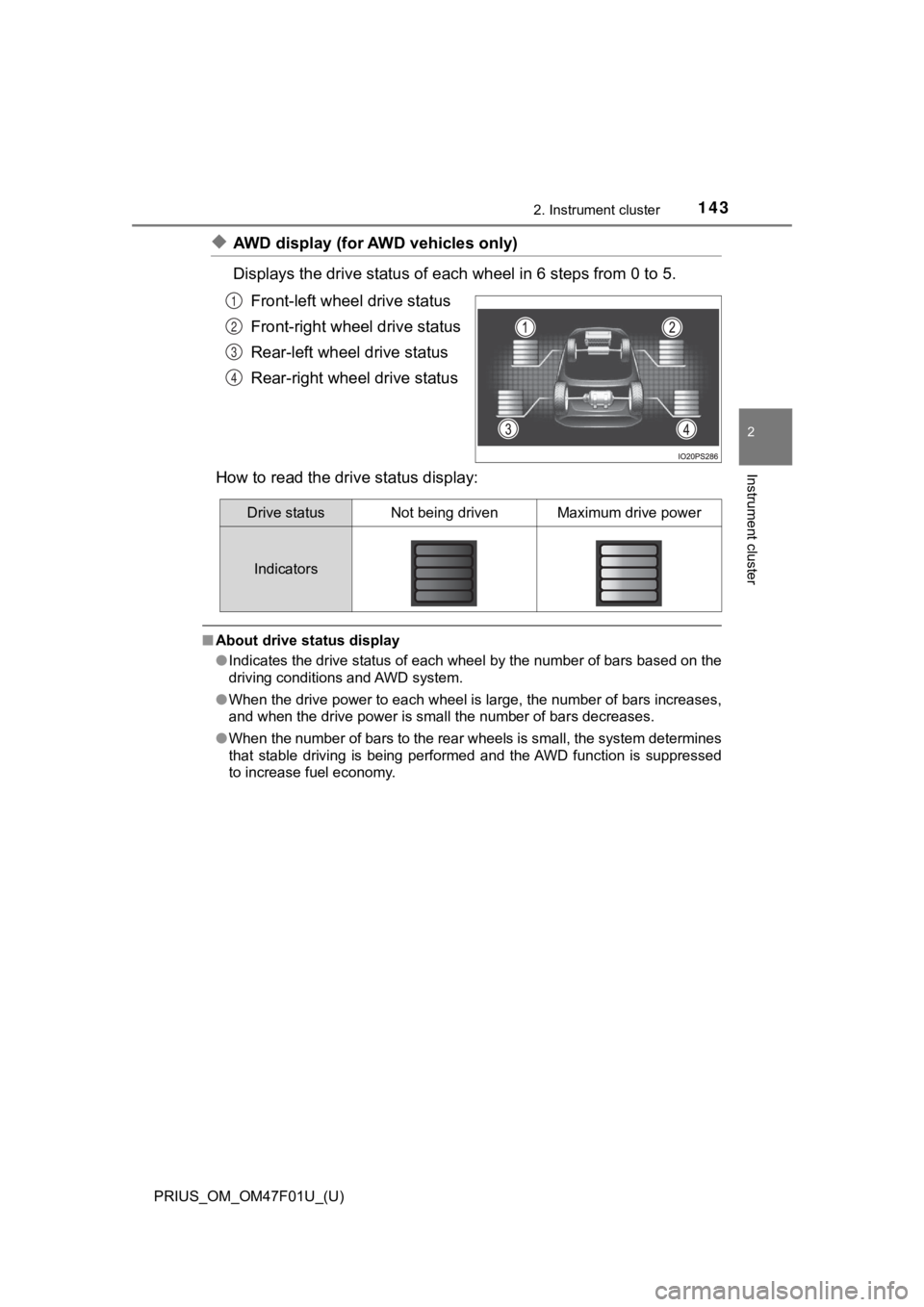
Displays the drive status of each wheel in 6 steps from 0 to 5.
Front-left wheel drive status
Front-right wheel drive status
Rear-left wheel drive status
Rear-right wheel drive status
How to read the driv e status display:
■About drive status display
●Indicates the drive status of each wheel by the number of bars based on the
driving conditions and AWD system.
● When the drive power to each wheel is large, the number of bars increases,
and when the drive power is small the number of bars decreases.
● When the number of bars to the rear wheels is small, the system determines
that stable driving is being performed and the AWD function is suppressed
to increase fuel economy.
1
2
3
4
Drive statusNot being drivenMaximum drive power
Indicators
Page 151 of 744
PRIUS_OM_OM47F01U_(U)
1512. Instrument cluster
2
Instrument cluster
The operation contents of the driving support systems and settings
related to the com bination meter disp lay can be changed.
Driving support systems such as the PCS (Pre-Collision System) (if
equipped) and Blind Spot Monitor (if equipped) is turned on and off by sim-
ply pressing . Make sure not to cancel the systems accidentally .
■
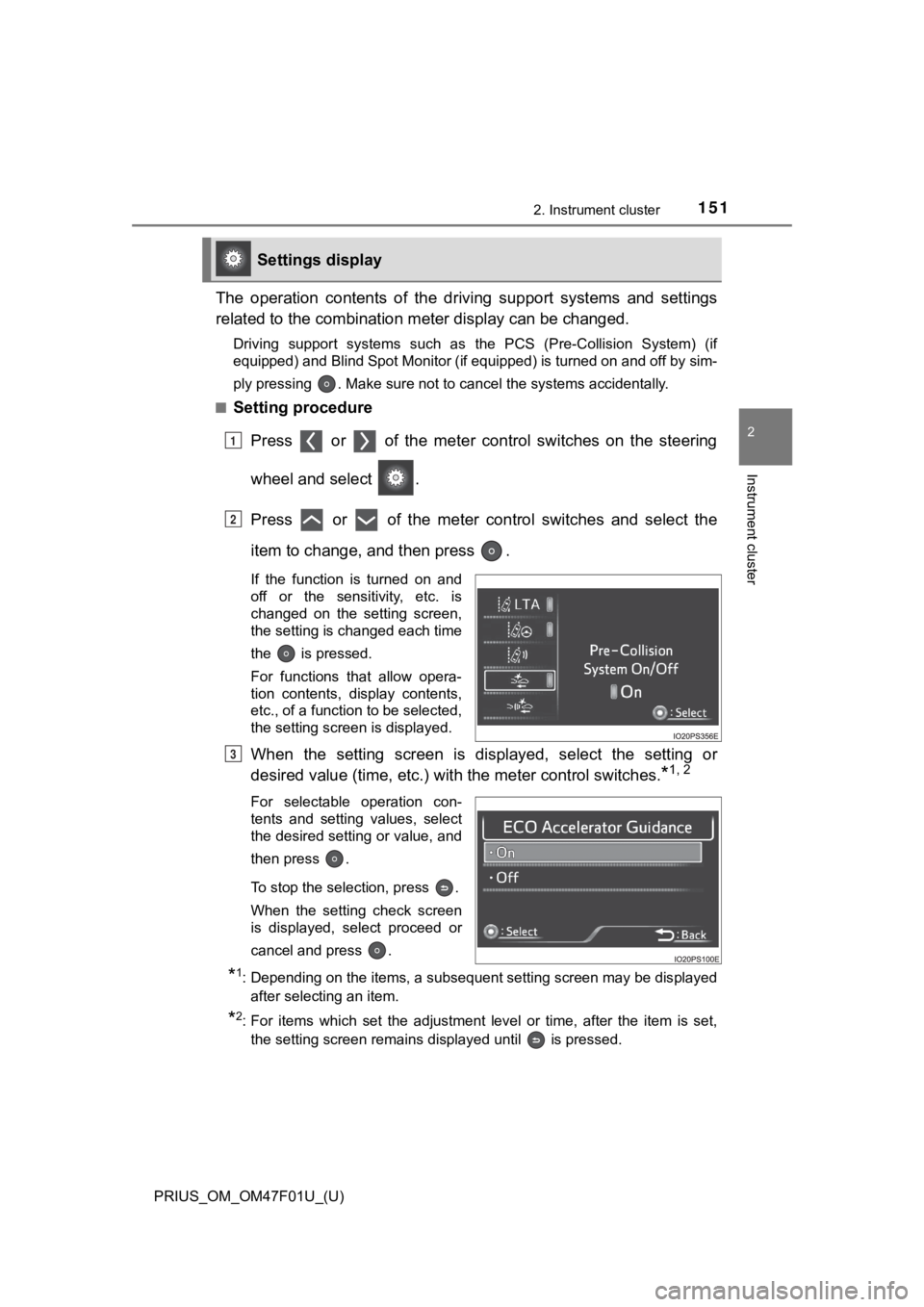
Setting procedure
Press or of the meter cont rol switches on the steering
wheel and select .
Press or of the meter control switches and select the
item to change, and then press .
If the function is turned on and
off or the sensitivity, etc. is
changed on the setting screen,
the setting is changed each time
the is pressed.
For functions that allow opera-
tion contents, display contents,
etc., of a function to be selected,
the setting screen is displayed.
When the setting screen is displayed, select the setting or
desired value (time, etc.) wit h the meter control switches.
*1, 2
For selectable operation con-
tents and setting values, select
the desired setting or value, and
then press .
To stop the selection, press .
When the setting check screen
is displayed, select proceed or
cancel and press .
*1: Depending on the items, a subsequent setting screen may be dis played
after selecting an item.
*2: For items which set the adjustment level or time, after the it em is set,
the setting screen remains displayed until is pressed.
Settings display
1
2
3
Page 161 of 744
PRIUS_OM_OM47F01U_(U)
1612. Instrument cluster
2
Instrument cluster
■Insert displays of the driving support systems
Insert displays are linked wit h the operation of the following sys-
tems and used to show some of the information shown on the mult i-
information display on the head-up display.
*: If equipped
■
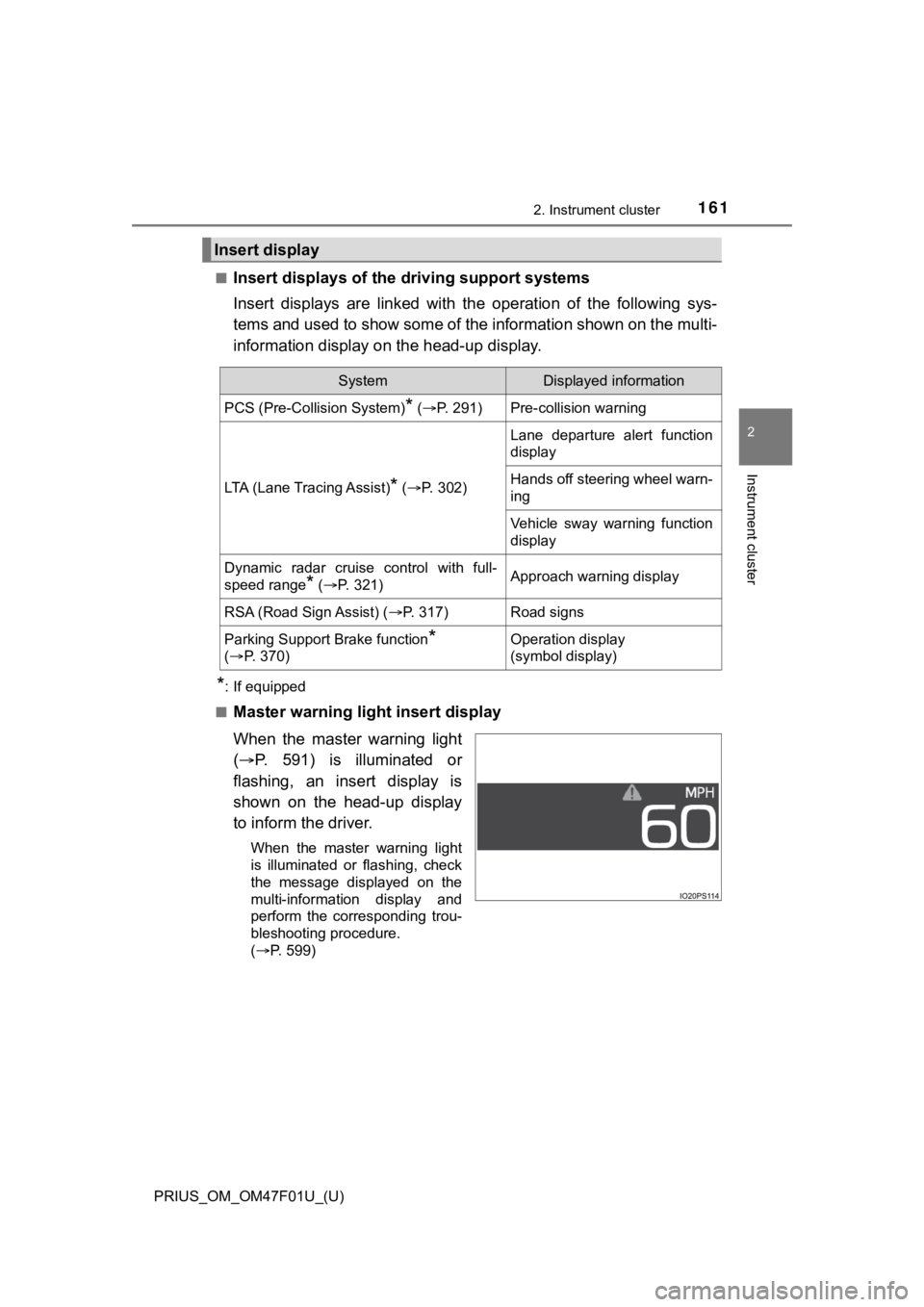
Master warning light insert display
When the master warning light
( P. 591) is illuminated or
flashing, an insert display is
shown on the head-up display
to inform the driver.
When the master warning light
is illuminated or flashing, check
the message displayed on the
multi-information display and
perform the corresponding trou-
bleshooting procedure.
( P. 599)
Insert display
SystemDisplayed information
PCS (Pre-Collision System)* ( P. 291)Pre-collision warning
LTA (Lane Tracing Assist)* (P. 302)
Lane departure alert function
display
Hands off steering wheel warn-
ing
Vehicle sway warning function
display
Dynamic radar cruise control with full-
speed range
* (P. 321)Approach warning display
RSA (Road Sign Assist) ( P. 317)Road signs
Parking Support Brake function*
( P. 3 7 0 )Operation display
(symbol display)