mirror TOYOTA PRIUS 2022 Owner's Manual
[x] Cancel search | Manufacturer: TOYOTA, Model Year: 2022, Model line: PRIUS, Model: TOYOTA PRIUS 2022Pages: 744, PDF Size: 14.35 MB
Page 352 of 744
352
PRIUS_OM_OM47F01U_(U)
4-5. Using the driving support systems
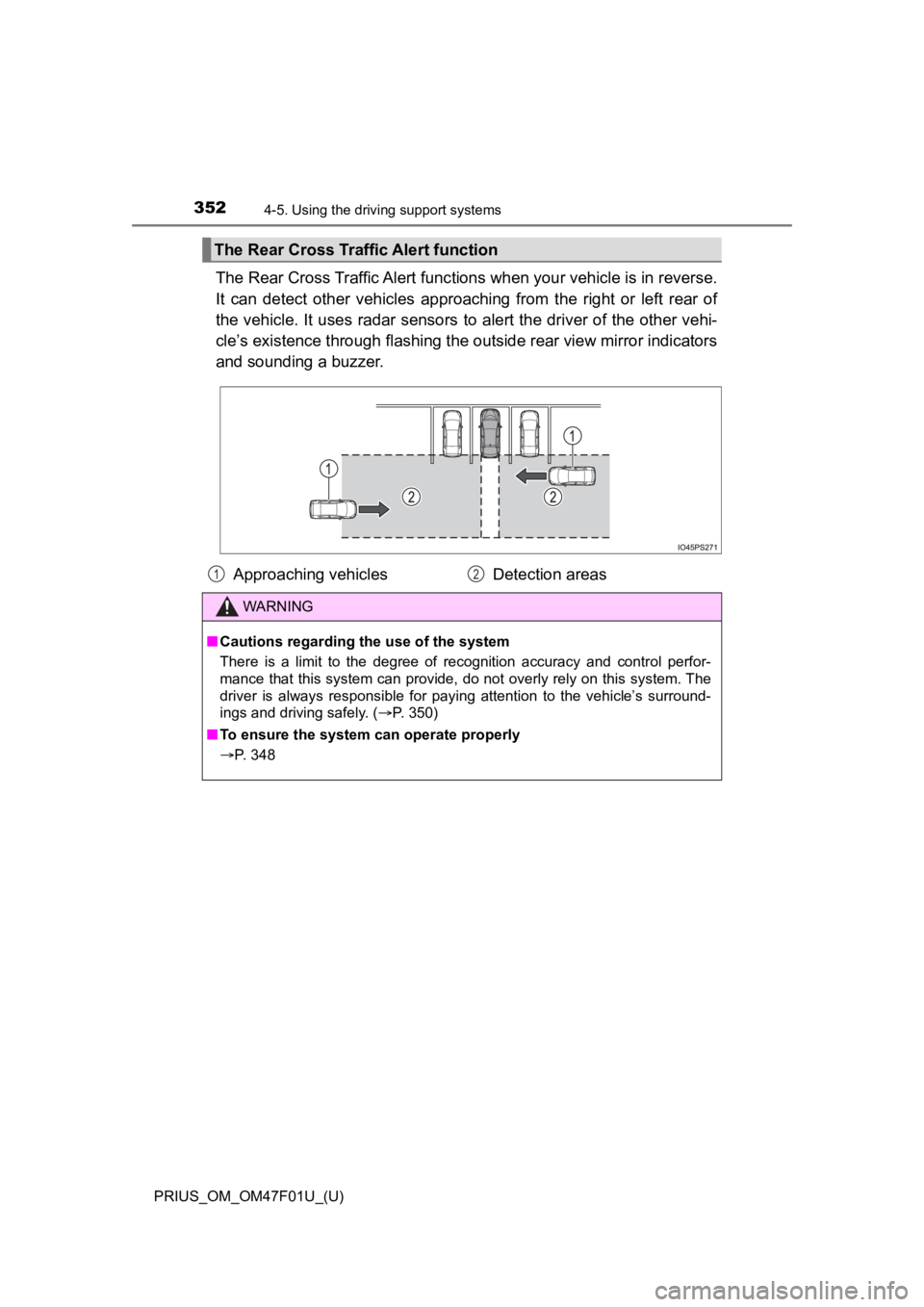
The Rear Cross Traffic Alert func tions when your vehicle is in reverse.
It can detect other vehicles approaching from the right or left rear of
the vehicle. It uses radar sensors to alert the driver of the o ther vehi-
cle’s existence through flashing the outside rear view mirror i ndicators
and sounding a buzzer.
The Rear Cross Traffic Alert function
Approaching vehicles Detection areas
WARNING
■Cautions regarding the use of the system
There is a limit to the degree of recognition accuracy and cont rol perfor-
mance that this system can provide, do not overly rely on this system. The
driver is always responsible for paying attention to the vehicl e’s surround-
ings and driving safely. ( P. 350)
■ To ensure the system can operate properly
P. 348
12
Page 392 of 744

392
PRIUS_OM_OM47F01U_(U)
4-5. Using the driving support systems
When the vehicle is almost entire ly within the target parking spot,
a high-pitched beep is emitted and the stop display is shown on
the display, stop the vehicle.
This completes the para llel parking assist mode.
● After stopping, feel free to maneuver the vehicle to reach the
desired parking spot.
● Be sure to back up while checking the area to the front and
rear of the vehicle direct ly and by using the mirrors.
■Parallel parking assist mode operating conditions
●In order to operate the parallel parking assist mode correctly, drive slowly (at
a speed at which the vehicle can be quickly stopped) parallel t o the road (or
shoulder) while maintaining a distance of approximately 3.3 ft. (1 m) to any
parked vehicles.
● The function cannot be used when the vehicle speed is approxima tely
19 mph (30 km/h) or higher.
● The front side sensors and rear side sensors are used to detect parked
vehicles and determine the parking spot. Therefore, when detection is not
possible ( P. 414), guidance is not issued.
● If there are no parked vehicles, the parking spot cannot be det ermined.
Therefore, the parallel parking assist mode cannot be operated.
● If unable to detect the environment surrounding the parking spa ce, the par-
allel parking assist mode may not be able to operate.
● Guidance will continue until the vehicle speed meets or exceeds approxi-
mately 19 mph (30 km/h) or the function is turned off using the S -APGS
switch.
■ Timing for pressing the S-APGS switch
In the following cases, the assist mode may also operate during the steps
taken to park using the parallel parking assist mode. However, in these
cases, conduct parking procedures according to the information on the multi-
information display.
● In step the S-APGS switch is pressed after already passing ove r the tar-
get parking spot.
If the vehicle is not stopped in step , pressing the S-APGS swi tch 1 time
while the vehicle is in motion allows you to select “Parallel P arking” and
proceed directly to step .
● The vehicle is moved up to the position in step without the S- APGS
switch being pressed. Then the S-APGS switch is pressed after having
changed the shift position to R.
12
1
1
2
3
Page 403 of 744
PRIUS_OM_OM47F01U_(U)
4034-5. Using the driving support systems
4
Driving
Assume an ordinary posture for backing up, rest your hands
lightly on the steering wheel without applying any force, direc tly
confirm the safety of the area to the rear and around the vehic le
slowly back up while adjusting your speed by depressing the
brake pedal.
Depending on the condition of the parking space, steps to may
need to be repeated.
When the vehicle is almost entire ly within the target parking spot,
a high-pitched beep is emitted and the stop display is shown on
the display ( P. 385), stop the vehicle.
This completes the back-in parking assist mode.
● For safety, the buzzer sounds slightly before the vehicle is
completely entered within the target parking spot. Further-
more, at that point, system operation will also finish. Firmly
hold the steering wheel and slowly back up while adjusting
your speed by depressing the brake pedal to reach the desired
parking spot.
● Be sure to back up while checking the area to the front and
rear of the vehicle direct ly and by using the mirrors.
■Back-in parking assist m ode operating conditions
● In order to operate the function correctly, drive slowly (at a speed at which
the vehicle can be quickly stopped).
● In order to operate the function correctly, drive slowly (at a speed at which
the vehicle can be quickly stopped). Come to a full stop so tha t the center of
the parking space is nearly perpendicular to the vehicle, and t hen operate
the S-APGS switch.
● The function cannot be used when the vehicle speed is approxima tely
19 mph (30 km/h) or higher.
● The front side sensors and rear side sensors are used to detect parked
vehicles and determine the parking spot. Therefore, when detection is not
possible ( P. 414), guidance is not issued.
● If there are no parked vehicles, the parking spot cannot be det ermined.
Therefore, the back-in parking assist mode cannot be operated.
● If unable to detect the environment surrounding the parking space, the
back-in parking assist mode may not be able to operate.
11
611
12
Page 412 of 744

412
PRIUS_OM_OM47F01U_(U)
4-5. Using the driving support systems
WARNING
●Do not rely solely upon the Simple Advanced Parking Guidance System.
As with unequipped vehicles, move forward and back up carefully while
directly confirming the safety of your surroundings and the are a to the rear
of the vehicle.
● Do not back up while viewing the multi-information display. Backing up
while only viewing the monitor screen may cause a collision or lead to an
accident, as the image displayed on the monitor screen may diff er from
actual conditions. Make sure to visually check the surrounding areas and
the area to the rear of the vehicle with and without the mirror while backing
up.
● Drive slowly while adjusting your speed by depressing the brake pedal
when backing up or moving forward.
● If it seems the vehicle may make contact with a pedestrian, ano ther vehi-
cle or any other obstacles, stop the vehicle by depressing the brake pedal,
and then press the S-APGS switch to turn off the system.
● Use the system in a parking lot with a flat surface.
● Observe the following precautions, as the steering wheel automatically
turns during use.
• There is risk of a necktie, scarf, your arm, etc. being caught on the
steering wheel. Please do not allow your upper body to be close to the
steering wheel. Also, do not allow children close to the steeri ng wheel.
• There is a possibility of injury when the steering wheel turns if you have long fingernails.
• In case of emergency, stop the vehicle by depressing the brake pedal,
and then press the S-APGS switch to turn off the system.
● Always confirm that there is appropriate space before attemptin g to park
the vehicle and operate the system.
Page 429 of 744
429
PRIUS_OM_OM47F01U_(U)
5Interior features
5-1. Using the air conditioning system and defogger
Automatic air conditioning system (vehicles with
7-inch display) ................. 430
Automatic air conditioning system (vehicles with
11.6-inch display) ............ 440
Heated steering wheel/ seat heaters .................... 450 5-2. Using the interior lights
Interior lights list ................ 452• Front interior light .......... 453
• Front personal lights ..... 453
• Rear interior light .......... 454
5-3. Using the storage features
List of storage features ..... 455 • Glove box...................... 456
• Console box .................. 456
• Cup holders .................. 457
• Bottle holders/
door pockets ................. 458
• Auxiliary boxes.............. 459
• Seat back pockets ........ 460
Luggage compartment features ........................... 461
5-4. Using the other interior features
Other interior features ....... 467 • Sun visors ..................... 467
• Vanity mirrors................ 467
• Power outlets ................ 468
• USB charging ports....... 469
• Wireless charger ........... 471
• Armrest ......................... 480
• Coat hooks.................... 480
• Assist grips ................... 481
Garage door opener.......... 482
Page 431 of 744
PRIUS_OM_OM47F01U_(U)
4315-1. Using the air conditioning system and defogger
5
Interior features
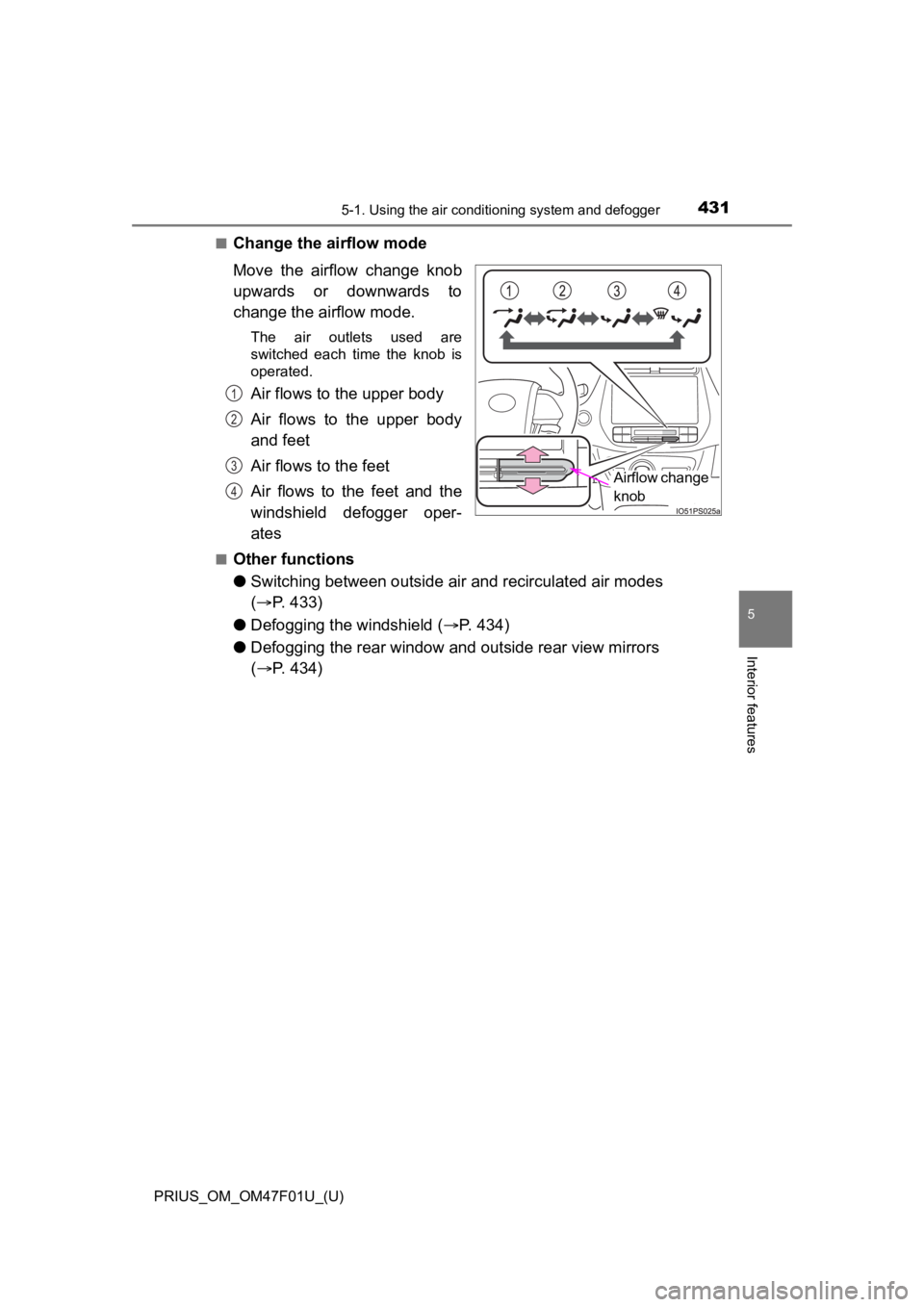
■Change the airflow mode
Move the airflow change knob
upwards or downwards to
change the airflow mode.
The air outlets used are
switched each time the knob is
operated.
Air flows to the upper body
Air flows to the upper body
and feet
Air flows to the feet
Air flows to the feet and the
windshield defogger oper-
ates
■Other functions
●Switching between outside air and recirculat ed air modes
( P. 433)
● Defogging the windshield ( P. 434)
● Defogging the rear window and outside rear view mirrors
( P. 434)
Airflow change
knob
1
2
3
4
Page 434 of 744
4345-1. Using the air conditioning system and defogger
PRIUS_OM_OM47F01U_(U)■
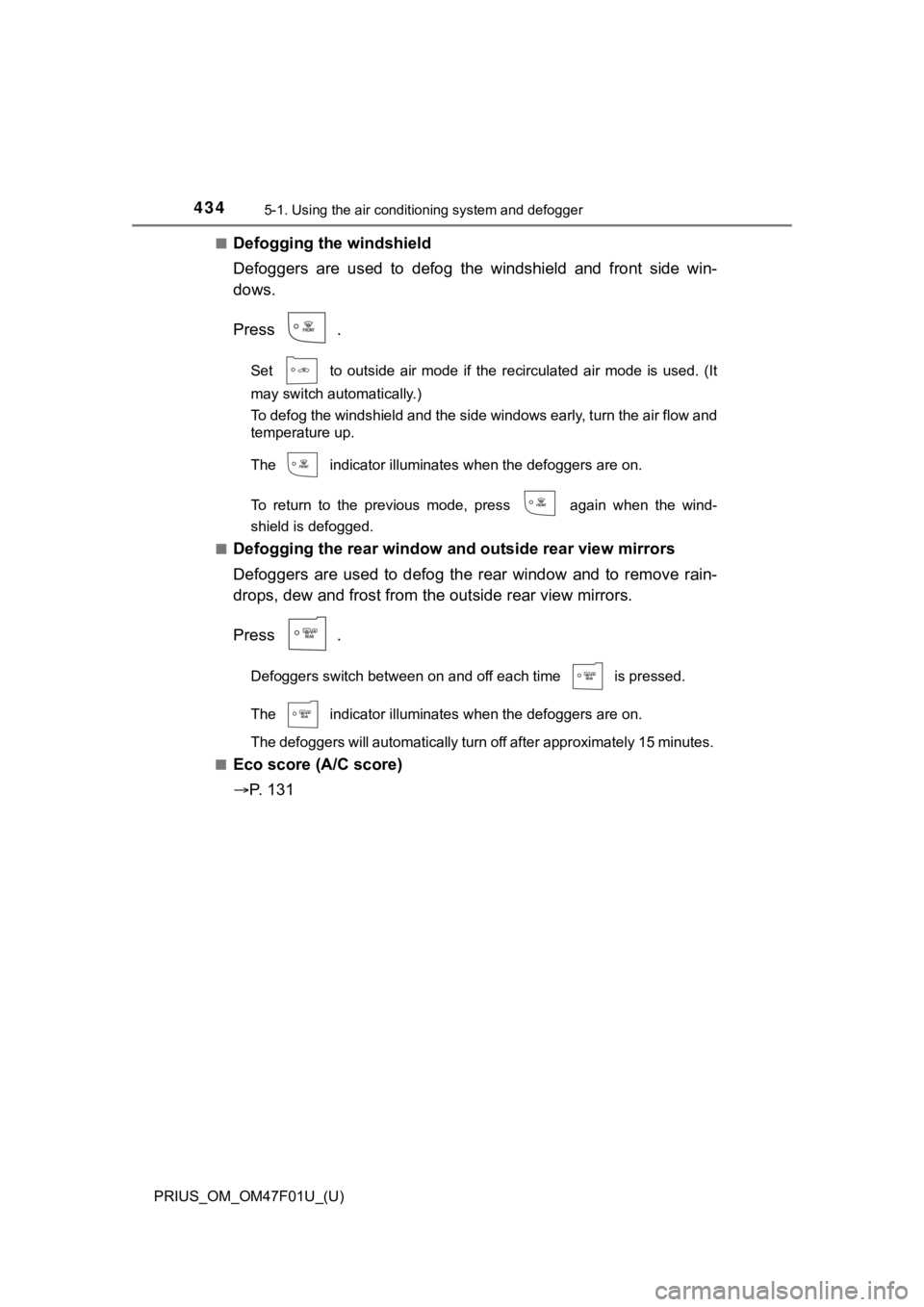
Defogging the windshield
Defoggers are used to defog the windshield and front side win-
dows.
Press .
Set to outside air mode if the recirculated air mode is used.
(It
may switch automatically.)
To defog the windshield and the side windows early, turn the ai r flow and
temperature up.
The indicator illuminates when the defoggers are on.
To return to the previous mode, press again when the wind-
shield is defogged.
■
Defogging the rear window and outside rear view mirrors
Defoggers are used to defog the rear window and to remove rain-
drops, dew and frost from the outside rear view mirrors.
Press .
Defoggers switch between on and off each time is pressed.
The indicator illuminates when the defoggers are on.
The defoggers will automatically turn off after approximately 1 5 minutes.
■
Eco score (A/C score)
P. 1 3 1
Page 439 of 744
PRIUS_OM_OM47F01U_(U)
4395-1. Using the air conditioning system and defogger
5
Interior features
WARNING
■To prevent the windshield from fogging up
● Do not use
during cool air operation in extremely humid weather.
The difference between the temperature of the outside air and that of the
windshield can cause the outer surface of the windshield to fog up, block-
ing your vision.
■ To prevent burns
Do not touch the rear view mirror surfaces when the outside rea r view mirror
defoggers are on.
NOTICE
■ To prevent 12-volt battery discharge
Do not leave the air conditioning system on longer than necessa ry when the
hybrid system is off.
■ When repairing/replacing parts of the air conditioning system
Have repair/replacement performed by your Toyota dealer. When a part of
the air conditioning system, such as the evaporator, is to be replaced, it
must be replaced with a new one.
■ Air outlets
The air outlets become hot when used for heating. Therefore, us e caution
and adjust the air outlets accordingly.
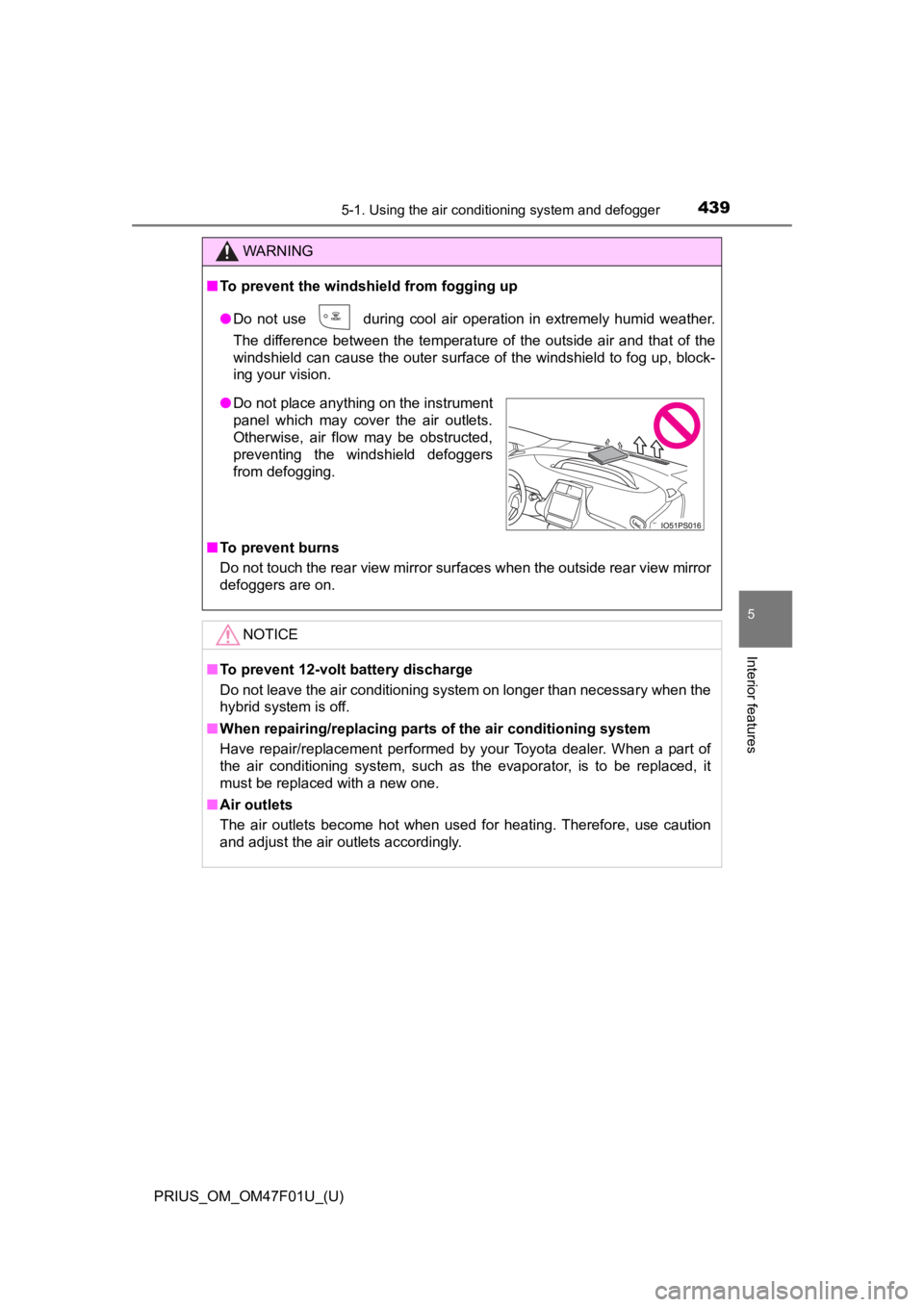
● Do not place anything on the instrument
panel which may cover the air outlets.
Otherwise, air flow may be obstructed,
preventing the windshield defoggers
from defogging.
Page 442 of 744
4425-1. Using the air conditioning system and defogger
PRIUS_OM_OM47F01U_(U)■
Other functions
●
Switching between outside air and recirculated air modes
( P. 443)
● Defogging the windshield ( P. 4 4 4 )
● Defogging the rear window and outside rear view mirrors
( P. 444)
Select on the air conditioning control screen.
Adjust the temperature setting. ( P. 4 4 1 )
To stop the operation, select .
■Automatic mode indicator
If the fan speed setting or air flow modes are operated, the
indicator goes off. However, automatic mode for func-
tions other than that o perated is maintained.
This function automatically contro ls the air conditioning airflow so that
priority is given to the front seats. When the front passenger seat is
not occupied, airflow may switch to only the driver’s seat. Unn eces-
sary air conditioning is suppressed, contributing to increased fuel effi-
ciency.
Front seat concentrated airflow mode operates in the following situa-
tions.
● No passengers are dete cted in the rear seats
● The windshield defogger is not operating
While operating, illuminates.
■Manually turning front seat con centrated airflow mode on/off
In front seat concentrated airflow mode, directing airflow to t he front
seats only and to all seats can be switched via switch operatio n.
When the mode has been switched manually, automatic airflow
control stops operating.
Select on the center displ ay and switch the airflow.
● Indicator illuminated: Airflow to the front seats only
● Indicator off: Airfl ow to all the seats
Using automatic mode
Front seat concentrated airflow mode (S-FLOW)
1
2
3
Page 444 of 744
4445-1. Using the air conditioning system and defogger
PRIUS_OM_OM47F01U_(U)■
Defogging the windshield
Defoggers are used to defog the windshield and front side win-
dows.
Press .
Set to outside air mode if the recirculated air mode is used.
(It may switch automatically.)
To defog the windshield and the side windows early, turn the ai
r flow and
temperature up.
The switch indicator illuminates when the defoggers are on.
To return to the previous mode, press again when the windshiel d is
defogged.
■
Defogging the rear window and outside rear view mirrors
Defoggers are used to defog the rear window and to remove rain-
drops, dew and frost from the outside rear view mirrors.
Press .
Defoggers switch between on and off each time is pressed.
The switch indicator illuminates when the defoggers are on.
The defoggers will automatically turn off after approximately 1 5 minutes.
■
Eco score (A/C score)
P. 1 4 8