warning lights TOYOTA PRIUS 2022 Owner's Manual
[x] Cancel search | Manufacturer: TOYOTA, Model Year: 2022, Model line: PRIUS, Model: TOYOTA PRIUS 2022Pages: 744, PDF Size: 14.35 MB
Page 306 of 744
306
PRIUS_OM_OM47F01U_(U)
4-5. Using the driving support systems
WARNING
●The vehicle is driven in an area where the brightness changes suddenly,
such as at the entrances and exits of tunnels, etc.
● Light from the headlights of an oncoming vehicle, the sun, etc. enters the
camera.
● The vehicle is driven on a slope.
● The vehicle is driven on a road which tilts left or right, or a winding road.
● The vehicle is driven on an unpaved or rough road.
● The traffic lane is excessively narrow or wide.
● The vehicle is extremely tilted due to carrying heavy luggage o r having
improper tire pressure.
● The distance to the preceding vehicle is extremely short.
● The vehicle is moving up and down a large amount due to road conditions
during driving (poor r oads or road seams).
● When driving in a tunnel or at night with the headlights off or when a head-
light is dim due to its lens being dirty or it being misaligned.
● The vehicle is struck by a crosswind.
● The vehicle is affected by wind from a vehicle driven in a nearby lane.
● The vehicle has just changed lanes or crossed an intersection.
● Tires which differ by structure, manufacturer, brand or tread p attern are
used.
● When tires of a size other than specified are installed.
● Snow tires, etc. are equipped.
● The vehicle is being driven at extremely high speeds.
Page 326 of 744

326
PRIUS_OM_OM47F01U_(U)
4-5. Using the driving support systems
Example of constant speed cruising
When there are no vehicles ahead
The vehicle travels at the speed set by the driver.
Example of deceleration crui sing and follow-up cruising
When a preceding vehicle driving slower than the set speed
appears
When a vehicle is detected running ahead of you, the system automatically
decelerates your vehicle. When a greater reduction in vehicle s peed is
necessary, the system applies the brakes (the stop lights will come on at
this time). The system will respond to changes in the speed of the vehicle
ahead in order to maintain the vehicle-to-vehicle distance set by the driver.
Approach warning warns you when the system cannot decelerate su ffi-
ciently to prevent your vehicle fr om closing in on the vehicle ahead.
When the vehicle ahead of you stops, your vehicle will also stop (vehicle is
stopped by system control). After the vehicle ahead starts off, pushing the
cruise control lever up or depressing the accelerator pedal (st art-off opera-
tion) will resume follow-up cruising. If the start-off operatio n is not per-
formed, system control continues to keep your vehicle stopped.
When the turn signal lever is operated and your vehicle moves to an over-
taking lane while driving at 50 mph (80 km/h) or more, the vehi cle will
accelerate to help to overtake a passing vehicle.
The system’s identification of what is an overtaking lane may b e deter-
mined solely based on the location of the steering wheel in the vehicle (left
side driver position versus right side driver position.) If the vehicle is driven
to a region where the overtaking lane is on a different side fr om where the
vehicle is normally driven, the vehicle may accelerate when the turn signal
lever is operated in the opposite direction to the overtaking l ane (e.g., if the
driver normally operates the vehicle in a region where the overtaking lane
is to the right but then drives to a region where the overtaking lane is to the
left, the vehicle may accelerate when the right turn signal is activated).
Example of acceleration
When there are no longer any preceding vehicles driving slower
than the set speed
The system accelerates until the set speed is reached. The syst em then
returns to constant speed cruising.
1
2
3
Page 368 of 744
368
PRIUS_OM_OM47F01U_(U)
4-5. Using the driving support systems
WARNING
■Cautions regarding the use of the system
There is a limit to the degree of recognition accuracy and cont rol perfor-
mance that this system can provide, do not overly rely on this system. The
driver is always responsible for paying attention to the vehicl e’s surround-
ings and driving safely.
■ To ensure the system can operate properly
Observe the following precautions to avoid an unexpected accident.
● Do not damage the sensors, and always keep them clean.
● Do not attach a sticker or install an electronic component, such as a backlit
license plate (especially fluorescent type), fog lights, fender pole or wire-
less antenna near a radar sensor.
● Do not subject the surrounding area of the sensor to a strong impact. If
subjected to an impact, have the vehicle inspected by your Toyota dealer.
If the front or rear bumper needs to be removed/installed or replaced, con-
tact your Toyota dealer.
● Do not modify, disassemble or paint the sensors.
● Do not attach a license plate cover.
● Keep your tires properly inflated.
■ When to disable the function
In the following situations, disable the function as it may operate even
though there is no possibility of a collision.
● Failing to observe the warnings above.
● A non-genuine Toyota suspension (lowered suspension, etc.) is installed.
■ Side sensors
In the following situations, the intuitive parking assist may n ot operate nor-
mally and may result in an unexpected accident. Drive carefully.
● Obstacles may not be detected in the side areas until the vehicle is driven
for a short time and a scan of the side areas is completed. ( P. 364)
● Even after the scan of the side areas is completed, obstacles s uch as
other vehicles, people or animals that approach from the sides cannot be
detected.
● Even after the scan of the side areas is completed, obstacles may not be
detected depending on the surrounding situation of the vehicle.
At that time, the side sensor operation displays ( P. 359) temporary turn
off.
■ Notes when washing the vehicle
● Do not apply intensive bursts of water or steam to the sensor area.
Doing so may result in the sensor malfunctioning.
● When using steam to wash the vehicle, do not direct steam too c lose to
the sensors. The sensors may not function properly if subjected to steam.
Page 560 of 744
560
PRIUS_OM_OM47F01U_(U)
6-3. Do-it-yourself maintenance
■After a fuse is replaced
●If the lights do not turn on even after the fuse has been repla ced, a bulb may
need replacement. ( P. 563)
● If the replaced fuse blows again, have the vehicle inspected by your Toyota
dealer.
■ If there is an overload in a circuit
The fuses are designed to blow, protecting the wiring harness f rom damage.
■ When replacing light bulbs
Toyota recommends that you use genuine Toyota products designed for this
vehicle. Because certain bulbs are connected to circuits designed to prevent
overload, non-genuine parts or parts not designed for this vehicle may be
unusable.
WARNING
■ To prevent system breakdowns and vehicle fire
Observe the following precautions.
Failure to do so may cause damage to the vehicle, and possibly a fire or
injury.
● Never use a fuse of a higher amperage rating than that indicate d, or use
any other object in place of a fuse.
● Always use a genuine Toyota fuse or equivalent.
Never replace a fuse with a wire, even as a temporary fix.
● Do not modify the fuses or fuse boxes.
NOTICE
■Before replacing fuses
Have the cause of electrical overload determined and repaired b y your
Toyota dealer as soon as possible.
Page 573 of 744
PRIUS_OM_OM47F01U_(U)
5736-3. Do-it-yourself maintenance
6
Maintenance and care
WARNING
■Replacing light bulbs
● Be sure to stop the hybrid system and turn off the lights. Do not attempt to
replace the bulb immediately after turning off the lights.
The bulbs become very hot and may cause burns.
● Do not touch the glass portion of the light bulb with bare hand s. When it is
unavoidable to hold the glass portion, use and hold with a clea n dry cloth
to avoid getting moisture and oils on the bulb.
Also, if the bulb is scratched or dropped, it may blow out or crack.
● Fully install light bulbs and any parts used to secure them. Failure to do so
may result in heat damage, fire, or water entering the headligh t unit. This
may damage the headlights or cause condensation to build up on the lens.
● Do not attempt to repair or disassemble light bulbs, connectors , electric
circuits or component parts.
Doing so may result in death or serious injury due to electric shock.
■ To prevent damage or fire
● Make sure bulbs are fully seated and locked.
● Check the wattage of the bulb before installing to prevent heat damage.
Page 591 of 744
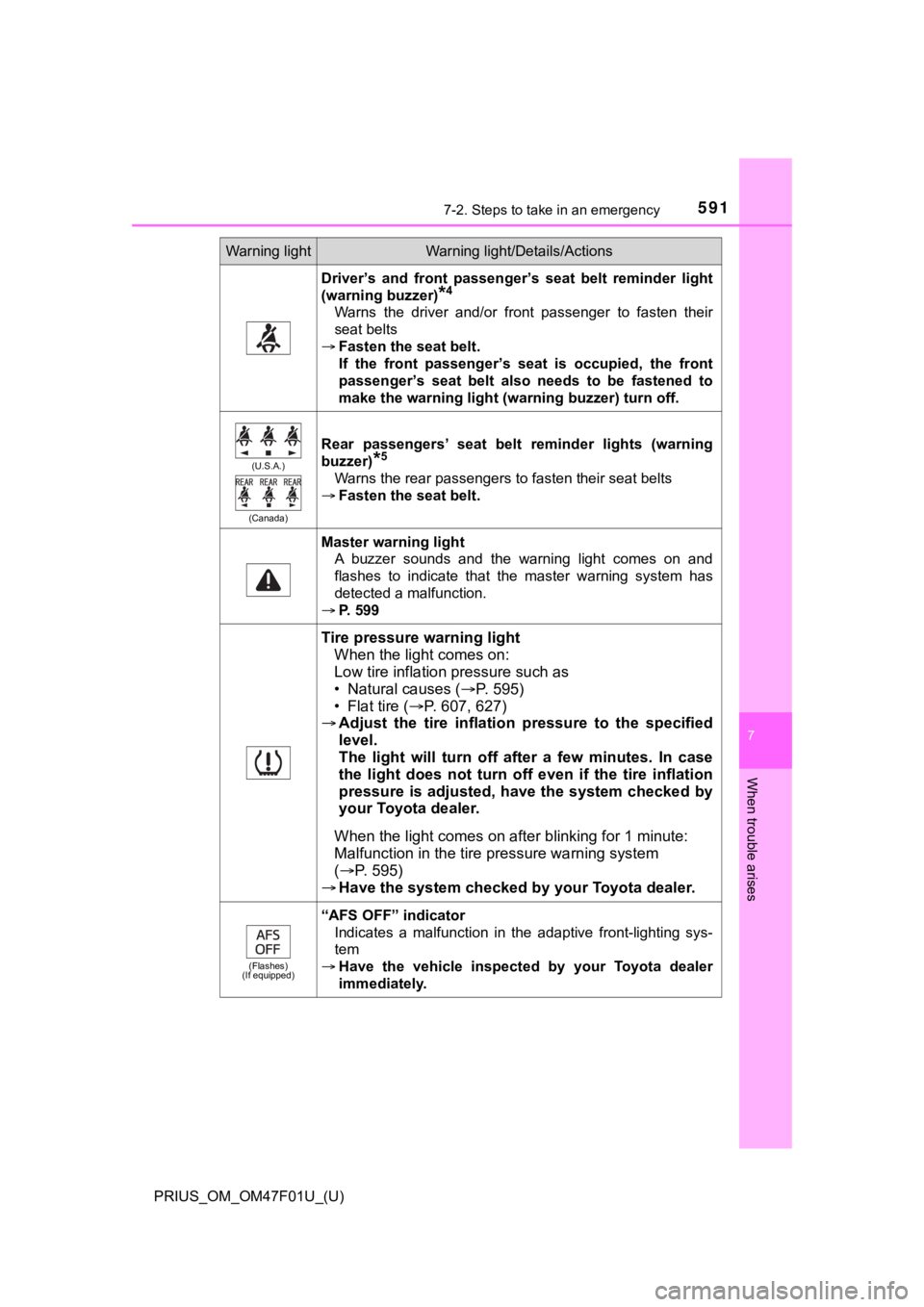
5917-2. Steps to take in an emergency
PRIUS_OM_OM47F01U_(U)
7
When trouble arises
Driver’s and front passenger’s seat belt reminder light
(warning buzzer)
*4
Warns the driver and/or front passenger to fasten their
seat belts
Fasten the seat belt.
If the front passenger’s seat is occupied, the front
passenger’s seat belt also needs to be fastened to
make the warning light (warning buzzer) turn off.
(U.S.A.)
(Canada)
Rear passengers’ seat belt reminder lights (warning
buzzer)
*5
Warns the rear passengers to fasten their seat belts
Fasten the seat belt.
Master warning light
A buzzer sounds and the warning light comes on and
flashes to indicate that the master warning system has
detected a malfunction.
P. 599
Tire pressure warning light
When the light comes on:
Low tire inflation pressure such as
• Natural causes ( P. 5 9 5 )
• Flat tire ( P. 607, 627)
Adjust the tire inflation pressure to the specified
level.
The light will turn off after a few minutes. In case
the light does not turn off even if the tire inflation
pressure is adjusted, have the system checked by
your Toyota dealer.
When the light comes on after blinking for 1 minute:
Malfunction in t he tire pressure warning system
( P. 5 9 5 )
Have the system checked by your Toyota dealer.
(Flashes)
(If equipped)
“AFS OFF” indicator
Indicates a malfunction in the adaptive front-lighting sys-
tem
Have the vehicle inspected by your Toyota dealer
immediately.
Warning lightWarning light/Details/Actions
Page 600 of 744
6007-2. Steps to take in an emergency
PRIUS_OM_OM47F01U_(U)
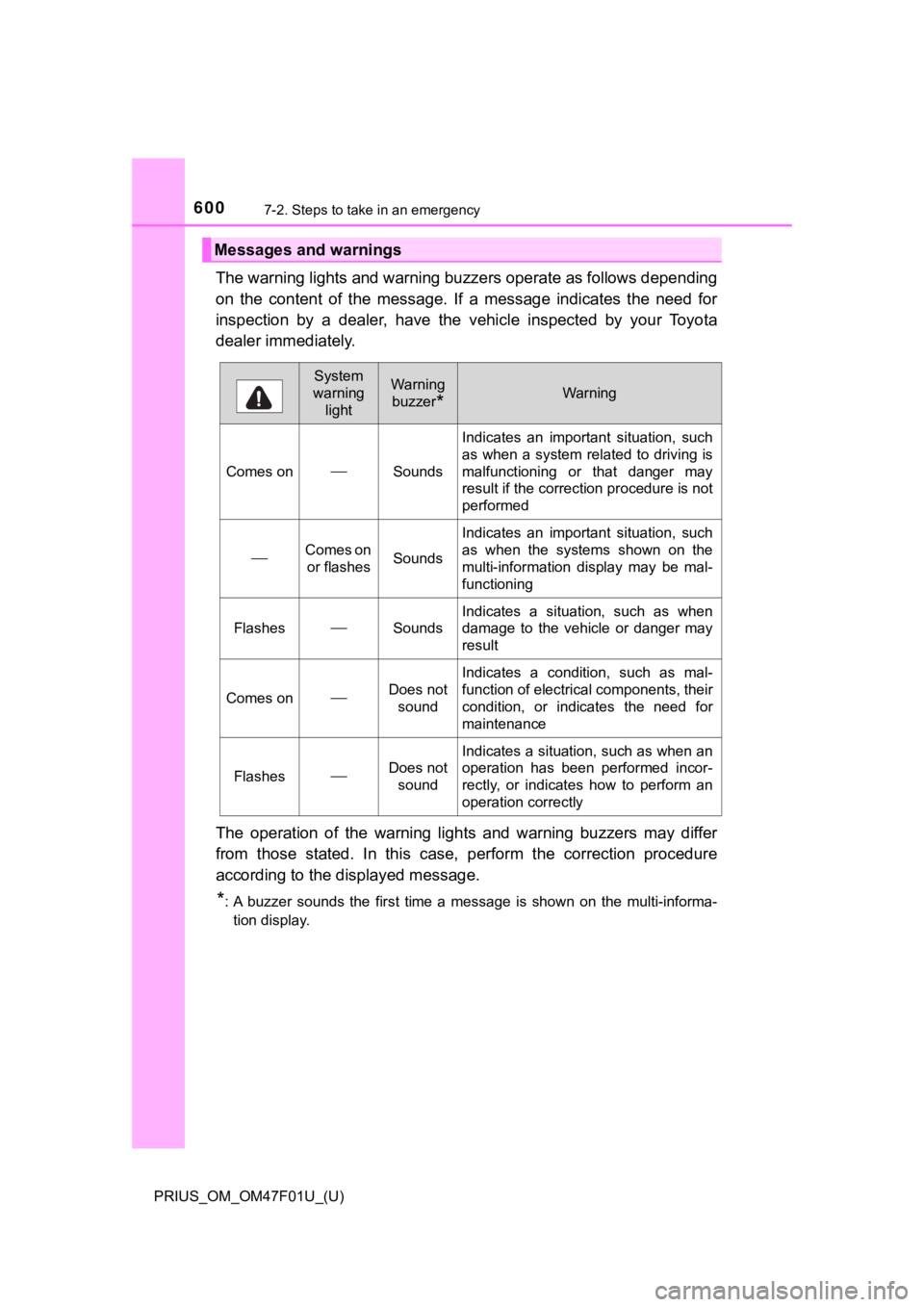
The warning lights and warning buzzers operate as follows depending
on the content of the message. If a message indicates the need for
inspection by a dealer, have the vehicle inspected by your Toyota
dealer immediately.
The operation of the warning lights and warning buzzers may dif fer
from those stated. In this case, perform the correction procedu re
according to the displayed message.
*: A buzzer sounds the first time a message is shown on the multi -informa-
tion display.
Messages and warnings
System
warning lightWarning
buzzer
*Warning
Comes onSounds
Indicates an important situation, such
as when a system related to driving is
malfunctioning or that danger may
result if the correction procedure is not
performed
Comes on or flashesSounds
Indicates an important situation, such
as when the systems shown on the
multi-information display may be mal-
functioning
FlashesSounds
Indicates a situation, such as when
damage to the vehicle or danger may
result
Comes onDoes not sound
Indicates a condition, such as mal-
function of electrical components, their
condition, or indicates the need for
maintenance
FlashesDoes not
sound
Indicates a situation, such as when an
operation has been performed incor-
rectly, or indicates how to perform an
operation correctly
Page 601 of 744
6017-2. Steps to take in an emergency
PRIUS_OM_OM47F01U_(U)
7
When trouble arises
■Warning messages
The warning messages explained below may differ from the actual messages
according to operation conditions and vehicle specifications.
■ System warning lights
The master warning light does not come on or flash in the following cases.
Instead, a separate system warning light will come on along wit h a message
or image shown on the multi-information display.
● “Antilock Brake System Malfunction Visit Your Dealer”:
The ABS warning light comes on. ( P. 589)
● “Braking Power Low Visit Your Dealer”:
The brake system warning light (yellow) will come on. ( P. 588)
● Indicates that a door is not fully closed while the vehicle is stopped.:
The Open door warning light comes on. ( P. 590)
■ If “Visit Your Dealer” is shown
The system or part shown on the multi-information display is malfunctioning.
Have the vehicle inspected by your Toyota dealer.
■ If a message about an operation is shown
● If a message about an operation of the accelerator pedal or bra ke pedal is
shown
• A warning message about an operation of the brake pedal may be shown
while the driving assist systems such as PCS (Pre-Collision System) (if
equipped) or the dynamic radar cruise control with full-speed r ange (if
equipped) is operating. If a warning message is shown, be sure to decel-
erate the vehicle or follow an instruction shown on the multi-i nformation
display.
• A warning message is shown when Brake Override System operates .
( P. 223, 604)
• A warning message is shown when Drive-Start Control or Parking Sup-
port Brake function (if equipped) operates ( P. 224, 376). Follow the
instructions on the multi-information display.
● If a message about an operation of the power switch is shown
An instruction for operation of the power switch is shown when the incorrect
procedure for starting the hybrid system is performed or the power switch is
operated incorrectly. Follow the instructions shown on the mult i-information
display to operate the power switch again.
● If a message about a shift operation is shown
To prevent the shift position from being selected incorrectly o r the vehicle
from moving unexpectedly, the shift position may be changed aut omatically
( P. 251) or shift operation may be required. In this case, chang e the shift
position following the instructions on the multi-information display.
● If a message or image about an open/close state of a part or replenishment
of a consumable is shown
Confirm the part indicated by the multi-information display or a warning light,
and then perform the coping method such as closing the open doo r or
replenishing a consumable.
Page 695 of 744
PRIUS_OM_OM47F01U_(U)
6958-2. Customization
8
Vehicle specifications
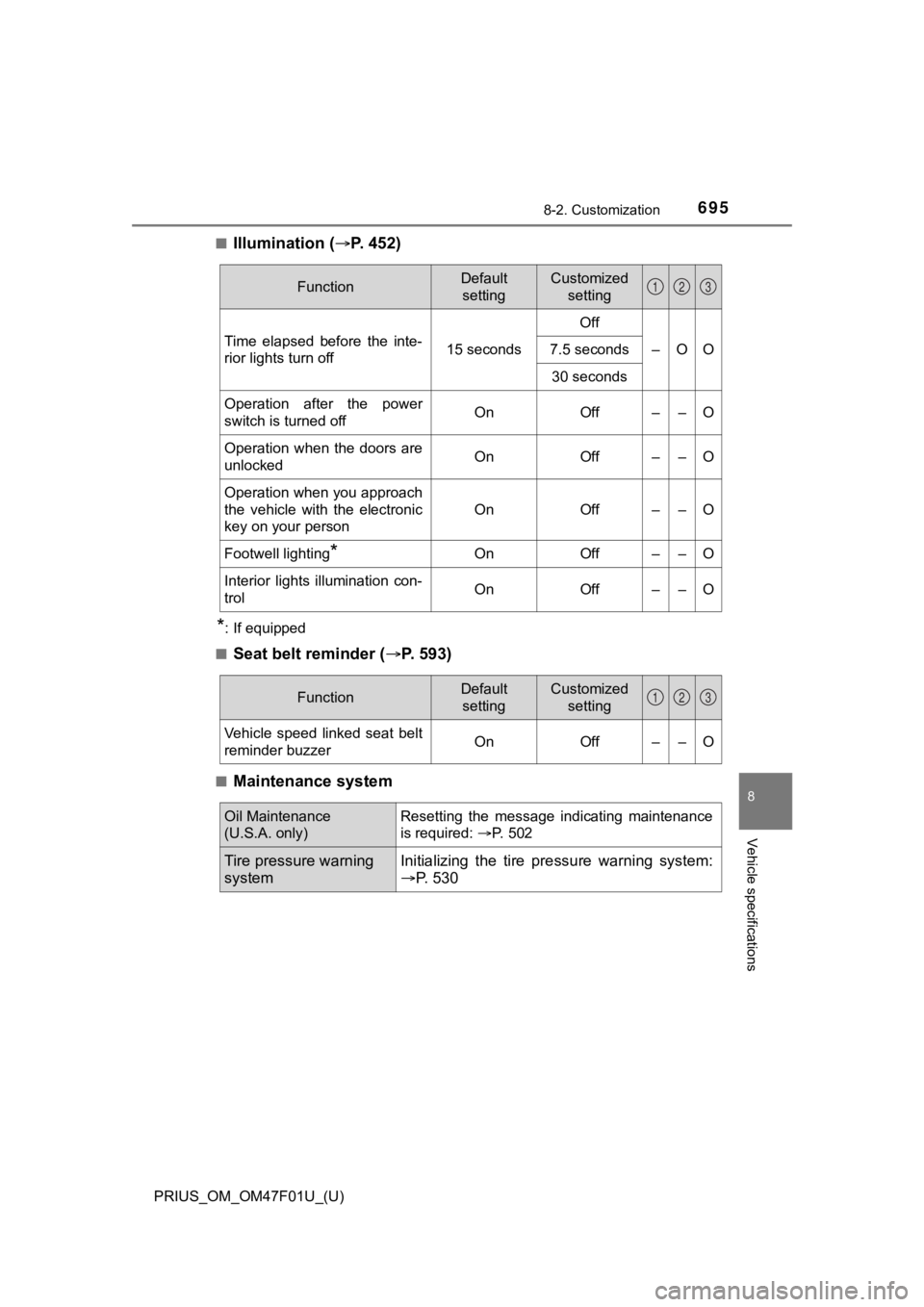
■Illumination (P. 4 5 2 )
*: If equipped
■
Seat belt reminder ( P. 593)
■Maintenance system
FunctionDefault
settingCustomized setting
Time elapsed before the inte-
rior lights turn off 15 secondsOff
–OO
7.5 seconds
30 seconds
Operation after the power
switch is turned offOnOff––O
Operation when the doors are
unlockedOnOff––O
Operation when you approach
the vehicle with the electronic
key on your person
OnOff––O
Footwell lighting*OnOff––O
Interior lights illumination con-
trolOnOff––O
123
FunctionDefault settingCustomized setting
Vehicle speed linked seat belt
reminder buzzerOnOff––O
123
Oil Maintenance
(U.S.A. only)Resetting the message indicating maintenance
is required: P. 502
Tire pressure warning
systemInitializing the tire p ressure warning system:
P. 530
Page 723 of 744
723Alphabetical index
PRIUS_OM_OM47F01U_(U)
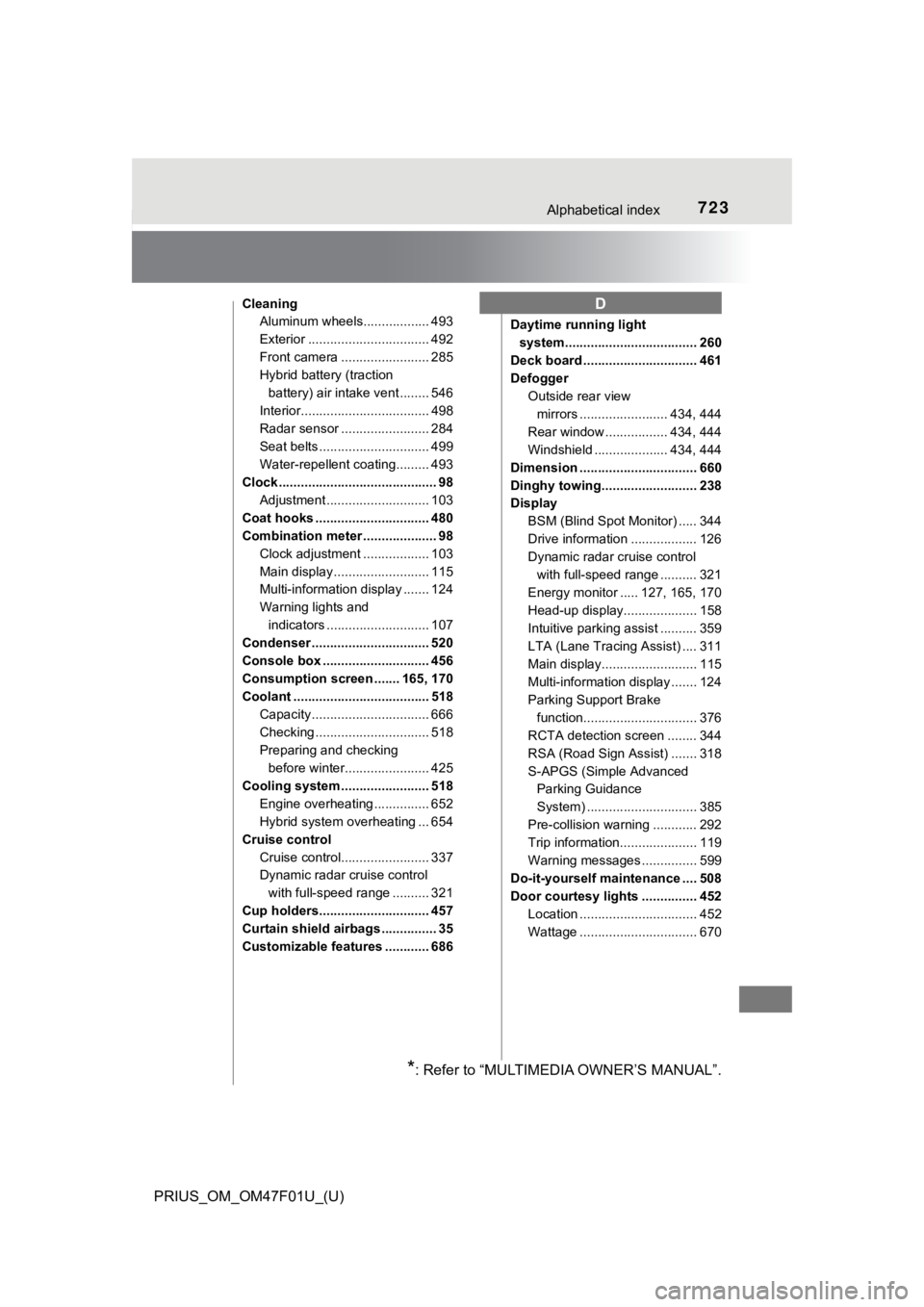
CleaningAluminum wheels.................. 493
Exterior ................................. 492
Front camera ........................ 285
Hybrid battery (traction
battery) air intake vent ........ 546
Interior................................... 498
Radar sensor ........................ 284
Seat belts .............................. 499
Water-repellent coating......... 493
Clock ........................................... 98
Adjustment ............................ 103
Coat hooks ............................... 480
Combination meter .................... 98 Clock adjustment .................. 103
Main display .......................... 115
Multi-information display ....... 124
Warning lights and indicators ............................ 107
Condenser ................................ 520
Console box ............................. 456
Consumption screen ....... 165, 170
Coolant ..................................... 518
Capacity ................................ 666
Checking ............................... 518
Preparing and checking before winter....................... 425
Cooling system ........................ 518 Engine overheating ............... 652
Hybrid system overheating ... 654
Cruise control Cruise control........................ 337
Dynamic radar cruise control with full-speed range .......... 321
Cup holders.............................. 457
Curtain shield airbags ............... 35
Customizable features ............ 686 Daytime running light
system.................................... 260
Deck board ............................... 461
Defogger Outside rear view
mirrors ........................ 434, 444
Rear window ................. 434, 444
Windshield .................... 434, 444
Dimension ................................ 660
Dinghy towing.......................... 238
Display BSM (Blind Spot Monitor) ..... 344
Drive information .................. 126
Dynamic radar cruise control with full-speed range .......... 321
Energy monitor ..... 127, 165, 170
Head-up display.................... 158
Intuitive parking assist .......... 359
LTA (Lane Tracing Assist) .... 311
Main display.......................... 115
Multi-information display ....... 124
Parking Support Brake function............................... 376
RCTA detection screen ........ 344
RSA (Road Sign Assist) ....... 318
S-APGS (Simple Advanced Parking Guidance
System) .............................. 385
Pre-collision warning ............ 292
Trip information..................... 119
Warning messages ............... 599
Do-it-yourself maintenance .... 508
Door courtesy lights ............... 452 Location ................................ 452
Wattage ................................ 670D
*: Refer to “MULTIMEDIA OWNER’S MANUAL”.