door lock TOYOTA PRIUS 2022 Service Manual
[x] Cancel search | Manufacturer: TOYOTA, Model Year: 2022, Model line: PRIUS, Model: TOYOTA PRIUS 2022Pages: 744, PDF Size: 14.35 MB
Page 601 of 744
6017-2. Steps to take in an emergency
PRIUS_OM_OM47F01U_(U)
7
When trouble arises
■Warning messages
The warning messages explained below may differ from the actual messages
according to operation conditions and vehicle specifications.
■ System warning lights
The master warning light does not come on or flash in the following cases.
Instead, a separate system warning light will come on along wit h a message
or image shown on the multi-information display.
● “Antilock Brake System Malfunction Visit Your Dealer”:
The ABS warning light comes on. ( P. 589)
● “Braking Power Low Visit Your Dealer”:
The brake system warning light (yellow) will come on. ( P. 588)
● Indicates that a door is not fully closed while the vehicle is stopped.:
The Open door warning light comes on. ( P. 590)
■ If “Visit Your Dealer” is shown
The system or part shown on the multi-information display is malfunctioning.
Have the vehicle inspected by your Toyota dealer.
■ If a message about an operation is shown
● If a message about an operation of the accelerator pedal or bra ke pedal is
shown
• A warning message about an operation of the brake pedal may be shown
while the driving assist systems such as PCS (Pre-Collision System) (if
equipped) or the dynamic radar cruise control with full-speed r ange (if
equipped) is operating. If a warning message is shown, be sure to decel-
erate the vehicle or follow an instruction shown on the multi-i nformation
display.
• A warning message is shown when Brake Override System operates .
( P. 223, 604)
• A warning message is shown when Drive-Start Control or Parking Sup-
port Brake function (if equipped) operates ( P. 224, 376). Follow the
instructions on the multi-information display.
● If a message about an operation of the power switch is shown
An instruction for operation of the power switch is shown when the incorrect
procedure for starting the hybrid system is performed or the power switch is
operated incorrectly. Follow the instructions shown on the mult i-information
display to operate the power switch again.
● If a message about a shift operation is shown
To prevent the shift position from being selected incorrectly o r the vehicle
from moving unexpectedly, the shift position may be changed aut omatically
( P. 251) or shift operation may be required. In this case, chang e the shift
position following the instructions on the multi-information display.
● If a message or image about an open/close state of a part or replenishment
of a consumable is shown
Confirm the part indicated by the multi-information display or a warning light,
and then perform the coping method such as closing the open doo r or
replenishing a consumable.
Page 643 of 744
643
PRIUS_OM_OM47F01U_(U)
7
When trouble arises
7-2. Steps to take in an emergency
If the electronic key does not operate
properly
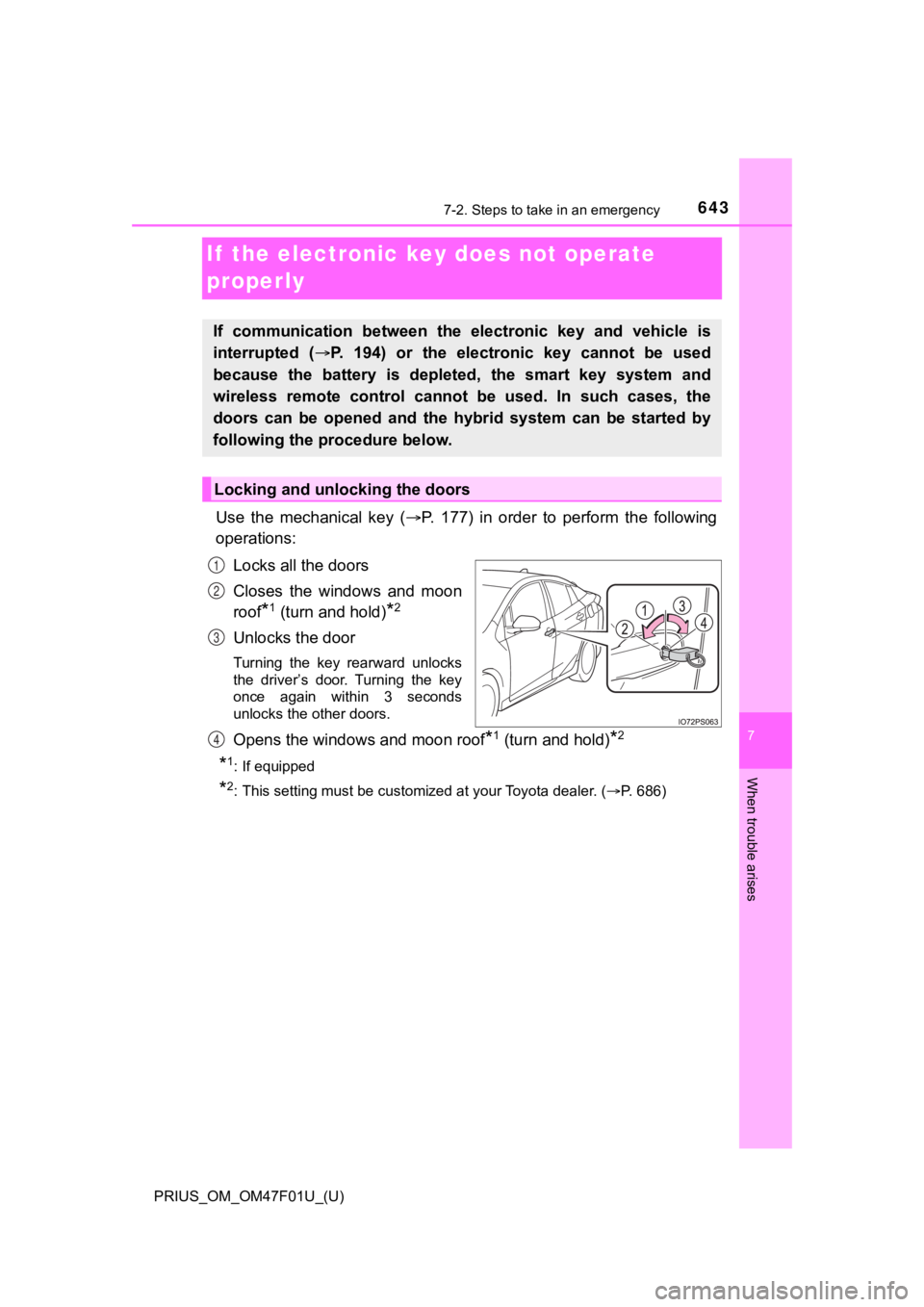
Use the mechanical key (P. 177) in order to perform the following
operations:
Locks all the doors
Closes the windows and moon
roof
*1 (turn and hold)*2
Unlocks the door
Turning the key rearward unlocks
the driver’s door. Turning the key
once again within 3 seconds
unlocks the other doors.
Opens the windows and moon roof*1 (turn and hold)*2
*1: If equipped
*2: This setting must be customized at your Toyota dealer. ( P. 686)
If communication between the electronic key and vehicle is
interrupted ( P. 194) or the electronic key cannot be used
because the battery is depleted, the smart key system and
wireless remote control can not be used. In such cases, the
doors can be opened and the hybrid system can be started by
following the procedure below.
Locking and unlocking the doors
1
2
3
4
Page 649 of 744

6497-2. Steps to take in an emergency
PRIUS_OM_OM47F01U_(U)
7
When trouble arises
■When recharging or replacing the 12-volt battery
●In some cases, it may not be possible to unlock the doors using the smart
key system when the 12-volt battery is discharged. Use the wire less remote
control or the mechanical key to lock or unlock the doors.
● The hybrid system may not start on the first attempt after the 12-volt battery
has recharged but will start normally after the second attempt. This is not a
malfunction.
● The power switch mode is memorized by the vehicle. When the 12- volt bat-
tery is reconnected, the system will return to the mode it was in before the
12-volt battery was discharged. Before disconnecting the 12-volt battery,
turn the power switch off.
If you are unsure what mode the power switch was in before the 12-volt bat-
tery discharged, be especially careful when reconnecting the 12 -volt battery.
● If the 12-volt battery discharges while the shift position is in P, it may not be
possible to shift the shift position to other positions. In thi s case, the vehicle
cannot be towed without lifting both front wheels because the f ront wheels
will be locked. ( P. 580)
■ When replacing the 12-volt battery
●Use a 12-volt battery that conforms to European regulations.
● Use a 12-volt battery that the case size is same as the previou s one (LN1),
20 hour rate capacity (20HR) is equivalent (45Ah) or greater, and perfor-
mance rating (CCA) is equivalent (295A) or greater.
• If the sizes differ, the 12-volt battery cannot be properly se cured.
• If the 20 hour rate capacity is low, even if the time period w here the vehi-
cle is not used is a short time, the 12-volt battery may discharge and the
hybrid system may not be able to start.
● For details, consult your Toyota dealer.
Page 689 of 744
PRIUS_OM_OM47F01U_(U)
6898-2. Customization
8
Vehicle specifications
■HUD (Head-up display)* ( P. 1 5 8 )
*: If equipped
■
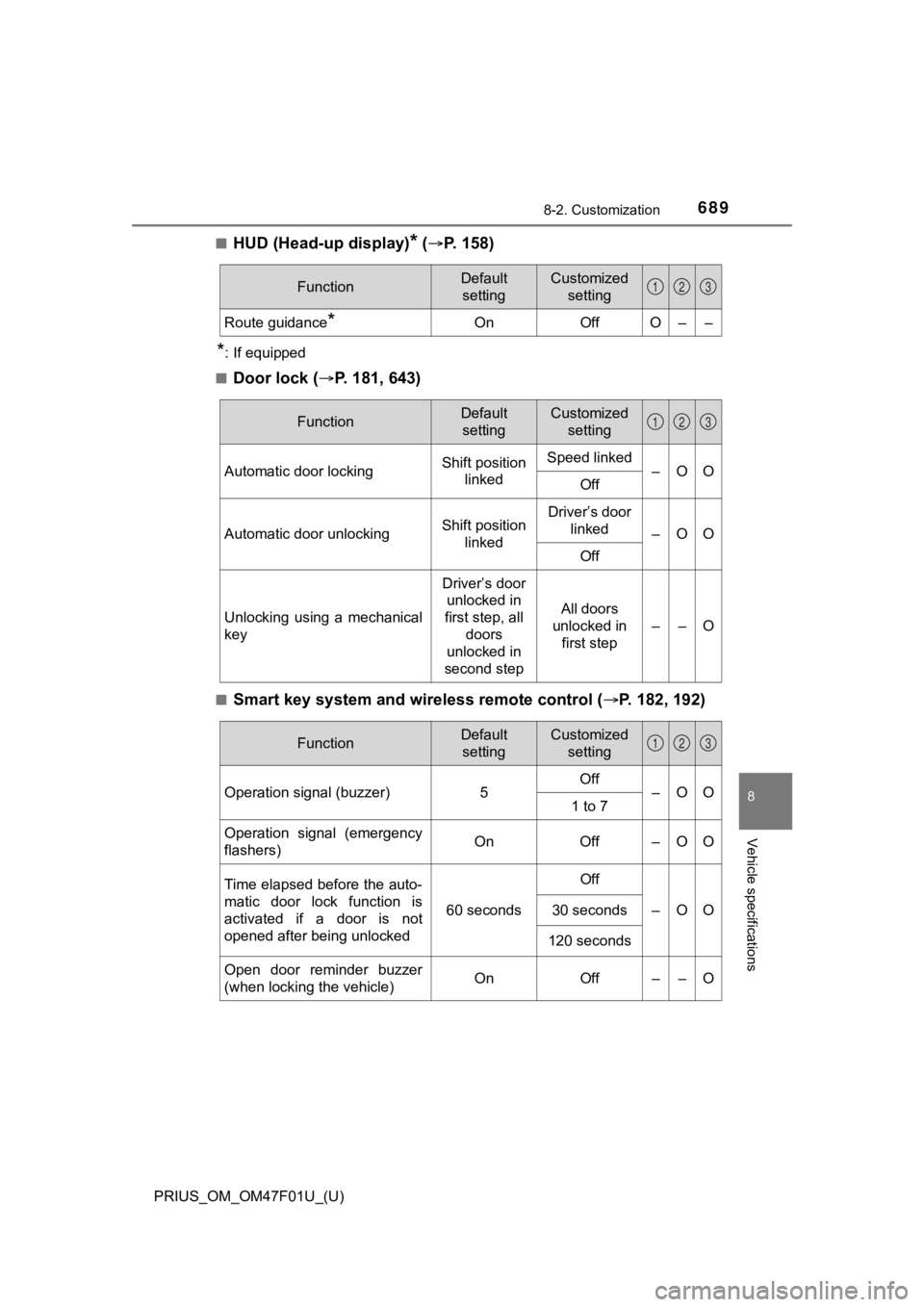
Door lock ( P. 181, 643)
■Smart key system and wireless remote control ( P. 182, 192)
FunctionDefault
settingCustomized setting
Route guidance*OnOffO––
123
FunctionDefault settingCustomized setting
Automatic door lockingShift position linkedSpeed linked–OOOff
Automatic door unlockingShift position linkedDriver’s door linked
–OO
Off
Unlocking using a mechanical
key
Driver’s door unlocked in
first step, all
doors
unlocked in
second step
All doors
unlocked in first step
––O
123
FunctionDefault settingCustomized setting
Operation signal (buzzer) 5Off
–OO
1 to 7
Operation signal (emergency
flashers) On
Off – O O
Time elapsed before the auto-
matic door lock function is
activated if a door is not
opened after being unlocked
60 seconds
Off
–OO30 seconds
120 seconds
Open door reminder buzzer
(when locking the vehicle)OnOff––O
123
Page 690 of 744
690
PRIUS_OM_OM47F01U_(U)
8-2. Customization
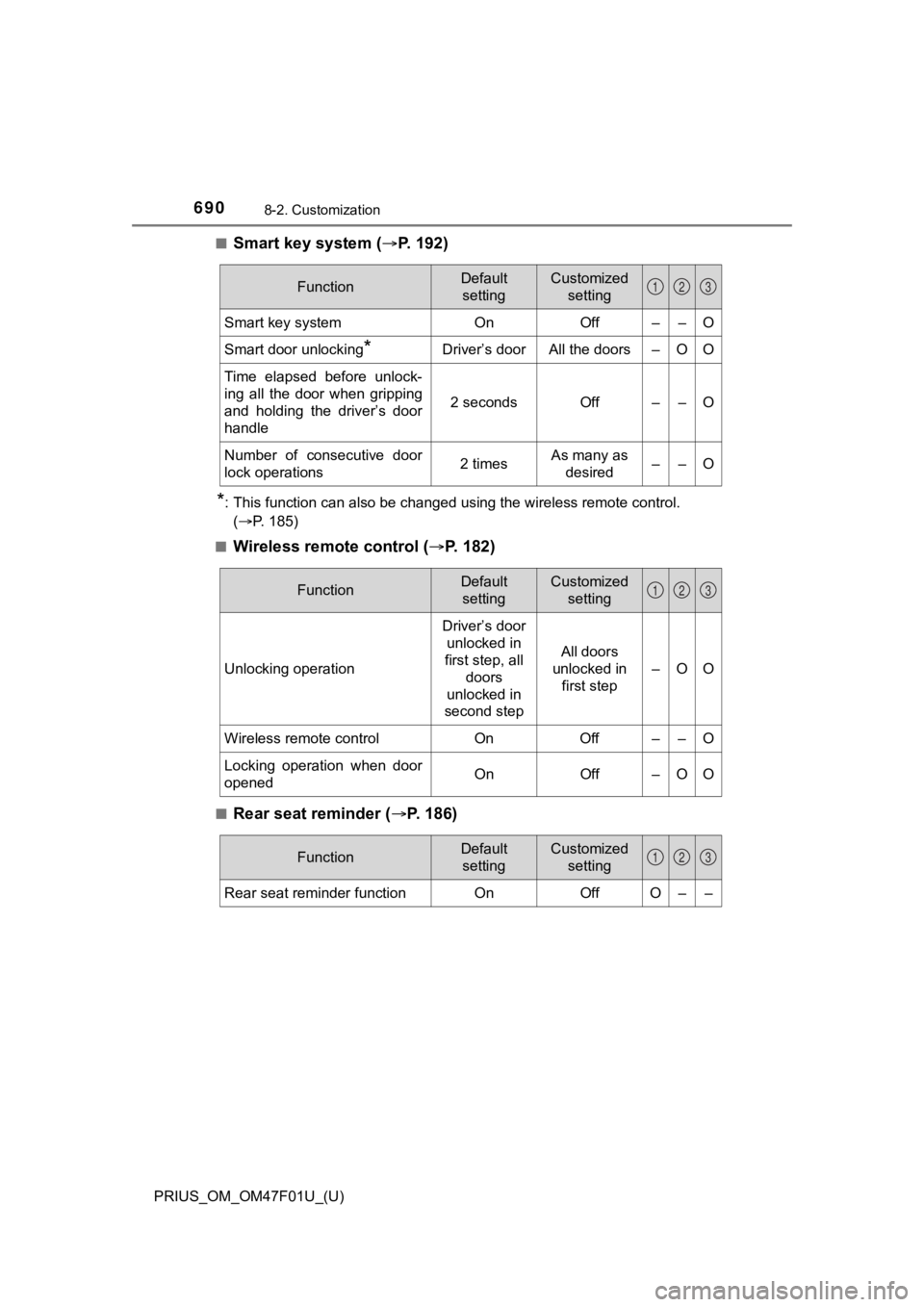
■Smart key system (P. 1 9 2 )
*: This function can also be changed using the wireless remote control.
(P. 185)
■
Wireless remote control ( P. 1 8 2 )
■Rear seat reminder ( P. 186)
FunctionDefault
settingCustomized setting
Smart key systemOnOff––O
Smart door unlocking*Driver’s doorAll the doors–OO
Time elapsed before unlock-
ing all the door when gripping
and holding the driver’s door
handle
2 secondsOff––O
Number of consecutive door
lock operations2 timesAs many as desired––O
123
FunctionDefault settingCustomized setting
Unlocking operation
Driver’s door unlocked in
first step, all doors
unlocked in
second step
All doors
unlocked in
first step
–OO
Wireless remote control On Off – – O
Locking operation when door
opened On Off – O O
123
FunctionDefault
settingCustomized setting
Rear seat reminder functionOnOffO––
123
Page 695 of 744
PRIUS_OM_OM47F01U_(U)
6958-2. Customization
8
Vehicle specifications
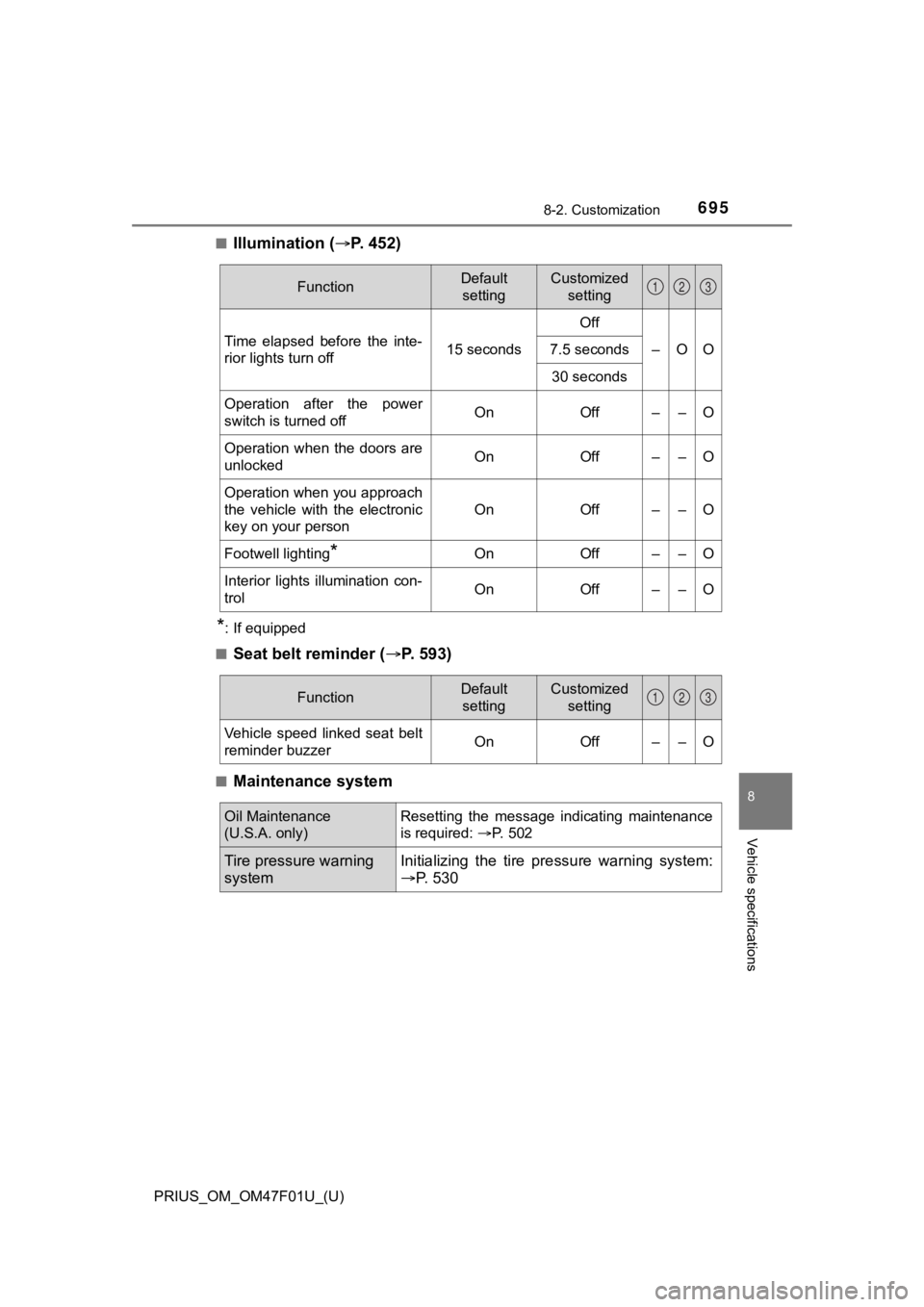
■Illumination (P. 4 5 2 )
*: If equipped
■
Seat belt reminder ( P. 593)
■Maintenance system
FunctionDefault
settingCustomized setting
Time elapsed before the inte-
rior lights turn off 15 secondsOff
–OO
7.5 seconds
30 seconds
Operation after the power
switch is turned offOnOff––O
Operation when the doors are
unlockedOnOff––O
Operation when you approach
the vehicle with the electronic
key on your person
OnOff––O
Footwell lighting*OnOff––O
Interior lights illumination con-
trolOnOff––O
123
FunctionDefault settingCustomized setting
Vehicle speed linked seat belt
reminder buzzerOnOff––O
123
Oil Maintenance
(U.S.A. only)Resetting the message indicating maintenance
is required: P. 502
Tire pressure warning
systemInitializing the tire p ressure warning system:
P. 530
Page 696 of 744
696
PRIUS_OM_OM47F01U_(U)
8-2. Customization
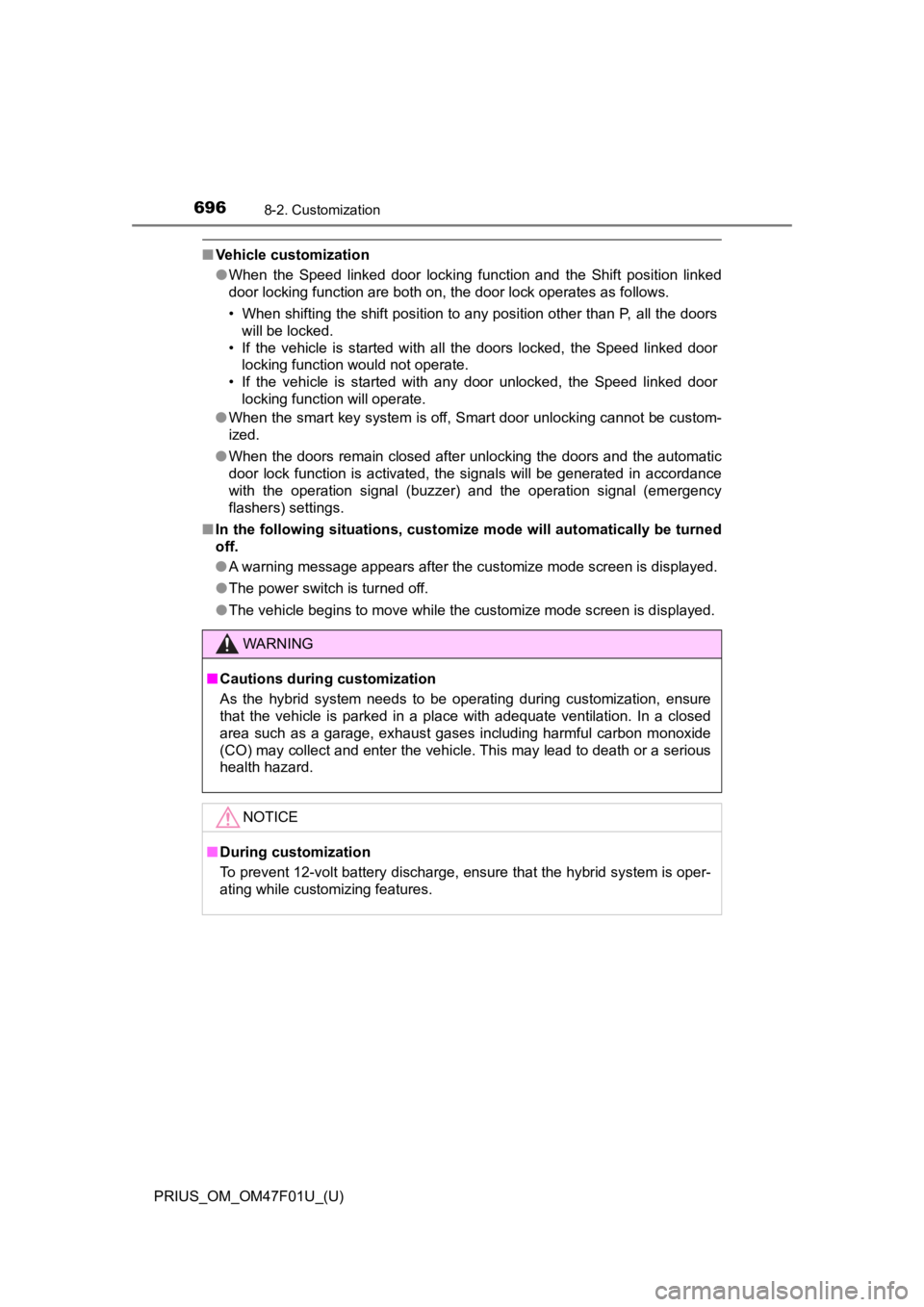
■Vehicle customization
●When the Speed linked door locking function and the Shift posit ion linked
door locking function are both on, the door lock operates as follows.
• When shifting the shift position to any position other than P, all the doors
will be locked.
• If the vehicle is started with all the doors locked, the Speed linked door locking function would not operate.
• If the vehicle is started with any door unlocked, the Speed li nked door
locking function will operate.
● When the smart key system is off, Smart door unlocking cannot be custom-
ized.
● When the doors remain closed after unlocking the doors and the automatic
door lock function is activated, the signals will be generated in accordance
with the operation signal (buzzer) and the operation signal (emergency
flashers) settings.
■ In the following situations, customize mode will automatically be turned
off.
● A warning message appears after the customize mode screen is displayed.
● The power switch is turned off.
● The vehicle begins to move while the customize mode screen is displayed.
WARNING
■Cautions during customization
As the hybrid system needs to be operating during customization , ensure
that the vehicle is parked in a place with adequate ventilation. In a closed
area such as a garage, exhaust gases including harmful carbon monoxide
(CO) may collect and enter the vehicle. This may lead to death or a serious
health hazard.
NOTICE
■ During customization
To prevent 12-volt battery discharge, ensure that the hybrid sy stem is oper-
ating while customizing features.
Page 716 of 744
716What to do if... (Troubleshooting)
PRIUS_OM_OM47F01U_(U)
What to do if... (Troubleshooting)
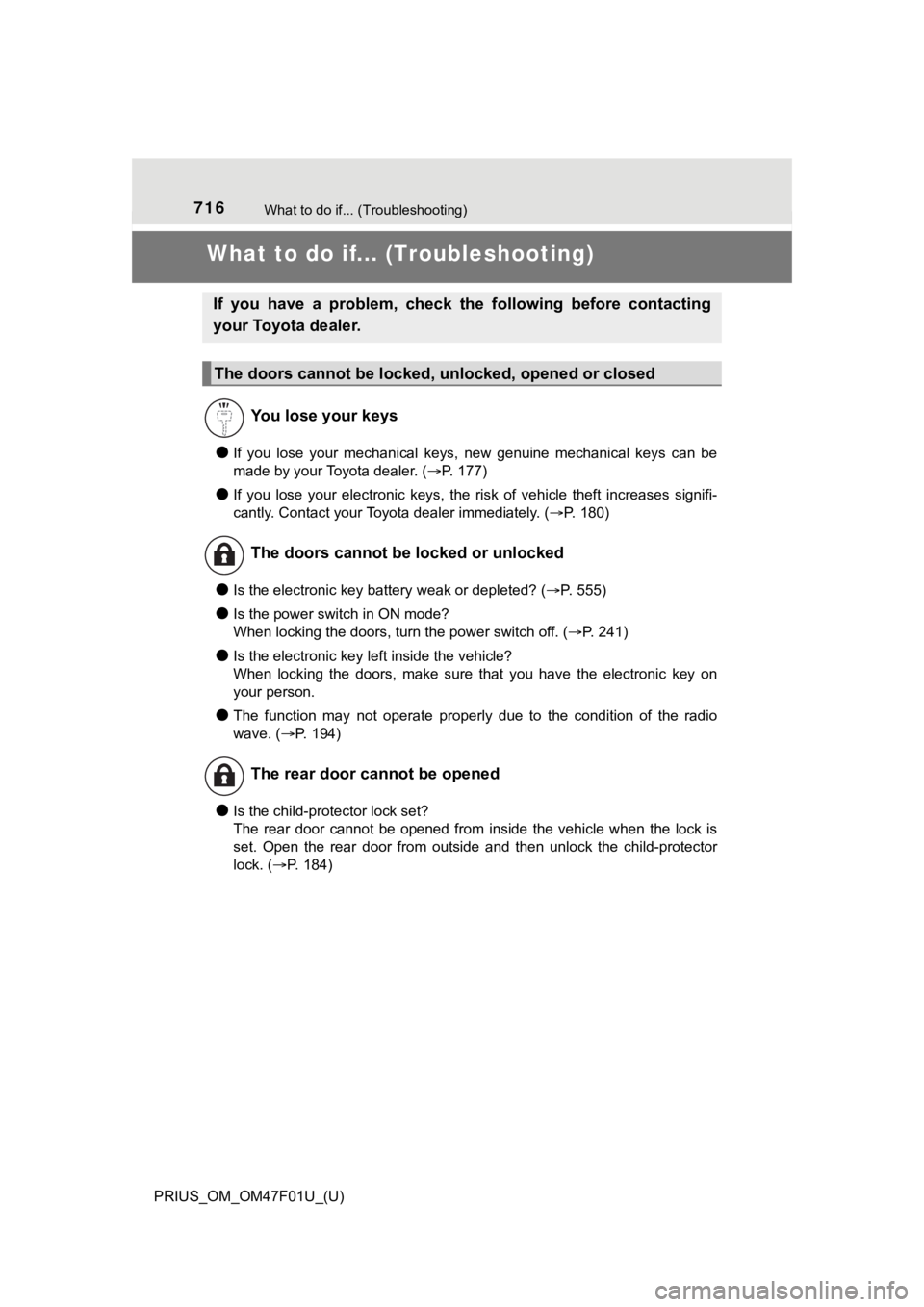
●If you lose your mechanical keys, new genuine mechanical keys can be
made by your Toyota dealer. ( P. 177)
●If you lose your electronic keys, the risk of vehicle theft inc reases signifi-
cantly. Contact your Toyota dealer immediately. ( P. 180)
●Is the electronic key battery weak or depleted? (P. 555)
●Is the power switch in ON mode?
When locking the doors, turn the power switch off. ( P. 241)
●Is the electronic key left inside the vehicle?
When locking the doors, make sure that you have the electronic key on
your person.
●The function may not operate properly due to the condition of t he radio
wave. ( P. 194)
●Is the child-protector lock set?
The rear door cannot be opened from inside the vehicle when the lock is
set. Open the rear door from outside and then unlock the child-protector
lock. ( P. 184)
If you have a problem, check the following before contacting
your Toyota dealer.
The doors cannot be locked, unlocked, opened or closed
You lose your keys
The doors cannot be locked or unlocked
The rear door cannot be opened
Page 721 of 744
721Alphabetical index
PRIUS_OM_OM47F01U_(U)
Anti-lock brake system (ABS) ...................................... 415
Function ................................ 415
Warning light ......................... 589
Approach warning ................... 331
Armrest ..................................... 480
Assist grips .............................. 481
Audio input
*
Audio system*
Automatic air conditioning system ............................ 430, 440
Air conditioning eco mode .......................... 433, 443
Air conditioning filter ............. 543
Automatic air conditioning
system ....... ................. 430, 440
Eco score (A/C score)........... 148
Front seat concentrated
airflow mode
(S-FLOW) ................... 432, 442
Automatic door locking and unlocking systems ................ 184
Automatic High Beam
(AHB) ...................................... 262
Automatic light control system .................................... 260
AUX port
*
Auxiliary box ............................ 459 Back door ................................. 187
Back-up light............................ 564
Replacing light bulb .............. 567
Wattage ................................ 670
Battery (12-volt battery) .......... 520
Battery checking ................... 520
If the 12-volt battery is discharged.......................... 646
Preparing and checking before winter ...................... 425
Replacing.............................. 649
Warning light......................... 588
Battery (traction battery) .......... 89 Air intake vent ......................... 90
Location .................................. 89
Specification ......................... 663
Blind Spot Monitor (BSM) ....... 344
Blind Spot Monitor function............................... 349
Rear Cross Traffic Alert
function............................... 352
Bluetooth
®*
B
*: Refer to “NAVIGATION SYSTEM OWNER’S MANUAL” or “MULTIMEDIA OWNER’S MANUAL”.
Page 722 of 744
722Alphabetical index
PRIUS_OM_OM47F01U_(U)
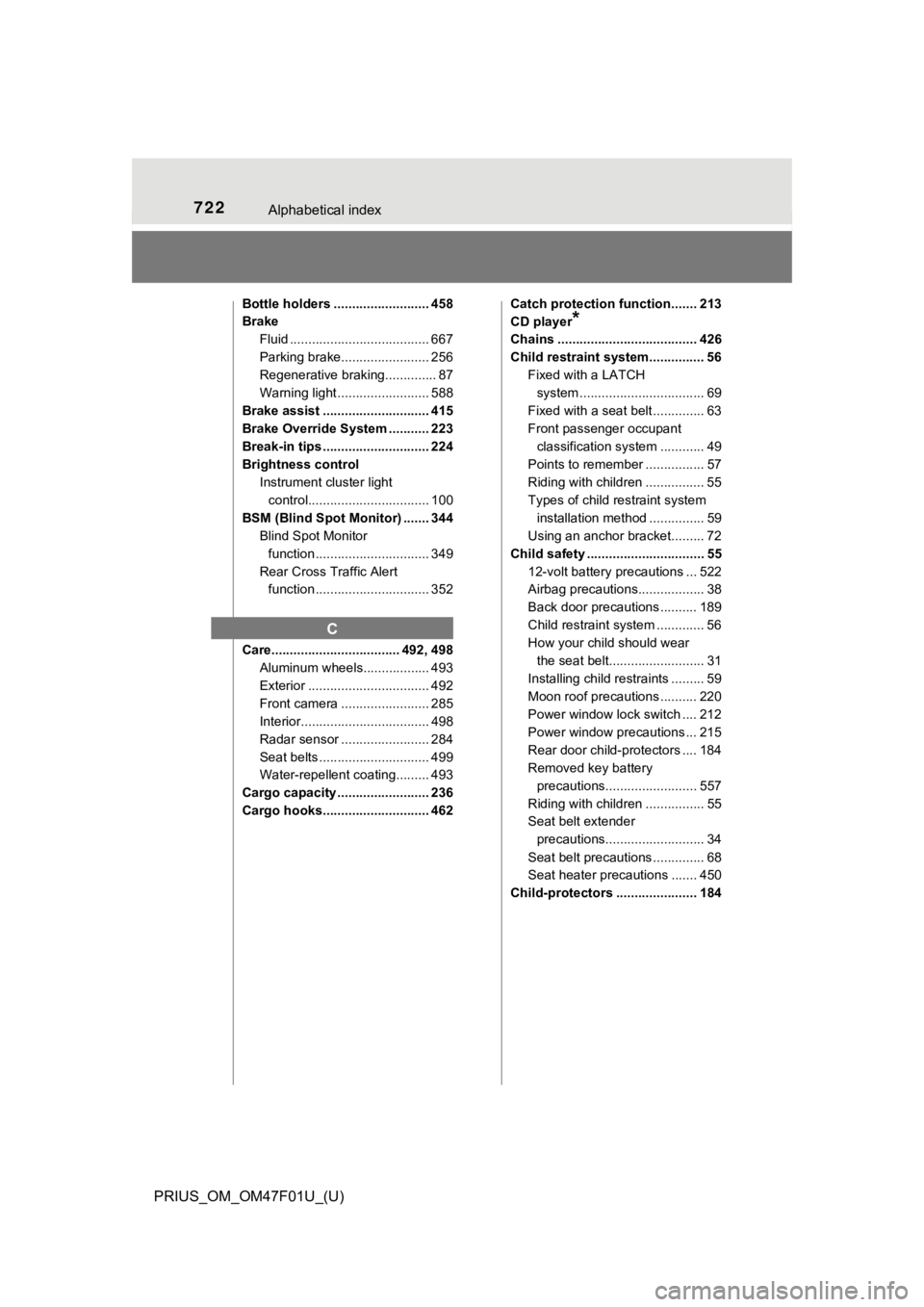
Bottle holders .......................... 458
BrakeFluid ...................................... 667
Parking brake........................ 256
Regenerative braking.............. 87
Warning light ......................... 588
Brake assist ............................. 415
Brake Override System ........... 223
Break-in tips ............................. 224
Brightness control Instrument cluster light
control................................. 100
BSM (Blind Spot Monitor) ....... 344 Blind Spot Monitor
function ............................... 349
Rear Cross Traffic Alert function ............................... 352
Care................................... 492, 498 Aluminum wheels.................. 493
Exterior ................................. 492
Front camera ........................ 285
Interior................................... 498
Radar sensor ........................ 284
Seat belts .............................. 499
Water-repellent coating......... 493
Cargo capacity ......................... 236
Cargo hooks............................. 462 Catch protection function....... 213
CD player
*
Chains ...................................... 426
Child restraint system............... 56
Fixed with a LATCH
system .......... ..................... ... 69
Fixed with a seat belt .............. 63
Front passenger occupant classification syst em ............ 49
Points to remember ................ 57
Riding with children ................ 55
Types of child restraint system installation method ............... 59
Using an anchor bracket......... 72
Child safety ................................ 55 12-volt battery precautions ... 522
Airbag precautions.................. 38
Back door precautions .......... 189
Child restraint system ............. 56
How your child should wear the seat belt.......................... 31
Installing child restraints ......... 59
Moon roof precautions .......... 220
Power window lock switch .... 212
Power window precautions ... 215
Rear door child-protectors .... 184
Removed key battery precautions......................... 557
Riding with children ................ 55
Seat belt extender precautions........................... 34
Seat belt precautions .............. 68
Seat heater precautions ....... 450
Child-protectors ...................... 184
C