steering TOYOTA PRIUS 2022 Repair Manual
[x] Cancel search | Manufacturer: TOYOTA, Model Year: 2022, Model line: PRIUS, Model: TOYOTA PRIUS 2022Pages: 744, PDF Size: 14.35 MB
Page 399 of 744
PRIUS_OM_OM47F01U_(U)
3994-5. Using the driving support systems
4
Driving
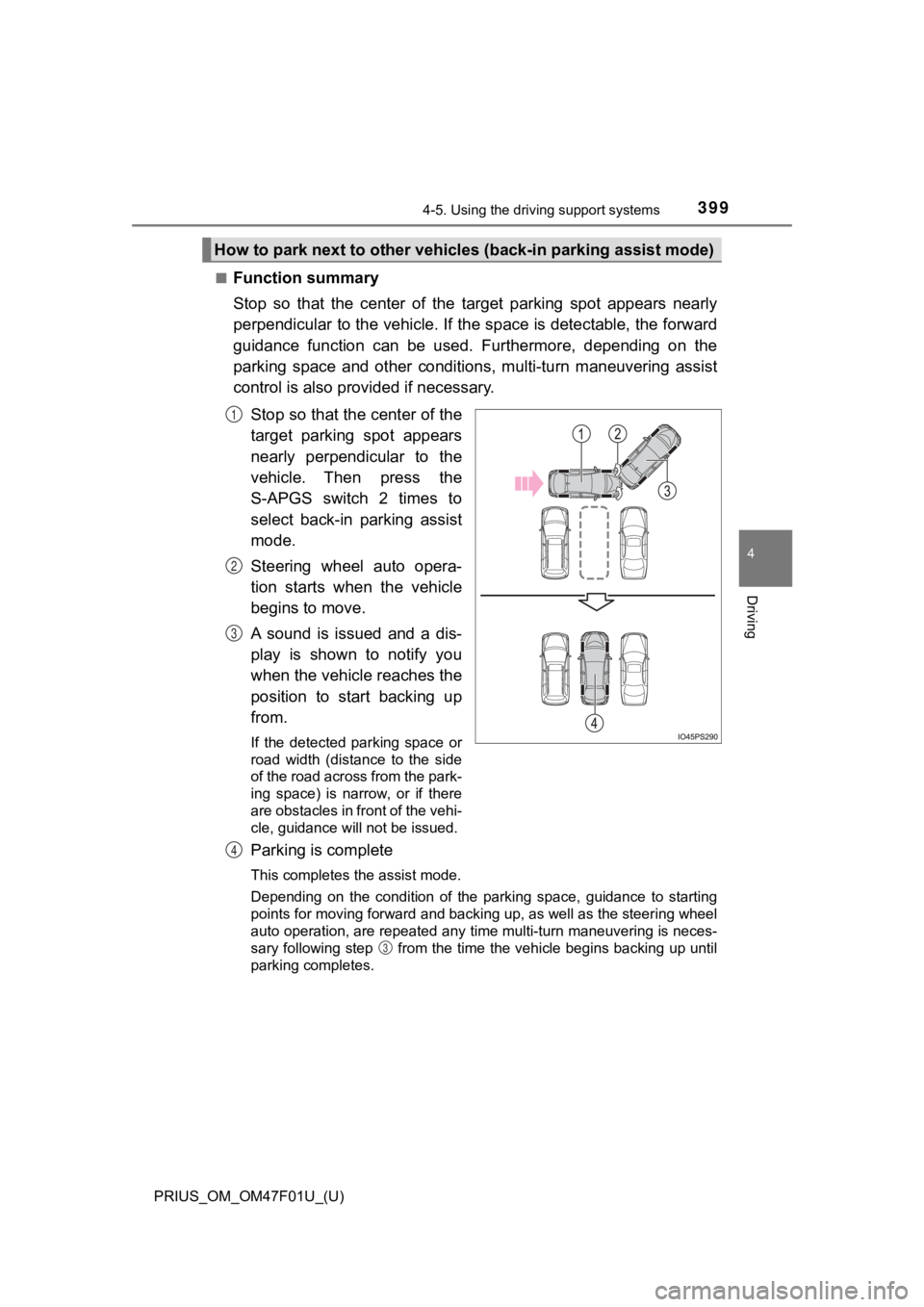
■Function summary
Stop so that the center of the target parking spot appears near ly
perpendicular to the vehicle. If the space is detectable, the f orward
guidance function can be used. Furthermore, depending on the
parking space and other conditions, multi-turn maneuvering assi st
control is also prov ided if necessary.
Stop so that the center of the
target parking spot appears
nearly perpendicular to the
vehicle. Then press the
S-APGS switch 2 times to
select back-in parking assist
mode.
Steering wheel auto opera-
tion starts when the vehicle
begins to move.
A sound is issued and a dis-
play is shown to notify you
when the vehicle reaches the
position to start backing up
from.
If the detected parking space or
road width (distance to the side
of the road across from the park-
ing space) is narrow, or if there
are obstacles in front of the vehi-
cle, guidance will not be issued.
Parking is complete
This completes the assist mode.
Depending on the condition of the parking space, guidance to st arting
points for moving forward and backing up, as well as the steeri ng wheel
auto operation, are repeated any time multi-turn maneuvering is neces-
sary following step from the time the vehicle begins backing up until
parking completes.
How to park next to other vehicl es (back-in parking assist mode )
1
2
3
4
3
Page 400 of 744
400
PRIUS_OM_OM47F01U_(U)
4-5. Using the driving support systems
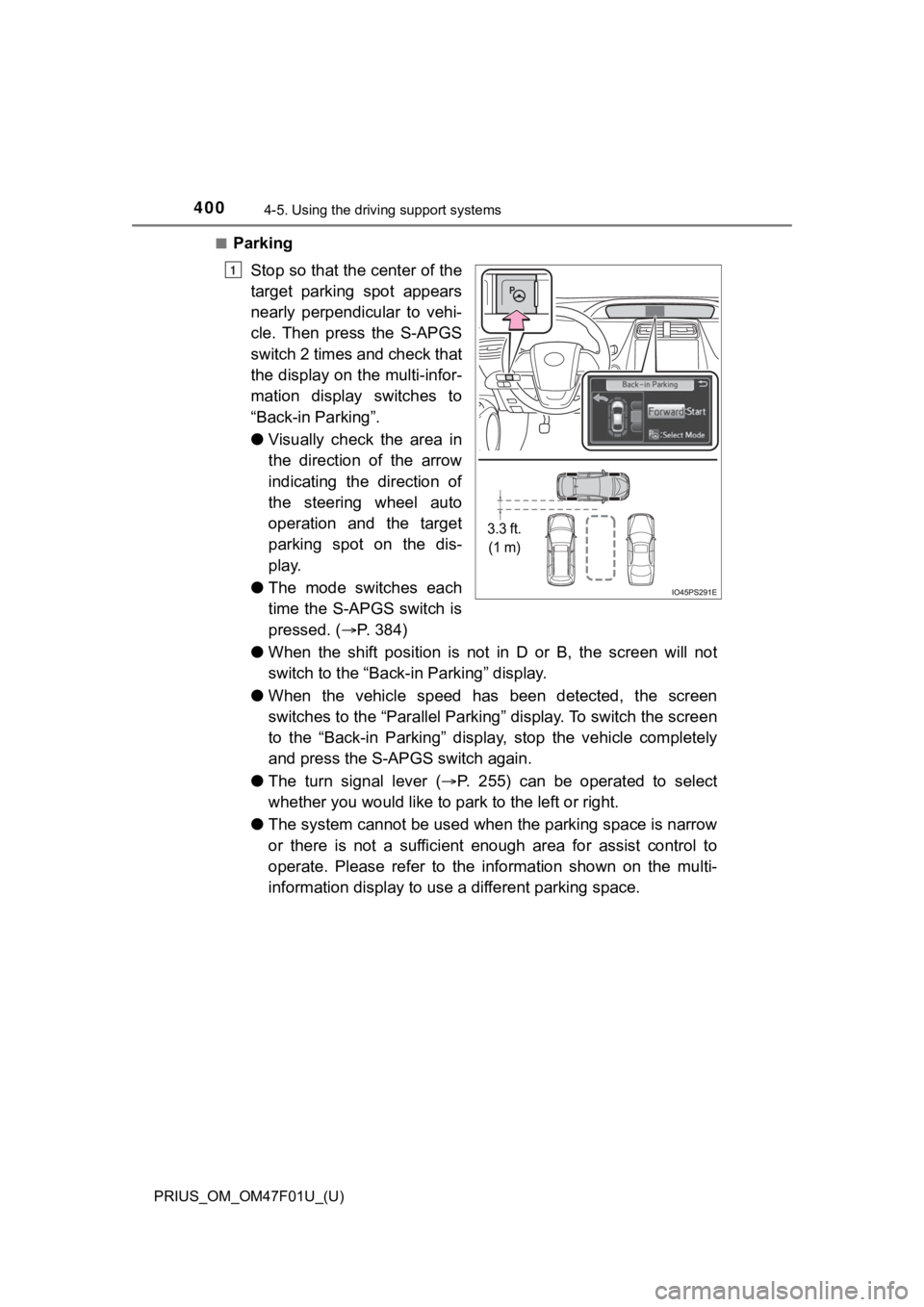
■Parking
Stop so that the center of the
target parking spot appears
nearly perpendicular to vehi-
cle. Then press the S-APGS
switch 2 times and check that
the display on the multi-infor-
mation display switches to
“Back-in Parking”.
●Visually check the area in
the direction of the arrow
indicating the direction of
the steering wheel auto
operation and the target
parking spot on the dis-
play.
● The mode switches each
time the S-APGS switch is
pressed. ( P. 3 8 4 )
● When the shift position is not in D or B, the screen will not
switch to the “Back-i n Parking” display.
● When the vehicle speed has been detected, the screen
switches to the “Parallel Parking” display. To switch the scree n
to the “Back-in Parking” display, stop the vehicle completely
and press the S-APGS switch again.
● The turn signal lever ( P. 255) can be operated to select
whether you would like to pa rk to the left or right.
● The system cannot be used when the parking space is narrow
or there is not a sufficient enough area for assist control to
operate. Please refer to the i nformation shown on the multi-
information displa y to use a different parking space.
3.3 ft.
(1 m)
1
Page 401 of 744
PRIUS_OM_OM47F01U_(U)
4014-5. Using the driving support systems
4
Driving
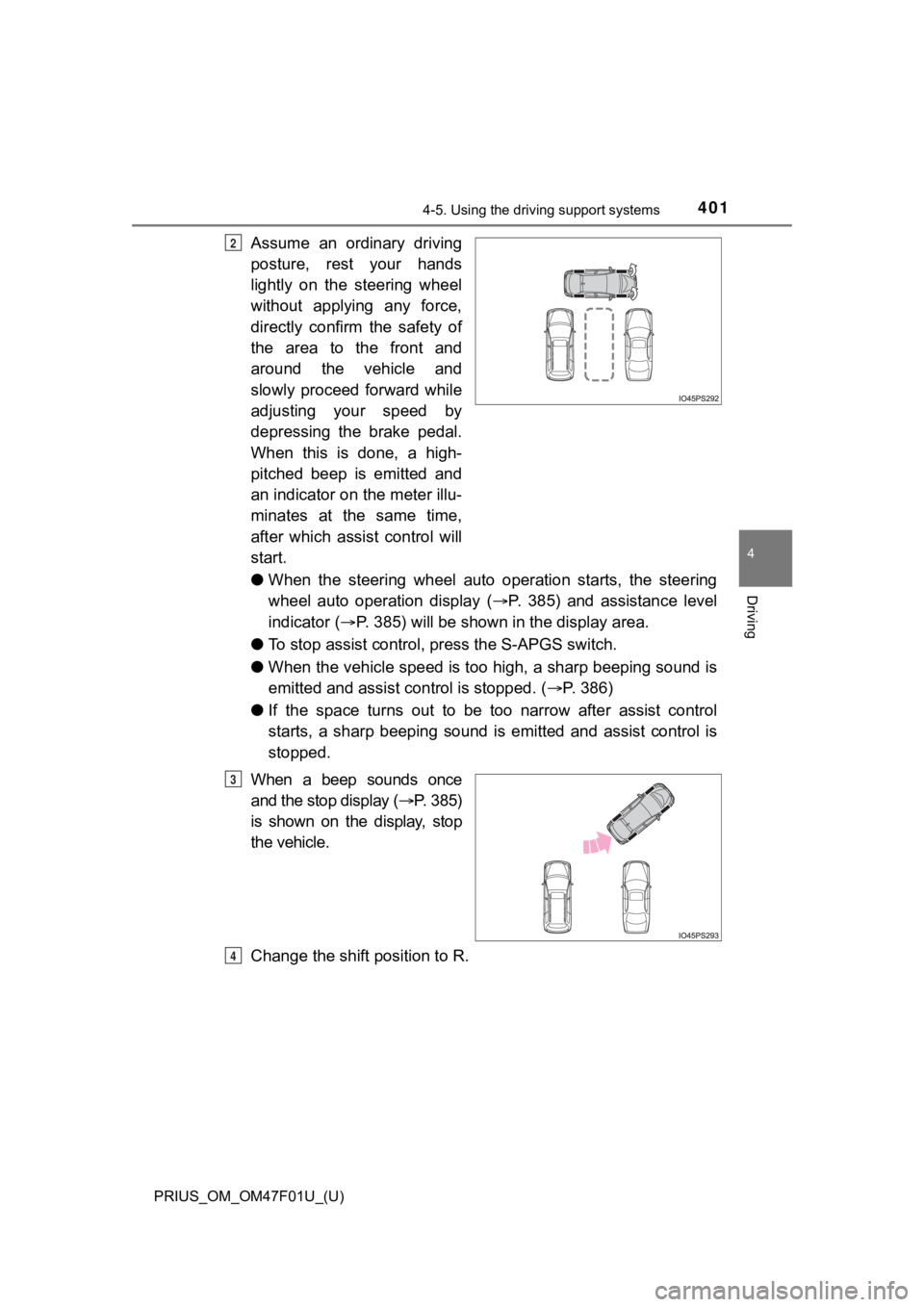
Assume an ordinary driving
posture, rest your hands
lightly on the steering wheel
without applying any force,
directly confirm the safety of
the area to the front and
around the vehicle and
slowly proceed forward while
adjusting your speed by
depressing the brake pedal.
When this is done, a high-
pitched beep is emitted and
an indicator on the meter illu-
minates at the same time,
after which assist control will
start.
●When the steering wheel auto operation starts, the steering
wheel auto operation display ( P. 385) and assistance level
indicator ( P. 385) will be shown in the display area.
● To stop assist control, press the S-APGS switch.
● When the vehicle speed is too high, a sharp beeping sound is
emitted and assist c ontrol is stopped. (P. 386)
● If the space turns out to be too narrow after assist control
starts, a sharp beeping sound is emitted and assist control is
stopped.
When a beep sounds once
and the stop display ( P. 3 8 5 )
is shown on the display, stop
the vehicle.
Change the shift position to R.2
3
4
Page 402 of 744
402
PRIUS_OM_OM47F01U_(U)
4-5. Using the driving support systems
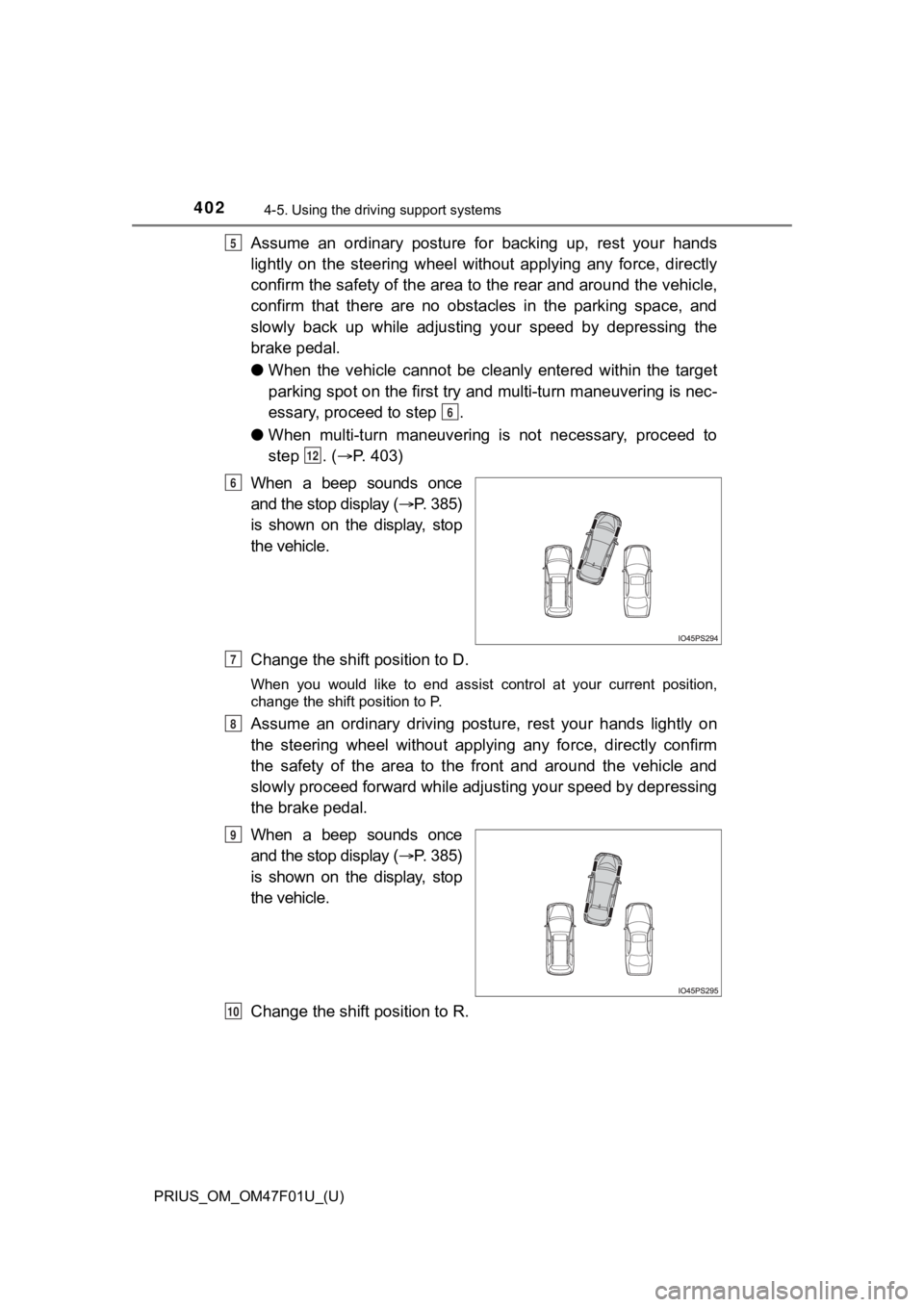
Assume an ordinary posture for backing up, rest your hands
lightly on the steering wheel without applying any force, direc tly
confirm the safety of the area t o the rear and around the vehic le,
confirm that there are no obsta cles in the parking space, and
slowly back up while adjusting your speed by depressing the
brake pedal.
● When the vehicle cannot be cleanly entered within the target
parking spot on the first try and multi-turn maneuvering is nec -
essary, proceed to step .
● When multi-turn maneuvering is not necessary, proceed to
step . ( P. 403)
When a beep sounds once
and the stop display ( P. 3 8 5 )
is shown on the display, stop
the vehicle.
Change the shift position to D.
When you would like to end assist control at your current position,
change the shift position to P.
Assume an ordinary driving postu re, rest your hands lightly on
the steering wheel without applying any force, directly confirm
the safety of the area to the front and around the vehicle and
slowly proceed forward while adjusting your speed by depressing
the brake pedal.
When a beep sounds once
and the stop display ( P. 3 8 5 )
is shown on the display, stop
the vehicle.
Change the shift position to R.
5
6
12
6
7
8
9
10
Page 403 of 744
PRIUS_OM_OM47F01U_(U)
4034-5. Using the driving support systems
4
Driving
Assume an ordinary posture for backing up, rest your hands
lightly on the steering wheel without applying any force, direc tly
confirm the safety of the area to the rear and around the vehic le
slowly back up while adjusting your speed by depressing the
brake pedal.
Depending on the condition of the parking space, steps to may
need to be repeated.
When the vehicle is almost entire ly within the target parking spot,
a high-pitched beep is emitted and the stop display is shown on
the display ( P. 385), stop the vehicle.
This completes the back-in parking assist mode.
● For safety, the buzzer sounds slightly before the vehicle is
completely entered within the target parking spot. Further-
more, at that point, system operation will also finish. Firmly
hold the steering wheel and slowly back up while adjusting
your speed by depressing the brake pedal to reach the desired
parking spot.
● Be sure to back up while checking the area to the front and
rear of the vehicle direct ly and by using the mirrors.
■Back-in parking assist m ode operating conditions
● In order to operate the function correctly, drive slowly (at a speed at which
the vehicle can be quickly stopped).
● In order to operate the function correctly, drive slowly (at a speed at which
the vehicle can be quickly stopped). Come to a full stop so tha t the center of
the parking space is nearly perpendicular to the vehicle, and t hen operate
the S-APGS switch.
● The function cannot be used when the vehicle speed is approxima tely
19 mph (30 km/h) or higher.
● The front side sensors and rear side sensors are used to detect parked
vehicles and determine the parking spot. Therefore, when detection is not
possible ( P. 414), guidance is not issued.
● If there are no parked vehicles, the parking spot cannot be det ermined.
Therefore, the back-in parking assist mode cannot be operated.
● If unable to detect the environment surrounding the parking space, the
back-in parking assist mode may not be able to operate.
11
611
12
Page 405 of 744
PRIUS_OM_OM47F01U_(U)
4054-5. Using the driving support systems
4
Driving
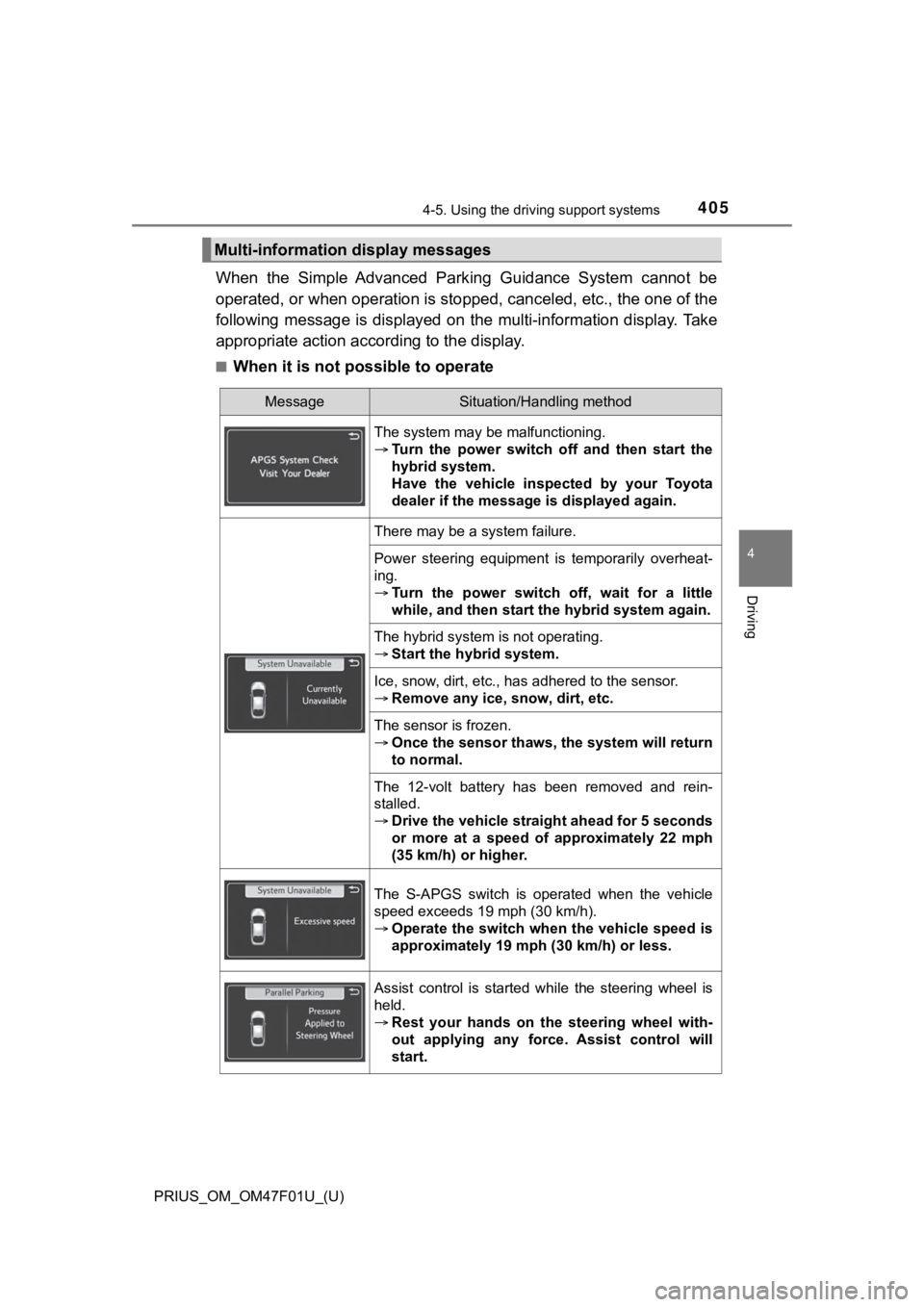
When the Simple Advanced Park ing Guidance System cannot be
operated, or when operation is stopped, canceled, etc., the one of the
following message is displayed on the multi-information display . Take
appropriate action acc ording to the display.
■When it is not possible to operate
Multi-information display messages
MessageSituation/Handling method
The system may be malfunctioning.
Turn the power switch off and then start the
hybrid system.
Have the vehicle inspected by your Toyota
dealer if the message is displayed again.
There may be a system failure.
Power steering equipment is temporarily overheat-
ing.
Turn the power switch off, wait for a little
while, and then start the hybrid system again.
The hybrid system is not operating.
Start the hybrid system.
Ice, snow, dirt, etc., has adhered to the sensor.
Remove any ice, snow, dirt, etc.
The sensor is frozen.
Once the sensor thaws, the system will return
to normal.
The 12-volt battery has been removed and rein-
stalled.
Drive the vehicle straight ahead for 5 seconds
or more at a speed of approximately 22 mph
(35 km/h) or higher.
The S-APGS switch is operated when the vehicle
speed exceeds 19 mph (30 km/h).
Operate the switch when the vehicle speed is
approximately 19 mph (30 km/h) or less.
Assist control is started while the steering wheel is
held.
Rest your hands on the steering wheel with-
out applying any force. Assist control will
start.
Page 406 of 744
406
PRIUS_OM_OM47F01U_(U)
4-5. Using the driving support systems
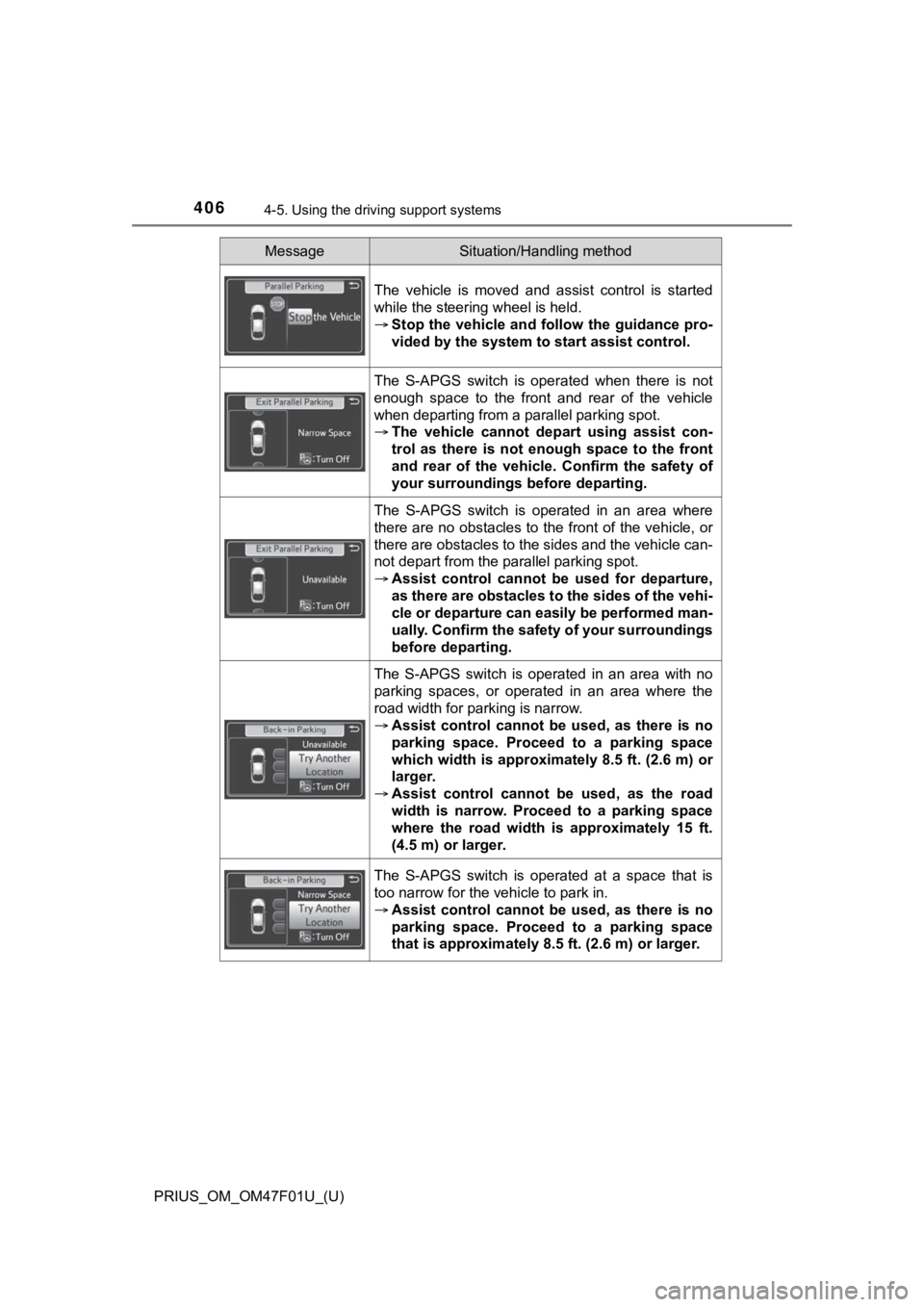
The vehicle is moved and assist control is started
while the steering wheel is held.
Stop the vehicle and follow the guidance pro-
vided by the system to start assist control.
The S-APGS switch is operated when there is not
enough space to the front and rear of the vehicle
when departing from a parallel parking spot.
The vehicle cannot depa rt using assist con-
trol as there is not enough space to the front
and rear of the vehicle . Confirm the safety of
your surroundings before departing.
The S-APGS switch is operated in an area where
there are no obstacles to the front of the vehicle, or
there are obstacles to the sides and the vehicle can-
not depart from the parallel parking spot.
Assist control cannot be used for departure,
as there are obstacles to the sides of the vehi-
cle or departure can easily be performed man-
ually. Confirm the safety of your surroundings
before departing.
The S-APGS switch is operated in an area with no
parking spaces, or operated in an area where the
road width for parking is narrow.
Assist control cannot be used, as there is no
parking space. Proceed to a parking space
which width is approximately 8.5 ft. (2.6 m) or
larger.
Assist control cannot be used, as the road
width is narrow. Proceed to a parking space
where the road width is approximately 15 ft.
(4.5 m) or larger.
The S-APGS switch is operated at a space that is
too narrow for the vehicle to park in.
Assist control cannot be used, as there is no
parking space. Proceed to a parking space
that is approximately 8.5 ft. (2.6 m) or larger.
MessageSituation/Handling method
Page 408 of 744
408
PRIUS_OM_OM47F01U_(U)
4-5. Using the driving support systems
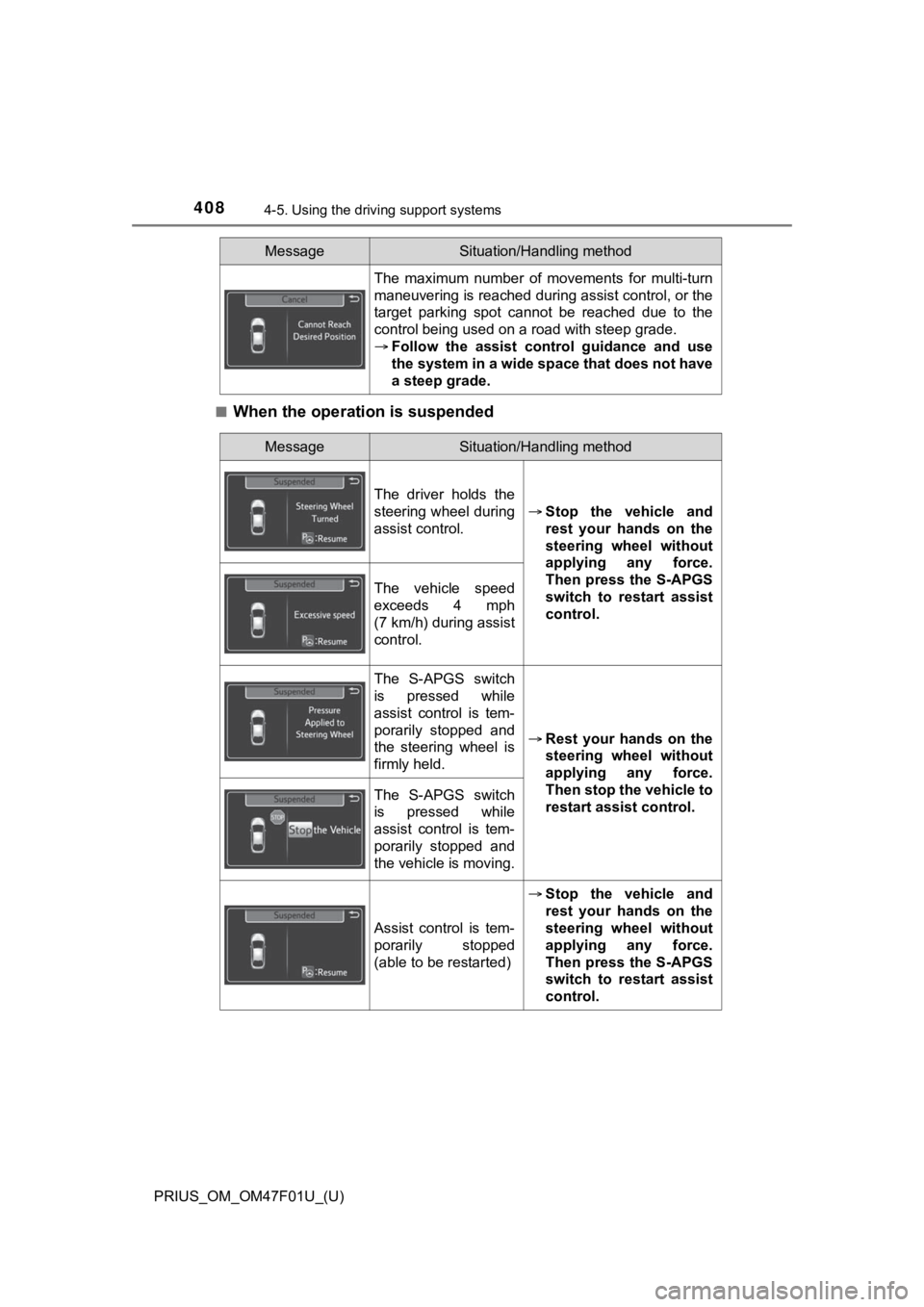
■When the operation is suspended
The maximum number of movements for multi-turn
maneuvering is reached during assist control, or the
target parking spot cannot be reached due to the
control being used on a road with steep grade.
Follow the assist control guidance and use
the system in a wide space that does not have
a steep grade.
MessageSituation/Handling method
MessageSituation/Handling method
The driver holds the
steering wheel during
assist control.
Stop the vehicle and
rest your hands on the
steering wheel without
applying any force.
Then press the S-APGS
switch to restart assist
control.
The vehicle speed
exceeds 4 mph
(7 km/h) during assist
control.
The S-APGS switch
is pressed while
assist control is tem-
porarily stopped and
the steering wheel is
firmly held.
Rest your hands on the
steering wheel without
applying any force.
Then stop the vehicle to
restart assist control.
The S-APGS switch
is pressed while
assist control is tem-
porarily stopped and
the vehicle is moving.
Assist control is tem-
porarily stopped
(able to be restarted)
Stop the vehicle and
rest your hands on the
steering wheel without
applying any force.
Then press the S-APGS
switch to restart assist
control.
Page 412 of 744

412
PRIUS_OM_OM47F01U_(U)
4-5. Using the driving support systems
WARNING
●Do not rely solely upon the Simple Advanced Parking Guidance System.
As with unequipped vehicles, move forward and back up carefully while
directly confirming the safety of your surroundings and the are a to the rear
of the vehicle.
● Do not back up while viewing the multi-information display. Backing up
while only viewing the monitor screen may cause a collision or lead to an
accident, as the image displayed on the monitor screen may diff er from
actual conditions. Make sure to visually check the surrounding areas and
the area to the rear of the vehicle with and without the mirror while backing
up.
● Drive slowly while adjusting your speed by depressing the brake pedal
when backing up or moving forward.
● If it seems the vehicle may make contact with a pedestrian, ano ther vehi-
cle or any other obstacles, stop the vehicle by depressing the brake pedal,
and then press the S-APGS switch to turn off the system.
● Use the system in a parking lot with a flat surface.
● Observe the following precautions, as the steering wheel automatically
turns during use.
• There is risk of a necktie, scarf, your arm, etc. being caught on the
steering wheel. Please do not allow your upper body to be close to the
steering wheel. Also, do not allow children close to the steeri ng wheel.
• There is a possibility of injury when the steering wheel turns if you have long fingernails.
• In case of emergency, stop the vehicle by depressing the brake pedal,
and then press the S-APGS switch to turn off the system.
● Always confirm that there is appropriate space before attemptin g to park
the vehicle and operate the system.
Page 413 of 744
PRIUS_OM_OM47F01U_(U)
4134-5. Using the driving support systems
4
Driving
WARNING
●Do not use the system in the following situations, as the syste m may be
unable to correctly assist you in reaching the target parking s pot and may
lead to an unexpected accident.
• In an area that is not a parking lot
• A parking lot that is not paved and has no parking space lines , such as
a sand or gravel parking lot
• A parking lot that has a slope or undulations in the road
• A frozen, snow-covered or slippery road
• The asphalt is melting due to hot weather
• There is an obstacle between the vehicle and the target parking spot
• Using tire chains or compact spare tire (if equipped)
● Do not use tire other than that provided by the manufacturer. T he system
may not operate properly. When replacing tires, contact your Toyota
dealer.
● The system may not be able position the vehicle in the set location in the
following situations.
• The tires are extremely worn or the tire pressure is low
• The vehicle is carrying very heavy load
• The vehicle is tilted due to having luggage, etc. located on one side of
the vehicle
• There are road heaters installed in the parking lot to prevent the road
surface from freezing.
In any other situations when the set position and vehicle position greatly
differ, have the vehicle inspected by your Toyota dealer.
● Make sure to observe the following precautions regarding the exit parallel
parking assist mode.
Exit parallel parking assist mode is a function used when depar ting from a
parallel parking spot. However, this function may not be usable if obsta-
cles or people are detected in front of the vehicle. Only use this function
when departing from a parallel parking spot. In the event that the steering
control operates, either turn the system off using the S-APGS s witch or
operate the steering wheel to stop the control.
● If exit parallel parking assist mode is mistakenly used in the following situ-
ations, the vehicle may make contact with an obstacle.
The departure function is operated in a direction where an obstacle is
present, but the obstacle is not detected by the side sensors ( situations
such as when the vehicle is directly beside a pole).