light TOYOTA PRIUS 2023 Owners Manual
[x] Cancel search | Manufacturer: TOYOTA, Model Year: 2023, Model line: PRIUS, Model: TOYOTA PRIUS 2023Pages: 770, PDF Size: 122.55 MB
Page 475 of 770
4735-3. Using the storage features
PRIUS_OM_OM47F32E_(EE)
5
Interior features
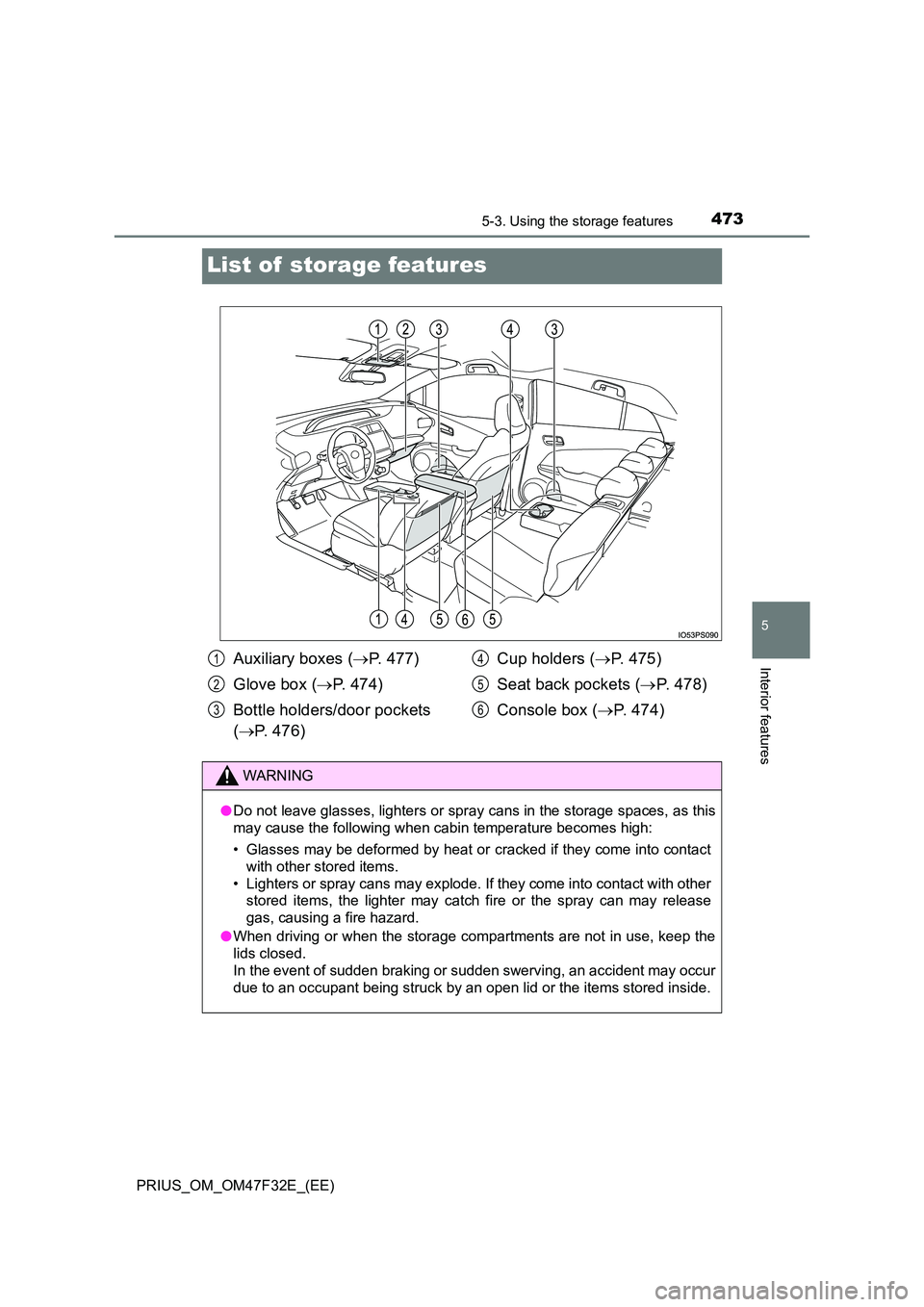
List of storage features
Auxiliary boxes (P. 477)
Glove box ( P. 474)
Bottle holders/door pockets
( P. 476)
Cup holders ( P. 475)
Seat back pockets ( P. 478)
Console box ( P. 474)
1
2
3
4
5
6
WARNING
●Do not leave glasses, lighters or spray cans in the storage spaces, as this
may cause the following when cabin temperature becomes high:
• Glasses may be deformed by heat or cracked if they come into contact
with other stored items.
• Lighters or spray cans may explode. If they come into contact with other
stored items, the lighter may catch fire or the spray can may release
gas, causing a fire hazard.
● When driving or when the storage compartments are not in use, keep the
lids closed.
In the event of sudden braking or sudden swerving, an accident may occur
due to an occupant being struck by an open lid or the items stored inside.
Page 476 of 770
4745-3. Using the storage features
PRIUS_OM_OM47F32E_(EE)
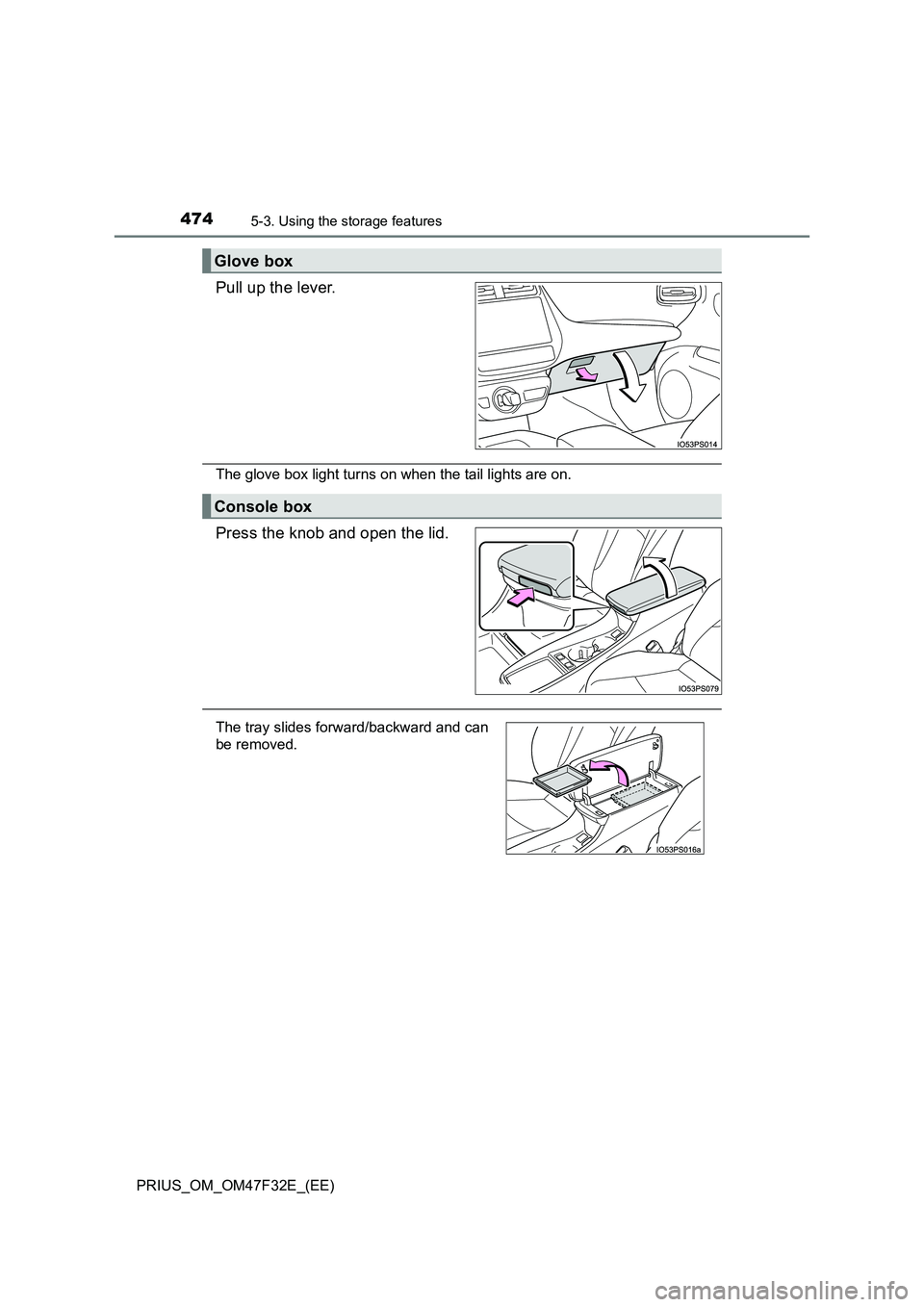
Pull up the lever.
The glove box light turns on when the tail lights are on.
Press the knob and open the lid.
Glove box
Console box
The tray slides forward/backward and can
be removed.
Page 487 of 770
4855-4. Using the other interior features
PRIUS_OM_OM47F32E_(EE)
5
Interior features
Other interior features
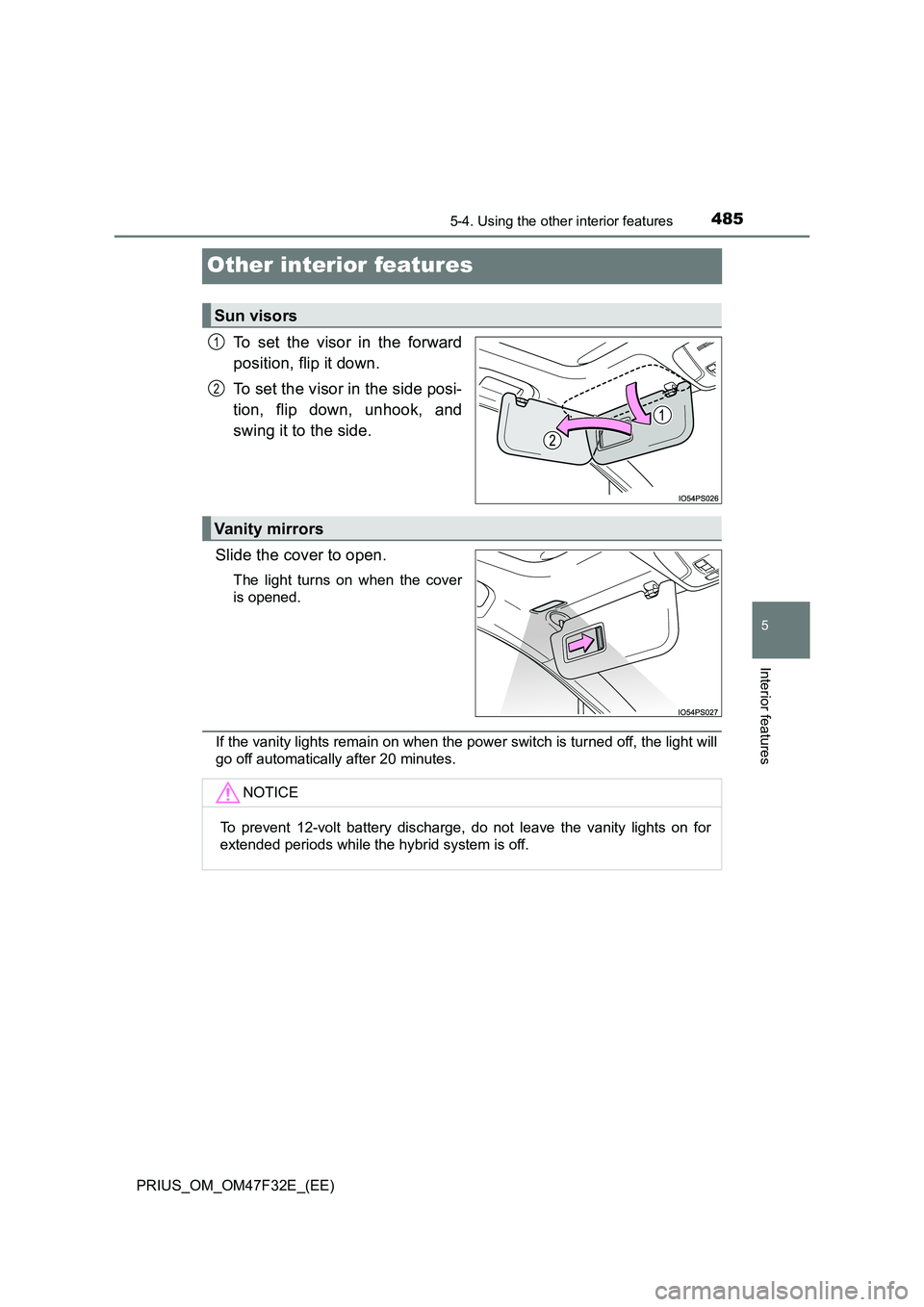
To set the visor in the forward
position, flip it down.
To set the visor in the side posi-
tion, flip down, unhook, and
swing it to the side.
Slide the cover to open.
The light turns on when the cover
is opened.
If the vanity lights remain on when the power switch is turned off, the light will
go off automatically after 20 minutes.
Sun visors
1
2
Vanity mirrors
NOTICE
To prevent 12-volt battery discharge, do not leave the vanity lights on for
extended periods while the hybrid system is off.
Page 489 of 770
4875-4. Using the other interior features
PRIUS_OM_OM47F32E_(EE)
5
Interior features
A portable device can be charged by just placing Qi standard wireless
charge compatible portable devices according to the Wireless Power
Consortium, such as smart phones and mobile batteries, etc., on the
charge area.
This function cannot be used with portable devices that are larger
than the charging area. Also, depending on the portable device, it may
not operate as normal. Please read the operation manual for portable
devices to be used.
■The “Qi” symbol
The “Qi” symbol is a trademark of the Wireless Power Consortium.
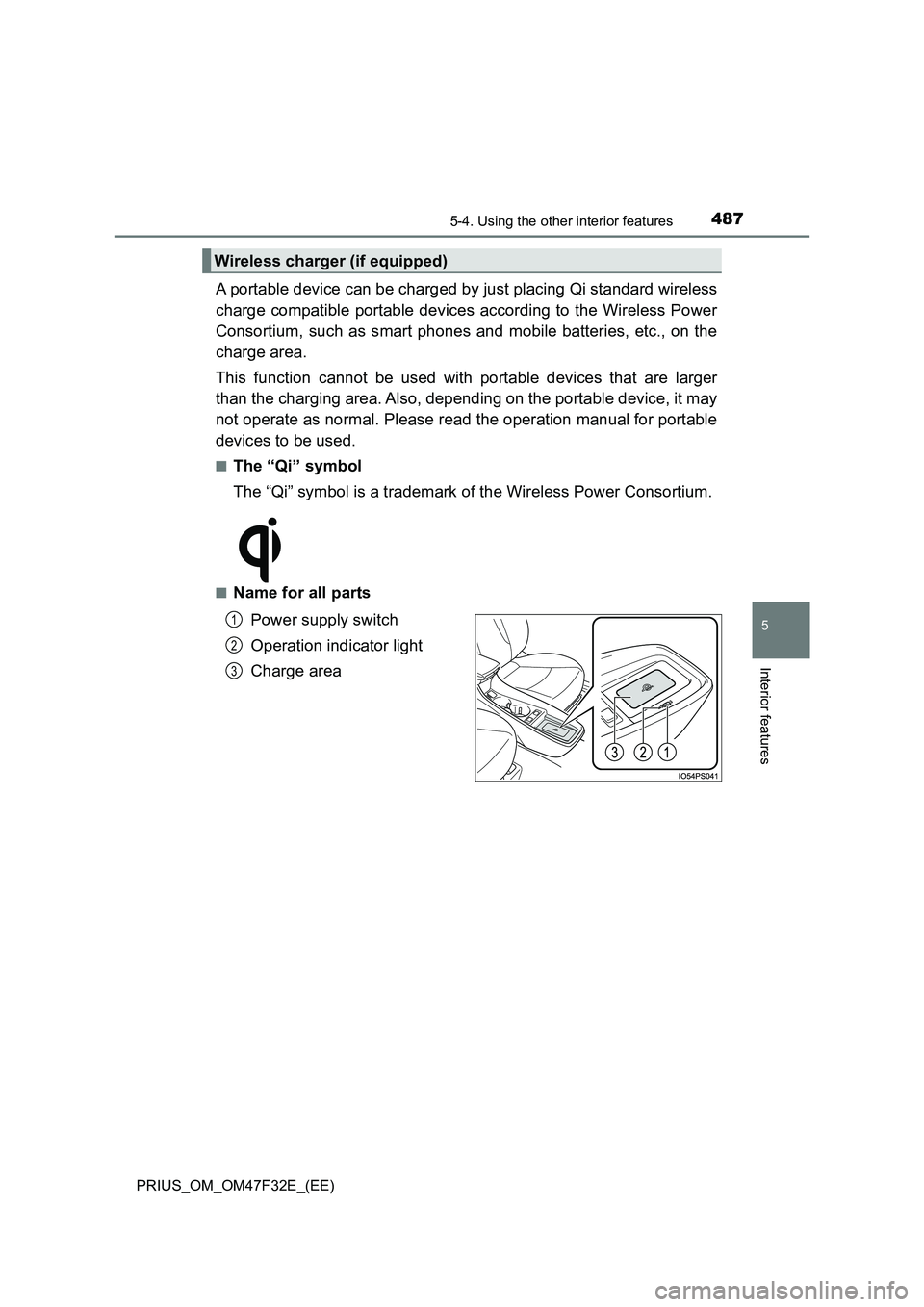
■Name for all parts
Power supply switch
Operation indicator light
Charge area
Wireless charger (if equipped)
1
2
3
Page 490 of 770
488
PRIUS_OM_OM47F32E_(EE)
5-4. Using the other interior features
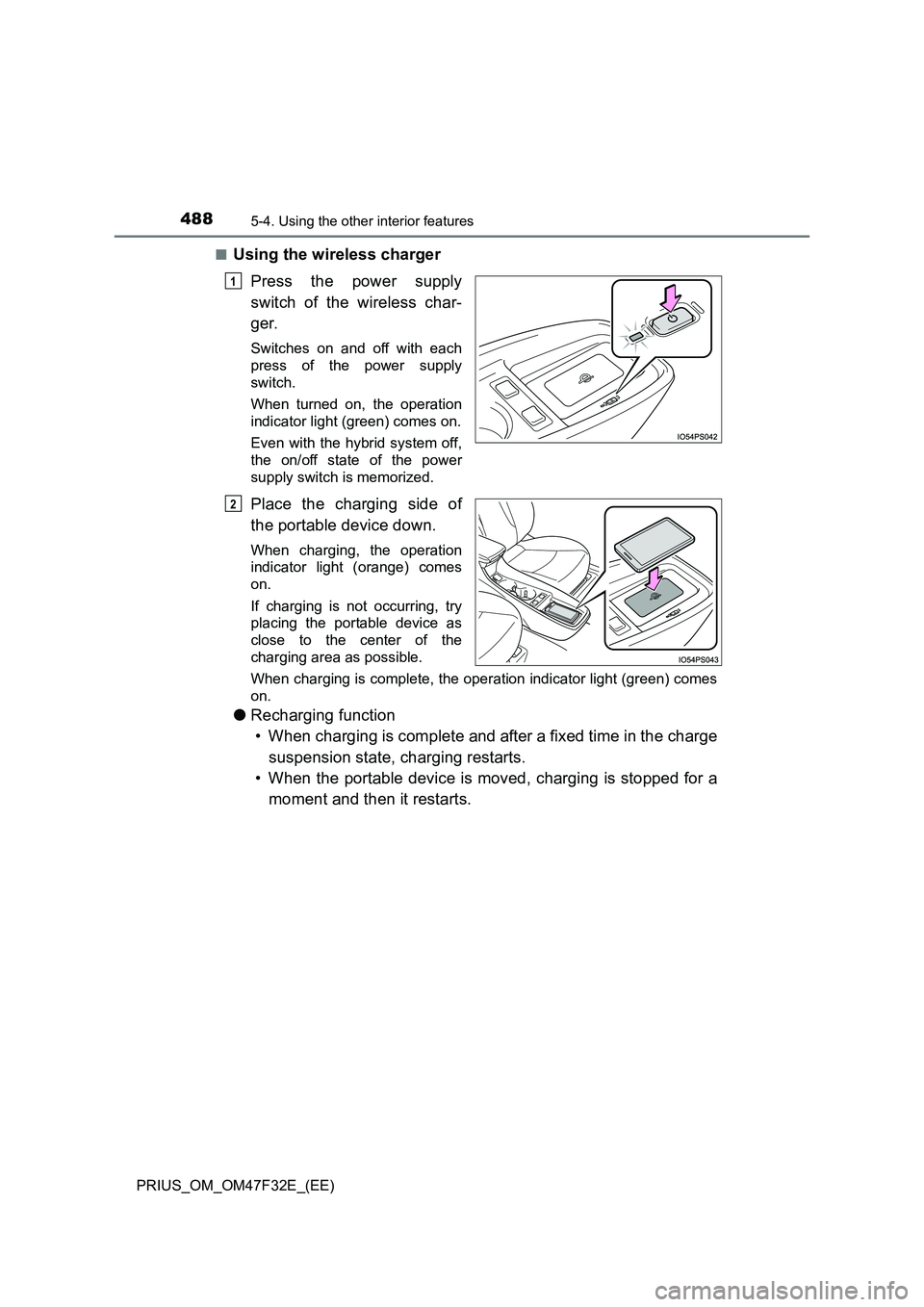
■Using the wireless charger
Press the power supply
switch of the wireless char-
ger.
Switches on and off with each
press of the power supply
switch.
When turned on, the operation
indicator light (green) comes on.
Even with the hybrid system off,
the on/off state of the power
supply switch is memorized.
Place the charging side of
the portable device down.
When charging, the operation
indicator light (orange) comes
on.
If charging is not occurring, try
placing the portable device as
close to the center of the
charging area as possible.
When charging is complete, the operation indicator light (green) comes
on.
● Recharging function
• When charging is complete and after a fixed time in the charge
suspension state, charging restarts.
• When the portable device is moved, charging is stopped for a
moment and then it restarts.
1
2
Page 491 of 770
4895-4. Using the other interior features
PRIUS_OM_OM47F32E_(EE)
5
Interior features
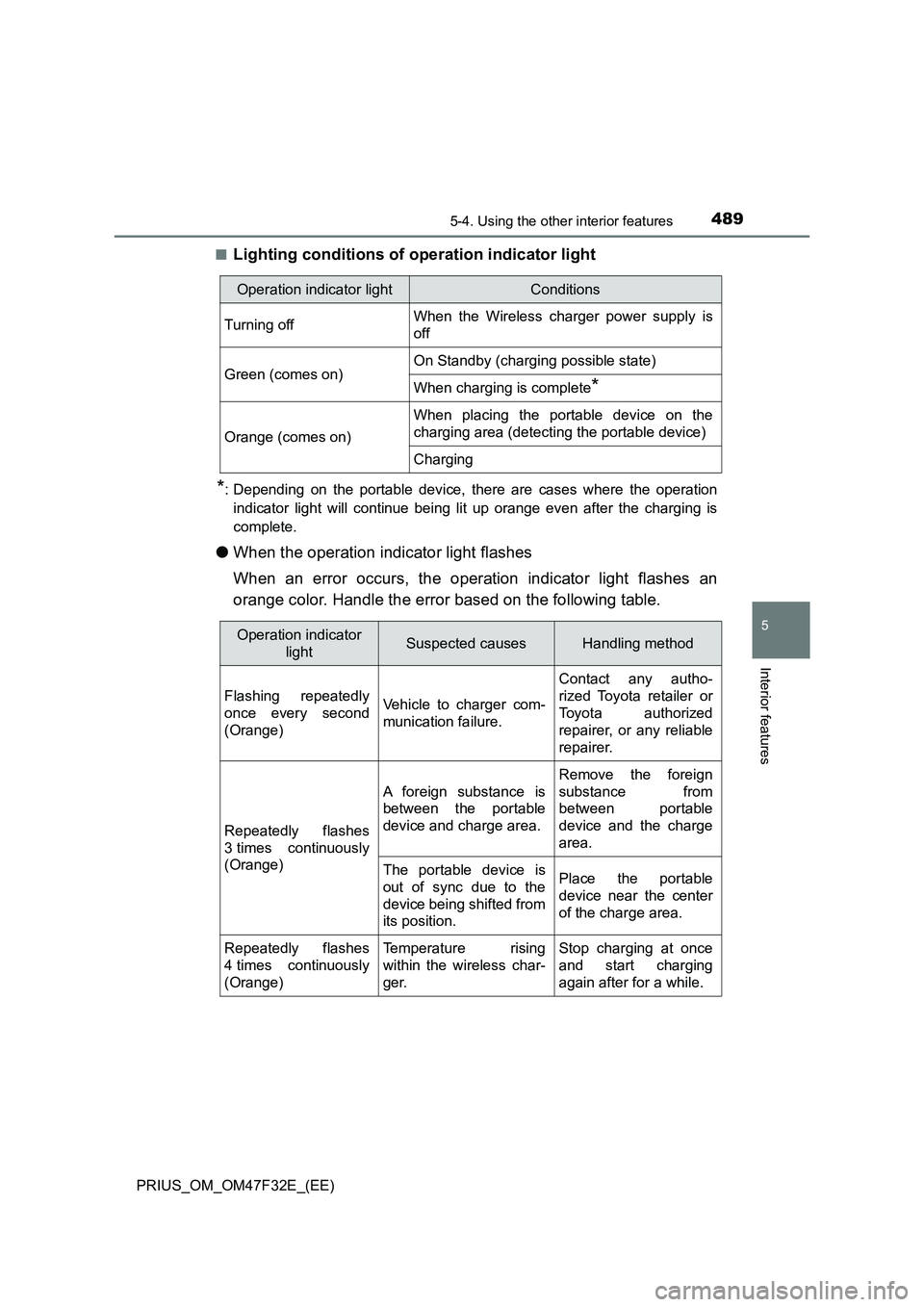
■Lighting conditions of operation indicator light
*: Depending on the portable device, there are cases where the operation
indicator light will continue being lit up orange even after the charging is
complete.
●When the operation indicator light flashes
When an error occurs, the operation indicator light flashes an
orange color. Handle the error based on the following table.
Operation indicator lightConditions
Turning offWhen the Wireless charger power supply is
off
Green (comes on)On Standby (charging possible state)
When charging is complete*
Orange (comes on)
When placing the portable device on the
charging area (detecting the portable device)
Charging
Operation indicator
lightSuspected causesHandling method
Flashing repeatedly
once every second
(Orange)Vehicle to charger com-
munication failure.
Contact any autho-
rized Toyota retailer or
Toyota authorized
repairer, or any reliable
repairer.
Repeatedly flashes
3 times continuously
(Orange)
A foreign substance is
between the portable
device and charge area.
Remove the foreign
substance from
between portable
device and the charge
area.
The portable device is
out of sync due to the
device being shifted from
its position.Place the portable
device near the center
of the charge area.
Repeatedly flashes
4 times continuously
(Orange)Temperature rising
within the wireless char-
ger.Stop charging at once
and start charging
again after for a while.
Page 492 of 770
490
PRIUS_OM_OM47F32E_(EE)
5-4. Using the other interior features
■The wireless charger can be operated when
The power switch is in ACCESSORY or ON mode.
■Usable portable devices
Qi standard wireless charge standard can be used on compatible devices.
However, not all Qi standard devices and compatibility are guaranteed.
Starting with mobile phones and smart phones, it is aimed for low power elec-
trically supplied portable devices of no more than 5W.
■When covers and accessories are attached to portable devices
Do not charge in situations where cover and accessories not able to handle
Qi are attached to the portable device. Depending on the type of cover and
accessory, it may not be possible to charge. When charging is not performed
even with the portable device placed on the charge area, remove the cover
and accessories.
■While charging, noise enters the AM radio
Turn off the wireless charger and confirm that the noise has decreased. If the
noise decreases, continuously pushing the power supply switch of the wire-
less charger for 2 seconds, the frequency of the charger can be changed and
the noise can be reduced.
Also, on that occasion, the operation indicator light will flash orange 2 times.
■Important points of the wireless charger
●If the electronic key cannot be detected within the vehicle interior, charging
cannot be done. When the door is opened and closed, charging may be
temporarily suspended.
●When charging, the wireless charging device and portable device will get
warmer, however this is not a malfunction.
When a portable device gets warm while charging, charging may stop due
to the protection function on the portable device side. In this case, when the
temperature of the portable device drops significantly, charge again.
■Operation sounds
When the power supply is turned on, while searching for the portable device a
sound will be produced, however this is not a malfunction.
Page 494 of 770
492
PRIUS_OM_OM47F32E_(EE)
5-4. Using the other interior features
NOTICE
■Conditions in which the function may not operate correctly
In the following conditions, it may not operate correctly
● The portable device is fully charged
● There is foreign matter between the charge area and portable device
● The temperature of the portable device gets higher from charging
● The charging surface of the portable device is facing up
● The placement of the portable device is out of alignment with the charge
area
● Near a TV tower, electric power plant, gas station, radio station, large dis-
play, airport or other facility that gener ates strong radio waves or electrical
noise
● When the electronic key is in contact with, or is covered by the following
metallic objects
• Cards to which aluminum foil is attached
• Cigarette boxes that have aluminum foil inside
• Metallic wallets or bags
• Coins
• Hand warmers made of metal
• Media such as CDs and DVDs
● When other wireless keys (that emit radio waves) are being used nearby
In addition, excluding the above-mentioned, when the charger does not per-
form normally or the operation indicato r light is flashing continuously, it is
considered that the wireless charger is malfunctioning. Contact any autho-
rized Toyota retailer or Toyota authorized repairer, or any reliable repairer.
■ To prevent failure or damage to data
● Do not bring magnetic cards, such as credit cards, or magnetic recording
media, etc., close to the charger while charging, otherwise, data may dis-
appear under the influence of magnetism. Also, do not bring precision
instruments such as wrist watches, etc., close to the charger, as such
objects may break.
● Do not leave portable devices in the cabin. The temperature inside the
cabin may become high, when under the sun, and cause damage to the
device.
■ To prevent 12-volt battery discharge
When the hybrid system is stopped, do not use the wireless charger for a
long time.
Page 497 of 770
495
6Maintenance and care
PRIUS_OM_OM47F32E_(EE)6-1. Maintenance and care
Cleaning and protecting
the vehicle exterior .......... 496
Cleaning and protecting
the vehicle interior ........... 502
6-2. Maintenance
Maintenance
requirements.................... 505
6-3. Do-it-yourself maintenance
Do-it-yourself service
precautions ...................... 508
Hood .................................. 511
Positioning a floor jack ....... 513
Engine compartment.......... 514
Tires ................................... 528
Tire inflation pressure ........ 537
Wheels ............................... 539
Air conditioning filter .......... 542
Cleaning the hybrid battery
(traction battery) air intake
vent and filter ................... 545
Wiper insert
replacement ..................... 550
Electronic key battery ........ 554
Checking and replacing
fuses ................................ 557
Light bulbs ......................... 561
Page 501 of 770
4996-1. Maintenance and care
PRIUS_OM_OM47F32E_(EE)
6
Maintenance and care
NOTICE
■To prevent paint deterioration and corrosion on the body and compo-
nents (aluminum wheels etc.)
● Wash the vehicle immediately in the following cases:
• After driving near the sea coast
• After driving on salted roads
• If coal tar or tree sap is present on the paint surface
• If dead insects, insect droppings or bird droppings are present on the
paint surface
• After driving in an area contaminated with soot, oily smoke, mine dust,
iron powder or chemical substances
• If the vehicle becomes heavily soiled with dust or mud
• If liquids such as benzene and gasoline are spilled on the paint surface
● If the paint is chipped or scratched, have it repaired immediately.
● To prevent the wheels from corroding, remove any dirt and store in a place
with low humidity when storing the wheels.
■ To prevent damage to the windshield wiper arms
When lifting the wiper arms away from the windshield pull the driver side
wiper arm upward first, and repeat for the passenger’s side. When returning
the wipers to their original position, do so from the passenger’s side first.
■ Cleaning the exterior lights
● Wash carefully. Do not use organic substances or scrub with a hard brush.
This may damage the surfaces of the lights.
● Do not apply wax to the surfaces of the lights.
Wax may cause damage to the lenses.