audio TOYOTA PRIUS 2023 User Guide
[x] Cancel search | Manufacturer: TOYOTA, Model Year: 2023, Model line: PRIUS, Model: TOYOTA PRIUS 2023Pages: 770, PDF Size: 122.55 MB
Page 322 of 770
3204-5. Using the driving support systems
PRIUS_OM_OM47F32E_(EE)■Temporary cancelation of functions
●When operation conditions are no longer met, a function may be temporarily
canceled. However, when the operation conditions are met again, operation
of the function is automatically restored. (P. 318)
●If the operation conditions (P. 319) are no longer met while the lane cen-
tering function is operating, the buzzer may sound to indicate that the func-
tion has been temporarily canceled.
■Steering assist function/lane centering function
●Depending on the vehicle speed, lane departure situation, road conditions,
etc., the driver may not feel the function is operating or the function may not
operate at all.
●The steering control of the function is overridden by the driver’s steering
wheel operation.
●Do not attempt to test the operation of the steering assist function.
■Lane departure alert function
●The warning buzzer may be difficult to hear due to external noise, audio
playback, etc.
●If the edge of the course
* is not clear or straight, the lane departure alert
function may not operate.
●Do not attempt to test the operation of the lane departure alert function.
*: Boundary between asphalt and the side of the road, such as grass, soil, or
a curb
Page 360 of 770
3584-5. Using the driving support systems
PRIUS_OM_OM47F32E_(EE)
■The BSM outside rear view mirror indicators visibility
When under strong sunlight, the outside rear view mirror indicator may be dif-
ficult to see.
■The Rear Crossing Traffic Alert buzzer hearing
The Rear Crossing Traffic Alert buzzer may be difficult to hear over loud
noises such as high audio volume.
■When “Blind Spot Monitor Unavailable” is shown on the multi-informa-
tion display
The sensor voltage has become abnormal, water, snow mud, etc., may be
built up in the vicinity of the sensor area of bumper (P. 371). Removing the
water, snow, mud, etc., from the vicinity of the sensor area bumper should
return it to normal. Also, the sensor may not function normally when used in
extremely hot or cold weather.
■When “Blind Spot Monitor System Malfunction Visit Your Dealer” is
shown on the multi-information display
There may be a sensor malfunction or misaligned. Have the vehicle
inspected by any authorized Toyota retailer or Toyota authorized repairer, or
any reliable repairer.
■Customization
The brightness of the outside rear view mirror indicators can be changed.
(Customizable features: P. 670)
Page 384 of 770
3824-5. Using the driving support systems
PRIUS_OM_OM47F32E_(EE)
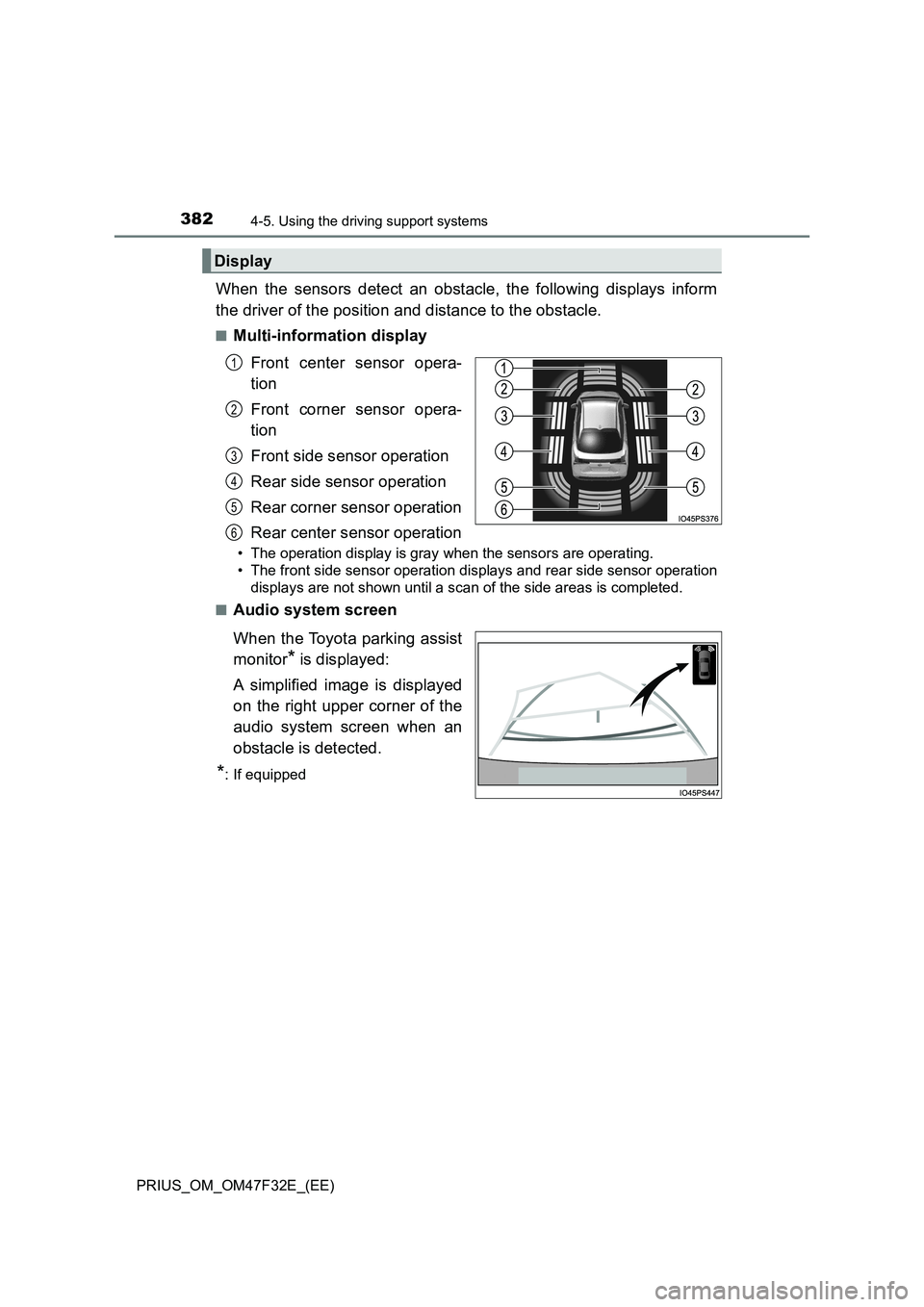
When the sensors detect an obstacle, the following displays inform
the driver of the position and distance to the obstacle.
■Multi-information display
Front center sensor opera-
tion
Front corner sensor opera-
tion
Front side sensor operation
Rear side sensor operation
Rear corner sensor operation
Rear center sensor operation
• The operation display is gray when the sensors are operating.
• The front side sensor operation displays and rear side sensor operation
displays are not shown until a scan of the side areas is completed.
■
Audio system screen
When the Toyota parking assist
monitor
* is displayed:
A simplified image is displayed
on the right upper corner of the
audio system screen when an
obstacle is detected.
*: If equipped
Display
1
2
3
4
5
6
Page 385 of 770
3834-5. Using the driving support systems
4
Driving
PRIUS_OM_OM47F32E_(EE)■
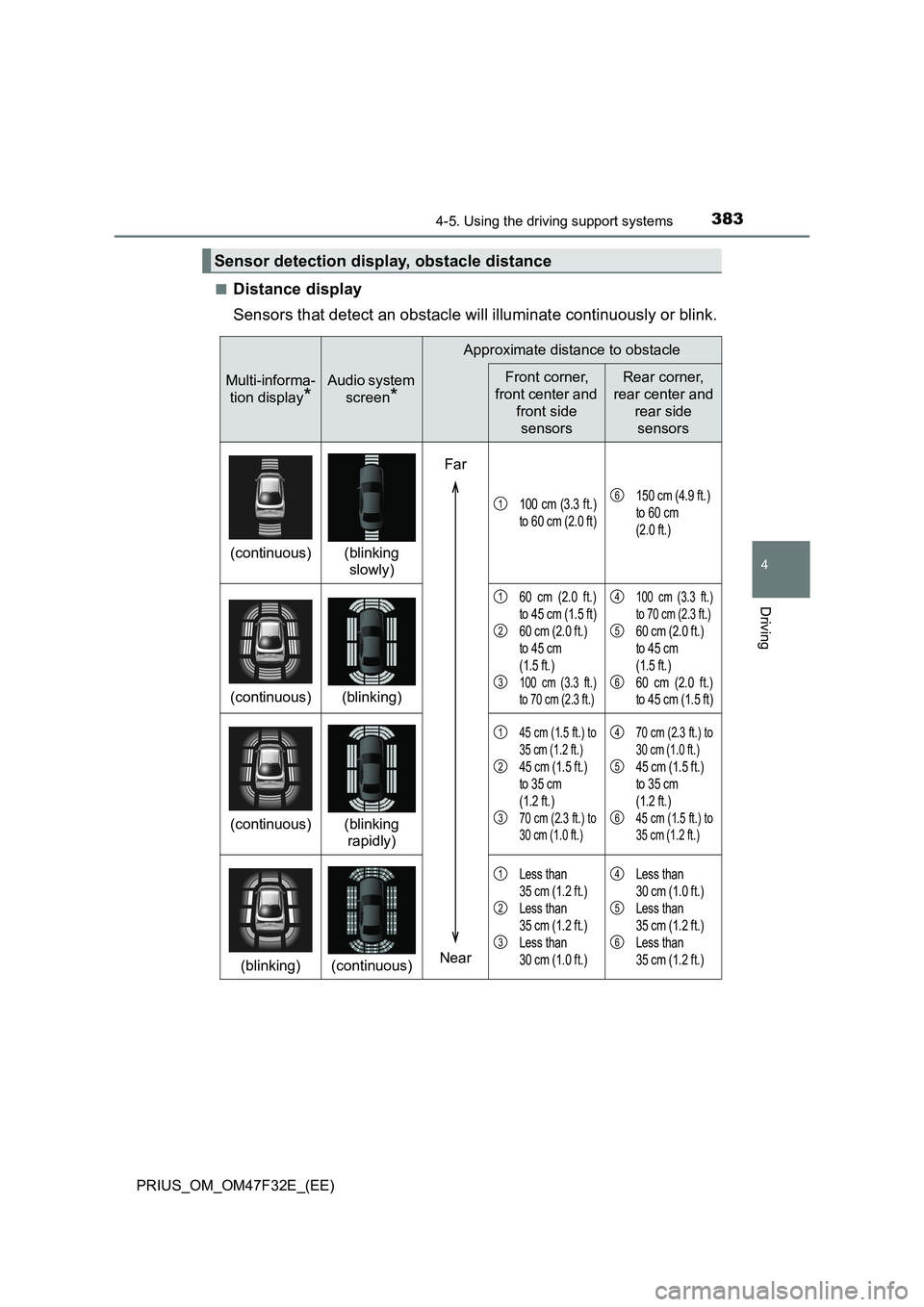
Distance display
Sensors that detect an obstacle will illuminate continuously or blink.
Sensor detection display, obstacle distance
Multi-informa-
tion display
*
Audio system
screen
*
Approximate distance to obstacle
Front corner,
front center and
front side
sensorsRear corner,
rear center and
rear side
sensors
(continuous)(blinking
slowly)
100 cm (3.3 ft.)
to 60 cm (2.0 ft)150 cm (4.9 ft.)
to 60 cm
(2.0 ft.)
(continuous)(blinking)
60 cm (2.0 ft.)
to 45 cm (1.5 ft)
60 cm (2.0 ft.)
to 45 cm
(1.5 ft.)
100 cm (3.3 ft.)
to 70 cm (2.3 ft.)
100 cm (3.3 ft.)
to 70 cm (2.3 ft.)
60 cm (2.0 ft.)
to 45 cm
(1.5 ft.)
60 cm (2.0 ft.)
to 45 cm (1.5 ft)
(continuous)(blinking
rapidly)
45 cm (1.5 ft.) to
35 cm (1.2 ft.)
45 cm (1.5 ft.)
to 35 cm
(1.2 ft.)
70 cm (2.3 ft.) to
30 cm (1.0 ft.)
70 cm (2.3 ft.) to
30 cm (1.0 ft.)
45 cm (1.5 ft.)
to 35 cm
(1.2 ft.)
45 cm (1.5 ft.) to
35 cm (1.2 ft.)
(blinking)(continuous)
Less than
35 cm (1.2 ft.)
Less than
35 cm (1.2 ft.)
Less than
30 cm (1.0 ft.)Less than
30 cm (1.0 ft.)
Less than
35 cm (1.2 ft.)
Less than
35 cm (1.2 ft.)
Far
Near
16
1
2
3
4
5
6
1
2
3
4
5
6
1
2
3
4
5
6
Page 389 of 770
3874-5. Using the driving support systems
4
Driving
PRIUS_OM_OM47F32E_(EE)
■Operation conditions
The power switch is turned on.
●Front corner sensors:
• Shift position is not in P
• Vehicle speed is approximately 10 km/h (6 mph) or less
●Front side sensors/rear side sensors:
• Shift position is not in P
• Vehicle speed is approximately 10 km/h (6 mph) or less
• Steering wheel is turned approximately 90 or more
●Front center sensors:
• Shift position is not in P or R
• Vehicle speed is approximately 10 km/h (6 mph) or less
●Rear corner sensors/rear center sensors:
Shift position is in R
■Toyota parking assist-sensor pop-up display
P. 409
■Sensor detection information
●The sensor’s detection areas are limited to the areas around the vehicle’s
bumper.
●Depending on the shape of the obstacle and other factors, the detection dis-
tance may shorten, or detection may be impossible.
●Obstacles may not be detected if they are too close to the sensor.
●There will be a short delay between obstacle detection and display. Even
when traveling at a low speed, if you come too close to an obstacle before
the display and buzzer activate, the display and buzzer may not activate at
all.
●Thin posts or objects lower than the sensor may not be detected when
approached, even if they have been detected once.
●It might be difficult to hear beeps due to the volume of audio system or air
flow noise of the air conditioning system.
Page 506 of 770
5046-1. Maintenance and care
PRIUS_OM_OM47F32E_(EE)
NOTICE
■Cleaning detergents
● Do not use the following types of detergent, as they may discolor the vehi-
cle interior or cause streaks or damage to painted surfaces:
• Non-seat portions: Organic substances such as benzene or gasoline,
alkaline or acidic solutions, dye, and bleach
• Seats: Alkaline or acidic solutions, such as thinner, benzene, and alco-
hol
● Do not use polish wax or polish cleaner. The instrument panel’s or other
interior part’s painted surface may be damaged.
■ Preventing damage to leather surfaces
Observe the following precautions to avoid damage to and deterioration of
leather surfaces:
● Remove any dust or dirt from leather surfaces immediately.
● Do not expose the vehicle to direct sunlight for extended periods of time.
Park the vehicle in the shade, especially during summer.
● Do not place items made of vinyl, plastic, or containing wax on the uphol-
stery, as they may stick to the leather surface if the vehicle interior heats
up significantly.
■ Water on the floor
Do not wash the vehicle floor with water.
Vehicle systems such as the audio system may be damaged if water comes
into contact with electrical components such as the audio system above or
under the floor of the vehicle. Water may also cause the body to rust.
■ When cleaning the inside of the windshield (vehicles with Toyota
Safety Sense)
Do not allow glass cleaner to contact the lens. Also, do not touch the lens.
( P. 2 8 3 )
■ Cleaning the inside of the rear window
● Do not use glass cleaner to clean the rear window, as this may cause
damage to the rear window defogger heater wires. Use a cloth dampened
with lukewarm water to gently wipe the window clean. Wipe the window in
strokes running parallel to the heater wires.
● Be careful not to scratch or damage the heater wires.
Page 589 of 770
5877-2. Steps to take in an emergency
PRIUS_OM_OM47F32E_(EE)
7
When trouble arises
■The tire pressure warning light may come on due to natural causes (if
equipped)
The tire pressure warning light may come on due to natural causes such as
natural air leaks or tire inflation pressure changes caused by temperature. In
this case, adjusting the tire inflation pressure will turn off the warning light
(after a few minutes).
■ When a tire is replaced with a spare tire (vehicles with the tire pressure
warning system)
Vehicles with compact spare tire: The compact spare tire is not equipped with
a tire pressure warning valve and transmitter. If a tire goes flat, the tire pres-
sure warning light will not turn off even though the flat tire has been replaced
with the spare tire. Replace the spare ti re with the repaired tire and adjust the
tire inflation pressure. The tire pressure warning light will go off after a few
minutes.
Vehicles with full-size spare tire: T he spare tire is also equipped with a tire
pressure warning valve and transmitter. The tire pressure warning light will
turn on if the tire inflation pressure of the spare tire is low. If a tire goes flat,
the tire pressure warning light will not turn off even though the flat tire has
been replaced with the spare tire. Replace the spare tire with the repaired tire
and adjust the tire inflation pressure. The tire pressure warning light will go off
after a few minutes.
■ Conditions that the tire pressure warning system may not function prop-
erly (if equipped)
P. 533
■ If the tire pressure warning light frequently comes on after blinking for
1 minute (if equipped)
If the tire pressure warning light frequently comes on after blinking for
1 minute when the power switch is turned to ON mode, have it checked by
any authorized Toyota retailer or Toyota authorized repairer, or any reliable
repairer.
■ Warning buzzer
In some cases, the buzzer may not be heard due to being in a noisy location
or audio sound.
Page 643 of 770
6417-2. Steps to take in an emergency
PRIUS_OM_OM47F32E_(EE)
7
When trouble arises
Once the hybrid system has started, remove the jumper cables in
the exact reverse order from which they were connected.
To install the engine cover, conduct the removal procedure in
reverse. After installing, check that the fixed pins are inserted
securely.
Once the hybrid system starts, have the vehicle inspected at any
authorized Toyota retailer or Toyota authorized repairer, or any reliable
repairer as soon as possible.
■ When opening the cover of the positive (+) battery terminal
P. 523
■ Starting the hybrid system when the 12-volt battery is discharged
The hybrid system cannot be started by push-starting.
■ To prevent 12-volt battery discharge
● Turn off the headlights and the audio system while the hybrid system is off.
● Turn off any unnecessary electrical components when the vehicle is running
at a low speed for an extended period, such as in heavy traffic.
■ When the 12-volt battery is removed or discharged
● Information stored in the ECU is cleared. When the 12-volt battery is
depleted, have the vehicle inspected at any authorized Toyota retailer or
Toyota authorized repairer, or any reliable repairer.
● Some systems may require initialization. (P. 679)
■ When removing the 12-volt battery terminals
When the 12-volt battery terminals are removed, the information stored in the
ECU is cleared. Before removing the 12-volt battery terminals, contact any
authorized Toyota retailer or Toyota authorized repairer, or any reliable
repairer.
■ Charging the 12-volt battery
The electricity stored in the 12-volt battery will discharge gradually even when
the vehicle is not in use, due to natural discharge and the draining effects of
certain electrical appliances. If the vehicle is left for a long time, the 12-volt
battery may discharge, and the hybrid system may be unable to start. (The
12-volt battery recharges automatically while the hybrid system is operating.)
8
9
Page 683 of 770
681
Index
PRIUS_OM_OM47F32E_(EE)What to do if...
(Troubleshooting) ..................... 682
Alphabetical index ...................... 686
For vehicles with navigation system or multimedia system,
refer to the “Navigation and multimedia system Owner’s
manual” for information regarding the equipment listed below.
• Navigation system
• Hands-free system (for cellular phone)
• Audio/video system
• Toyota parking assist monitor
• Panoramic view monitor
Page 689 of 770
687Alphabetical index
PRIUS_OM_OM47F32E_(EE)
Antenna
Smart entry & start system.... 187
Anti-lock brake system
(ABS) ...................................... 441
Function ................................ 441
Warning light ......................... 581
Approach warning ................... 339
Armrest ..................................... 493
Assist grips .............................. 494
Audio input
*
Audio system*
Automatic air conditioning
system .................................... 458
Air conditioning filter.............. 542
Automatic air conditioning
system ................................ 458
Blower customization ............ 462
Eco score (A/C score) ........... 150
Front seat concentrated
airflow mode (S-FLOW)...... 461
Automatic headlight leveling
system .................................... 264
Automatic High Beam
(AHB) ...................................... 266
Automatic light control
system .................................... 263
Auxiliary box ............................ 477Back door ................................. 182
Back-up light ............................ 561
Replacing light bulb .............. 562
Wattage ................................ 667
Battery (12-volt battery) .......... 521
Battery checking ................... 521
If the 12-volt battery is
discharged .......................... 639
Preparing and checking
before winter....................... 452
Replacing .............................. 642
Warning light ......................... 580
Battery (traction battery)........... 84
Air intake vent ......................... 85
Location .................................. 84
Specification ......................... 657
Blind Spot Monitor (BSM) ....... 356
Blind Spot Monitor
function ............................... 372
Rear Crossing Traffic Alert
function ............................... 375
Bluetooth
®*
Bottle holders .......................... 476
Brake
Fluid ...................................... 664
Parking brake........................ 260
Regenerative braking.............. 81
Warning light ......................... 580
Brake assist ............................. 441
Brake Override System ........... 221
Break-in tips ............................. 222
Brightness control
Instrument cluster light
control................................. 102
BSM (Blind Spot Monitor) ....... 356
Blind Spot Monitor function ... 372
Rear Crossing Traffic Alert
function ............................... 375
B
*: Refer to “Navigation and multimedia system Owner’s manual”.