brake sensor TOYOTA PRIUS 2023 User Guide
[x] Cancel search | Manufacturer: TOYOTA, Model Year: 2023, Model line: PRIUS, Model: TOYOTA PRIUS 2023Pages: 770, PDF Size: 122.55 MB
Page 393 of 770
3914-5. Using the driving support systems
4
Driving
PRIUS_OM_OM47F32E_(EE)
● When vehicle horns, vehicle detectors, motorcycle engines, air brakes of
large vehicles, the clearance sonar of ot her vehicles or other devices which
produce ultrasonic waves are near the vehicle
● If the front of the vehicle is raised or lowered due to the carried load
● If the orientation of a sensor has been changed due to a collision or other
impact
● Driving close to columns (H-shaped steel beams, etc.) in multi-story parking
garages, construction sites, etc.
● If the vehicle cannot be driven in a stable manner, such as when the vehicle
has been in an accident or is malfunctioning
● When tire chains, a compact spare tire or an emergency tire puncture repair
kit are used.
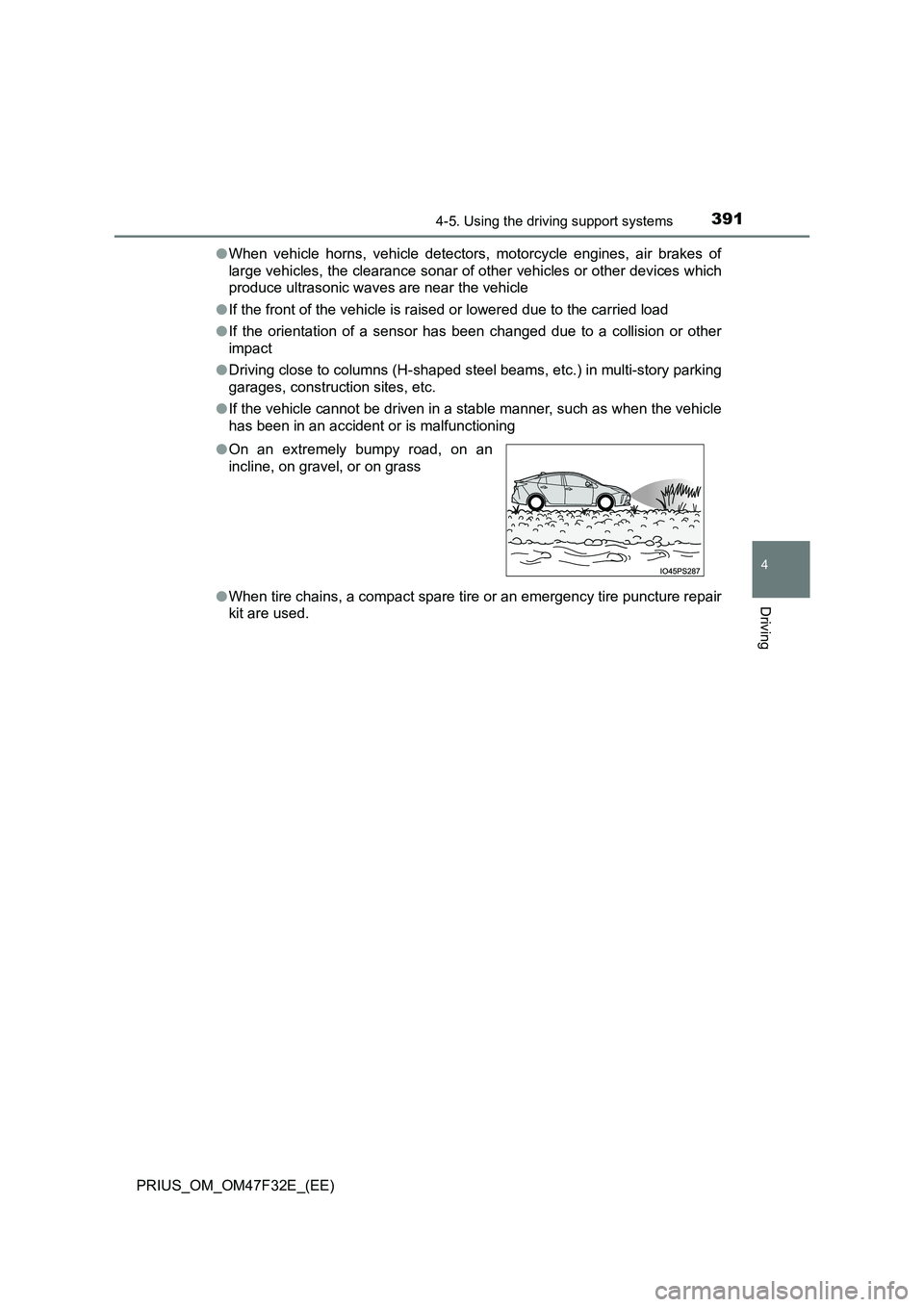
● On an extremely bumpy road, on an
incline, on gravel, or on grass
Page 396 of 770
3944-5. Using the driving support systems
PRIUS_OM_OM47F32E_(EE)
Parking Support Brake function
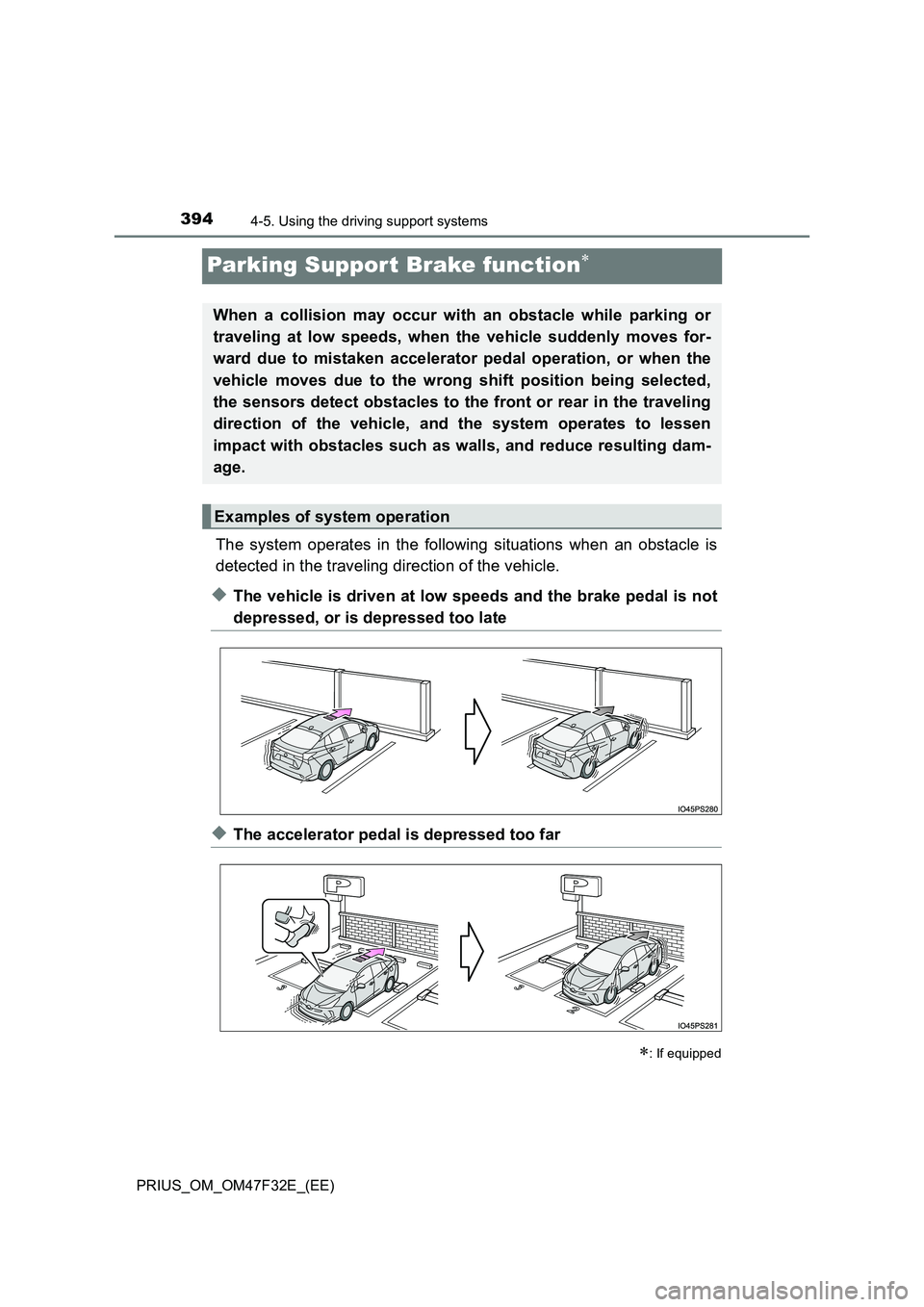
The system operates in the following situations when an obstacle is
detected in the traveling direction of the vehicle.
◆The vehicle is driven at low speeds and the brake pedal is not
depressed, or is depressed too late
◆The accelerator pedal is depressed too far
: If equipped
When a collision may occur with an obstacle while parking or
traveling at low speeds, when the vehicle suddenly moves for-
ward due to mistaken accelerator pedal operation, or when the
vehicle moves due to the wrong shift position being selected,
the sensors detect obstacles to the front or rear in the traveling
direction of the vehicle, and the system operates to lessen
impact with obstacles such as walls, and reduce resulting dam-
age.
Examples of system operation
Page 398 of 770
3964-5. Using the driving support systems
PRIUS_OM_OM47F32E_(EE)
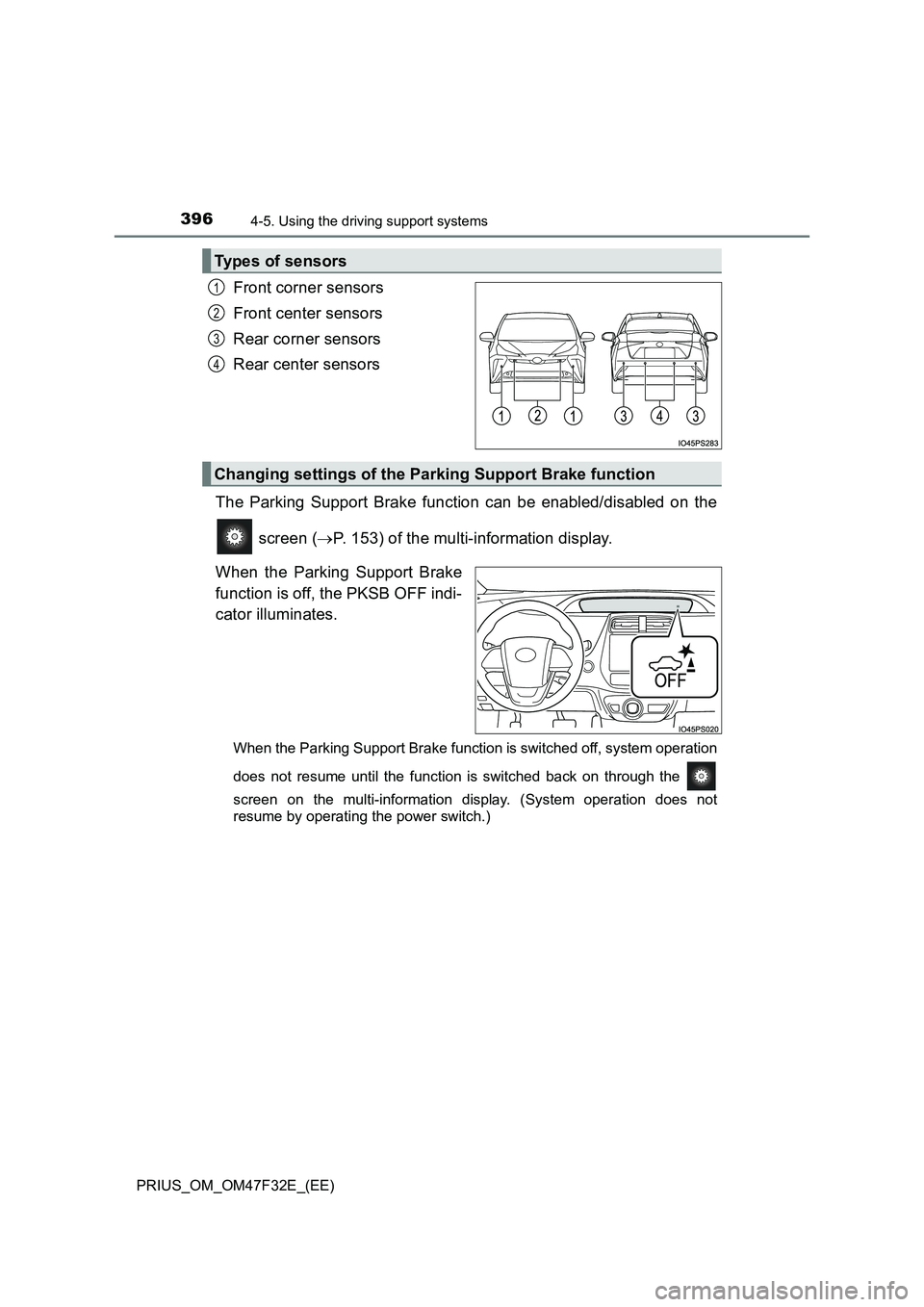
Front corner sensors
Front center sensors
Rear corner sensors
Rear center sensors
The Parking Support Brake function can be enabled/disabled on the
screen ( P. 153) of the multi-information display.
When the Parking Support Brake
function is off, the PKSB OFF indi-
cator illuminates.
When the Parking Support Brake function is switched off, system operation
does not resume until the function is switched back on through the
screen on the multi-information display. (System operation does not
resume by operating the power switch.)
Types of sensors
1
2
3
4
Changing settings of the Parking Support Brake function
Page 403 of 770
4014-5. Using the driving support systems
4
Driving
PRIUS_OM_OM47F32E_(EE)
■Sensor detection range
The detection range of the Parking Support Brake function differs from the
detection range of the Toyota parking assist-sensor. (P. 386)
Therefore, even if the Toyota parking assist-sensor detects an obstacle and
provides a warning, the Parking Support Brake function may not start operat-
ing.
■System operation
When the vehicle is stopped by system operation, the Parking Support Brake
function stops and the PKSB OFF indicator illuminates.
■System recovery
When the Parking Support Brake function is stopped by system operation
and you would like to resume operation, either turn the Parking Support
Brake function on again (P. 396), or turn the power switch off and then back
on. Furthermore, when the vehicle moves with an obstacle no longer in the
traveling direction of the vehicle, or when the traveling direction of the vehicle
changes (such as when switching from moving forward to backing up, and
vice versa), system operation automatically resumes.
■Obstacles not detected by the sensors
The following obstacles may not be detected by the sensors.
●Objects such as people, cloth and snow, that are difficult for sonic waves to
reflect off of. (In particular, people may also not be detected depending on
the type of clothing they are wearing.)
●Objects not perpendicular with the ground, objects not at a right angle to the
traveling direction of the vehicle, uneven objects or waving objects
●Low objects
●Thin objects such as wires, fences, ropes and signposts
●Objects that are extremely close to the bumper
■Situations in which the system may not operate properly
P. 389
■Situations in which the system may operate even if there is no possibil-
ity of a collision
P. 390
■In the unlikely event that the Parking Support Brake function mistakenly
operates at a crossing or elsewhere
Even in the unlikely event that the Parking Support Brake function mistakenly
operates at a crossing or elsewhere, brake control is canceled after approxi-
mately 2 seconds, allowing you to proceed forward and leave the area. Fur-
thermore, brake control is also canceled when the brake pedal is depressed.
Depressing the accelerator pedal again allows you to proceed forward and
leave the area.
Page 404 of 770
4024-5. Using the driving support systems
PRIUS_OM_OM47F32E_(EE)
■ When removing and installing the 12-volt battery
The system needs to be initialized.
The system can be initialized by driving the vehicle straight ahead for 5 sec-
onds or more at a speed of approximately 35 km/h (22 mph) or higher.
■ When “PKSB Unavailable” is displayed on the multi-information display
and the PKSB OFF indicator flashes
● Ice, snow, dirt, etc., may have adhered to the sensor. If this occurs, remove
the ice, snow, dirt, etc., from the sensor to return the system to normal.
Also, a warning message may be displayed at low temperatures due to ice
forming on the sensor, and the sensor may not detect obstacles. Once the
ice melts, the system will return to normal.
● If this message is shown even after removing dirt from the sensor, or shown
when the sensor was not dirty to begin with, have the vehicle inspected at
any authorized Toyota retailer or Toyota authorized repairer, or any reliable
repairer.
■ When “PKSB Malfunction Visit Your Dealer” is displayed on the multi-
information display, the PKSB OFF indicator flashes and the buzzer
sounds
The system may not be operating properly. Have the vehicle inspected at any
authorized Toyota retailer or Toyota authorized repairer, or any reliable
repairer.
WARNING
■ Cautions regarding the use of the system
Do not rely solely upon the system. Relying solely upon the system may
lead to an unexpected accident.
● Driving safely is the sole responsibility of the driver. Pay careful attention
to the surrounding conditions in order to ensure safe driving. The Parking
Support Brake function can provide suppor t to lessen the severity of colli-
sions. However, it may not operate depending on the situation.
● The Parking Support Brake function is not a system designed to com-
pletely stop the vehicle. Furthermore, even if the Parking Support Brake
function is able to stop the vehicle, brake control is canceled after approxi-
mately 2 seconds, so depress the brake pedal immediately.
● It is extremely dangerous to check the system operations by intentionally
driving the vehicle into the direction of a wall, etc. Never attempt such
actions.
Page 405 of 770
4034-5. Using the driving support systems
4
Driving
PRIUS_OM_OM47F32E_(EE)
WARNING
■When to disable the Parking Support Brake
In the following situations, disable the Parking Support Brake as the system
may operate even though there is no possibility of a collision.
● When inspecting the vehicle using a chassis roller, chassis dynamo or free
roller
● When loading the vehicle onto a boat, truck or other transport vessel
● If the suspension has been modified or tires of a size other than specified
are installed
● If the front of the vehicle is raised or lowered due to the carried load
● When equipment that may obstruct a sensor is installed, such as a towing
eyelet, bumper protector (an additional tr im strip, etc.), bicycle carrier, or
snow plow
● When using automatic car washing devices
● If the vehicle cannot be driven in a stable manner, such as when the vehi-
cle has been in an accident or is malfunctioning
● When the vehicle is driven in a sporty manner or off-road
● When the tires are not properly inflated
● When the tires are very worn
● When tire chains, compact spare tire or an emergency tire puncture repair
kit are used
■ To ensure the system can operate properly
P. 3 9 2
■ Handling the suspension
Do not modify the suspension, as changes to the height or incline of the
vehicle may prevent the sensors from correctly detecting obstacles, may
cause the system not operate, or may cause the system to operate unnec-
essarily.
■ If the Parking Support Brake function (static objects) operates unnec-
essarily, such as at a railroad crossing
P. 4 0 1
■ Notes when washing the vehicle
P. 3 9 3
Page 406 of 770
4044-5. Using the driving support systems
PRIUS_OM_OM47F32E_(EE)
NOTICE
■Preventing sensor malfunctions
● If the area around a sensor is subjected to an impact, equipment may not
operate properly due to a sensor malfunction. Have the vehicle inspected
at any authorized Toyota retailer or Toyota authorized repairer, or any reli-
able repairer.
● When using a high-pressure washer to wash the vehicle, do not spray
water directly on the sensors. The sensors may not function properly if
subjected to an impact from strong water pressure.
● When using steam to wash the vehicle, do not direct steam too close to
the sensors. The sensors may not function properly if subjected to steam.
■ Preventing unnecessary operation
In the following situations, turn the Parking Support Brake function off. The
system may operate even though there is no possibility of a collision.
● A chassis roller, chassis dynamo, free roller or similar equipment is being
used for an inspection, etc.
● The vehicle is being loaded onto a ship, truck or other transport vessel
● The suspension has been lowered or tires that have a different size than
the genuine tires are equipped
● The height of the vehicle has drastically changed due to the carried load
(the nose tilts up or down).
● A towing eyelet is installed
● When using an automatic car wash
■ Notes when washing the vehicle
P. 393
Page 411 of 770
4094-5. Using the driving support systems
4
Driving
PRIUS_OM_OM47F32E_(EE)
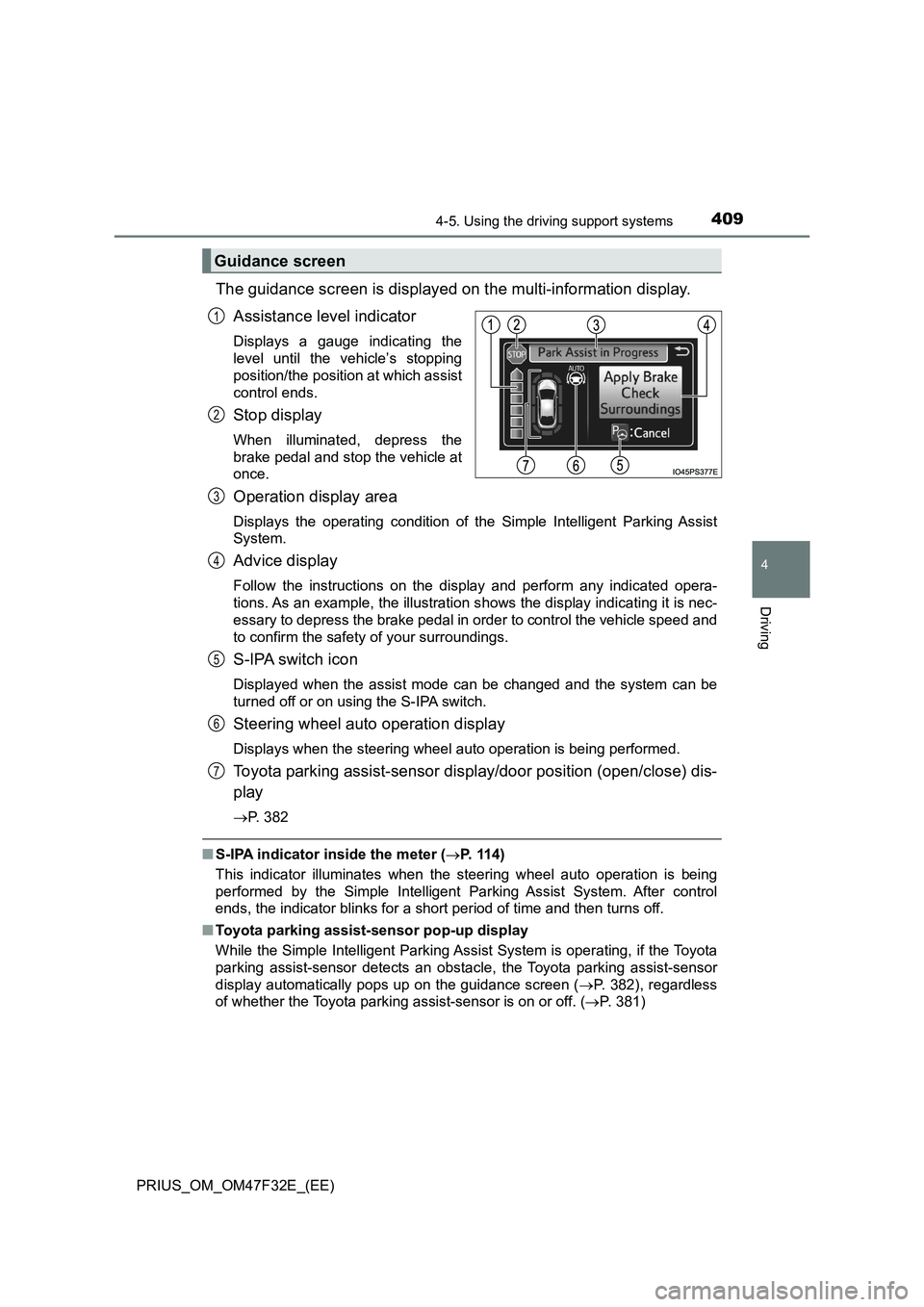
The guidance screen is displayed on the multi-information display.
Assistance level indicator
Displays a gauge indicating the
level until the vehicle’s stopping
position/the position at which assist
control ends.
Stop display
When illuminated, depress the
brake pedal and stop the vehicle at
once.
Operation display area
Displays the operating condition of the Simple Intelligent Parking Assist
System.
Advice display
Follow the instructions on the display and perform any indicated opera-
tions. As an example, the illustration shows the display indicating it is nec-
essary to depress the brake pedal in order to control the vehicle speed and
to confirm the safety of your surroundings.
S-IPA switch icon
Displayed when the assist mode can be changed and the system can be
turned off or on using the S-IPA switch.
Steering wheel auto operation display
Displays when the steering wheel auto operation is being performed.
Toyota parking assist-sensor display/door position (open/close) dis-
play
P. 382
■S-IPA indicator inside the meter (P. 114)
This indicator illuminates when the steering wheel auto operation is being
performed by the Simple Intelligent Parking Assist System. After control
ends, the indicator blinks for a short period of time and then turns off.
■Toyota parking assist-sensor pop-up display
While the Simple Intelligent Parking Assist System is operating, if the Toyota
parking assist-sensor detects an obstacle, the Toyota parking assist-sensor
display automatically pops up on the guidance screen (P. 382), regardless
of whether the Toyota parking assist-sensor is on or off. (P. 381)
Guidance screen
1
2
3
4
5
6
7
Page 424 of 770
4224-5. Using the driving support systems
PRIUS_OM_OM47F32E_(EE)
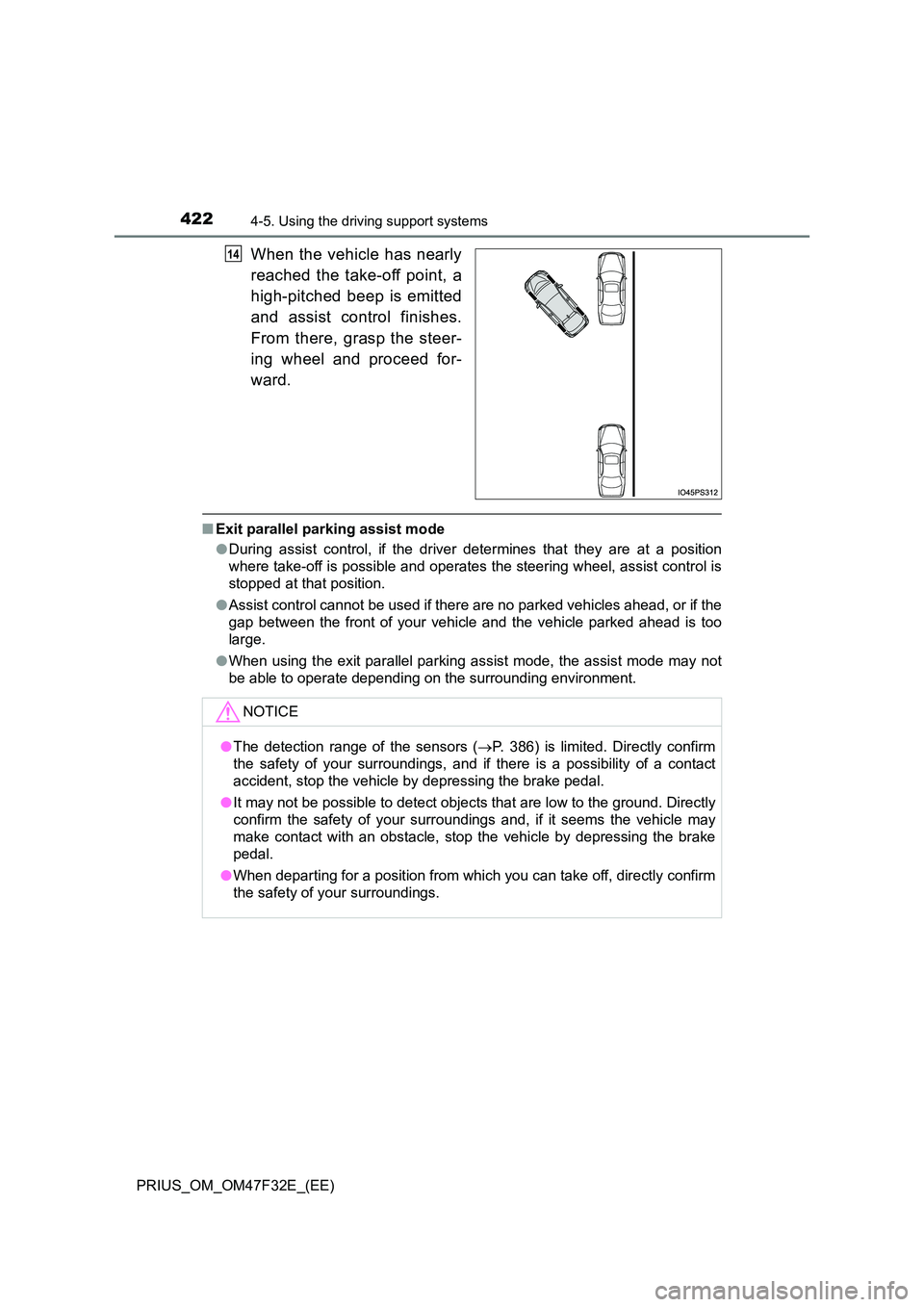
When the vehicle has nearly
reached the take-off point, a
high-pitched beep is emitted
and assist control finishes.
From there, grasp the steer-
ing wheel and proceed for-
ward.
■ Exit parallel parking assist mode
● During assist control, if the driver determines that they are at a position
where take-off is possible and operates the steering wheel, assist control is
stopped at that position.
● Assist control cannot be used if there are no parked vehicles ahead, or if the
gap between the front of your vehicle and the vehicle parked ahead is too
large.
● When using the exit parallel parking assist mode, the assist mode may not
be able to operate depending on the surrounding environment.
14
NOTICE
● The detection range of the sensors (P. 386) is limited. Directly confirm
the safety of your surroundings, and if there is a possibility of a contact
accident, stop the vehicle by depressing the brake pedal.
● It may not be possible to detect objects that are low to the ground. Directly
confirm the safety of your surroundings and, if it seems the vehicle may
make contact with an obstacle, stop the vehicle by depressing the brake
pedal.
● When departing for a position from which you can take off, directly confirm
the safety of your surroundings.
Page 431 of 770
4294-5. Using the driving support systems
4
Driving
PRIUS_OM_OM47F32E_(EE)
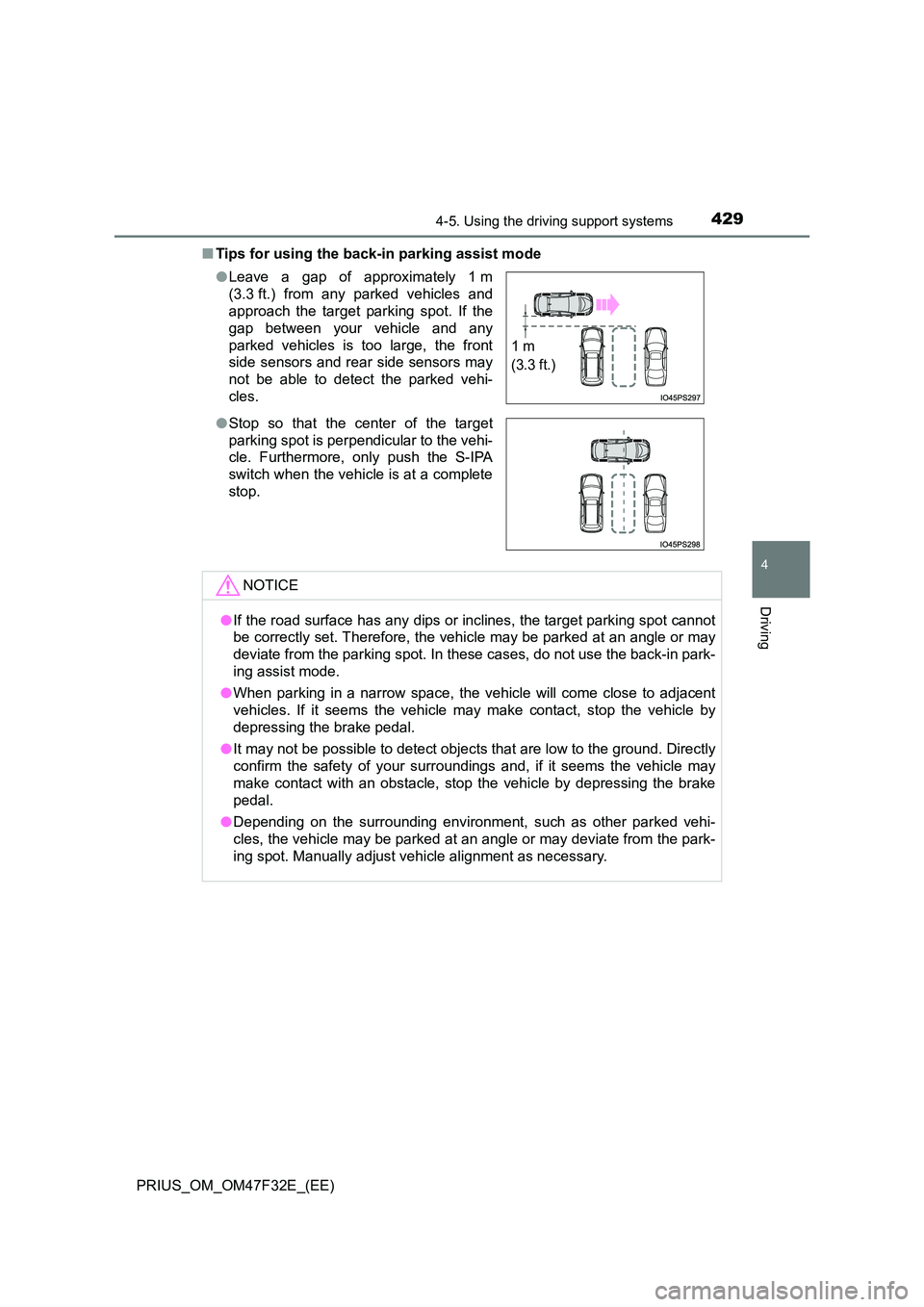
■ Tips for using the back-in parking assist mode
● Leave a gap of approximately 1 m
(3.3 ft.) from any parked vehicles and
approach the target parking spot. If the
gap between your vehicle and any
parked vehicles is too large, the front
side sensors and rear side sensors may
not be able to detect the parked vehi-
cles.
● Stop so that the center of the target
parking spot is perpendicular to the vehi-
cle. Furthermore, only push the S-IPA
switch when the vehicle is at a complete
stop.
NOTICE
● If the road surface has any dips or inclines, the target parking spot cannot
be correctly set. Therefore, the vehicle may be parked at an angle or may
deviate from the parking spot. In these cases, do not use the back-in park-
ing assist mode.
● When parking in a narrow space, the vehicle will come close to adjacent
vehicles. If it seems the vehicle may make contact, stop the vehicle by
depressing the brake pedal.
● It may not be possible to detect objects that are low to the ground. Directly
confirm the safety of your surroundings and, if it seems the vehicle may
make contact with an obstacle, stop the vehicle by depressing the brake
pedal.
● Depending on the surrounding environment, such as other parked vehi-
cles, the vehicle may be parked at an angle or may deviate from the park-
ing spot. Manually adjust vehi cle alignment as necessary.
1 m
(3.3 ft.)