fog light TOYOTA PRIUS 2023 User Guide
[x] Cancel search | Manufacturer: TOYOTA, Model Year: 2023, Model line: PRIUS, Model: TOYOTA PRIUS 2023Pages: 770, PDF Size: 122.55 MB
Page 272 of 770
2704-3. Operating the lights and wipers
PRIUS_OM_OM47F32E_(EE)
Fog light switch
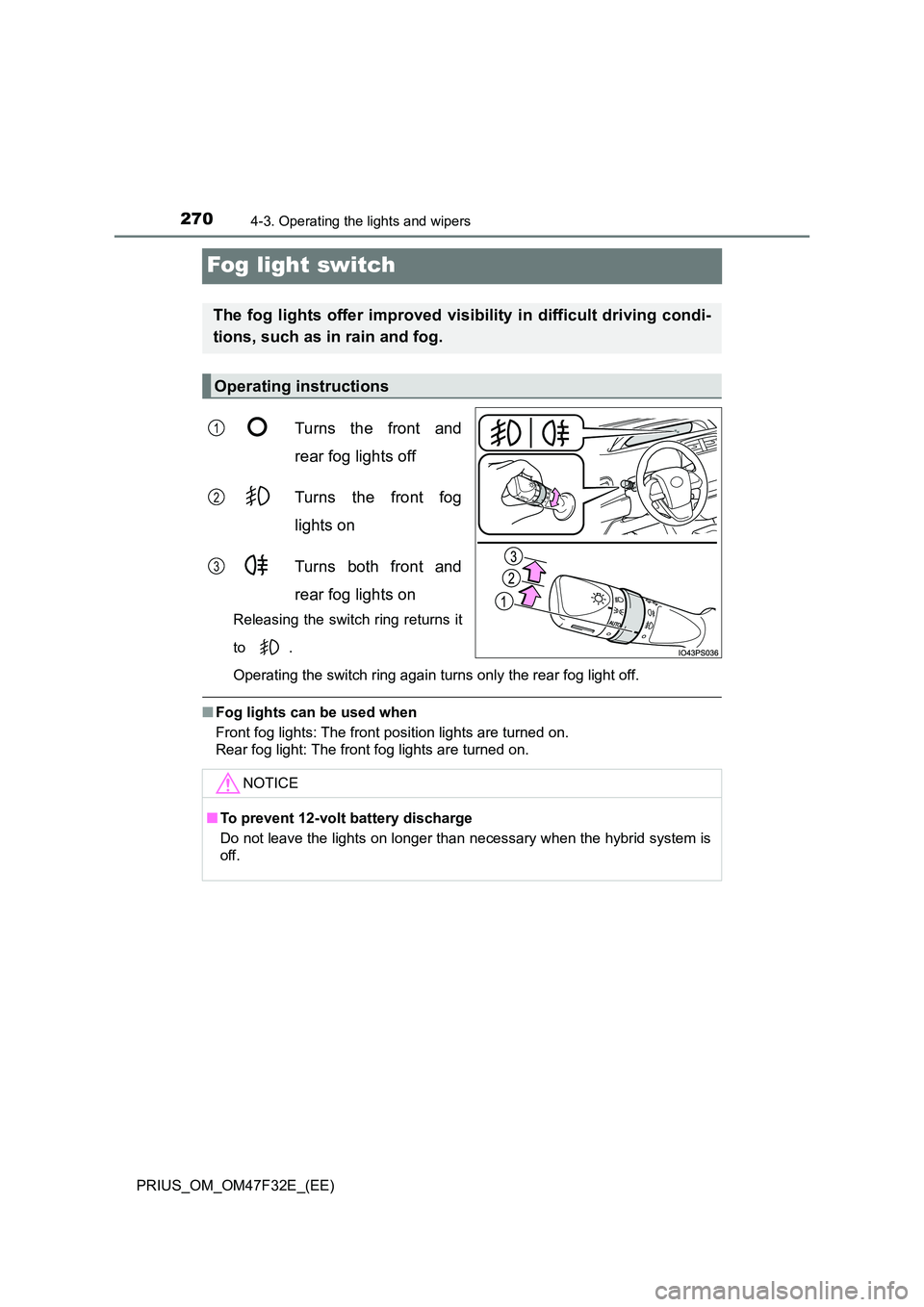
Turns the front and
rear fog lights off
Turns the front fog
lights on
Turns both front and
rear fog lights on
Releasing the switch ring returns it
to .
Operating the switch ring again turns only the rear fog light off.
■ Fog lights can be used when
Front fog lights: The front position lights are turned on.
Rear fog light: The front fog lights are turned on.
The fog lights offer improved visibility in difficult driving condi-
tions, such as in rain and fog.
Operating instructions
1
2
3
NOTICE
■ To prevent 12-volt battery discharge
Do not leave the lights on longer than necessary when the hybrid system is
off.
Page 287 of 770
2854-5. Using the driving support systems
4
Driving
PRIUS_OM_OM47F32E_(EE)
WARNING
■To avoid malfunction of the front camera
Observe the following precautions.
Otherwise, the front camera may not operate properly, possibly leading to
an accident resulting in death or serious injury.
● Keep the windshield clean at all times.
• If the windshield is dirty or cover ed with an oily film, water droplets,
snow, etc., clean the windshield.
• If a glass coating agent is applied to t he windshield, it will still be neces-
sary to use the windshield wipers to remove water droplets, etc. from
the area of the windshield in front of the front camera.
• If the inner side of the windshield where the front camera is installed is
dirty, contact any authorized Toyota retailer or Toyota authorized
repairer, or any reliable repairer.
● If the part of the windshield in front of the front camera is fogged up or cov-
ered with condensation, or ice, use the windshield defogger to remove the
fog, condensation, or ice. ( P. 462)
● If water droplets cannot be properly removed from the area of the wind-
shield in front of the front camera by the windshield wipers, replace the
wiper insert or wiper blade.
● Do not attach window tint to the windshield.
● Replace the windshield if it is damaged or cracked.
After replacing the windshield, the front camera must be recalibrated. Con-
tact any authorized Toyota retailer or Toyota authorized repairer, or any
reliable repairer for details.
● Do not allow liquids to contact the front camera.
● Do not allow bright lights to shine into the front camera.
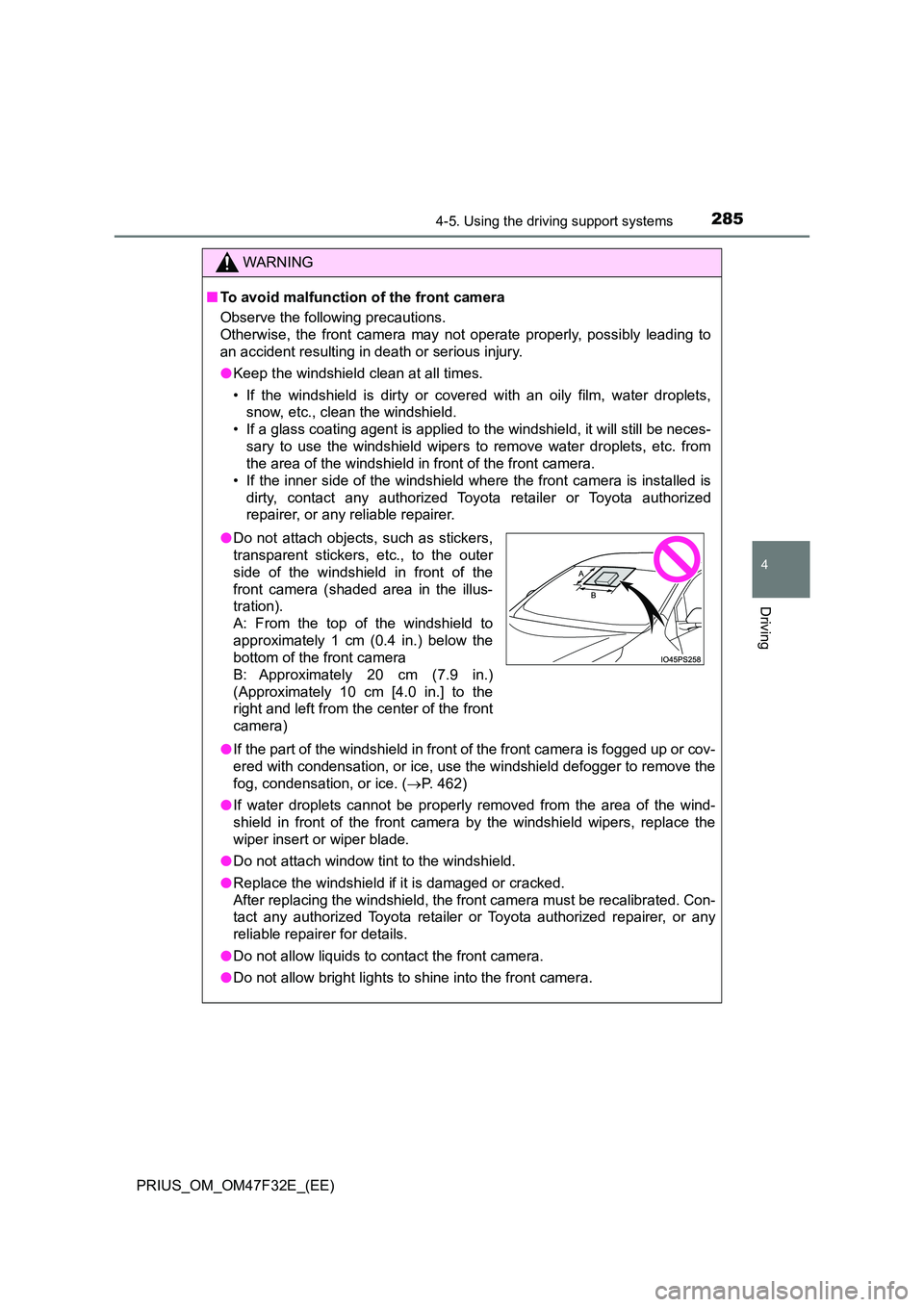
●Do not attach objects, such as stickers,
transparent stickers, etc., to the outer
side of the windshield in front of the
front camera (shaded area in the illus-
tration).
A: From the top of the windshield to
approximately 1 cm (0.4 in.) below the
bottom of the front camera
B: Approximately 20 cm (7.9 in.)
(Approximately 10 cm [4.0 in.] to the
right and left from the center of the front
camera)
Page 296 of 770
2944-5. Using the driving support systems
PRIUS_OM_OM47F32E_(EE)■If a warning message is displayed on the multi-information display
A system may be temporarily unavailable or there may be a malfunction in
the system.
●In the following situations, perform the actions specified in the table. When
the normal operating conditions are detected, the message will disappear
and the system will become operational.
If the message does not disappear, contact any authorized Toyota retailer or
Toyota authorized repairer, or any reliable repairer.
SituationActions
When the area around a cam-
era is covered with dirt, mois-
ture (fogged up, covered with
condensation, ice, etc.), or
other foreign matter
Using the wiper and A/C function,
remove the dirt and other attached mat-
ter. (P. 462)
When the temperature around
the front camera is outside of
the operational range, such as
when the vehicle is in the sun or
in an extremely cold environ-
ment
If the front camera is hot, such as after
the vehicle had been parked in the sun,
use the air conditioning system to
decrease the temperature around the
front camera.
If a sunshade was used when the vehi-
cle was parked, depending on its type,
the sunlight reflected from the surface
of the sunshade may cause the tem-
perature of the front camera to become
excessively high.
If the front camera is cold, such after the
vehicle is parked in an extremely cold
environment, use the air conditioning
system to increase the temperature
around the front camera.
The area in front of the front
camera is obstructed, such as
when the hood is open or a
sticker is attached to the part of
the windshield in front of the
front camera.
Close the hood, remove the sticker, etc.
to clear the obstruction.
When “Pre-Collision System
Unavailable” is displayed.Check whether there is attached materi-
als on the radar sensor and radar sensor
cover, and if there is, remove it.
Page 297 of 770
2954-5. Using the driving support systems
4
Driving
PRIUS_OM_OM47F32E_(EE)●In the following situations, if the situation has changed (or the vehicle has
been driven for some time) and the normal operating conditions are
detected, the message will disappear and the system will become opera-
tional.
If the message does not disappear, contact any authorized Toyota retailer or
Toyota authorized repairer, or any reliable repairer.
• When the temperature around the radar sensor is outside of the opera-
tional range, such as when the vehicle is in the sun or in an extremely
cold environment
• When the front camera cannot detect objects in front of the vehicle, such
as when driving in the dark, snow, or fog, or when bright lights are shining
into the front camera
• Depending on the conditions in the vicinity of the vehicle, the radar may
judge the surrounding environment can not be properly recognized. In
that case, “Pre-Collision System Unavailable” is displayed.
Page 307 of 770
3054-5. Using the driving support systems
4
Driving
PRIUS_OM_OM47F32E_(EE)• When a very bright light ahead, such as the sun or the headlights of
oncoming traffic, shines directly into the front camera
• When approaching the side or front of a vehicle ahead
• If a vehicle ahead is a motorcycle
• If a vehicle ahead is narrow, such as a personal mobility vehicle
• If a preceding vehicle has a small rear end, such as an unloaded truck
• If a vehicle ahead is carrying a load which protrudes past its rear bumper
• If a vehicle ahead is irregularly shaped, such as a tractor or side car
• If a vehicle ahead is a child sized bicycle, a bicycle that is carrying a large
load, a bicycle ridden by more than one person, or a uniquely shaped
bicycle (bicycle with a child seat, tandem bicycle, etc.)
• If a pedestrian/or the riding height of a bicyclist ahead is shorter than
approximately 1 m (3.2 ft.) or taller than approximately 2 m (6.5 ft.)
• If a pedestrian/bicyclist is wearing oversized clothing (a rain coat, long
skirt, etc.), making their silhouette obscure
• If a pedestrian is bending forward or squatting or bicyclist is bending for-
ward
• If a pedestrian/bicyclist is moving fast
• If a pedestrian is pushing a stroller, wheelchair, bicycle or other vehicle
• When driving in inclement weather such as heavy rain, fog, snow or a
sandstorm
• When driving through steam or smoke
• When the surrounding area is dim, such as at dawn or dusk, or while at
night or in a tunnel, making a detectable object appear to be nearly the
same color as its surroundings
• When driving in a place where the surrounding brightness changes sud-
denly, such as at the entrance or exit of a tunnel
• After the hybrid system has started the vehicle has not been driven for a
certain amount of time
• While making a left/right turn and for a few seconds after making a left/
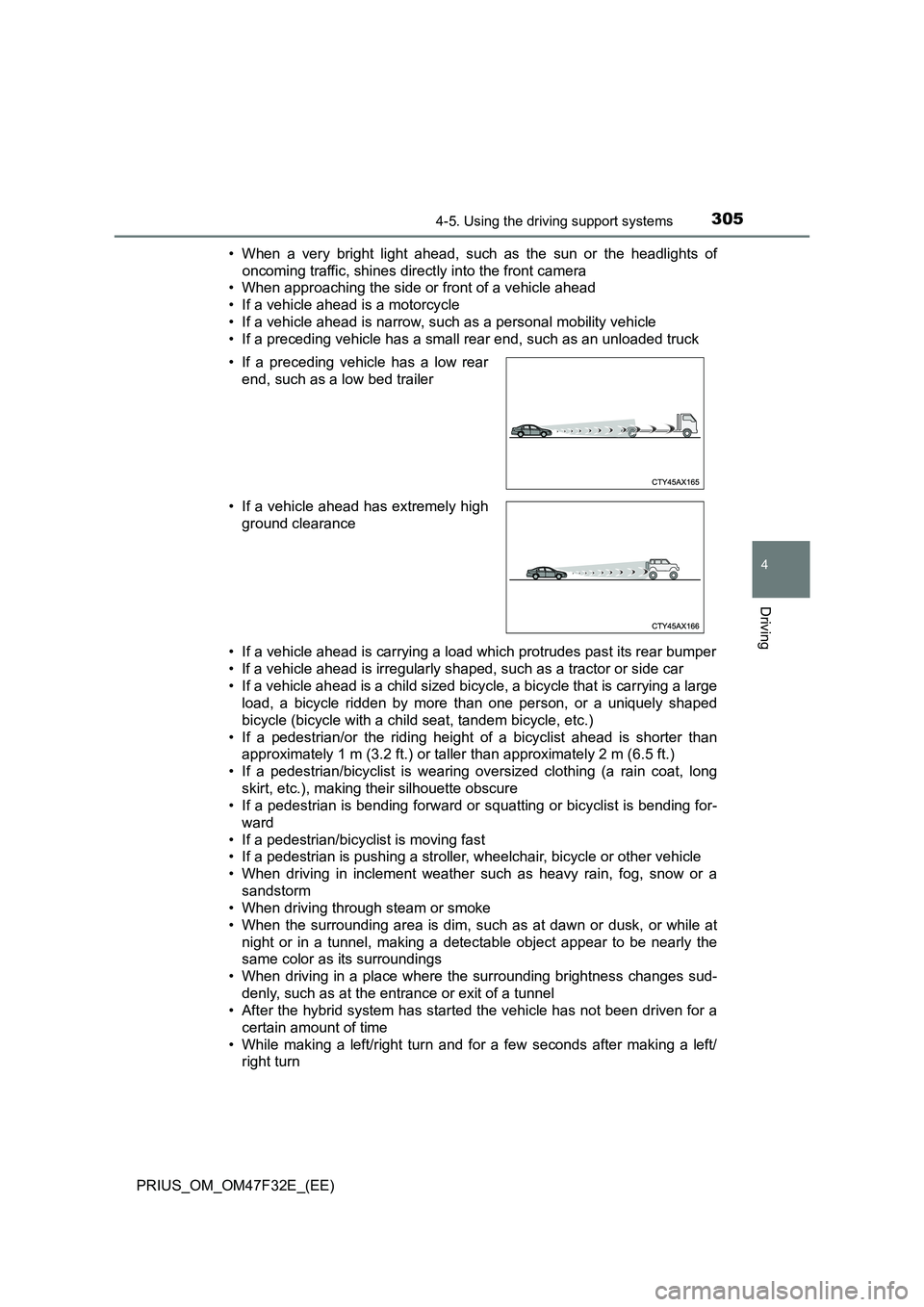
right turn • If a preceding vehicle has a low rear
end, such as a low bed trailer
• If a vehicle ahead has extremely high
ground clearance
Page 310 of 770
3084-5. Using the driving support systems
PRIUS_OM_OM47F32E_(EE)
WARNING
■Before using LTA system
● Do not rely solely upon the LTA system. The LTA system does not auto-
matically drive the vehicle or reduce the amount of attention that must be
paid to the area in front of the vehicle. The driver must always assume full
responsibility for driving safely by paying careful attention to the surround-
ing conditions and operating the steering wheel to correct the path of the
vehicle. Also, the driver must take adequate breaks when fatigued, such
as from driving for a long period of time.
● Failure to perform appropriate driving operations and pay careful attention
may lead to an accident, resulting in death or serious injury.
● When not using the LTA system, use the LTA switch to turn the system off.
■ Situations unsuitable for LTA system
In the following situations, use the LTA switch to turn the system off. Failure
to do so may lead to an accident, resulting in death or serious injury.
● Vehicle is driven on a road surface which is slippery due to rainy weather,
fallen snow, freezing, etc.
● Vehicle is driven on a snow-covered road.
● White (yellow) lines are difficult to see due to rain, snow, fog, dust, etc.
● Vehicle is driven in a temporary lane or restricted lane due to construction
work.
● Vehicle is driven in a construction zone.
● A spare tire, tire chains, etc. are equipped.
● When the tires have been excessively worn, or when the tire inflation pres-
sure is low.
● During emergency towing.
■ Preventing LTA system malfunctions and operations performed by
mistake
● Do not modify the headlights or place stickers, etc. on the surface of the
lights.
● Do not modify the suspension etc. If the suspension etc. needs to be
replaced, contact any authorized Toyota retailer or Toyota authorized
repairer, or any reliable repairer.
● Do not install or place anything on the hood or grille. Also, do not install a
grille guard (bull bars, kangaroo bar, etc.).
● If your windshield needs repairs, contact any authorized Toyota retailer or
Toyota authorized repairer, or any reliable repairer.
Page 329 of 770
3274-5. Using the driving support systems
4
Driving
PRIUS_OM_OM47F32E_(EE)
In the following situations, the RSA system will notify the driver.
●When the vehicle speed exceeds the speed notification threshold of
the speed limit sign displayed, the sign display will be emphasized
and a buzzer will sound.
●When the RSA system recognizes a no-entry sign and detects that
the vehicle has entered a no-entry area based on the map informa-
tion of the navigation system, the no-entry sign flashes and a
buzzer will sound.(For vehicles with navigation system)
●If it is detected that your vehicle is overtaking when a no overtaking
sign is displayed on the multi-information display, the displayed sign
will flash and a buzzer will sound.
Depending on the situation, traffic environment (traffic direction,
speed unit) may be detected incorrectly and a notification function
may not operate properly.
■Setting procedure
P. 153
■Automatic turn-off of RSA sign display
One or more signs automatically turn off in the following situations.
●No sign has been recognized for a certain distance.
●The road changes due to a left or right turn, etc.
■Conditions in which the function may not operate or detect correctly
In the following situations, RSA does not operate normally and may not rec-
ognize signs, display the incorrect sign, etc. However, this does not indicate a
malfunction.
●The front camera is misaligned due to a strong impact being applied to the
sensor, etc.
●Dirt, snow, stickers, etc. are on the windshield near the front camera.
●In inclement weather such as heavy rain, fog, snow or sand storms
●Light from an oncoming vehicle, the sun, etc. enters the front camera.
●The sign is dirty, faded, tilted or bent.
●The contrast of electronic sign is low.
●All or part of the sign is hidden by the leaves of a tree, a pole, etc.
●The sign is only visible to the front camera for a short amount of time.
●The driving scene (turning, lane change, etc.) is judged incorrectly.
●If a sign not appropriate for the currently traveled lane, but the sign exists
directly after a freeway branches, or in an adjacent lane just before merging.
Notification function
Page 394 of 770
3924-5. Using the driving support systems
PRIUS_OM_OM47F32E_(EE)
WARNING
■Cautions regarding the use of the system
There is a limit to the degree of recognition accuracy and control perfor-
mance that this system can provide, do not overly rely on this system. The
driver is always responsible for paying attention to the vehicle’s surround-
ings and driving safely.
■ To ensure the system can operate properly
Observe the following precautions to avoid an unexpected accident.
● Do not damage the sensors, and always keep them clean.
● Do not attach a sticker or install an electronic component, such as a backlit
license plate (especially fluorescent type), fog lights, fender pole or wire-
less antenna near a radar sensor.
● Do not subject the surrounding area of the sensor to a strong impact. If
subjected to an impact, have the vehicle inspected by any authorized
Toyota retailer or Toyota authorized repai rer, or any reliable repairer. If the
front or rear bumper needs to be removed/installed or replaced, contact
any authorized Toyota retailer or Toyota authorized repairer, or any reliable
repairer.
● Do not modify, disassemble or paint the sensors.
● Do not attach a license plate cover.
● Keep your tires properly inflated.
■ When to disable the function
In the following situations, disable the function as it may operate even
though there is no possibility of a collision.
● Failing to observe the warnings above.
● A non-genuine Toyota suspension (lowered suspension, etc.) is installed.
■ Side sensors
In the following situations, the Toyota parking assist-sensor may not operate
normally and may result in an unexpected accident. Drive carefully.
● Obstacles may not be detected in the side areas until the vehicle is driven
for a short time and a scan of the side areas is completed. ( P. 388)
● Even after the scan of the side areas is completed, obstacles such as
other vehicles, people or animals that approach from the sides cannot be
detected.
● Even after the scan of the side areas is completed, obstacles may not be
detected depending on the surrounding situation of the vehicle.
At that time, the side sensor operation displays ( P. 382) temporary turn
off.
Page 459 of 770
457
5Interior features
PRIUS_OM_OM47F32E_(EE)5-1. Using the air conditioning
system and defogger
Automatic air conditioning
system ............................. 458
Seat heaters ...................... 468
5-2. Using the interior lights
Interior lights list ................. 470
• Front interior light .......... 471
• Front personal lights ...... 471
• Rear interior light ........... 472
5-3. Using the storage features
List of storage features ...... 473
• Glove box ...................... 474
• Console box .................. 474
• Cup holders ................... 475
• Bottle holders/
door pockets .................. 476
• Auxiliary boxes .............. 477
• Seat back pockets ......... 478
Luggage compartment
features............................ 479
5-4. Using the other interior
features
Other interior features ........ 485
• Sun visors...................... 485
• Vanity mirrors ................ 485
• Power outlets................. 486
• Wireless charger ........... 487
• Armrest .......................... 493
• Coat hooks .................... 493
• Assist grips .................... 494
Page 471 of 770
4695-1. Using the air conditioning system and defogger
PRIUS_OM_OM47F32E_(EE)
5
Interior features
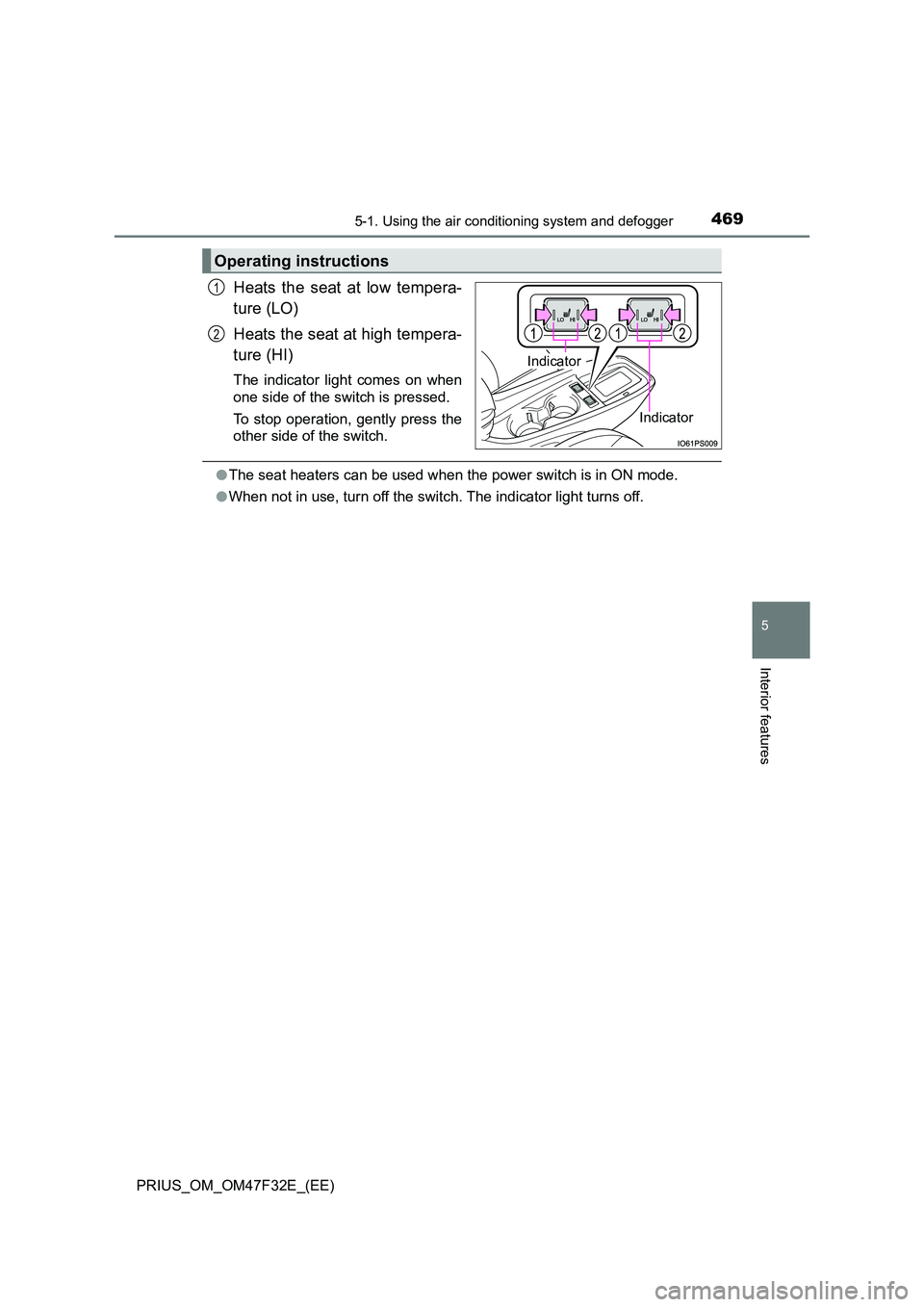
Heats the seat at low tempera-
ture (LO)
Heats the seat at high tempera-
ture (HI)
The indicator light comes on when
one side of the switch is pressed.
To stop operation, gently press the
other side of the switch.
● The seat heaters can be used when the power switch is in ON mode.
● When not in use, turn off the switch. The indicator light turns off.
Operating instructions
Indicator
Indicator
1
2