warning lights TOYOTA PRIUS 2023 User Guide
[x] Cancel search | Manufacturer: TOYOTA, Model Year: 2023, Model line: PRIUS, Model: TOYOTA PRIUS 2023Pages: 770, PDF Size: 122.55 MB
Page 102 of 770
1002. Instrument cluster
PRIUS_OM_OM47F32E_(EE)
Combination meter
The units used on the display may differ depending on the target region.
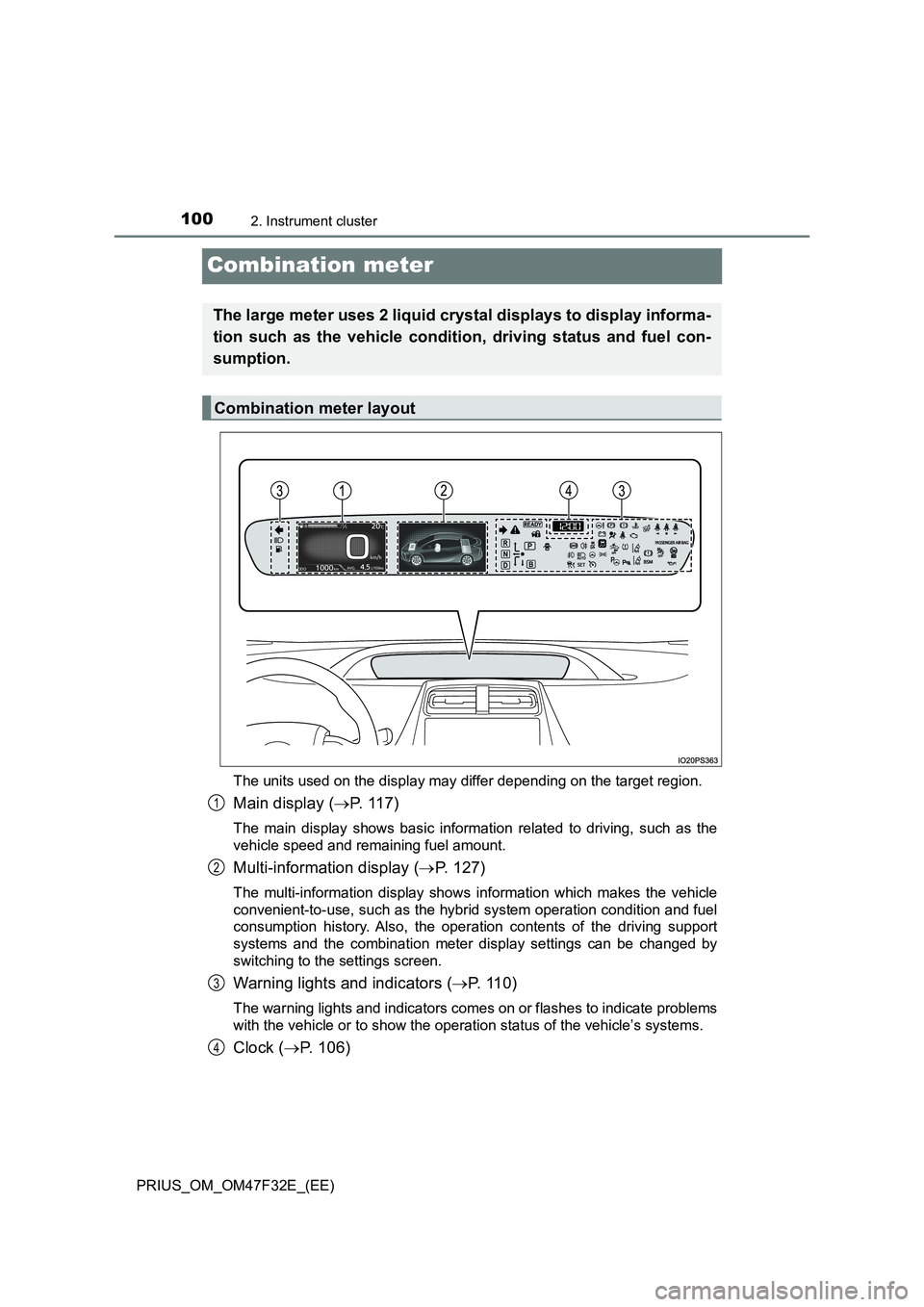
Main display (P. 1 1 7 )
The main display shows basic information related to driving, such as the
vehicle speed and remaining fuel amount.
Multi-information display (P. 127)
The multi-information display shows information which makes the vehicle
convenient-to-use, such as the hybrid system operation condition and fuel
consumption history. Also, the operation contents of the driving support
systems and the combination meter display settings can be changed by
switching to the settings screen.
Warning lights and indicators (P. 1 1 0 )
The warning lights and indicators comes on or flashes to indicate problems
with the vehicle or to show the operation status of the vehicle’s systems.
Clock (P. 106)
The large meter uses 2 liquid crystal displays to display informa-
tion such as the vehicle condition, driving status and fuel con-
sumption.
Combination meter layout
1
2
3
4
Page 112 of 770
1102. Instrument cluster
PRIUS_OM_OM47F32E_(EE)
War ning lights and indicators
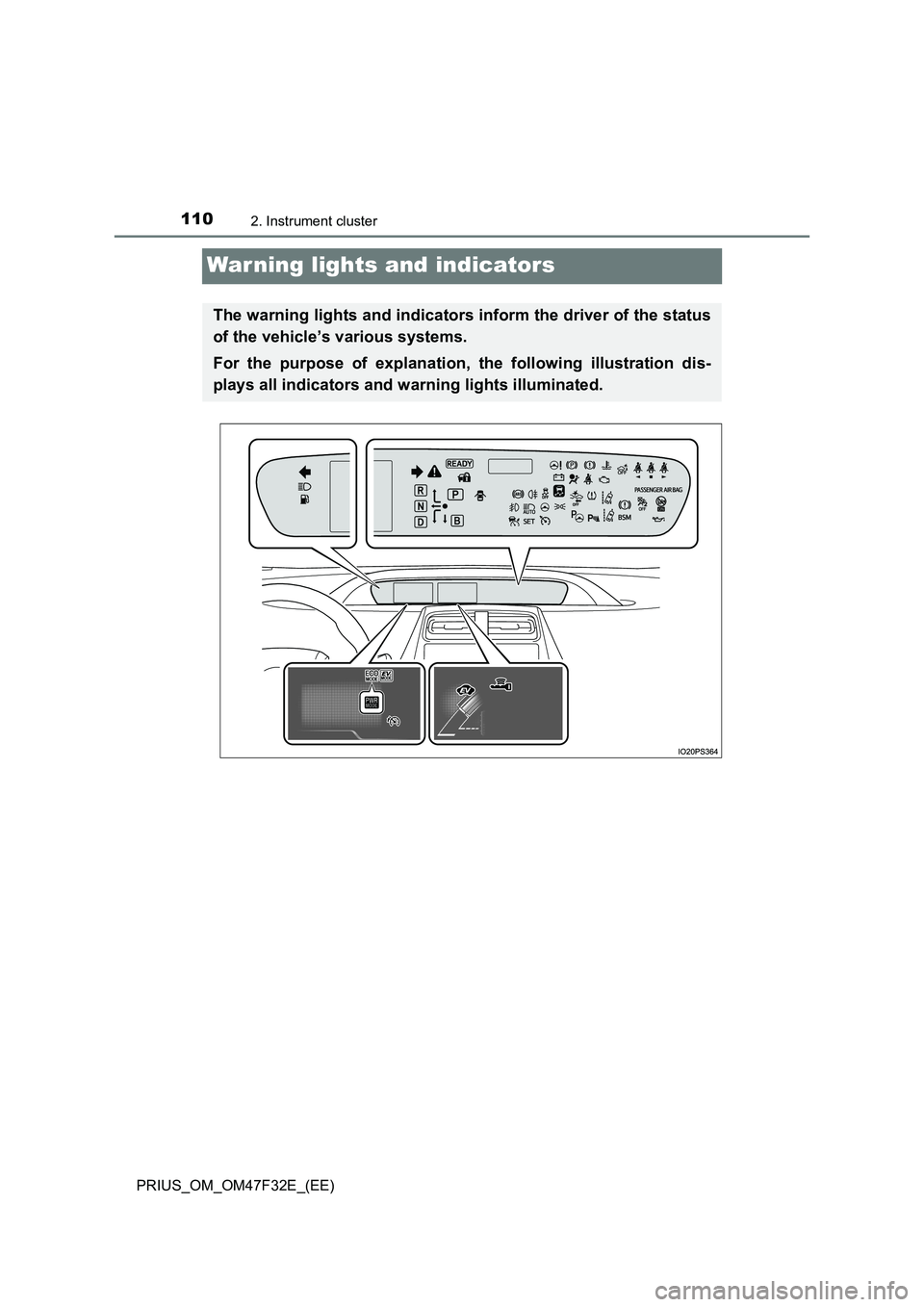
The warning lights and indicators inform the driver of the status
of the vehicle’s various systems.
For the purpose of explanation, the following illustration dis-
plays all indicators and warning lights illuminated.
Page 113 of 770
1112. Instrument cluster
2
Instrument cluster
PRIUS_OM_OM47F32E_(EE)
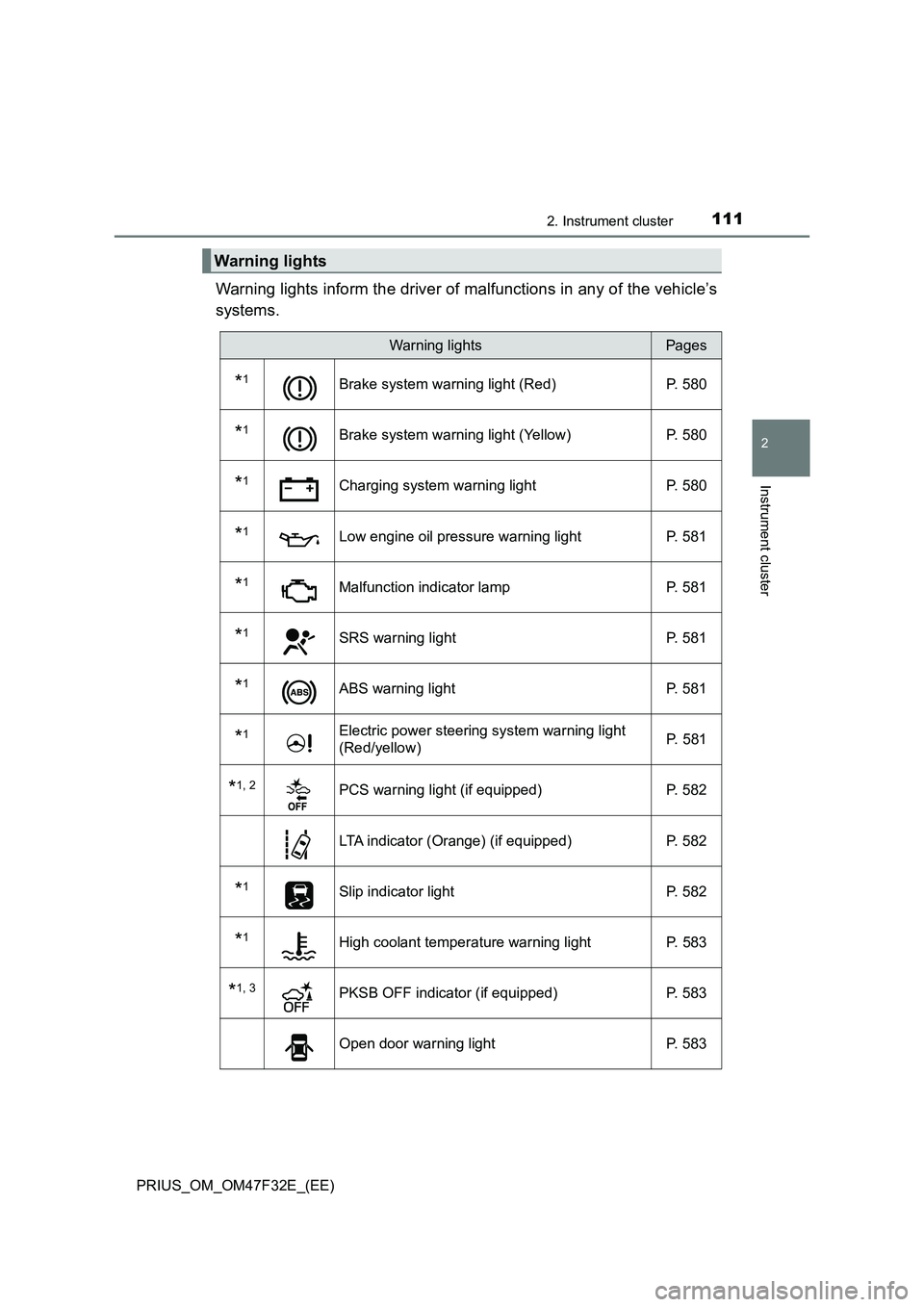
Warning lights inform the driver of malfunctions in any of the vehicle’s
systems.
Warning lights
Warning lightsPages
*1Brake system warning light (Red) P. 580
*1Brake system warning light (Yellow) P. 580
*1Charging system warning light P. 580
*1Low engine oil pressure warning light P. 581
*1Malfunction indicator lamp P. 581
*1SRS warning light P. 581
*1ABS warning light P. 581
*1Electric power steering system warning light
(Red/yellow) P. 581
*1, 2PCS warning light (if equipped) P. 582
LTA indicator (Orange) (if equipped) P. 582
*1Slip indicator light P. 582
*1High coolant temperature warning light P. 583
*1, 3PKSB OFF indicator (if equipped) P. 583
Open door warning light P. 583
Page 114 of 770
1122. Instrument cluster
PRIUS_OM_OM47F32E_(EE)
*1: These lights turn on when the power switch is turned to ON mode to indi-
cate that a system check is being performed. They will turn off after the
hybrid system is on, or after a few seconds. There may be a malfunction in
a system if a light does not come on, or turn off. Have the vehicle
inspected by any authorized Toyota retailer or Toyota authorized repairer,
or any reliable repairer.
*2: The light flashes or illuminates to indicate a malfunction.
*3: The light flashes to indicate a malfunction.
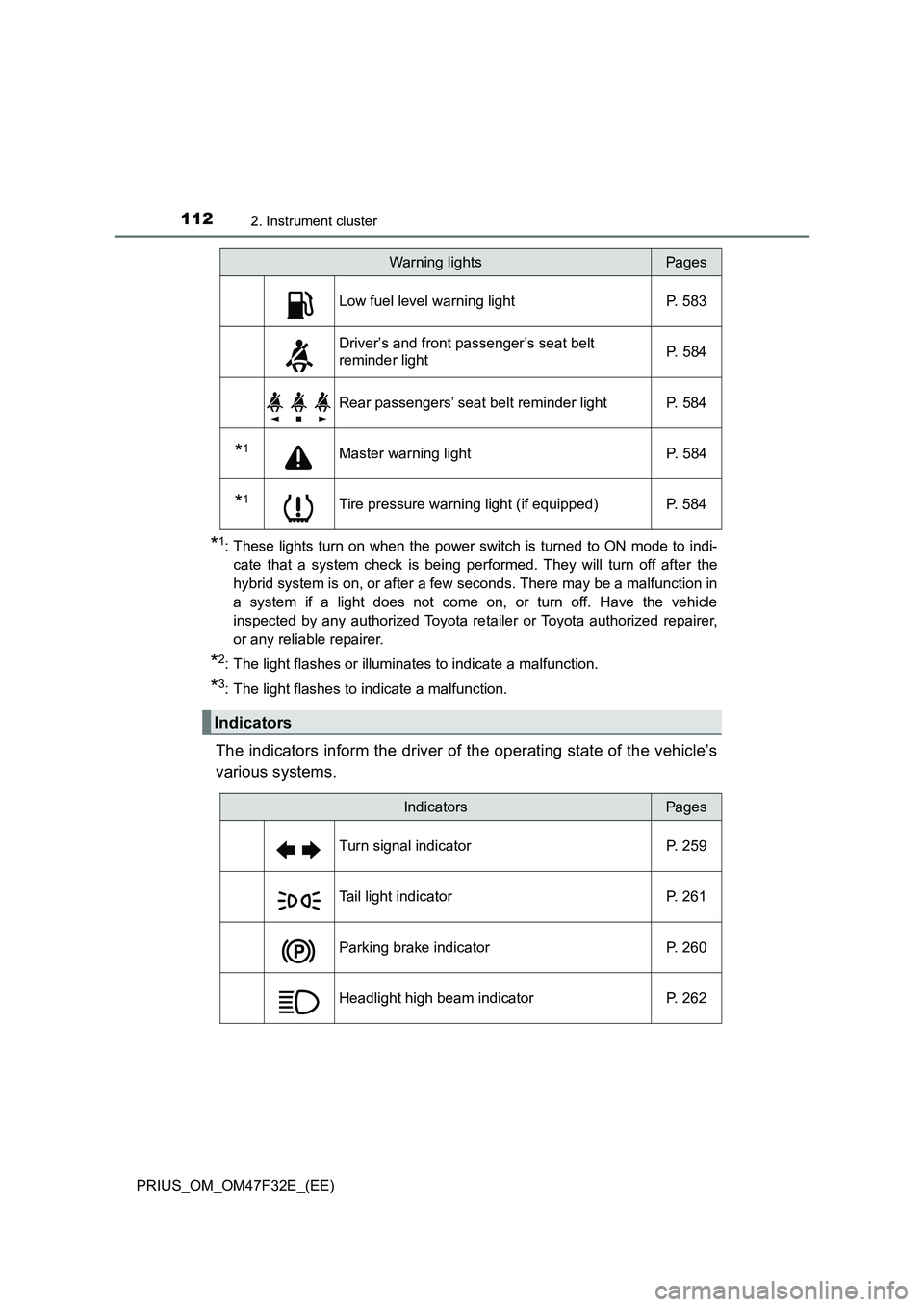
The indicators inform the driver of the operating state of the vehicle’s
various systems.
Low fuel level warning light P. 583
Driver’s and front passenger’s seat belt
reminder lightP. 584
Rear passengers’ seat belt reminder light P. 584
*1Master warning light P. 584
*1Tire pressure warning light (if equipped) P. 584
Indicators
Warning lightsPages
IndicatorsPages
Turn signal indicator P. 259
Tail light indicator P. 261
Parking brake indicator P. 260
Headlight high beam indicator P. 262
Page 166 of 770
1642. Instrument cluster
PRIUS_OM_OM47F32E_(EE)
■Enabling/disabling of the head-up display
When the head-up display is turned off with the “HUD” switch, it is not dis-
played until the “HUD” switch is used to turn the head-up display on again.
(Operation of the head-up display is not linked with the power switch.)
■ Display brightness
● The brightness of the head-up display is automatically adjusted according to
the operation status of the headlights (on/off) and the brightness of the sur-
roundings.
● When the brightness of the head-up display is adjusted to a certain level or
higher, the display automatically dims when the vehicle is stopped. Once the
vehicle starts off and the vehicle speed reaches approximately 5 km/h
(3.1 mph) or more, the display automatically returns to its previous bright-
ness.
■ Vehicle speed display
In extremely cold environments, the display of the speedometer and the vehi-
cle speed of the head-up display may slightly differ.
■ Head-up display
The head-up display may seem dark and hard to see when viewed through
sunglasses, especially polarized sunglasses.
■ When the 12-volt battery is disconnected
The customize settings of the head-up display will be reset.
WARNING
■ Before using the head-up display
● Check that the position and brightness of the head-up display image does
not interfere with safe driving. Incorrect adjustment of the image’s position
or brightness may obstruct the driver’s view and lead to an accident,
resulting in death or serious injury.
● Do not continuously look at the head-up display while driving as you may
fail to see pedestrians, objects on the road, etc. ahead of the vehicle.
Page 208 of 770
2063-4. Adjusting the steering wheel and mirrors
PRIUS_OM_OM47F32E_(EE)
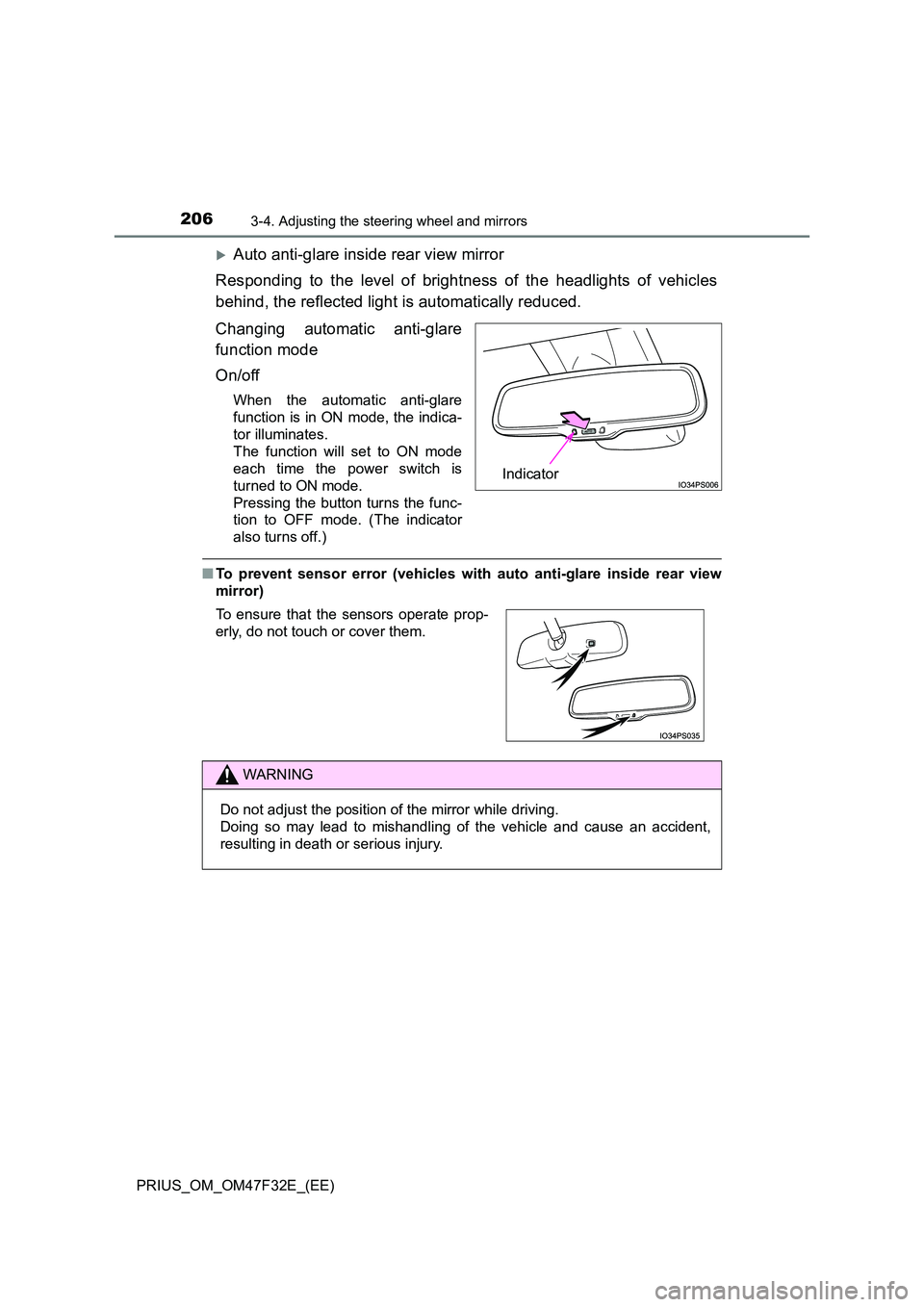
Auto anti-glare inside rear view mirror
Responding to the level of brightness of the headlights of vehicles
behind, the reflected light is automatically reduced.
Changing automatic anti-glare
function mode
On/off
When the automatic anti-glare
function is in ON mode, the indica-
tor illuminates.
The function will set to ON mode
each time the power switch is
turned to ON mode.
Pressing the button turns the func-
tion to OFF mode. (The indicator
also turns off.)
■ To prevent sensor error (vehicles with auto anti-glare inside rear view
mirror)
Indicator
To ensure that the sensors operate prop-
erly, do not touch or cover them.
WARNING
Do not adjust the position of the mirror while driving.
Doing so may lead to mishandling of the vehicle and cause an accident,
resulting in death or serious injury.
Page 244 of 770
2424-1. Before driving
PRIUS_OM_OM47F32E_(EE)
WARNING
Follow all the instructions described in this section.
Failure to do so could cause an accident resulting in death or serious injury.
■ Trailer towing precautions
When towing, make sure that none of the weight limits are exceeded.
( P. 2 3 4 )
■ To avoid accident or injury
● Vehicles with a compact spare tire:
Do not tow a trailer when the compact spare tire is installed on your vehi-
cle.
● Vehicles with the emergency tire puncture repair kit:
Do not tow a trailer when the tire installed is repaired with the emergency
tire puncture repair kit.
● Do not use cruise control or dynamic radar cruise control with full-speed
range when trailer towing. (if equipped)
■ Vehicle speed in towing
Observe the legal maximum speeds for trailer towing.
■ Before descending hills or long declines
Reduce speed and downshift. However, never downshift suddenly while
descending steep or long downhill grades.
■ Operation of the brake pedal
Do not hold the brake pedal depressed often or for long periods of time.
Doing so may result in the brake overheating or reduce braking effects.
NOTICE
■ Do not directly splice trailer lights
Directly splicing trailer lights may damage your vehicle’s electrical system
and cause a malfunction.
Page 268 of 770
2664-3. Operating the lights and wipers
PRIUS_OM_OM47F32E_(EE)
AHB (Automatic High Beam)
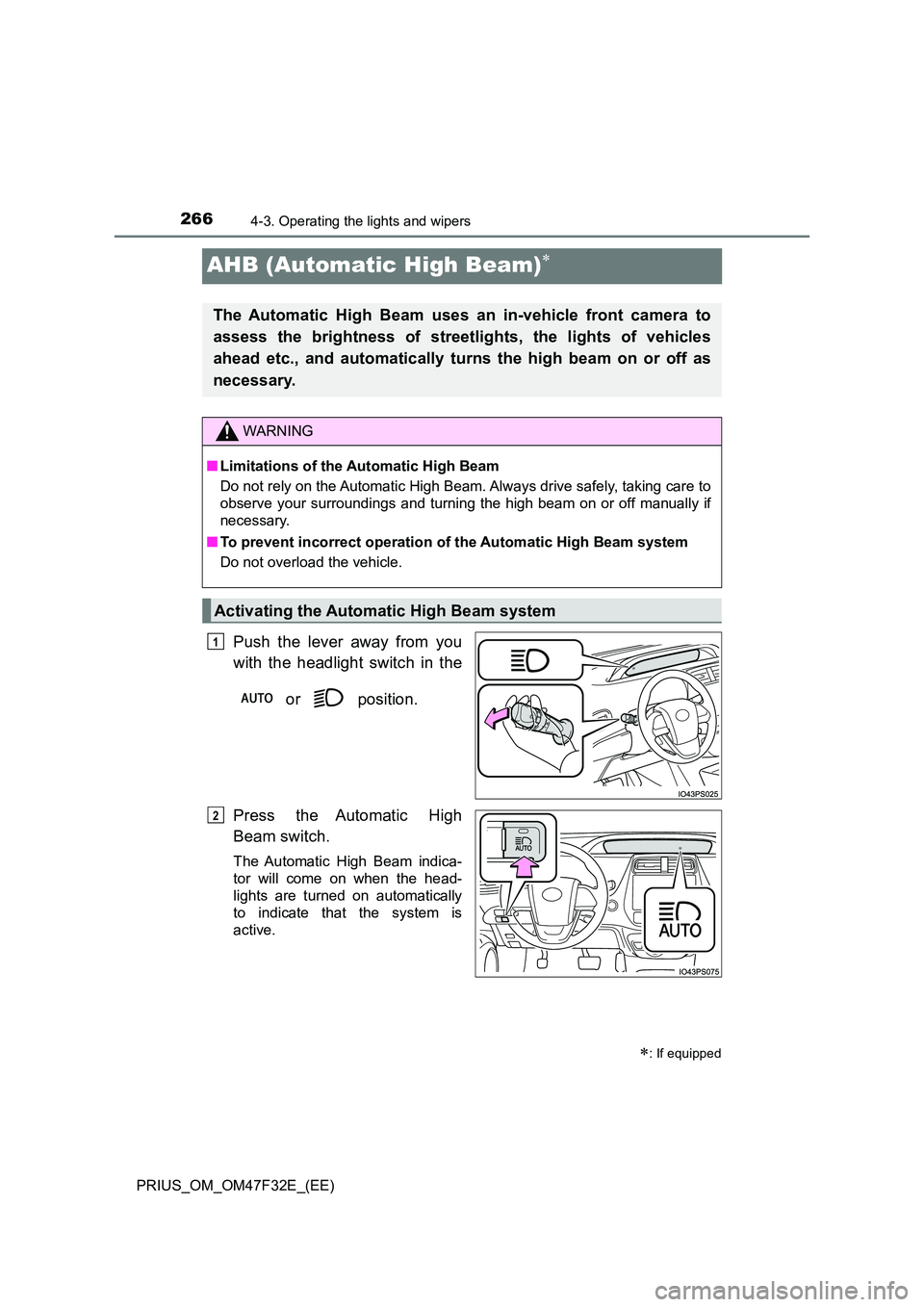
Push the lever away from you
with the headlight switch in the
or position.
Press the Automatic High
Beam switch.
The Automatic High Beam indica-
tor will come on when the head-
lights are turned on automatically
to indicate that the system is
active.
: If equipped
The Automatic High Beam uses an in-vehicle front camera to
assess the brightness of streetlights, the lights of vehicles
ahead etc., and automatically turns the high beam on or off as
necessary.
WARNING
■ Limitations of the Automatic High Beam
Do not rely on the Automatic High Beam. Always drive safely, taking care to
observe your surroundings and turning the high beam on or off manually if
necessary.
■ To prevent incorrect operation of the Automatic High Beam system
Do not overload the vehicle.
Activating the Automatic High Beam system
1
2
Page 276 of 770
2744-3. Operating the lights and wipers
PRIUS_OM_OM47F32E_(EE)
WARNING
■Caution regarding the use of windshield wipers in AUTO mode (vehi-
cles with rain-sensing windshield wipers)
The windshield wipers may operate unexpectedly if the sensor is touched or
the windshield is subject to vibration in AUTO mode. Take care that your fin-
gers etc. do not become caught in the windshield wipers.
■ Caution regarding the use of washer fluid
When it is cold, do not use the washer fluid until the windshield becomes
warm. The fluid may freeze on the windshield and cause low visibility. This
may lead to an accident, resulting in death or serious injury.
NOTICE
■ When the windshield is dry
Do not use the wipers, as they may damage the windshield.
■ When the washer fluid tank is empty
Do not operate the switch continually as the washer fluid pump may over-
heat.
■ When a nozzle becomes blocked
In this case, contact any authorized Toyota retailer or Toyota authorized
repairer, or any reliable repairer.
Do not try to clear it with a pin or other object. The nozzle will be damaged.
■ To prevent 12-volt battery discharge
Do not leave the wipers on longer than necessary when the hybrid system
is off.
Page 287 of 770
2854-5. Using the driving support systems
4
Driving
PRIUS_OM_OM47F32E_(EE)
WARNING
■To avoid malfunction of the front camera
Observe the following precautions.
Otherwise, the front camera may not operate properly, possibly leading to
an accident resulting in death or serious injury.
● Keep the windshield clean at all times.
• If the windshield is dirty or cover ed with an oily film, water droplets,
snow, etc., clean the windshield.
• If a glass coating agent is applied to t he windshield, it will still be neces-
sary to use the windshield wipers to remove water droplets, etc. from
the area of the windshield in front of the front camera.
• If the inner side of the windshield where the front camera is installed is
dirty, contact any authorized Toyota retailer or Toyota authorized
repairer, or any reliable repairer.
● If the part of the windshield in front of the front camera is fogged up or cov-
ered with condensation, or ice, use the windshield defogger to remove the
fog, condensation, or ice. ( P. 462)
● If water droplets cannot be properly removed from the area of the wind-
shield in front of the front camera by the windshield wipers, replace the
wiper insert or wiper blade.
● Do not attach window tint to the windshield.
● Replace the windshield if it is damaged or cracked.
After replacing the windshield, the front camera must be recalibrated. Con-
tact any authorized Toyota retailer or Toyota authorized repairer, or any
reliable repairer for details.
● Do not allow liquids to contact the front camera.
● Do not allow bright lights to shine into the front camera.
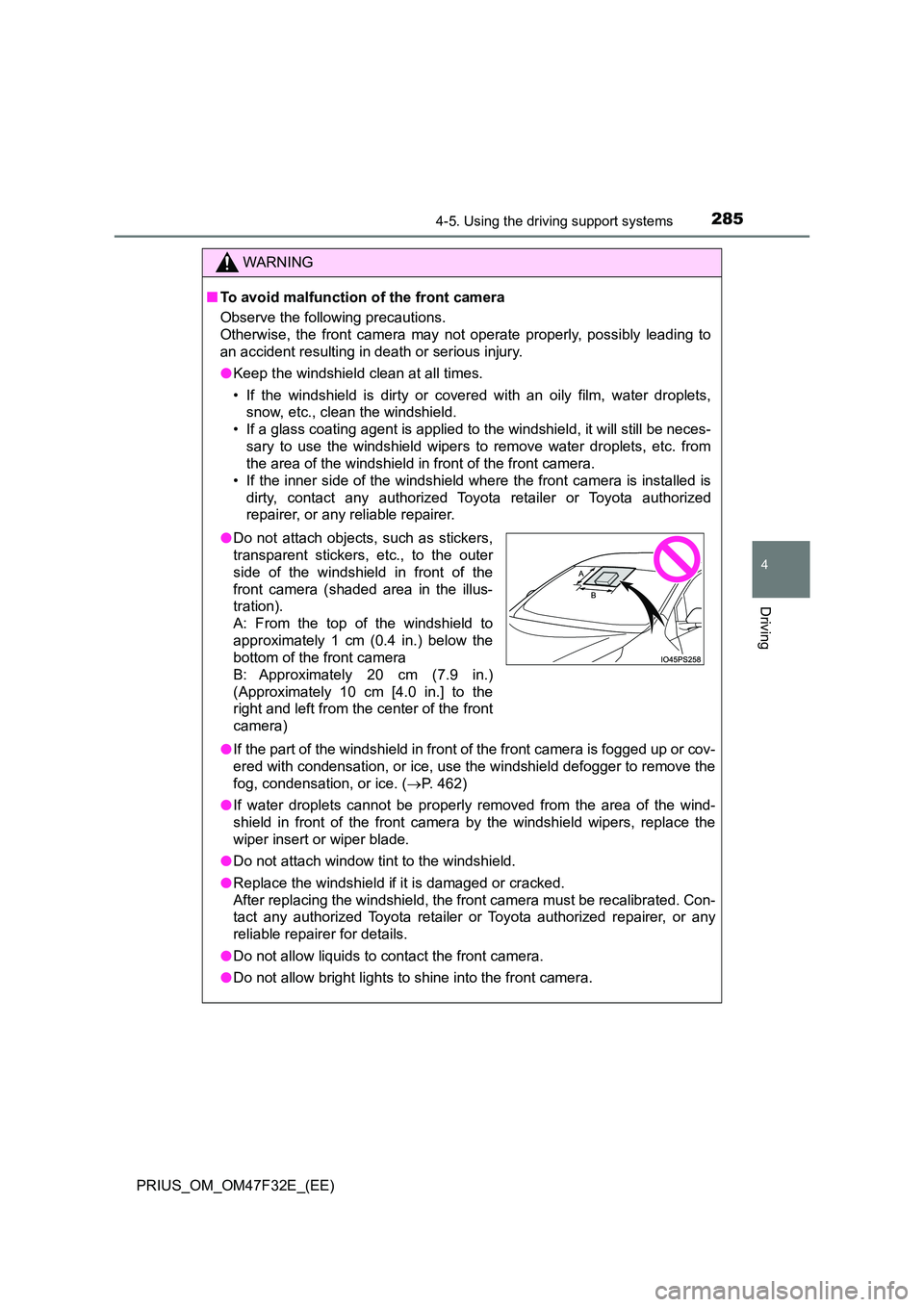
●Do not attach objects, such as stickers,
transparent stickers, etc., to the outer
side of the windshield in front of the
front camera (shaded area in the illus-
tration).
A: From the top of the windshield to
approximately 1 cm (0.4 in.) below the
bottom of the front camera
B: Approximately 20 cm (7.9 in.)
(Approximately 10 cm [4.0 in.] to the
right and left from the center of the front
camera)