mirror TOYOTA PRIUS 2023 Owner's Manual
[x] Cancel search | Manufacturer: TOYOTA, Model Year: 2023, Model line: PRIUS, Model: TOYOTA PRIUS 2023Pages: 770, PDF Size: 122.55 MB
Page 288 of 770
2864-5. Using the driving support systems
PRIUS_OM_OM47F32E_(EE)
WARNING
●Do not dirty or damage the front camera.
When cleaning the inside of the windshi eld, do not allow glass cleaner to
contact the lens of the front camera. Also, do not touch the lens.
If the lens is dirty or damaged, contact any authorized Toyota retailer or
Toyota authorized repairer, or any reliable repairer.
● Do not subject the front camera to a strong impact.
● Do not change the installation position or direction of the front camera or
remove it.
● Do not disassemble the front camera.
● Do not modify any components of the vehicle around the front camera
(inside rear view mirror, etc.) or ceiling.
● Do not attach any accessories to the hood, front grille or front bumper that
may obstruct the front camera. Contact any authorized Toyota retailer or
Toyota authorized repairer, or any reliable repairer for details.
● If a surfboard or other long object is to be mounted on the roof, make sure
that it will not obstruct the front camera.
● Do not modify the headlights or other lights.
Page 358 of 770
3564-5. Using the driving support systems
PRIUS_OM_OM47F32E_(EE)
BSM (Blind Spot Monitor)
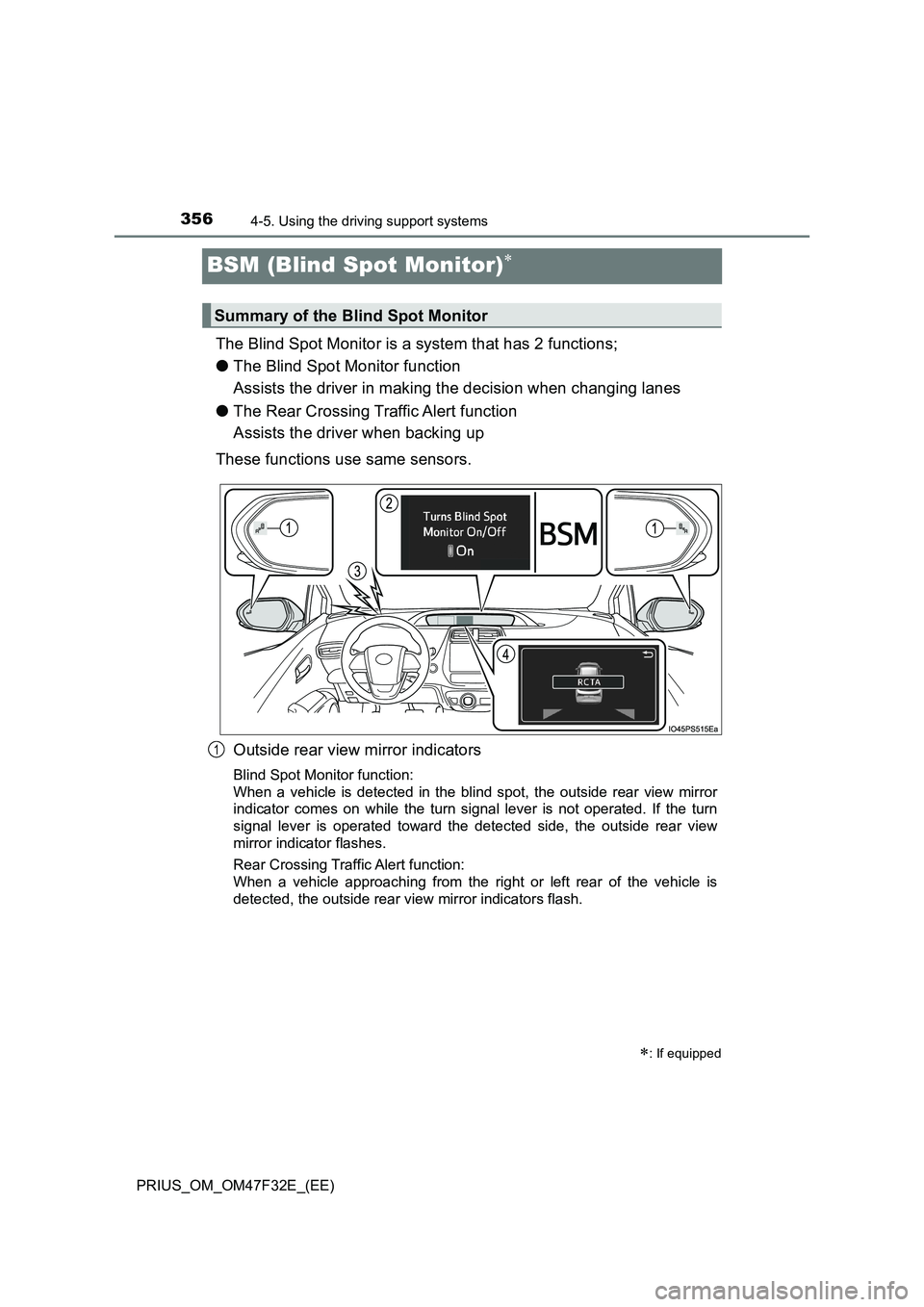
The Blind Spot Monitor is a system that has 2 functions;
●The Blind Spot Monitor function
Assists the driver in making the decision when changing lanes
●The Rear Crossing Traffic Alert function
Assists the driver when backing up
These functions use same sensors.
Outside rear view mirror indicators
Blind Spot Monitor function:
When a vehicle is detected in the blind spot, the outside rear view mirror
indicator comes on while the turn signal lever is not operated. If the turn
signal lever is operated toward the detected side, the outside rear view
mirror indicator flashes.
Rear Crossing Traffic Alert function:
When a vehicle approaching from the right or left rear of the vehicle is
detected, the outside rear view mirror indicators flash.
: If equipped
Summary of the Blind Spot Monitor
1
Page 360 of 770
3584-5. Using the driving support systems
PRIUS_OM_OM47F32E_(EE)
■The BSM outside rear view mirror indicators visibility
When under strong sunlight, the outside rear view mirror indicator may be dif-
ficult to see.
■The Rear Crossing Traffic Alert buzzer hearing
The Rear Crossing Traffic Alert buzzer may be difficult to hear over loud
noises such as high audio volume.
■When “Blind Spot Monitor Unavailable” is shown on the multi-informa-
tion display
The sensor voltage has become abnormal, water, snow mud, etc., may be
built up in the vicinity of the sensor area of bumper (P. 371). Removing the
water, snow, mud, etc., from the vicinity of the sensor area bumper should
return it to normal. Also, the sensor may not function normally when used in
extremely hot or cold weather.
■When “Blind Spot Monitor System Malfunction Visit Your Dealer” is
shown on the multi-information display
There may be a sensor malfunction or misaligned. Have the vehicle
inspected by any authorized Toyota retailer or Toyota authorized repairer, or
any reliable repairer.
■Customization
The brightness of the outside rear view mirror indicators can be changed.
(Customizable features: P. 670)
Page 374 of 770
3724-5. Using the driving support systems
PRIUS_OM_OM47F32E_(EE)
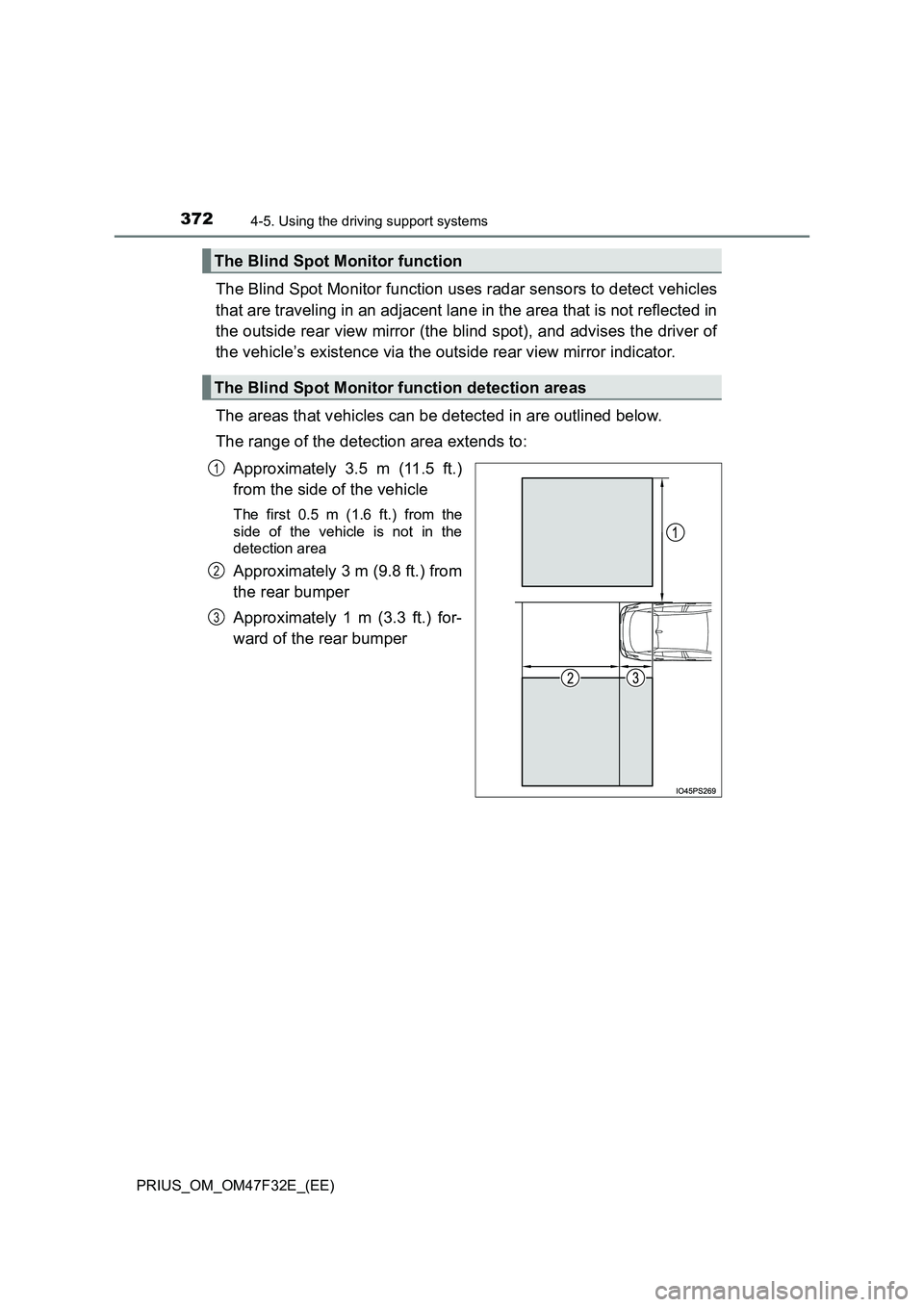
The Blind Spot Monitor function uses radar sensors to detect vehicles
that are traveling in an adjacent lane in the area that is not reflected in
the outside rear view mirror (the blind spot), and advises the driver of
the vehicle’s existence via the outside rear view mirror indicator.
The areas that vehicles can be detected in are outlined below.
The range of the detection area extends to:
Approximately 3.5 m (11.5 ft.)
from the side of the vehicle
The first 0.5 m (1.6 ft.) from the
side of the vehicle is not in the
detection area
Approximately 3 m (9.8 ft.) from
the rear bumper
Approximately 1 m (3.3 ft.) for-
ward of the rear bumper
The Blind Spot Monitor function
The Blind Spot Monitor function detection areas
1
2
3
Page 377 of 770
3754-5. Using the driving support systems
4
Driving
PRIUS_OM_OM47F32E_(EE)
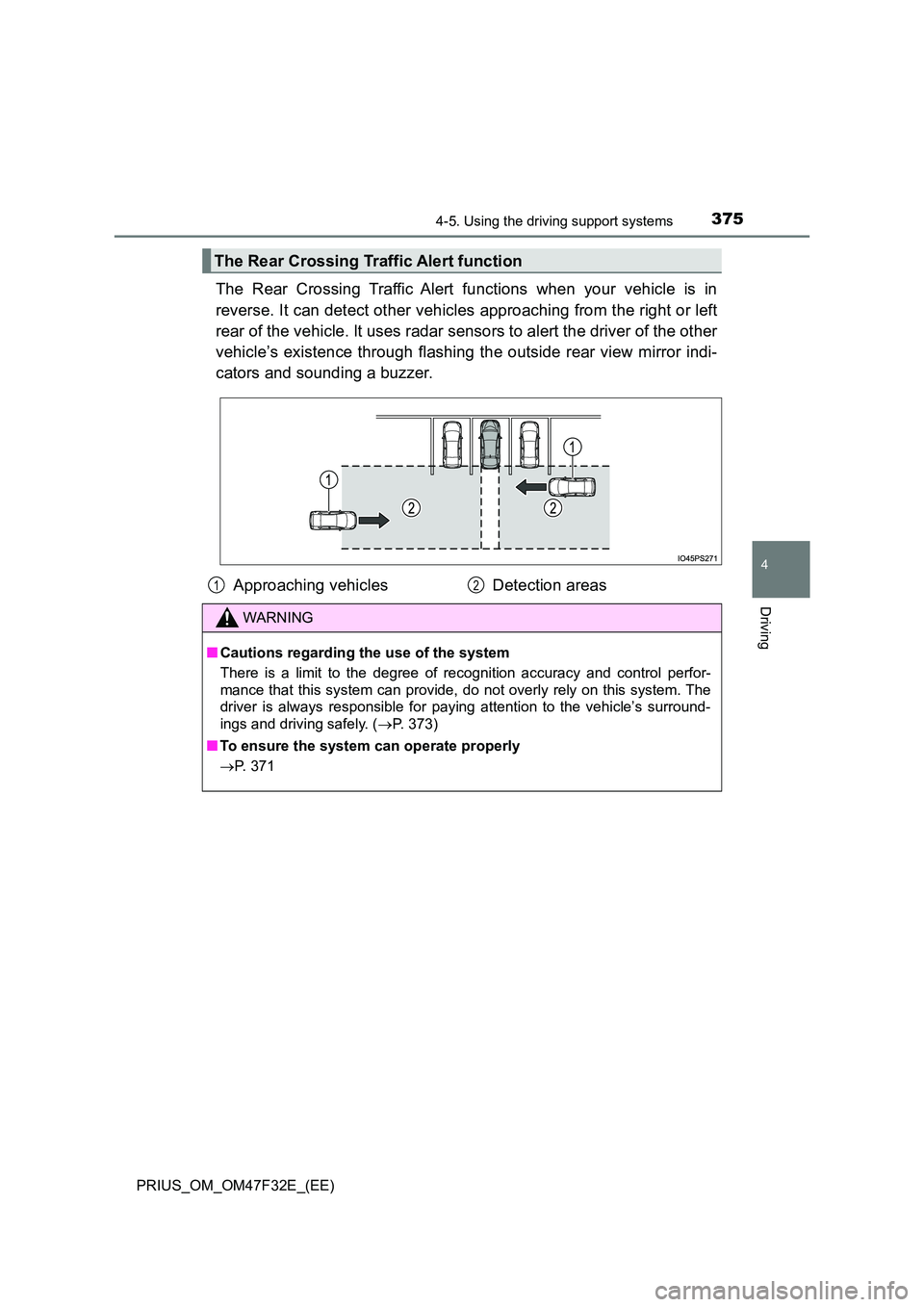
The Rear Crossing Traffic Alert functions when your vehicle is in
reverse. It can detect other vehicles approaching from the right or left
rear of the vehicle. It uses radar sensors to alert the driver of the other
vehicle’s existence through flashing the outside rear view mirror indi-
cators and sounding a buzzer.
The Rear Crossing Traffic Alert function
Approaching vehicles Detection areas
WARNING
■ Cautions regarding the use of the system
There is a limit to the degree of recognition accuracy and control perfor-
mance that this system can provide, do not overly rely on this system. The
driver is always responsible for paying attention to the vehicle’s surround-
ings and driving safely. ( P. 373)
■ To ensure the system can operate properly
P. 371
12
Page 418 of 770
4164-5. Using the driving support systems
PRIUS_OM_OM47F32E_(EE)
When the vehicle is almost entirely within the target parking spot,
a high-pitched beep is emitted and the stop display is shown on
the display, stop the vehicle.
This completes the parallel parking assist mode.
●After stopping, feel free to maneuver the vehicle to reach the
desired parking spot.
●Be sure to back up while checking the area to the front and
rear of the vehicle directly and by using the mirrors.
■Parallel parking assist mode operating conditions
●In order to operate the parallel parking assist mode correctly, drive slowly (at
a speed at which the vehicle can be quickly stopped) parallel to the road (or
shoulder) while maintaining a distance of approximately 1 m (3.3 ft.) to any
parked vehicles.
●The function cannot be used when the vehicle speed is approximately
30 km/h (19 mph) or higher.
●The front side sensors and rear side sensors are used to detect parked
vehicles and determine the parking spot. Therefore, when detection is not
possible (P. 439), guidance is not issued.
●If there are no parked vehicles, the parking spot cannot be determined.
Therefore, the parallel parking assist mode cannot be operated.
●If unable to detect the environment surrounding the parking space, the par-
allel parking assist mode may not be able to operate.
●Guidance will continue until the vehicle speed meets or exceeds approxi-
mately 30 km/h (19 mph) or the function is turned off using the S-IPA switch.
■Timing for pressing the S-IPA switch
In the following cases, the assist mode may also operate during the steps
taken to park using the parallel parking assist mode. However, in these
cases, conduct parking procedures according to the information on the multi-
information display.
●In step the S-IPA switch is pressed after already passing over the target
parking spot.
If the vehicle is not stopped in step , pressing the S-IPA switch 1 time
while the vehicle is in motion allows you to select “Parallel Parking” and
proceed directly to step .
●The vehicle is moved up to the position in step without the S-IPA switch
being pressed. Then the S-IPA switch is pressed after having changed the
shift position to R.
12
1
1
2
3
Page 429 of 770
4274-5. Using the driving support systems
4
Driving
PRIUS_OM_OM47F32E_(EE)
Assume an ordinary posture for backing up, rest your hands
lightly on the steering wheel without applying any force, directly
confirm the safety of the area to the rear and around the vehicle
slowly back up while adjusting your speed by depressing the
brake pedal.
Depending on the condition of the parking space, steps to may
need to be repeated.
When the vehicle is almost entirely within the target parking spot,
a high-pitched beep is emitted and the stop display is shown on
the display (P. 409), stop the vehicle.
This completes the back-in parking assist mode.
●For safety, the buzzer sounds slightly before the vehicle is
completely entered within the target parking spot. Further-
more, at that point, system operation will also finish. Firmly
hold the steering wheel and slowly back up while adjusting
your speed by depressing the brake pedal to reach the desired
parking spot.
●Be sure to back up while checking the area to the front and
rear of the vehicle directly and by using the mirrors.
11
611
12
Page 439 of 770
4374-5. Using the driving support systems
4
Driving
PRIUS_OM_OM47F32E_(EE)
WARNING
●Do not rely solely upon the Simple Intelligent Parking Assist System. As
with unequipped vehicles, move forward and back up carefully while
directly confirming the safety of your surroundings and the area to the rear
of the vehicle.
● Do not back up while viewing the multi-information display. Backing up
while only viewing the monitor screen may cause a collision or lead to an
accident, as the image displayed on the monitor screen may differ from
actual conditions. Make sure to visually check the surrounding areas and
the area to the rear of the vehicle with and without the mirror while backing
up.
● Drive slowly while adjusting your speed by depressing the brake pedal
when backing up or moving forward.
● If it seems the vehicle may make contact with a pedestrian, another vehi-
cle or any other obstacles, stop the vehicle by depressing the brake pedal,
and then press the S-IPA switch to turn off the system.
● Use the system in a parking lot with a flat surface.
● Observe the following precautions, as the steering wheel automatically
turns during use.
• There is risk of a necktie, scarf, your arm, etc. being caught on the
steering wheel. Please do not allow your upper body to be close to the
steering wheel. Also, do not allow children close to the steering wheel.
• There is a possibility of injury when the steering wheel turns if you have
long fingernails.
• In case of emergency, stop the vehicle by depressing the brake pedal,
and then press the S-IPA switch to turn off the system.
● Always confirm that there is appropriate space before attempting to park
the vehicle and operate the system.
Page 459 of 770
457
5Interior features
PRIUS_OM_OM47F32E_(EE)5-1. Using the air conditioning
system and defogger
Automatic air conditioning
system ............................. 458
Seat heaters ...................... 468
5-2. Using the interior lights
Interior lights list ................. 470
• Front interior light .......... 471
• Front personal lights ...... 471
• Rear interior light ........... 472
5-3. Using the storage features
List of storage features ...... 473
• Glove box ...................... 474
• Console box .................. 474
• Cup holders ................... 475
• Bottle holders/
door pockets .................. 476
• Auxiliary boxes .............. 477
• Seat back pockets ......... 478
Luggage compartment
features............................ 479
5-4. Using the other interior
features
Other interior features ........ 485
• Sun visors...................... 485
• Vanity mirrors ................ 485
• Power outlets................. 486
• Wireless charger ........... 487
• Armrest .......................... 493
• Coat hooks .................... 493
• Assist grips .................... 494
Page 461 of 770
4595-1. Using the air conditioning system and defogger
PRIUS_OM_OM47F32E_(EE)
5
Interior features
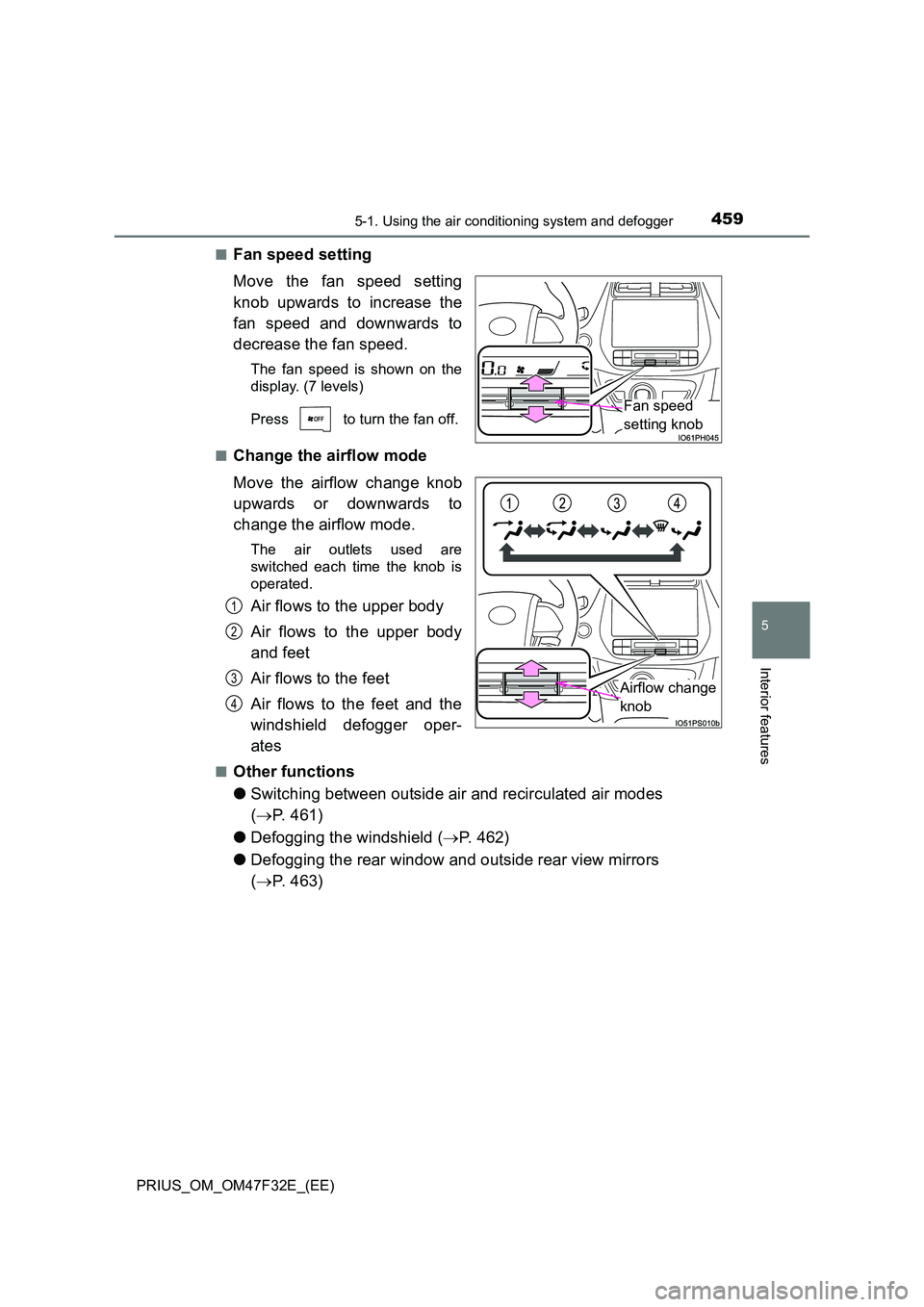
■Fan speed setting
Move the fan speed setting
knob upwards to increase the
fan speed and downwards to
decrease the fan speed.
The fan speed is shown on the
display. (7 levels)
Press to turn the fan off.
■Change the airflow mode
Move the airflow change knob
upwards or downwards to
change the airflow mode.
The air outlets used are
switched each time the knob is
operated.
Air flows to the upper body
Air flows to the upper body
and feet
Air flows to the feet
Air flows to the feet and the
windshield defogger oper-
ates
■Other functions
● Switching between outside air and recirculated air modes
( P. 461)
● Defogging the windshield (P. 462)
● Defogging the rear window and outside rear view mirrors
( P. 463)
Fan speed
setting knob
Airflow change
knob
1
2
3
4