ECO mode TOYOTA PRIUS 2023 Owner's Guide
[x] Cancel search | Manufacturer: TOYOTA, Model Year: 2023, Model line: PRIUS, Model: TOYOTA PRIUS 2023Pages: 770, PDF Size: 122.55 MB
Page 258 of 770
2564-2. Driving procedures
PRIUS_OM_OM47F32E_(EE)■Restraining sudden start (Drive-Start Control)
P. 222
■Automatic P position selection function
In the following situations, the shift position is automatically changed to P.
●When pressing the power switch with the vehicle stopped while the power
switch is in ON mode and the shift position is in a position other than P (after
the shift position has changed to P, the power switch will turn off)
*
●If the driver’s door is opened and all of the following conditions are met,
while the shift position is in a position other than P
• The power switch is in ON mode.
• The driver is not wearing the seat belt.
• The brake pedal is not depressed.
To start off the vehicle after the shift position is changed to P, operate the
shift lever again.
*: When the power switch is pressed while driving at extremely slow speeds,
such as immediately before stopping the vehicle, the shift position may
automatically change to P. Make sure that the vehicle is completely stopped
before pressing the power switch.
The shift position may also automatically switch to P if one of the following
conditions is detected while the vehicle is stopped by dynamic radar cruise
control with full-speed range (if equipped).
●Driver’s seat belt is not fastened
●Driver’s door is opened
●Approximately 3 minutes elapse after the vehicle stopped
■If the shift position cannot be shifted from P
There is a possibility that the 12-volt battery is discharged. Check the 12-volt
battery in this situation. (P. 639)
■About engine braking
When shift position B is selected, releasing the accelerator pedal will apply
engine braking.
●When the vehicle is driven at high speeds, compared to ordinary gasoline-
fueled vehicles, the engine braking deceleration is felt less than that of other
vehicles.
●The vehicle can be accelerated even when shift position B is selected.
If the vehicle is driven continuously in the B position, fuel efficiency will
become low. Usually, select the D position.
■After recharging/reconnecting the 12-volt battery
P. 523
Page 276 of 770
2744-3. Operating the lights and wipers
PRIUS_OM_OM47F32E_(EE)
WARNING
■Caution regarding the use of windshield wipers in AUTO mode (vehi-
cles with rain-sensing windshield wipers)
The windshield wipers may operate unexpectedly if the sensor is touched or
the windshield is subject to vibration in AUTO mode. Take care that your fin-
gers etc. do not become caught in the windshield wipers.
■ Caution regarding the use of washer fluid
When it is cold, do not use the washer fluid until the windshield becomes
warm. The fluid may freeze on the windshield and cause low visibility. This
may lead to an accident, resulting in death or serious injury.
NOTICE
■ When the windshield is dry
Do not use the wipers, as they may damage the windshield.
■ When the washer fluid tank is empty
Do not operate the switch continually as the washer fluid pump may over-
heat.
■ When a nozzle becomes blocked
In this case, contact any authorized Toyota retailer or Toyota authorized
repairer, or any reliable repairer.
Do not try to clear it with a pin or other object. The nozzle will be damaged.
■ To prevent 12-volt battery discharge
Do not leave the wipers on longer than necessary when the hybrid system
is off.
Page 278 of 770
2764-3. Operating the lights and wipers
PRIUS_OM_OM47F32E_(EE)
■The rear window wiper and washer can be operated when
The power switch is in ON mode.
■ If no washer fluid sprays
Check that the washer nozzle is not blocked if there is washer fluid in the
washer fluid tank.
NOTICE
■ When the rear window is dry
Do not use the wiper, as it may damage the rear window.
■ When the washer fluid tank is empty
Do not operate the switch continually as the washer fluid pump may over-
heat.
■ When a nozzle becomes blocked
In this case, contact any authorized Toyota retailer or Toyota authorized
repairer, or any reliable repairer.
Do not try to clear it with a pin or other object. The nozzle will be damaged.
■ To prevent 12-volt battery discharge
Do not leave the wiper on longer than necessary when the hybrid system is
off.
Page 320 of 770
3184-5. Using the driving support systems
PRIUS_OM_OM47F32E_(EE)
■Operation conditions of each function
●Lane departure alert function
This function operates when all of the following conditions are met.
• LTA is turned on.
• Vehicle speed is approximately 50 km/h (32 mph) or more.
*1
• System recognizes white (yellow) lane lines or a course*2. (When a white
[yellow] line or course
*2 is recognized on only one side, the system will
operate only for the recognized side.)
• Width of traffic lane is approximately 3 m (9.8 ft.) or more.
• Turn signal lever is not operated.
• Vehicle is not being driven around a sharp curve.
• No system malfunctions are detected. (P. 322)
*1: The function operates even if the vehicle speed is less than approxi-
mately 50 km/h (32 mph) when the lane centering function is operating.
*2: Boundary between asphalt and the side of the road, such as grass, soil,
or a curb
●Steering assist function
This function operates when all of the following conditions are met in addi-
tion to the operation conditions for the lane departure alert function.
• Setting for (“LTA Steering Assist Mode”) in of the multi-
information display is set to “On”. (P. 127)
• Vehicle is not accelerated or decelerated by a fixed amount or more.
• Steering wheel is not operated with a steering force level suitable for
changing lanes.
• ABS, VSC, TRC and PCS are not operating.
• TRC or VSC is not turned off.
• Hands off steering wheel warning is not displayed. (P. 321)
●Vehicle sway warning function
This function operates when all of the following conditions are met.
• Setting for (“Lane Sway Warning Status”) in of the multi-
information display is set to “On”. (P. 127)
• Vehicle speed is approximately 50 km/h (32 mph) or more.
• Width of traffic lane is approximately 3 m (9.8 ft.) or more.
• No system malfunctions are detected. (P. 322)
Page 321 of 770
3194-5. Using the driving support systems
4
Driving
PRIUS_OM_OM47F32E_(EE)●Lane centering function
This function operates when all of the following conditions are met.
• LTA is turned on.
• Setting for (“LTA Steering Assist Mode”) and (“LTA
Center Trace On/Off”) in of the multi-information display are set to
“On”. (P. 127)
• This function recognizes white (yellow) lane lines or the position of a pre-
ceding vehicle (except when the preceding vehicle is small, such as a
motorcycle).
• The dynamic radar cruise control with full-speed range is operating in
vehicle-to-vehicle distance control mode.
• Width of traffic lane is approximately 3 to 4 m (10 to 13 ft.).
• Turn signal lever is not operated.
• Vehicle is not being driven around a sharp curve.
• No system malfunctions are detected. (P. 322)
• Vehicle does not accelerate or decelerate by a fixed amount or more.
• Steering wheel is not operated with a steering force level suitable for
changing lanes.
• ABS, VSC, TRC and PCS are not operating.
• TRC or VSC is not turned off.
• Hands off steering wheel warning is not displayed. (P. 321)
• The vehicle is being driven in the center of a lane.
• Steering assist function is not operating.
Page 330 of 770
3284-5. Using the driving support systems
PRIUS_OM_OM47F32E_(EE)●Stickers are attached to the rear of the preceding vehicle.
●A sign resembling a system compatible sign is recognized.
●Side road speed signs may be detected and displayed (if positioned in sight
of the front camera) while the vehicle is traveling on the main road.
●Roundabout exit road speed signs may be detected and displayed (if posi-
tioned in sight of the front camera) while traveling on a roundabout.
●The front of the vehicle is raised or lowered due to the carried load
●The surrounding brightness is not sufficient or changes suddenly.
●When a sign intended for trucks, etc. is recognized.
●The vehicle is driven in a country with a different direction of traffic.
●The navigation system map data is outdated.
●The navigation system is not operating.
●The speed information displayed on the meter and on the navigation system
may be different due to the navigation system using map data.
■Speed limit sign display
If the power switch was last turned off while a speed limit sign was displayed
on the main display or multi-information display, the same sign displays again
when the power switch is turned to ON mode.
■If “RSA Malfunction Visit Your Dealer” is shown
The system may be malfunctioning. Have the vehicle inspected by any autho-
rized Toyota retailer or Toyota authorized repairer, or any reliable repairer.
■Customization
Some functions can be customized. (Customizable features: P. 670)
Page 335 of 770
3334-5. Using the driving support systems
4
Driving
PRIUS_OM_OM47F32E_(EE)
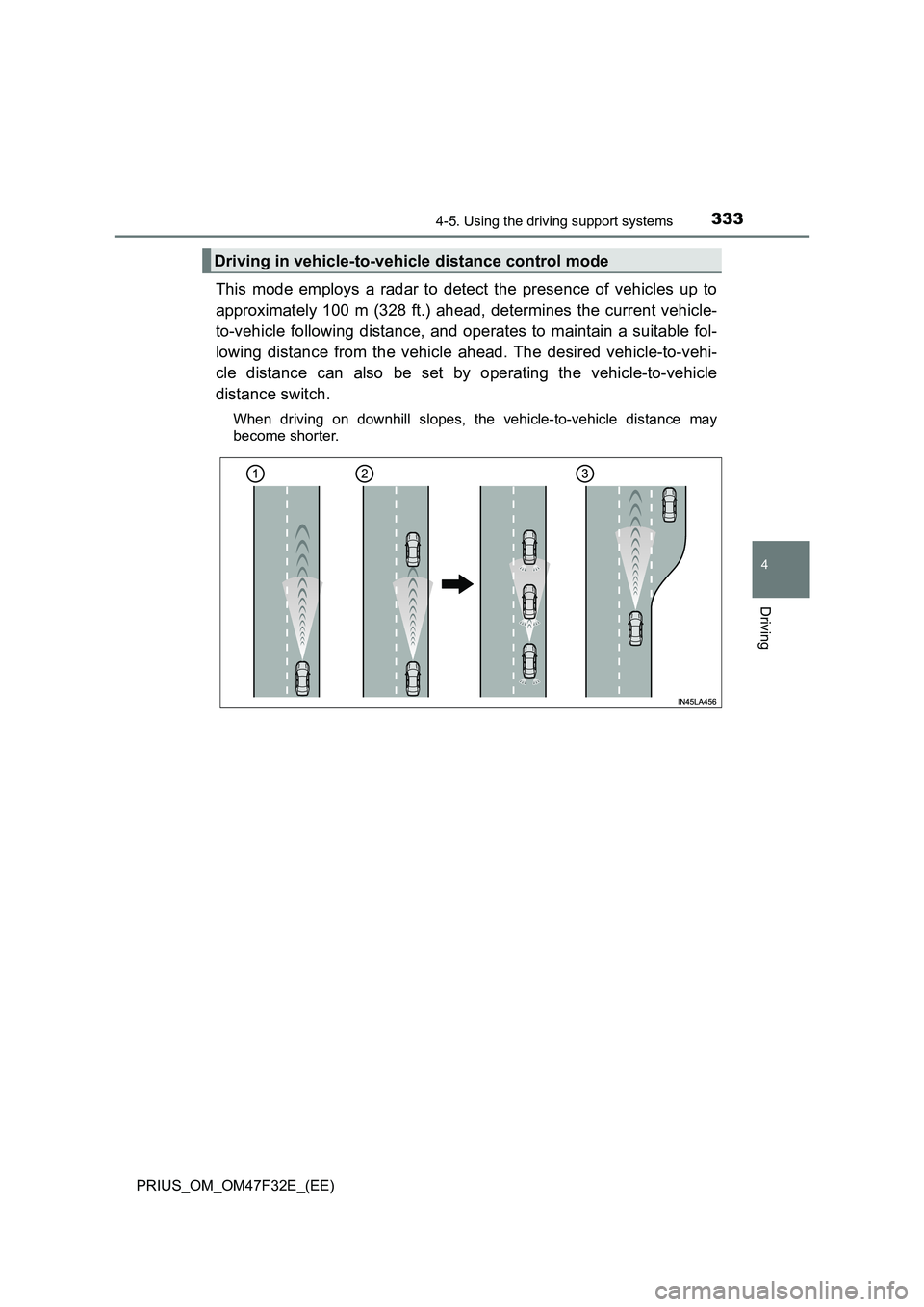
This mode employs a radar to detect the presence of vehicles up to
approximately 100 m (328 ft.) ahead, determines the current vehicle-
to-vehicle following distance, and operates to maintain a suitable fol-
lowing distance from the vehicle ahead. The desired vehicle-to-vehi-
cle distance can also be set by operating the vehicle-to-vehicle
distance switch.
When driving on downhill slopes, the vehicle-to-vehicle distance may
become shorter.
Driving in vehicle-to-vehicle distance control mode
Page 337 of 770
3354-5. Using the driving support systems
4
Driving
PRIUS_OM_OM47F32E_(EE)
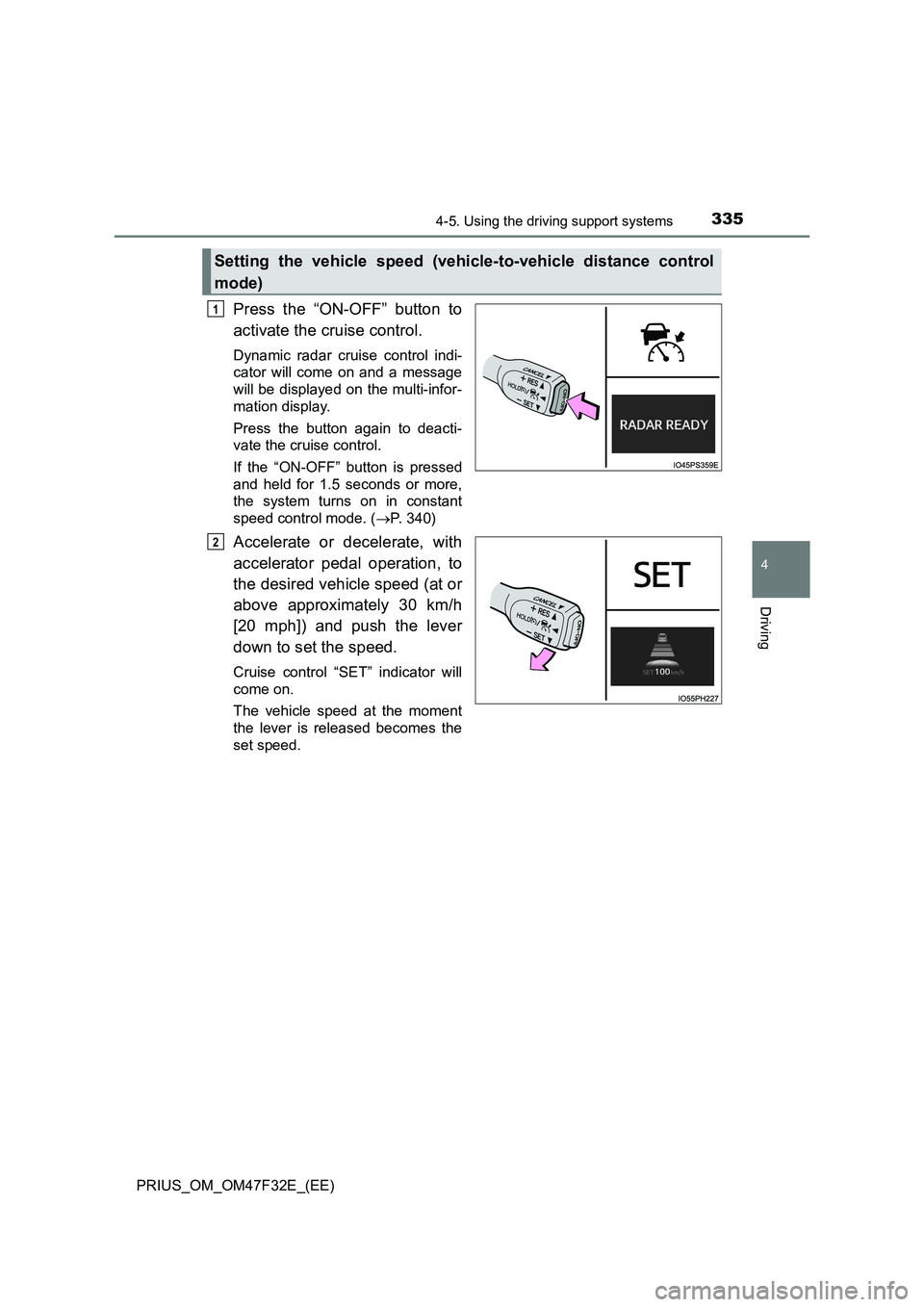
Press the “ON-OFF” button to
activate the cruise control.
Dynamic radar cruise control indi-
cator will come on and a message
will be displayed on the multi-infor-
mation display.
Press the button again to deacti-
vate the cruise control.
If the “ON-OFF” button is pressed
and held for 1.5 seconds or more,
the system turns on in constant
speed control mode. (P. 340)
Accelerate or decelerate, with
accelerator pedal operation, to
the desired vehicle speed (at or
above approximately 30 km/h
[20 mph]) and push the lever
down to set the speed.
Cruise control “SET” indicator will
come on.
The vehicle speed at the moment
the lever is released becomes the
set speed.
Setting the vehicle speed (vehicle-to-vehicle distance control
mode)
1
2
Page 342 of 770
3404-5. Using the driving support systems
PRIUS_OM_OM47F32E_(EE)
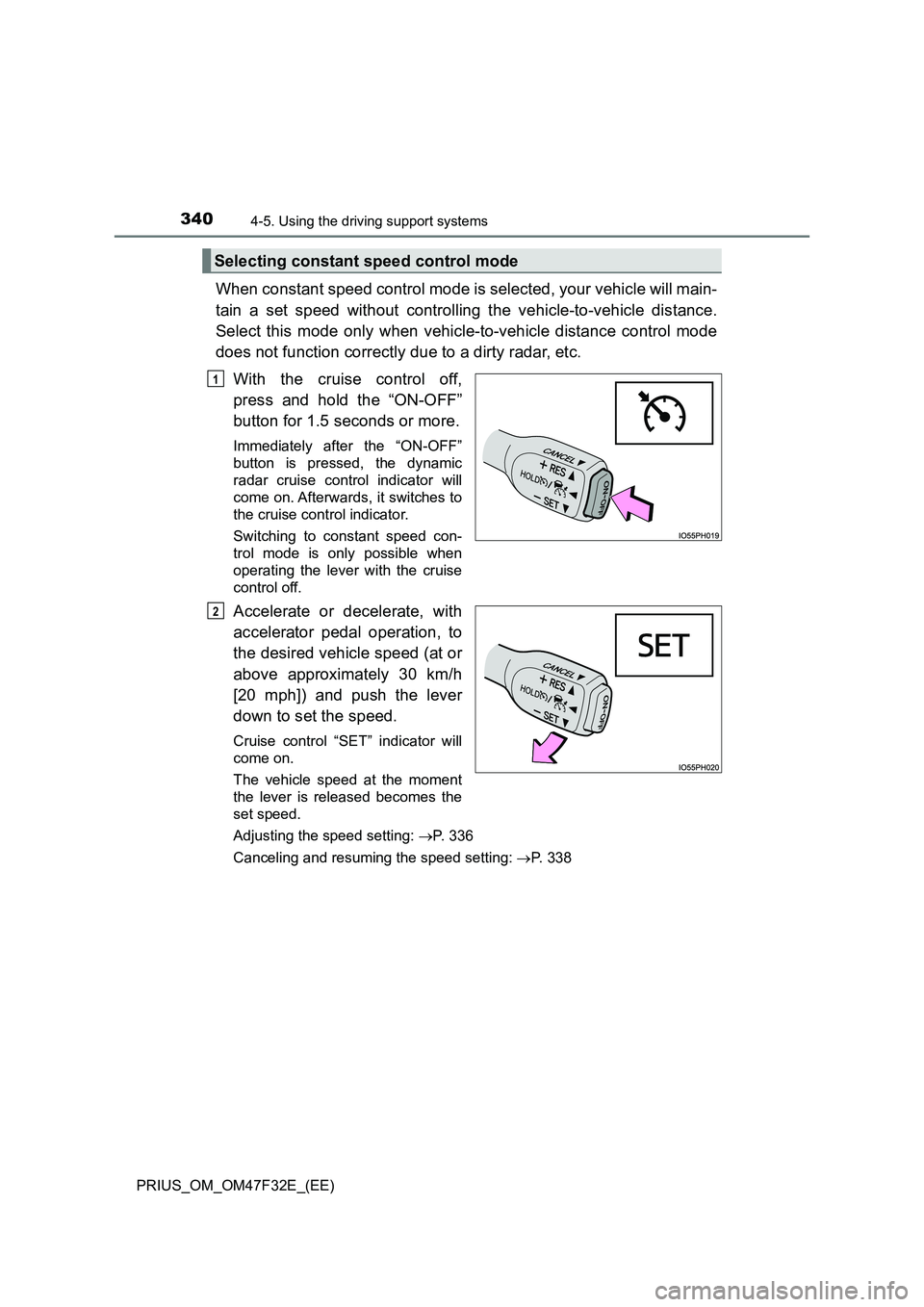
When constant speed control mode is selected, your vehicle will main-
tain a set speed without controlling the vehicle-to-vehicle distance.
Select this mode only when vehicle-to-vehicle distance control mode
does not function correctly due to a dirty radar, etc.
With the cruise control off,
press and hold the “ON-OFF”
button for 1.5 seconds or more.
Immediately after the “ON-OFF”
button is pressed, the dynamic
radar cruise control indicator will
come on. Afterwards, it switches to
the cruise control indicator.
Switching to constant speed con-
trol mode is only possible when
operating the lever with the cruise
control off.
Accelerate or decelerate, with
accelerator pedal operation, to
the desired vehicle speed (at or
above approximately 30 km/h
[20 mph]) and push the lever
down to set the speed.
Cruise control “SET” indicator will
come on.
The vehicle speed at the moment
the lever is released becomes the
set speed.
Adjusting the speed setting: P. 336
Canceling and resuming the speed setting: P. 338
Selecting constant speed control mode
1
2
Page 343 of 770
3414-5. Using the driving support systems
4
Driving
PRIUS_OM_OM47F32E_(EE)
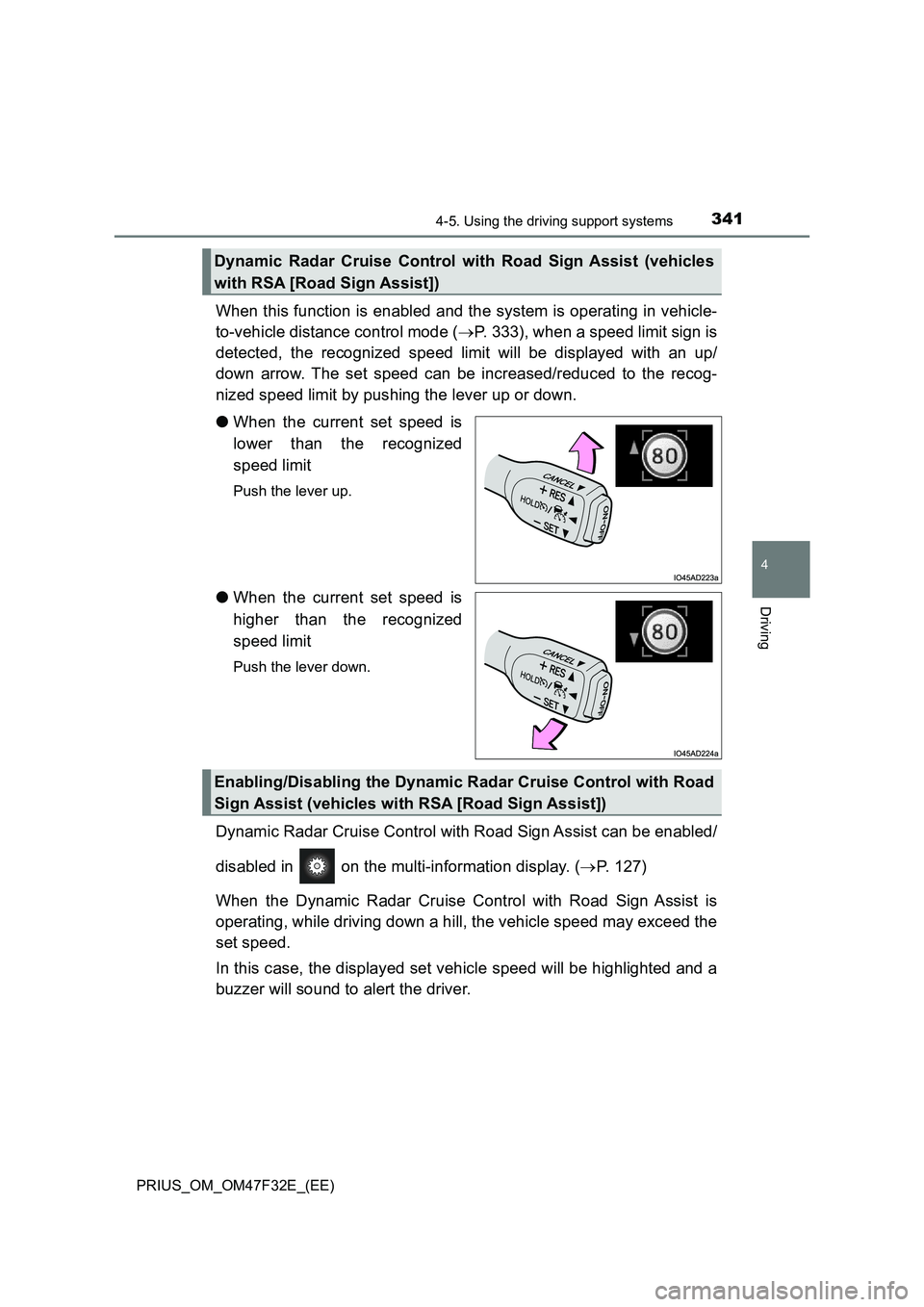
When this function is enabled and the system is operating in vehicle-
to-vehicle distance control mode (P. 333), when a speed limit sign is
detected, the recognized speed limit will be displayed with an up/
down arrow. The set speed can be increased/reduced to the recog-
nized speed limit by pushing the lever up or down.
●When the current set speed is
lower than the recognized
speed limit
Push the lever up.
●When the current set speed is
higher than the recognized
speed limit
Push the lever down.
Dynamic Radar Cruise Control with Road Sign Assist can be enabled/
disabled in on the multi-information display. (P. 127)
When the Dynamic Radar Cruise Control with Road Sign Assist is
operating, while driving down a hill, the vehicle speed may exceed the
set speed.
In this case, the displayed set vehicle speed will be highlighted and a
buzzer will sound to alert the driver.
Dynamic Radar Cruise Control with Road Sign Assist (vehicles
with RSA [Road Sign Assist])
Enabling/Disabling the Dynamic Radar Cruise Control with Road
Sign Assist (vehicles with RSA [Road Sign Assist])