radio TOYOTA PRIUS 2023 Owners Manual
[x] Cancel search | Manufacturer: TOYOTA, Model Year: 2023, Model line: PRIUS, Model: TOYOTA PRIUS 2023Pages: 770, PDF Size: 122.55 MB
Page 11 of 770
9
PRIUS_OM_OM47F32E_(EE)The installation of an RF-transmitter system in your vehicle could affect elec-
tronic systems such as:
●Hybrid system
●Multiport fuel injection system/sequential multiport fuel injection system
●Toyota Safety Sense
●Cruise control system
●Anti-lock brake system
●SRS airbag system
●Seat belt pretensioner system
Be sure to check with any authorized Toyota retailer or Toyota authorized
repairer, or any reliable repairer for precautionary measures or special
instructions regarding installation of an RF-transmitter system.
Further information regarding frequency bands, power levels, antenna posi-
tions and installation provisions for the installation of RF-transmitters, is avail-
able on request at any authorized Toyota retailer or Toyota authorized
repairer, or any reliable repairer.
High voltage parts and cables on the hybrid vehicles emit approximately the
same amount of electromagnetic waves as the conventional gasoline pow-
ered vehicles or home electronic appliances despite of their electromagnetic
shielding.
Unwanted noise may occur in the reception of the radio frequency transmitter
(RF-transmitter).
Installation of an RF-transmitter system
Page 46 of 770
441-1. For safe use
PRIUS_OM_OM47F32E_(EE)
WARNING
■SRS airbag precautions
● If breathing becomes difficult after the SRS airbags have deployed, open a
door or side window to allow fresh air in, or leave the vehicle if it is safe to
do so. Wash off any residue as soon as possible to prevent skin irritation.
● If the areas where the SRS airbags are stored, such as the steering wheel
pad and front and rear pillar garni shes, are damaged or cracked, have
them replaced by any authorized Toyota retailer or Toyota authorized
repairer, or any reliable repairer.
■ Modification and disposal of SRS airbag system components
Do not dispose of your vehicle or perform any of the following modifications
without consulting any authorized Toyota retailer or Toyota authorized
repairer, or any reliable repairer. The SRS airbags may malfunction or
deploy (inflate) accidentally, causing death or serious injury.
● Installation, removal, disassembly and repair of the SRS airbags
● Repairs, modifications, removal or replacement of the steering wheel,
instrument panel, dashboard, seats or seat upholstery, front, side and rear
pillars, roof side rails, front door panels, front door trims or front door
speakers
● Modifications to the front door panel (such as making a hole in it)
● Repairs or modifications of the front fender, front bumper, or side of the
occupant compartment
● Installation of a grille guard (bull bars, kangaroo bar, etc.), snow plows or
winches
● Modifications to the vehicle’s suspension system
● Installation of electronic devices such as mobile two-way radios (RF-trans-
mitter) and CD players
Page 79 of 770
771-3. Emergency assistance
1
PRIUS_OM_OM47F32E_(EE)
For safety and security
WARNING
■When the Emergency Call may not be made
● It may not be possible to make Emergency Calls in any of the following sit-
uations. In such cases, report to emergency services provider (112 system
etc.) by other means such as nearby public phones.
• Even when the vehicle is in the cellular phone service area, it may be
difficult to connect to the ERA-GLONASS/EVAK control center if the
reception is poor or the line is busy. In such cases, even though the sys-
tem attempts to connect to the ERA-GLONASS/EVAK control center,
you may not be able to connect to the ERA-GLONASS/EVAK control
center to make Emergency Calls and contact emergency services.
• When the vehicle is out of the cellular phone service area, the Emer-
gency Calls cannot be made.
• When any related equipment (such as the “SOS” button panel, indicator
lights, microphone, speaker, DCM, antenna, or any wires connecting
the equipment) is malfunctioning, damaged or broken, the Emergency
Call cannot be made.
• During an Emergency Call, the system makes repeated attempts to
connect to the ERA-GLONASS/EVAK control center. However, if it can-
not connect to the ERA-GLONASS/EVAK control center due to poor
radio wave reception, the system may not be able to connect to the cel-
lular network and the call may finish without connecting. The red indica-
tor light will blink for approximately 30 seconds to indicate this
disconnection.
• This device may not function if a shock is applied to it.
● If the 12-volt battery’s voltage decreases or there is a disconnection, the
system may not be able to connect to the ERA-GLONASS/EVAK control
center.
■ When the Emergency Call system is replaced with a new one
The Emergency Call system should be registered. Contact any authorized
Toyota retailer or Toyota authorized repairer, or any reliable repairer.
Page 88 of 770
861-4. Hybrid system
PRIUS_OM_OM47F32E_(EE)
■If a warning light comes on, a warning message is displayed, or the
12-volt battery is disconnected
The hybrid system may not start. In this case, try to start the system again. If
the “READY” indicator does not come on, contact any authorized Toyota
retailer or Toyota authorized repairer, or any reliable repairer.
■ Running out of fuel
When the vehicle has run out of fuel and the hybrid system cannot be started,
refuel the vehicle with at least enough gasoline to make the low fuel level
warning light ( P. 583) go off. If there is only a small amount of fuel, the
hybrid system may not be able to start. (The standard amount of fuel is about
7.5 L [2.0 gal., 1.7 Imp.gal.], when the vehicle is on a level surface. This value
may vary when the vehicle is on a slope. Add extra fuel when the vehicle is
inclined.)
■ Electromagnetic waves
● High voltage parts and cables on hybrid vehicles incorporate electromag-
netic shielding, and therefore emit approximately the same amount of elec-
tromagnetic waves as conventional gasoline powered vehicles or home
electronic appliances.
● Your vehicle may cause sound interference in some third party-produced
radio parts.
■ Hybrid battery (traction battery)
The hybrid battery (traction battery) has a limited service life. The lifespan of
the hybrid battery (traction battery) can change in accordance with driving
style and driving conditions.
■ Declaration of conformity
This model conforms to hydrogen emissions according to regulation ECE100
(Battery electric vehicle safety).
Page 175 of 770
1733-1. Key information
3
Operation of each component
PRIUS_OM_OM47F32E_(EE)
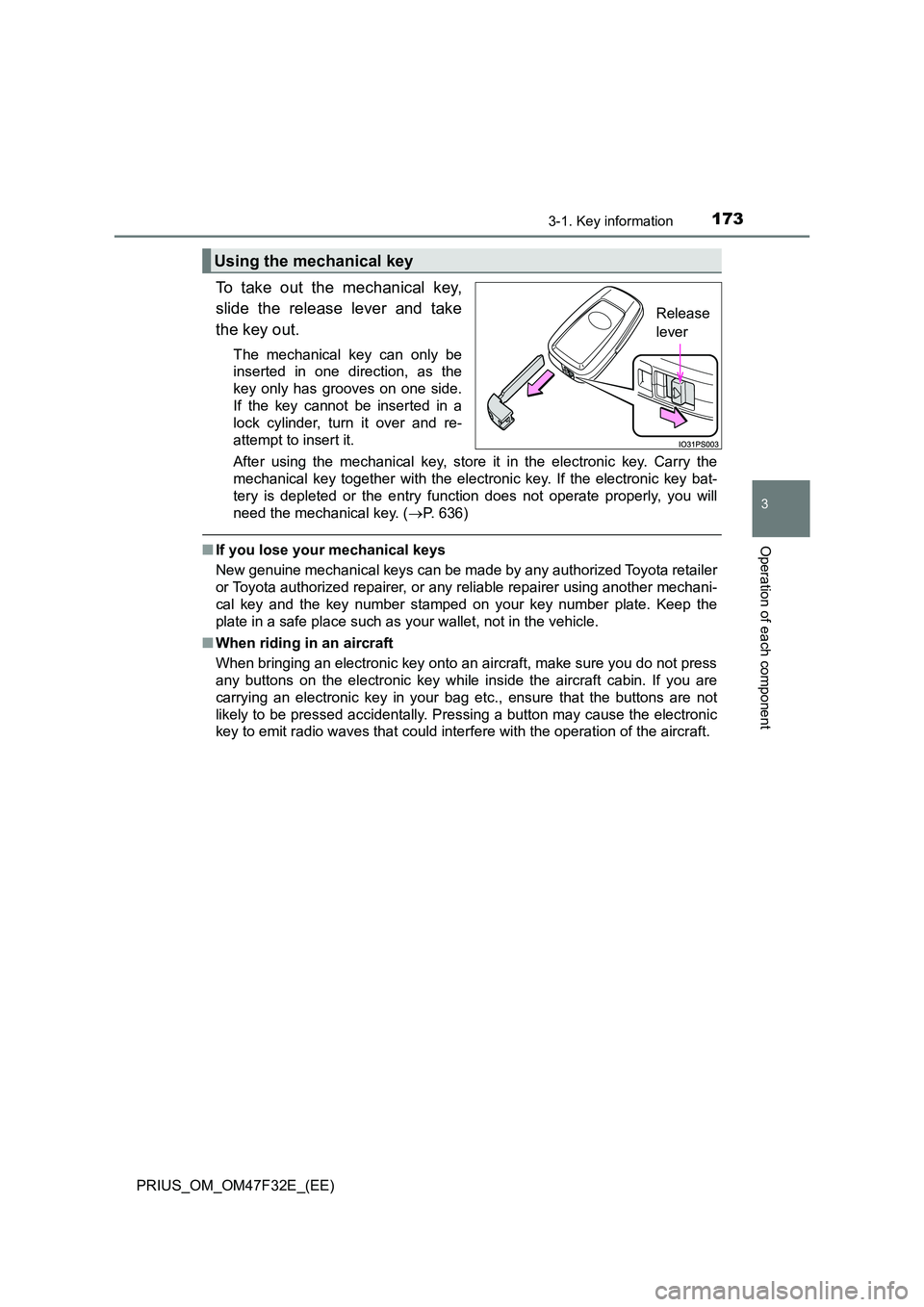
To take out the mechanical key,
slide the release lever and take
the key out.
The mechanical key can only be
inserted in one direction, as the
key only has grooves on one side.
If the key cannot be inserted in a
lock cylinder, turn it over and re-
attempt to insert it.
After using the mechanical key, store it in the electronic key. Carry the
mechanical key together with the electronic key. If the electronic key bat-
tery is depleted or the entry func tion does not operate properly, you will
need the mechanical key. ( P. 636)
■If you lose your mechanical keys
New genuine mechanical keys can be made by any authorized Toyota retailer
or Toyota authorized repairer, or any reliable repairer using another mechani-
cal key and the key number stamped on your key number plate. Keep the
plate in a safe place such as your wallet, not in the vehicle.
■ When riding in an aircraft
When bringing an electronic key onto an aircraft, make sure you do not press
any buttons on the electronic key while inside the aircraft cabin. If you are
carrying an electronic key in your bag etc., ensure that the buttons are not
likely to be pressed accidentally. Pressing a button may cause the electronic
key to emit radio waves that could interfere with the operation of the aircraft.
Using the mechanical key
Release
lever
Page 176 of 770
1743-1. Key information
PRIUS_OM_OM47F32E_(EE)■Electronic key battery depletion
●The standard battery life is 1 to 2 years.
●If the battery becomes low, an alarm will sound in the cabin and a message
will be displayed on the multi-information display when the hybrid system
stops.
●As the electronic key always receives radio waves, the battery will become
depleted even if the electronic key is not used. The following symptoms indi-
cate that the electronic key battery may be depleted. Replace the battery
when necessary. (P. 554)
• The smart entry & start system or the wireless remote control does not
operate.
• The detection area becomes smaller.
• The LED indicator on the key surface does not turn on.
You can replace the battery by yourself (P. 554). However, as there is a
danger that the electronic key may be damaged, it is recommended that
replacement is carried out by any authorized Toyota retailer or Toyota
authorized repairer, or any reliable repairer.
●To avoid serious deterioration, do not leave the electronic key within 1 m
(3 ft.) of the following electrical appliances that produce a magnetic field:
•TVs
• Personal computers
• Cellular phones, cordless phones and battery chargers
• Table lamps
• Induction cookers
Page 178 of 770
1763-1. Key information
PRIUS_OM_OM47F32E_(EE)
NOTICE
■To prevent key damage
● Do not drop the keys, subject them to strong shocks or bend them.
● Do not expose the keys to high temperatures for long periods of time.
● Do not get the keys wet or wash them in an ultrasonic washer etc.
● Do not attach metallic or magnetic materials to the keys or place the keys
close to such materials.
● Do not disassemble the keys.
● Do not attach a sticker or anything else to the surface of the electronic key.
● Do not place the keys near objects that produce magnetic fields, such as
TVs, audio systems and induction cookers.
● Do not place the keys near medical electrical equipment such as low-fre-
quency therapy equipment or microwave therapy equipment, and do not
receive medical attention with the keys on your person.
■ Carrying the electronic key on your person
Carry the electronic key 10 cm (3.9 in.) or more away from electric appli-
ances that are turned on. Radio wave s emitted from electric appliances
within 10 cm (3.9 in.) of the electronic key may interfere with the key, caus-
ing the key to not function properly.
■ In case of a smart entry & start system malfunction or other key-related
problems
Take your vehicle with all the electronic keys provided with your vehicle to
any authorized Toyota retailer or Toyota authorized repairer, or any reliable
repairer.
■ When an electronic key is lost
If the electronic key remains lost, the risk of vehicle theft increases signifi-
cantly. Visit any authorized Toyota reta iler or Toyota authorized repairer, or
any reliable repairer imm ediately with all remaining electronic keys that
were provided with your vehicle.
Page 191 of 770
1893-2. Opening, closing and locking the doors
3
Operation of each component
PRIUS_OM_OM47F32E_(EE)
■ When “Smart Entry & Start System Malfunction See Owner’s Manual” is
displayed on the multi-information display
The system may be malfunctioning. Have the vehicle inspected by any autho-
rized Toyota retailer or Toyota authorized repairer, or any reliable repairer
immediately.
■ Battery-saving function
The battery-saving function will be activated in order to prevent the electronic
key battery and the 12-volt battery from being discharged while the vehicle is
not in operation for a long time.
● In the following situations, the smart entry & start system may take some
time to unlock the doors.
• The electronic key has been left in an area of approximately 2 m (6 ft.) of
the outside of the vehicle for 10 minutes or longer.
• The smart entry & start system has not been used for 5 days or longer.
● If the smart entry & start system has not been used for 14 days or longer,
the doors cannot be unlocked at any doors except the driver’s door. In this
case, take hold of the driver’s door handle, or use the wireless remote con-
trol or the mechanical key, to unlock the doors.
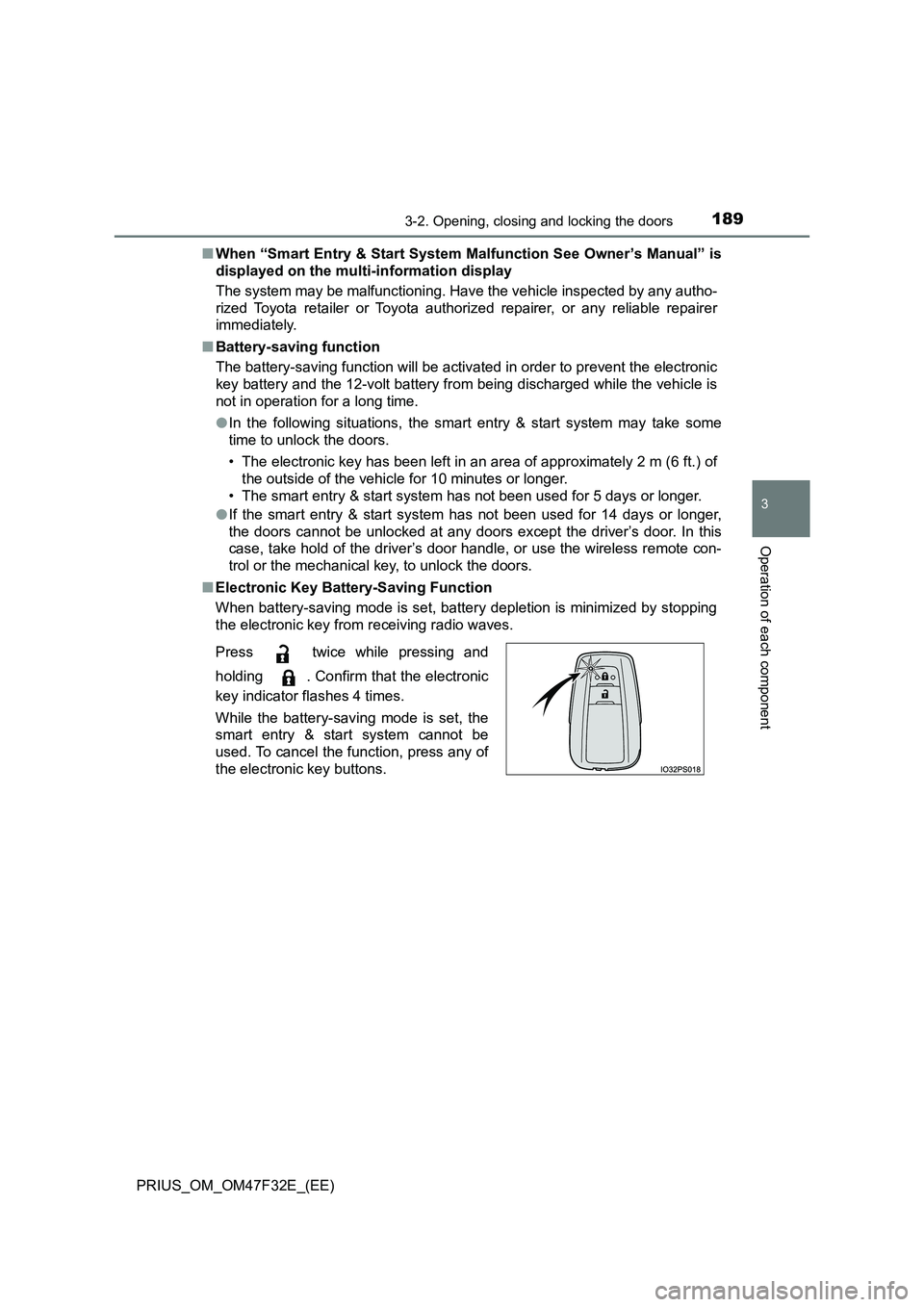
■ Electronic Key Battery-Saving Function
When battery-saving mode is set, battery depletion is minimized by stopping
the electronic key from receiving radio waves.
Press twice while pressing and
holding . Confirm that the electronic
key indicator flashes 4 times.
While the battery-saving mode is set, the
smart entry & start system cannot be
used. To cancel the function, press any of
the electronic key buttons.
Page 192 of 770
1903-2. Opening, closing and locking the doors
PRIUS_OM_OM47F32E_(EE)■Conditions affecting operation
The smart entry & start system, wireless remote control and immobilizer sys-
tem use weak radio waves. In the following situations, the communication
between the electronic key and the vehicle may be affected, preventing the
smart entry & start system, wireless remote control and immobilizer system
from operating properly. (Ways of coping: P. 636)
●When the electronic key battery is depleted
●Near a TV tower, electric power plant, gas station, radio station, large dis-
play, airport or other facility that generates strong radio waves or electrical
noise
●When the electronic key is in contact with, or is covered by the following
metallic objects
• Cards to which aluminum foil is attached
• Cigarette boxes that have aluminum foil inside
• Metallic wallets or bags
• Coins
• Hand warmers made of metal
• Media such as CDs and DVDs
●When other wireless key (that emit radio waves) is being used nearby
●When carrying the electronic key together with the following devices that
emit radio waves
• Portable radio, cellular phone, cordless phone or other wireless commu-
nication devices
• Another vehicle’s electronic key or a wireless key that emits radio waves
• Personal computers or personal digital assistants (PDAs)
• Digital audio players
• Portable game systems
●If window tint with a metallic content or metallic objects are attached to the
rear window
●When the electronic key is placed near a battery charger or electronic
devices
Page 193 of 770
1913-2. Opening, closing and locking the doors
3
Operation of each component
PRIUS_OM_OM47F32E_(EE)■Note for the entry function
●Even when the electronic key is within the effective range (detection areas),
the system may not operate properly in the following cases:
• The electronic key is too close to the window or outside door handle, near
the ground, or in a high place when the doors are locked or unlocked.
• The electronic key is on the instrument panel, floor, or in the door pockets
or glove box when the hybrid system is started or power switch modes
are changed.
●Do not leave the electronic key on top of the instrument panel or near the
door pockets when exiting the vehicle. Depending on the radio wave recep-
tion conditions, it may be detected by the antenna outside the cabin and the
door will become lockable from the outside, possibly trapping the electronic
key inside the vehicle.
●As long as the electronic key is within the effective range, the doors may be
unlocked or locked by anyone.
●Even if the electronic key is not inside the vehicle, it may be possible to start
the hybrid system if the electronic key is near the window.
●The doors may unlock if a large amount of water splashes on the door han-
dle, such as in the rain or in a car wash when the electronic key is within the
effective range. (The door will automatically be locked after approximately
30 seconds if the doors are not opened and closed.)
●If the wireless remote control is used to lock the doors when the electronic
key is near the vehicle, there is a possibility that the door may not be
unlocked by the entry function. (Use the wireless remote control to unlock
the doors.)
●Touching the door lock sensor while wearing gloves may delay or prevent
lock operation. Remove the gloves and touch the lock sensor again.
●On some models: When the lock operation is performed using the lock sen-
sor, recognition signals will be shown up to two consecutive times. After this,
no recognition signals will be given.
●If the door handle becomes wet while the electronic key is within the effec-
tive range, the door may lock and unlock repeatedly. In this case, follow the
following correction procedures to wash the vehicle.
• Place the electronic key in a location 2 m (6 ft.) or more away from the
vehicle. (Take care to ensure that the key is not stolen.)
• Set electronic key to battery-saving mode to disable the smart entry &
start system. (P. 189)