fuel TOYOTA PRIUS C 2014 NHP10 / 1.G Owner's Manual
[x] Cancel search | Manufacturer: TOYOTA, Model Year: 2014, Model line: PRIUS C, Model: TOYOTA PRIUS C 2014 NHP10 / 1.GPages: 563, PDF Size: 8.89 MB
Page 109 of 563

108 1-6. Refueling
CAUTION
■When refueling the vehicle
Observe the following precautions while refueling the vehicle. Failure to do
so may result in death or serious injury.
●After exiting the vehicle and before opening the fuel door, touch an
unpainted metal surface to discharge any static electricity. It is important to
discharge static electricity before refueling because sparks resulting from
static electricity can cause fuel vapors to ignite while refueling.
● Always hold the grips on the fuel tank cap and turn it slowly to remove it.
A whooshing sound may be heard when the fuel tank cap is loosened.
Wait until the sound cannot be heard before fully removing the cap. In hot
weather, pressurized fuel may spray out the filler neck and cause injury.
● Do not allow anyone that has not discharged static electricity from their
body to come close to an open fuel tank.
● Do not inhale vaporized fuel.
Fuel contains substances that are harmful if inhaled.
● Do not smoke while refueling the vehicle.
Doing so may cause the fuel to ignite and cause a fire.
● Do not return to the vehicle or touch any person or object that is statically
charged.
This may cause static electricity to build up, resulting in a possible ignition
hazard.
■ When refueling
Observe the following precautions to prevent fuel overflowing from the fuel
tank:
●Securely insert the fuel nozzle into the fuel filler neck
● Stop filling the tank after the fuel nozzle automatically clicks off
● Do not top off the fuel tank
■ When replacing the fuel cap
Do not use anything but a genuine Toyota fuel tank cap designed for your
vehicle. Doing so may cause a fire or other incident which may result in
death or serious injury.
Page 110 of 563

109
1-6. Refueling
1
Before driving
NOTICE
■
Refueling
Do not spill fuel during refueling.
Doing so may damage the vehicle, such as causing the emission control
system to operate abnormally or damaging fuel system components or the
vehicle's painted surface.
Page 153 of 563

152 2-1. Driving procedures
■Operating your vehicle in a foreign country
Comply with the relevant vehicle registration laws and confirm the availability
of the correct fuel. ( P. 498)
■ For efficient use
●Shift the shift lever to D when driving.
In the N position, the gasoline engine operates but electricity cannot be
generated. The hybrid battery (traction battery) will discharge, requiring
unnecessary engine power to recharge.
● Drive your vehicle smoothly.
Avoid abrupt acceleration and deceleration. Gradual acceleration and
deceleration will make more effective use of the electric motor (traction
motor) without having to use gasoline engine power.
● Avoid repeated acceleration.
Repeated acceleration consumes hybrid battery (traction battery) power,
resulting in poor acceleration. Battery power can be restored by driving
with the accelerator pedal slightly released.
● Shift the shift lever to P when parking.
In the N position, the hybrid battery (traction battery) does not recharge.
Leaving the shift lever in the N position for an extended period of time
may discharge the hybrid battery. The vehicle cannot run if the hybrid
battery is discharged.
Page 175 of 563

174 2-1. Driving procedures
■Automatic cancelation of EV drive mode
When driving in EV drive mode, the gasoline engine may automatically
restart in the following situations. When EV drive mode is canceled, a buzzer
will sound and the EV drive mode indicator will flash and go off.
●The hybrid battery (traction battery) becomes low.
● Vehicle speed becomes high.
● The accelerator pedal is depressed firmly or the vehicle is on a hill etc.
■ Possible driving distance when driving in EV drive mode
In EV drive mode, it is possible to drive up to about 1.3 miles (2 km) if driving
at a speed of about 25 mph (40 km/h) or less. (The distance that is possible
depends on the hybrid battery [traction battery] level and driving conditions.)
■ Fuel economy
PRIUS c is designed to achieve the best possible fuel economy during nor-
mal driving (using the gasoline engine and electric motor [traction motor]).
Driving in EV drive mode more than necessary may lower fuel economy.
■ Vehicle Proximity Notification System sound
Even when EV drive mode is turned on, the Vehicle Proximity Notification
System may produce a sound. ( P. 25)
CAUTION
■Caution while driving
When driving in EV drive mode no engine noise is made. As such, pedestri-
ans, people riding bicycles or other people and vehicles in the surrounding
area may not be aware of the vehicle starting off or approaching them even if
the Vehicle Proximity Notification System is active. Therefore, take extra
care while driving.
Page 177 of 563
176 2-1. Driving procedures
■Shift position purpose
*: To improve fuel efficiency and reduce noises, set the shift lever in the D
position for normal driving.
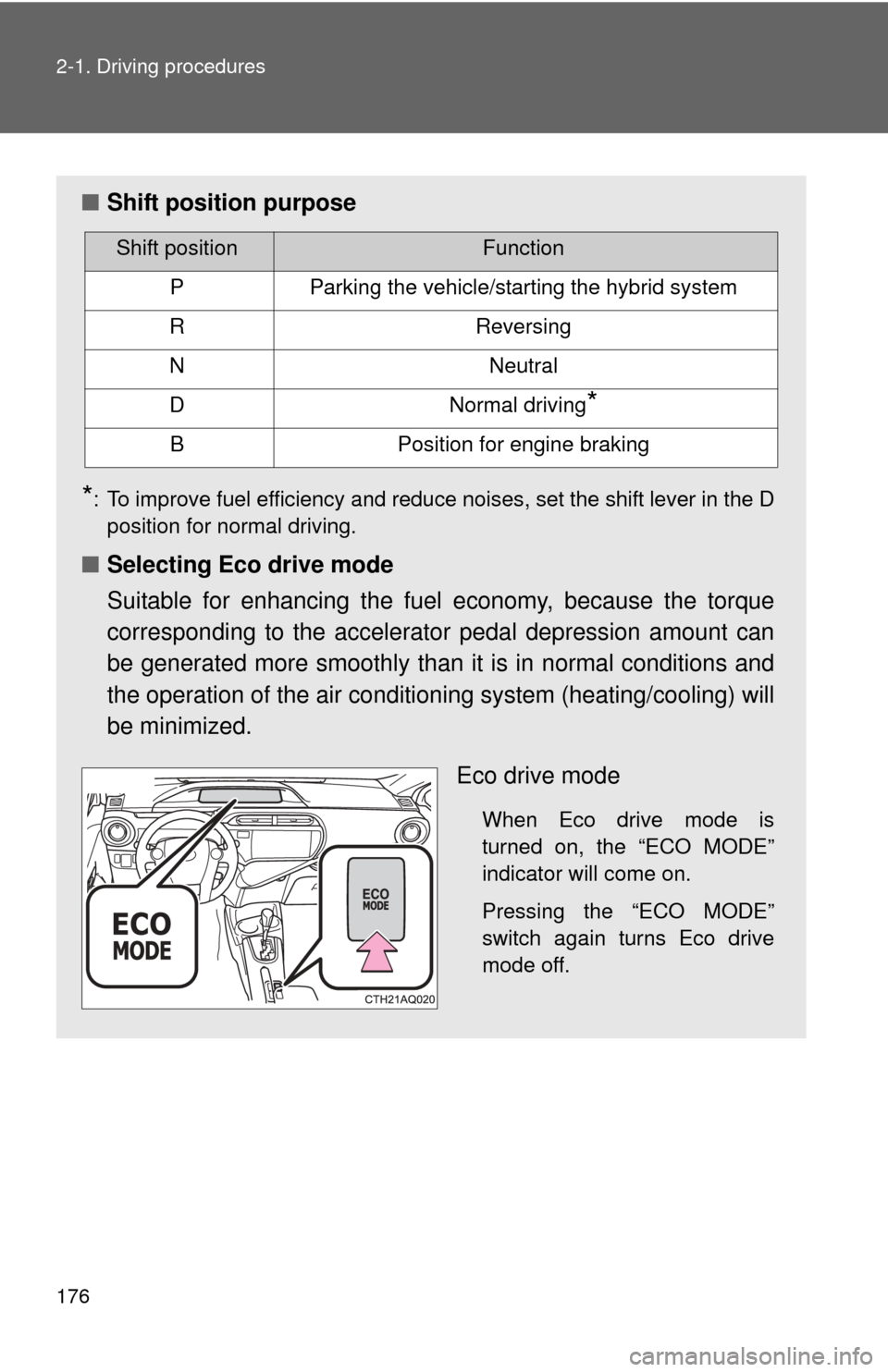
■ Selecting Eco drive mode
Suitable for enhancing the fuel economy, because the torque
corresponding to the accelerator pedal depression amount can
be generated more smoothly than it is in normal conditions and
the operation of the air condition ing system (heating/cooling) will
be minimized.
Eco drive mode
When Eco drive mode is
turned on, the “ECO MODE”
indicator will come on.
Pressing the “ECO MODE”
switch again turns Eco drive
mode off.
Shift positionFunction
PParking the vehicle/starting the hybrid system
RReversing
NNeutral
DNormal driving*
BPosition for engine braking
Page 178 of 563

177
2-1. Driving procedures
2
When driving
■
Operation of the air conditio ning system in Eco drive mode
Eco drive mode controls the heating/cooling operations and fan speed of the
air conditioning system to enhance fuel efficiency. ( P. 244) To improve air
conditioning performance, adjust the temperature setting or fan speed, or
turn off Eco drive mode.
■ When in heavy traffic
If the shift lever is in N, the hybrid battery (traction battery) will not be
charged. To help prevent the battery from discharging, avoid putting the shift
lever in N for an extended period of time.
■ If the shift lever cannot be shifted from P
P. 477
CAUTION
■When driving on slippery road surfaces
Do not accelerate or shift gears suddenly.
Sudden changes in engine braking may cause the vehicle to spin or skid,
resulting in an accident.
Page 182 of 563
181
2
When driving
2-2. Instrument cluster
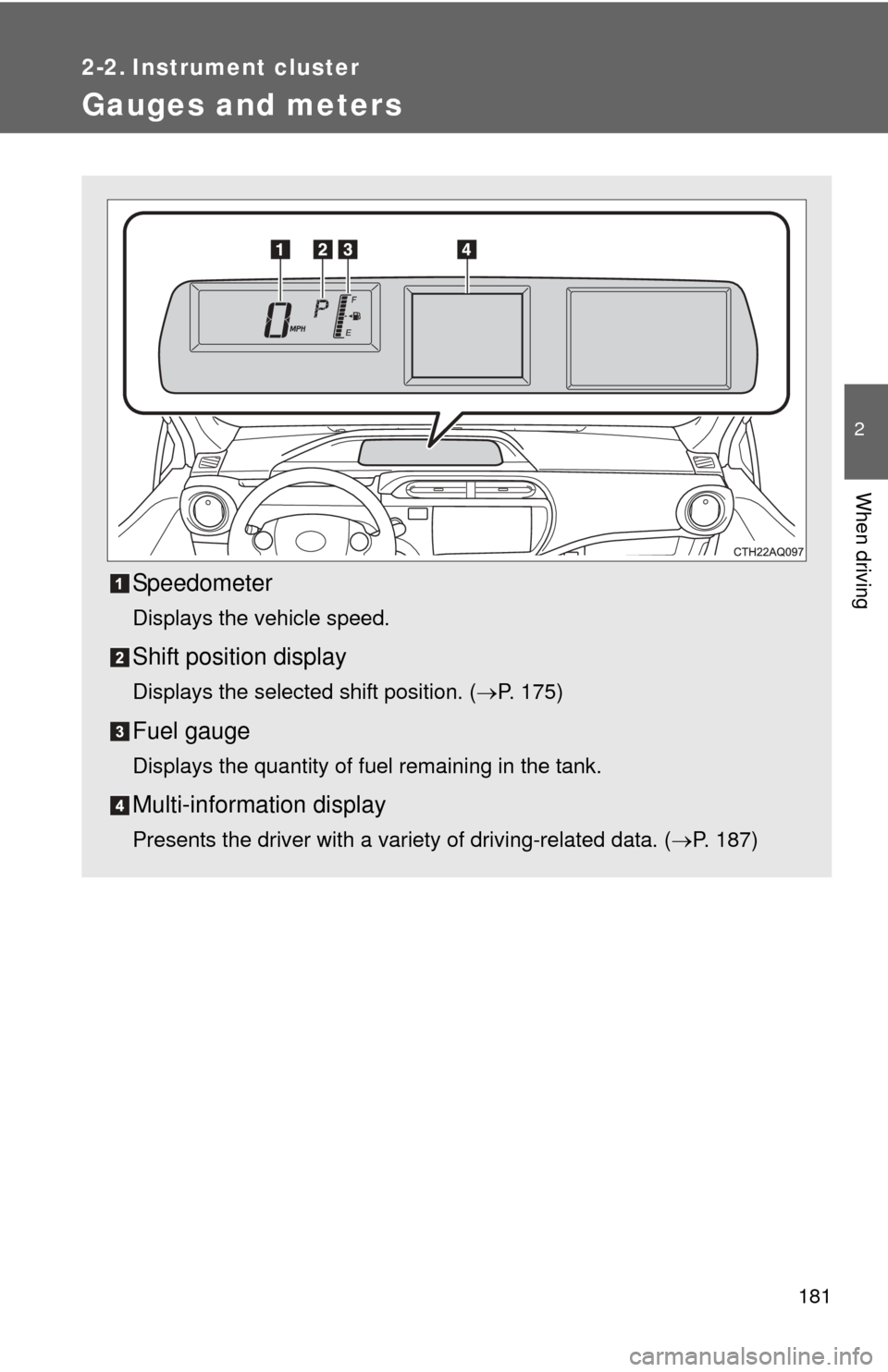
Gauges and meters
Speedometer
Displays the vehicle speed.
Shift position display
Displays the selected shift position. (P. 175)
Fuel gauge
Displays the quantity of fuel remaining in the tank.
Multi-information display
Presents the driver with a variety of driving-related data. ( P. 187)
Page 183 of 563
182 2-2. Instrument cluster
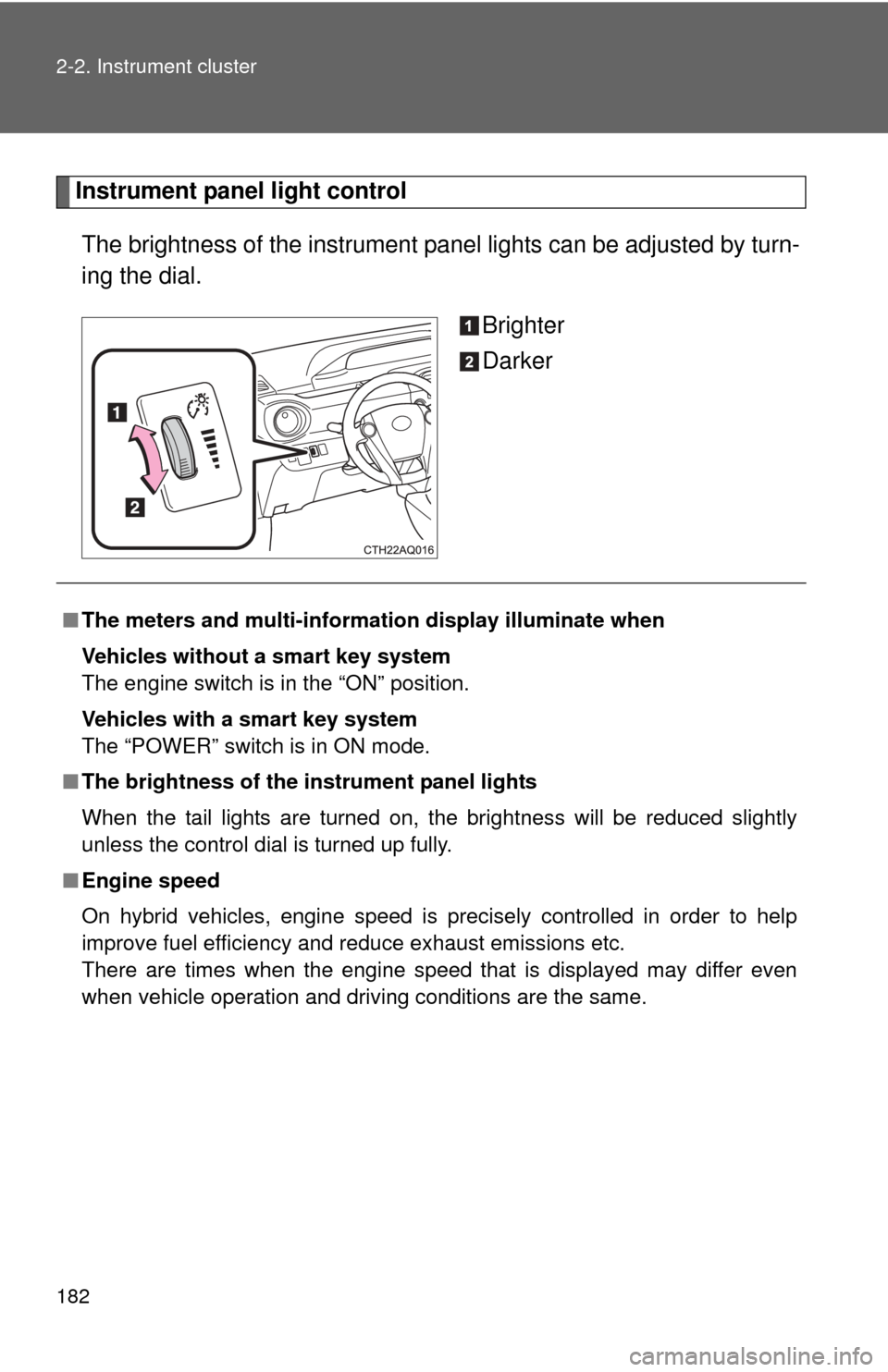
Instrument panel light controlThe brightness of the instrument pa nel lights can be adjusted by turn-
ing the dial.
Brighter
Darker
■The meters and multi-informat ion display illuminate when
Vehicles without a smart key system
The engine switch is in the “ON” position.
Vehicles with a smart key system
The “POWER” switch is in ON mode.
■ The brightness of the instrument panel lights
When the tail lights are turned on, the brightness will be reduced slightly
unless the control dial is turned up fully.
■ Engine speed
On hybrid vehicles, engine speed is precisely controlled in order to help
improve fuel efficiency and reduce exhaust emissions etc.
There are times when the engine speed that is displayed may differ even
when vehicle operation and driving conditions are the same.
Page 188 of 563
187
2-2. Instrument cluster
2
When driving
Multi-information display
The multi-information display presents the driver with a variety of
driving-related data including the current outside air temperature.
●Drive information
Displays information such as
the hybrid system operating
conditions and fuel consump-
tion.
●Settings and screen off
Perform operations such as
changing the date/time and
screen settings.
●Warning messages
( P. 447)
Automatically displayed if a
malfunction occurs in one of
the vehicle’s systems.
Page 190 of 563
189
2-2. Instrument cluster
2
When driving
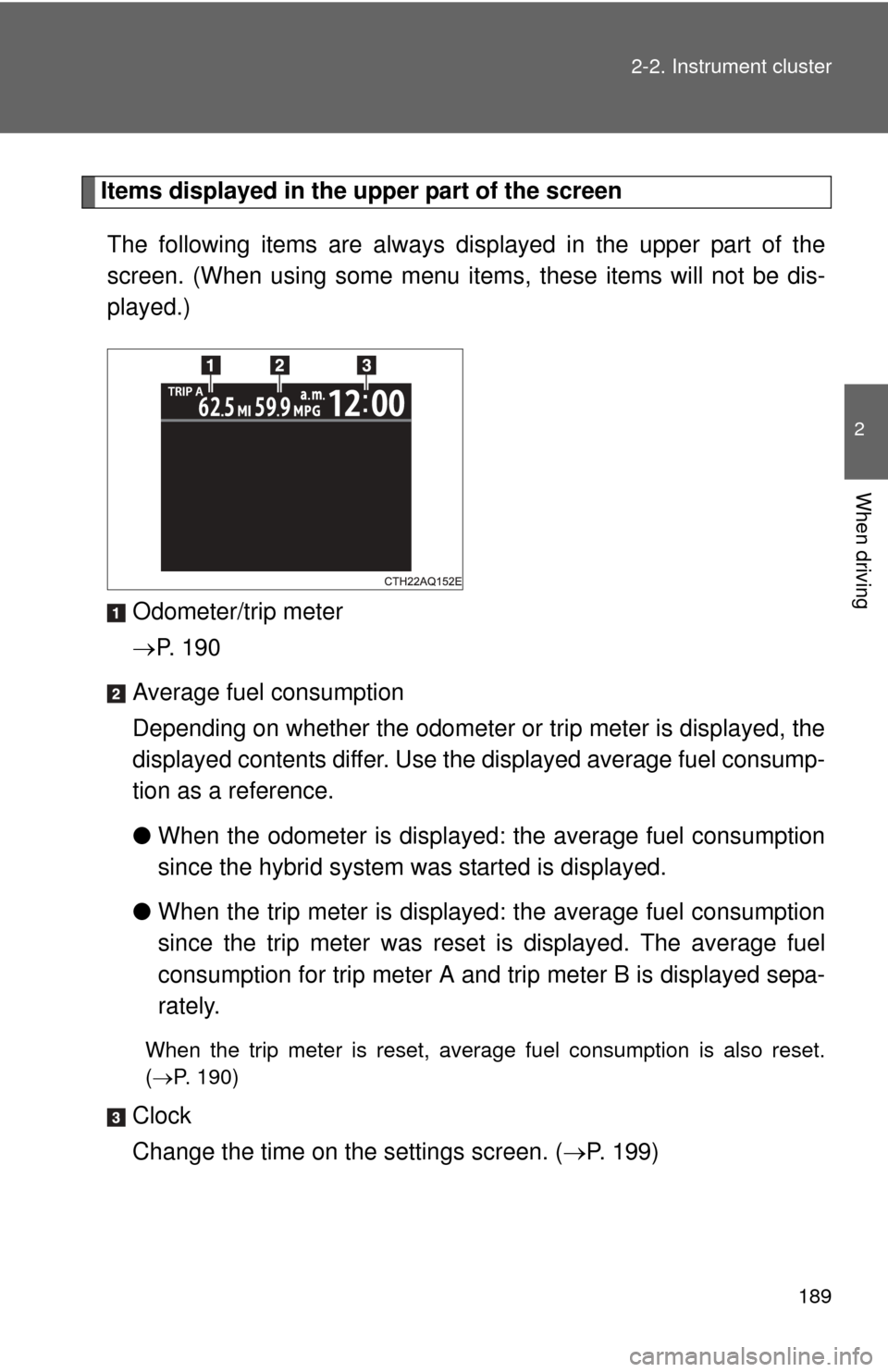
Items displayed in the upper part of the screen
The following items are always disp layed in the upper part of the
screen. (When using some menu it ems, these items will not be dis-
played.)
Odometer/trip meter
P. 1 9 0
Average fuel consumption
Depending on whether the odometer or trip meter is displayed, the
displayed contents differ. Use the displayed average fuel consump-
tion as a reference.
● When the odometer is displayed: the average fuel consumption
since the hybrid system was started is displayed.
● When the trip meter is displayed: the average fuel consumption
since the trip meter was reset is displayed. The average fuel
consumption for trip meter A and trip meter B is displayed sepa-
rately.
When the trip meter is reset, average fuel consumption is also reset.
(P. 190)
Clock
Change the time on the settings screen. ( P. 199)