fuel TOYOTA PRIUS C 2014 NHP10 / 1.G Owner's Guide
[x] Cancel search | Manufacturer: TOYOTA, Model Year: 2014, Model line: PRIUS C, Model: TOYOTA PRIUS C 2014 NHP10 / 1.GPages: 563, PDF Size: 8.89 MB
Page 192 of 563
191
2-2. Instrument cluster
2
When driving
Switching menu screens
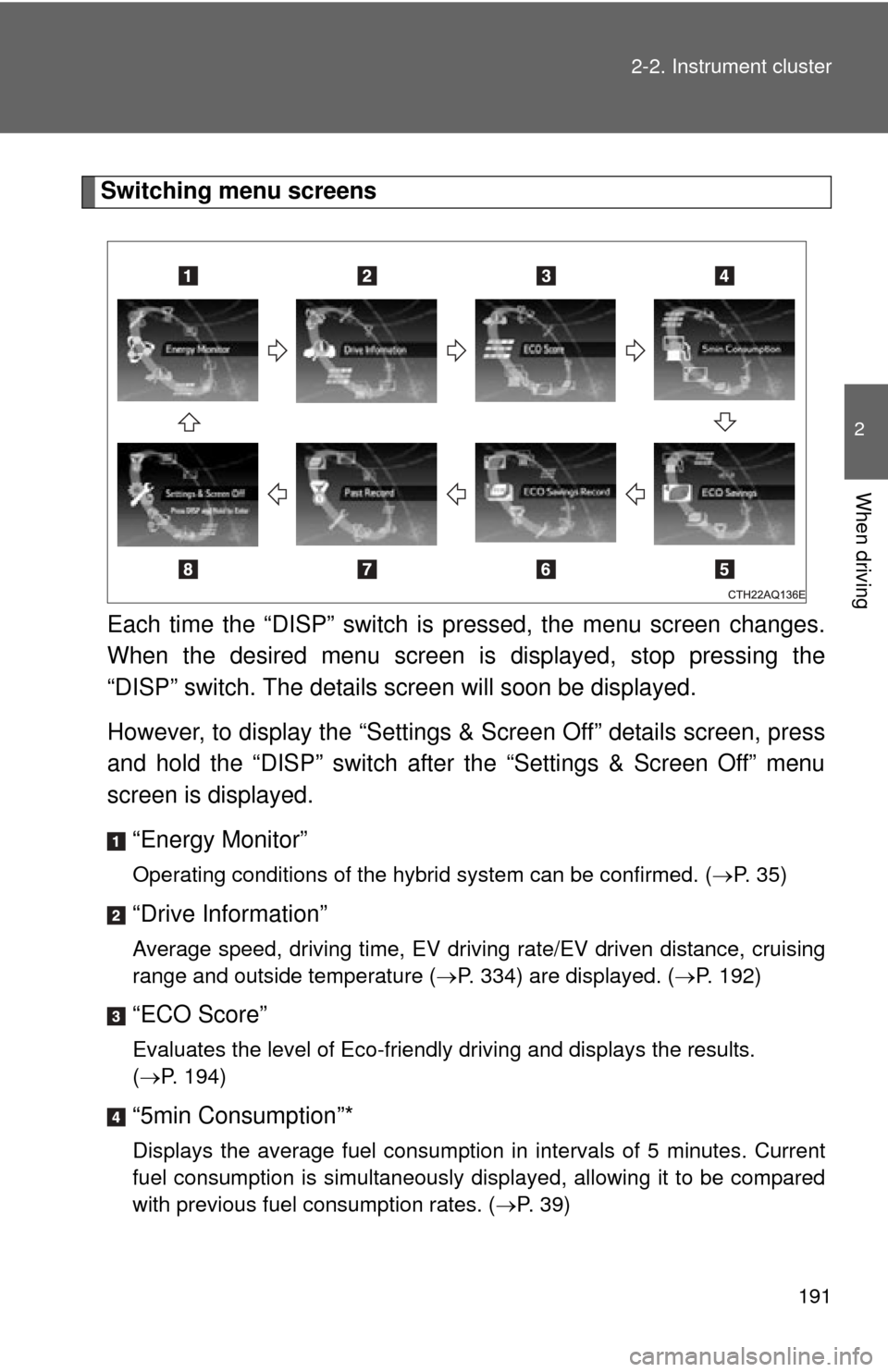
Each time the “DISP” switch is pressed, the menu screen changes.
When the desired menu screen is displayed, stop pressing the
“DISP” switch. The details screen will soon be displayed.
However, to display the “Settings & Screen Off” details screen, press
and hold the “DISP” switch after the “Settings & Screen Off” menu
screen is displayed.
“Energy Monitor”
Operating conditions of the hybrid system can be confirmed. ( P. 35)
“Drive Information”
Average speed, driving time, EV driving rate/EV driven distance, cruising
range and outside temperature (P. 334) are displayed. ( P. 192)
“ECO Score”
Evaluates the level of Eco-friendly driving and displays the results.
(P. 194)
“5min Consumption”*
Displays the average fuel consumption in intervals of 5 minutes. Current
fuel consumption is simultaneously displayed, allowing it to be compared
with previous fuel consumption rates. ( P. 39)
Page 193 of 563
192 2-2. Instrument cluster
“ECO Savings”
If the price of gasoline is input, the cost of the consumed fuel according to
the driven distance is displayed. If the fuel consumption comparison is set,
the difference between the input fuel consumption and your vehicle's
actual fuel consumption is expressed as an amount of money that was
possibly saved. (P. 195)
“ECO Savings Record”*
Displays eco savings record. ( P. 196)
“Past Record”*
Displays the best 3 fuel consumption records and the current fuel con-
sumption ranking. Fuel consumption can also be displayed by the month.
(P. 40)
“Settings & Screen Off”
Operations such as changing each screen’s setting and the date/time can
be performed. ( P. 198)
*: Settings are set to off (initialized settings) at the time of shipping. (P. 201)
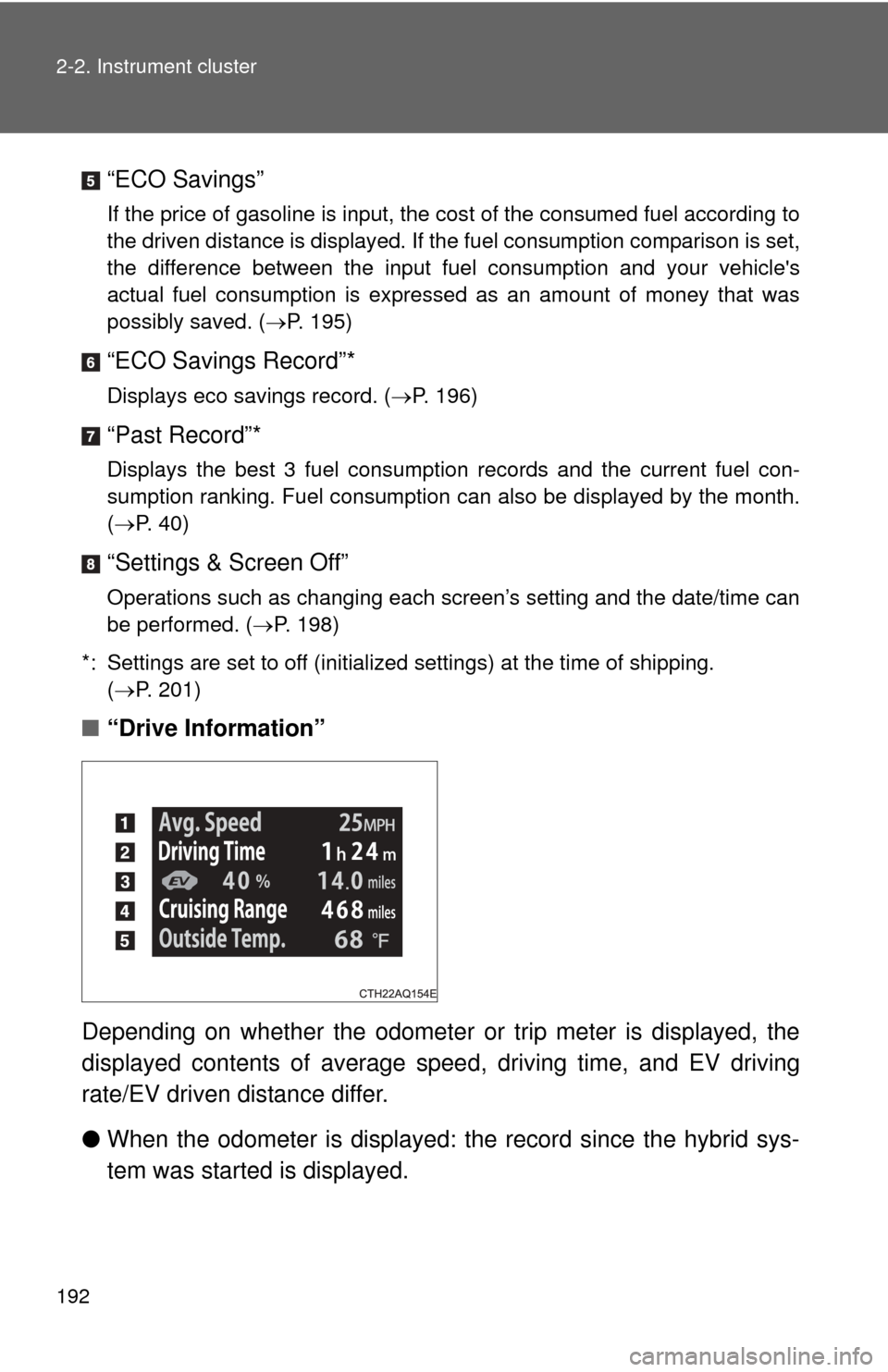
■ “Drive Information”
Depending on whether the odometer or trip meter is displayed, the
displayed contents of average spee d, driving time, and EV driving
rate/EV driven distance differ.
● When the odometer is displayed: the record since the hybrid sys-
tem was started is displayed.
Page 194 of 563

193
2-2. Instrument cluster
2
When driving
●
When the trip meter is displayed: the record since the trip meter
was reset is displayed. The record for trip meter A and trip meter B
is displayed separately.
When the trip meter is reset, the record is also reset. ( P. 190)
Average speed
Average speed will be displayed.
Driving time
Driving time will be displayed.
EV driving rate/EV driven distance
EV driving rate and driven distance (percentage and distance
driven using just the elec tric motor [traction motor] only) will be dis-
played.
Cruising range
Displays the estimated maximum di stance that can be driven with
the quantity of fuel remaining.
• This distance is computed based on your average fuel consumption.
As a result, the actual distance that can be driven may differ from
that displayed.
• When only a small amount of fuel is added to the tank, the display
may not be updated.
Vehicles without a smart key system:
when refueling, turn the engine switch to the “LOCK” position. If the
vehicle is refueled without turning the engine switch to the “LOCK”
position, the display may not be updated.
Vehicles with a smart key system:
when refueling, turn the “POWER” switch off. If the vehicle is refu-
eled without turning the “POWER” switch off, the display may not be
updated.
Outside temperature
P. 3 3 4
Page 196 of 563
195
2-2. Instrument cluster
2
When driving
■
“ECO Savings”
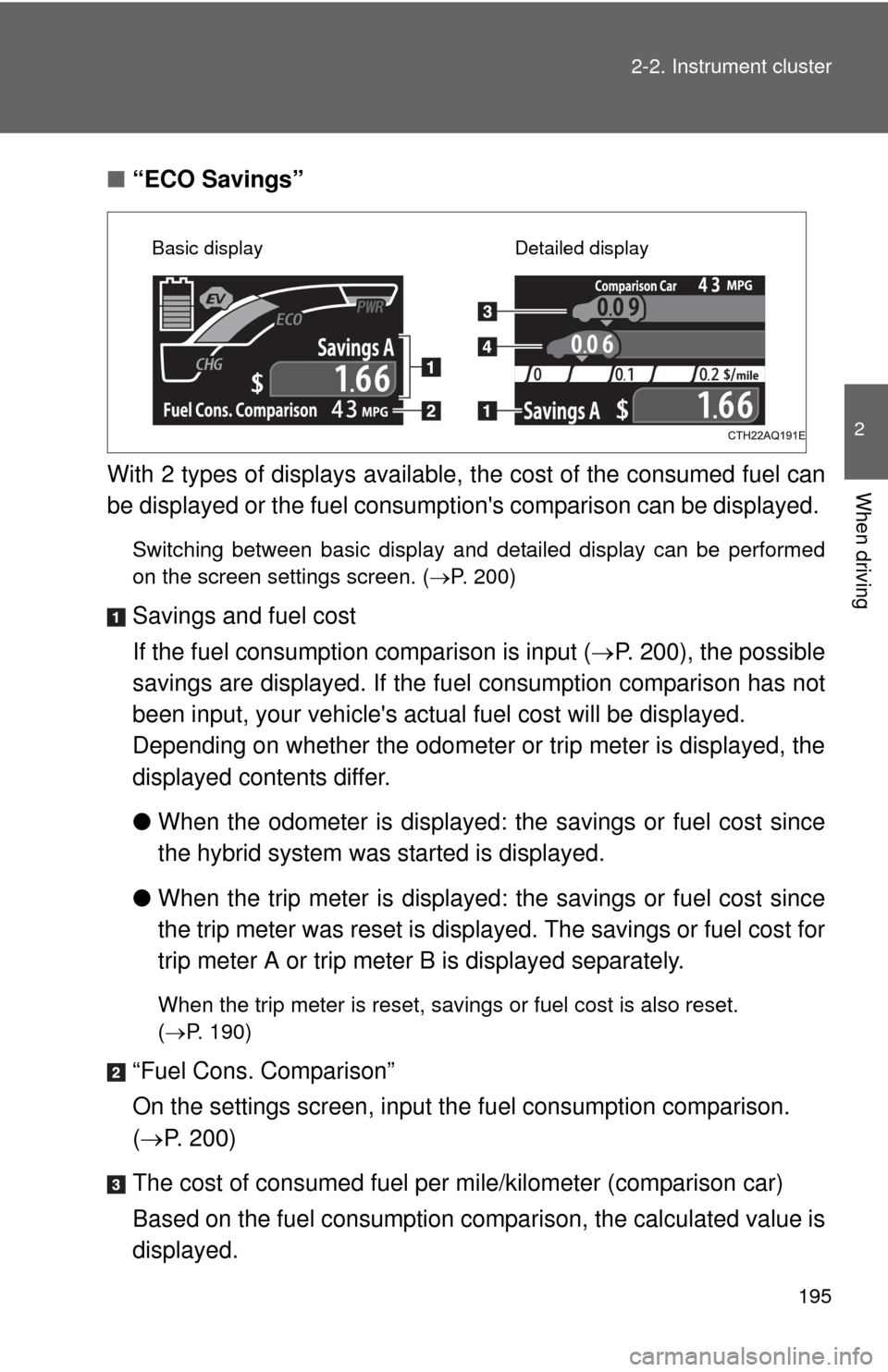
With 2 types of displays available, the cost of the consumed fuel can
be displayed or the fuel consumption's comparison can be displayed.
Switching between basic display and detailed display can be performed
on the screen settings screen. ( P. 200)
Savings and fuel cost
If the fuel consumption comparison is input ( P. 200), the possible
savings are displayed. If the fu el consumption comparison has not
been input, your vehicle's actual fuel cost will be displayed.
Depending on whether the odometer or trip meter is displayed, the
displayed contents differ.
● When the odometer is displayed: the savings or fuel cost since
the hybrid system was started is displayed.
● When the trip meter is displayed: the savings or fuel cost since
the trip meter was reset is displayed. The savings or fuel cost for
trip meter A or trip meter B is displayed separately.
When the trip meter is reset, savings or fuel cost is also reset.
(P. 190)
“Fuel Cons. Comparison”
On the settings screen, input th e fuel consumption comparison.
( P. 200)
The cost of consumed fuel per mile/kilometer (comparison car)
Based on the fuel consumption comparison, the calculated value is
displayed.
Basic display Detailed display
Page 197 of 563
196 2-2. Instrument cluster
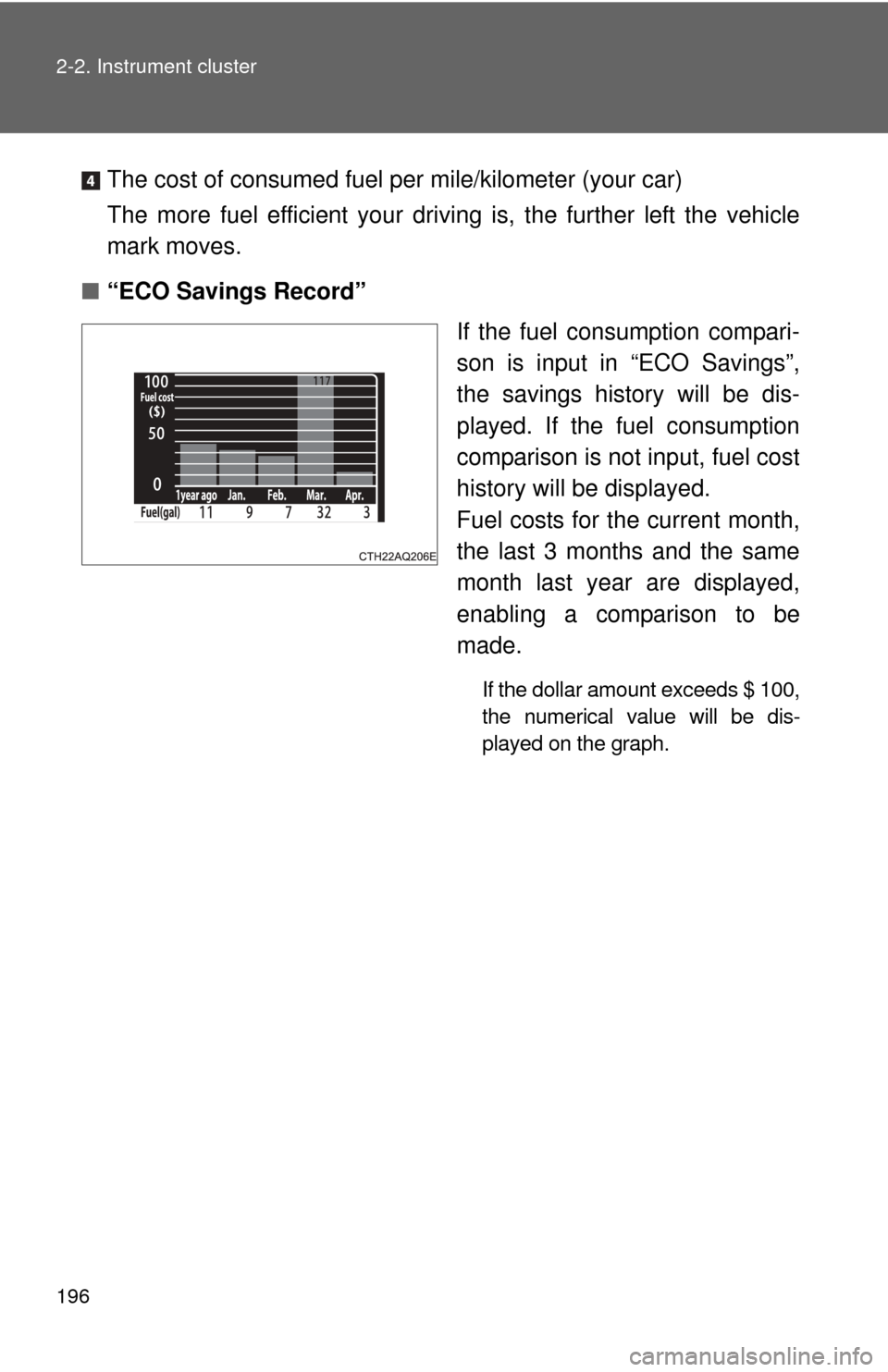
The cost of consumed fuel per mile/kilometer (your car)
The more fuel efficient your drivi ng is, the further left the vehicle
mark moves.
■ “ECO Savings Record”
If the fuel consumption compari-
son is input in “ECO Savings”,
the savings history will be dis-
played. If the fuel consumption
comparison is not input, fuel cost
history will be displayed.
Fuel costs for the current month,
the last 3 months and the same
month last year are displayed,
enabling a comparison to be
made.
If the dollar amount exceeds $ 100,
the numerical value will be dis-
played on the graph.
Page 201 of 563
200 2-2. Instrument cluster
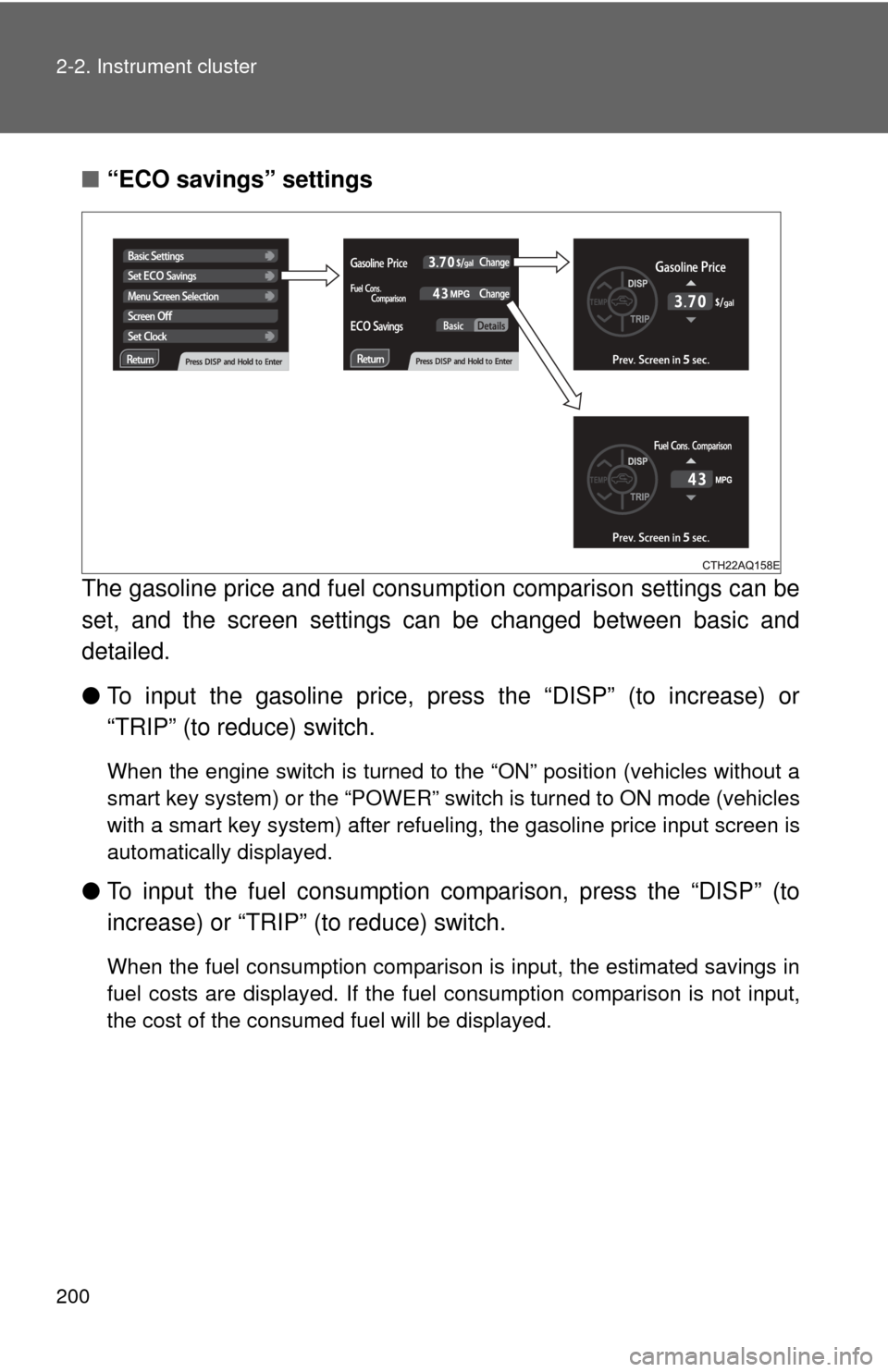
■“ECO savings” settings
The gasoline price and fuel consum ption comparison settings can be
set, and the screen settings can be changed between basic and
detailed.
● To input the gasoline price, pr ess the “DISP” (to increase) or
“TRIP” (to reduce) switch.
When the engine switch is turned to the “ON” position (vehicles without a
smart key system) or the “POWER” switch is turned to ON mode (vehicles
with a smart key system) after refueling, the gasoline price input screen is
automatically displayed.
● To input the fuel consumption co mparison, press the “DISP” (to
increase) or “TRIP” (to reduce) switch.
When the fuel consumption comparison is input, the estimated savings in
fuel costs are displayed. If the fuel consumption comparison is not input,
the cost of the consumed fuel will be displayed.
Page 202 of 563
201
2-2. Instrument cluster
2
When driving
■
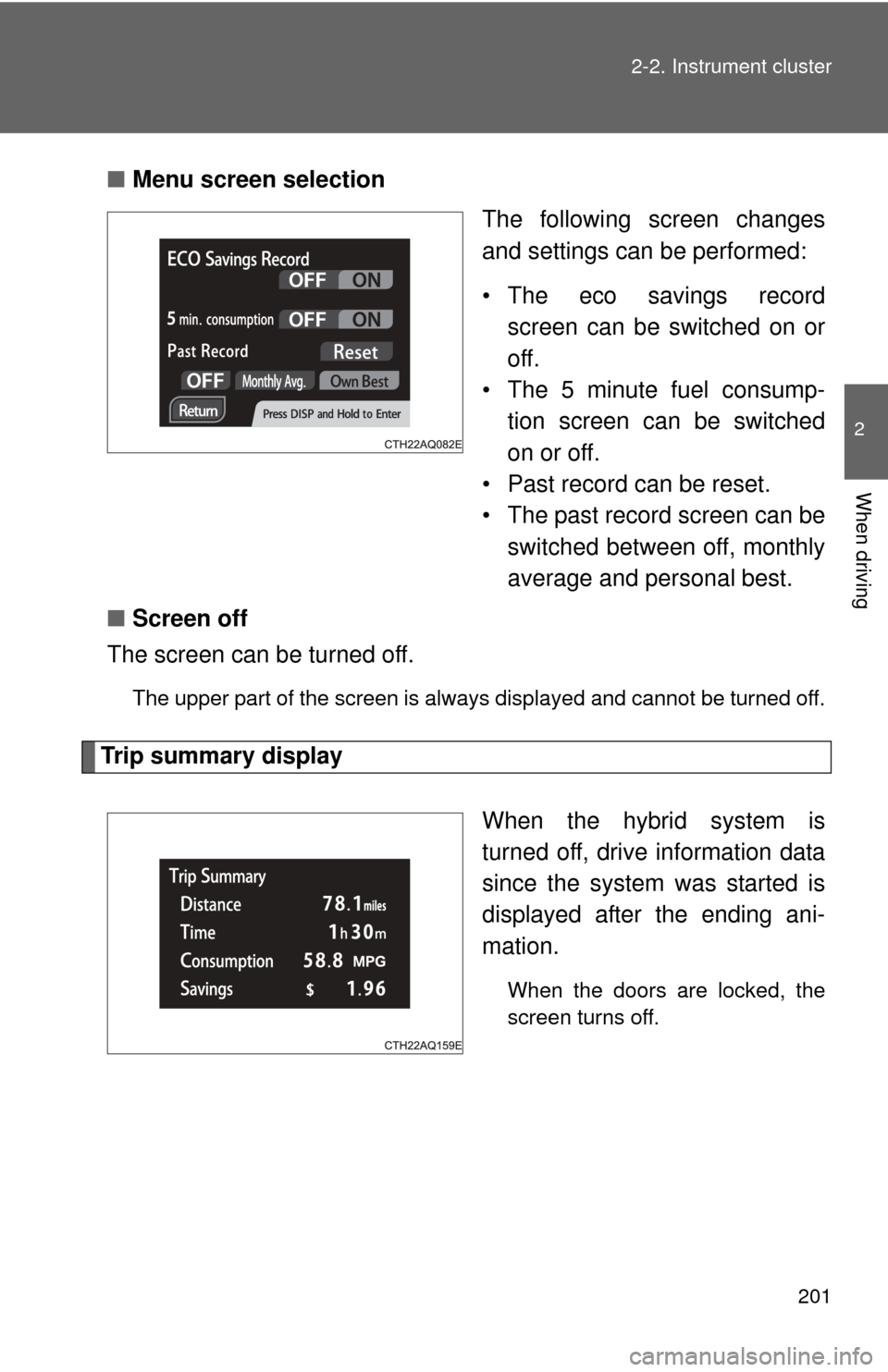
Menu screen selection
The following screen changes
and settings can be performed:
• The eco savings recordscreen can be switched on or
off.
• The 5 minute fuel consump-
tion screen can be switched
on or off.
• Past record can be reset.
• The past record screen can be switched between off, monthly
average and personal best.
■ Screen off
The screen can be turned off.
The upper part of the screen is always displayed and cannot be turned off.
Trip summary display
When the hybrid system is
turned off, drive information data
since the system was started is
displayed after the ending ani-
mation.
When the doors are locked, the
screen turns off.
Page 203 of 563

202 2-2. Instrument cluster
■The clock is displayed when
Vehicles without a smart key system
The engine switch is in the “ON” position.
Vehicles with a smart key system
The “POWER” switch is in ON mode.
■ Eco score
●As the accelerator pedal is not depressed, the driven distance using
cruise control (if equipped) is not included in the eco score.
● As the eco score evaluation differs according to driving conditions and
environmental factors, in some cases it may not be linked to fuel con-
sumption.
■ Eco savings
●Fuel cost and savings should be used as a guide only.
● Depending on refueling methods, driving conditions and environmental
factors, the actual and displayed fuel costs may differ.
● In some cases, fuel cost and savings may not be linked to the eco score
evaluation.
■ When disconnecting and reconnect ing 12-volt battery terminals
The following information data will be reset:
● Clock
● Past record (aside from the top 3 results)
● Average fuel consumption
● Cruising range
● Average vehicle speed
● Driving time
● EV driving rate/EV driven distance
Additionally, some displays may return to their default settings.
■ Liquid crystal display
Small spots or light spots may appear on the display. This phenomenon is
characteristic of liquid crystal displays, and there is no problem continuing to
use the display.
Page 207 of 563

206 2-3. Operating the lights and wipers
■Daytime running light system
●To make your vehicle more visible to other drivers, the headlights turn on
automatically (at a reduced intensity) whenever the hybrid system is
started and the parking brake is released. Daytime running lights are not
designed for use at night.
For type A: Daytime running lights can be turned off by operating the
switch.
● Compared to turning on the headlights, the daytime running light system
offers greater durability and consumes less electricity, so it can help
improve fuel economy.
■ Light reminder buzzer
Vehicles without a smart key system
A buzzer sounds when the engine switch is turned to the “LOCK” or “ACC”
position and the driver's door is opened while the lights are turned on.
Vehicles with a smart key system
A buzzer sounds when the “POWER” switch is turned off or turned to
ACCESSORY mode and the driver's door is opened while the lights are
turned on.
■ Battery-saving function
In the following conditions, the remaining lights will go off automatically after
20 minutes in order to prevent the vehicle battery from being discharged:
●The headlights and/or tail lights are on.
● The engine switch is turned to the “ACC” or “LOCK” position (vehicles
without a smart key system) or the “P OWER” switch is turned to ACCES-
SORY mode or turned off (vehicles with a smart key system).
This function will be canceled in any of the following situations:
● When the engine switch is turned to the “ON” position (vehicles without a
smart key system) or the “POWER” switch is turned to ON mode (vehi-
cles with a smart key system).
● When the light switch is operated.
● When the door is opened or closed.
Page 227 of 563
226
2-5. Driving information
Cargo and luggage
Capacity and distributionCargo capacity depends on the total weight of the occupants.
(Cargo capacity) = (Total load capa city) — (Total weight of occupants)
Steps for Determining Correct Load Limit
(1)Locate the statement “The co mbined weight of occupants and
cargo should never exceed XXX kg or XXX lbs.” on your vehicle's
placard.
(2)Determine the combined weight of the driver and passengers that
will be riding in your vehicle.
(3)Subtract the combined weight of the driver and passengers from XXX kg or XXX lbs.
(4)The resulting figure equals the available amount of cargo and lug- gage load capacity.
For example, if the “XXX” amount equals 1400 lbs. and there will
be five 150 lb passengers in your vehicle, the amount of available
cargo and luggage load capacity is 650 lbs. (1400 - 750 (5 150) =
650 lbs.)
(5)Determine the combined weight of luggage and cargo being loaded on the vehicle. That weight may not safely exceed the avail-
able cargo and luggage load capacity calculated in Step 4.
Take notice of the following information about storage precau-
tions, cargo capacity and load:
● Stow cargo and luggage in the luggage compartment whenever
possible.
● Be sure all items are secured in place.
● To maintain vehicle balance while driving, position luggage
evenly within the luggage compartment.
● For better fuel economy, do no t carry unnecessary weight.