steering TOYOTA PRIUS C 2019 Accessories, Audio & Navigation (in English)
[x] Cancel search | Manufacturer: TOYOTA, Model Year: 2019, Model line: PRIUS C, Model: TOYOTA PRIUS C 2019Pages: 282, PDF Size: 4.78 MB
Page 7 of 282
7
Prius_C_Navi_U
1
2
3
4
5
6
7
9
8
1. BASIC OPERATION ........................ 66
QUICK REFERENCE ............................ 66
SOME BASICS ...................................... 67
2. RADIO OPERATION ....................... 72
AM/FM RADIO....................................... 72
XM Satellite Radio ................................. 82
INTERNET RADIO ................................ 89
3. MEDIA OPERATION ....................... 90
CD ......................................................... 90
USB MEMORY ...................................... 94
iPod ....................................................... 99
Bluetooth
® AUDIO ............................... 104
AUX ..................................................... 109
4. AUDIO REMOTE CONTROLS ...... 112
STEERING SWITCHES ...................... 112
5. SETUP ........................................... 114
AUDIO SETTINGS .............................. 114
6. TIPS FOR OPERATING THE AUDIO SYSTEM .................. 116
OPERATING INFORMATION ............. 116
1. VOICE COMMAND SYSTEM OPERATION ................................ 126
VOICE COMMAND SYSTEM .............. 126
CASUAL SPEECH
RECOGNIZATION ............................ 132
COMMAND LIST ................................. 133
2. MOBILE ASSISTANT OPERATION ................................ 135
MOBILE ASSISTANT .......................... 135
1. USEFUL INFORMATION .............. 138
RECEIVING WEATHER
INFORMATION ................................. 138
DATA SERVICES SETTINGS ............. 140
1. REAR VIEW MONITOR SYSTEM ....... ............................ ... 142
REAR VIEW MONITOR SYSTEM ....... 142
REAR VIEW MONITOR SYSTEM
PRECAUTIONS ................................ 144
THINGS YOU SHOULD KNOW .......... 149
1. PHONE OPERATION (HANDS-FREE SYSTEM
FOR CELLULAR PHONES)........ 152
QUICK REFERENCE .......................... 152
SOME BASICS .................................... 153
CALLING ON THE
Bluetooth
® PHONE ........................... 156
RECEIVING ON THE Bluetooth
® PHONE ........................... 162
TALKING ON THE Bluetooth
® PHONE ........................... 163
Bluetooth® PHONE MESSAGE
FUNCTION ........................................ 166
2. SETUP........................................... 171
PHONE/MESSAGE SETTINGS .......... 171
3. WHAT TO DO IF... ........................ 183
TROUBLESHOOTING ......................... 183
3AUDIO SYSTEM
4VOICE COMMAND SYSTEM
5INFORMATION
6PERIPHERAL MONITORING
SYSTEM
7PHONE
Page 40 of 282
40
Prius_C_Navi_U
2. Bluetooth® SETTINGS
1. REGISTERING/CONNECTING Bluetooth® DEVICE
1Turn the Bluetooth® connection setting
of your cellular phone on.
This function is not available when
Bluetooth® connection setting of your cel-
lular phone is set to off.
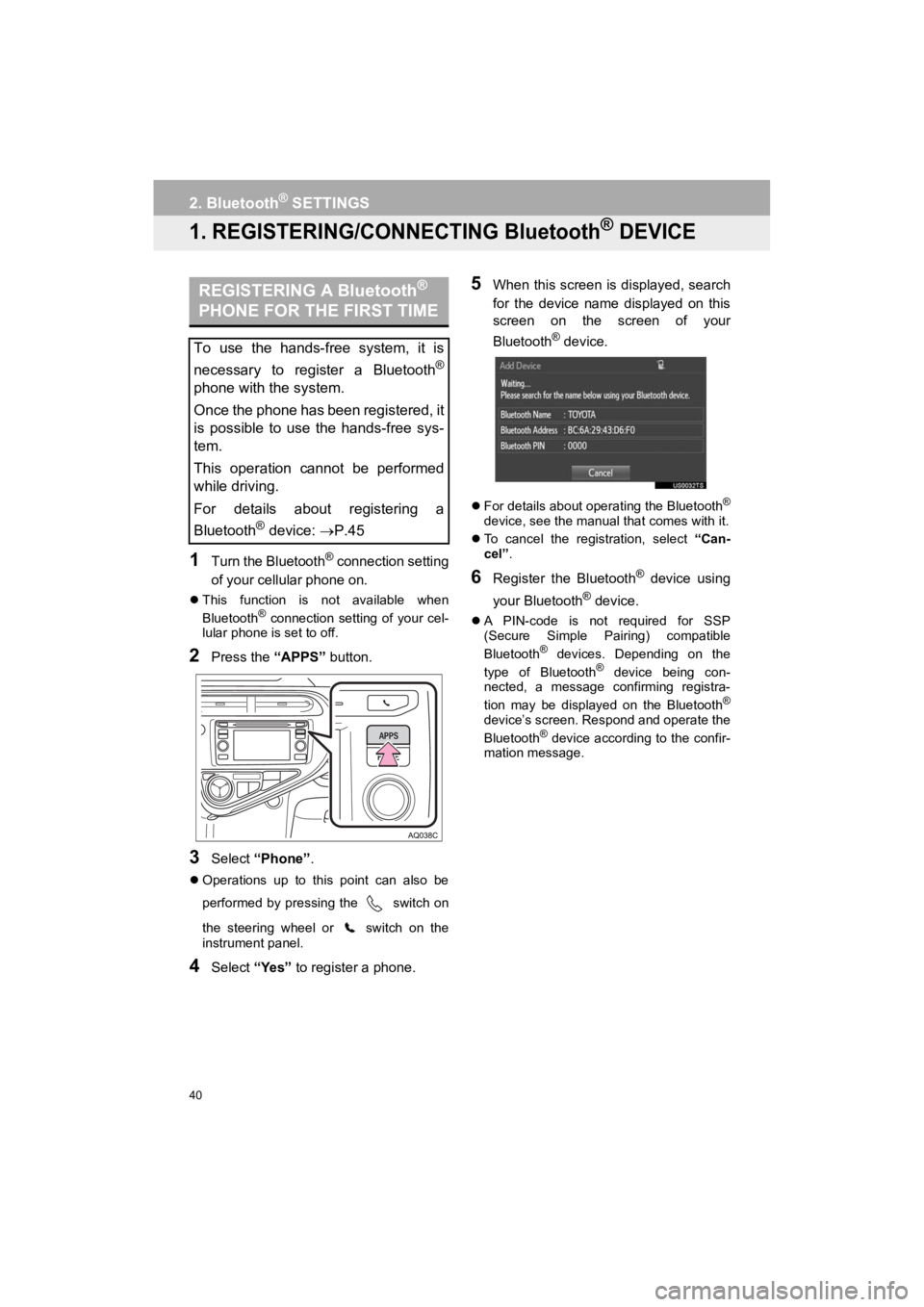
2Press the “APPS” button.
3Select “Phone” .
Operations up to this point can also be
performed by pressing the switch on
the steering wheel or switch on the
instrument panel.
4Select “Yes” to register a phone.
5When this screen is displayed, search
for the device name displayed on this
screen on the screen of your
Bluetooth
® device.
For details about operating the Bluetooth®
device, see the manual that comes with it.
To cancel the registration, select “Can-
cel”.
6Register the Bluetooth® device using
your Bluetooth
® device.
A PIN-code is not required for SSP
(Secure Simple Pairing) compatible
Bluetooth
® devices. Depending on the
type of Bluetooth® device being con-
nected, a message confirming registra-
tion may be displayed on the Bluetooth
®
device’s screen. Respond and operate the
Bluetooth® device according to the confir-
mation message.
REGISTERING A Bluetooth®
PHONE FOR THE FIRST TIME
To use the hands-free system, it is
necessary to register a Bluetooth
®
phone with the system.
Once the phone has been registered, it
is possible to use the hands-free sys-
tem.
This operation cannot be performed
while driving.
For details about registering a
Bluetooth
® device: P.45
Page 65 of 282
3
65
Prius_C_Navi_U
4
5
6
7
8
9
1
2
3
1. CD .................................................. 90
OVERVIEW ........................................... 90
PLAYING AN AUDIO CD ...................... 93
PLAYING AN MP3/WMA/AAC DISC ......................... 93
2. USB MEMORY ............................... 94
OVERVIEW ........................................... 94
PLAYING A USB AUDIO ....................... 98
3. iPod ................................................ 99
OVERVIEW ........................................... 99
4. Bluetooth® AUDIO ...................... 104
OVERVIEW ......................................... 104
CONNECTING A Bluetooth
® DEVICE .......................... 108
LISTENING TO Bluetooth
® AUDIO ............................ 108
5. AUX .............................................. 109
OVERVIEW ......................................... 109
1. STEERING SWITCHES............... 112
1. AUDIO SETTINGS ...................... 114
AUDIO SETTINGS SCREEN............... 114
1. OPERATING INFORMATION ......................... 116
RADIO.................................................. 116
CD PLAYER AND DISC ...................... 117
iPod ...................................................... 119
FILE INFORMATION ........................... 120
TERMS ................................................ 123
ERROR MESSAGES ........................... 124
3MEDIA OPERATION4AUDIO REMOTE CONTROLS
5SETUP
6TIPS FOR OPERATING
THE AUDIO SYSTEM
AUDIO SYSTEM
Page 66 of 282
66
Prius_C_Navi_U
1. BASIC OPERATION
1. QUICK REFERENCE
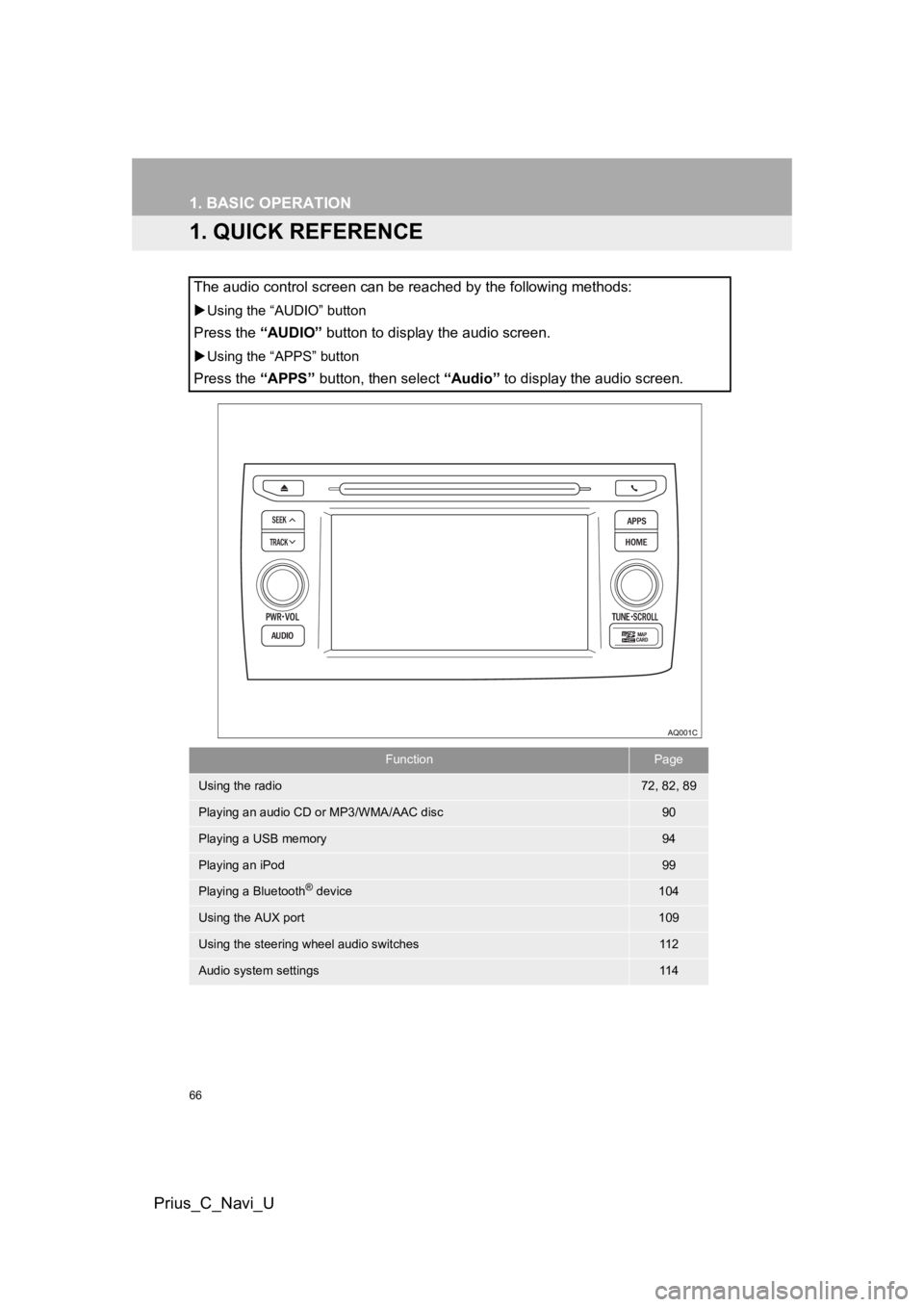
The audio control screen can be reached by the following methods:
Using the “AUDIO” button
Press the “AUDIO” button to display the audio screen.
Using the “APPS” button
Press the “APPS” button, then select “Audio” to display the audio screen.
FunctionPage
Using the radio72, 82, 89
Playing an audio CD or MP3/WMA/AAC disc90
Playing a USB memory94
Playing an iPod99
Playing a Bluetooth® device104
Using the AUX port109
Using the steering wheel audio switches11 2
Audio system settings11 4
Page 89 of 282
89
2. RADIO OPERATION
Prius_C_Navi_U
AUDIO SYSTEM
3
3. INTERNET RADIO
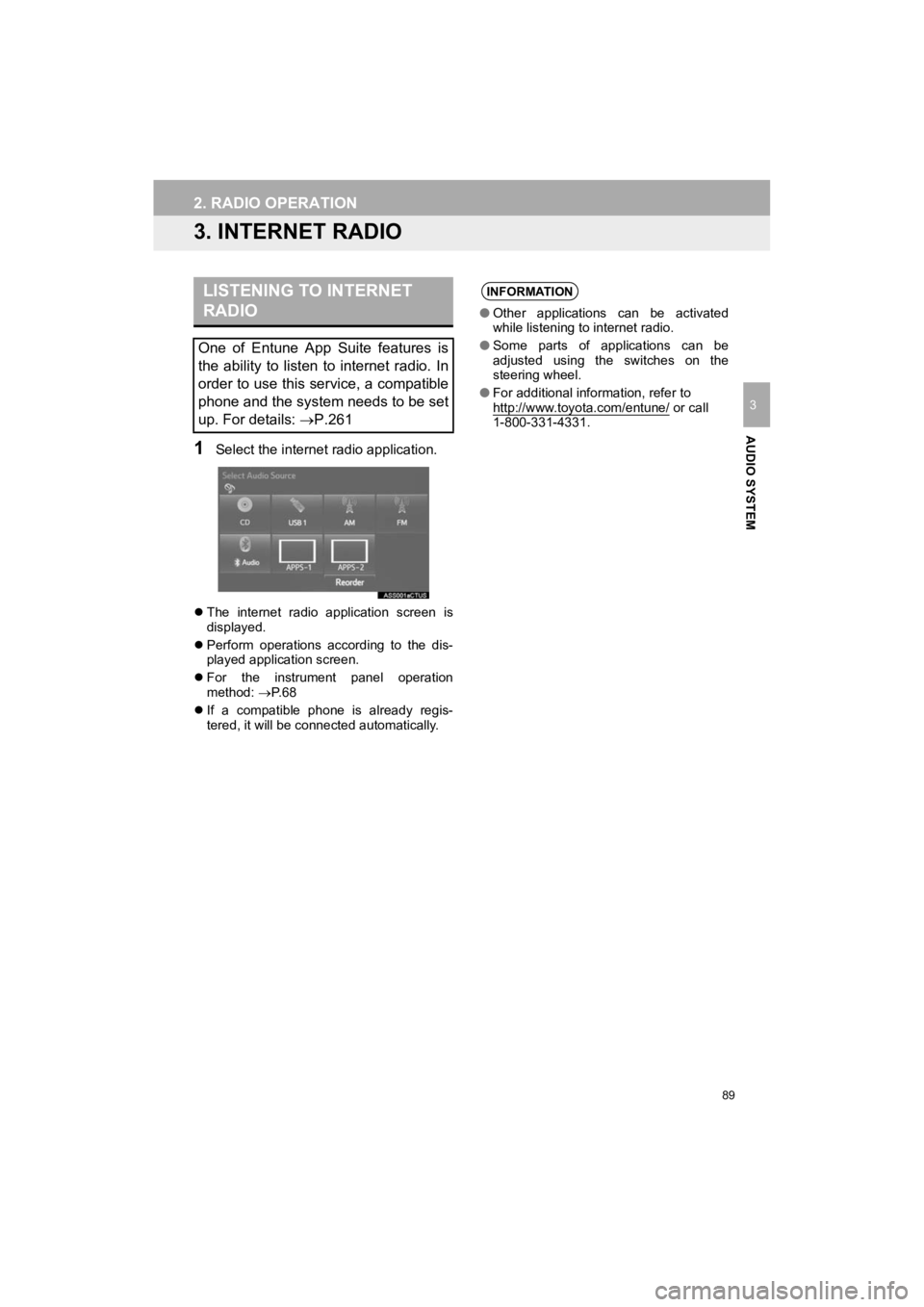
1Select the internet radio application.
The internet radio application screen is
displayed.
Perform operations according to the dis-
played application screen.
For the instrument panel operation
method: P. 6 8
If a compatible phone is already regis-
tered, it will be connected automatically.
LISTENING TO INTERNET
RADIO
One of Entune App Suite features is
the ability to listen to internet radio. In
order to use this service, a compatible
phone and the system needs to be set
up. For details: P.261
INFORMATION
●Other applications can be activated
while listening to internet radio.
● Some parts of applications can be
adjusted using the switches on the
steering wheel.
● For additional information, refer to
http://www.toyota.com/entune/
or call
1-800-331-4331.
Page 112 of 282
112
Prius_C_Navi_U
4. AUDIO REMOTE CONTROLS
1. STEERING SWITCHES
“MODE” switch
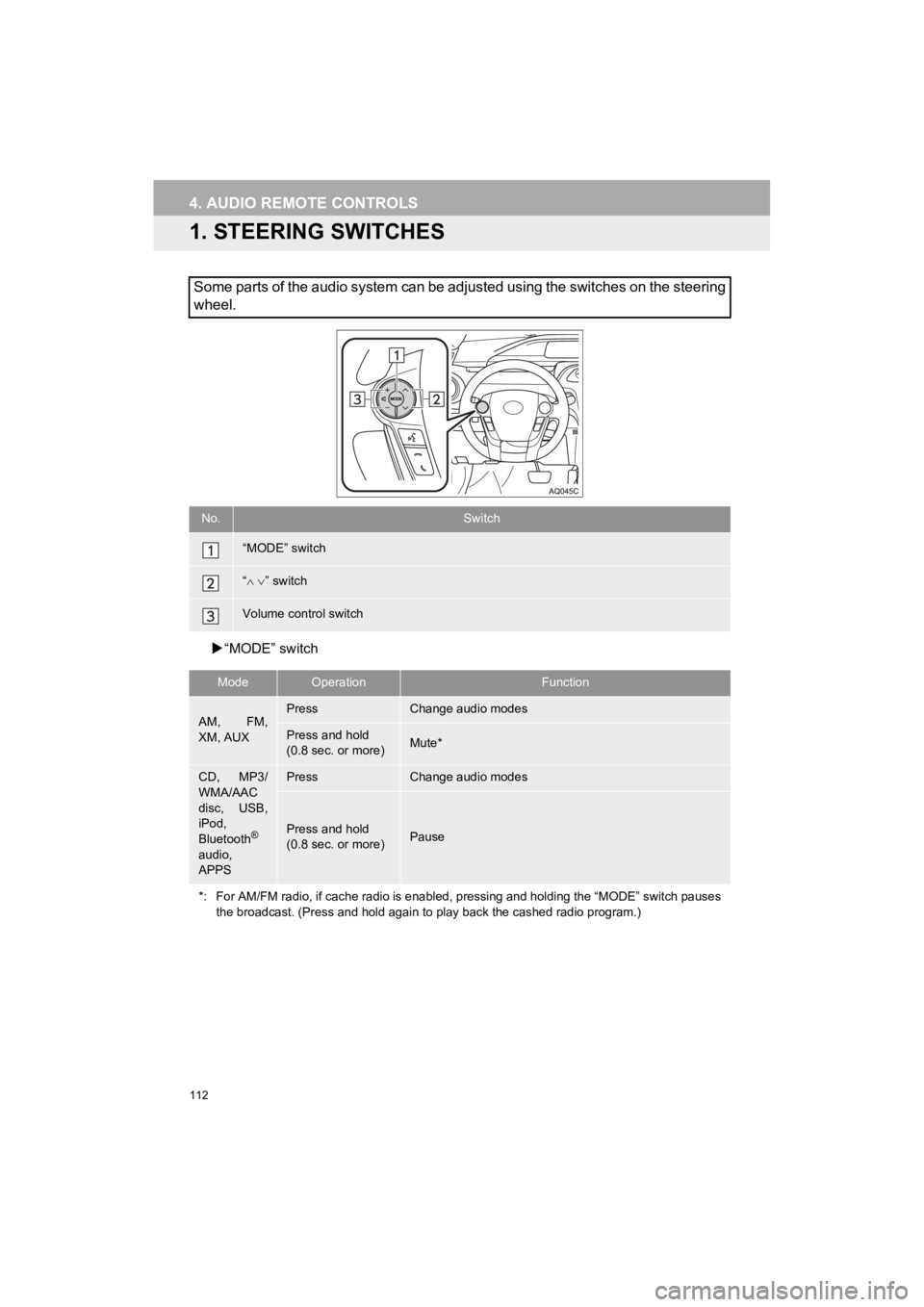
Some parts of the audio system can be adjusted using the switch es on the steering
wheel.
No.Switch
“MODE” switch
“ ” switch
Volume control switch
ModeOperationFunction
AM, FM,
XM, AUXPressChange audio modes
Press and hold
(0.8 sec. or more)Mute*
CD, MP3/
WMA/AAC
disc, USB,
iPod,
Bluetooth
®
audio,
APPS
PressChange audio modes
Press and hold
(0.8 sec. or more)Pause
*: For AM/FM radio, if cache radio is enabled, pressing and hold ing the “MODE” switch pauses
the broadcast. (Press and hold agai n to play back the cashed radio program.)
Page 126 of 282
126
Prius_C_Navi_U
1. VOICE COMMAND SYSTEM OPERATION
1. VOICE COMMAND SYSTEM
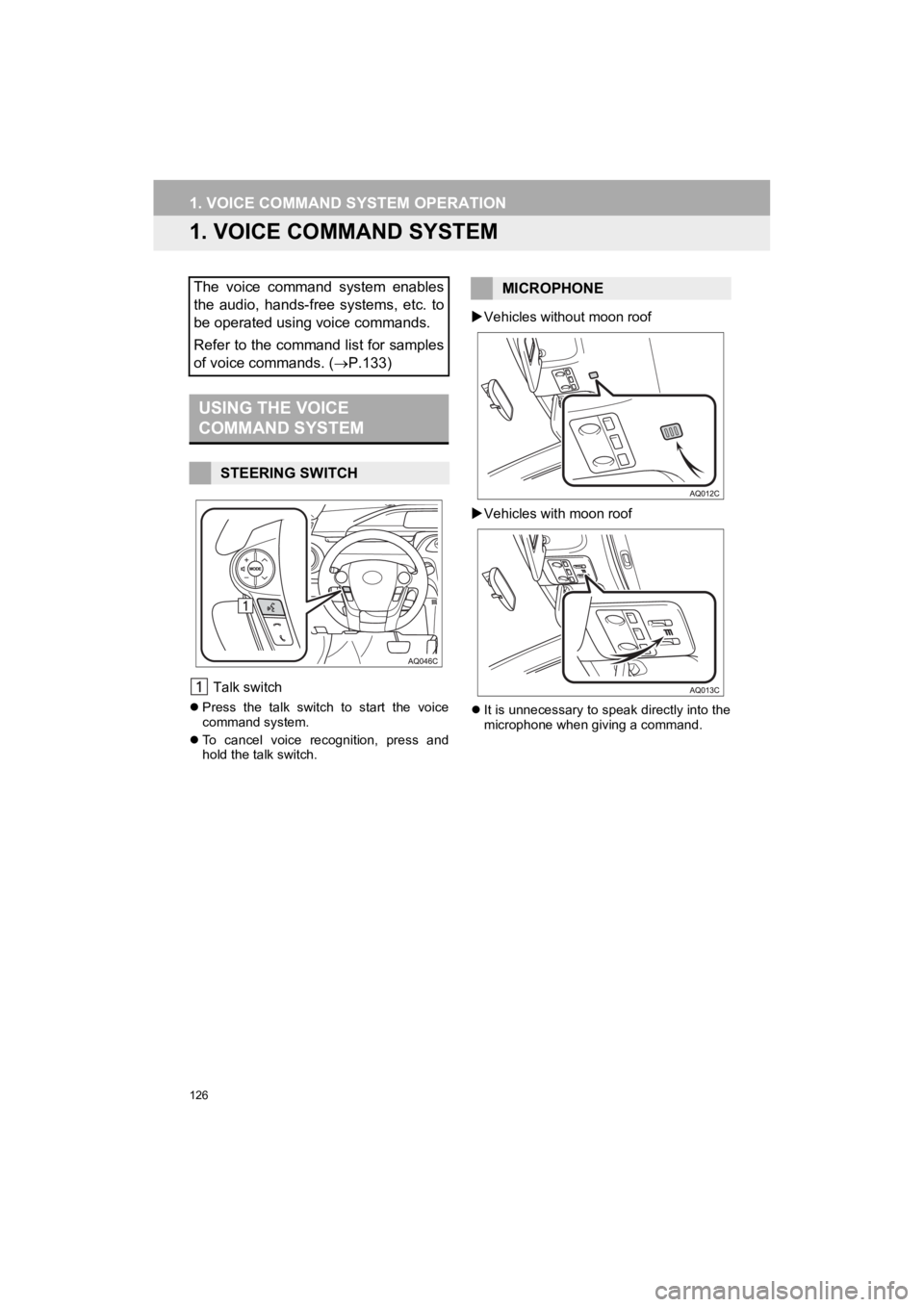
Talk switch
Press the talk switch to start the voice
command system.
To cancel voice recognition, press and
hold the talk switch.
Vehicles without moon roof
Vehicles with moon roof
It is unnecessary to speak directly into the
microphone when giving a command.
The voice command system enables
the audio, hands-free systems, etc. to
be operated using voice commands.
Refer to the command list for samples
of voice commands. ( P.133)
USING THE VOICE
COMMAND SYSTEM
STEERING SWITCH
MICROPHONE
Page 131 of 282
131
1. VOICE COMMAND SYSTEM OPERATION
Prius_C_Navi_U
VOICE COMMAND SYSTEM
4
1Press the talk switch.
2Say the phone number.
In the same manner as it is displayed on
the screen, “Dial
“Dial a number” say the phone number.
Say the phone number one digit at a time.
For example, if the phone number is
2345678:
Say “two three four five six seven
eight”
Do not say “twenty three forty five sixty
seven eight”
3Say “Call” or press the switch on
the steering wheel.
When the confirmation screen appears,
say “Yes” or select “Yes” or press the
switch on the steering wheel.
VOICE COMMAND EXAMPLE:
DIAL NUMBER
When the system recognizes multiple
phone numbers, a phone number candi-
date list will be displayed on the screen.
Pressing the
switch on the steering
wheel makes a call to the top entry on
the list. If the desired phone number is
not displayed on the top of the screen,
say the number of the desired phone
number from the candidate list to select
a phone number from the candidate list.
Page 135 of 282
135
Prius_C_Navi_U
VOICE COMMAND SYSTEM
4
2. MOBILE ASSISTANT OPERATION
1. MOBILE ASSISTANT
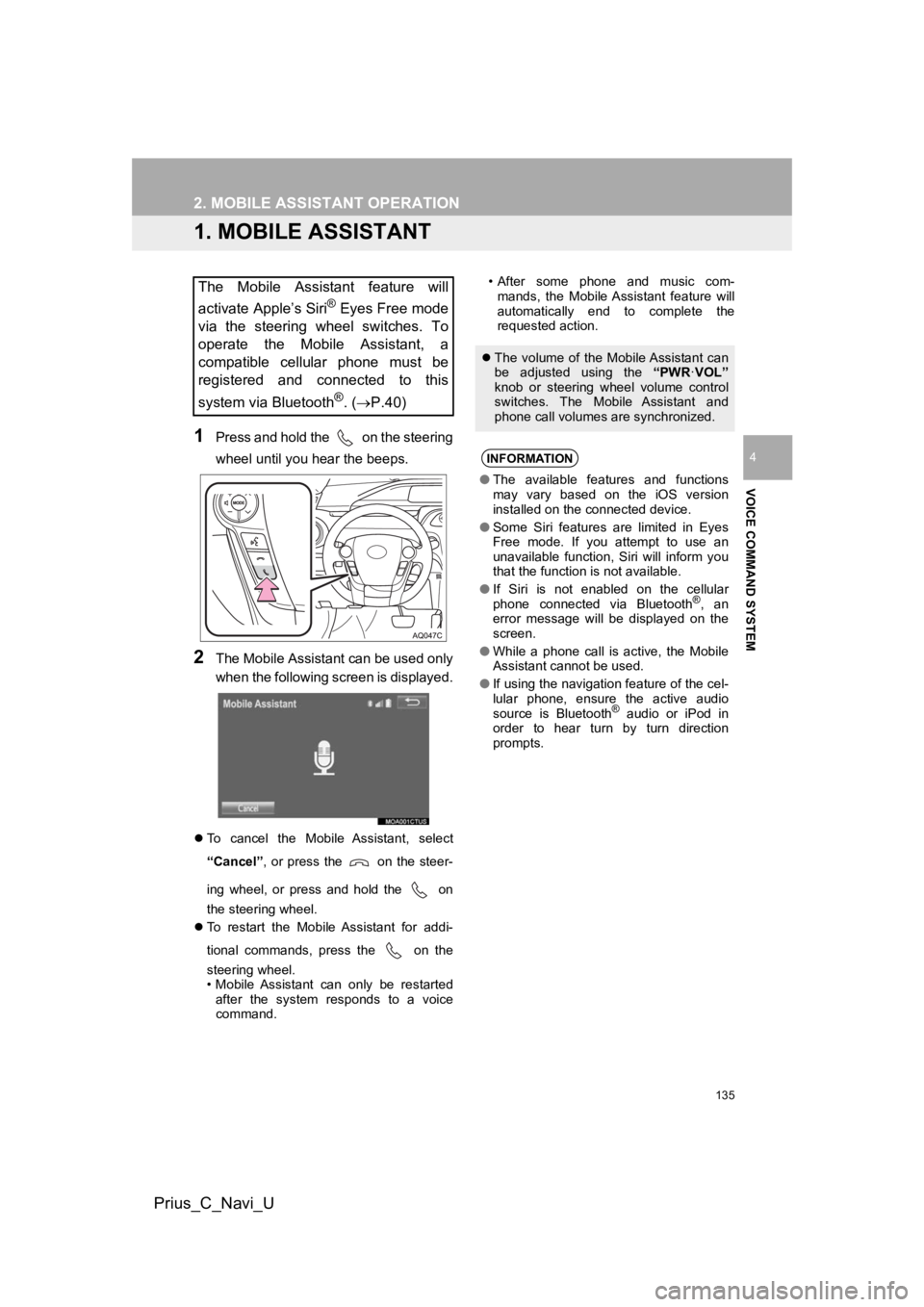
1Press and hold the on the steering
wheel until you hear the beeps.
2The Mobile Assistant can be used only
when the following screen is displayed.
To cancel the Mobile Assistant, select
“Cancel”, or press the on the steer-
ing wheel, or press and hold the on
the steering wheel.
To restart the Mobile Assistant for addi-
tional commands, press the on the
steering wheel.
• Mobile Assistant can only be restarted
after the system responds to a voice
command. • After some phone and music com-
mands, the Mobile Assistant feature will
automatically end to complete the
requested action.
The Mobile Assistant feature will
activate Apple’s Siri
® Eyes Free mode
via the steering wheel switches. To
operate the Mobile Assistant, a
compatible cellular phone must be
registered and connected to this
system via Bluetooth
®. ( P.40)
The volume of the Mobile Assistant can
be adjusted using the “PWR·VOL”
knob or steering wheel volume control
switches. The Mobile Assistant and
phone call volumes are synchronized.
INFORMATION
● The available features and functions
may vary based on the iOS version
installed on the connected device.
● Some Siri features are limited in Eyes
Free mode. If you attempt to use an
unavailable function, Siri will inform you
that the function is not available.
● If Siri is not enabled on the cellular
phone connected via Bluetooth
®, an
error message will be displayed on the
screen.
● While a phone call is active, the Mobile
Assistant cannot be used.
● If using the navigation feature of the cel-
lular phone, ensure the active audio
source is Bluetooth
® audio or iPod in
order to hear turn by turn direction
prompts.
Page 142 of 282
142
Prius_C_Navi_U
1. REAR VIEW MONITOR SYSTEM
1. REAR VIEW MONITOR SYSTEM*
The rear view monitor system assists
the driver by displaying an image of the
view behind the vehicle with fixed
guide lines on the screen while backing
up, for example while parking.
INFORMATION
●The screen illustrations used in this text
are intended as examples, and may dif-
fer from the image that is actually dis-
played on the screen.
DRIVING PRECAUTIONS
The rear view monitor system is a sup-
plemental device intended to assist the
driver when backing up. When backing
up, be sure to visually check all around
the vehicle both directly and using the
mirrors before proceeding. If you do
not, you may hit another vehicle, and
could possibly cause an accident.
Pay attention to the following precau-
tions when using the rear view monitor
system.
*: If equipped
WA R N I N G
●Never depend on the rear view monitor
system entirely when backing up. The
image and the position of the guide lines
displayed on the screen may differ from
the actual state.
Use caution, just as you would when
backing up any vehicle.
● Be sure to back up slowly, depressing
the brake pedal to control vehicle speed.
● The instructions given are only guide-
lines. When and how much to turn the
steering wheel will vary according to
traffic conditions, road surface condi-
tions, vehicle condition, etc. when park-
ing. It is necessary to be fully aware of
this before using the rear view monitor
system.
● When parking, be sure to check that the
parking space will accommodate your
vehicle before maneuvering into it.
● Do not use the rear view monitor system
in the following cases:
• On icy or slick road surfaces, or in
snow
• When using tire chains or emergency tires
• When the back door is not closed com- pletely
• On roads that are not flat or straight, such as curves or slopes
● In low temperatures, the screen may
darken or the image may become faint.
The image could distort when the vehi-
cle is moving, or you may become
unable to see the image on the screen.
Be sure to visually check all around the
vehicle both directly and using the mir-
rors before proceeding.
● If the tire sizes are changed, the position
of the fixed guide lines displayed on the
screen may change.
● The camera uses a special lens. The
distances between objects and pedestri-
ans that appear in the image displayed
on the screen will differ from the actual
distances.( P.145)