lock TOYOTA PRIUS C 2020 Owners Manual
[x] Cancel search | Manufacturer: TOYOTA, Model Year: 2020, Model line: PRIUS C, Model: TOYOTA PRIUS C 2020Pages: 600, PDF Size: 12.02 MB
Page 490 of 600
4908-2. Steps to take in an emergency
PRIUS c_U
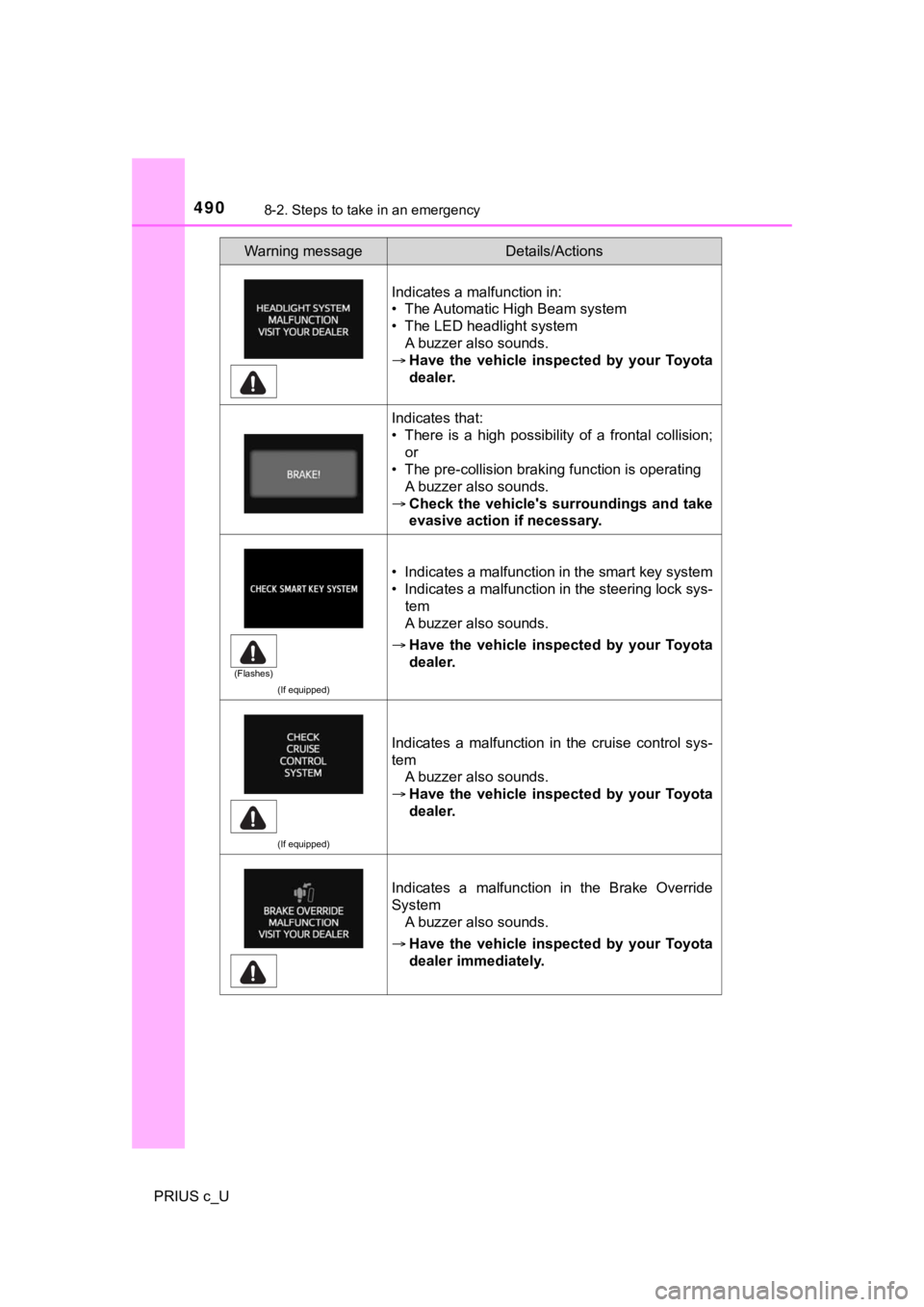
Indicates a malfunction in:
• The Automatic High Beam system
• The LED headlight systemA buzzer also sounds.
Have the vehicle inspected by your Toyota
dealer.
Indicates that:
• There is a high possibility of a frontal collision;
or
• The pre-collision braking function is operating A buzzer also sounds.
Check the vehicle's surroundings and take
evasive action if necessary.
(If equipped)
• Indicates a malfunction in the smart key system
• Indicates a malfunction in the steering lock sys-
tem
A buzzer also sounds.
Have the vehicle inspected by your Toyota
dealer.
(If equipped)
Indicates a malfunction in the cruise control sys-
tem
A buzzer also sounds.
Have the vehicle inspected by your Toyota
dealer.
Indicates a malfunction in the Brake Override
System
A buzzer also sounds.
Have the vehicle inspected by your Toyota
dealer immediately.
Warning messageDetails/Actions
(Flashes)
Page 494 of 600
4948-2. Steps to take in an emergency
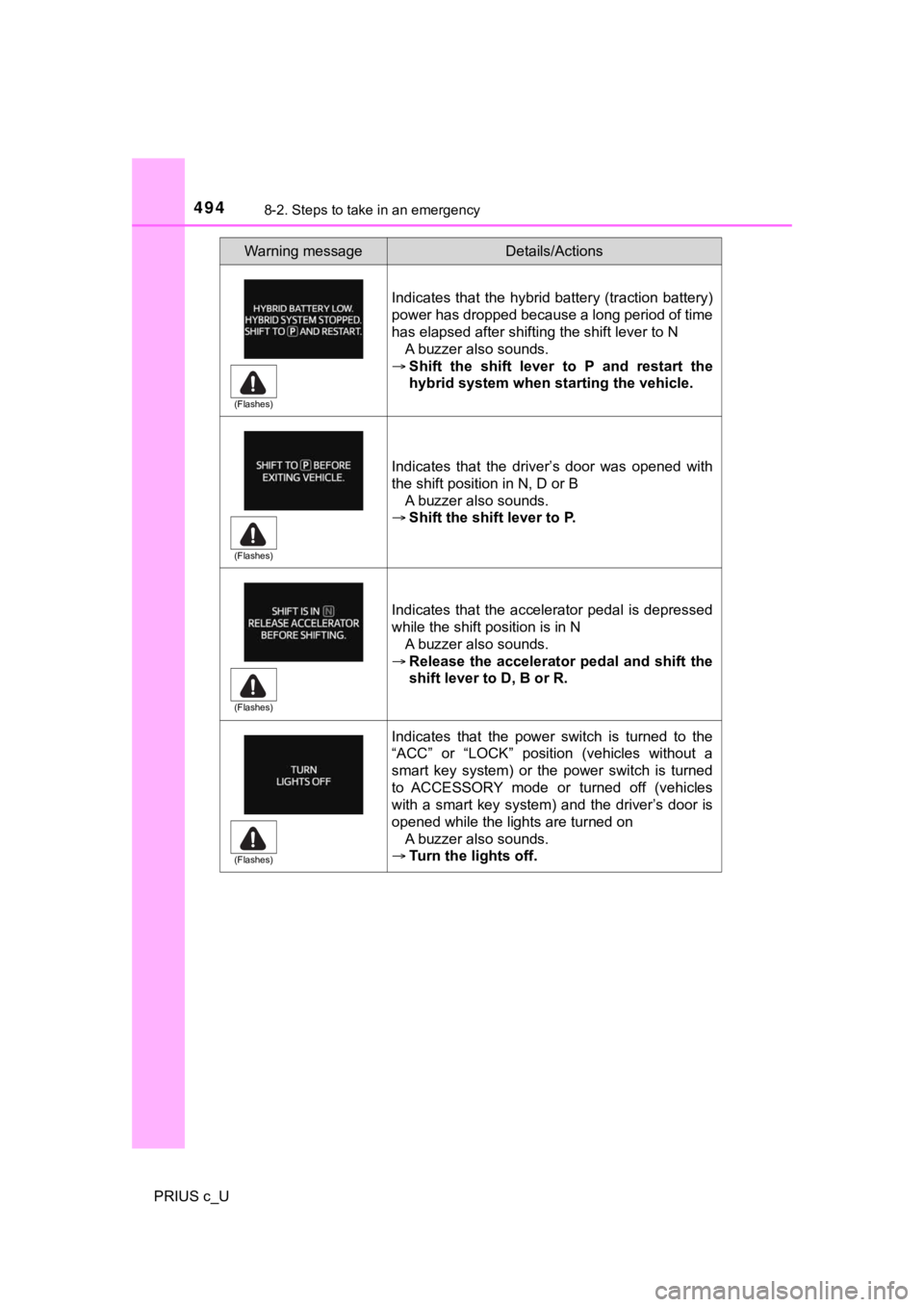
PRIUS c_UIndicates that the hybrid battery (traction battery)
power has dropped because a long period of time
has elapsed after shifting the shift lever to N
A buzzer also sounds.
Shift the shift lever to P and restart the
hybrid system when starting the vehicle.
Indicates that the driver’s door was opened with
the shift position in N, D or B A buzzer also sounds.
Shift the shift lever to P.
Indicates that the accelerator pedal is depressed
while the shift position is in N A buzzer also sounds.
Release the accelerator pedal and shift the
shift lever to D, B or R.
Indicates that the power switch is turned to the
“ACC” or “LOCK” position (vehicles without a
smart key system) or the power switch is turned
to ACCESSORY mode or turned off (vehicles
with a smart key system) and the driver’s door is
opened while the lights are turned on A buzzer also sounds.
Turn the lights off.
Warning messageDetails/Actions
(Flashes)
(Flashes)
(Flashes)
(Flashes)
Page 499 of 600
4998-2. Steps to take in an emergency
8
When trouble arises
PRIUS c_U
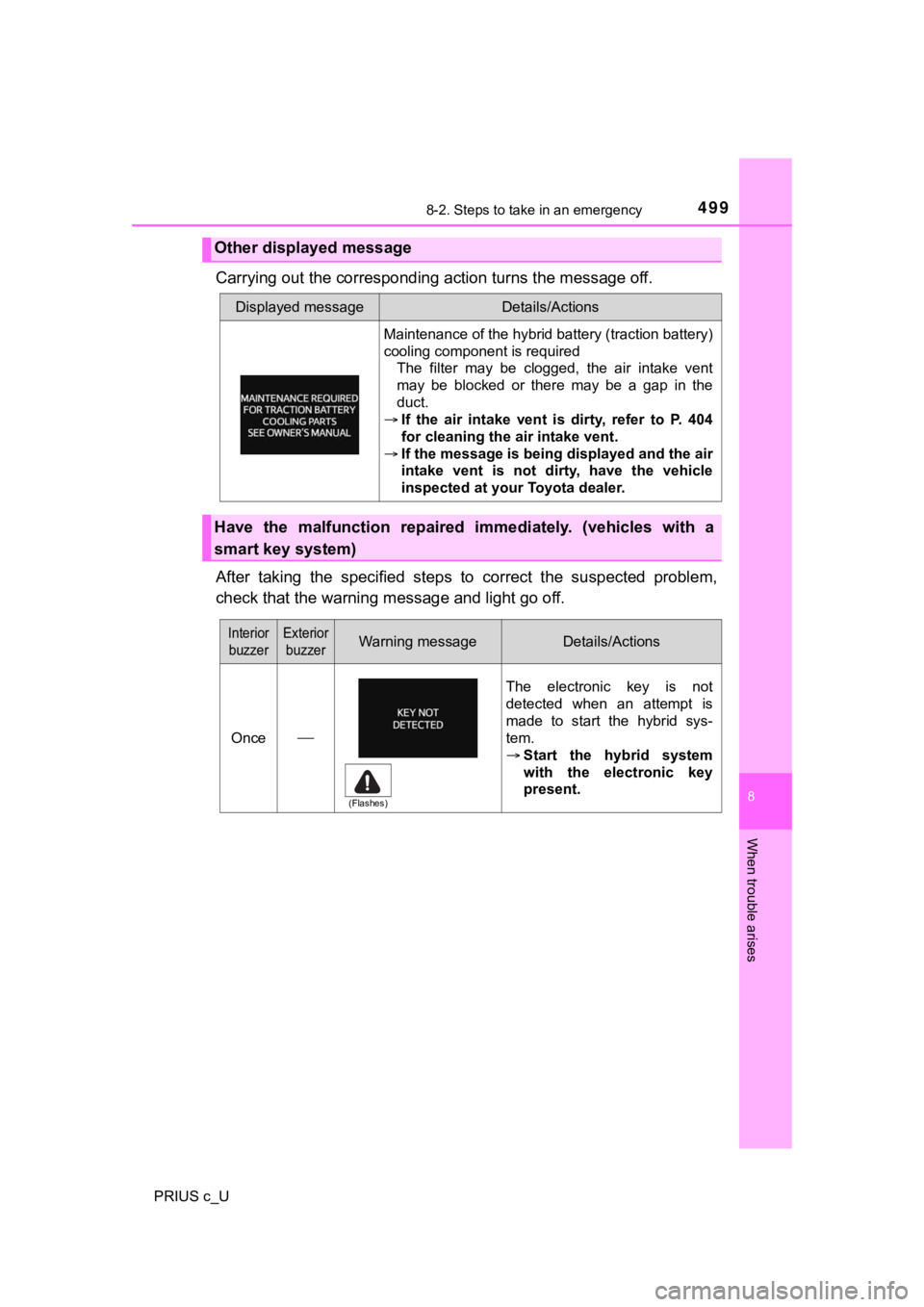
Carrying out the corresponding action turns the message off.
After taking the specified steps to correct the suspected probl em,
check that the warning m essage and light go off.
Other displayed message
Displayed messageDetails/Actions
Maintenance of the hybrid battery (traction battery)
cooling component is required
The filter may be clogged, the air intake vent
may be blocked or there may be a gap in the
duct.
If the air intake vent is dirty, refer to P. 404
for cleaning the air intake vent.
If the message is being displayed and the air
intake vent is not dirty, have the vehicle
inspected at your Toyota dealer.
Have the malfunction repaired immediately. (vehicles with a
smart key system)
Interior
buzzerExterior buzzerWarning messageDetails/Actions
Once The electronic key is not
detected when an attempt is
made to start the hybrid sys-
tem.
Start the hybrid system
with the electronic key
present.
(Flashes)
Page 500 of 600
5008-2. Steps to take in an emergency
PRIUS c_U
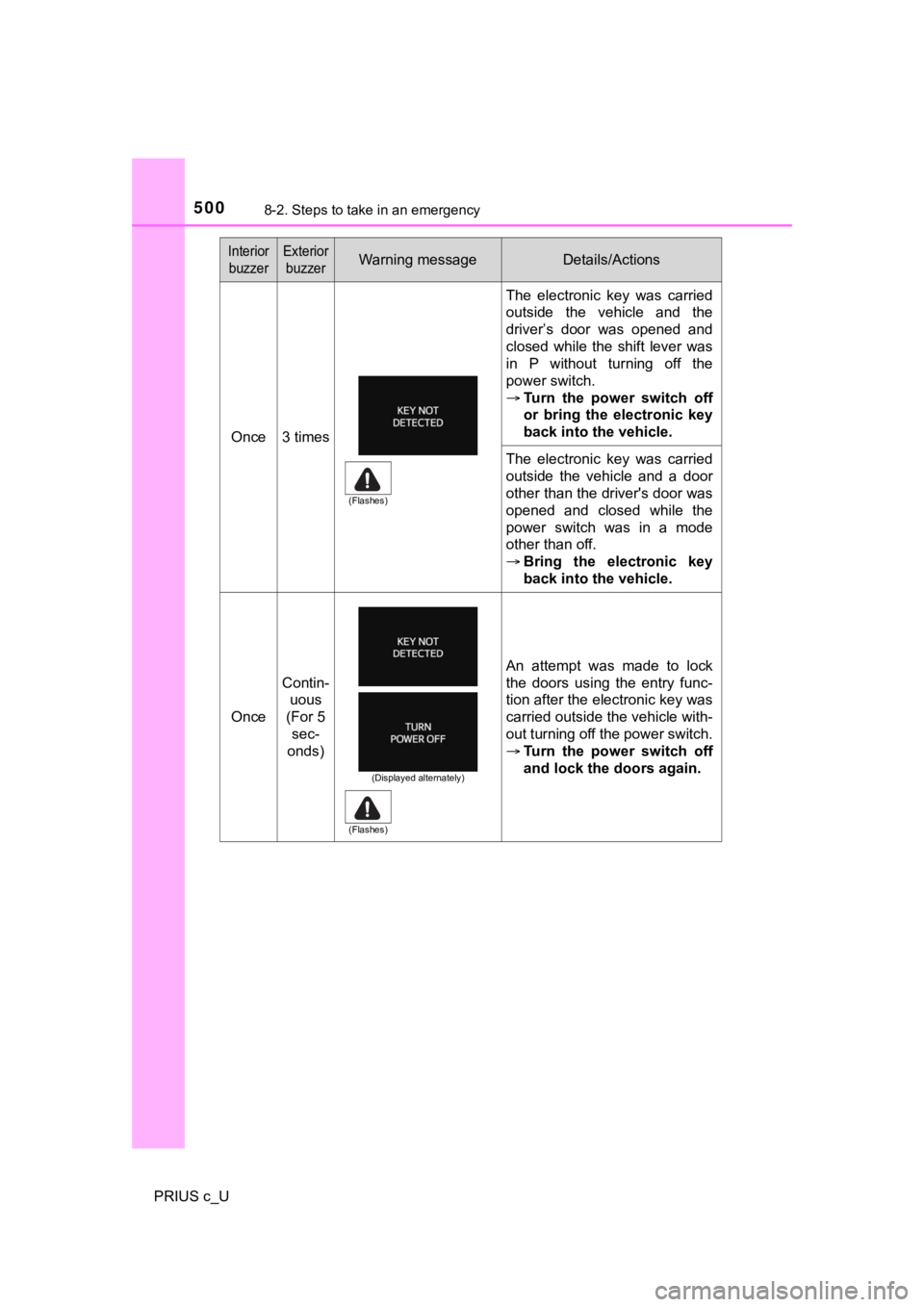
Once3 times
The electronic key was carried
outside the vehicle and the
driver’s door was opened and
closed while the shift lever was
in P without turning off the
power switch.
Turn the power switch off
or bring the electronic key
back into the vehicle.
The electronic key was carried
outside the vehicle and a door
other than the driver's door was
opened and closed while the
power switch was in a mode
other than off.
Bring the electronic key
back into the vehicle.
Once
Contin-
uous
(For 5 sec-
onds)
An attempt was made to lock
the doors using the entry func-
tion after the electronic key was
carried outside the vehicle with-
out turning off the power switch.
Turn the power switch off
and lock the doors again.
Interior
buzzerExterior buzzerWarning messageDetails/Actions
(Flashes)
(Displayed alternately)
(Flashes)
Page 502 of 600
5028-2. Steps to take in an emergency
PRIUS c_U
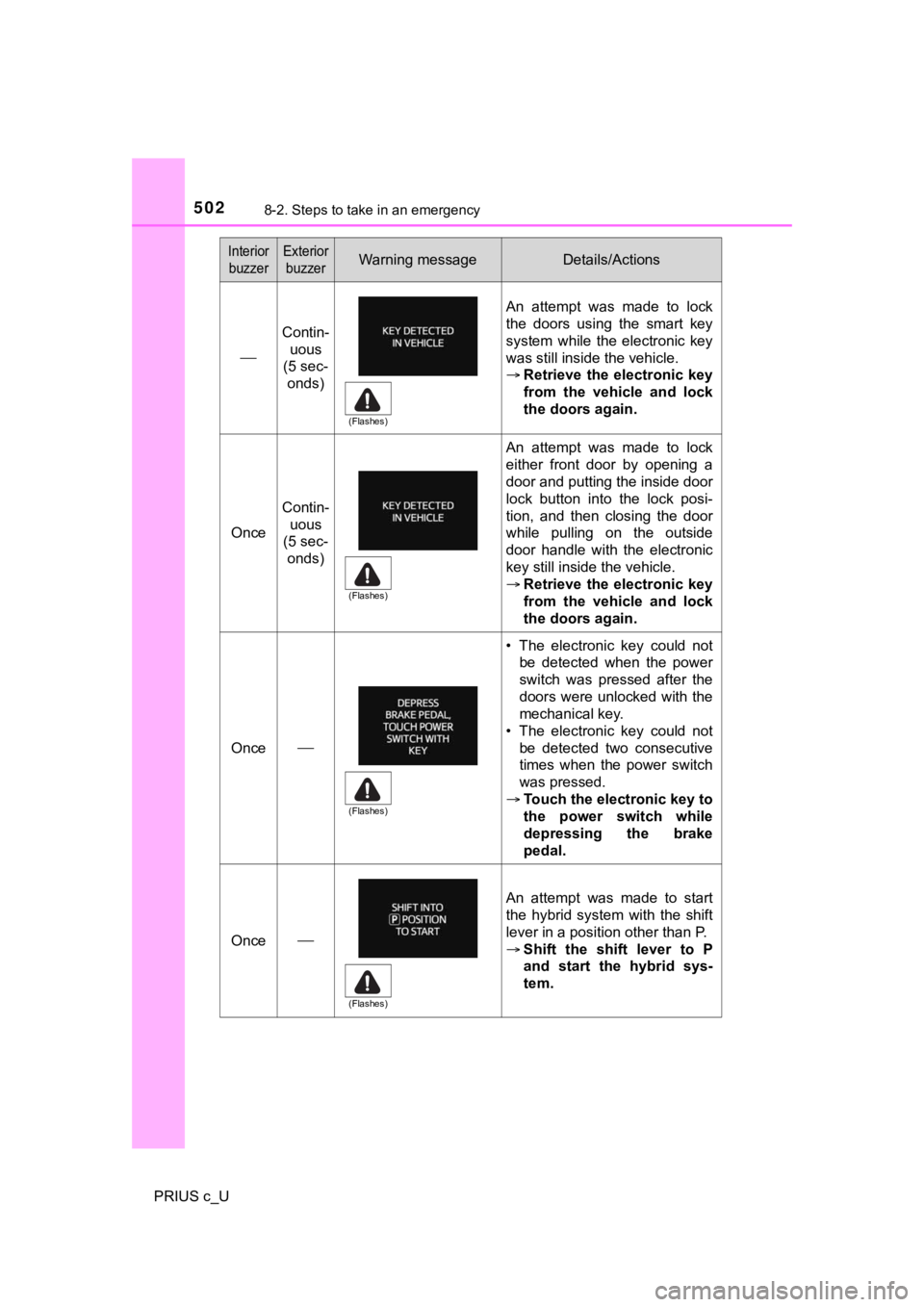
Contin-uous
(5 sec-
onds)
An attempt was made to lock
the doors using the smart key
system while the electronic key
was still inside the vehicle.
Retrieve the electronic key
from the vehicle and lock
the doors again.
Once
Contin-
uous
(5 sec- onds)
An attempt was made to lock
either front door by opening a
door and putting the inside door
lock button into the lock posi-
tion, and then closing the door
while pulling on the outside
door handle with the electronic
key still inside the vehicle.
Retrieve the electronic key
from the vehicle and lock
the doors again.
Once
• The electronic key could not
be detected when the power
switch was pressed after the
doors were unlocked with the
mechanical key.
• The electronic key could not
be detected two consecutive
times when the power switch
was pressed.
Touch the electronic key to
the power switch while
depressing the brake
pedal.
Once
An attempt was made to start
the hybrid system with the shift
lever in a position other than P.
Shift the shift lever to P
and start the hybrid sys-
tem.
Interior
buzzerExterior buzzerWarning messageDetails/Actions
(Flashes)
(Flashes)
(Flashes)
(Flashes)
Page 504 of 600
5048-2. Steps to take in an emergency
PRIUS c_U
■Warning buzzer
In some cases, the buzzer may not be heard because of noisy pla ce or an
audio sound.
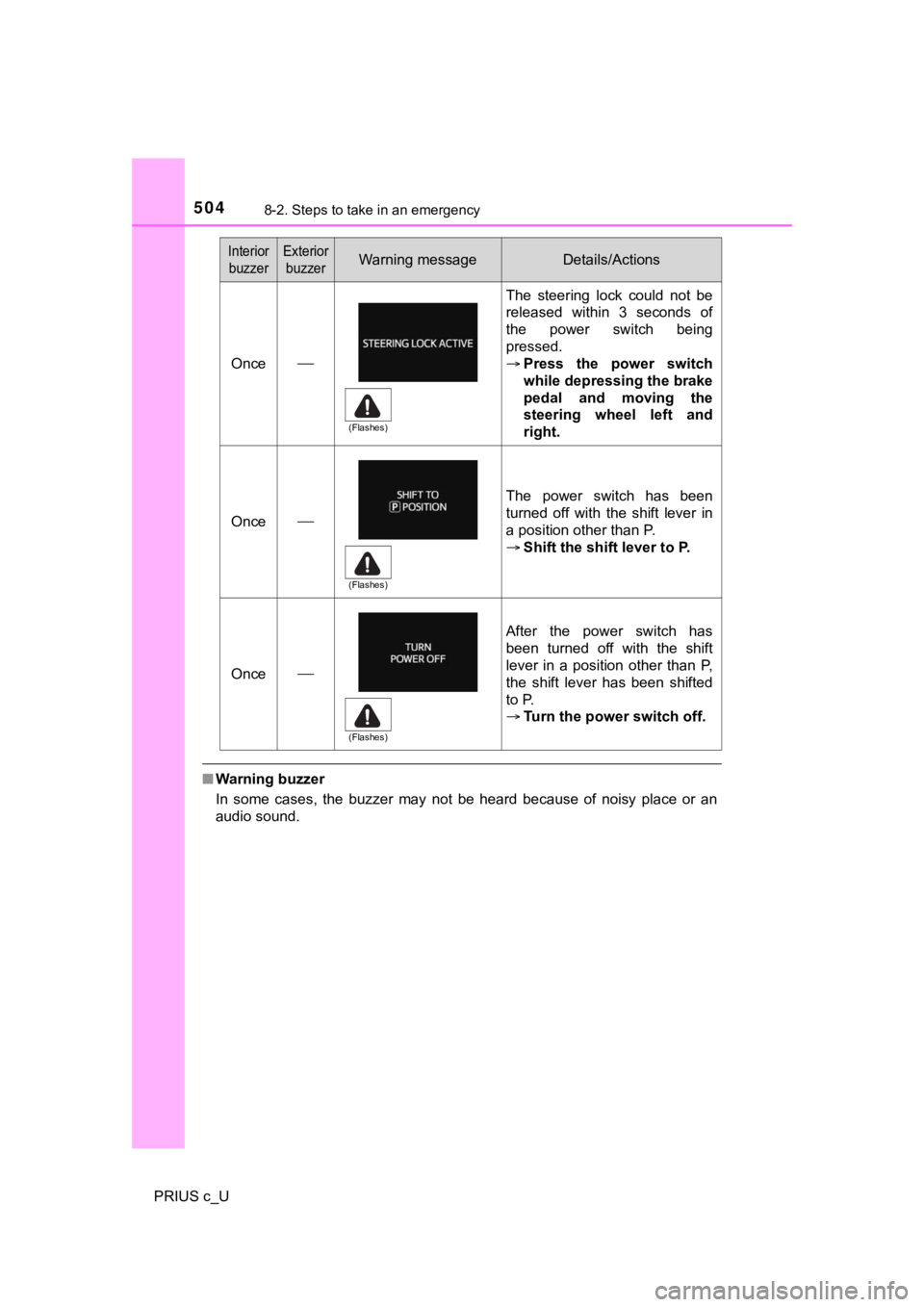
Once
The steering lock could not be
released within 3 seconds of
the power switch being
pressed.
Press the power switch
while depressing the brake
pedal and moving the
steering wheel left and
right.
Once
The power switch has been
turned off with the shift lever in
a position other than P.
Shift the shift lever to P.
Once
After the power switch has
been turned off with the shift
lever in a position other than P,
the shift lever has been shifted
to P.
Turn the power switch off.
Interior
buzzerExterior buzzerWarning messageDetails/Actions
(Flashes)
(Flashes)
(Flashes)
Page 518 of 600
5188-2. Steps to take in an emergency
PRIUS c_U
One of the following may be the cause of the problem:
● Vehicles with a smart key system: The electronic key may not be
functioning properly. ( P. 520)
● There may not be sufficient f uel in the vehicle’s tank.
Refuel the vehicle. ( P. 221)
● Vehicles with immobilizer syste m: There may be a malfunction in
the immobilizer system. ( P. 8 8 )
● There may be a malfunction i n the steering lock system.
● Vehicles with a smart key system : The hybrid system may be mal-
functioning due to an electrical problem such as an open circui t or a
blown fuse. However, depending on the type of malfunction, an
interim measure is available to start the hybrid system. (P. 519)
One of the following may be the cause of the problem:
● The 12-volt battery may be discharged. ( P. 522)
● The 12-volt battery terminal conn ections may be loose or corroded.
( P. 431)
If the hybrid system will not start
Reasons for the hybrid system not starting vary depending on
the situation. Check the followi ng and perform the appropriate
procedure:
The hybrid system will not start even though the correct starting
procedure is being followed. ( P. 188, 192)
The interior lights and headlights are dim, or the horn does no t
sound or sounds at a low volume.
Page 520 of 600
5208-2. Steps to take in an emergency
PRIUS c_U
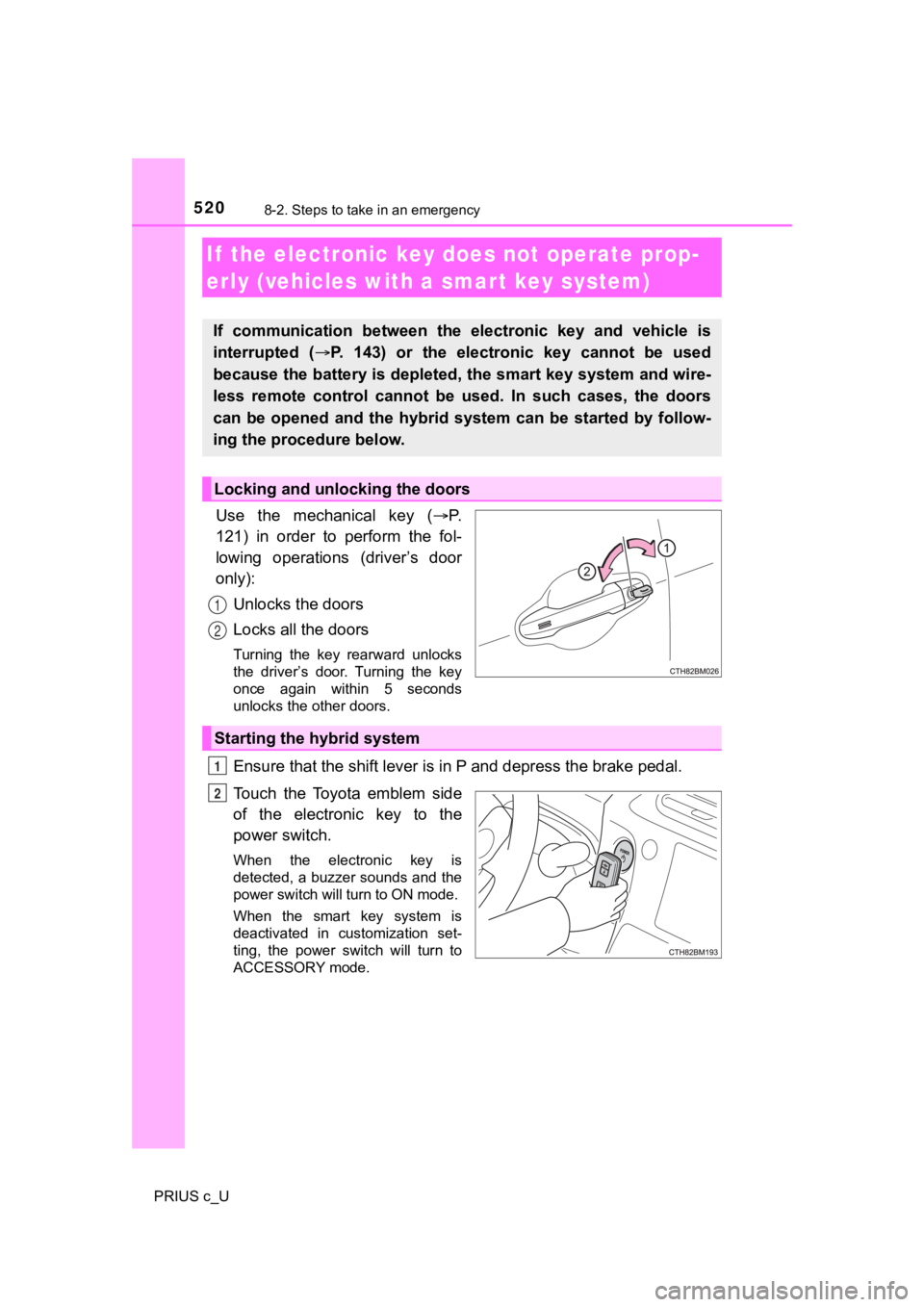
Use the mechanical key (P.
121) in order to perform the fol-
lowing operations (driver’s door
only):
Unlocks the doors
Locks all the doors
Turning the key rearward unlocks
the driver’s door. Turning the key
once again within 5 seconds
unlocks the other doors.
Ensure that the shift lever is in P and depress the brake pedal.
Touch the Toyota emblem side
of the electronic key to the
power switch.
When the electronic key is
detected, a buzzer sounds and the
power switch will turn to ON mode.
When the smart key system is
deactivated in customization set-
ting, the power switch will turn to
ACCESSORY mode.
If the electronic key does not operate prop-
erly (vehicles with a smar t key system)
If communication between the electronic key and vehicle is
interrupted ( P. 143) or the electronic key cannot be used
because the battery is depleted, the smart key system and wire-
less remote control cannot be used. In such cases, the doors
can be opened and the hybrid system can be started by follow-
ing the procedure below.
Locking and unlocking the doors
1
2
Starting the hybrid system
1
2
Page 521 of 600
5218-2. Steps to take in an emergency
8
When trouble arises
PRIUS c_U
Firmly depress the brake pedal and check that is displayed
on the multi-information display.
Press the power switc h shortly and firmly.
In the event that the power s witch still cannot be operated, co ntact
your Toyota dealer.
■ Stopping the hybrid system
Shift the shift lever to P and press the power switch as you normally do when
stopping the hybrid system.
■ Replacing the key battery
As the above procedure is a temporary measure, it is recommende d that the
electronic key battery be replaced immediately when the battery is depleted.
( P. 451)
■ Changing power switch modes
Release the brake pedal and press the power switch in above.
The hybrid system does not start and modes will be changed each time the
switch is pressed. ( P. 193)
■ If the doors cannot be locked o r unlocked by the smart key syst em
Lock and unlock the doors by the mechanical key or wireless rem ote control.
■ When the electronic key does not work properly
●Make sure that the smart key system has not been deactivated in the cus-
tomization setting. If it is off, turn the function on.
(Customizable features: P. 560)
● Check if battery-saving mode is set. If it is set, cancel the f unction.
( P. 142)
3
4
3
Page 525 of 600

5258-2. Steps to take in an emergency
8
When trouble arises
PRIUS c_U
■Starting the hybrid system when the 12-volt battery is discharged
The hybrid system cannot be started by push-starting.
■ To prevent 12-volt battery discharge
●Turn off the headlights and the audio system while the hybrid s ystem is off.
● Turn off any unnecessary electrical components when the vehicle is running
at a low speed for an extended period, such as in heavy traffic .
■ Precautions when the 12-volt batte ry is discharged (vehicles with a
smart key system)
● In some cases, it may not be possible to unlock the doors using the smart
key system immediately after the 12-volt battery has been disco nnected and
reconnected. Use the wireless remote control or the mechanical key to lock
or unlock the doors.
● The hybrid system may not start on the first attempt after the 12-volt battery
has recharged but will start normally after the second attempt. This is not a
malfunction.
● The power switch mode is memorized by the vehicle. When the 12- volt bat-
tery is reconnected, the system will return to the mode it was in before the
12-volt battery was discharged. Before disconnecting the 12-volt battery,
turn the power switch off.
If the power switch was in ACCESSORY or ON mode before the 12-volt bat-
tery was discharged, the audio system and/or air conditioning system may
operate when the 12-volt battery is reconnected.
■ When the 12-volt battery is removed or discharged
● Information stored in the ECU is cleared. When the 12-volt batt ery is
depleted, have the vehicle inspected at your Toyota dealer.
● Some systems may require initialization. ( P. 565)
■ When removing the 12-vo lt battery terminals
When the 12-volt battery terminals are removed, the information stored in the
ECU is cleared. Before removing the 12-volt battery terminals, contact your
Toyota dealer.
■ Charging the 12-volt battery
The electricity stored in the 12-volt battery will discharge gr adually even when
the vehicle is not in use, due to natural discharge and the dra ining effects of
certain electrical appliances. If the vehicle is left for a lon g time, the 12-volt
battery may discharge, and the hybrid system may be unable to s tart. (The
12-volt battery recharges automatically while the hybrid system is operating.)