lock TOYOTA PRIUS C 2020 Repair Manual
[x] Cancel search | Manufacturer: TOYOTA, Model Year: 2020, Model line: PRIUS C, Model: TOYOTA PRIUS C 2020Pages: 600, PDF Size: 12.02 MB
Page 189 of 600
1894-2. Driving procedures
4
Driving
PRIUS c_U
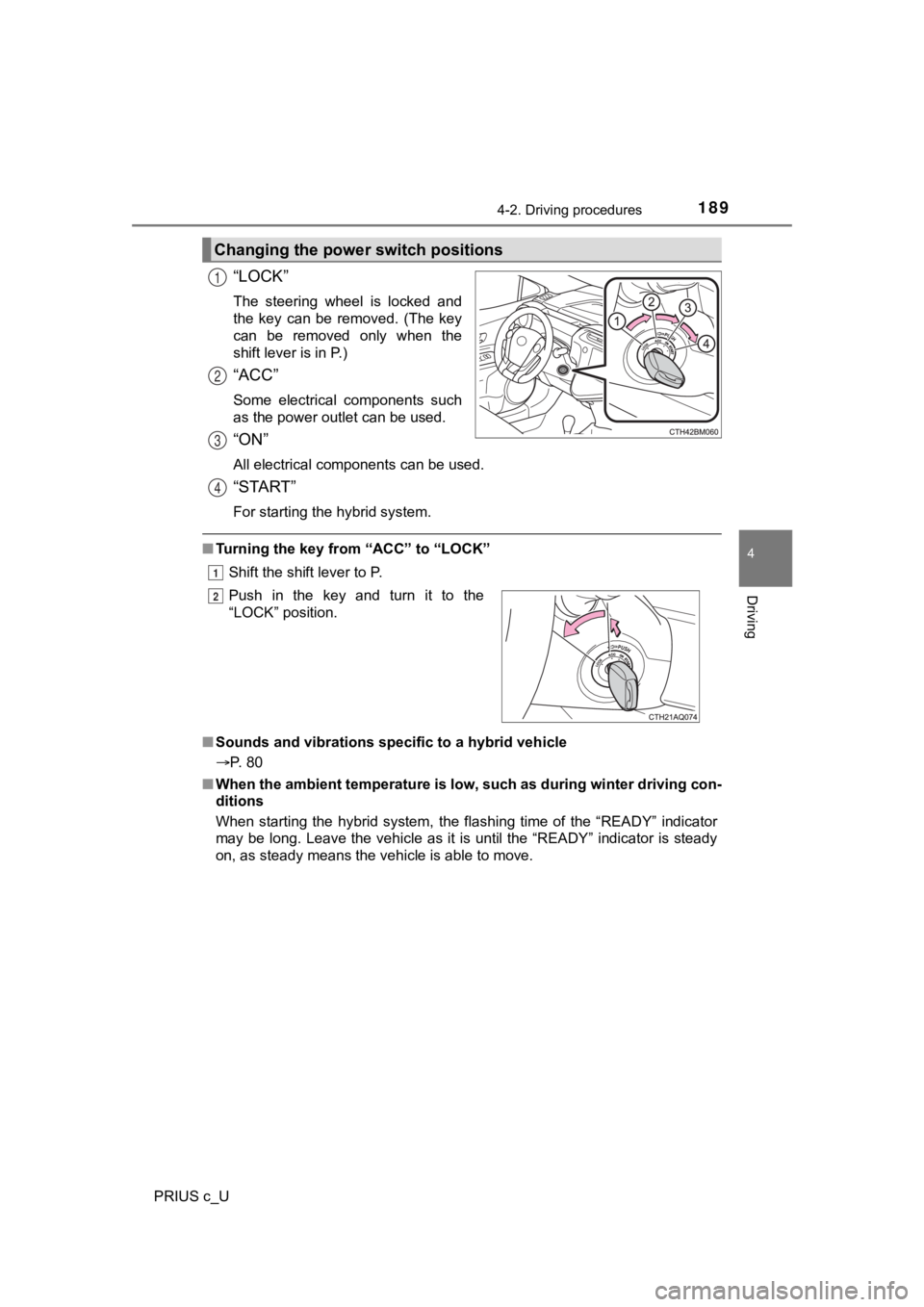
“LOCK”
The steering wheel is locked and
the key can be removed. (The key
can be removed only when the
shift lever is in P.)
“ACC”
Some electrical components such
as the power outlet can be used.
“ON”
All electrical components can be used.
“START”
For starting the hybrid system.
■Turning the key from “ACC” to “LOCK”
Shift the shift lever to P.
■ Sounds and vibrations sp ecific to a hybrid vehicle
P. 80
■ When the ambient temperature is low, such as during winter driv ing con-
ditions
When starting the hybrid system, the flashing time of the “READ Y” indicator
may be long. Leave the vehicle as it is until the “READY” indic ator is steady
on, as steady means the vehicle is able to move.
Changing the power switch positions
1
2
3
4
1
Push in the key and turn it to the
“LOCK” position.2
Page 190 of 600
1904-2. Driving procedures
PRIUS c_U■
If the hybrid system does not start (vehicles with immobilizer system)
The immobilizer system may not have been deactivated. ( P. 88)
Contact your Toyota dealer.
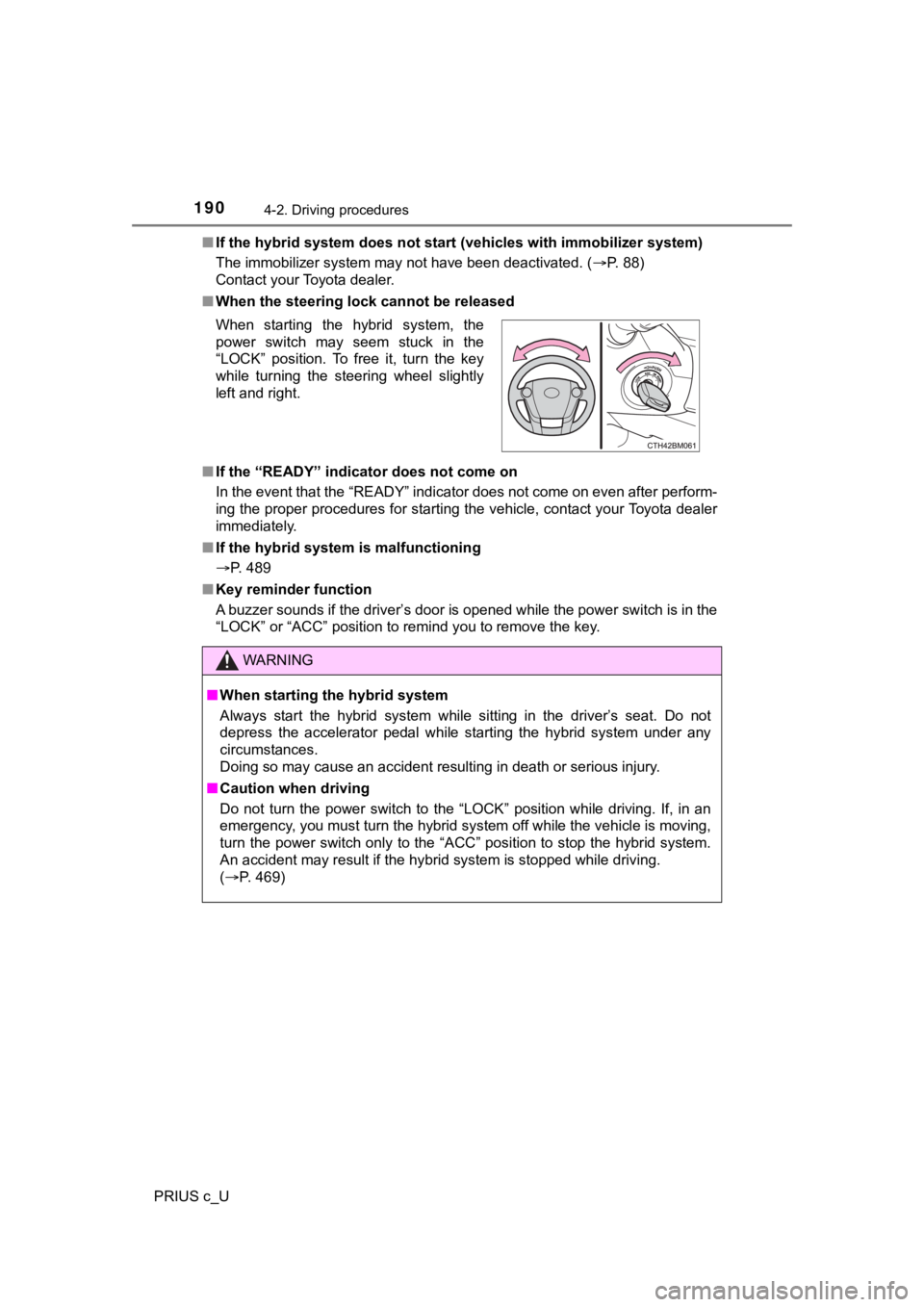
■ When the steering lock cannot be released
■ If the “READY” indicator does not come on
In the event that the “READY” indicator does not come on even a fter perform-
ing the proper procedures for starting the vehicle, contact you r Toyota dealer
immediately.
■ If the hybrid system is malfunctioning
P. 489
■ Key reminder function
A buzzer sounds if the driver’s door is opened while the power switch is in the
“LOCK” or “ACC” position to remind you to remove the key. When starting the hybrid system, the
power switch may seem stuck in the
“LOCK” position. To free it, turn the key
while turning the steering wheel slightly
left and right.
WARNING
■ When starting the hybrid system
Always start the hybrid system while sitting in the driver’s se at. Do not
depress the accelerator pedal while starting the hybrid system under any
circumstances.
Doing so may cause an accident resulting in death or serious in jury.
■ Caution when driving
Do not turn the power switch to the “LOCK” position while drivi ng. If, in an
emergency, you must turn the hybrid system off while the vehicle is moving,
turn the power switch only to the “ACC” position to stop the hy brid system.
An accident may result if the hybrid system is stopped while dr iving.
( P. 469)
Page 195 of 600
1954-2. Driving procedures
4
Driving
PRIUS c_U■
Notes for the entry function
P. 144
■ If the hybrid system does not start
●The immobilizer system may not have been deactivated. ( P. 88)
Contact your Toyota dealer.
■ Steering lock
After turning the power switch off and opening and closing the doors, the
steering wheel will be locked due to the steering lock function. Operating the
power switch again automatically cancels the steering lock.
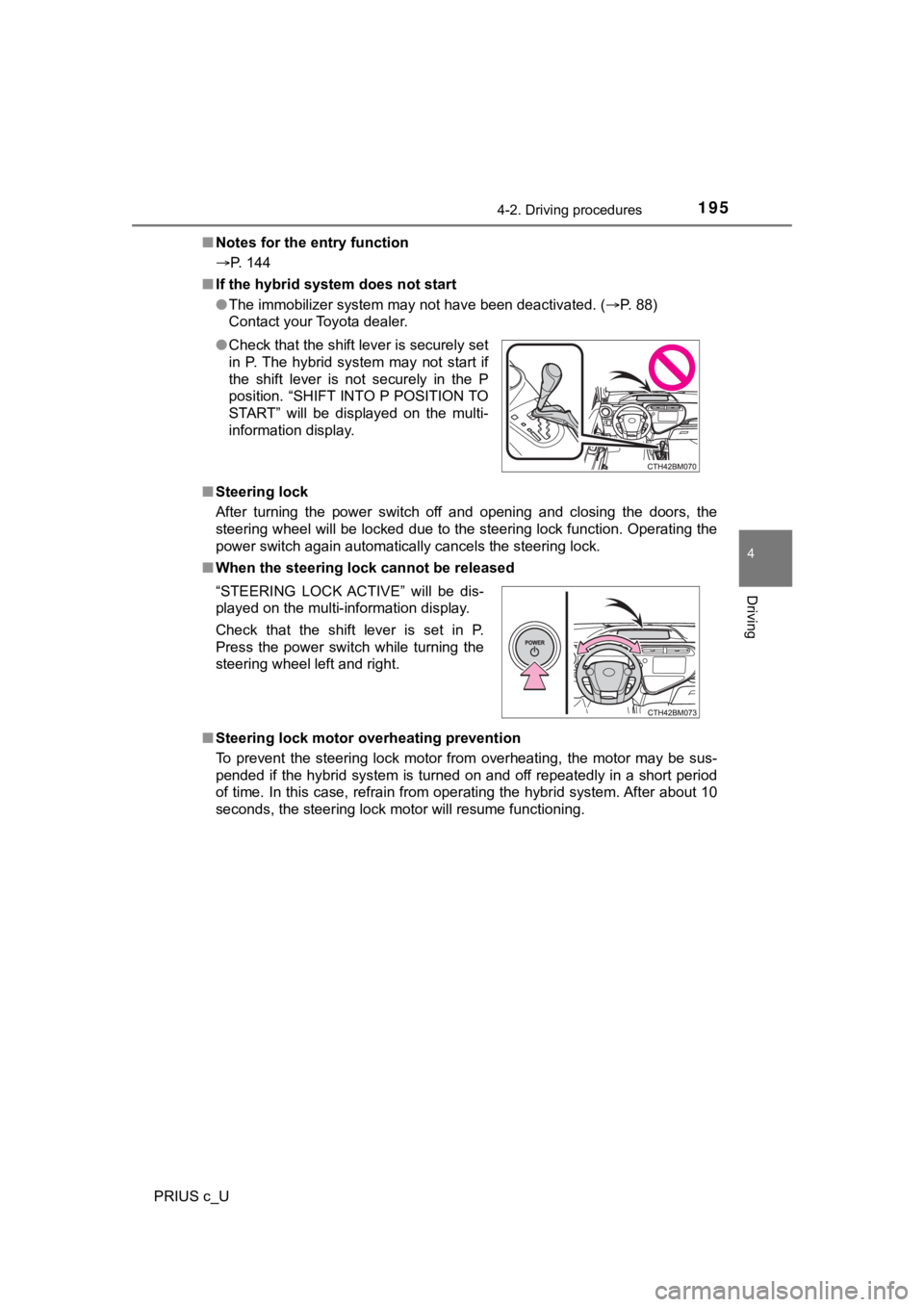
■ When the steering lock cannot be released
■ Steering lock motor overheating prevention
To prevent the steering lock motor from overheating, the motor may be sus-
pended if the hybrid system is turned on and off repeatedly in a short period
of time. In this case, refrain from operating the hybrid system . After about 10
seconds, the steering lock motor will resume functioning. ● Check that the shift lever is securely set
in P. The hybrid system may not start if
the shift lever is not securely in the P
position. “SHIFT INTO P POSITION TO
START” will be displayed on the multi-
information display.
“STEERING LOCK ACTIVE” will be dis-
played on the multi-information display.
Check that the shift lever is set in P.
Press the power switch while turning the
steering wheel left and right.
Page 197 of 600

1974-2. Driving procedures
4
Driving
PRIUS c_U
WARNING
■When starting the hybrid system
Always start the hybrid system while sitting in the driver’s se at. Do not
depress the accelerator pedal while starting the hybrid system under any
circumstances.
Doing so may cause an accident resulting in death or serious in jury.
■ Caution while driving
If a hybrid system failure occurs while the vehicle is moving, do not lock or
open the doors until the vehicle reaches a safe and complete stop. Doing so
may cause activation of the steering lock which may lead to an accident,
resulting in death or serious injury.
■ When “CHECK SMART KEY SYSTEM” is displayed on the multi-infor-
mation display
The system may be malfunctioning. Have the vehicle inspected by your
Toyota dealer immediately. Failure to do so may lead to the sys tem operat-
ing abnormally and possibly cause an accident or damage to the vehicle.
■ Stopping the hybrid system in an emergency
If you want to stop the hybrid system in an emergency while dri ving the
vehicle, press and hold the power switch for more than 2 second s, or press
it briefly 3 times or more in succession. ( P. 469)
However, do not touch the power switch while driving except in an emer-
gency. Turning the hybrid system off while driving will not cau se loss of
steering or braking control, however, power assist to the steer ing will be
lost. This will make it more difficult to steer smoothly, so yo u should pull over
and stop the vehicle as soon as it is safe to do so.
Page 204 of 600
2044-2. Driving procedures
PRIUS c_U■
Restraining sudden start (Drive-Start Control)
P. 173
■ Shift lock system
The shift lock system is a system to prevent accidental operation of the shift
lever in starting.
The shift lever can be shifted from P only when the power switc h is in the
“ON” position (vehicles without a smart key system) or the power switch is in
ON mode (vehicles with a smart key system) and the brake pedal is being
depressed.
■ If the shift lever cannot be shifted from P
First, check whether the brake pedal is being depressed.
If the shift lever cannot be shifted with your foot on the brak e pedal, there may
be a problem with the shift lock system. Have the vehicle inspected by your
Toyota dealer immediately.
The following steps may be used as an emergency measure to ensu re that
the shift lever can be shifted.
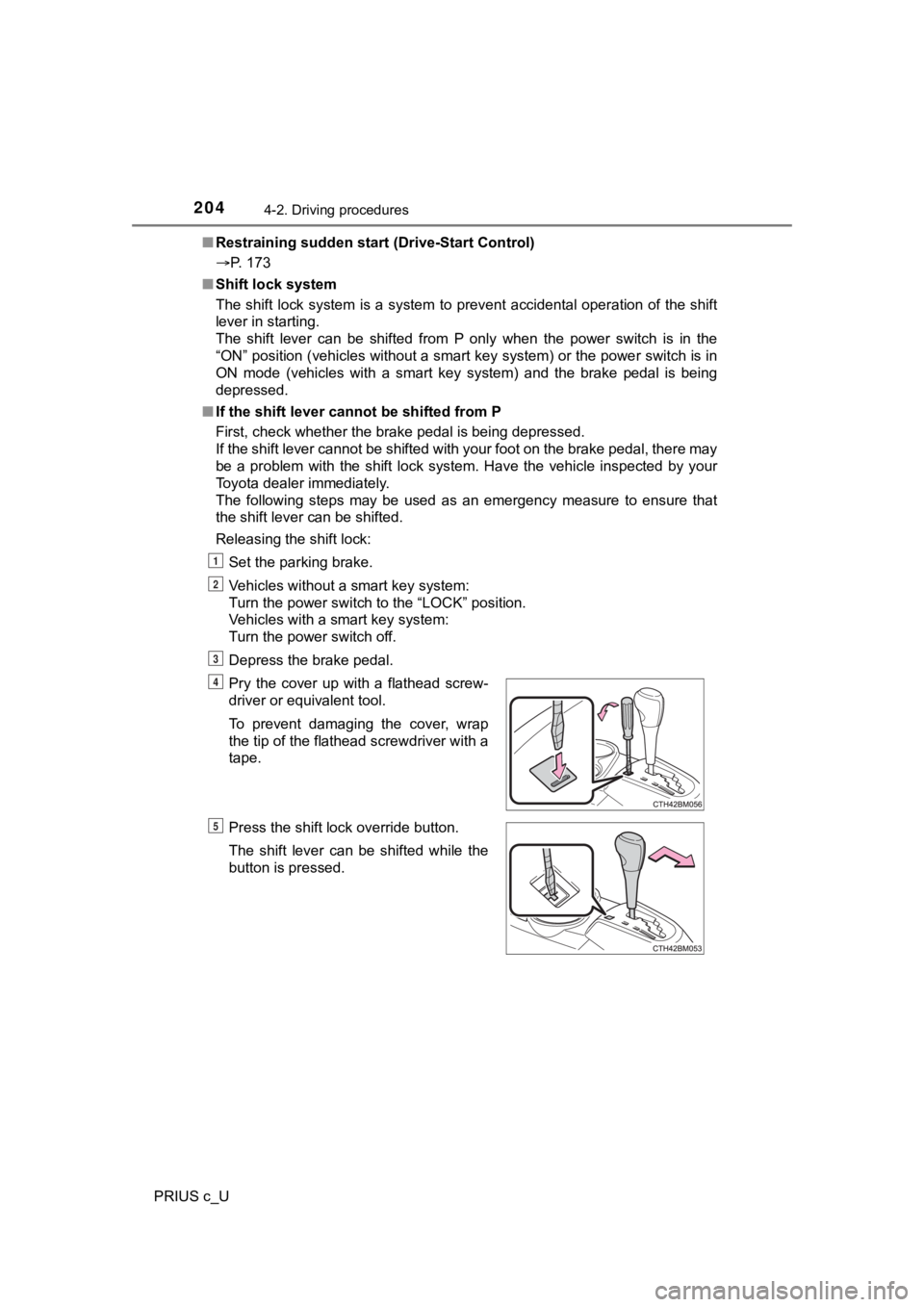
Releasing the shift lock:
Set the parking brake.
Vehicles without a smart key system:
Turn the power switch to the “LOCK” position.
Vehicles with a smart key system:
Turn the power switch off.
Depress the brake pedal.
Pry the cover up with a flathead screw-
driver or equivalent tool.
To prevent damaging the cover, wrap
the tip of the flathead screwdriver with a
tape.
Press the shift lock override button.
The shift lever can be shifted while the
button is pressed.
1
2
3
4
5
Page 205 of 600

2054-2. Driving procedures
4
Driving
PRIUS c_U
WARNING
■When driving on slippery road surfaces
Do not accelerate or shift gears suddenly.
Sudden changes in engine braking may cause the vehicle to spin or skid,
resulting in an accident.
■ To prevent an accident when releasing the shift lock
Before pressing the shift lock override button, make sure to se t the parking
brake and depress the brake pedal.
If the accelerator pedal is accidentally depressed instead of t he brake pedal
when the shift lock override button is pressed and the shift le ver is shifted
out of P, the vehicle may suddenly start, possibly leading to a n accident
resulting in death or serious injury.
NOTICE
■ Hybrid battery (tract ion battery) charge
If the shift lever is in N, the hybrid battery (traction batter y) will not be
charged even when the engine is running. Therefore, if the vehi cle is left
with the shift lever in N for a long period of time, the hybrid battery (traction
battery) will discharge, and this may result in the vehicle not being able to
start.
Page 210 of 600

2104-3. Operating the lights and wipers
PRIUS c_U
■Daytime running light system
●The daytime running lights illuminate using the same lights as the headlights
and illuminate darker than the headlights.
● Type A: To make your vehicle more visible to other drivers during daytime
driving, the daytime running lights turn on automatically when all of the fol-
lowing conditions are met. (The daytime running lights are not designed for
use at night.)
• The hybrid system is started
• The parking brake is released
• The headlight switch is in the or position
The daytime running lights remain on after they illuminate, even if the parking
brake is set again.
● Type B: To make your vehicle more visible to other drivers during daytime
driving, the daytime running lights turn on automatically when all of the fol-
lowing conditions are met. (The daytime running lights are not designed for
use at night.)
• The hybrid system is started
• The parking brake is released
• The headlight switch is in the or position
The daytime running lights remain on after they illuminate, even if the parking
brake is set again.
● For the U.S.A.: Daytime running lights can be turned off by ope rating the
switch.
● Compared to turning on the headlights, the daytime running ligh t system
offers greater durability and consumes less electricity, so it can help improve
fuel economy.
■ Automatic light off system
Vehicles without a smart key system
● When the headlights are on: The headlights and tail lights turn off 30 sec-
onds after the power switch is turned to the “ACC” or “LOCK” po sition and a
door is opened and closed. (Vehicles with a wireless remote con trol: The
lights turn off immediately if on the key is pressed after all the doors
are locked.)
● When only the tail lights are on: The tail lights turn off automatically if the
power switch is turned to the “ACC” or “LOCK” position and the driver’s door
is opened.
To turn the lights on again, turn the power switch to “ON” posi tion, or turn the
light switch off once and then back to or .
If any of the doors or trunk lid is kept open, the lights automatically turn off
after 20 minutes.
Page 211 of 600
2114-3. Operating the lights and wipers
4
Driving
PRIUS c_U
Vehicles with a smart key system
● When the headlights are on: The headlights and tail lights turn off 30 sec-
onds after the power switch is turned to ACCESSORY mode or turn ed off
and a door is opened and closed. (The lights turn off immediate ly if on
the key is pressed after all the doors are locked.)
● When only the tail lights are on: The tail lights turn off automatically if the
power switch is turned to ACCESSORY mode or turned off and the driver’s
door is opened.
To turn the lights on again, turn the power switch to ON mode, or turn the light
switch off once and then back to or .
If any of the doors or trunk lid is kept open, the lights automatically turn off
after 20 minutes.
■ Light reminder buzzer
Vehicles without a smart key system
A buzzer sounds when the power switch is turned to the “LOCK” o r “ACC”
position and the driver's door is opened while the lights are t urned on.
Vehicles with a smart key system
A buzzer sounds when the power switch is turned off or turned t o ACCES-
SORY mode and the driver's door is opened while the lights are turned on.
■ 12-volt battery-saving function
In the following conditions, the remaining lights will go off automatically after
20 minutes in order to prevent the vehicle battery from being d ischarged:
● The headlights and/or tail lights are on.
● The power switch is turned to the “ACC” or “LOCK” position (veh icles with-
out a smart key system) or the power switch is turned to ACCESSORY
mode or turned off (vehicles with a smart key system).
This function will be canceled in any of the following situatio ns:
● When the power switch is turned to the “ON” position (vehicles without a
smart key system) or the power switch is turned to ON mode (veh icles with
a smart key system).
● When the light switch is operated.
● When the door is opened or closed.
■ Customization that can be configured at Toyota dealer
Setting (e.g. daytime running light system) can be changed.
(Customizable features: P. 560)
NOTICE
■To prevent 12-volt b attery discharge
Do not leave the lights on longer than necessary when the hybri d system is
off.
Page 216 of 600
2164-3. Operating the lights and wipers
PRIUS c_U
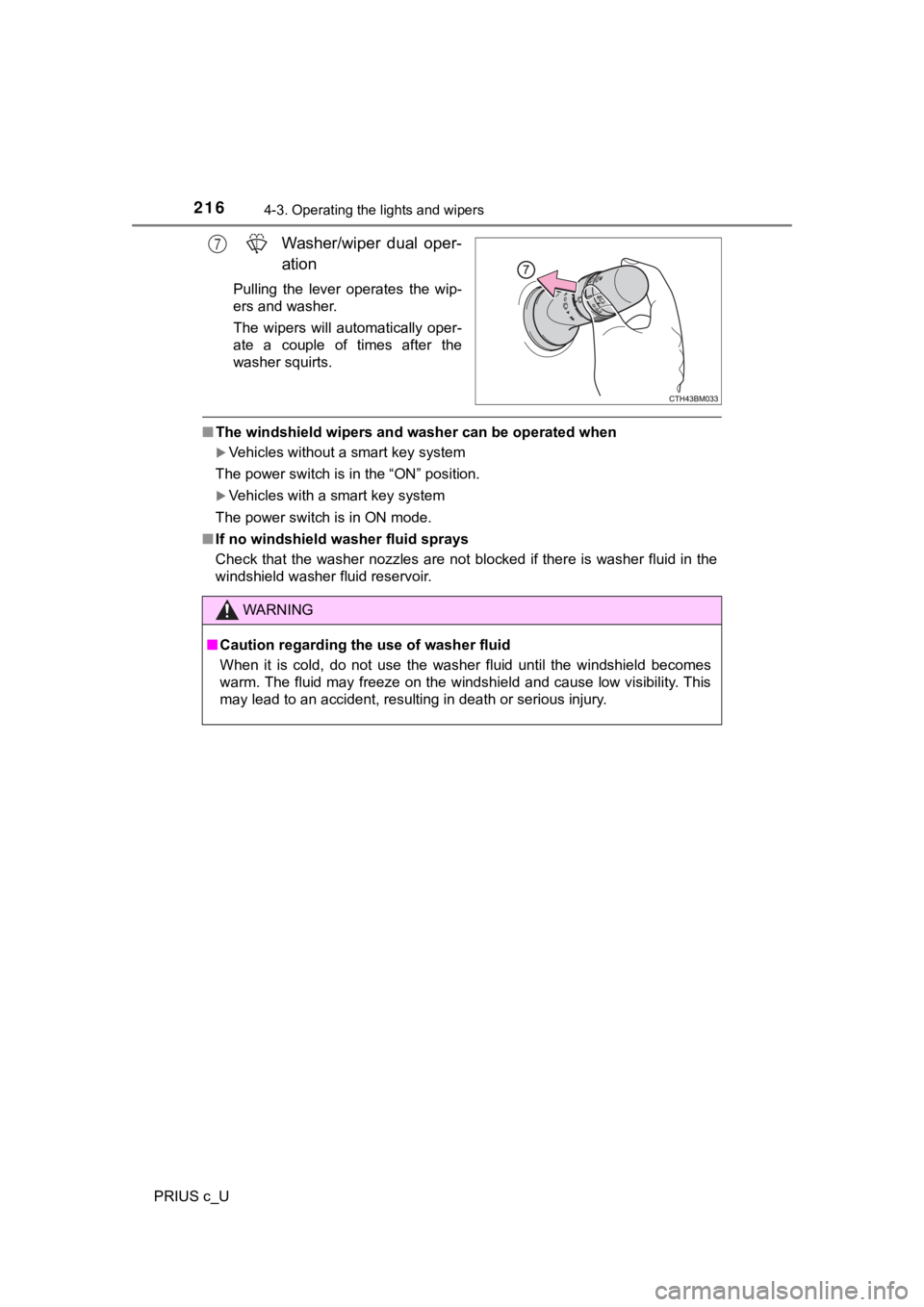
Washer/wiper dual oper-
ation
Pulling the lever operates the wip-
ers and washer.
The wipers will automatically oper-
ate a couple of times after the
washer squirts.
■The windshield wipers and washer can be operated when
Vehicles without a smart key system
The power switch is in the “ON” position.
Vehicles with a smart key system
The power switch is in ON mode.
■ If no windshield washer fluid sprays
Check that the washer nozzles are not blocked if there is washe r fluid in the
windshield washer fluid reservoir.
7
WARNING
■ Caution regarding the use of washer fluid
When it is cold, do not use the washer fluid until the windshie ld becomes
warm. The fluid may freeze on the windshield and cause low visi bility. This
may lead to an accident, resulting in death or serious injury.
Page 217 of 600

2174-3. Operating the lights and wipers
4
Driving
PRIUS c_U
NOTICE
■When the windshield is dry
Do not use the wipers, as they may damage the windshield.
■ When the washer fluid tank is empty
Do not operate the switch continually as the washer fluid pump may over-
heat.
■ When a nozzle becomes blocked
In this case, contact your Toyota dealer.
Do not try to clear it with a pin or other object. The nozzle w ill be damaged.