lock TOYOTA PRIUS C 2020 Owner's Manual
[x] Cancel search | Manufacturer: TOYOTA, Model Year: 2020, Model line: PRIUS C, Model: TOYOTA PRIUS C 2020Pages: 600, PDF Size: 12.02 MB
Page 109 of 600
1092. Instrument cluster
2
Instrument cluster
PRIUS c_U
■The clock is displayed when
Vehicles without a smart key system
The power switch is in the “ON” position.
Vehicles with a smart key system
The power switch is in ON mode.
■ Eco score
●As the accelerator pedal is not depressed, the driven distance using cruise
control (if equipped) is not included in the eco score.
● As the eco score evaluation differs according to driving conditions and envi-
ronmental factors, in some cases it may not be linked to fuel c onsumption.
■ Eco savings
●Fuel cost and savings should be used as a guide only.
● Depending on refueling methods, driving conditions and environm ental fac-
tors, the actual and displayed fuel costs may differ.
● In some cases, fuel cost and savings may not be linked to the eco score
evaluation.
■ When disconnecting and reconnecting 12-volt battery terminals
The following information data will be reset:
●Clock
● Past record (aside from the top 3 results)
● 5 min./1 min. fuel consumption display
● Cruising range
● Average vehicle speed
● Driving time
● EV driving rate/EV driven distance
Additionally, some displays may return to their default setting s.
■ Liquid crystal display
Small spots or light spots may appear on the display. This phen omenon is
characteristic of liquid crystal displays, and there is no prob lem continuing to
use the display.
Page 110 of 600
1102. Instrument cluster
PRIUS c_U■
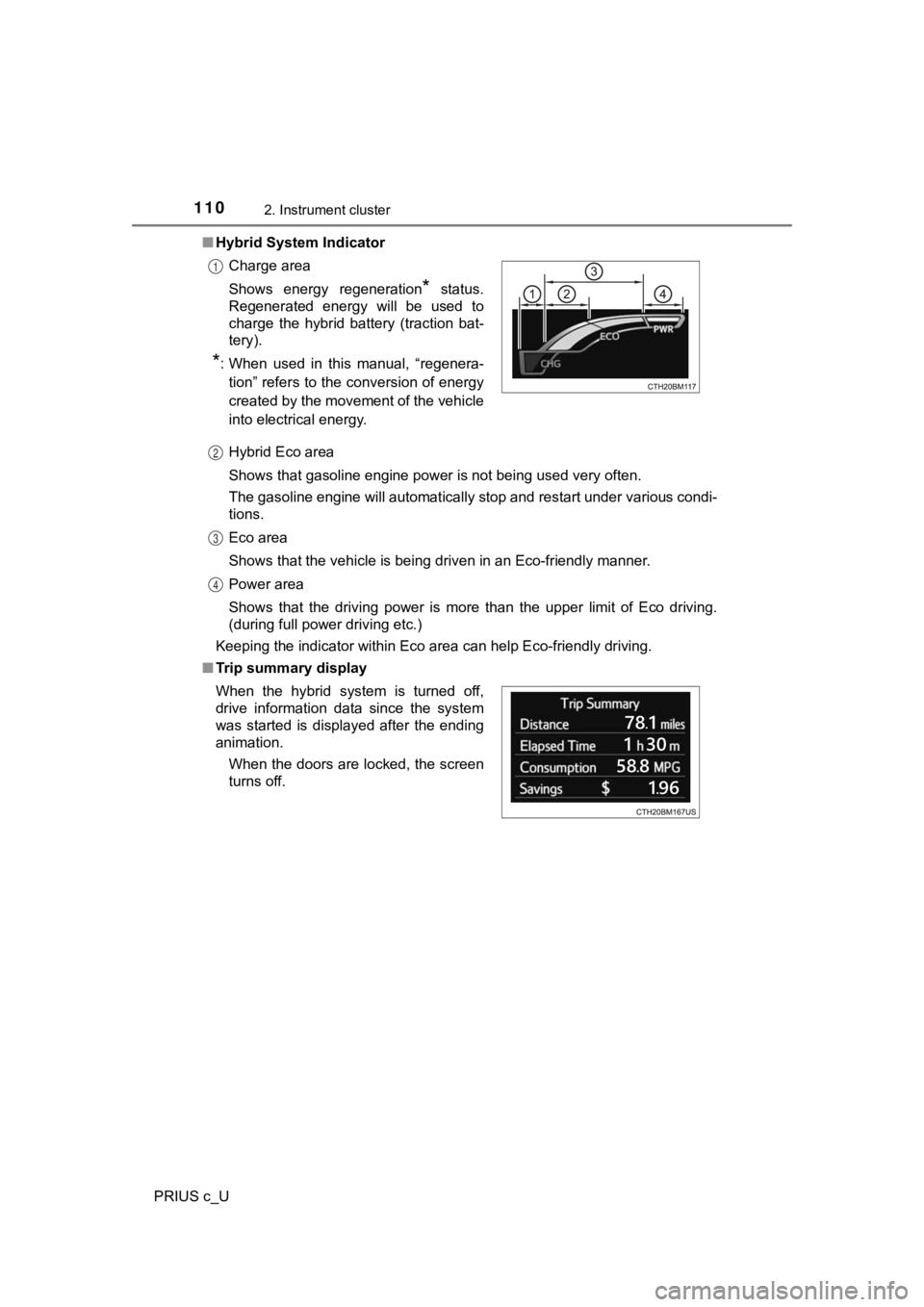
Hybrid System Indicator
Hybrid Eco area
Shows that gasoline engine power is not being used very often.
The gasoline engine will automatically stop and restart under v arious condi-
tions.
Eco area
Shows that the vehicle is being driven in an Eco-friendly manne r.
Power area
Shows that the driving power is more than the upper limit of Eco driving.
(during full power driving etc.)
Keeping the indicator within Eco area can help Eco-friendly dri ving.
■ Trip summary displayCharge area
Shows energy regeneration
* status.
Regenerated energy will be used to
charge the hybrid battery (traction bat-
tery).
*: When used in this manual, “regenera-
tion” refers to the conversion of energy
created by the movement of the vehicle
into electrical energy.
1
2
3
4
When the hybrid system is turned off,
drive information data since the system
was started is displayed after the ending
animation.
When the doors are locked, the screen
turns off.
Page 119 of 600
119
3
Operation of
each component
PRIUS c_U 3-1. Key information
Keys .................................. 120
3-2. Opening, closing and locking the doors
Side doors ......................... 127
Back door .......................... 136
Smart key system ............. 141
3-3. Adjusting the seats Front seats ........................ 150
Rear seats......................... 151
Head restraints.................. 155
3-4. Adjusting the steering wheel and mirrors
Steering wheel .................. 158
Inside rear view mirror ...... 160
Outside rear view mirrors ............................. 161
3-5. Opening and closing the windows
Power windows ................. 163
Moon roof .......................... 167
Page 121 of 600
1213-1. Key information
3
Operation of each component
PRIUS c_U
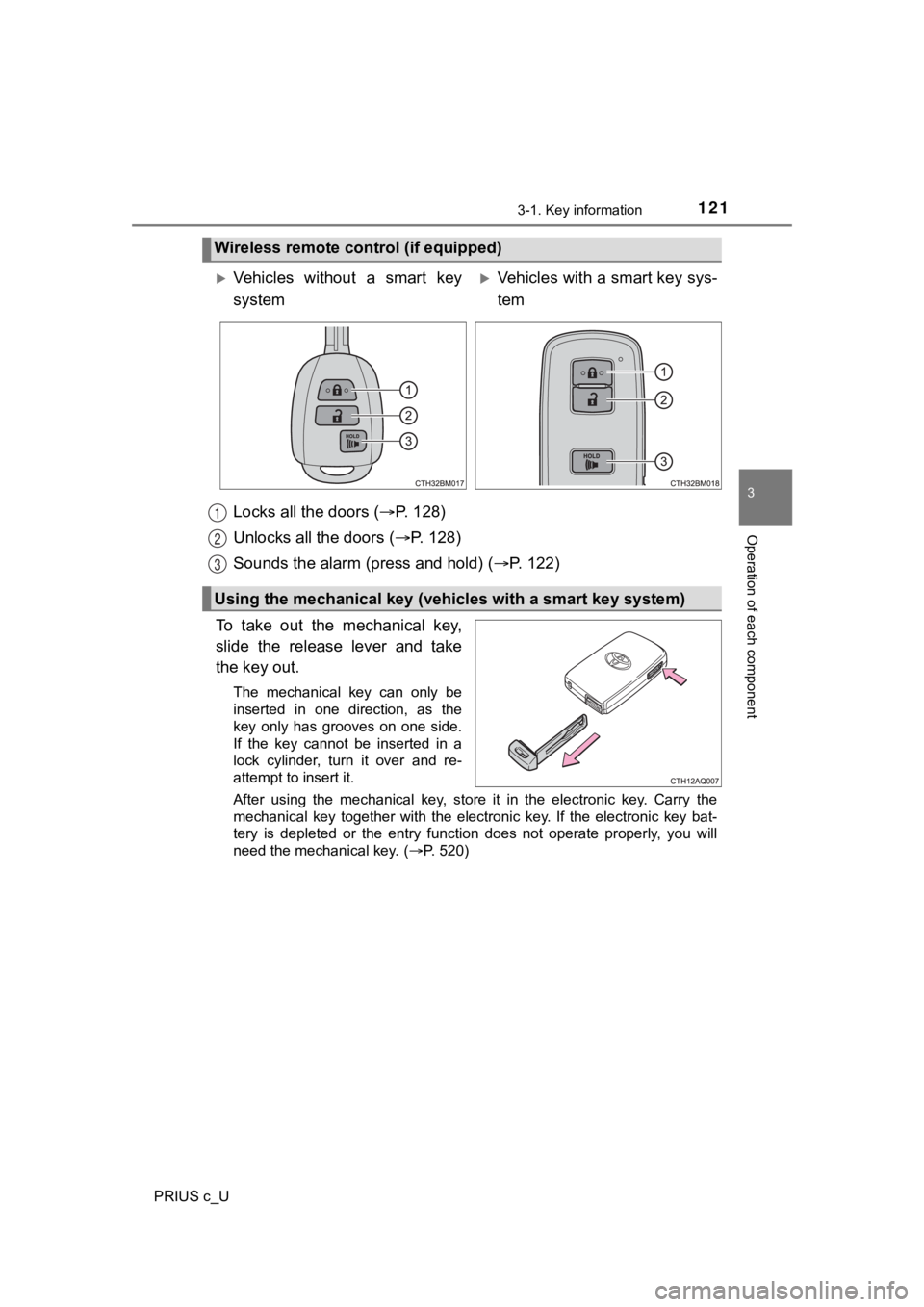
Locks all the doors (P. 1 2 8 )
Unlocks all the doors ( P. 1 2 8 )
Sounds the alarm (press and hold) ( P. 122)
To take out the mechanical key,
slide the release lever and take
the key out.
The mechanical key can only be
inserted in one direction, as the
key only has grooves on one side.
If the key cannot be inserted in a
lock cylinder, turn it over and re-
attempt to insert it.
After using the mechanical key, store it in the electronic key. Carry the
mechanical key together with the electronic key. If the electro nic key bat-
tery is depleted or the entry function does not operate properl y, you will
need the mechanical key.
( P. 520)
Wireless remote control (if equipped)
Vehicles without a smart key
systemVehicles with a smart key sys-
tem
Using the mechanical key (vehic les with a smart key system)
1
2
3
Page 127 of 600
127
3
Operation of each component
PRIUS c_U
3-2. Opening, closing and locking the doors
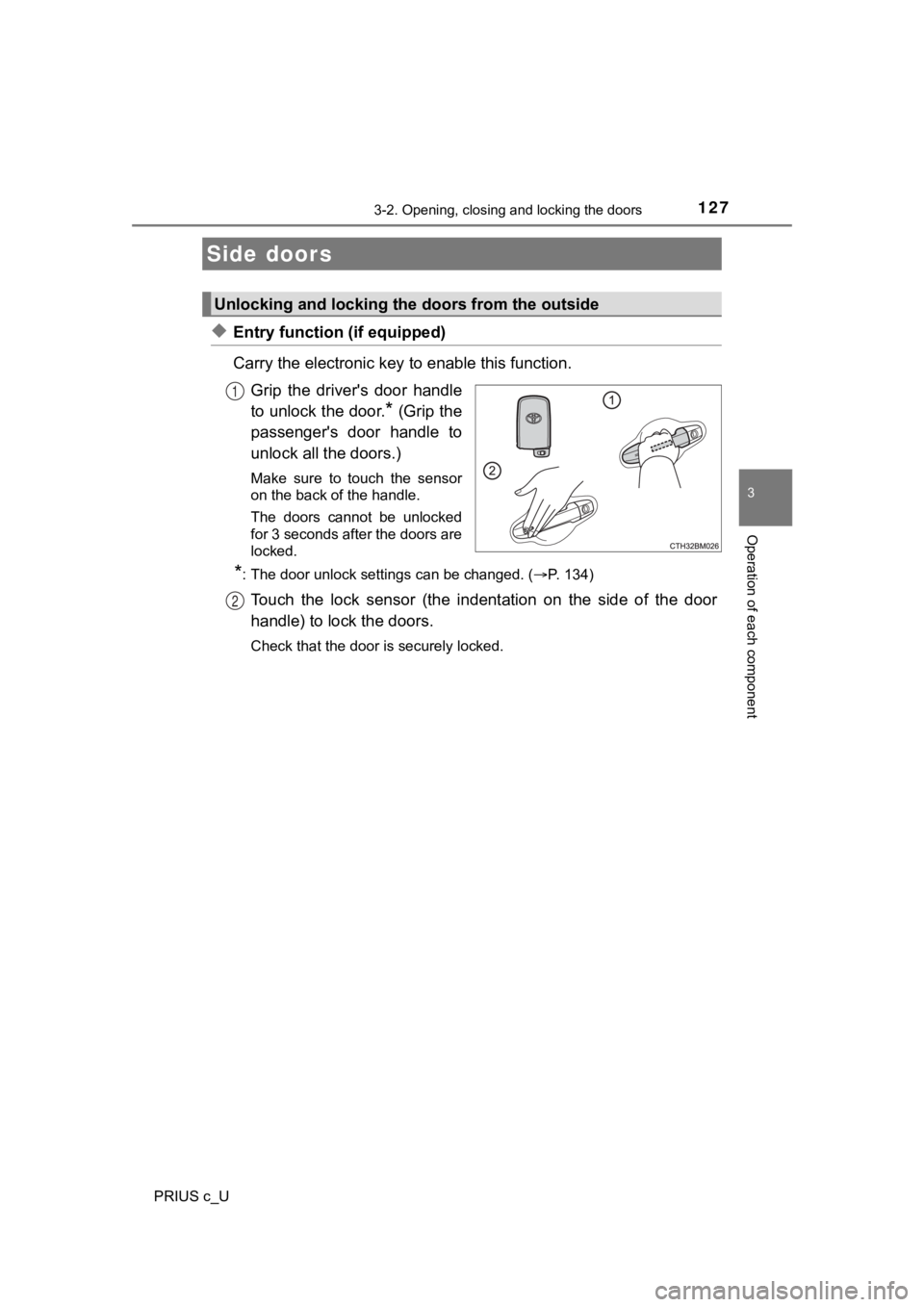
◆Entry function (if equipped)
Carry the electronic key to enable this function.
Grip the driver's door handle
to unlock the door.
* (Grip the
passenger's door handle to
unlock all the doors.)
Make sure to touch the sensor
on the back of the handle.
The doors cannot be unlocked
for 3 seconds after the doors are
locked.
*: The door unlock settings can be changed. ( P. 134)
Touch the lock sensor (the indentation on the side of the door
handle) to lock the doors.
Check that the door is securely locked.
Side doors
Unlocking and locking the doors from the outside
1
2
Page 128 of 600
1283-2. Opening, closing and locking the doors
PRIUS c_U
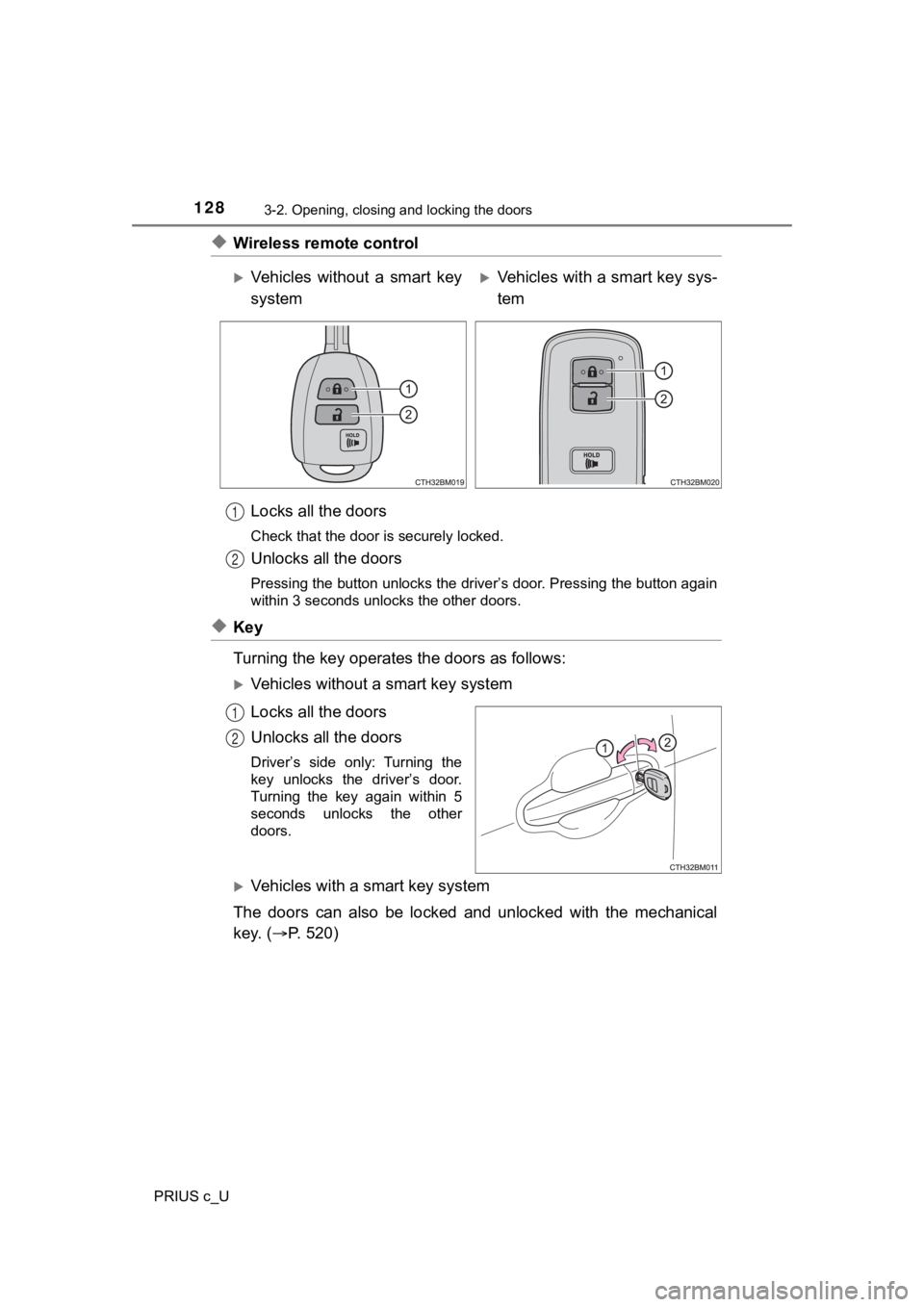
◆Wireless remote controlLocks all the doors
Check that the door is securely locked.
Unlocks all the doors
Pressing the button unlocks the driver’s door. Pressing the button again
within 3 seconds unlocks the other doors.
◆Key
Turning the key operates the doors as follows:
Vehicles without a smart key system
Locks all the doors
Unlocks all the doors
Driver’s side only: Turning the
key unlocks the driver’s door.
Turning the key again within 5
seconds unlocks the other
doors.
Vehicles with a smart key system
The doors can also be locked and unlocked with the mechanical
key. ( P. 5 2 0 )
Vehicles without a smart key
systemVehicles with a smart key sys-
tem
1
2
1
2
Page 129 of 600
1293-2. Opening, closing and locking the doors
3
Operation of each component
PRIUS c_U
■Operation signals
Vehicles without a smart key system
The emergency flashers flash to indicate that the doors have been locked/
unlocked. (Locked: once; Unlocked: twice)
Vehicles with a smart key system
A buzzer sounds and the emergency flashers flash to indicate th at the doors
have been locked/unlocked. (Locked: once; Unlocked: twice)
■ Security feature
Vehicles without a smart key system
If a door is not opened within approximately 60 seconds after t he vehicle is
unlocked, the security feature automatically locks the vehicle again.
Vehicles with a smart key system
If a door is not opened within approximately 60 seconds after t he vehicle is
unlocked, the security feature automatically locks the vehicle again. (How-
ever, depending on the location of the electronic key, the key may be
detected as being in the vehicle. In this case, vehicle may be unlocked.)
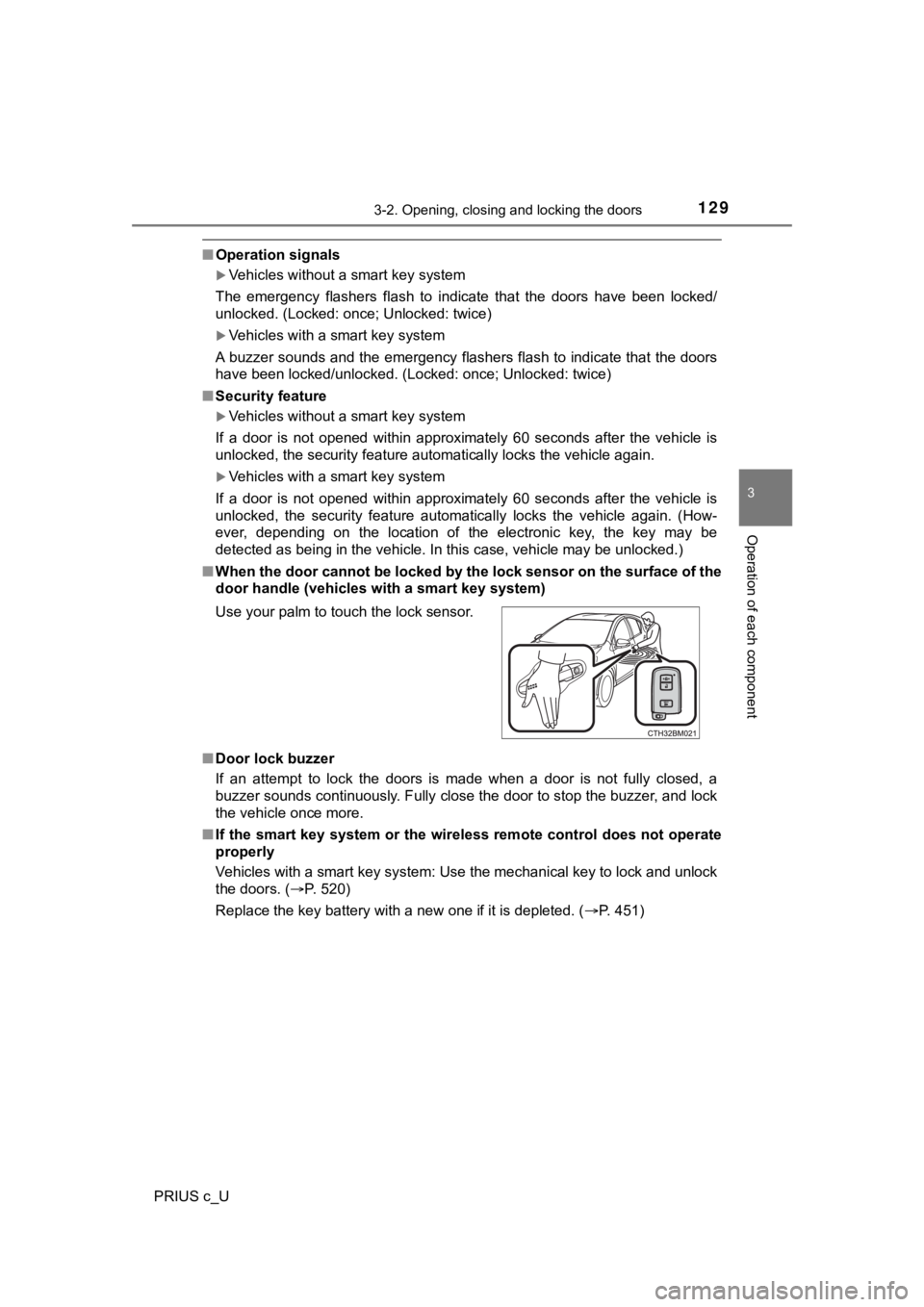
■ When the door cannot be locked by the lock sensor on the surface of the
door handle (vehicles with a smart key system)
■ Door lock buzzer
If an attempt to lock the doors is made when a door is not full y closed, a
buzzer sounds continuously. Fully close the door to stop the bu zzer, and lock
the vehicle once more.
■ If the smart key system or the wireless remote control does not operate
properly
Vehicles with a smart key system: Use the mechanical key to loc k and unlock
the doors. ( P. 520)
Replace the key battery with a new one if it is depleted. ( P. 451)
Use your palm to touch the lock sensor.
Page 130 of 600
1303-2. Opening, closing and locking the doors
PRIUS c_U
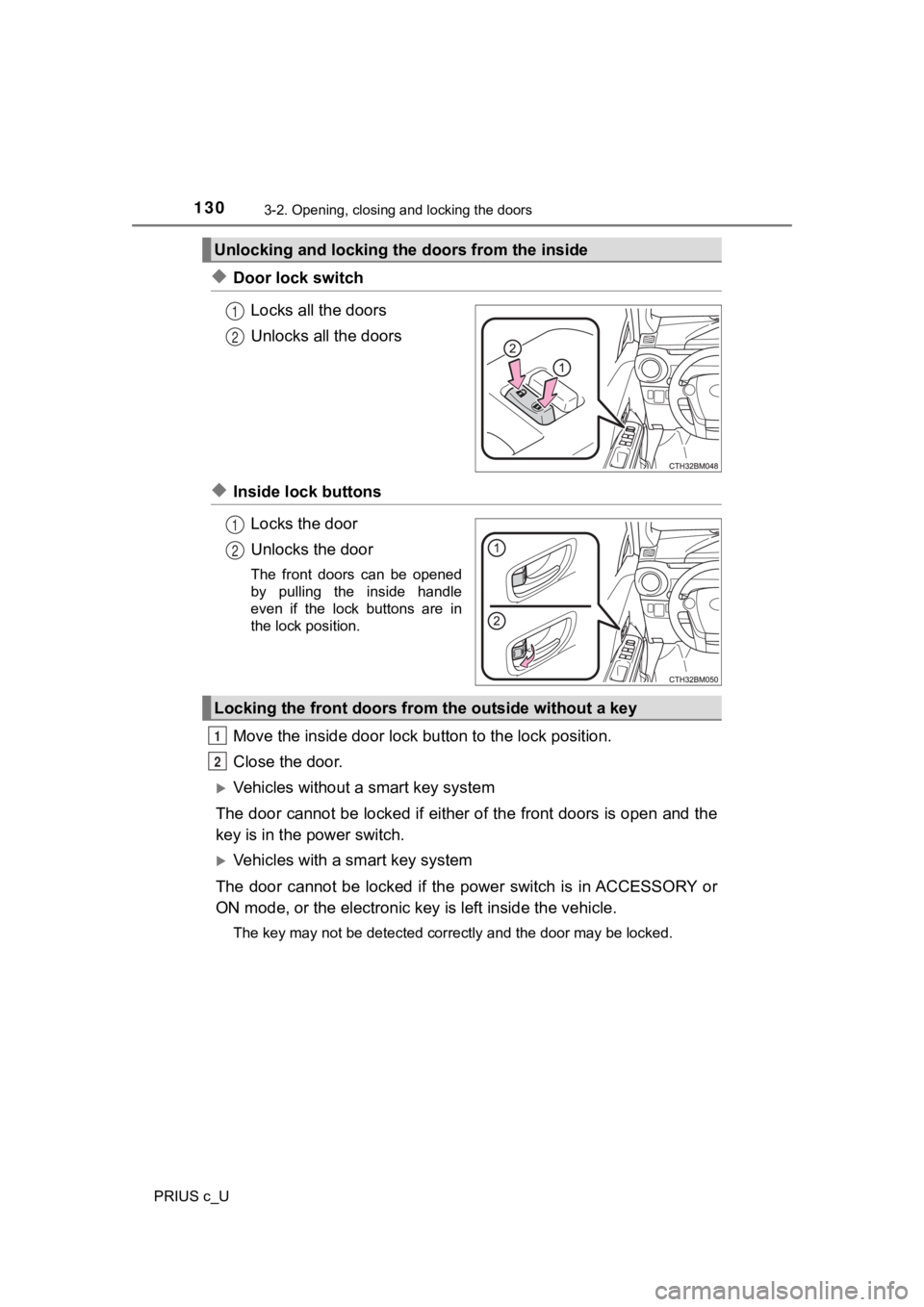
◆Door lock switchLocks all the doors
Unlocks all the doors
◆Inside lock buttonsLocks the door
Unlocks the door
The front doors can be opened
by pulling the inside handle
even if the lock buttons are in
the lock position.
Move the inside door lock bu tton to the lock position.
Close the door.
Vehicles without a smart key system
The door cannot be locked if either of the front doors is open and the
key is in the power switch.
Vehicles with a smart key system
The door cannot be locked if the p ower switch is in ACCESSORY or
ON mode, or the electronic key is left inside the vehicle.
The key may not be detected correctly and the door may be locke d.
Unlocking and locking the doors from the inside
1
2
1
2
Locking the front doors from the outside without a key
1
2
Page 131 of 600
1313-2. Opening, closing and locking the doors
3
Operation of each component
PRIUS c_U
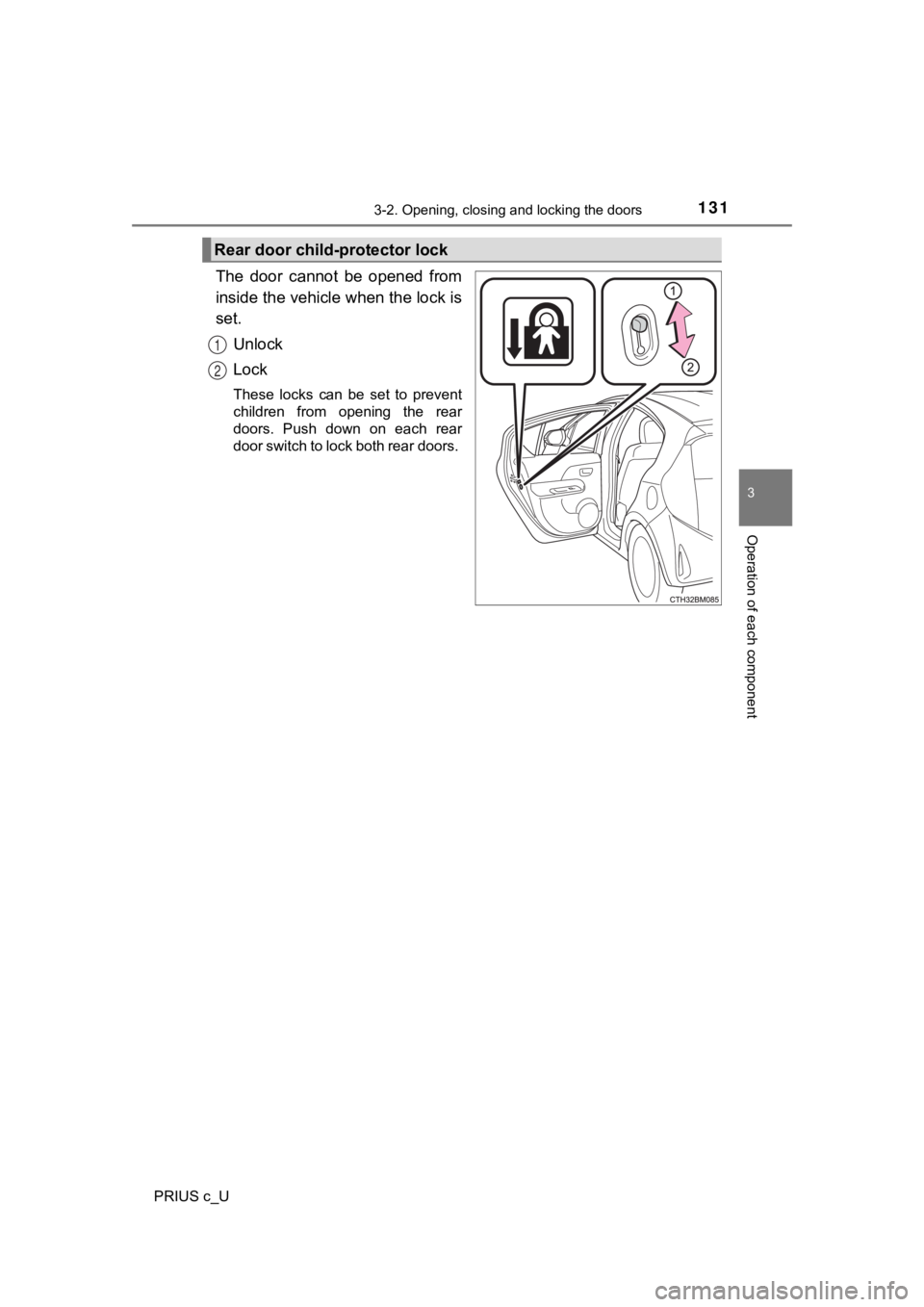
The door cannot be opened from
inside the vehicle when the lock is
set.Unlock
Lock
These locks can be set to prevent
children from opening the rear
doors. Push down on each rear
door switch to lock both rear doors.
Rear door child-protector lock
1
2
Page 132 of 600
1323-2. Opening, closing and locking the doors
PRIUS c_U
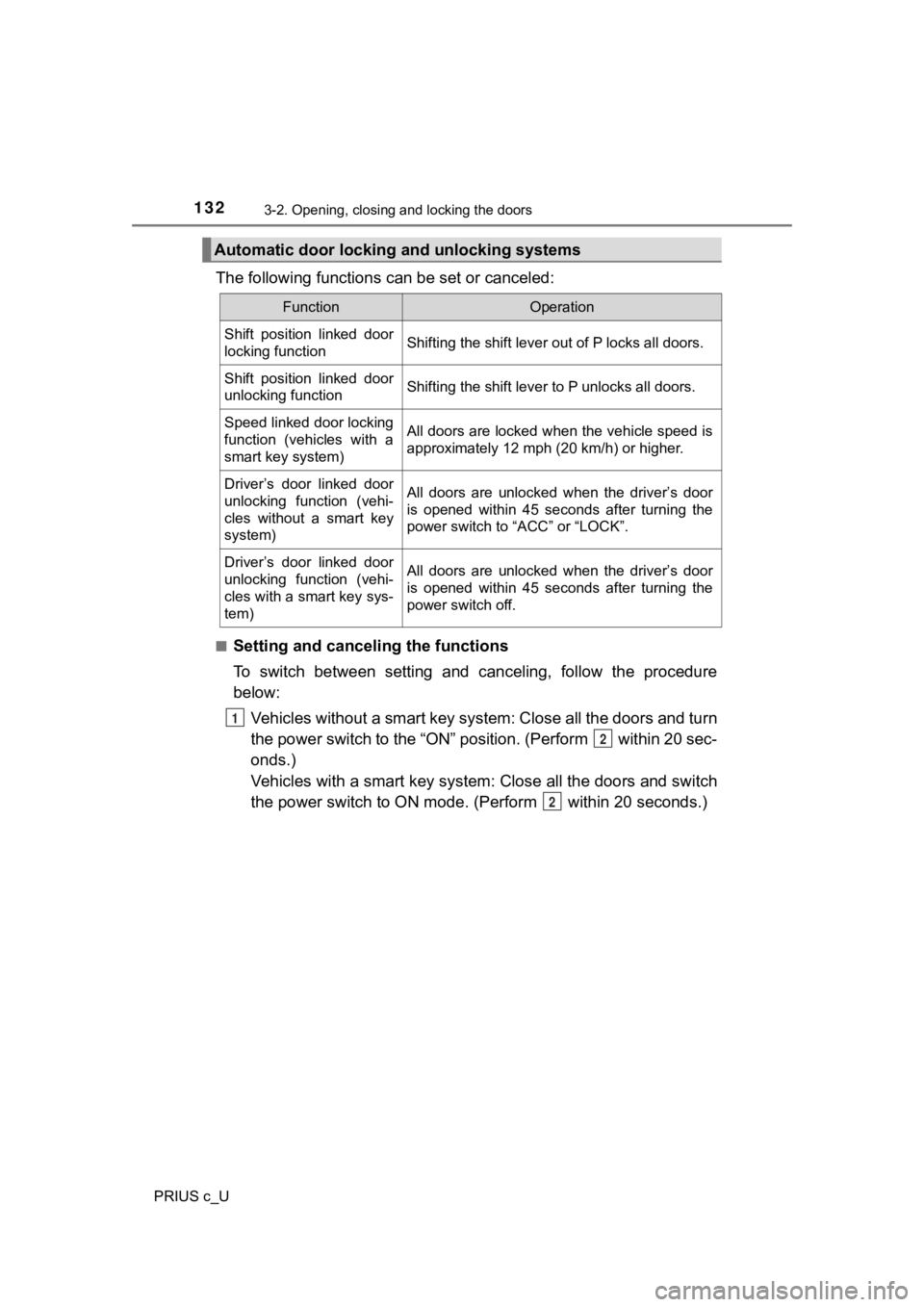
The following functions can be set or canceled:
■Setting and canceling the functions
To switch between setting and canceling, follow the procedure
below: Vehicles without a smart key system: Close all the doors and tu rn
the power switch to the “ON” position. (Perform within 20 sec-
onds.)
Vehicles with a smart key system : Close all the doors and switch
the power switch to ON mode. (Perform within 20 seconds.)
Automatic door locking and unlocking systems
FunctionOperation
Shift position linked door
locking functionShifting the shift lever out of P locks all doors.
Shift position linked door
unlocking functionShifting the shift lever to P unlocks all doors.
Speed linked door locking
function (vehicles with a
smart key system)All doors are locked when the vehicle speed is
approximately 12 mph (20 km/h) or higher.
Driver’s door linked door
unlocking function (vehi-
cles without a smart key
system)All doors are unlocked when the driver’s door
is opened within 45 seconds after turning the
power switch to “ACC” or “LOCK”.
Driver’s door linked door
unlocking function (vehi-
cles with a smart key sys-
tem)All doors are unlocked when the driver’s door
is opened within 45 seconds after turning the
power switch off.
1
2
2