key TOYOTA PRIUS C 2020 Manual PDF
[x] Cancel search | Manufacturer: TOYOTA, Model Year: 2020, Model line: PRIUS C, Model: TOYOTA PRIUS C 2020Pages: 600, PDF Size: 12.02 MB
Page 433 of 600
4337-3. Do-it-yourself maintenance
7
Maintenance and care
PRIUS c_U■
After recharging/reconnecting the 12-volt battery (vehicles wit h a smart
key system)
● Unlocking the doors using the smart key system may not be possi ble imme-
diately after reconnecting the 12-volt battery. If this happens, use the wire-
less remote control or the mechanical key to lock/unlock the do ors.
● Start the hybrid system with the power switch in ACCESSORY mode . The
hybrid system may not start with the power switch turned off. However, the
hybrid system will operate normally from the second attempt.
● The power switch mode is recorded by the vehicle. If the 12-vol t battery is
reconnected, the vehicle will return the power switch mode to t he status it
was in before the 12-volt battery was disconnected. Make sure t o turn off
the power before disconnect the 12-volt battery. Take extra car e when con-
necting the 12-volt battery if the power switch mode prior to d ischarge is
unknown.
If the system will not start even after multiple attempts, contact your Toyota
dealer.
WARNING
■ Chemicals in the 12-volt battery
The 12-volt battery contains poisonous and corrosive sulfuric a cid and may
produce hydrogen gas which is flammable and explosive. To reduce the risk
of death or serious injury, take the following precautions while working on or
near the 12-volt battery:
● Do not cause sparks by touching the 12-volt battery terminals w ith tools.
● Do not smoke or light a match near the 12-volt battery.
● Avoid contact with eyes, skin and clothes.
● Never inhale or swallow electrolyte.
● Wear protective safety glasses when working near the 12-volt ba ttery.
● Keep children away from the 12-volt battery.
■ Where to safely charge the 12-volt battery
Always charge the 12-volt battery in an open area. Do not charg e the 12-
volt battery in a garage or closed room where there is insuffic ient ventila-
tion.
Page 436 of 600

4367-3. Do-it-yourself maintenance
PRIUS c_U
Your vehicle is equipped with a tire pressure warning system that uses
tire pressure warning valves and transmitters to detect low tire infla-
tion pressure before serious problems arise.
If the tire pressure drops below a predetermined level, the dri ver is
warned by a warning light. ( P. 483)
◆Installing tire pressure warn ing valves and transmitters
When replacing tires or wheels, tire pressure warning valves an d
transmitters must also be installed.
When new tire pressure warning valves and transmitters are
installed, new ID codes must be registered in the tire pressure
warning computer and the tire pressure warning system must be
initialized. Have tire pressure warning valve and transmitter I D
codes registered by your Toyota dealer. ( P. 437)
◆Initializing the tire pressure warning system
■The tire pressure warning system must be initialized in the fol-
lowing circumstances:
● When rotating front and rear tires which have different tire in fla-
tion pressures
● When changing the tire size
When the tire pressure warning sy stem is initialized, the current tire
inflation pressure is set as the benchmark pressure.
■How to initialize the tire pressure warning system
Park the vehicle in a safe place and turn the power switch (vehi-
cles without a smart key system) or the power switch (vehicles
with a smart key system) off.
Initialization cannot be perfo rmed while the vehicle is moving.
Adjust the tire inflation pressure to the specified cold tire i nflation
pressure level. ( P. 543)
Make sure to adjust the tire pre ssure to the specified cold tire infla-
tion pressure level. The tire pressure warning system will oper ate
based on this pr essure level.
Tire pressure warning system
1
2
Page 437 of 600
4377-3. Do-it-yourself maintenance
7
Maintenance and care
PRIUS c_U
Turn the power switch to the “ON” position (vehicles without a
smart key system) or power switch to ON mode (vehicles with a
smart key system).
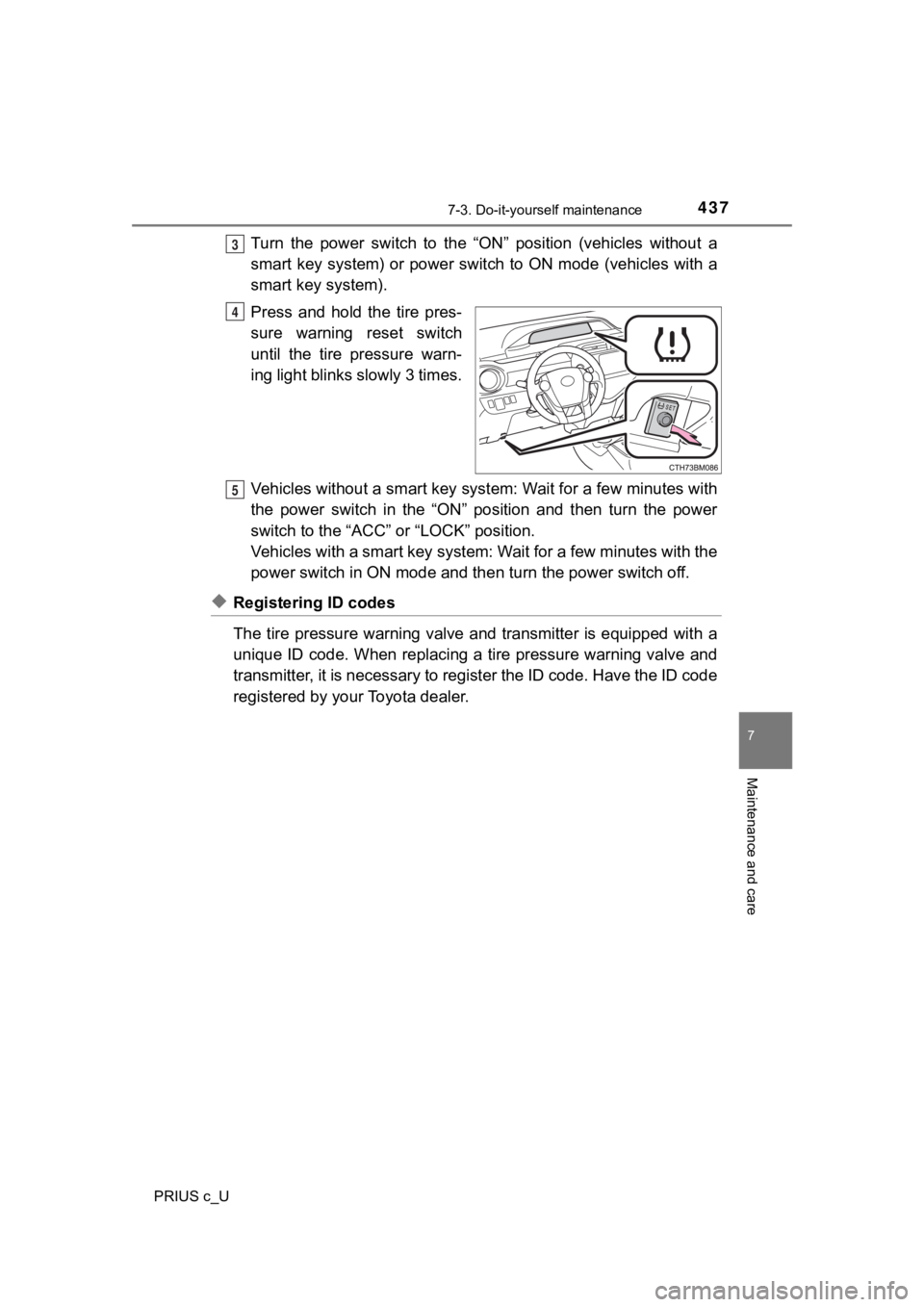
Press and hold the tire pres-
sure warning reset switch
until the tire pressure warn-
ing light blinks slowly 3 times.
Vehicles without a smart key syst em: Wait for a few minutes with
the power switch in the “ON” position and then turn the power
switch to the “ACC” or “LOCK” position.
Vehicles with a smart key system : Wait for a few minutes with the
power switch in ON mode and then turn the power switch off.
◆Registering ID codes
The tire pressure warning valve and transmitter is equipped wit h a
unique ID code. When replacing a tire pressure warning valve an d
transmitter, it is necessary to register the ID code. Have the ID code
registered by your Toyota dealer.
3
4
5
Page 449 of 600
4497-3. Do-it-yourself maintenance
7
Maintenance and care
PRIUS c_U
Vehicles without a smart key system: Turn the power switch to the
“LOCK” position.
Vehicles with a smart key syst em: Turn the power switch off.
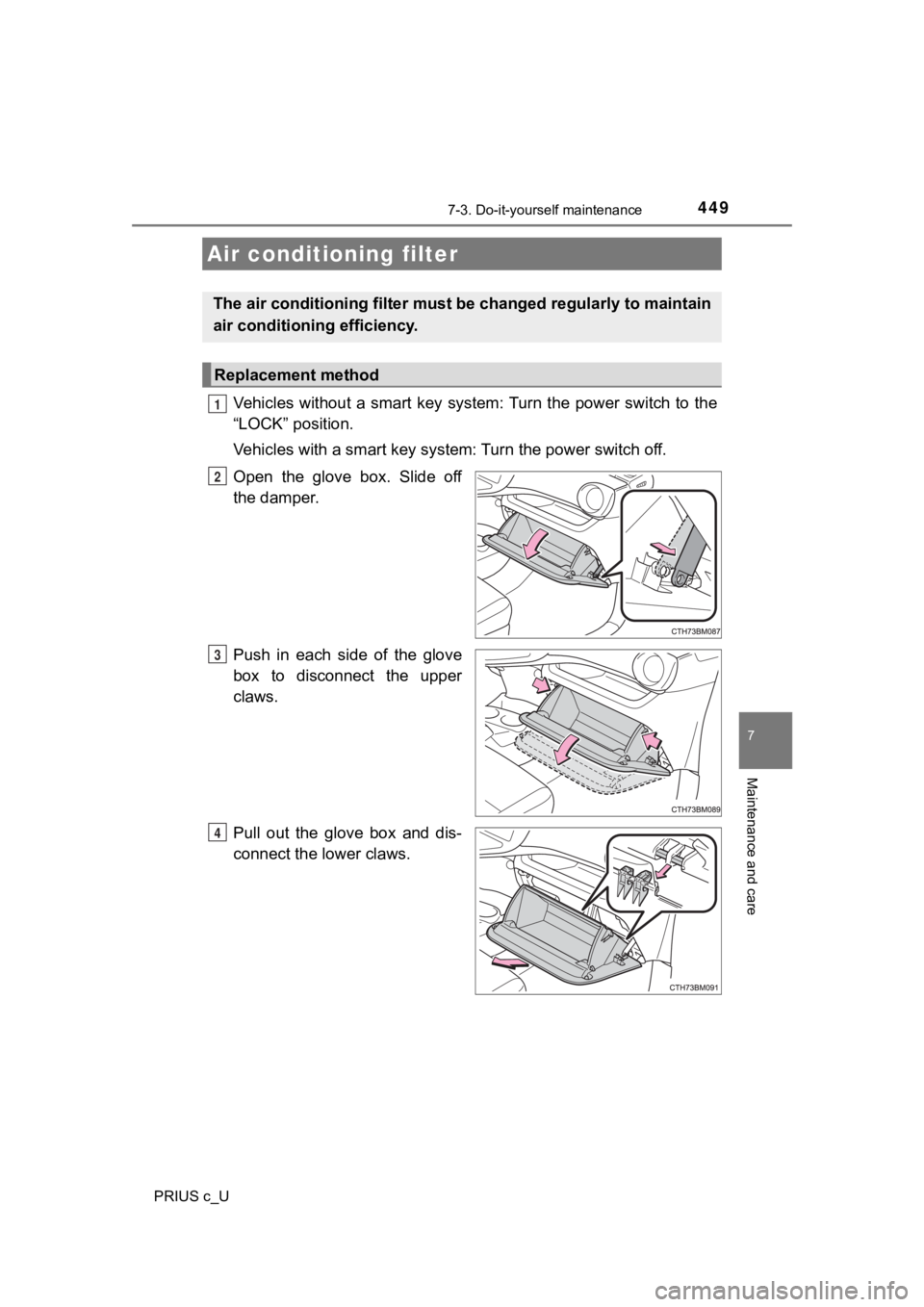
Open the glove box. Slide off
the damper.
Push in each side of the glove
box to disconnect the upper
claws.
Pull out the glove box and dis-
connect the lower claws.
Air conditioning filter
The air conditioning filter must b e changed regularly to maintain
air conditioning efficiency.
Replacement method
1
2
3
4
Page 451 of 600
4517-3. Do-it-yourself maintenance
7
Maintenance and care
PRIUS c_U
●Flathead screwdriver
● Small flathead screwdriver
● Lithium battery CR2016 (vehicles without a smart key system), o r
CR2032 (vehicles with a smart key system)
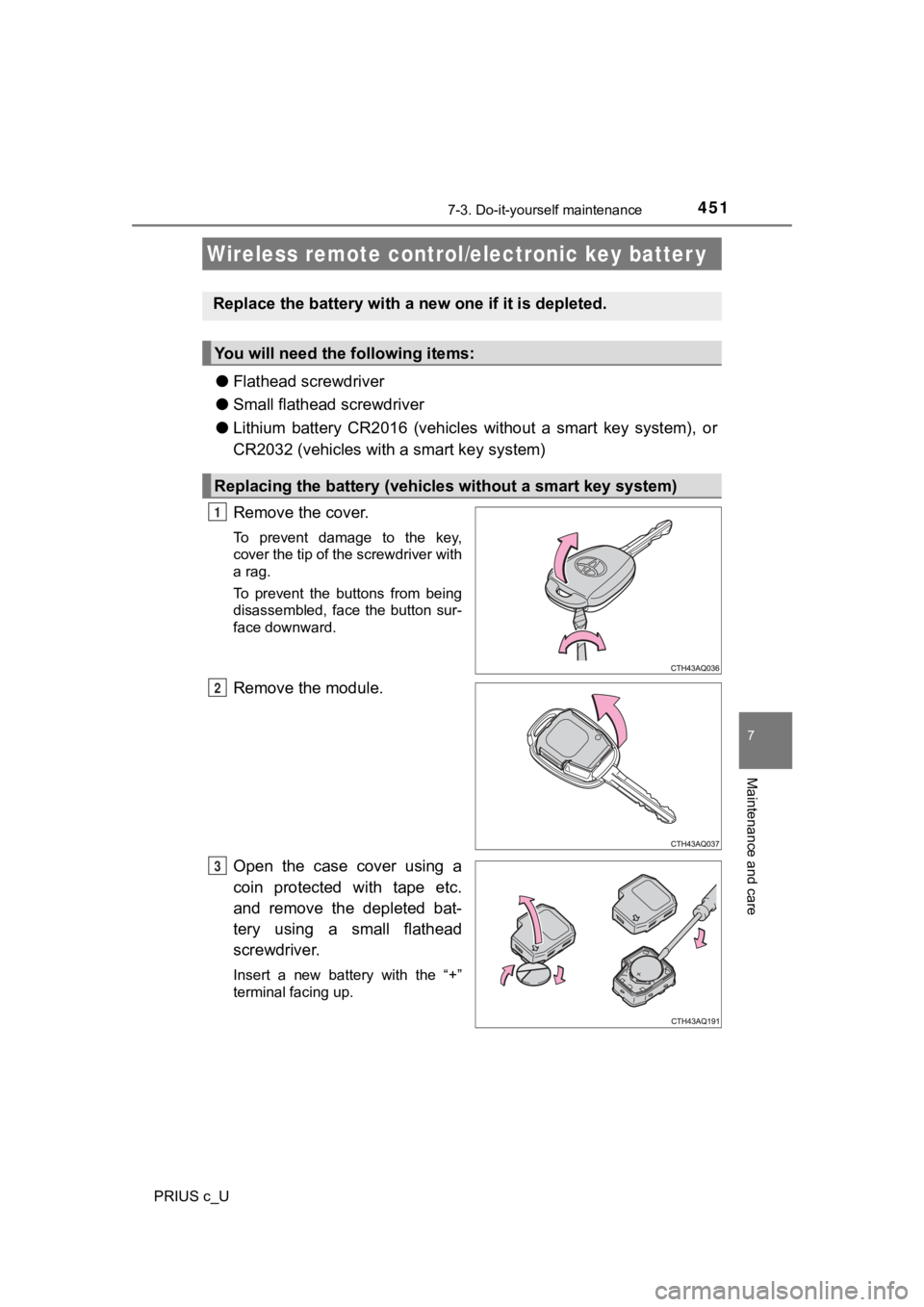
Remove the cover.
To prevent damage to the key,
cover the tip of the screwdriver with
a rag.
To prevent the buttons from being
disassembled, face the button sur-
face downward.
Remove the module.
Open the case cover using a
coin protected with tape etc.
and remove the depleted bat-
tery using a small flathead
screwdriver.
Insert a new battery with the “+”
terminal facing up.
Wireless remote control/electronic key batter y
Replace the battery with a n ew one if it is depleted.
You will need the following items:
Replacing the battery (vehicles without a smart key system)
1
2
3
Page 452 of 600
4527-3. Do-it-yourself maintenance
PRIUS c_U
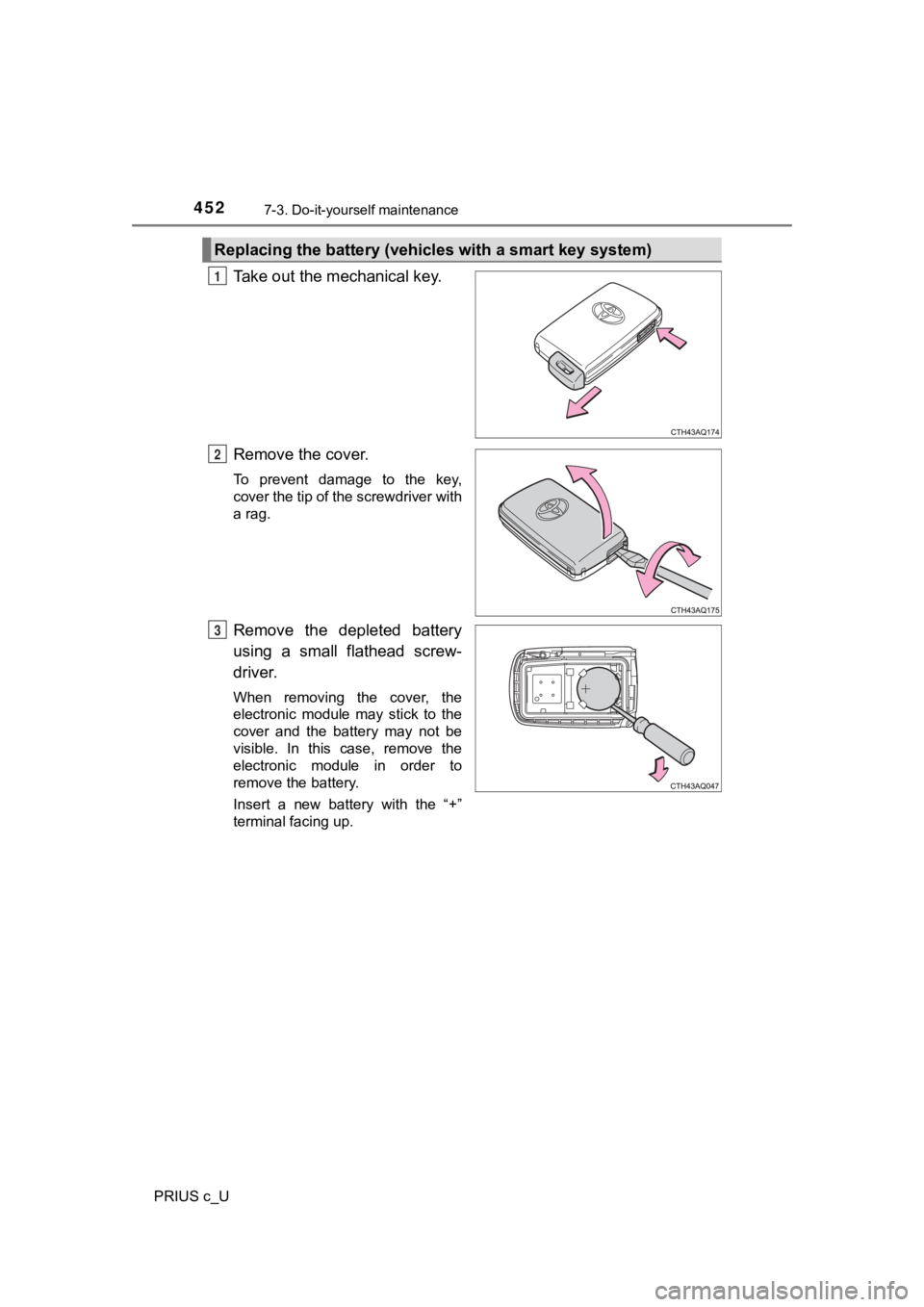
Take out the mechanical key.
Remove the cover.
To prevent damage to the key,
cover the tip of the screwdriver with
a rag.
Remove the depleted battery
using a small flathead screw-
driver.
When removing the cover, the
electronic module may stick to the
cover and the battery may not be
visible. In this case, remove the
electronic module in order to
remove the battery.
Insert a new battery with the “+”
terminal facing up.
Replacing the battery (vehicles with a smart key system)
1
2
3
Page 453 of 600
4537-3. Do-it-yourself maintenance
7
Maintenance and care
PRIUS c_U
■Use a CR2016 (vehicles without a smart key system) or CR2032 (v ehicles
with a smart key system) lithium battery
● Batteries can be purchased at your Toyota dealer, local electri cal appliance
shops or camera stores.
● Replace only with the same or equivalent type recommended by the manu-
facturer.
● Dispose of used batteries according to local laws.
■ If the key battery is depleted
The following symptoms may occur:
●The smart key system (if equipped) and wireless remote control will not
function properly.
● The operational range will be reduced.
WARNING
■Removed battery a nd other parts
These parts are small and if swallowed by a child, they can cause choking.
Keep away from children. Failure to do so could result in death or serious
injury.
NOTICE
■ For normal operation after replacing the battery
Observe the following precautions to prevent accidents:
● Always work with dry hands.
Moisture may cause the battery to rust.
● Do not touch or move any other component inside the remote cont rol.
● Do not bend either of the battery terminals.
Page 454 of 600
4547-3. Do-it-yourself maintenance
PRIUS c_U
Vehicles without a smart key system: Turn the power switch to the
“LOCK” poison.
Vehicles with a smart key syst em: Turn the power switch off.
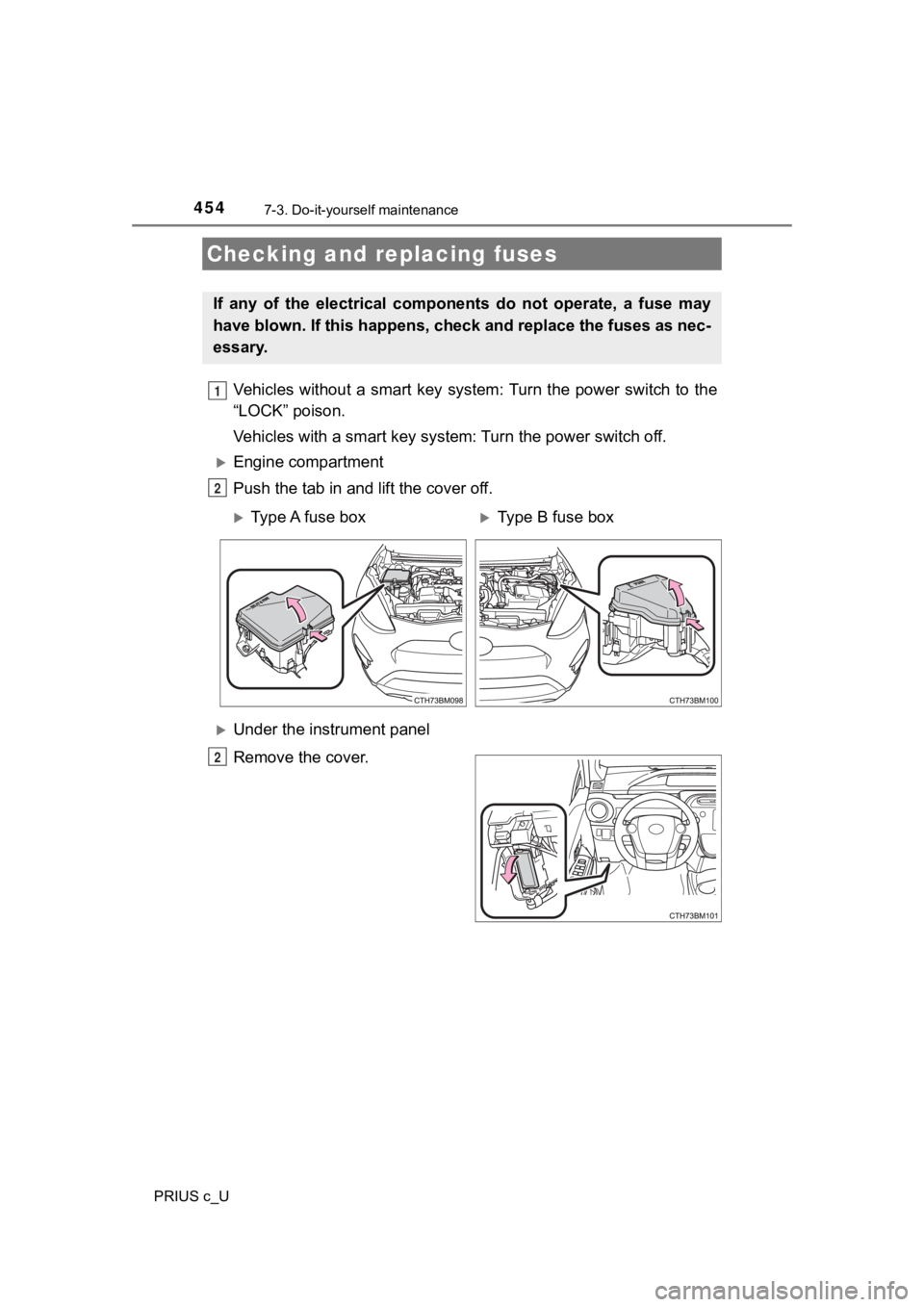
Engine compartment
Push the tab in and lift the cover off.
Under the instrument panel
Remove the cover.
Checking and replacing fuses
If any of the electrical components do not operate, a fuse may
have blown. If this happens, che ck and replace the fuses as nec-
essary.
1
2
Type A fuse boxType B fuse box
2
Page 467 of 600

467
8When trouble arises
PRIUS c_U8-1. Essential information
Emergency flashers .......... 468
If your vehicle has to be stopped in
an emergency ................. 469
If the vehicle is trapped in rising water.................. 471
8-2. Steps to take in an emergency
If your vehicle needs to be towed ..................... 472
If you think something is wrong .......................... 479
If a warning light turns on or a warning buzzer
sounds ............................ 480
If a warning message is displayed ..................... 488
If you have a flat tire.......... 505
If the hybrid system will not start ..................... 518
If the electronic key does not operate properly ........ 520
If the vehicle 12-volt battery is discharged ....... 522
If your vehicle overheats ........................ 529
If the vehicle becomes stuck ................ 533
Page 469 of 600
4698-1. Essential information
8
When trouble arises
PRIUS c_U
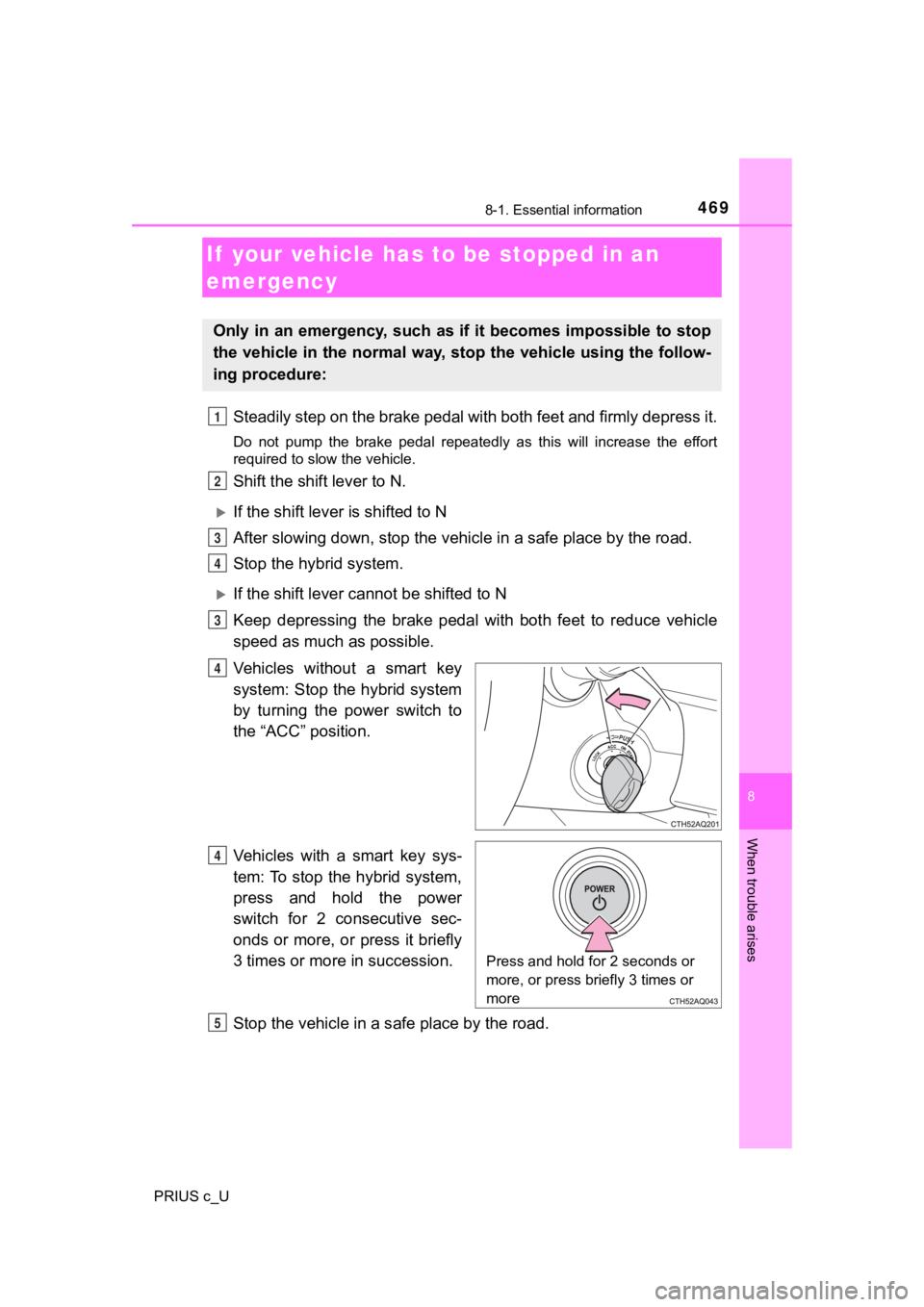
Steadily step on the brake pedal with both feet and firmly depress it.
Do not pump the brake pedal repeatedly as this will increase th e effort
required to slow the vehicle.
Shift the shift lever to N.
If the shift lever is shifted to N
After slowing down, stop the vehi cle in a safe place by the road.
Stop the hybrid system.
If the shift lever cann ot be shifted to N
Keep depressing the brake pedal with both feet to reduce vehicl e
speed as much as possible.
Vehicles without a smart key
system: Stop the hybrid system
by turning the power switch to
the “ACC” position.
Vehicles with a smart key sys-
tem: To stop the hybrid system,
press and hold the power
switch for 2 consecutive sec-
onds or more, or press it briefly
3 times or more in succession.
Stop the vehicle in a s afe place by the road.
If your vehicle has to be stopped in an
emergency
Only in an emergency, such as if it becomes impossible to stop
the vehicle in the normal way, st op the vehicle using the follow-
ing procedure:
1
2
3
4
3
4
Press and hold for 2 seconds or
more, or press briefly 3 times or
more
Q
R