light TOYOTA PRIUS PHV 2012 User Guide
[x] Cancel search | Manufacturer: TOYOTA, Model Year: 2012, Model line: PRIUS PHV, Model: TOYOTA PRIUS PHV 2012Pages: 684, PDF Size: 12.16 MB
Page 54 of 684
54 1-1. Plug-in hybrid system
PRIUS PHV_OM_OM47818U_(U)
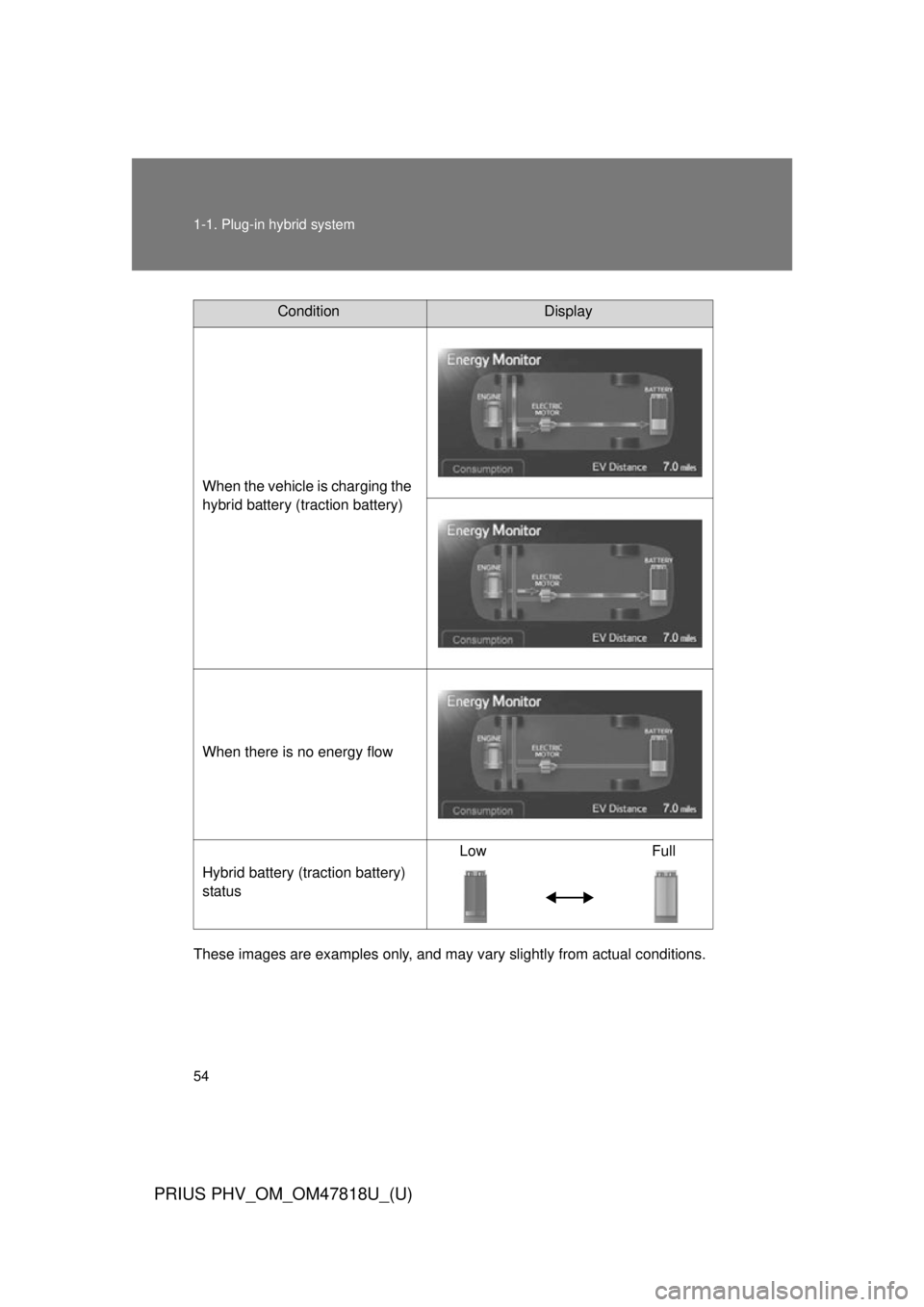
These images are examples only, and may vary slightly from actual conditions.
ConditionDisplay
When the vehicle is charging the
hybrid battery (traction battery)
When there is no energy flow
Hybrid battery (traction battery)
status Low Full
Page 57 of 684
57
1-1. Plug-in hybrid system
1
Before driving
PRIUS PHV_OM_OM47818U_(U)
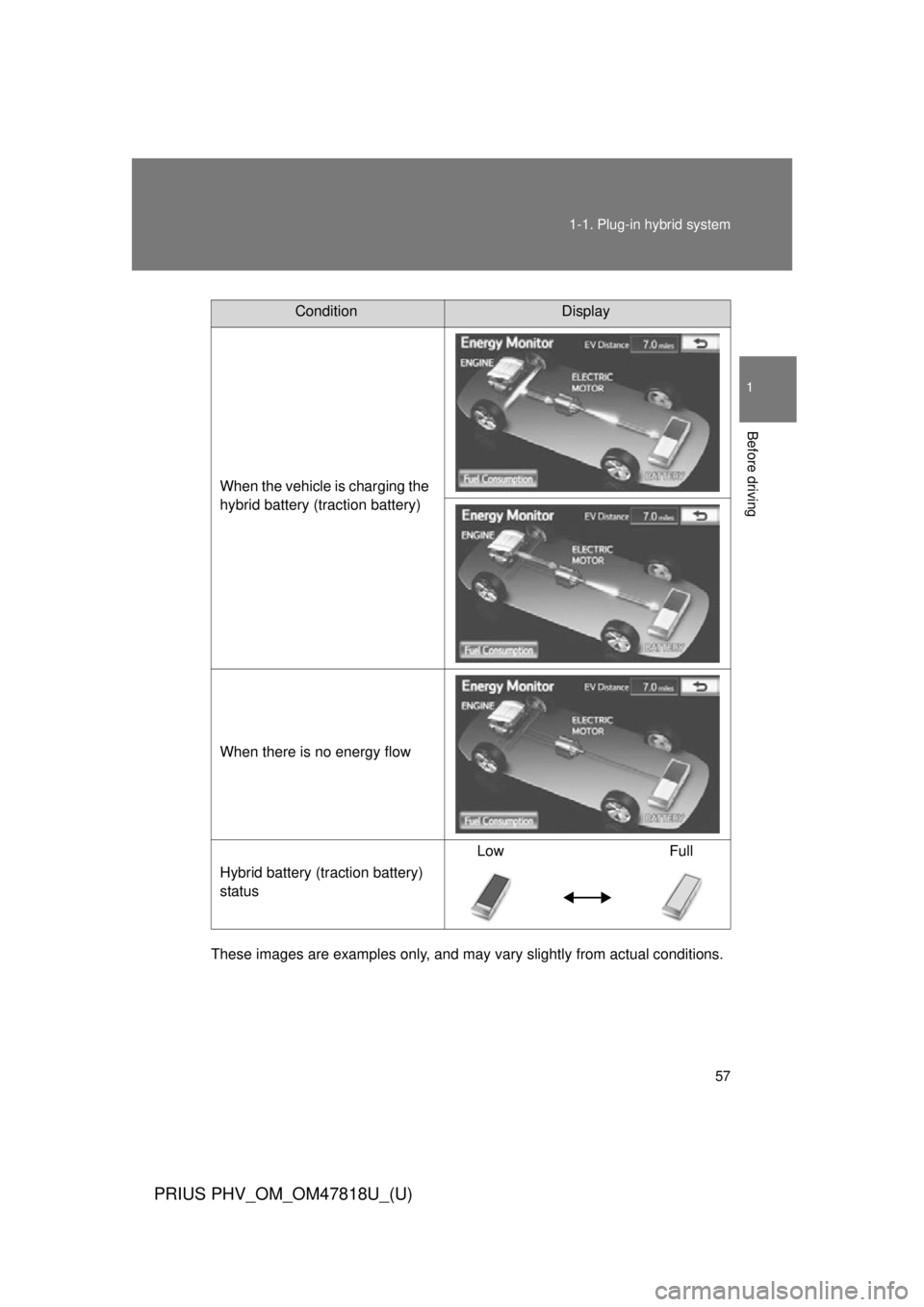
These images are examples only, and may va
ry slightly from actual conditions.
ConditionDisplay
When the vehicle is charging the
hybrid battery (traction battery)
When there is no energy flow
Hybrid battery (traction battery)
status Low Full
Page 60 of 684
60 1-1. Plug-in hybrid system
PRIUS PHV_OM_OM47818U_(U)
These images are examples only, and may vary slightly from actual conditions.
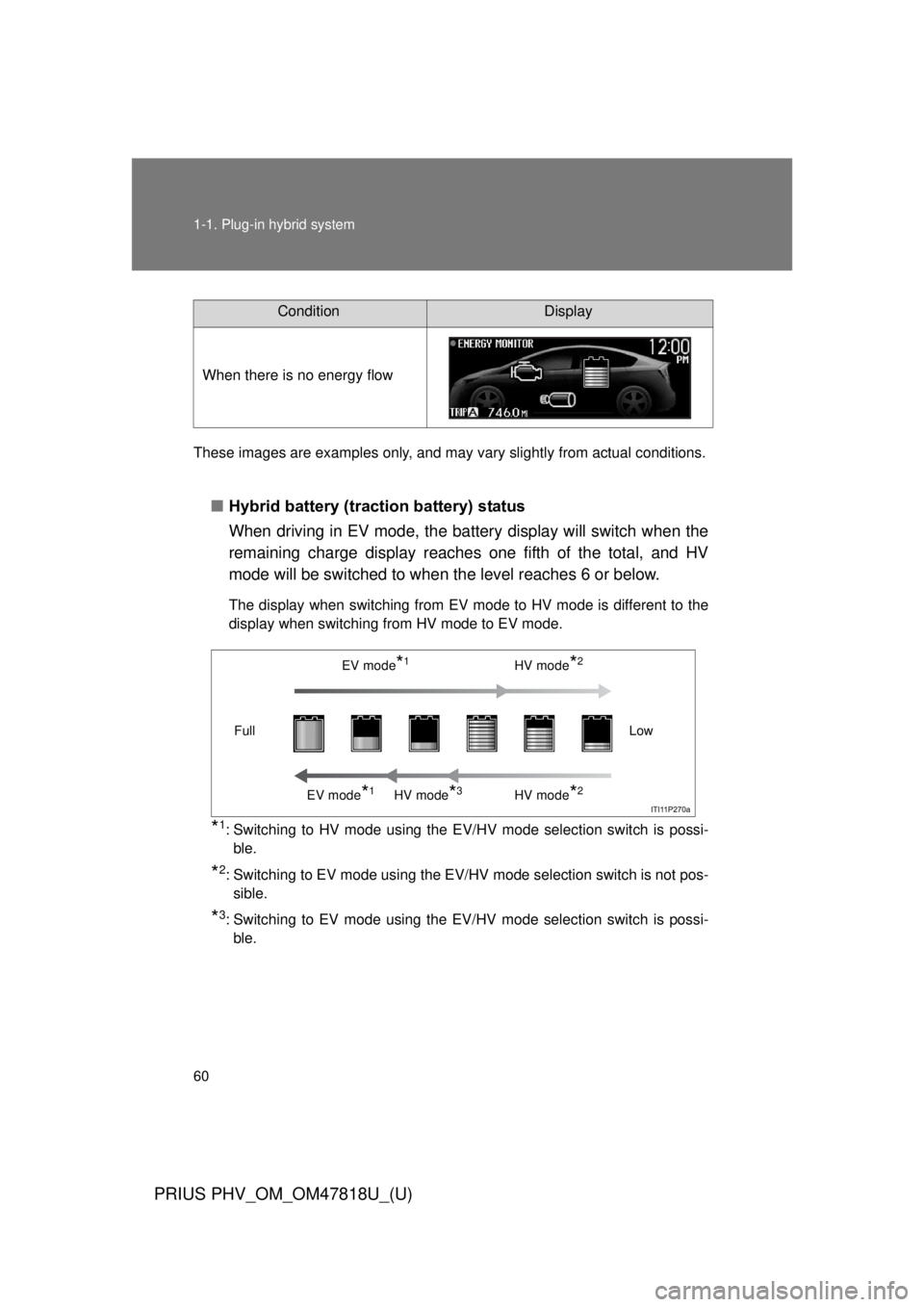
■Hybrid battery (traction battery) status
When driving in EV mode, the battery display will switch when the
remaining charge display reaches one fifth of the total, and HV
mode will be switched to when the level reaches 6 or below.
The display when switching from EV mode to HV mode is different to the
display when switching from HV mode to EV mode.
*1: Switching to HV mode using the EV/HV mode selection switch is possi-
ble.
*2: Switching to EV mode using the EV/HV mode selection switch is not pos-sible.
*3: Switching to EV mode using the EV/HV mode selection switch is possi-ble.
ConditionDisplay
When there is no energy flow
EV mode*1HV mode*2
EV mode*1HV mode*3HV mode*2
Low
Full
Page 61 of 684
61
1-1. Plug-in hybrid system
1
Before driving
PRIUS PHV_OM_OM47818U_(U)
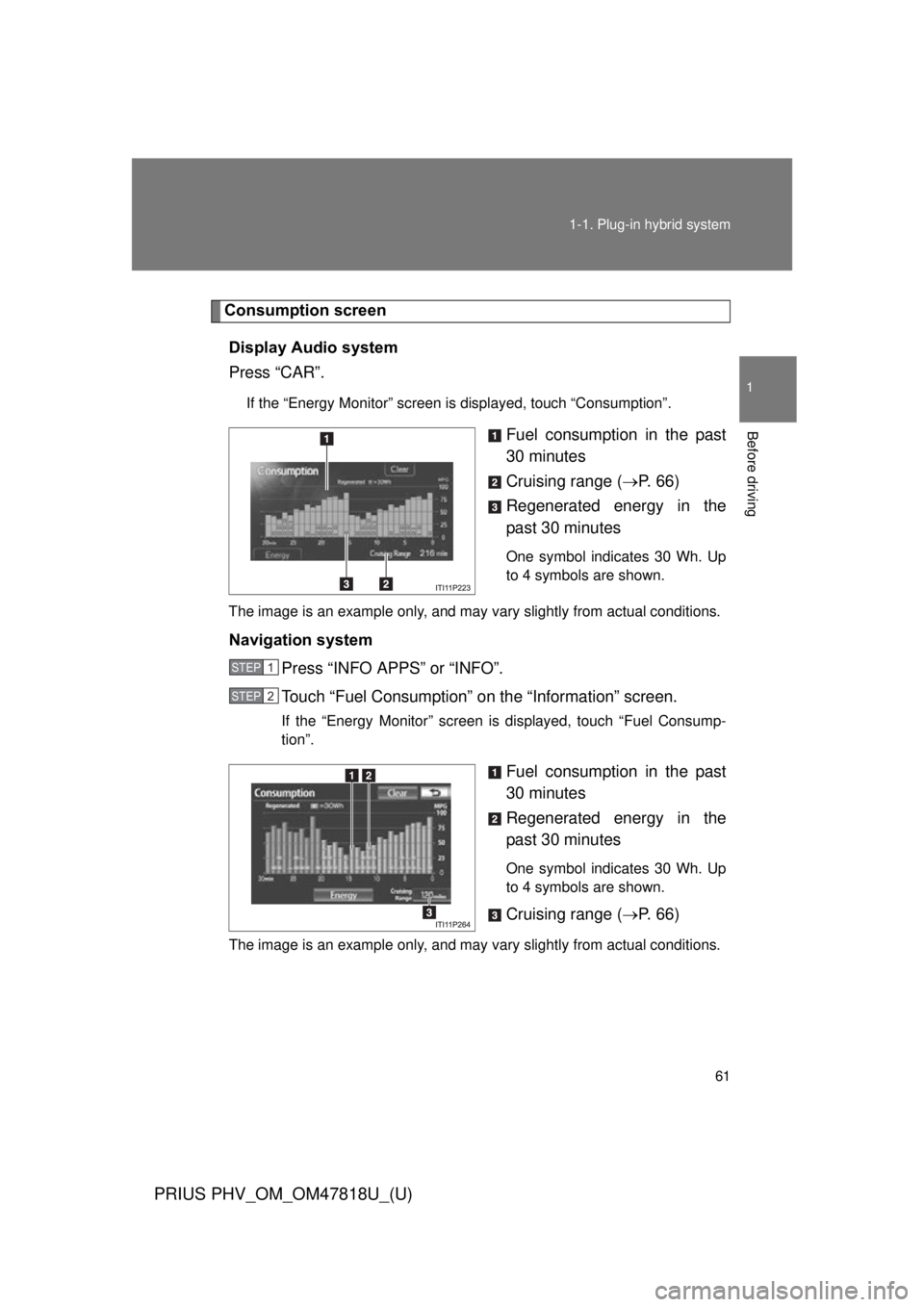
Consumption screen
Display Audio system
Press “CAR”.
If the “Energy Monitor” screen is displayed, touch “Consumption”.
Fuel consumption in the past
30 minutes
Cruising range ( P. 6 6 )
Regenerated energy in the
past 30 minutes
One symbol indicates 30 Wh. Up
to 4 symbols are shown.
The image is an example only, and may vary slightly from actual conditions.
Navigation system Press “INFO APPS” or “INFO”.
Touch “Fuel Consumption” on the “Information” screen.
If the “Energy Monitor” screen is displayed, touch “Fuel Consump-
tion”.
Fuel consumption in the past
30 minutes
Regenerated energy in the
past 30 minutes
One symbol indicates 30 Wh. Up
to 4 symbols are shown.
Cruising range (P. 6 6 )
The image is an example only, and may vary slightly from actual conditions.
STEP 1
STEP 2
Page 63 of 684

63
1-1. Plug-in hybrid system
1
Before driving
PRIUS PHV_OM_OM47818U_(U)
EV indicator*1
Eco Driving Indicator Light*1
Average speed*2
Average fuel consumption*2
Use the displayed average fuel
consumption as a reference.
*1: P. 268
*2:The current amount since the trip
meter was reset will be displayed.
These functions can be reset by
pressing and holding the “TRIP”
button when either the 5-minute
or 1-minute interval fuel con-
sumption display is being shown.
Page 64 of 684
64 1-1. Plug-in hybrid system
PRIUS PHV_OM_OM47818U_(U)
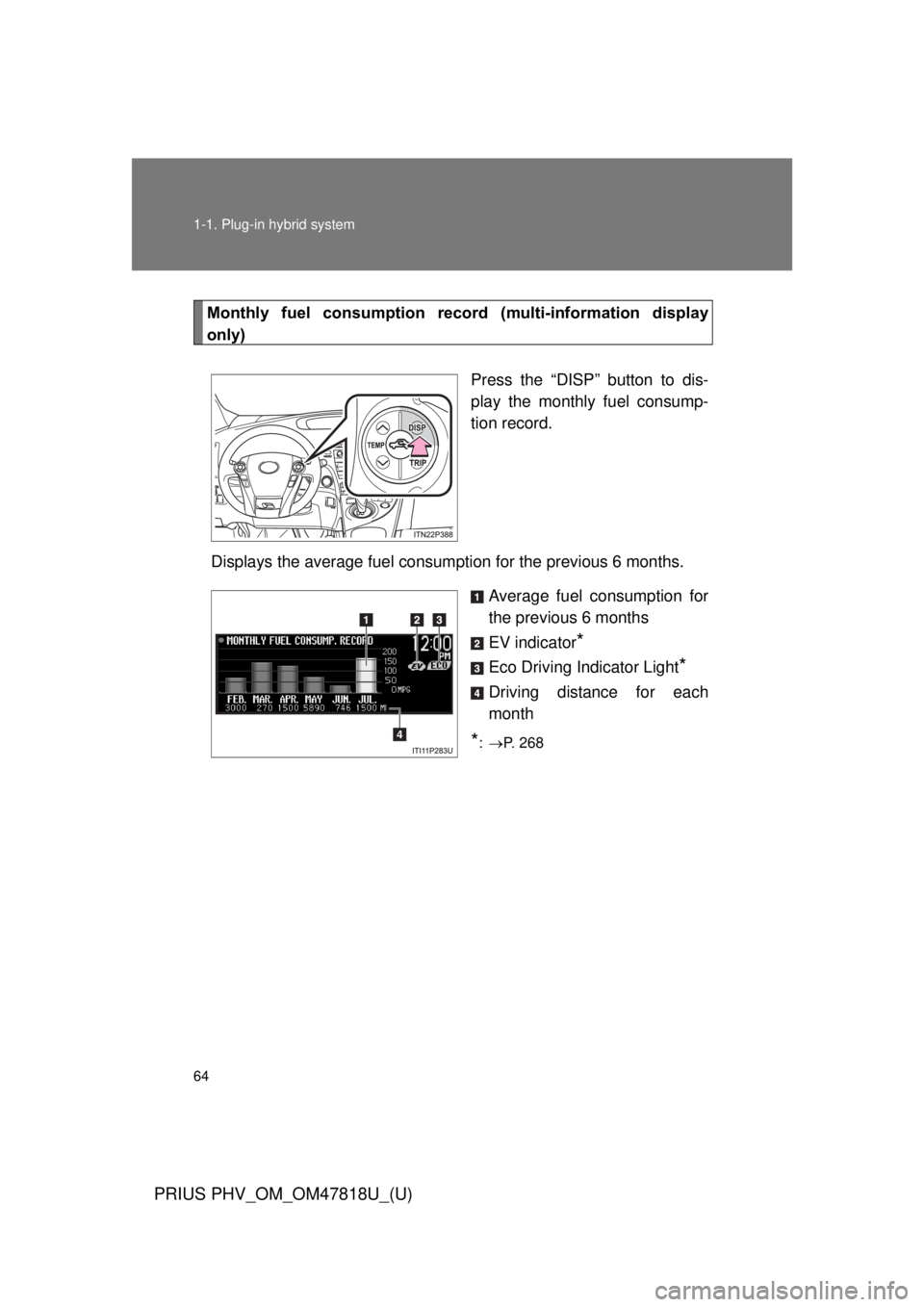
Monthly fuel consumption record (multi-information display
only)
Press the “DISP” button to dis-
play the monthly fuel consump-
tion record.
Displays the average fuel consum ption for the previous 6 months.
Average fuel consumption for
the previous 6 months
EV indicator
*
Eco Driving Indicator Light*
Driving distance for each
month
*: P. 268
Page 67 of 684
67
1
1-1. Plug-in hybrid system
Before driving
PRIUS PHV_OM_OM47818U_(U)
Plug-in hybrid vehicle driving tips
For economical and ecological driving, pay attention to the following
points:
■ Using EV mode and HV mode effectively
Primarily using EV mode when driving in cities and using HV
mode when driving on highways (or freeways) can help con-
serve fuel and electricity. ( P. 3 7 )
■ Using Eco drive mode
When using Eco drive mode, a torque corresponding to the
accelerator pedal depression amount can be generated more
smoothly than it is in normal conditions. In addition, the opera-
tion of the air conditioning system (heating/cooling) will be mini-
mized, improving fuel a nd electricity economy. ( P. 247)
■ Use of Hybrid System Indicator
Eco-friendly driving is possible by keeping the Hybrid System
Indicator within Eco area. ( P. 268)
■ When braking the vehicle
Make sure to operate the brakes gently and in good time. A
greater amount of electrical energy can be retained when slow-
ing down.
■ Delays
Repeated acceleration and deceleration, as well as long waits at
traffic lights, will lead to high fuel and electricity consumption.
Check traffic reports before l eaving and avoid delays as much
as possible. When encountering a delay, gently release the
brake pedal to allow the vehicle to move forward slightly while
avoiding overuse of the accelerator pedal. Doing so can help
control excessive electric ity and fuel consumption.
Page 80 of 684
80
1-2. Charging
PRIUS PHV_OM_OM47818U_(U)
How to charge
This vehicle has been designed to allow charging from an external
power source using a charging cable for exclusive use with standard
household AC outlets.
However, the vehicle differs greatly from standard household electri-
cal goods in the following ways, and incorrect usage could cause
fire or electric shock, possibly leading to death or serious injury.
● The charging operation is designe d to operate at 12A continu-
ously for the charge dura tion (up to 3 hours).
● Charging can be conducted outdoors.
To charge properly, follow the pr ocedure after reading the explana-
tion below. Charging is intended to be carried out by licensed driv-
ers only who properly understand the charging procedure. Charging
should not be carried out by children.
When charging with a charging st ation, follow the procedures for
using the charging station.
■ Confirm the following before charging
●The parking brake is applied. ( P. 255)
● Lights such as the headlights, emergency flashers and interior
lights etc. are switched off.
If these light switches are turned ON, then these features will con-
sume electricity, and charging time will increase.
●The “POWER” switch is OFF. ( P. 240)
■ Items to be regularly inspected
P. 103
Page 83 of 684
83
1-2. Charging
1
Before driving
PRIUS PHV_OM_OM47818U_(U)
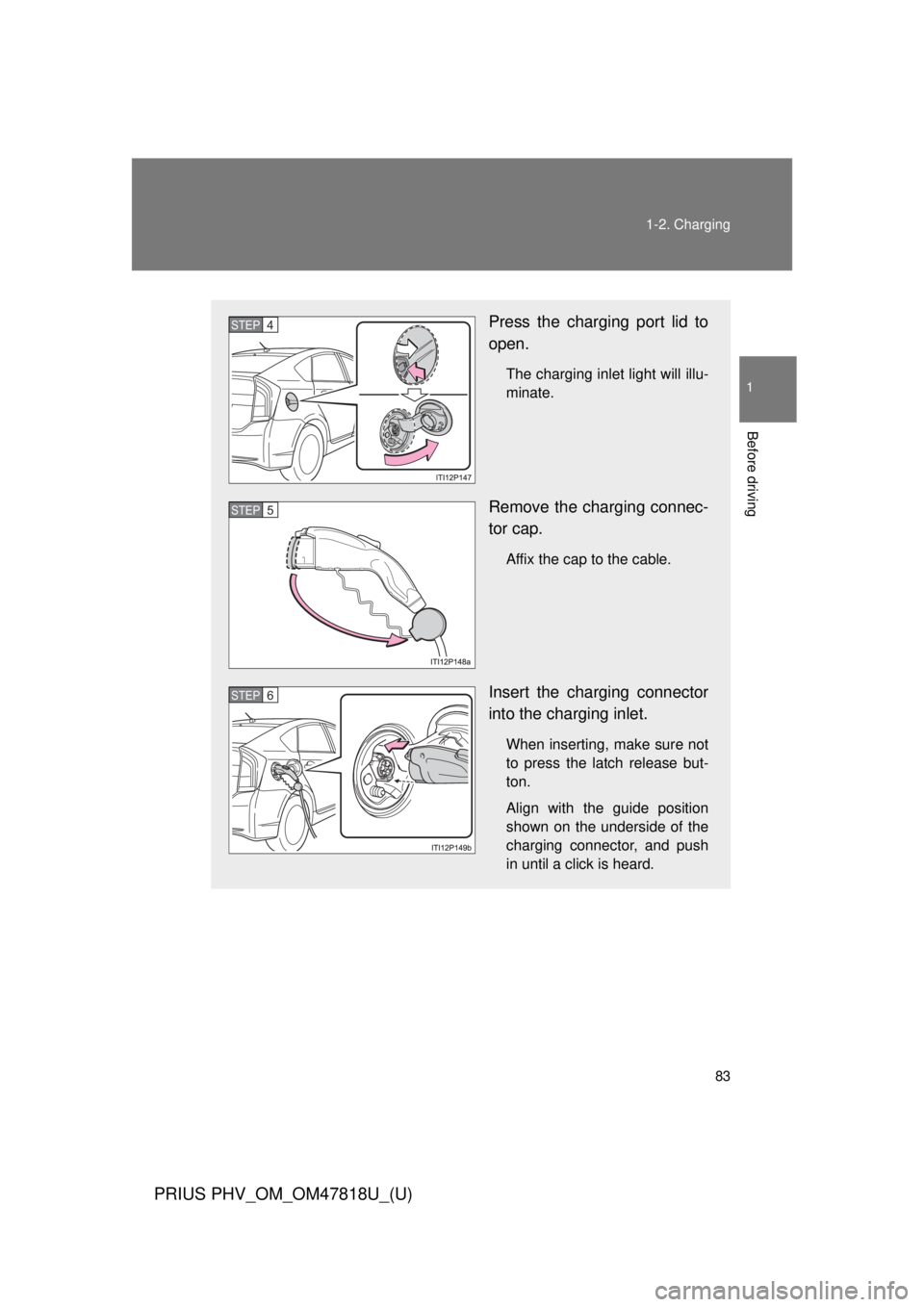
Press the charging port lid to
open.
The charging inlet light will illu-
minate.
Remove the charging connec-
tor cap.
Affix the cap to the cable.
Insert the charging connector
into the charging inlet.
When inserting, make sure not
to press the latch release but-
ton.
Align with the guide position
shown on the underside of the
charging connector, and push
in until a click is heard.
STEP 4
STEP 5
STEP 6
Page 84 of 684
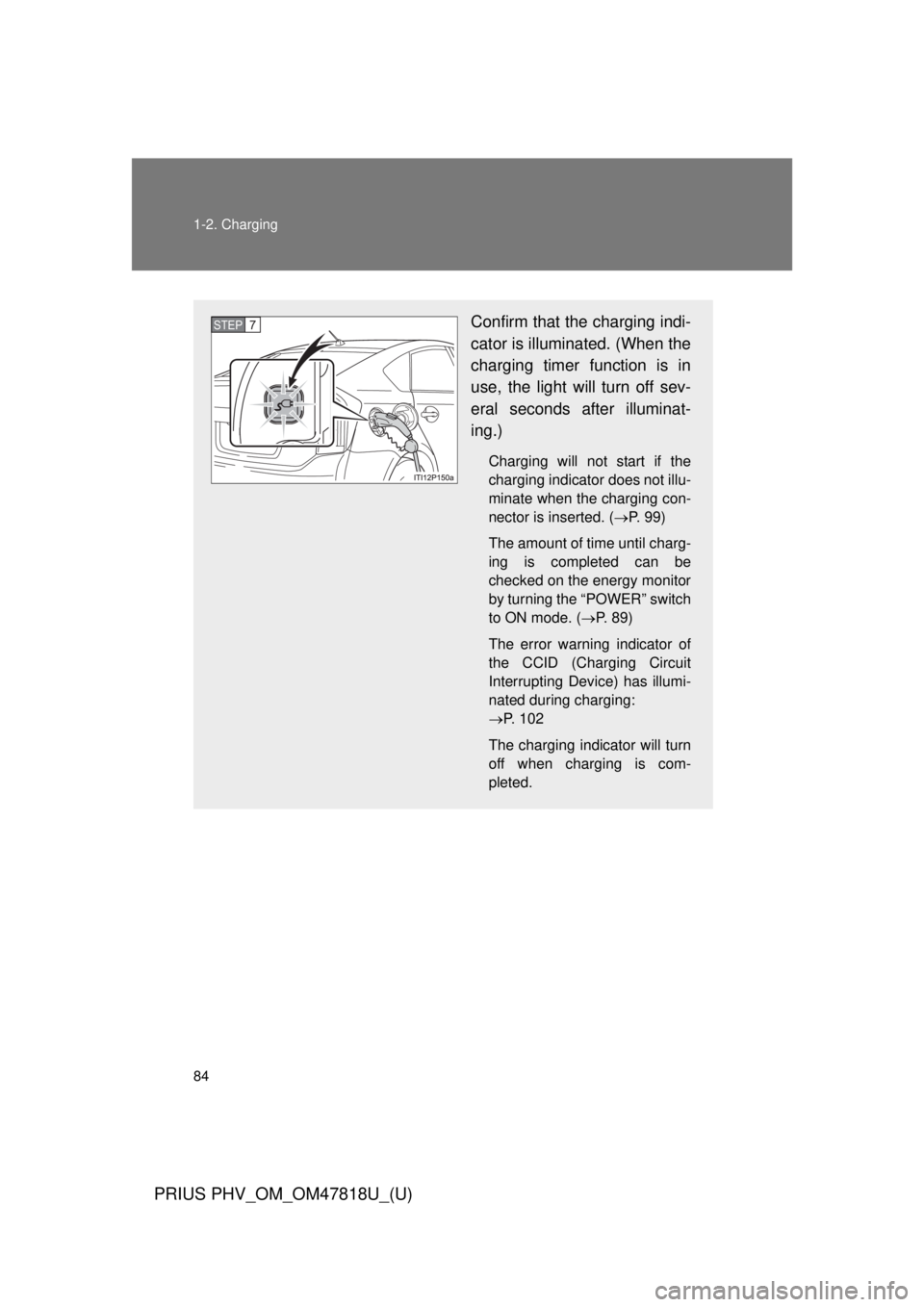
84 1-2. Charging
PRIUS PHV_OM_OM47818U_(U)
Confirm that the charging indi-
cator is illuminated. (When the
charging timer function is in
use, the light will turn off sev-
eral seconds after illuminat-
ing.)
Charging will not start if the
charging indicator does not illu-
minate when the charging con-
nector is inserted. (P. 9 9 )
The amount of time until charg-
ing is completed can be
checked on the energy monitor
by turning the “POWER” switch
to ON mode. ( P. 89)
The error warning indicator of
the CCID (Charging Circuit
Interrupting Device) has illumi-
nated during charging:
P. 102
The charging indicator will turn
off when charging is com-
pleted.
STEP7