reset TOYOTA PRIUS PHV 2012 User Guide
[x] Cancel search | Manufacturer: TOYOTA, Model Year: 2012, Model line: PRIUS PHV, Model: TOYOTA PRIUS PHV 2012Pages: 684, PDF Size: 12.16 MB
Page 271 of 684
271
2-2. Instrument cluster
PRIUS PHV_OM_OM47818U_(U)
2
When driving
EV driving ratio indicator
The ratio of the distance driven using only power charged from an
external power source against other driving conditions is displayed
on the EV driving ratio screen. Two separate EV driving ratios can be
used: EV driving ratio (1) and EV driving ratio (2).
Calculation can be started or finished at any time via the reset operation.
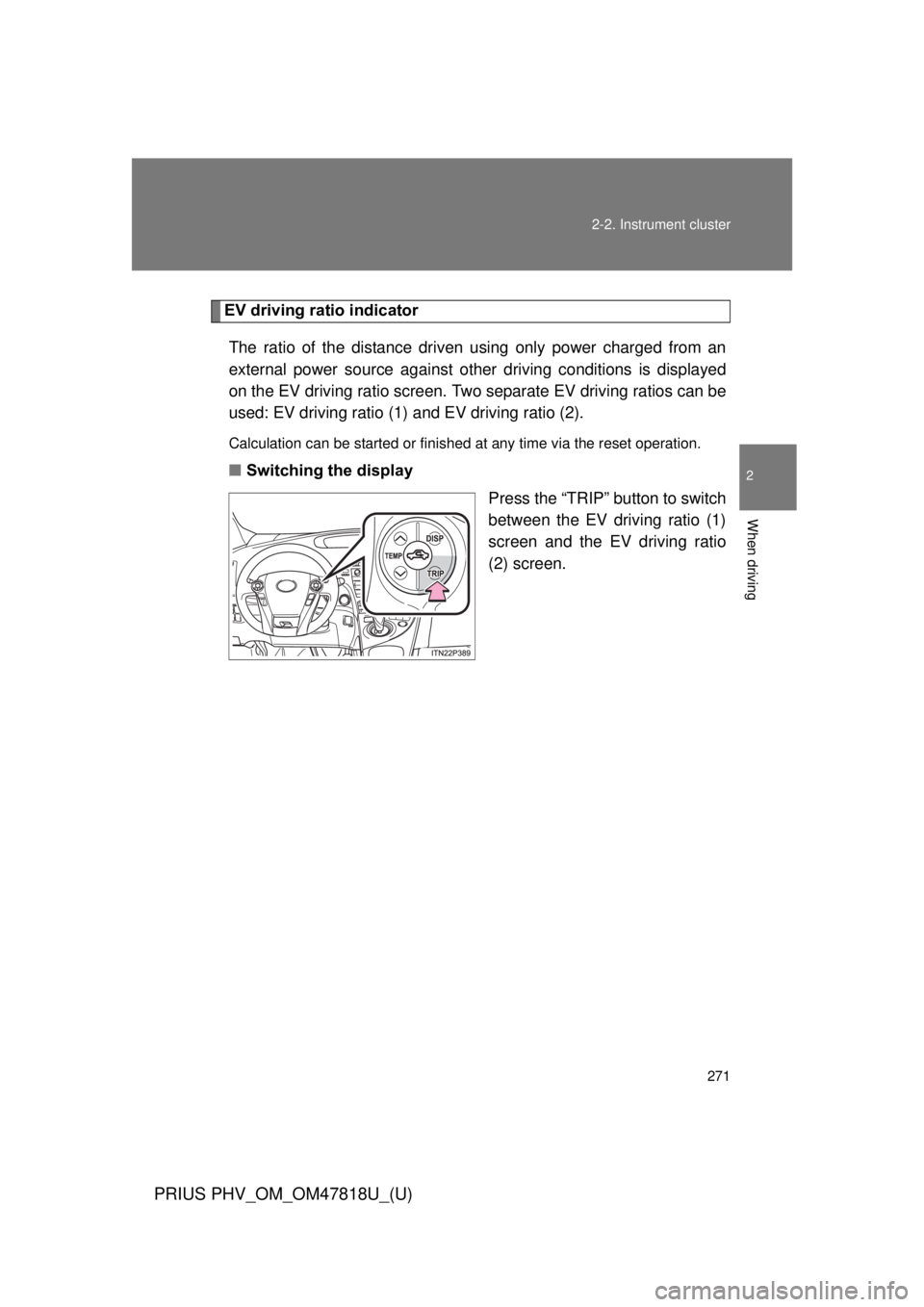
■ Switching the display
Press the “TRIP” button to switch
between the EV driving ratio (1)
screen and the EV driving ratio
(2) screen.
Page 273 of 684
273
2-2. Instrument cluster
PRIUS PHV_OM_OM47818U_(U)
2
When driving
■
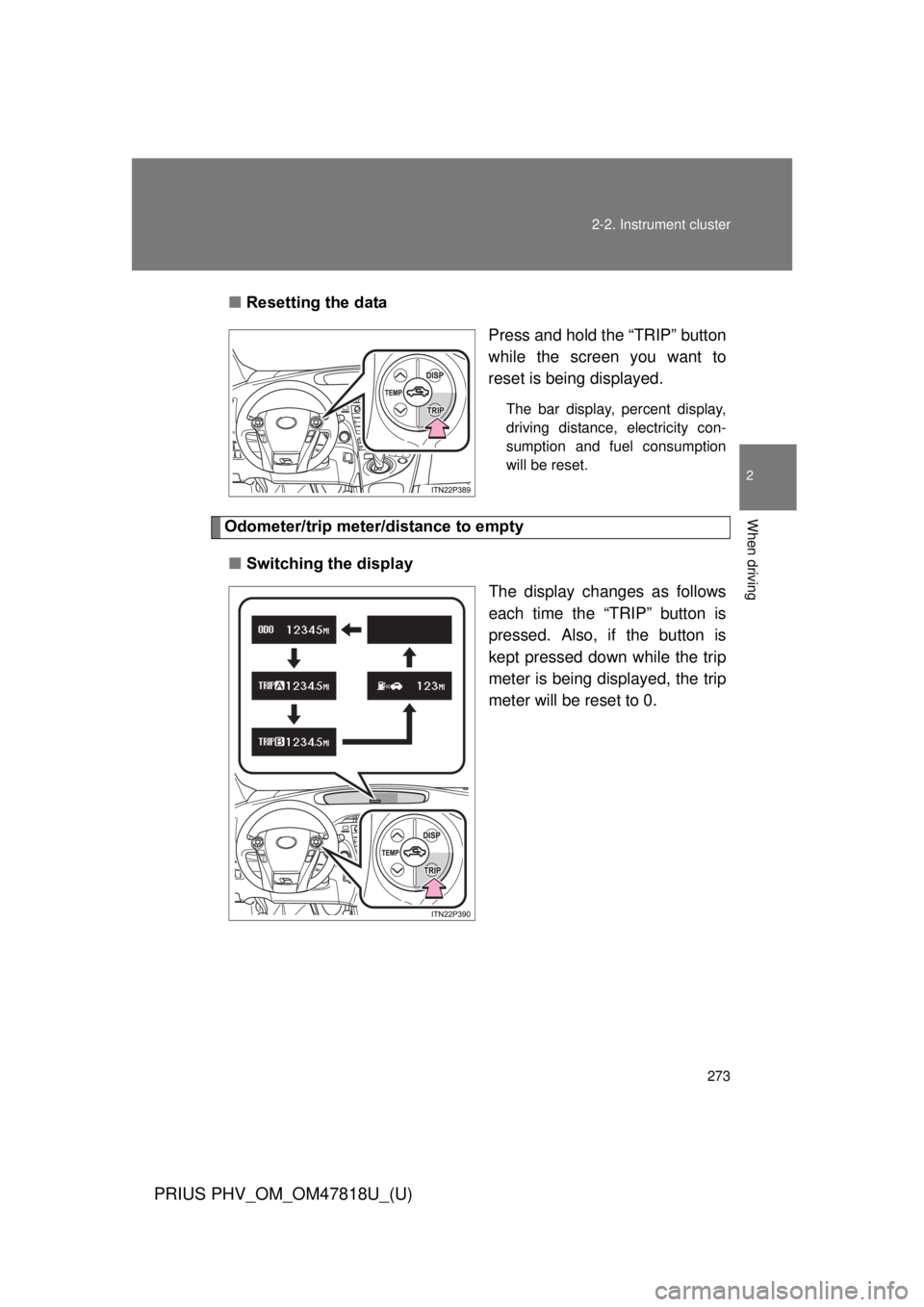
Resetting the data
Press and hold the “TRIP” button
while the screen you want to
reset is being displayed.
The bar display, percent display,
driving distance, electricity con-
sumption and fuel consumption
will be reset.
Odometer/trip meter/distance to empty
■ Switching the display
The display changes as follows
each time the “TRIP” button is
pressed. Also, if the button is
kept pressed down while the trip
meter is being displayed, the trip
meter will be reset to 0.
Page 274 of 684
274 2-2. Instrument cluster
PRIUS PHV_OM_OM47818U_(U)
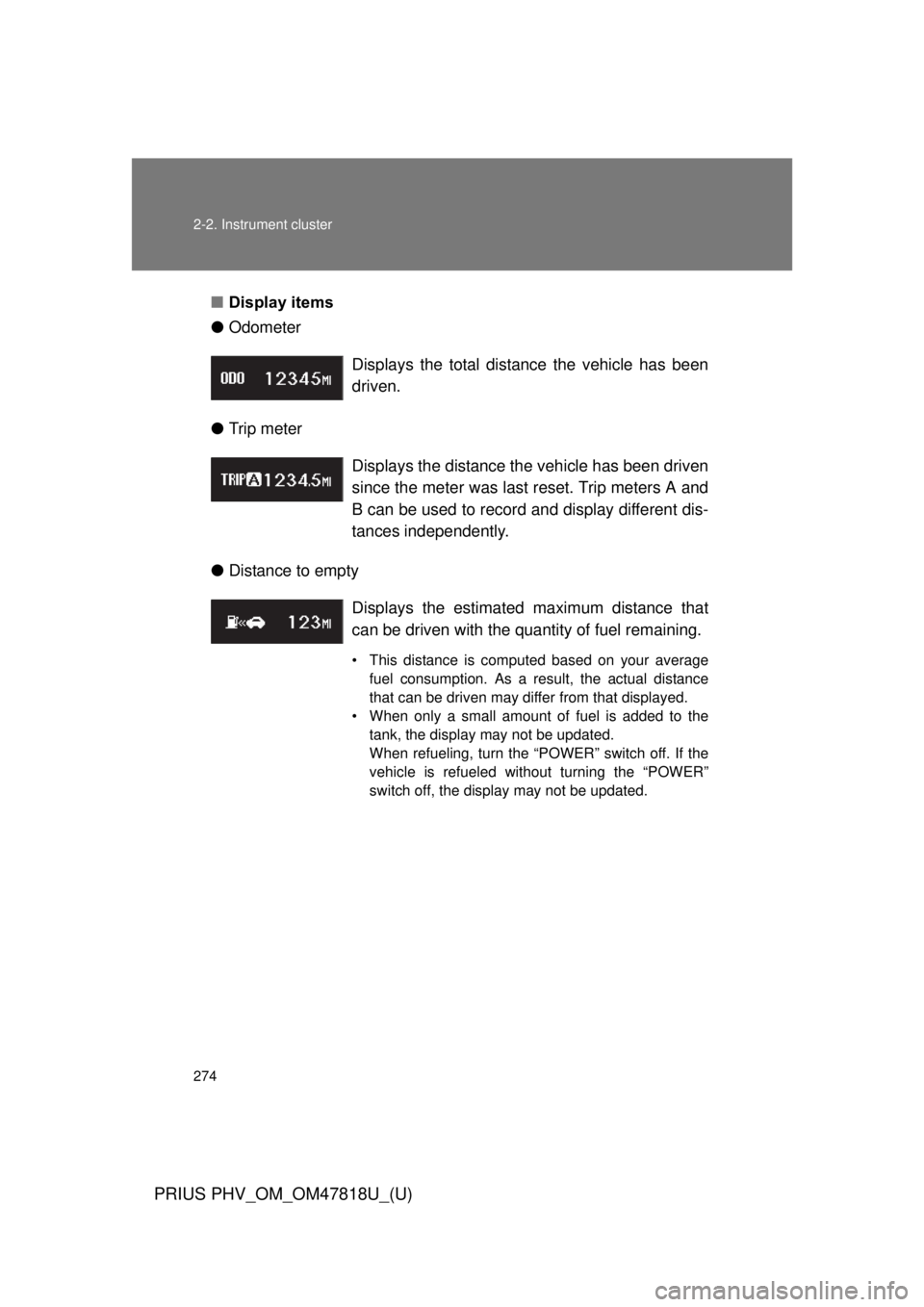
■Display items
● Odometer
● Trip meter
● Distance to empty Displays the total distance the vehicle has been
driven.
Displays the distance the vehicle has been driven
since the meter was last reset. Trip meters A and
B can be used to record and display different dis-
tances independently.
Displays the estimate
d maximum distance that
can be driven with the quantity of fuel remaining.
• This distance is computed based on your average fuel consumption. As a result, the actual distance
that can be driven may differ from that displayed.
• When only a small amount of fuel is added to the tank, the display may not be updated.
When refueling, turn the “POWER” switch off. If the
vehicle is refueled without turning the “POWER”
switch off, the display may not be updated.
Page 283 of 684
283
2-2. Instrument cluster
PRIUS PHV_OM_OM47818U_(U)
2
When driving
■
Driving in Eco drive mode
The multi-information display will automatically switch the display to Hybrid
System Indicator, regardless of which display is currently being shown.
(P. 268)
■ Touch tracer display (if equipped)
● The touch tracer display can be set to not display even if the steering
switches are touched.
● Only the circular, rubber-covered switches have a built-in touch sensor.
Touching any of the other switches will not display the touch tracer dis-
play.
■ Display settings can be changed when
The vehicle speed is less than approximately 5 mph (8 km/h).
■ Engine speed
On hybrid vehicles, engine speed is precisely controlled in order to help
improve fuel efficiency and reduce exhaust emissions etc. There are times
when the engine speed that is displayed may differ even when vehicle oper-
ation and driving conditions are the same.
■ When the 12-volt battery is disconnected
The following data will be reset.
● Average fuel consumption
● Distance to empty
● Average vehicle speed
● EV driving ratio
● Clock
● Display settings
● Trip meter
Page 290 of 684

■When driving on snowy roads or in other bright environments
When the highest level of brightness has been reached, the display can b\
e
made ev")
290 2-2. Instrument cluster
PRIUS PHV_OM_OM47818U_(U)
■When driving on snowy roads or in other bright environments
When the highest level of brightness has been reached, the display can b\
e
made even brighter by pressing and holding “ ” on the brightness control
button.
Pressing “ ” on the brightness control button or turning the “POWER” switch
off will cause the brightness level to revert to the original level.
■ Display speed setting function
The speedometer can be set to display only when a desired vehicle speed is
reached.
Press and hold the “HUD” main switch while the vehicle is stopped
and while the head-up display is showing only the speedometer.
The speedometer will begin to flash.
Set the desired display speed on the speedometer by pressing “ ”
and “ ” on the display position adjustment button.
Press “ ” to raise the speed and “ ” to lower. The speed will change
by 1 mph (1.6 km/h) each time the button is pressed, and continu-
ously by 10 mph (16 km/h) when the button is pressed and held.
Press and hold the “HUD” main switch to finish setting.
■ Head-up display
The head-up display may seem dark and hard to see when viewed through
sunglasses, especially polarized sunglasses.
Adjust the brightness of the head-up display or remove your sunglasses.
■ When the 12-volt battery is disconnected
The head-up display settings will be reset.
STEP 1
STEP 2
STEP 3
Page 310 of 684

310 2-4. Using other driving systems
PRIUS PHV_OM_OM47818U_(U)
■Cruise control can be set when
● The shift position is in D.
● Vehicle speed is above approximately 25 mph (40 km/h).
■ Accelerating after setting the vehicle speed
● The vehicle can be accelerated normally. After acceleration, the set
speed resumes.
● Even without canceling the cruise control, the set speed can be
increased by first accelerating the vehicle to the desired speed and then
pushing the lever down to set the new speed.
■ Automatic cruise control cancelation
Cruise control will stop maintaining the vehicle speed in any of the following
situations.
● Actual vehicle speed falls more than approximately 10 mph (16 km/h)
below the preset vehicle speed.
At this time, the memorized set speed is not retained.
● Actual vehicle speed is below approximately 25 mph (40 km/h).
● Enhanced VSC is activated.
■ If the cruise control indicator light flashes
Press the “ON-OFF” button once to deactivate the system, and then press
the button again to reactivate the system.
If the cruise control speed cannot be set or if the cruise control cancels
immediately after being activated, there may be a malfunction in the cruise
control system. Have the vehicle inspected by your Toyota dealer.
Page 432 of 684
432 4-2. Maintenance
PRIUS PHV_OM_OM47818U_(U)
■Reset the maintenance data (U.S.A. only)
After the required maintenance is performed according to the maintenance
schedule, please reset the maintenance data.
To reset the data, follow the procedures described below:
Turn the “POWER” switch off with the trip meter A shown.
Turn the “POWER” switch to ON mode with the MPH or km/h button
( P. 259) held down.
Keep pressing the button until the trip meter indicates “000000” and
the multi-information display indicates that the reset is complete.
■ Allow inspection and repairs to be performed by a Toyota dealer
● Toyota technicians are well-trained specialists and are kept up to date
with the latest service information. They are well informed about the
operation of all systems on your vehicle.
● Keep a copy of the repair order. It proves that the maintenance that has
been performed is under warranty coverage. If any problem should arise
while your vehicle is under warranty, your Toyota dealer will promptly
take care of it.
STEP 1
STEP 2
STEP 3
Page 455 of 684
455
4-3. Do-it-yourself maintenance
PRIUS PHV_OM_OM47818U_(U)
4
Maintenance and care
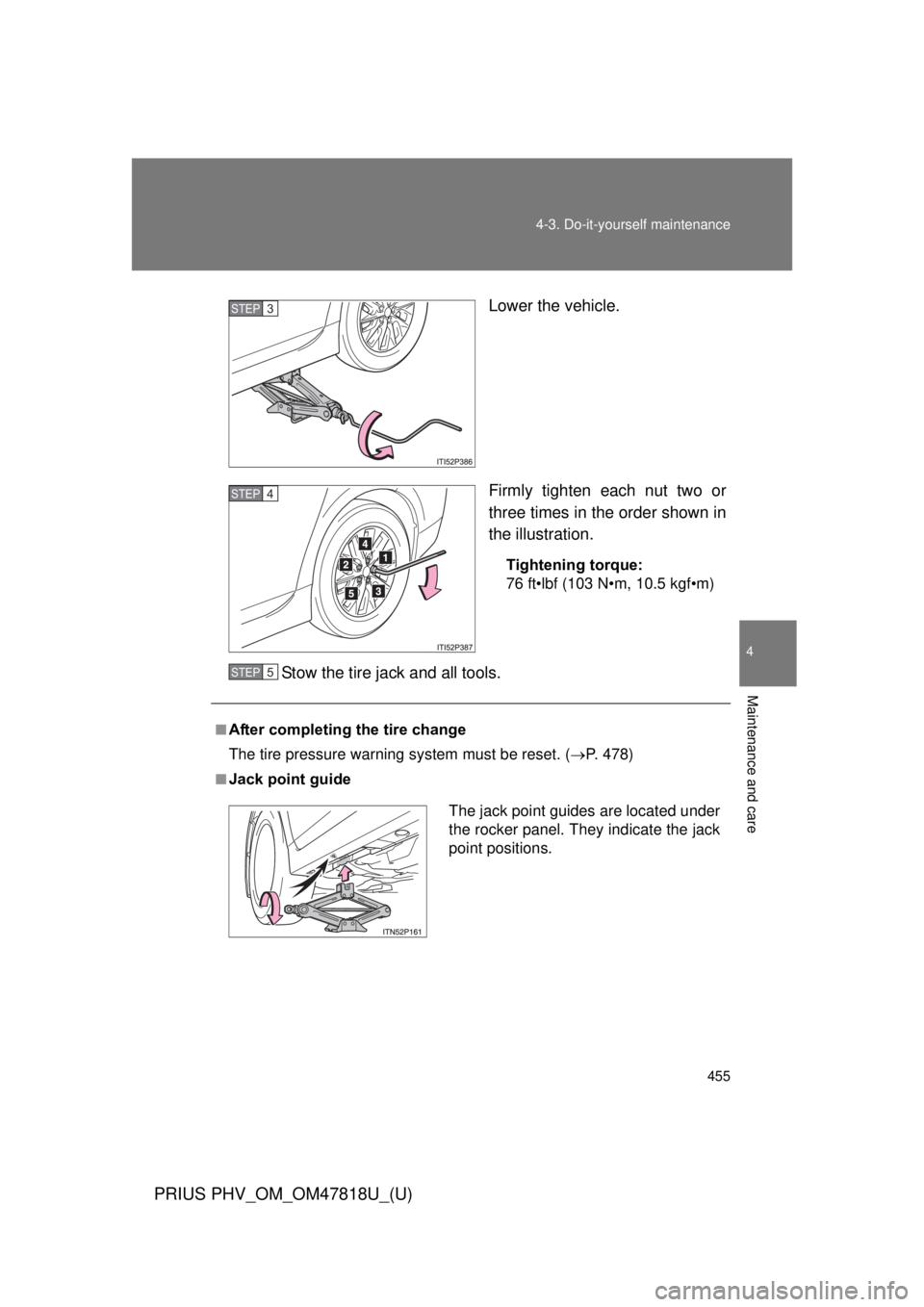
Lower the vehicle.
Firmly tighten each nut two or
three times in the order shown in
the illustration.
Tightening torque:
76 ft•lbf (103 N•m, 10.5 kgf•m)
Stow the tire jack and all tools.
STEP 3
STEP 4
■After completing the tire change
The tire pressure warning
system must be reset. (P. 478)
■Jack point guide
STEP 5
The jack point guides are located under
the rocker panel. They indicate the jack
point positions.
Page 479 of 684
479
4-3. Do-it-yourself maintenance
PRIUS PHV_OM_OM47818U_(U)
4
Maintenance and care
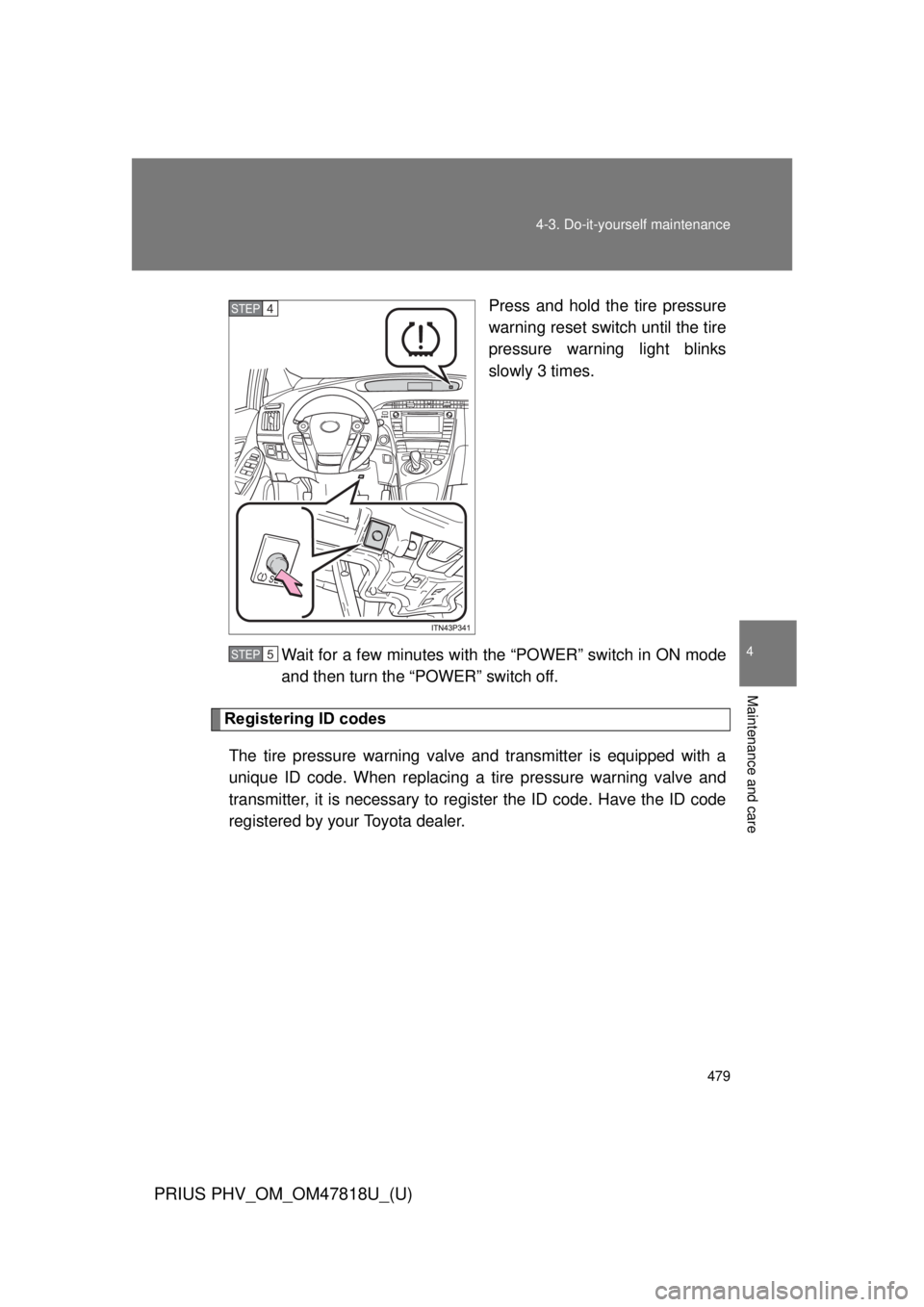
Press and hold the tire pressure
warning reset switch until the tire
pressure warning light blinks
slowly 3 times.
Wait for a few minutes with th e “POWER” switch in ON mode
and then turn the “POWER” switch off.
Registering ID codes
The tire pressure warning valve and transmitter is equipped with a
unique ID code. When replacing a tire pressure warning valve and
transmitter, it is necessary to regi ster the ID code. Have the ID code
registered by your Toyota dealer.
STEP 4
STEP 5
Page 482 of 684

482 4-3. Do-it-yourself maintenance
PRIUS PHV_OM_OM47818U_(U)
■Initializing the tire pressure warning system
Initialize the system with the tire infl ation pressure adjusted to the speci-
fied level.
■If the tread on snow tires wears down below 0.16 in. (4 mm)
The effectiveness of the tires as snow tires is lost.
■If you press the tire pressure warning reset switch accidentally
If initialization is performed, adjust the tire in flation pressure to the speci-
fied level and initialize the tire pressure warning system again.
■When initialization of the tire pressure warning system has failed
Initialization can be completed in a few minutes. However, in the follow-
ing cases, the settings have not been recorded and the system will not
operate properly. If repeated attempts to record tire inflation pressure
settings are unsuccessful, have the vehicle inspected by your Toyota
dealer.
●When operating the tire pressure warning reset switch, the tire pres-
sure warning light doe s not blink 3 times.
●After carrying out the initialization procedure, the tire pressure warn-
ing light blinks for 1 minute then stays on after driving for 20 minutes.