bulb TOYOTA PRIUS PLUG-IN 2012 User Guide
[x] Cancel search | Manufacturer: TOYOTA, Model Year: 2012, Model line: PRIUS PLUG-IN, Model: TOYOTA PRIUS PLUG-IN 2012Pages: 704, PDF Size: 19.59 MB
Page 538 of 704
514
4-3. Do-it-yourself maintenance
PRIUS PHV_OM_OM47818U_(U)
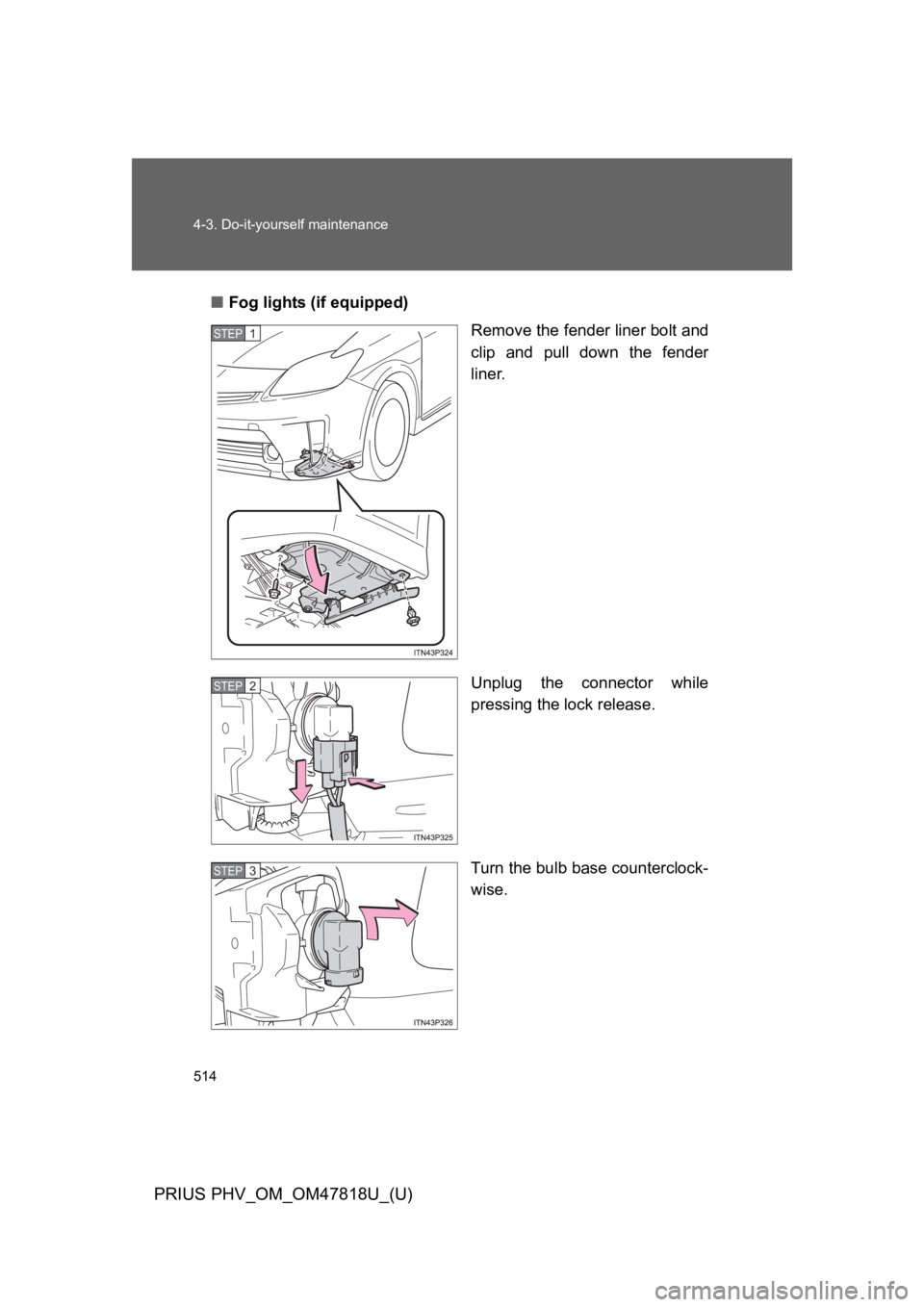
■Fog lights (if equipped)
Remove the fender liner bolt and
clip and pull down the fender
liner.
Unplug the connector while
pressing the lock release.
Turn the bulb base counterclock-
wise.
STEP 1
STEP 2
STEP 3
Page 539 of 704
515
4-3. Do-it-yourself maintenance
PRIUS PHV_OM_OM47818U_(U)
4
Maintenance and care
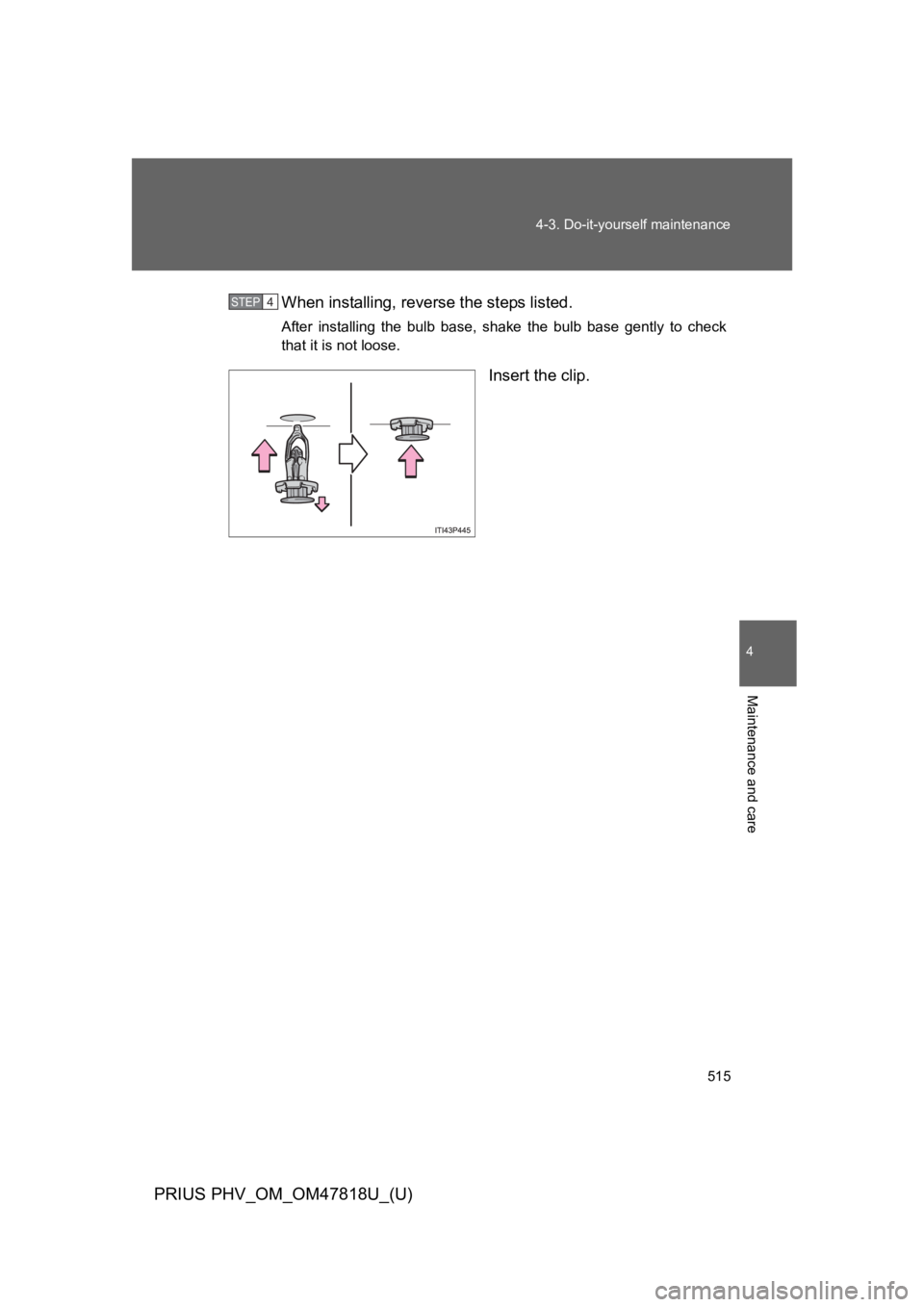
When installing, reverse the steps listed.
After installing the bulb base, shake the bulb base gently to check
that it is not loose.
Insert the clip.
STEP 4
Page 540 of 704
516
4-3. Do-it-yourself maintenance
PRIUS PHV_OM_OM47818U_(U)
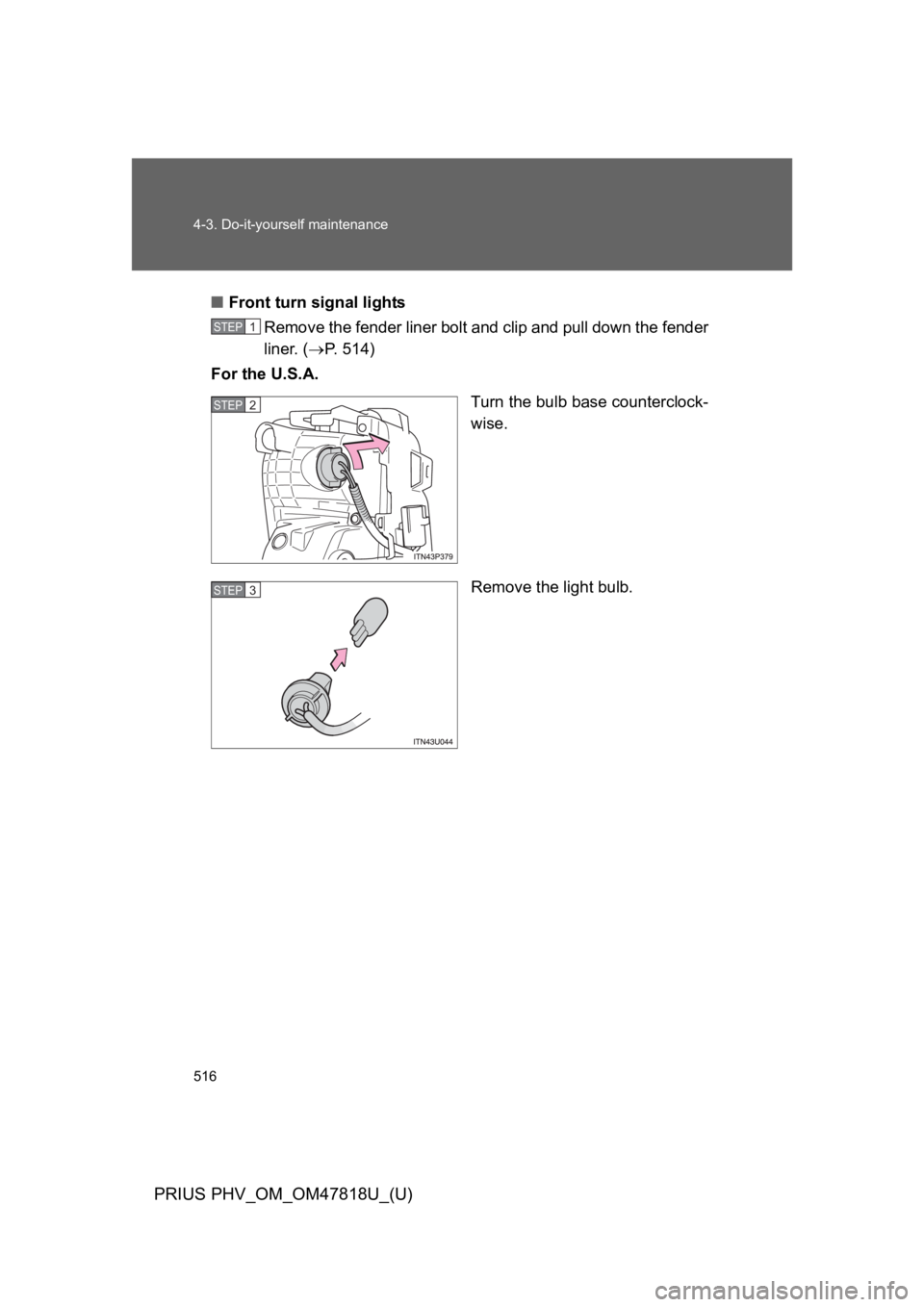
■Front turn signal lights
Remove the fender liner bolt and clip and pull down the fender
liner. (→P. 5 1 4 )
For the U.S.A.
Turn the bulb base counterclock-
wise.
Remove the light bulb.
STEP 1
STEP 2
STEP 3
Page 541 of 704
517
4-3. Do-it-yourself maintenance
PRIUS PHV_OM_OM47818U_(U)
4
Maintenance and care
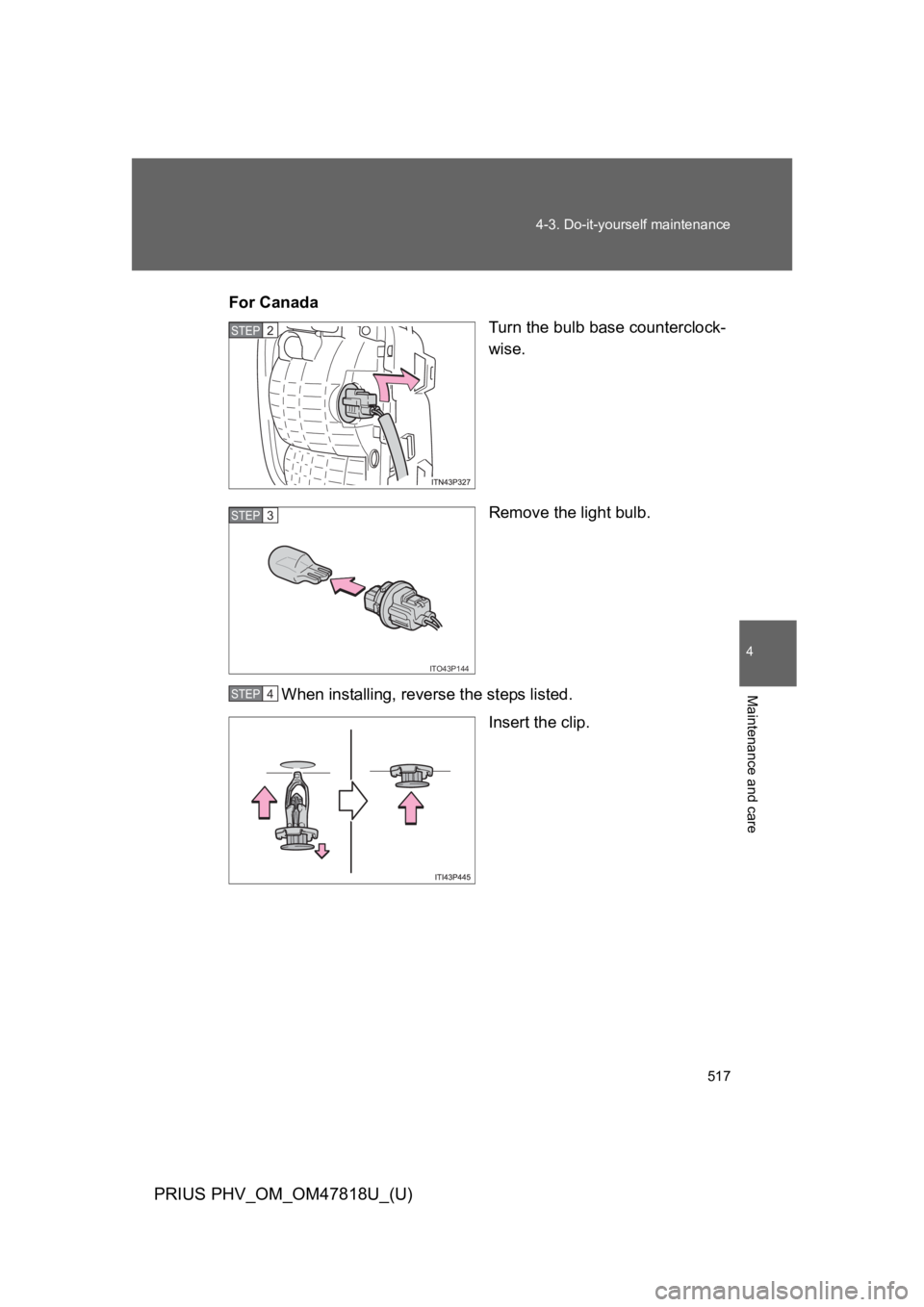
For CanadasTurn the bulb base counterclock-
wise.
Remove the light bulb.
When installing, reverse the steps listed.
Insert the clip.
STEP 2
ITO43P144
STEP 3
STEP 4
Page 542 of 704
518
4-3. Do-it-yourself maintenance
PRIUS PHV_OM_OM47818U_(U)
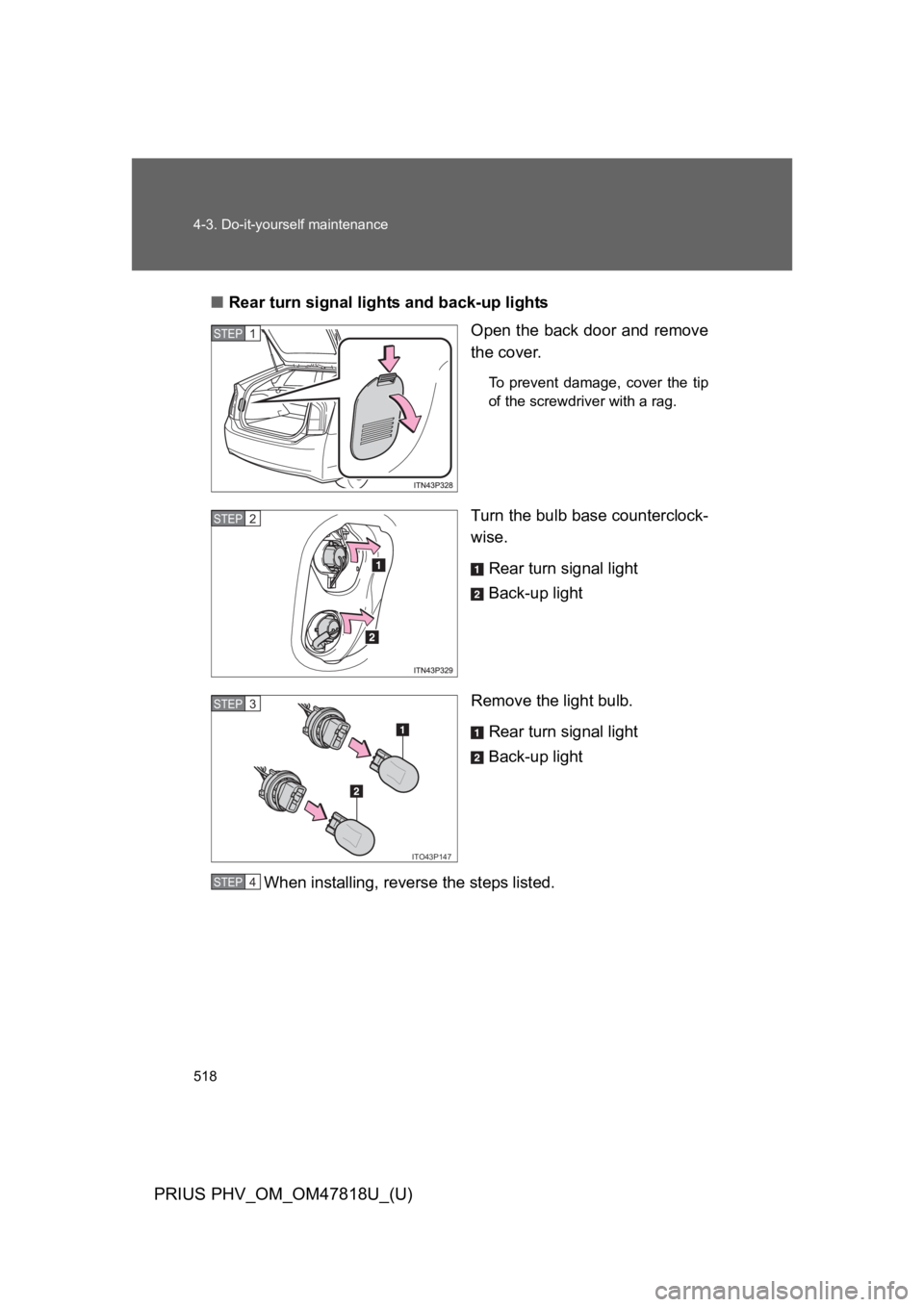
■Rear turn signal lights and back-up lights
Open the back door and remove
the cover.
To p r e v e n t d a m a g e , c o v e r t h e t i p
of the screwdriver with a rag.
Turn the bulb base counterclock-
wise.
Rear turn signal light
Back-up light
Remove the light bulb.
Rear turn signal light
Back-up light
When installing, reverse the steps listed.
STEP 1
STEP 2
ITO43P147
STEP 3
STEP 4
Page 543 of 704
519
4-3. Do-it-yourself maintenance
PRIUS PHV_OM_OM47818U_(U)
4
Maintenance and care
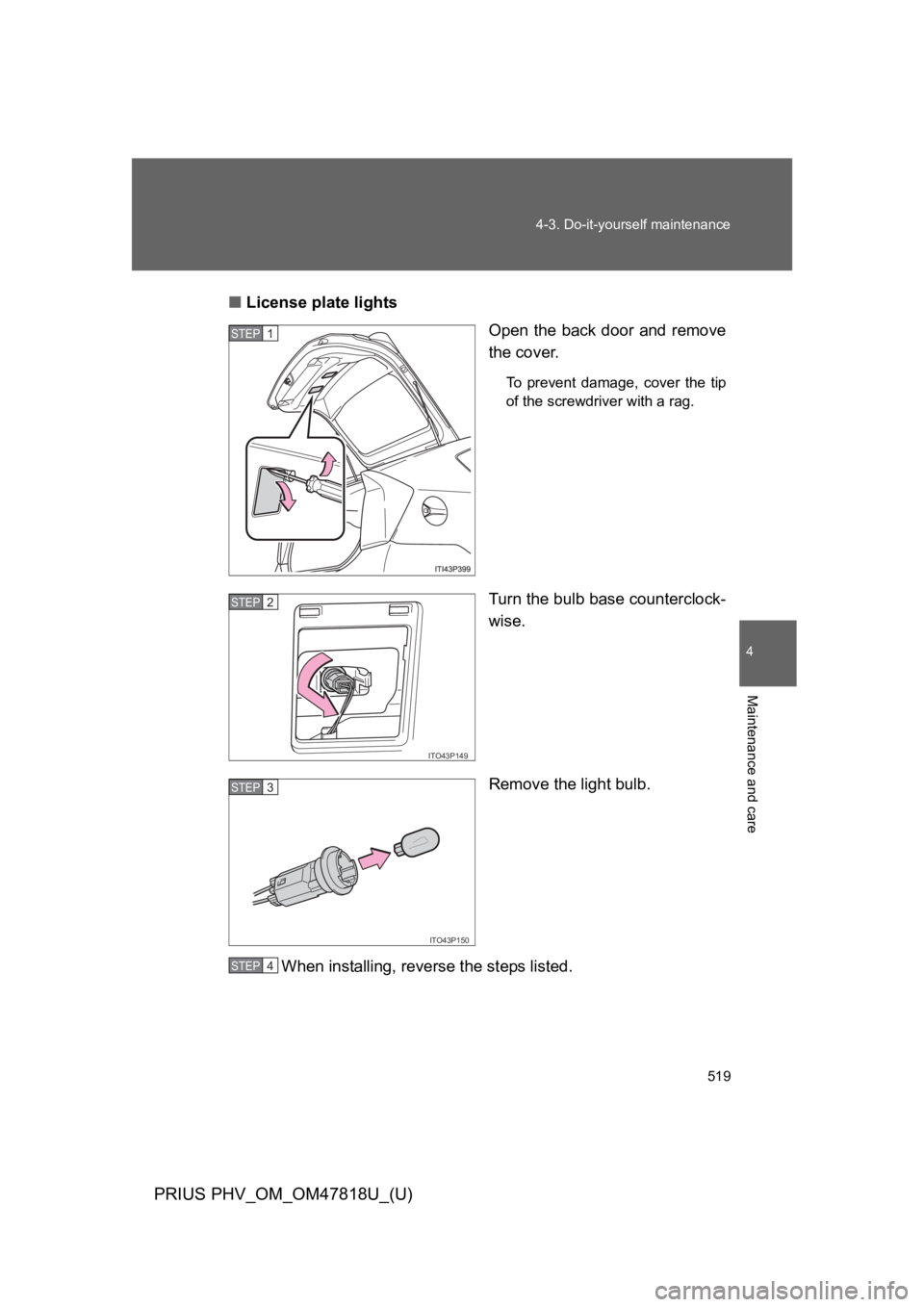
■License plate lights
Open the back door and remove
the cover.
To p r e v e n t d a m a g e , c o v e r t h e t i p
of the screwdriver with a rag.
Turn the bulb base counterclock-
wise.
Remove the light bulb.
When installing, reverse the steps listed.
STEP 1
ITO43P149
STEP 2
ITO43P150
STEP 3
STEP 4
Page 544 of 704
520
4-3. Do-it-yourself maintenance
PRIUS PHV_OM_OM47818U_(U)
■Replacing the following bulbs
If any of the lights listed below has burnt out, have it replaced by
your Toyota dealer.
●Headlight low beams (LED headlights)
●Parking lights (LED headlights)
●St op lights
●Ta i l l i g h t s
●High mounted stoplight
●Daytime running lights (except for Canada)
■LED lights
The headlight low beams (LED headlights), parking lights (LED headlights),
stop lights, tail lights, high mounted stoplight and daytime running lights
(except for Canada) consist of a number of LEDs. If any of the LEDs burn
out, take your vehicle to your Toyota dealer to have the light replaced.
■Condensation build-up on the inside of the lens
Contact your Toyota dealer for more information in the following situations.
Te m p o r a r y c o n d e n s a t i o n b u i l d - u p o n t h e i n s i d e o f t h e h e a d l i g h t l e n s d o e s
not indicate a malfunction.
●Large drops of water have built up on the inside of the lens.
●Water has built up inside the headlight.
■When replacing light bulbs
→P. 5 0 5
Page 545 of 704
521
4-3. Do-it-yourself maintenance
PRIUS PHV_OM_OM47818U_(U)
4
Maintenance and care
CAUTION
■Replacing light bulbs
●Be sure to stop the hybrid system and turn off the lights. Do not attempt to
replace the bulb immediately after turning off the lights.
The bulbs become very hot and may cause burns.
●Do not touch the glass portion of the light bulb with bare hands. Hold the
bulb by the plastic or metal portion.
If the bulb is scratched or dropped, it may blow out or crack.
●Fully install light bulbs and any parts used to secure them. Failure to do so
may result in heat damage, fire, or water entering the headlight unit. This
may damage the headlights or cause condensation to build up on the lens.
■To p r e v e n t d a m a g e o r f i r e
Make sure bulbs are fully seated and locked.
Page 642 of 704
620
6-1. Specifications
PRIUS PHV_OM_OM47818U_(U)
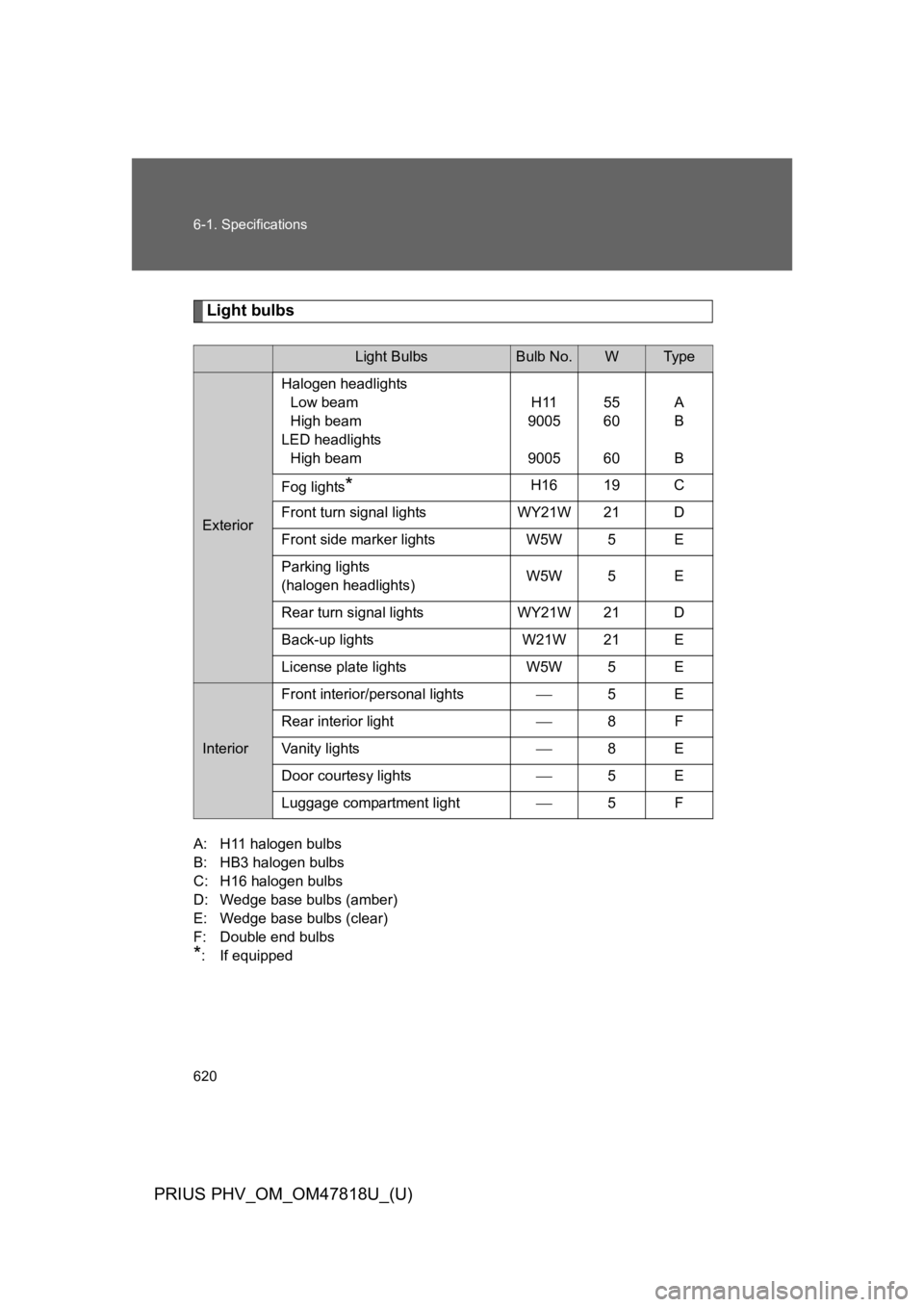
Light bulbs
A: H11 halogen bulbs
B: HB3 halogen bulbs
C: H16 halogen bulbs
D: Wedge base bulbs (amber)
E: Wedge base bulbs (clear)
F: Double end bulbs
*: If equipped
Light BulbsBulb No.WType
Exterior
Halogen headlights
Low beam
High beam
LED headlights
High beam
H11
9005
9005
55
60
60
A
B
B
Fog lights*H16 19 C
Front turn signal lights WY21W 21 D
Front side marker lights W5W 5 E
Parking lights
(halogen headlights)W5W 5 E
Rear turn signal lights WY21W 21 D
Back-up lights W21W 21 E
License plate lights W5W 5 E
Interior
Front interior/personal lights⎯5E
Rear interior light⎯8F
Va n i t y l i g h t s⎯8E
Door courtesy lights⎯5E
Luggage compartment light⎯5F
Page 689 of 704
669
Alphabetical index
PRIUS PHV_OM_OM47818U_(U)
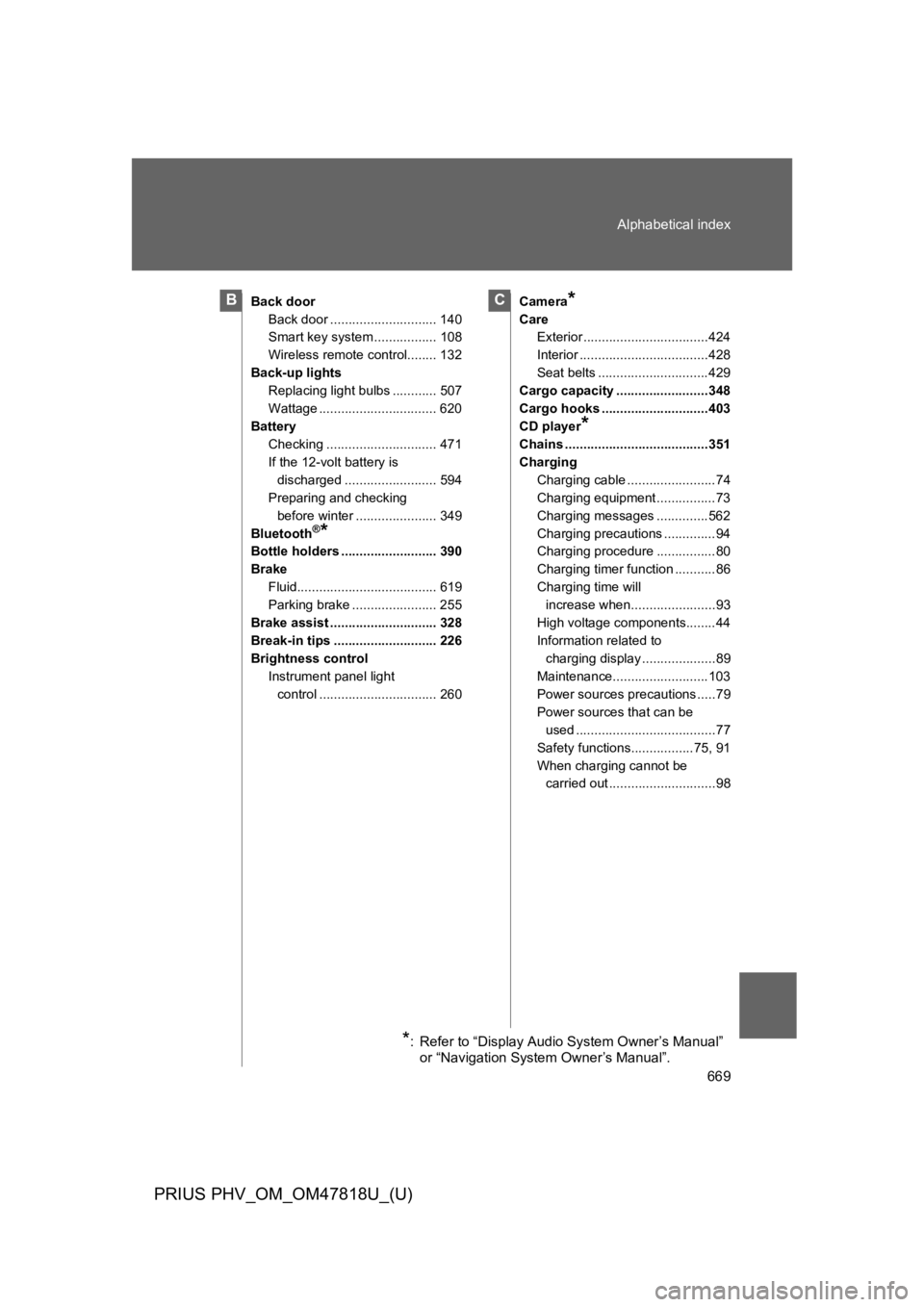
Back door
Back door ............................. 140
Smart key system ................. 108
Wireless remote control........ 132
Back-up lights
Replacing light bulbs ............ 507
Wattage ................................ 620
Battery
Checking .............................. 471
If the 12-volt battery is
discharged ......................... 594
Preparing and checking
before winter ...................... 349
Bluetooth®*
Bottle holders .......................... 390
Brake
Fluid...................................... 619
Parking brake ....................... 255
Brake assist ............................. 328
Break-in tips ............................ 226
Brightness control
Instrument panel light
control ................................ 260
Camera*
Care
Exterior ..................................424
Interior ...................................428
Seat belts ..............................429
Cargo capacity .........................348
Cargo hooks .............................403
CD player*
Chains .......................................351
Charging
Charging cable ........................74
Charging equipment ................73
Charging messages ..............562
Charging precautions ..............94
Charging procedure ................80
Charging timer function ...........86
Charging time will
increase when.......................93
High voltage components........44
Information related to
charging display ....................89
Maintenance..........................103
Power sources precautions .....79
Power sources that can be
used ......................................77
Safety functions.................75, 91
When charging cannot be
carried out .............................98
BC
*: Refer to “Display Audio System Owner’s Manual”
or “Navigation System Owner’s Manual”.