charging TOYOTA PRIUS PLUG-IN 2012 User Guide
[x] Cancel search | Manufacturer: TOYOTA, Model Year: 2012, Model line: PRIUS PLUG-IN, Model: TOYOTA PRIUS PLUG-IN 2012Pages: 704, PDF Size: 19.59 MB
Page 11 of 704
12
1. Charging operation
PLUG-IN QG_U (OM47747U)
■Displays shown on the multi-information display
Each type of information related to recharging is displayed on the
multi-information display.
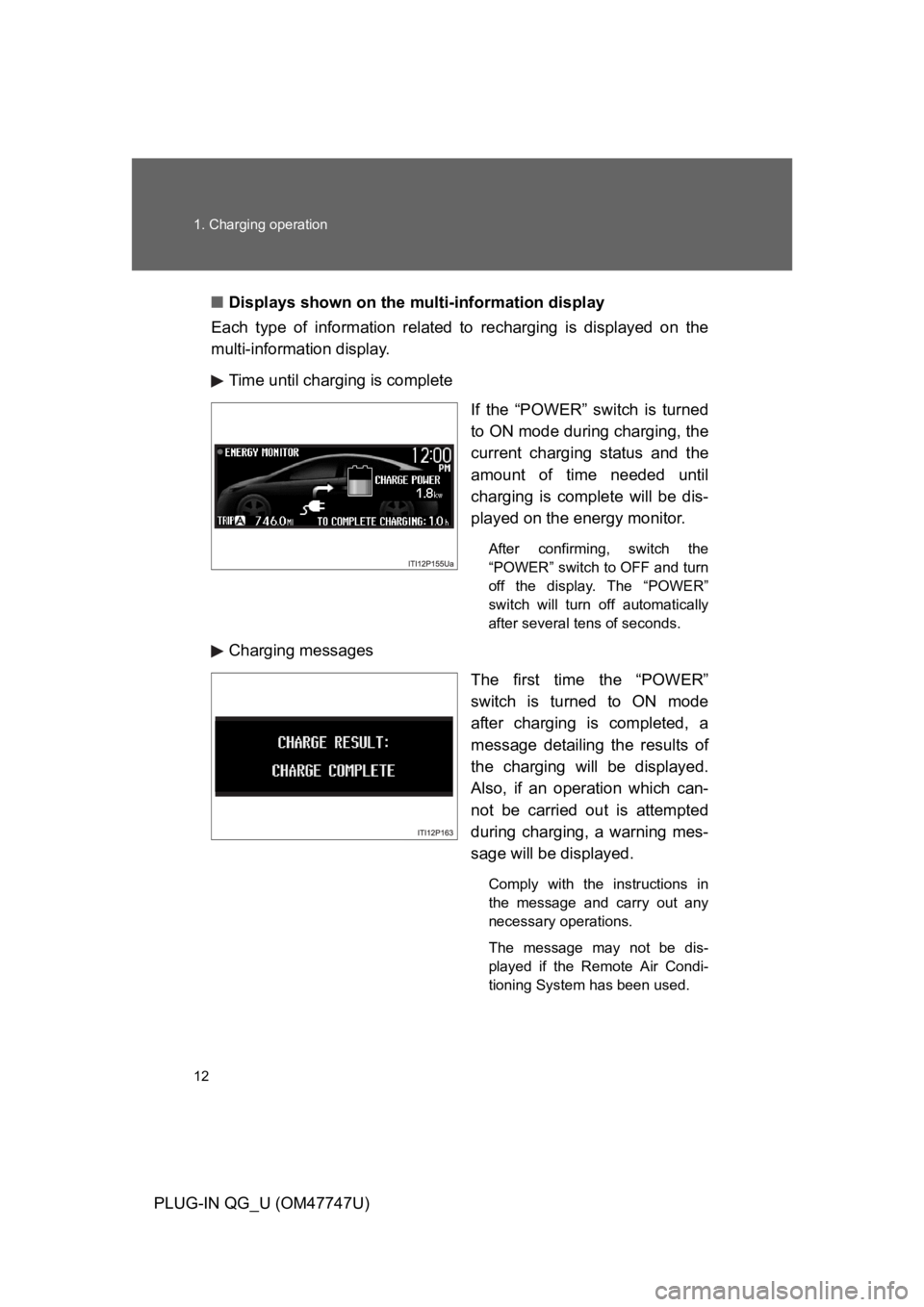
Time until charging is complete
If the “POWER” switch is turned
to ON mode during charging, the
current charging status and the
amount of time needed until
charging is complete will be dis-
played on the energy monitor.
After confirming, switch the
“POWER” switch to OFF and turn
off the display. The “POWER”
switch will turn off automatically
after several tens of seconds.
Charging messages
The first time the “POWER”
switch is turned to ON mode
after charging is completed, a
message detailing the results of
the charging will be displayed.
Also, if an operation which can-
not be carried out is attempted
during charging, a warning mes-
sage will be displayed.
Comply with the instructions in
the message and carry out any
necessary operations.
The message may not be dis-
played if the Remote Air Condi-
tioning System has been used.
Page 12 of 704
13
1. Charging operation
PLUG-IN QG_U (OM47747U)
■Inspecting the electrical leakage detection function
For safety, inspect the charging cable on a routine basis (at least
once a month).
Check that the electrical leakage detection function operates properly
by following the procedure below.
In the unlikely event that the electrical leakage detection function
does not operate properly, contact your Toyota dealer as soon as
possible.
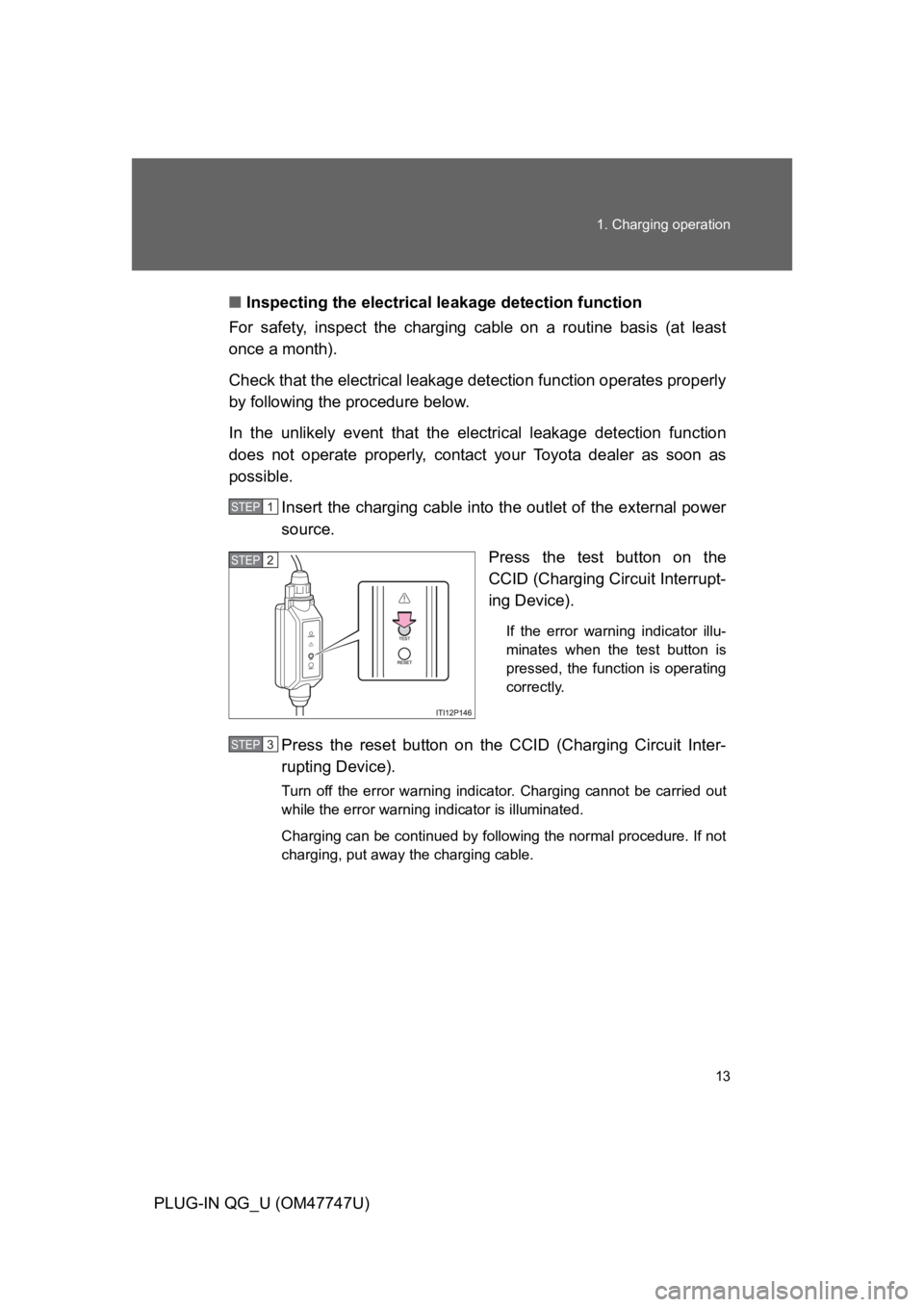
Insert the charging cable into the outlet of the external power
source.
Press the test button on the
CCID (Charging Circuit Interrupt-
ing Device).
If the error warning indicator illu-
minates when the test button is
pressed, the function is operating
correctly.
Press the reset button on the CCID (Charging Circuit Inter-
rupting Device).
Turn off the error warning indicator. Charging cannot be carried out
while the error warning indicator is illuminated.
Charging can be continued by following the normal procedure. If not
charging, put away the charging cable.
STEP1
STEP2
STEP3
Page 13 of 704

14
1. Charging operation
PLUG-IN QG_U (OM47747U)
■Safety functions
●The hybrid system will not start while the charging cable is attached to
the vehicle, even if the “POWER” switch is operated.
●If the charging cable is connected while the “READY” indicator is illumi-
nated, the hybrid system will stop automatically and driving will not be
possible.
●When the charging cable is connected to the vehicle, the shift position
cannot be changed from P to another position.
●If the latch release button is pressed, charging will not begin even if the
charging cable is connected.
Also, charging will be stopped if the latch release button is pressed and
held for several seconds during charging. When restarting charging, rein-
sert the charging connector after pulling it out, and check that the charg-
ing indicator illuminates.
Page 14 of 704
15
1. Charging operation
PLUG-IN QG_U (OM47747U)
CAUTION
■When charging
Follow these points when charging. If you do not follow them, fire or electri-
cal shock may occur, possibly resulting in death or serious injury.
●Connect to a power source suitable for charging.
●Check that the outlet, charging cable and charging inlet are not damaged.
●Check that the tips of the plug have not been deformed.
●If the plug is dirty or dusty, clean it before inserting.
●Plugging into the outlet that is located in a spot that is not high above the
ground or floor is recommended.
●Insert the plug firmly into the outlet.
●Do not touch the electrical terminals of the charging connector or short it
with foreign objects.
●Do not get water in the charging inlet.
Do not wash the vehicle while the charging cable is connected to the vehi-
cle.
●Do not touch metal objects or pointed objects (needles etc.) to the port of
the charging inlet.
●Do not charge if the charging cable is coiled or bundled.
●Wrapping 120 V charging cable while in-use is not recommended because
cable may overheat. Failure to rewrap charging cable when not in-use
could result in strangulation or tripping hazard.
●After connecting the charging cable, confirm that it is not bent.
●Do not place heavy objects on the charging cable.
●If charging is interrupted, remove the charging connector before removing
the plug.
Page 15 of 704
16
1. Charging operation
PLUG-IN QG_U (OM47747U)
CAUTION
■When charging
●When charging outdoors, make sure to connect to a weatherproof outlet
for outdoor use.
Also, if rain falls during charging, take care that rainwater does not run
along the length of cable and enter the outlet.
●Do not insert the plug if the outlet is submerged in water or snow.
If the plug has already been inserted and it is necessary to remove it, first
switch the circuit breaker OFF, then remove the plug.
●Follow these points when charging while it is raining or snowing.
•Check that no snow, water or ice has accumulated around the charging
connector terminals and the vehicle charging inlet. Tap snow, water or
ice gently from connector prior to inserting charging connector into the
vehicle’s charging inlet.
•Do not connect the plug if your hands are wet. Also, do not get the plug
or outlet wet.
●Do not charge the vehicle during a lightning storm.
■After charging
Remove the plug if it will not be used for a long time.
Dirt and dust may accumulate plug or outlet, which could cause a
malfunction or fire, possibly leading to death or serious injury.
Page 16 of 704
17
1. Charging operation
PLUG-IN QG_U (OM47747U)
CAUTION
■Power sources precautions
Observe the following precautions.
If you do not follow them, fire, electrical shock or damage may occur, possi-
bly resulting in death or serious injury.
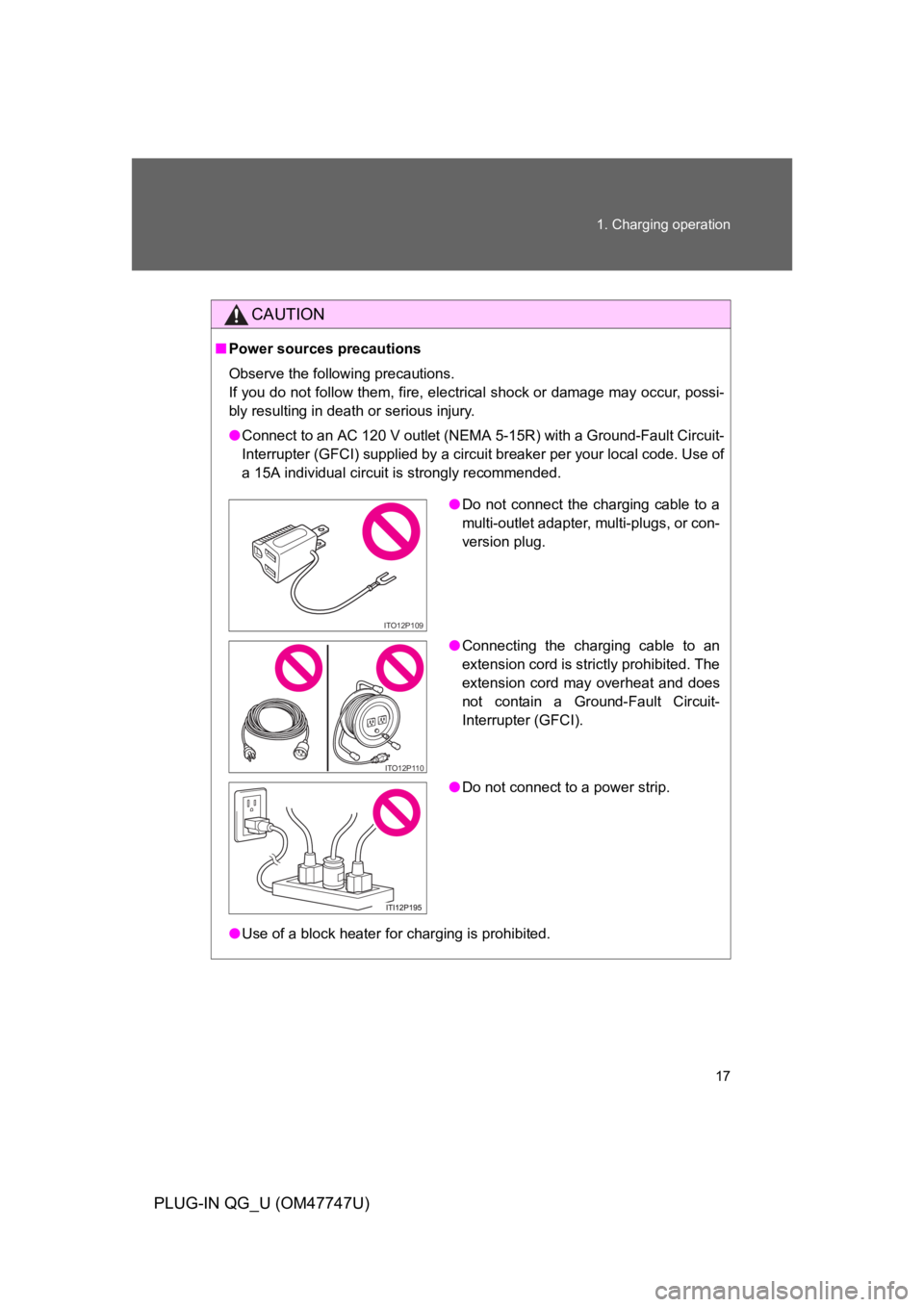
●Connect to an AC 120 V outlet (NEMA 5-15R) with a Ground-Fault Circuit-
Interrupter (GFCI) supplied by a circuit breaker per your local code. Use of
a 15A individual circuit is strongly recommended.
●Use of a block heater for charging is prohibited.
●Do not connect the charging cable to a
multi-outlet adapter, multi-plugs, or con-
version plug.
●Connecting the charging cable to an
extension cord is strictly prohibited. The
extension cord may overheat and does
not contain a Ground-Fault Circuit-
Interrupter (GFCI).
●Do not connect to a power strip.
ITO12P109
ITO12P110
Page 17 of 704
18
1. Charging operation
PLUG-IN QG_U (OM47747U)
CAUTION
■Battery charger
Observe the following precautions. The battery charger is located under the
luggage compartment.
Failure to do so may cause death or serious injury from burns or electric
shocks.
●Do not touch the battery charger during charging, as it becomes hot.
●Do not disassemble, repair or modify the battery charger.
If repair is necessary, consult your Toyota dealer.
■Routine inspection
Check the following points regularly.
If use is continued without inspection, fire or electric shock may occur,
possibly resulting in death or serious injury.
●The charging cable, plug, charging connector, CCID (Charging Circuit
Interrupting Device) etc. have not been damaged
●The outlet has not been damaged
●The plug does not get extremely hot during use
●The tip of the plug has not been deformed
●The plug is not dirtied by dust etc.
Inspect the plug after removing it from the outlet.
■Maintaining the charging cable
When the cable is dirty, first remove the dirt with a hard, wringed cloth, and
then wipe the cable with a dry cloth. Do not wash with water, as doing so
could cause a fire or electrical shock when charging, which could lead to
death or serious injury.
■When not using the charging cable for a long time
Remove the plug from the outlet. Dust could accumulate on the plug or in
the outlet, possibly causing overheating which could lead to a fire.
Also, keep the cable in a place free from moisture.
Page 18 of 704

19
PLUG-IN QG_U (OM47747U)
2. Plug-in Hybrid Applications
Plug-in Hybrid Applications is a service for plug-in hybrid vehicles.
These are added to the Safety Connect and Entune products.
The contents provide charge support, comfort support and drive sup-
port via the vehicle’s navigation system and the owner’s Smartphone.
Both of the following accounts are required for the services.
●Active Safety Connect account
●Active Toyota Entune account
Plug-in Hybrid Applications operation
The following functions can be used with the navigation system.
●Download of nearby charging stations to the map screen (Type A)
●View list of nearby charging stations and corresponding charging
station information (such as voltage supported) (Type B)
The function of Type B is a function added to Entune.
For details about the function, refer to http://www.toyota.com/entune/.
Page 22 of 704
23
3. Basic operation
PLUG-IN QG_U (OM47747U)
How to operate the power (ignition) switch
■Starting the hybrid system
Check that the charging cable is disconnected.
Check that the parking brake is set.
Firmly depress the brake pedal.
Check that the “POWER” switch indicator turns green. If the indica-
tor does not turn green, the hybrid system cannot be started.
When the shift position is N, the hybrid system cannot start. Shift the
shift position to P when starting the hybrid system.
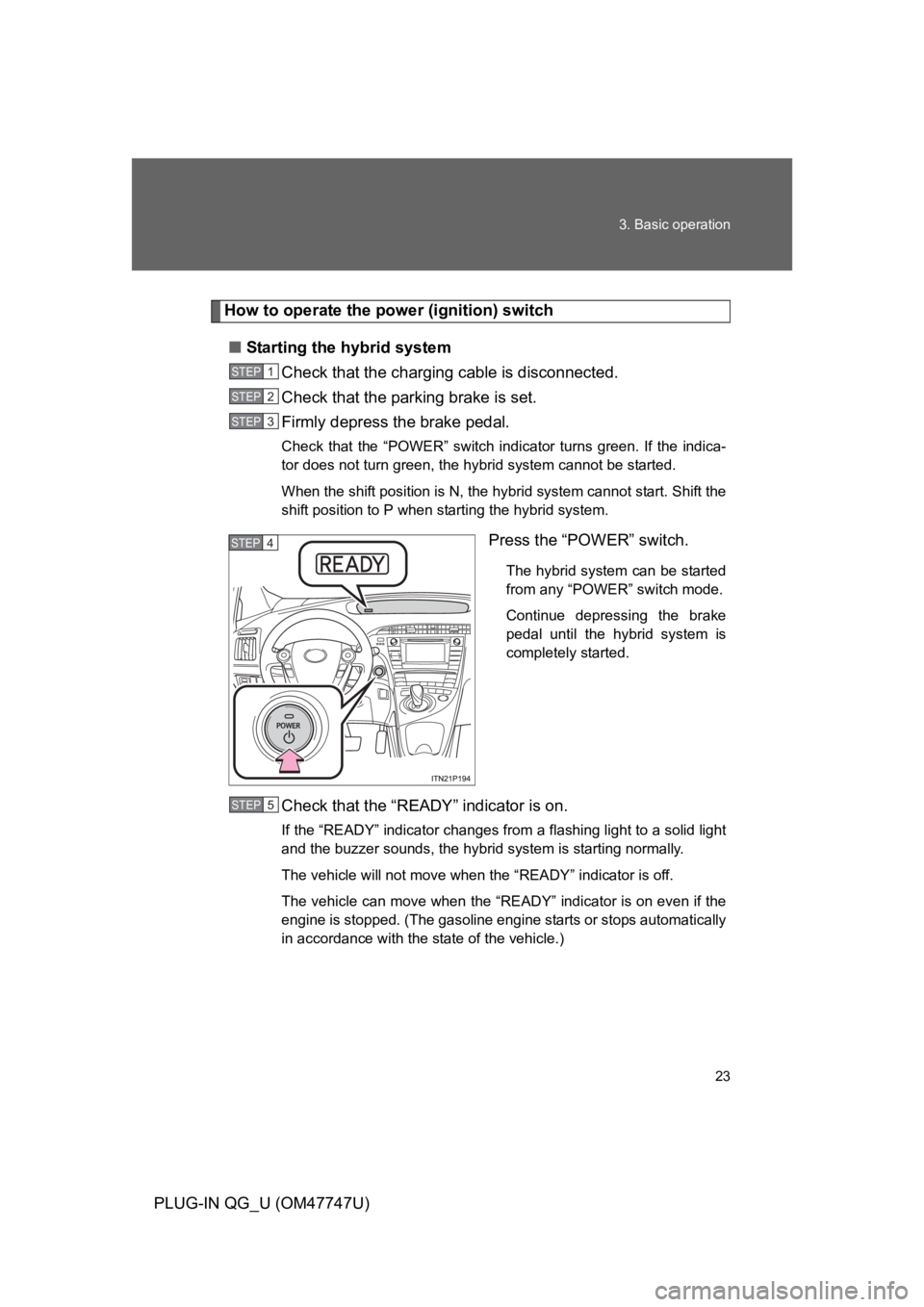
Press the “POWER” switch.
The hybrid system can be started
from any “POWER” switch mode.
Continue depressing the brake
pedal until the hybrid system is
completely started.
Check that the “READY” indicator is on.
If the “READY” indicator changes from a flashing light to a solid light
and the buzzer sounds, the hybrid system is starting normally.
The vehicle will not move when the “READY” indicator is off.
The vehicle can move when the “READY” indicator is on even if the
engine is stopped. (The gasoline engine starts or stops automatically
in accordance with the state of the vehicle.)
STEP1
STEP2
STEP3
STEP4
STEP5
Page 27 of 704

28
3. Basic operation
PLUG-IN QG_U (OM47747U)
■About engine braking
When shift position B is selected, releasing the accelerator pedal will apply
engine braking.
●When the vehicle is driven at high speeds, compared to ordinary gaso-
line-fueled vehicles, the engine braking deceleration is felt less than that
of other vehicles.
●The vehicle can be accelerated even when shift position B is selected.
If the vehicle is driven continuously in the B position, fuel efficiency will
become low. Usually, shift the shift position to D.
NOTICE
■Hybrid battery (traction battery) charge
If the shift position is in N, the hybrid battery (traction battery) will not be
charged. To help prevent the battery from discharging, avoid leaving the N
position selected for an extended period of time.