key battery TOYOTA PRIUS PLUG-IN 2012 Owners Manual
[x] Cancel search | Manufacturer: TOYOTA, Model Year: 2012, Model line: PRIUS PLUG-IN, Model: TOYOTA PRIUS PLUG-IN 2012Pages: 704, PDF Size: 19.59 MB
Page 132 of 704
105
1
Before driving
PRIUS PHV_OM_OM47818U_(U)
1-3. Key information
Keys
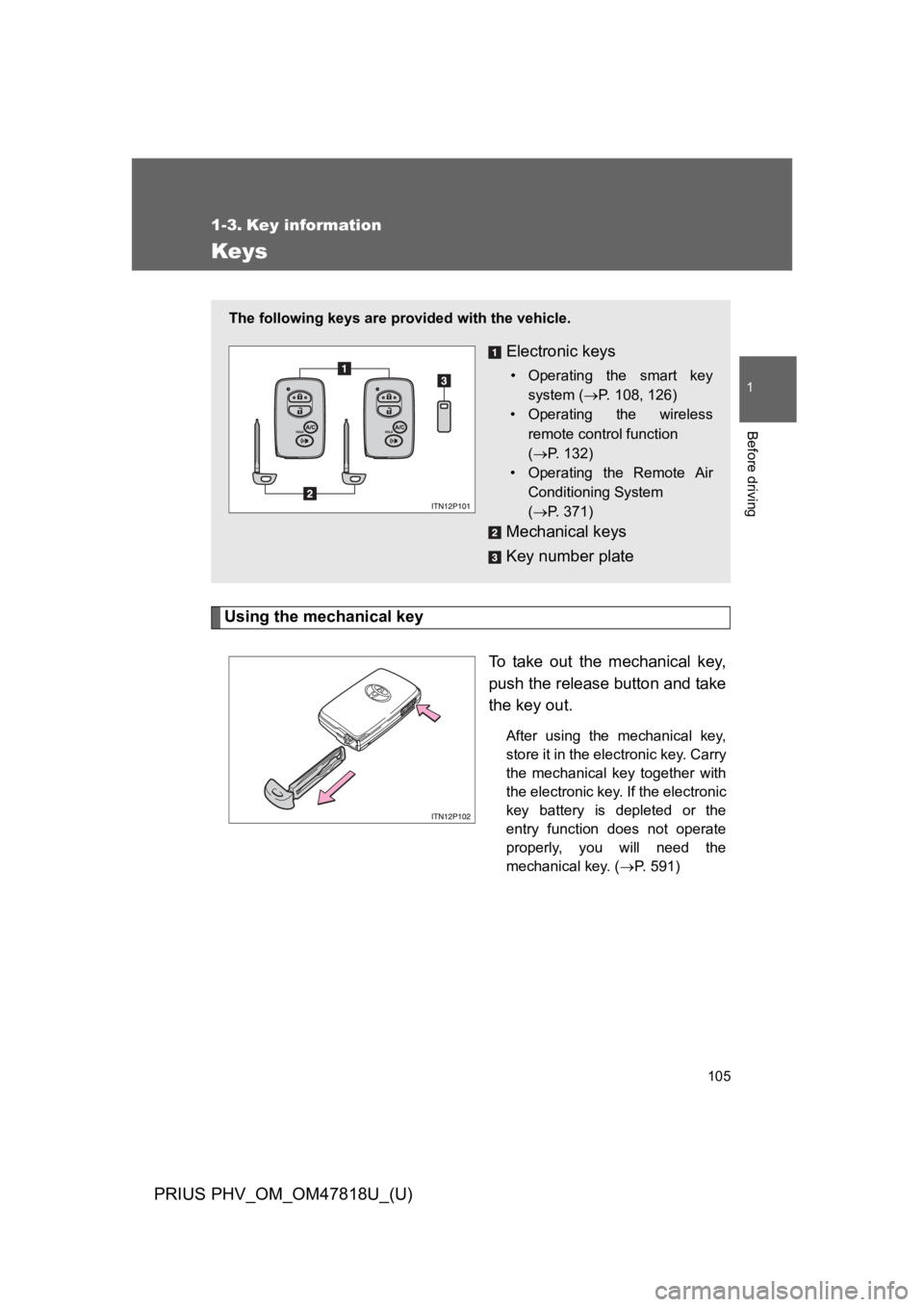
Using the mechanical key
To t a k e o u t t h e m e c h a n i c a l k e y,
push the release button and take
the key out.
After using the mechanical key,
store it in the electronic key. Carry
the mechanical key together with
the electronic key. If the electronic
key battery is depleted or the
entry function does not operate
properly, you will need the
mechanical key. (→P. 5 9 1 )
The following keys are provided with the vehicle.
Electronic keys
•Operating the smart key
system (→P. 1 0 8 , 1 2 6 )
•Operating the wireless
remote control function
(→P. 1 3 2 )
•Operating the Remote Air
Conditioning System
(→P. 3 7 1 )
Mechanical keys
Key number plate
Page 143 of 704

116
1-4. Opening, closing and locking the doors
PRIUS PHV_OM_OM47818U_(U)
*1:A message will be shown on the multi-information display in the instru-
ment cluster.
*2:If the hybrid system does not start when the electronic key is inside the
vehicle, the electronic key battery may be depleted or there may be dif-
ficulties receiving signal from the key. (→P. 5 9 1 )
AlarmSituationCorrection procedure
Interior alarm
pings once*1
The electronic key has a
low battery
Replace the electronic
key battery
An attempt was made to
start the hybrid system
without the electronic key
being present, or the elec-
tronic key was not func-
tioning normally
Start the hybrid sys-
tem with the elec-
tronic key present*2
Interior alarm
pings once and
exterior alarm
sounds 3 times*1
The driver’s door was
closed after the key was
carried outside the vehicle,
and the “POWER” switch
was not turned OFF
Turn the “POWER”
switch off and close
the driver’s door again
An occupant carried the
electronic key outside the
vehicle and closed the
door while the “POWER”
switch was not OFF
Bring the electronic
key back into the vehi-
cle
Page 145 of 704

118
1-4. Opening, closing and locking the doors
PRIUS PHV_OM_OM47818U_(U)
■Battery-saving function
The battery-saving function will be activated in order to prevent the elec-
tronic key battery and the 12-volt battery from being discharged while the
vehicle is not in operation for a long time.
●In the following situations, the smart key system may take some time to
unlock the doors.
•The electronic key has been left in an area of approximately 6 ft. (2 m)
of the outside of the vehicle for 10 minutes or longer.
•The smart key system has not been used for 5 days or longer.
●If the smart key system has not been used for 14 days or longer, the
doors cannot be unlocked at any doors except the driver’s door. In this
case, take hold of the driver’s door handle, or use the wireless remote
control or the mechanical key, to unlock the doors.
Page 146 of 704

119
1-4. Opening, closing and locking the doors
1
Before driving
PRIUS PHV_OM_OM47818U_(U)
■Conditions affecting operation
The smart key system, wireless remote control and immobilizer system use
weak radio waves. In the following situations, the communication between
the electronic key and the vehicle may be affected, preventing the smart key
system, wireless remote control and immobilizer system from operating
properly. (Ways of coping: →P. 5 9 1 )
●When the electronic key battery is depleted
●Near a TV tower, electric power plant, gas station, radio station, large dis-
play, airport or other facility that generates strong radio waves or electri-
cal noise
●When carrying a portable radio, cellular phone, cordless phone or other
wireless communication devices
●When the electronic key is in contact with, or is covered by the following
metallic objects
•Cards to which aluminum foil is attached
•Cigarette boxes that have aluminum foil inside
•Metallic wallets or bags
•Coins
•Hand warmers made of metal
•Media such as CDs and DVDs
●When other wireless key (that emit radio waves) is being used nearby
●When carrying the electronic key together with the following devices that
emit radio waves
•Another vehicle’s electronic key or a wireless key that emits radio
waves
•Personal computers or personal digital assistants (PDAs)
•Digital audio players
•Portable game systems
●If window tint with a metallic content or metallic objects are attached to
the rear window
Page 150 of 704

123
1-4. Opening, closing and locking the doors
1
Before driving
PRIUS PHV_OM_OM47818U_(U)
■If the smart key system does not operate properly
●Locking and unlocking the doors: Use the mechanical key. (→P. 5 9 1 )
●Starting the hybri d system: →P. 5 9 2
■Electronic key battery depletion
●The standard battery life is 1 to 2 years.
●If the battery becomes low, an alarm will sound in the cabin when the
hybrid system stops. (→P. 1 1 4 )
●As the electronic key always receives radio waves, the battery will
become depleted even if the electronic key is not used. The following
symptoms indicate that the electronic key battery may be depleted.
Replace the battery when necessary. (→P. 4 9 3 )
•The smart key system or the wireless remote control does not operate.
•The detection area becomes smaller.
•The LED indicator on the key surface does not turn on.
●To a v o i d s e r i o u s d e t e r i o r a t i o n , d o n o t l e a v e t h e e l e c t r o n i c k e y w i t h i n 3 f t .
(1 m) of the following electrical appliances that produce a magnetic field:
•TVs
•Personal computers
•Cellular phones, cordless phones and battery chargers
•Charging cellular phones or cordless phones
•Induction cookers
•Table lamps
■When the electronic key battery is fully depleted
→P. 4 9 3
■Customization
Settings (e.g. smart key system) can be changed.
(Customizable features →P. 6 3 9 )
Page 155 of 704

128
1-4. Opening, closing and locking the doors
PRIUS PHV_OM_OM47818U_(U)
■Conditions affecting operation
→P. 1 1 9
■Electronic key battery depletion
→P. 1 2 3
■To o p e r a t e t h e s y s t e m p r o p e r l y
Make sure to carry the electronic key when operating the system.
Depending on the position and holding condition of the electronic key, the
key may not be detected correctly and the system may not operate properly.
(The door lock prevention may not operate.)
■Note for the smart key system
●Even when the electronic key is within the effective range (detection
areas), the system may not operate properly.
For example, the electronic key is on the instrument panel, luggage
cover, floor or in the door pockets or glove box when the hybrid system is
started or “POWER” switch modes are changed.
●Even if the electronic key is not inside the vehicle, it may be possible to
start the hybrid system if the electronic key is near the window.
Page 157 of 704

130
1-4. Opening, closing and locking the doors
PRIUS PHV_OM_OM47818U_(U)
*1:A message will be shown on the multi-information display in the instru-
ment cluster.
*2:If the hybrid system does not start when the electronic key is inside the
vehicle, the electronic key battery may be depleted or there may be dif-
ficulties receiving signal from the key. (→P. 5 9 1 )
■If the electronic key does not operate properly
→P. 5 9 1
■When the electronic key battery is fully depleted
→P. 4 9 3
■Customization
Settings (e.g. smart key system) can be changed.
(Customizable features →P. 6 3 9 )
AlarmSituationCorrection procedure
Interior alarm
pings once*1
The electronic key has a
low battery
Replace the electronic
key battery
An attempt was made to
start the hybrid system
without the electronic key
being present, or the elec-
tronic key was not func-
tioning normally
Start the hybrid sys-
tem with the elec-
tronic key present*2
Interior alarm
pings once and
exterior alarm
sounds 3 times*1
The driver’s door was
closed after the key was
carried outside the vehicle,
and the “POWER” switch
was not turned OFF
Turn the “POWER”
switch off and close
the driver’s door again
An occupant carried the
electronic key outside the
vehicle and closed the
door while the “POWER”
switch was not OFF
Bring the electronic
key back into the vehi-
cle
Page 160 of 704
133
1-4. Opening, closing and locking the doors
1
Before driving
PRIUS PHV_OM_OM47818U_(U)
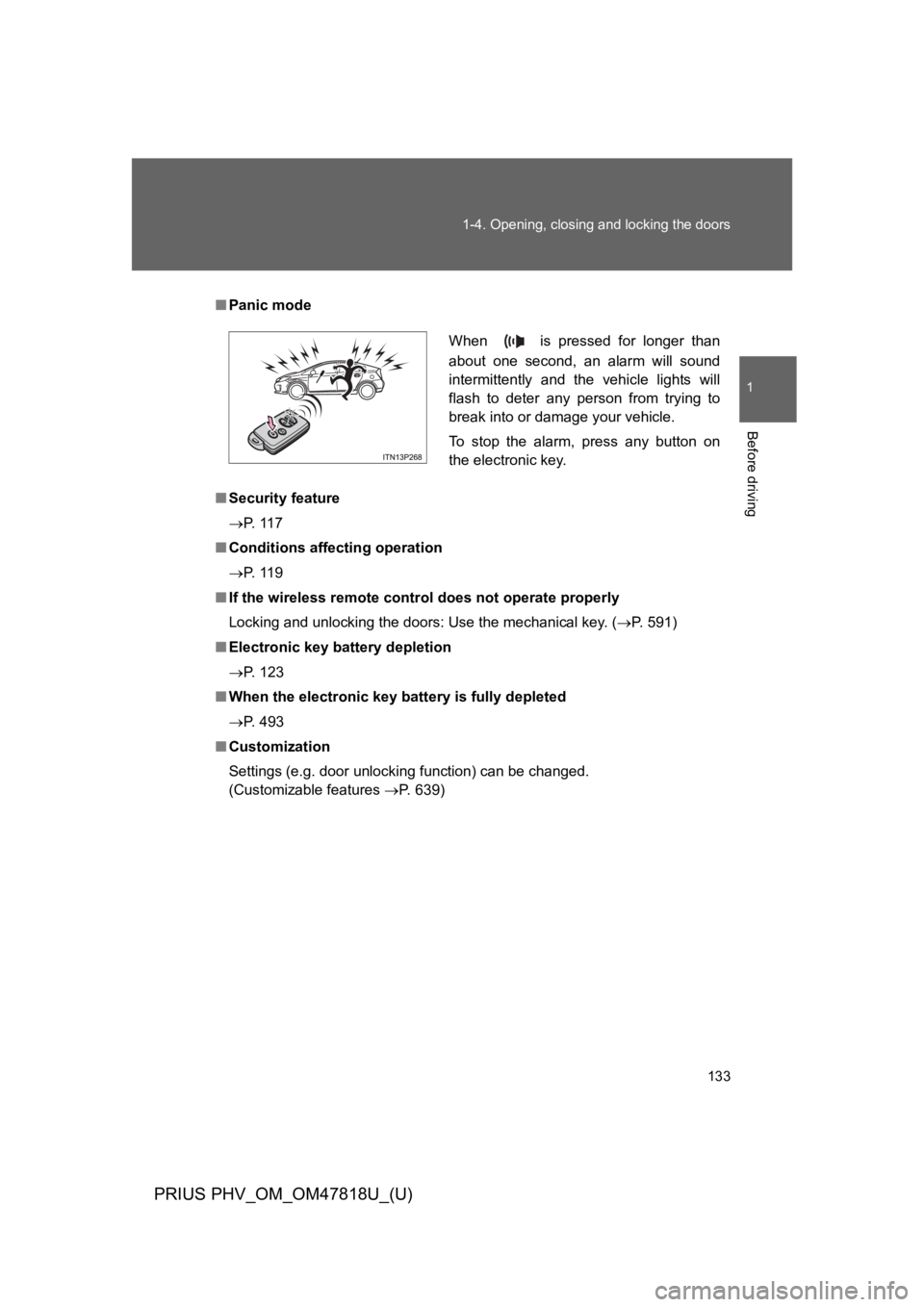
■Panic mode
■Security feature
→P. 1 1 7
■Conditions affecting operation
→P. 1 1 9
■If the wireless remote control does not operate properly
Locking and unlocking the doors: Use the mechanical key. (→P. 5 9 1 )
■Electronic key battery depletion
→P. 1 2 3
■When the electronic key battery is fully depleted
→P. 4 9 3
■Customization
Settings (e.g. door unlocking function) can be changed.
(Customizable features →P. 6 3 9 )
When is pressed for longer than
about one second, an alarm will sound
intermittently and the vehicle lights will
flash to deter any person from trying to
break into or damage your vehicle.
To s t o p t h e a l a r m , p r e s s a n y b u t t o n o n
the electronic key.
Page 267 of 704

241
2-1. Driving procedures
PRIUS PHV_OM_OM47818U_(U)
2
When driving
■Auto power off function
If the vehicle is left in ACCESSORY mode for more than 20 minutes or ON
mode (the hybrid system is not operating) for more than an hour with the
shift position in P, the “POWER” switch will automatically turn off. However,
this function cannot entirely prevent the 12-volt battery from discharging. Do
not leave the vehicle with the “POWER” switch in ACCESSORY or ON mode
for long periods of time when the hybrid system is not operating.
■Sounds and vibrations specific to a hybrid vehicle
→P. 4 2
■Electronic key battery depletion
→P. 1 2 3
■When the ambient temperature is low, such as during winter driving
conditions
The “READY” indicator may flash for a long time when the hybrid system is
starting. Driving will become possible once the “READY” indicator has illumi-
nated. Wait until the “READY” indicator has illuminated.
■Conditions affecting operation
→P. 1 1 9
■Notes for the entry function
→P. 1 2 0
■If the hybrid system does not start
●The immobilizer system may not have been deactivated. (→P. 1 7 9 )
Contact your Toyota dealer.
●The charging cable may be connected to the vehicle. (→P. 9 1 )
Page 268 of 704

242
2-1. Driving procedures
PRIUS PHV_OM_OM47818U_(U)
■When the “POWER” switch indicator flashes in amber
The system may be malfunctioning. Have the vehicle inspected by your
To y o t a d e a l e r i m m e d i a t e l y.
■If the “READY” indicator does not come on
If the “READY” indicator does not come on when you press the “POWER”
switch with the shift position in P and the brake pedal depressed, contact
your Toyota dealer immediately.
■If the hybrid system is malfunctioning
→P. 5 3 5
■If the electronic key battery is depleted
→P. 4 9 3
■Operation of the “POWER” switch
●When operating the “POWER” switch, one short, firm press is enough. If
the switch is pressed improperly, the hybrid system may not start or the
“POWER” switch mode may not change. It is not necessary to press and
hold the switch.
●If attempting to restart the hybrid system immediately after turning the
“POWER” switch off, the hybrid system may not start in some cases.
After turning the “POWER” switch off, please wait a few seconds before
restarting the hybrid system.
■Automatically P position selection function
→P. 2 5 0