phone TOYOTA PRIUS PLUG-IN 2015 User Guide
[x] Cancel search | Manufacturer: TOYOTA, Model Year: 2015, Model line: PRIUS PLUG-IN, Model: TOYOTA PRIUS PLUG-IN 2015Pages: 728, PDF Size: 20.85 MB
Page 118 of 728
75
1
1-1. Plug-in hybrid system
Before driving
PRIUS PHV_OM_OM47A11U_(U)
Plug-in Hybrid Applications
Plug-in Hybrid Applications operation
The following functions can be used with the navigation system.
●Download of nearby charging stations to the map screen (Type A)
●View list of nearby charging stations and corresponding charging
station information (such as voltage supported) (Type B)
The function of Type B is a function added to Entune.
For details about the function, refer to http://www.toyota.com/entune/.
Plug-in Hybrid Applications is a service for plug-in hybrid vehicles.
These are added to the Safety Connect and Entune products.
The contents provide charge support, comfort support and drive
support via the vehicle’s navigation system and the owner’s Smart-
phone.
Both of the following accounts are required for the services.
●Active Safety Connect account
●Active Toyota Entune account
For Safety Connect and Entune, refer to the following page.
Page 166 of 728

123
1-4. Opening, closing and locking the doors
1
Before driving
PRIUS PHV_OM_OM47A11U_(U)
■Conditions affecting operation
The smart key system, wireless remote control and immobilizer system use
weak radio waves. In the following situations, the communication between
the electronic key and the vehicle may be affected, preventing the smart key
system, wireless remote control and immobilizer system from operating
properly. (Ways of coping: oP. 5 9 9 )
●When the electronic key battery is depleted
●Near a TV tower, electric power plant, gas station, radio station, large dis-
play, airport or other facility that generates strong radio waves or electri-
cal noise
●When carrying a portable radio, cellular phone, cordless phone or other
wireless communication devices
●When the electronic key is in contact with, or is covered by the following
metallic objects
•Cards to which aluminum foil is attached
•Cigarette boxes that have aluminum foil inside
•Metallic wallets or bags
•Coins
•Hand warmers made of metal
•Media such as CDs and DVDs
●When other wireless key (that emit radio waves) is being used nearby
●When carrying the electronic key together with the following devices that
emit radio waves
•Another vehicle’s electronic key or a wireless key that emits radio
waves
•Personal computers or personal digital assistants (PDAs)
•Digital audio players
•Portable game systems
●If window tint with a metallic content or metallic objects are attached to
the rear window
Page 170 of 728

127
1-4. Opening, closing and locking the doors
1
Before driving
PRIUS PHV_OM_OM47A11U_(U)
■If the smart key system does not operate properly
●Locking and unlocking the doors: Use the mechanical key. (oP. 5 9 9 )
●Starting the hybri d system: oP. 6 0 0
■Electronic key battery depletion
●The standard battery life is 1 to 2 years.
●If the battery becomes low, an alarm will sound in the cabin when the
hybrid system stops. (oP. 1 1 8 )
●As the electronic key always receives radio waves, the battery will
become depleted even if the electronic key is not used. The following
symptoms indicate that the electronic key battery may be depleted.
Replace the battery when necessary. (oP. 4 9 7 )
•The smart key system or the wireless remote control does not operate.
•The detection area becomes smaller.
•The LED indicator on the key surface does not turn on.
●To a v o i d s e r i o u s d e t e r i o r a t i o n , d o n o t l e a v e t h e e l e c t r o n i c k e y w i t h i n 3 f t .
(1 m) of the following electrical appliances that produce a magnetic field:
•TVs
•Personal computers
•Cellular phones, cordless phones and battery chargers
•Recharging cellular phones or cordless phones
•Induction cookers
•Table lamps
■When the electronic key battery is fully depleted
oP. 4 9 7
■Customization
Settings (e.g. smart key system) can be changed.
(Customizable features oP. 6 4 7 )
Page 462 of 728
421
3-5. Other interior features
PRIUS PHV_OM_OM47A11U_(U)
3
Interior features
Safety Connect
: If equipped
Safety Connect is a subscription-based telematics service that uses
Global Positioning System (GPS) data and embedded cellular tech-
nology to provide safety and security features to subscribers. Safety
Connect is supported by Toyota’s designated response center,
which operates 24 hours per day, 7 days per week.
Safety Connect service is available by subscription on select,
telematics hardware-equipped vehicles.
By using the Safety Connect service, you are agreeing to be bound
by the Telematics Subscription Service Agreement and its Terms and
Conditions, as in effect and amended from time to time, a current
copy of which is available at Toyota.com. All use of the Safety Con-
nect service is subject to such then-applicable Terms and Condi-
tions.
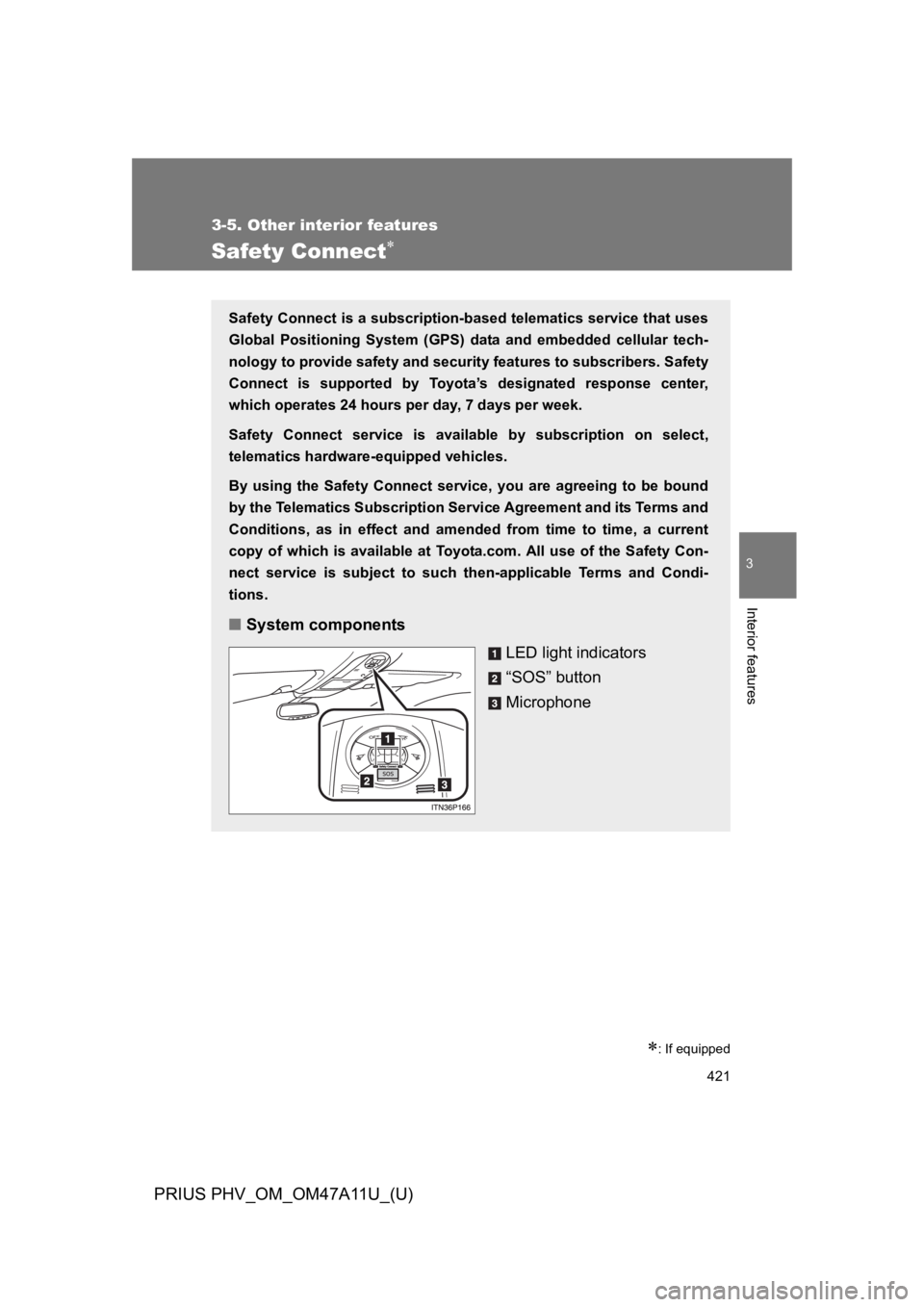
■System components
LED light indicators
“SOS” button
Microphone
Page 464 of 728
423
3-5. Other interior features
PRIUS PHV_OM_OM47A11U_(U)
3
Interior features
■Safety Connect Services Information
●Phone calls using the vehicles Bluetooth® technology will not be possible
during Safety Connect.
●Safety Connect is available beginning Fall 2009 on select Toyota models.
Contact with the Safety Connect response center is dependent upon the
telematics device being in operative condition, cellular connection avail-
ability, and GPS satellite signal reception, which can limit the ability to
reach the response center or receive emergency service support. Enroll-
ment and Telematics Subscription Service Agreement required. A variety
of subscription terms is available; charges vary by subscription term
selected.
●Automatic Collision Notification, Emergency Assistance, Stolen Vehicle
Location, and Enhanced Roadside Assistance will function in the United
States, including Hawaii and Alask a, and in Canada. No Safety Connect
services will function outside of the United States in countries other than
Canada.
●Safety Connect services are not subject to section 255 of the Telecom-
munications Act and the device is not TTY compatible.
■Languages
The Safety Connect response center will offer support in multiple languages.
The Safety Connect system will offer voice prompts in English and Spanish.
Please indicate your language of choice when enrolling.
■When contacting the response center
Yo u m a y b e u n a b l e t o c o n t a c t t h e r e s p o n s e c e n t e r i f t h e n e t w o r k i s b u s y.
■Safety Connect backup battery depletion
An exclusive backup battery is built in to assist the Automatic Collision Noti-
fication, which is activated when impact above a certain level is applied to
the vehicle, or when the airbags operate. This battery is a primary battery,
and cannot be charged. The red LED indicator will flash to indicate that the
battery should be replaced.
The backup battery will need to be replaced if the Automatic Collision Notifi-
cation operates for 60 seconds or more. For replacement, consult your Toy-
ota dealer.
Page 467 of 728

426
3-5. Other interior features
PRIUS PHV_OM_OM47A11U_(U)
Safety information for Safety Connect
Important! Read this information before using Safety Connect.
■Exposure to radio frequency signals
The Safety Connect system installed in your vehicle is a low-power
radio transmitter and receiver. It receives and also sends out radio
frequency (RF) signals.
In August 1996, the Federal Communications Commission (FCC)
adopted RF exposure guidelines with safety levels for mobile wire-
less phones. Those guidelines are consistent with the safety stan-
dards previously set by the following U.S. and international
standards bodies.
●ANSI (American National Standards Institute) C95.1 [1992]
●NCRP (National Council on Radiation Protection and Measure-
ment) Report 86 [1986]
●ICNIRP (International Commission on Non-Ionizing Radiation
Protection) [1996]
Those standards were based on comprehensive and periodic eval-
uations of the relevant scientific literature. Over 120 scientists,
engineers, and physicians from universities, and government
health agencies and industries reviewed the available body of
research to develop the ANSI Standard (C95.1).
The design of Safety Connect complies with the FCC guidelines in
addition to those standards.
Page 717 of 728
681
Alphabetical index
PRIUS PHV_OM_OM47A11U_(U)
Garage door opener ................ 413
Gauges ..................................... 262
Glove boxes ............................. 392
Hands-free system
(for cellular phone)*
Hazard lights
Switch ................................... 528
Head restraints
Adjustment .......................... 156
Headlight cleaner .................... 312
Headlights
Cleaner ................................. 312
Replacing light bulbs ............ 511
Switch ................................... 297
Wattage ................................ 628
Heaters
Automatic air conditioning
system................................ 364
Seat heaters ......................... 403
Side mirrors .......................... 381
Hill-start assist control ........... 338
Hood ......................................... 448
Hooks
Cargo.................................... 409
Horn .......................................... 261
Hybrid system
Emergency shut off system .... 45
Energy monitor/
consumption screen ............. 52
High voltage components ....... 44
Hybrid System Indicator ....... 273
Ignition switch ....................... 242
Monthly fuel consumption
record ................................... 65
“POWER” switch .................. 242
I/M test.......................................444
Identification
Engine ...................................620
Vehicle ..................................619
Ignition switch ..........................242
Illuminated entry system .........388
Immobilizer system..................183
Indicator lights .........................267
Initialization
Items to initialize....................655
Inside rear view mirror ............170
Instrument panel light
control ....................................265
Interior lights
Interior lights..................389, 390
Switch............................389, 390
Wattage .................................628
Jack
Positioning a floor jack ..........451
Vehicle-equipped jack ...........454
Jack handle ..............................454
Keyless entry............................136
Keys
Electronic key ........................110
If the electronic key does not
operate properly.................. 599
If you lose your keys .............598
Key number ...........................110
Keyless entry.........................136
Keys ......................................110
Mechanical key .....................110
“POWER” switch ...................242
Wireless remote
control key ..........................136
Knee airbag ..............................187
G
H
I
J
K
*:Refer to “DISPLAY AUDIO SYSTEM OWNER’S MANUAL”
or “NAVIGATION SYSTEM OWNER’S MANUAL”.
Page 718 of 728

682
Alphabetical index
PRIUS PHV_OM_OM47A11U_(U)
Language ..................................285
License plate lights
Replacing light bulbs ............. 511
Wattage .................................628
Light bulbs
Replacing .............................. 511
Wattage .................................628
Lights
Emergency flasher switch .....528
Fog light switch .....................303
Foot lights..............................388
Hazard light switch ................528
Headlight switch .................... 297
Interior lights..................389, 390
Personal lights.......................389
Replacing light bulbs ............. 511
Shift lever lighting ..................388
Turn signal lever....................259
Turn signal light switch ..........259
Vanity lights ...........................399
Wattage .................................628
Load capacity ...........................354
Luggage compartment light
Switch....................................145
Wattage .................................628
Luggage cover .........................410
Maintenance
Do-it-yourself
maintenance ....................... 445
General maintenance............ 439
Maintenance data ................. 618
Maintenance
requirements....................... 436
Maintenance data..................... 437
Meter
Instrument panel light
control ................................. 265
Meters ................................... 262
Speed unit select button ....... 264
Trip information display ......... 279
Micro dust and pollen filter ..... 368
Microphone*............................ 421
Mirrors
Inside rear view mirror .......... 170
Side mirror heater ................. 381
Side mirrors........................... 173
Vanity mirrors ........................ 399
MP3 disc*
Multi-information display ........ 271
Navigation system
(refer to “Navigation
System Owner’s Manual”)
Noise from under vehicle .......... 22
LM
N
Page 721 of 728

685
Alphabetical index
PRIUS PHV_OM_OM47A11U_(U)
Switch
Audio remote control switches*
Cruise control switch ............ 313
Driving mode select
switch ................................. 251
Eco drive mode switch ......... 251
Emergency flasher switch .... 528
EV/HV mode selection
switch ................................... 37
Fog light switch..................... 303
Fuel filler door opener
switch ................................. 178
Hazard light switch ............... 528
Headlight cleaner switch ...... 312
Ignition switch ....................... 242
Light switches ....................... 297
Power door lock switch......... 138
“POWER” switch .................. 242
Power window switch ........... 175
Pre-collision braking off
switch ................................. 341
Talk switch*
Telephone switch*
Tire pressure warning
reset switch ........................ 482
Window lock switch .............. 175
Wipers and washer switch.... 305
Tail lights
Switch....................................297
Talk switch*
Telephone switch*
Theft deterrent system
Immobilizer system ...............183
Tire inflation pressure .............490
Tire information
Glossary ................................639
Size .......................................635
Tire identification number ......634
Uniform Tire Quality
Grading ...............................637
Tire pressure warning
system ............................481, 542
Tires
Chains ...................................357
Checking ...............................481
If you have a flat tire ..............574
Inflation pressure...................490
Inflation pressure sensor .......482
Information ............................633
Replacing ..............................454
Rotating tires .........................481
Size .......................................627
Snow tires .............................355
Tire pressure warning
system ........................481, 542
T
*:Refer to “DISPLAY AUDIO SYSTEM OWNER’S MANUAL”
or “NAVIGATION SYSTEM OWNER’S MANUAL”.