reset TOYOTA PRIUS PLUG-IN HYBRID 2015 1.G Owners Manual
[x] Cancel search | Manufacturer: TOYOTA, Model Year: 2015, Model line: PRIUS PLUG-IN HYBRID, Model: TOYOTA PRIUS PLUG-IN HYBRID 2015 1.GPages: 692, PDF Size: 12.42 MB
Page 15 of 692
15
PRIUS PHV_OM_OM47A11U_(U)
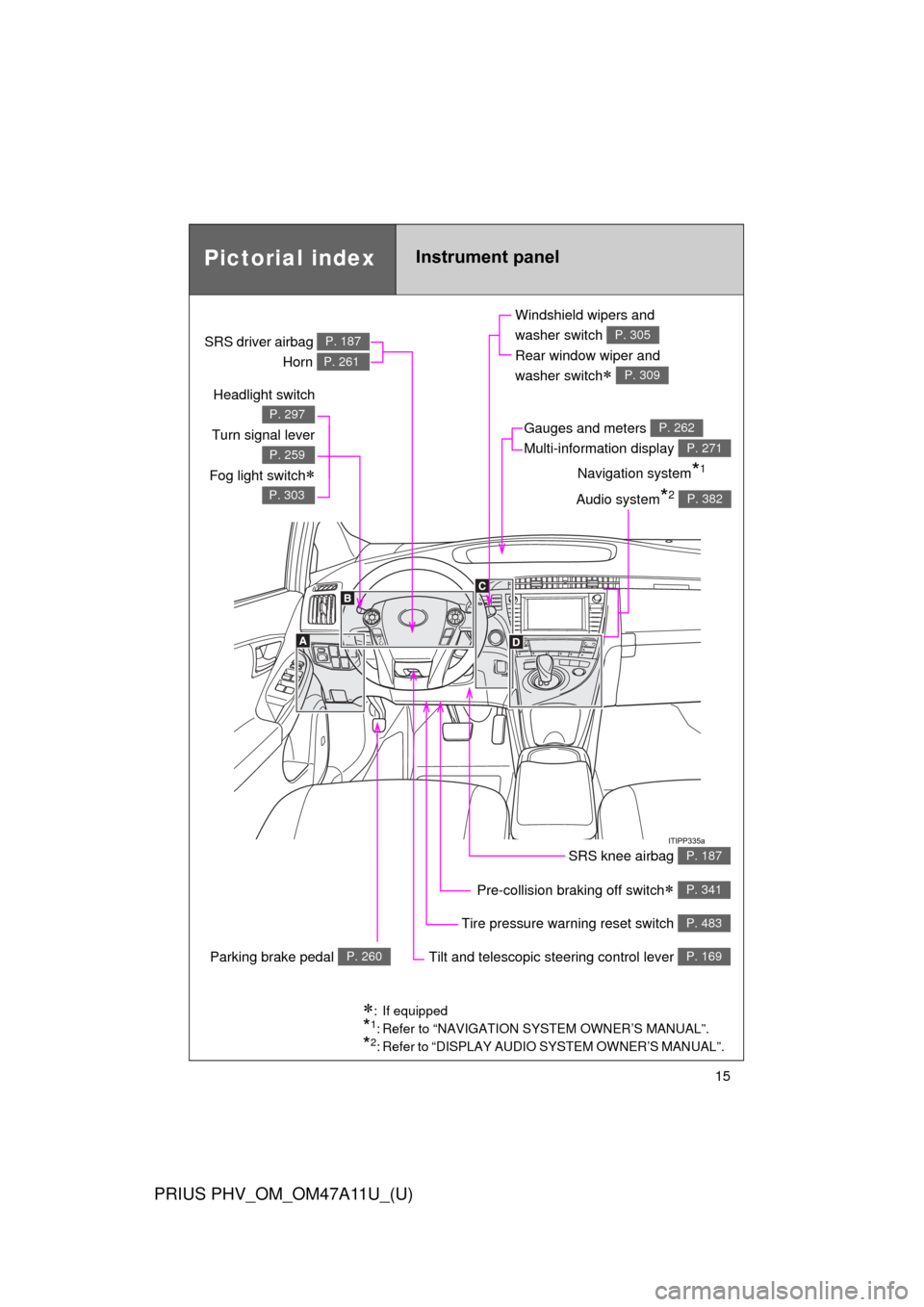
Headlight switch
Turn signal lever
Fog light switch
P. 297
P. 259
P. 303
Pre-collision braking off switch P. 341
Parking brake pedal P. 260
Tire pressure warning reset switch P. 483
Windshield wipers and
washer switch
Rear window wiper and
washer switch
P. 305
P. 309
Gauges and meters
Multi-information display P. 262
P. 271
Audio system*2 P. 382
Navigation system*1
SRS driver airbag
Horn
P. 187
P. 261
SRS knee airbag P. 187
Tilt and telescopic steering control lever P. 169
: If equipped
*1: Refer to “NAVIGATION SYSTEM OWNER’S MANUAL”.
*2: Refer to “DISPLAY AUDIO SYSTEM OWNER’S MANUAL”.
Pictorial indexInstrument panel
Page 64 of 692

64 1-1. Plug-in hybrid system
PRIUS PHV_OM_OM47A11U_(U)
EV indicator*1
Eco Driving Indicator Light*1
Average speed*2
Average fuel consumption*2
Use the displayed average fuel
consumption as a reference.
*1: P. 273
*2:The current amount since the tripmeter was reset will be displayed.
These functions can be reset by
pressing and holding the “TRIP”
button when either the 5-minute
or 1-minute interval fuel con-
sumption display is being shown.
Page 66 of 692
66 1-1. Plug-in hybrid system
PRIUS PHV_OM_OM47A11U_(U)
■Remaining hybrid battery (traction battery) charge display
The remaining charge display of the hybrid battery (traction battery) icon on
the multi-information display switches in accordance with the remaining
charge. ( P. 61)
■ Resetting the consumption data
Display Audio system
Selecting “Clear” on the “Consumption” screen will reset the fuel consump-
tion and the regenerated energy for the past 30 minutes.
Selecting “Yes” on the following screen will confirm resetting of all the data.
Navigation system
Selecting “Clear” on the “Consumption” screen will reset the fuel consump-
tion and the regenerated energy for the past 30 minutes.
Selecting “Yes” on the following screen will confirm resetting of all the data.
Multi-information display
If the “POWER” switch is turned OF F, average fuel consumption and regen-
erated energy data will be reset.
■ EV driving range display
●When in EV mode or when necessary charge is remaining for EV mode,
the estimated EV driving range can also be confirmed using the Hybrid
System Indicator. ( P. 273)
● The distance displayed is computed based on electricity consumption.
As a result, the actual distance that can be driven may differ from that
displayed.
■ Resetting the monthly fuel consumption
Press and hold the “TRIP” button while the monthly fuel consumption is dis-
played.
A confirmation message will be displayed.
Press and hold the “TRIP” button to reset the data.
Press the “DISP” button to cancel the reset operation. The screen will return
to the previous display if no buttons are pressed for approximately 10 sec-
onds.
Page 79 of 692
79
1-2. Charging
1
Before driving
PRIUS PHV_OM_OM47A11U_(U)
■
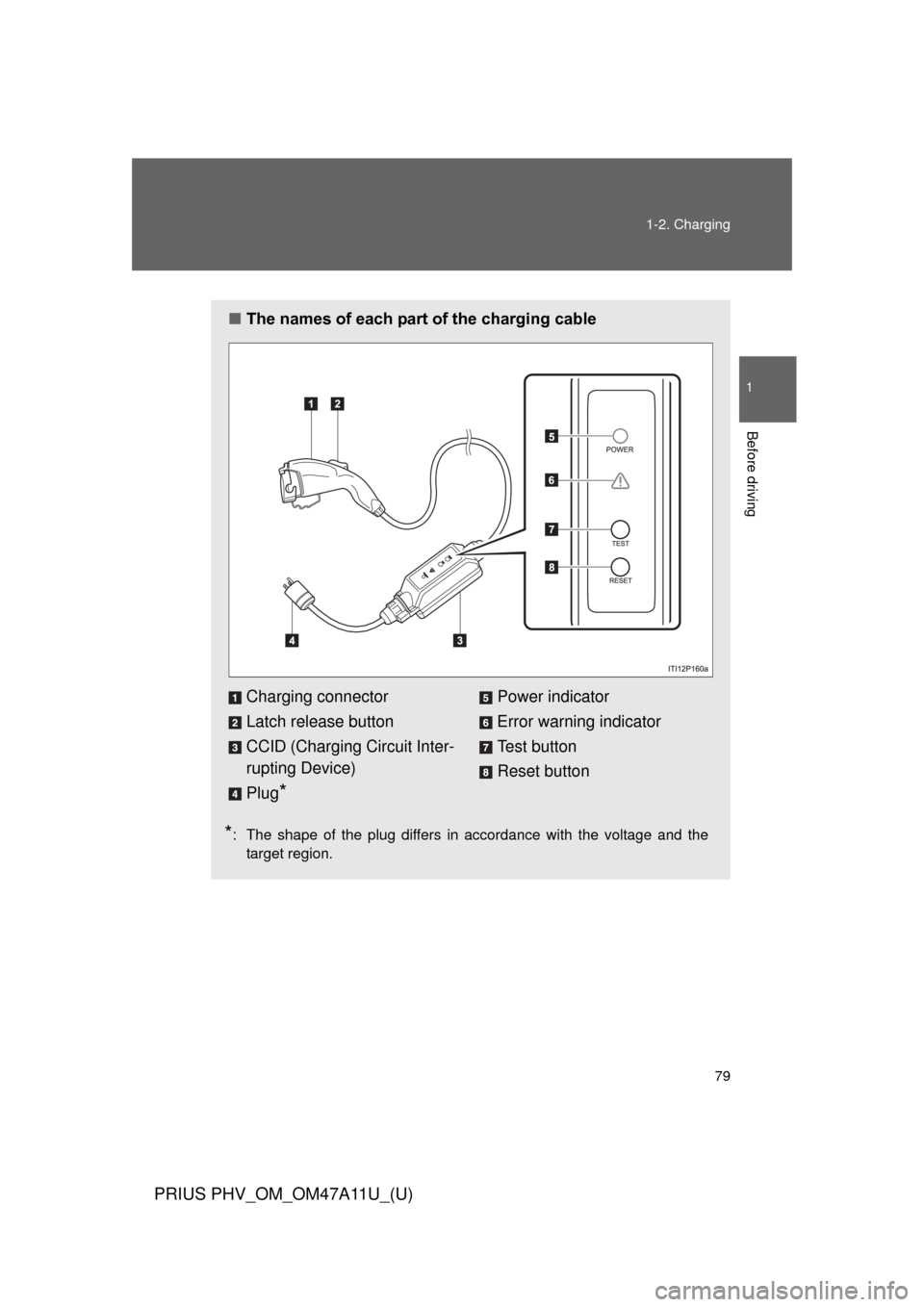
The names of each part of the charging cable
*: The shape of the plug differs in accordance with the voltage and the
target region.
Charging connector
Latch release button
CCID (Charging Circuit Inter-
rupting Device)
Plug
*
Power indicator
Error warning indicator
Test button
Reset button
Page 87 of 692
87
1-2. Charging
1
Before driving
PRIUS PHV_OM_OM47A11U_(U)
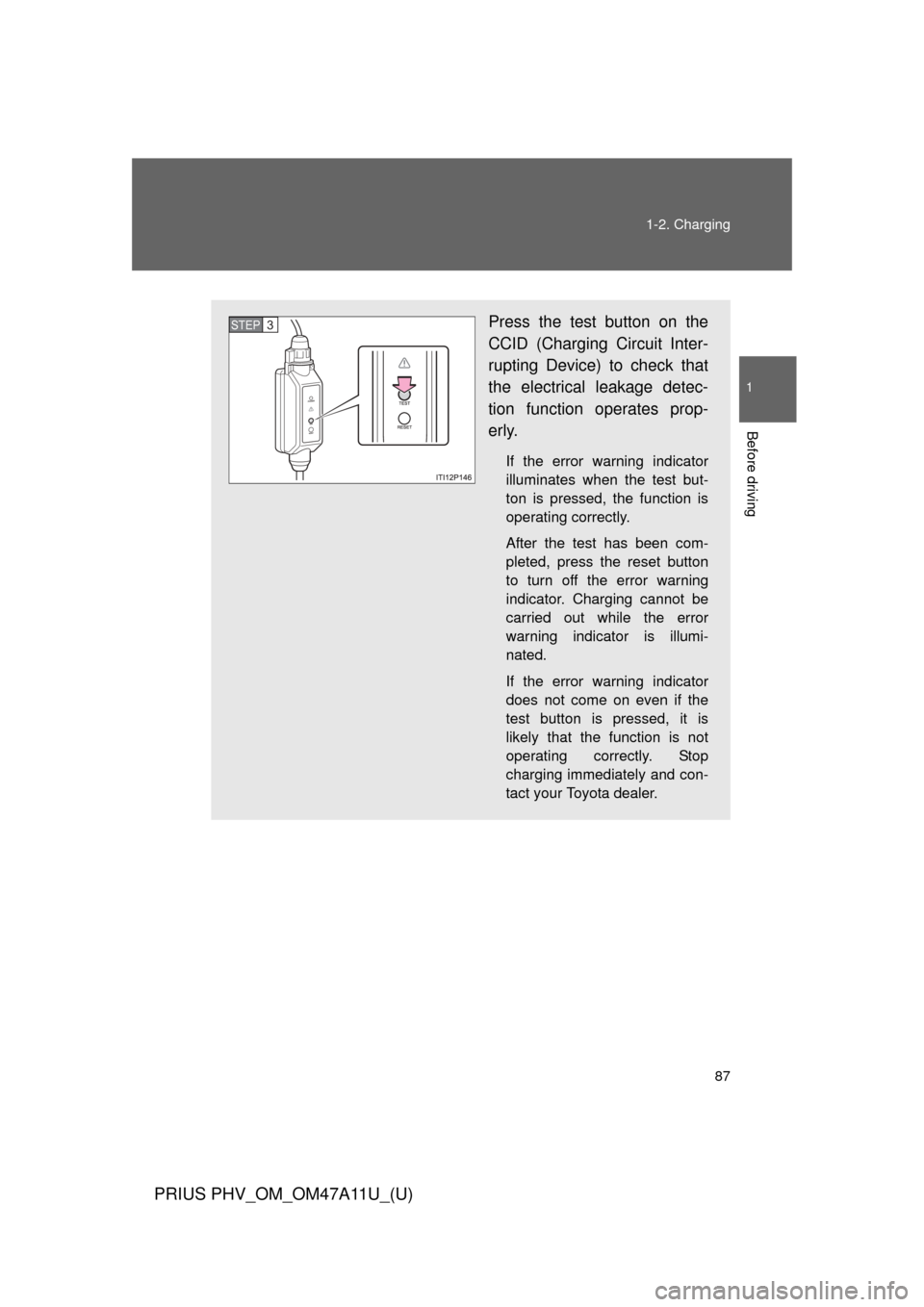
Press the test button on the
CCID (Charging Circuit Inter-
rupting Device) to check that
the electrical leakage detec-
tion function operates prop-
erly.
If the error warning indicator
illuminates when the test but-
ton is pressed, the function is
operating correctly.
After the test has been com-
pleted, press the reset button
to turn off the error warning
indicator. Charging cannot be
carried out while the error
warning indicator is illumi-
nated.
If the error warning indicator
does not come on even if the
test button is pressed, it is
likely that the function is not
operating correctly. Stop
charging immediately and con-
tact your Toyota dealer.
STEP 3
Page 101 of 692
101
1-2. Charging
1
Before driving
PRIUS PHV_OM_OM47A11U_(U)
CAUTION
■
Battery charger
The battery charger is located under the luggage compartment. Observe the
following precautions.
Failure to do so may cause death or serious injury from burns or electric
shocks.
●Do not touch the battery charger during charging, as it becomes hot.
● Do not disassemble, repair or modify the battery charger.
If repair is necessary, consult your Toyota dealer.
■ If the error warning indicator on the CCID (Charging Circuit Interrupt-
ing Device) stays on during charging
Press the reset button on the CCID (Charging Circuit Interrupting Device)
(P. 107). If the error warning indicator does not turn off even when the
reset button is pressed, an electrical leakage may be occurring in the path to
the power source, or there may be a problem with the charging cable or the
charging system. In this event, stop charging immediately, remove the
charging cable and contact your Toyota dealer. An accident may occur or
damage may be inflicted if charging continues.
■ When the charging cable is connected to the vehicle
Do not operate the shift lever.
In the unlikely event that the charging cable has been damaged, the shift
position may change from P to another position and the vehicle could move,
possibly leading to an accident.
Page 105 of 692

105
1-2. Charging
1
Before driving
PRIUS PHV_OM_OM47A11U_(U)
SituationReasonCorrection procedure
The error warning indi-
cator on the CCID
(Charging Circuit Inter-
rupting Device) comes
on
• The electrical leakage
detection function or
the self-test function
has operated and the
power supply has been
interrupted.
• The test button has been pressed.
Reset the CCID (Charg-
ing Circuit Interrupting
Device). (
P. 107)
The charging indicator
does not illuminate
even though the charg-
ing connector is con-
nected The latch release but-
ton is being pressed.
For safety purposes,
charging will be inter-
rupted when the latch
release button is
pressed.
(P. 9 6 )
When connecting the
charging connector to
the vehicle, insert it into
the charging inlet with-
out pressing the latch
release button.
The charging connec-
tor is not properly con-
nected to the charging
inlet. Check that the charg-
ing connector is firmly
connected to the
charging inlet.
If the charging indicator
does not illuminate
even though the charg-
ing connector is firmly
connected, there may
be a problem in the
system. Stop charging
immediately and con-
sult your Toyota dealer.
The hybrid battery
(traction battery) is
already fully charged.
Page 107 of 692
107
1-2. Charging
1
Before driving
PRIUS PHV_OM_OM47A11U_(U)
■
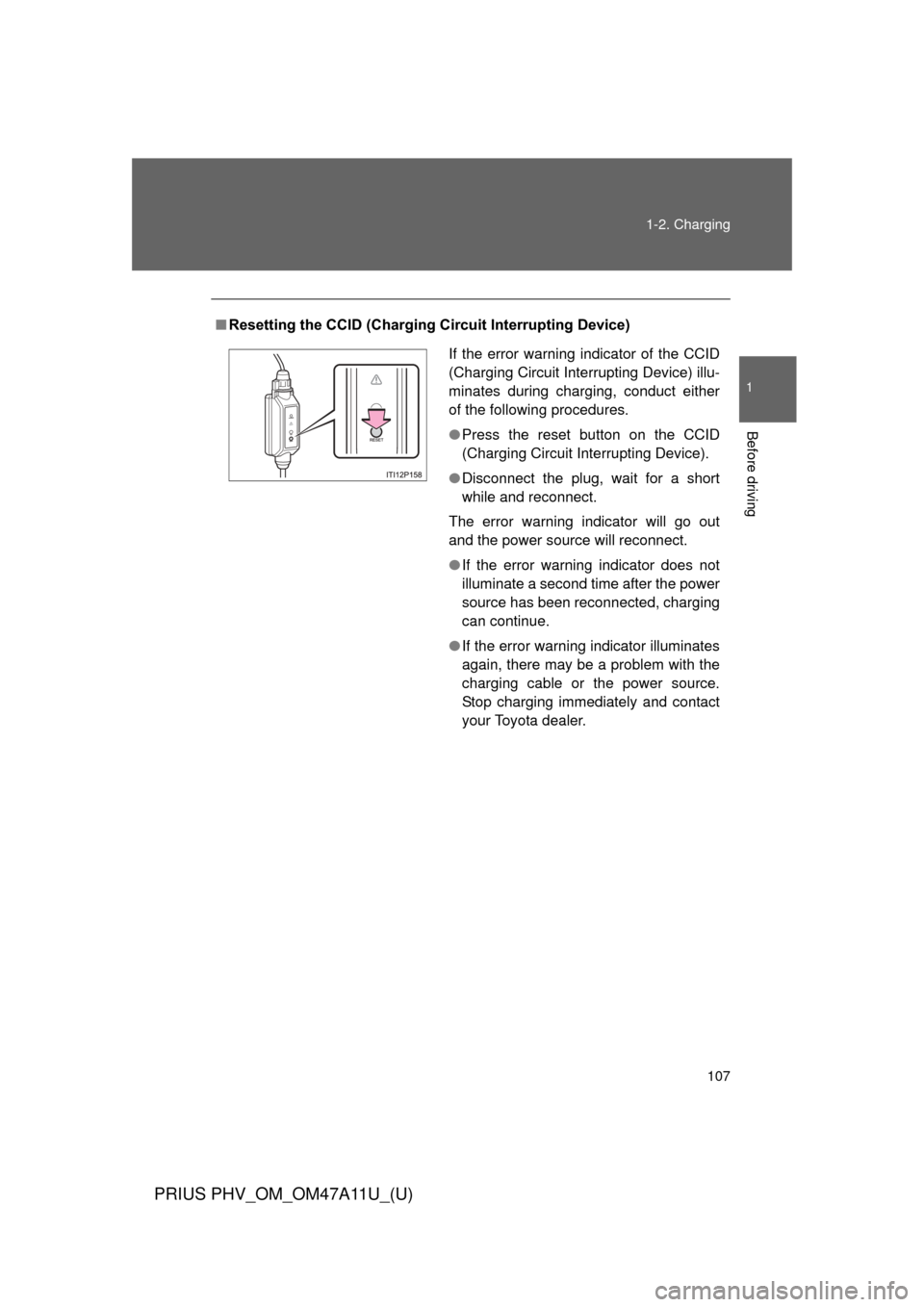
Resetting the CCID (Charging Circuit Interrupting Device)
If the error warning indicator of the CCID
(Charging Circuit Interrupting Device) illu-
minates during charging, conduct either
of the following procedures.
●Press the reset button on the CCID
(Charging Circuit Interrupting Device).
● Disconnect the plug, wait for a short
while and reconnect.
The error warning indicator will go out
and the power source will reconnect.
● If the error warning indicator does not
illuminate a second time after the power
source has been reconnected, charging
can continue.
● If the error warning indicator illuminates
again, there may be a problem with the
charging cable or the power source.
Stop charging immediately and contact
your Toyota dealer.
Page 108 of 692
108
1-2. Charging
PRIUS PHV_OM_OM47A11U_(U)
Inspecting the charging cable
Inspecting the electrical leakage detection function
Check that the electrical leakage detection function operates properly
by following the procedure below.
In the unlikely event that the elec trical leakage detection function
does not operate properly, contact your Toyota dealer as soon as
possible.
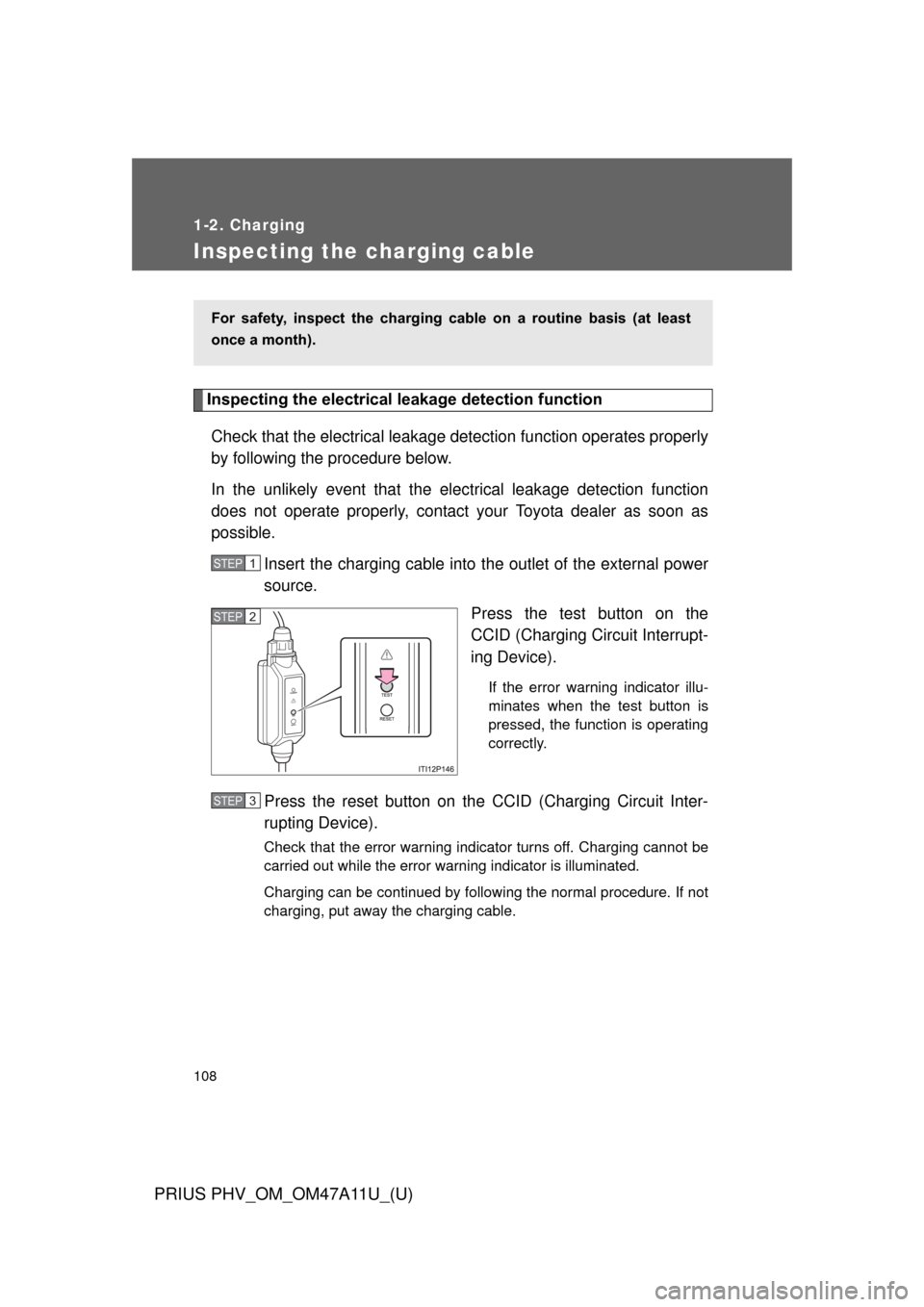
Insert the charging cable into the outlet of the external power
source.
Press the test button on the
CCID (Charging Circuit Interrupt-
ing Device).
If the error warning indicator illu-
minates when the test button is
pressed, the function is operating
correctly.
Press the reset button on the CCID (Charging Circuit Inter-
rupting Device).
Check that the error warning indicator turns off. Charging cannot be
carried out while the error warning indicator is illuminated.
Charging can be continued by following the normal procedure. If not
charging, put away the charging cable.
For safety, inspect the charging cable on a routine basis (at least
once a month).
STEP 1
STEP 2
STEP 3
Page 273 of 692
273
2-2. Instrument cluster
PRIUS PHV_OM_OM47A11U_(U)
2
When driving
Hybrid System Indicator
Hybrid System Indicator displays the hybrid system operating condi-
tion and provides Eco-friendly driving assistance in accordance with
the driving conditions and the acceleration.
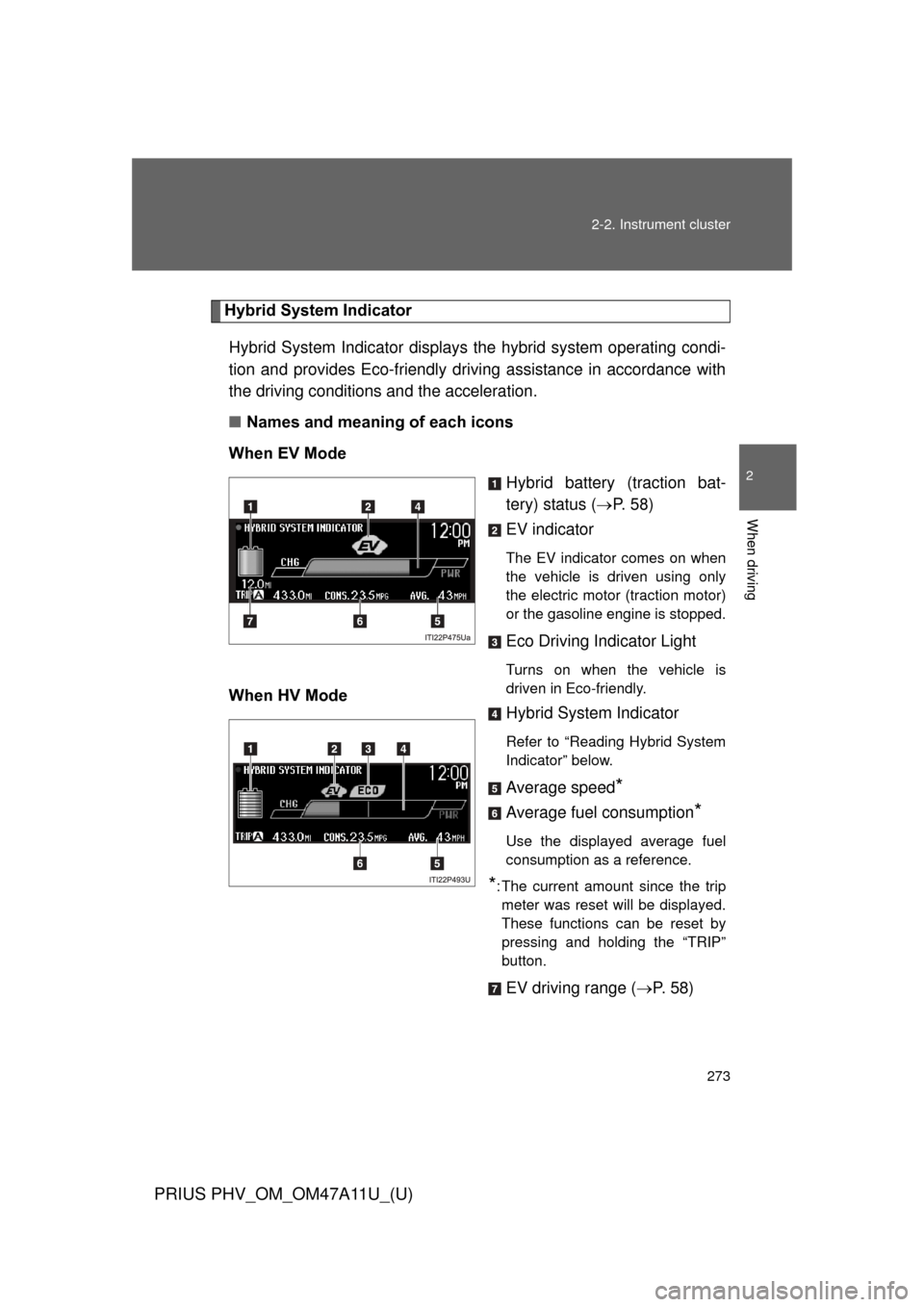
■ Names and meaning of each icons
When EV Mode Hybrid battery (traction bat-
tery) status (P. 5 8 )
EV indicator
The EV indicator comes on when
the vehicle is driven using only
the electric motor (traction motor)
or the gasoline engine is stopped.
Eco Driving Indicator Light
Turns on when the vehicle is
driven in Eco-friendly.
When HV Mode Hybrid System Indicator
Refer to “Reading Hybrid System
Indicator” below.
Average speed*
Average fuel consumption*
Use the displayed average fuel
consumption as a reference.
*: The current amount since the trip
meter was reset will be displayed.
These functions can be reset by
pressing and holding the “TRIP”
button.
EV driving range ( P. 58)