cruise control TOYOTA PRIUS PLUG-IN HYBRID 2017 User Guide
[x] Cancel search | Manufacturer: TOYOTA, Model Year: 2017, Model line: PRIUS PLUG-IN HYBRID, Model: TOYOTA PRIUS PLUG-IN HYBRID 2017Pages: 744, PDF Size: 84.41 MB
Page 245 of 744
2453. Instrument cluster
3
Instrument cluster
PRIUS PHV_OM_OM47A89E_(EE)■
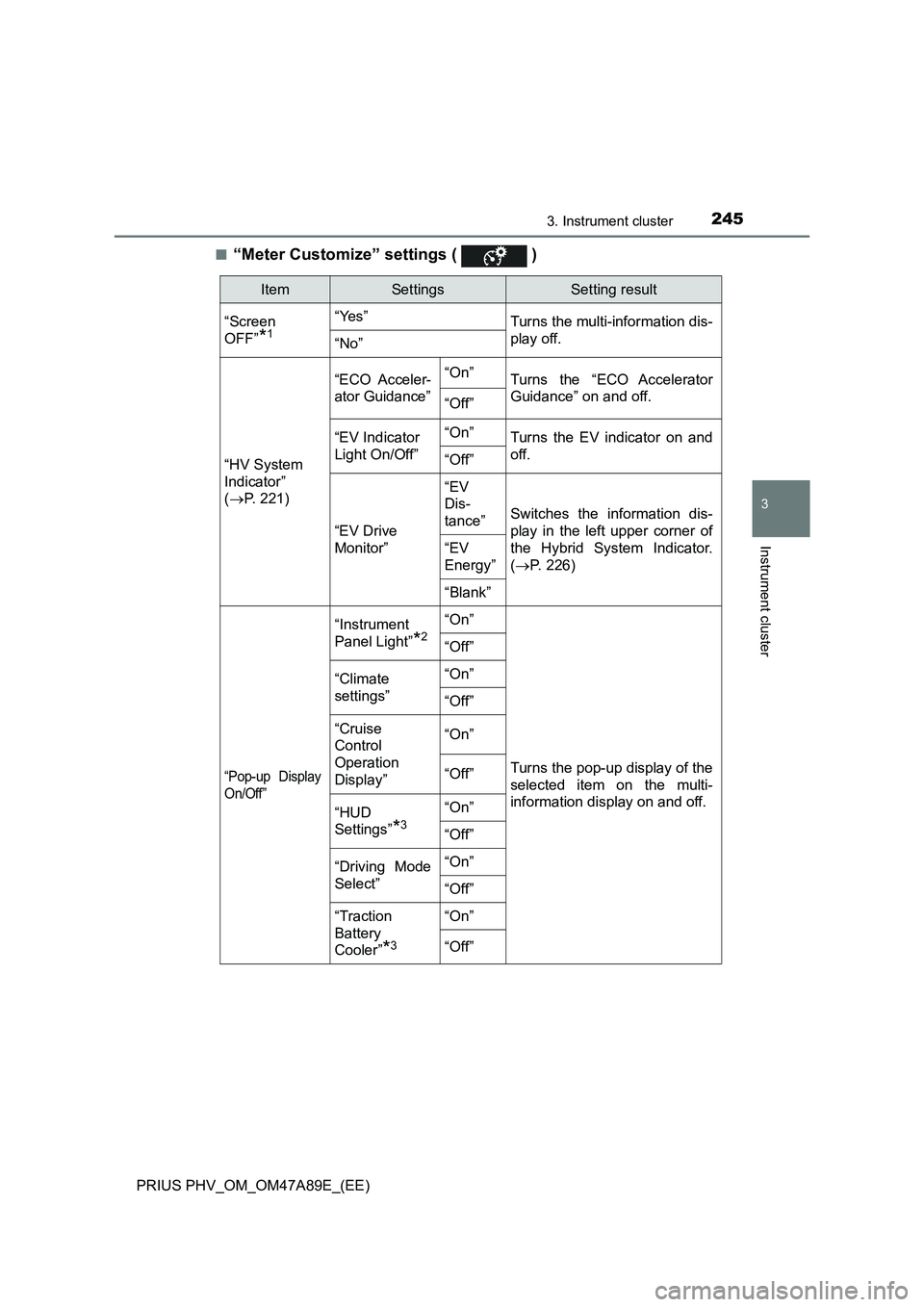
“Meter Customize” settings ( )
ItemSettingsSetting result
“Screen
OFF”
*1
“Yes”
Turns the multi-information dis-
play off.
“No”
“HV System
Indicator”
(P. 221)“ECO Acceler-
ator Guidance”“On”
Turns the “ECO Accelerator
Guidance” on and off.
“Off”
“EV Indicator
Light On/Off”“On”Turns the EV indicator on and
off.
“Off”
“EV Drive
Monitor”
“EV
Dis-
tance”
Switches the information dis-
play in the left upper corner of
the Hybrid System Indicator.
(P. 226)
“EV
Energy”
“Blank”
“Pop-up Display
On/Off”
“Instrument
Panel Light”
*2
“On”
Turns the pop-up display of the
selected item on the multi-
information display on and off.
“Off”
“Climate
settings”“On”
“Off”
“Cruise
Control
Operation
Display”“On”
“Off”
“HUD
Settings”
*3
“On”
“Off”
“Driving Mode
Select”“On”
“Off”
“Traction
Battery
Cooler”
*3
“On”
“Off”
Page 253 of 744
2533. Instrument cluster
3
Instrument cluster
PRIUS PHV_OM_OM47A89E_(EE)■
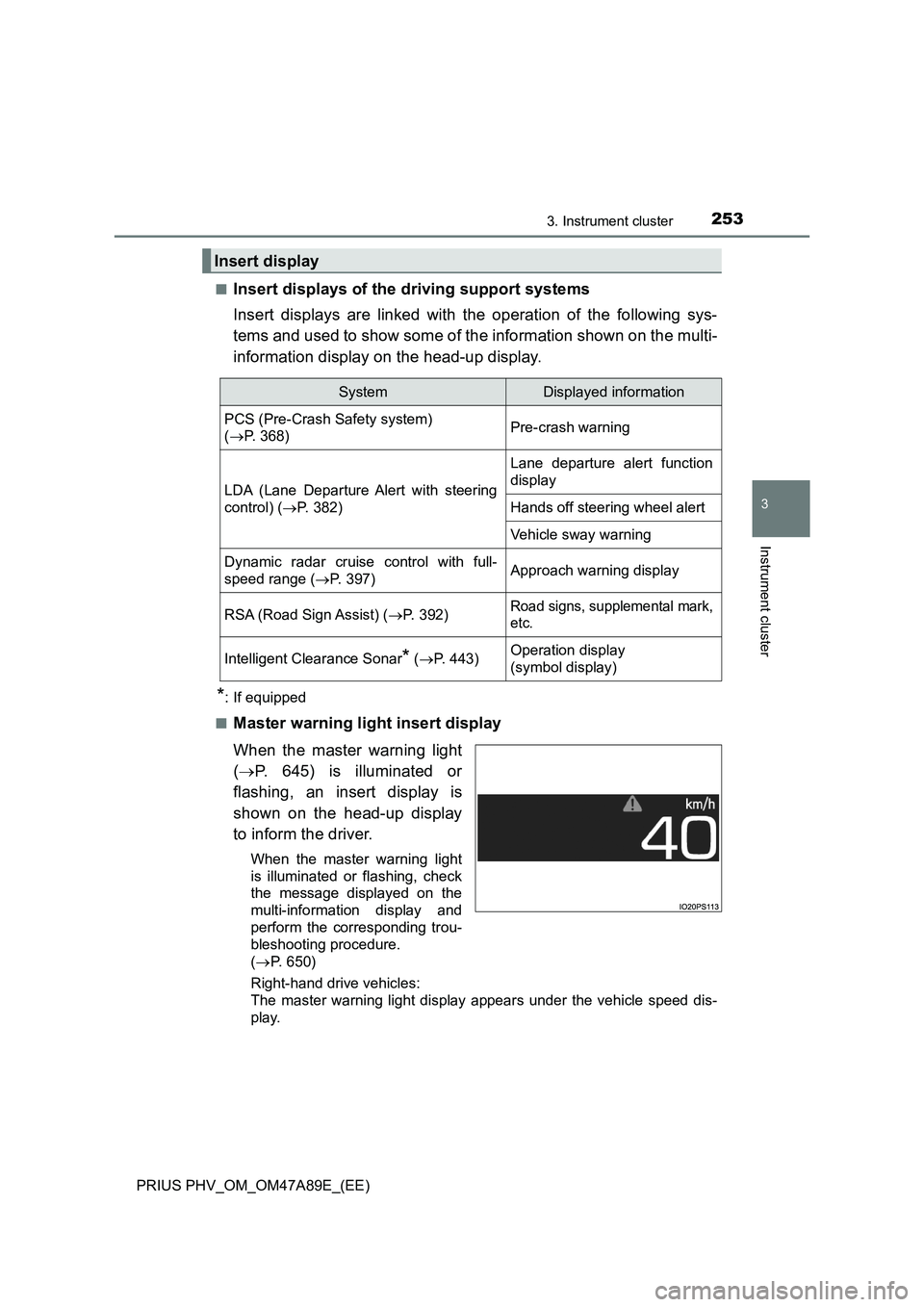
Insert displays of the driving support systems
Insert displays are linked with the operation of the following sys-
tems and used to show some of the information shown on the multi-
information display on the head-up display.
*: If equipped
■
Master warning light insert display
When the master warning light
(P. 645) is illuminated or
flashing, an insert display is
shown on the head-up display
to inform the driver.
When the master warning light
is illuminated or flashing, check
the message displayed on the
multi-information display and
perform the corresponding trou-
bleshooting procedure.
(P. 650)
Right-hand drive vehicles:
The master warning light display appears under the vehicle speed dis-
play.
Insert display
SystemDisplayed information
PCS (Pre-Crash Safety system)
(P. 368)Pre-crash warning
LDA (Lane Departure Alert with steering
control) (P. 382)
Lane departure alert function
display
Hands off steering wheel alert
Vehicle sway warning
Dynamic radar cruise control with full-
speed range (P. 397)Approach warning display
RSA (Road Sign Assist) (P. 392)Road signs, supplemental mark,
etc.
Intelligent Clearance Sonar* (P. 443)Operation display
(symbol display)
Page 311 of 744
311
5Driving
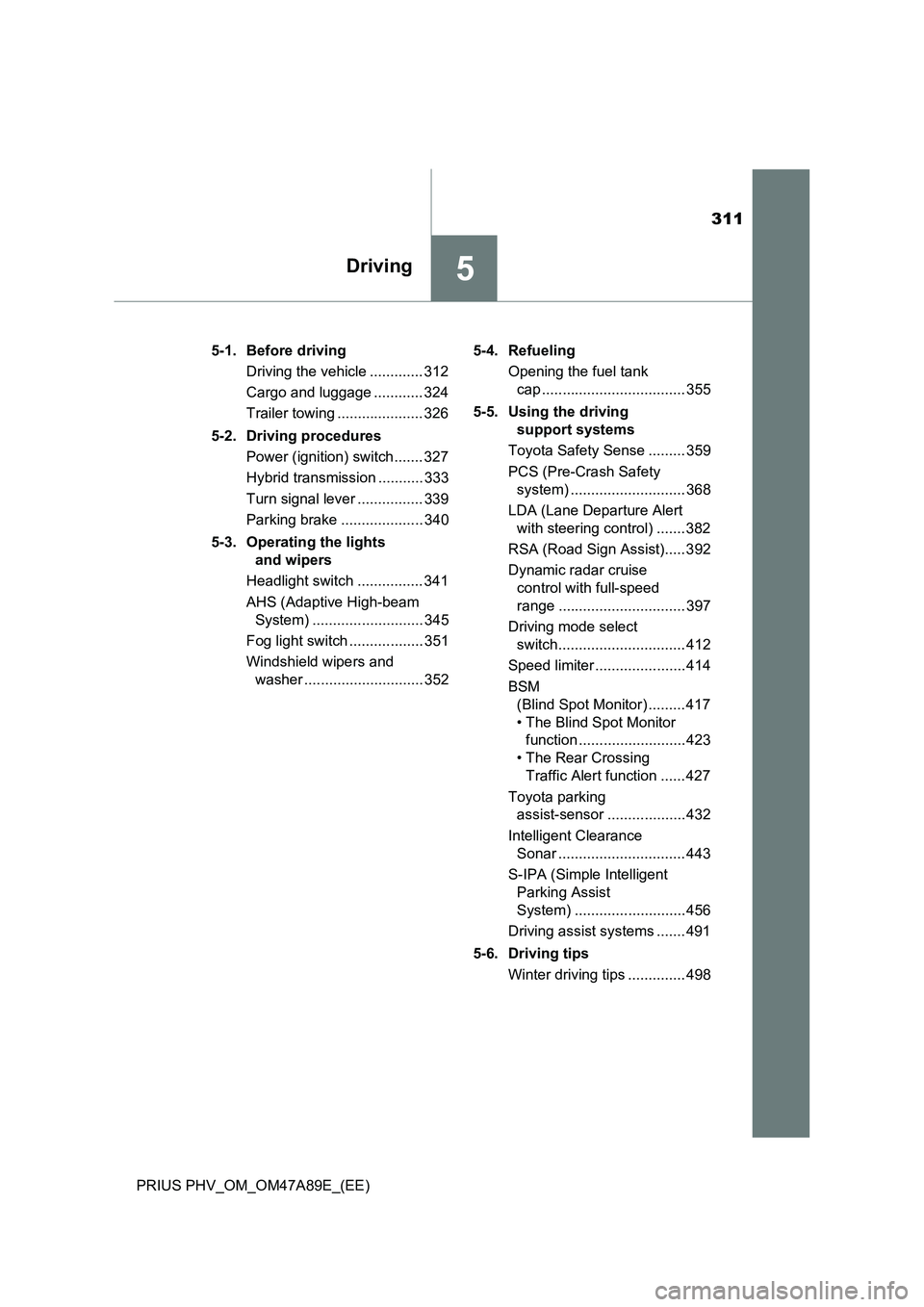
PRIUS PHV_OM_OM47A89E_(EE)5-1. Before driving
Driving the vehicle ............. 312
Cargo and luggage ............ 324
Trailer towing ..................... 326
5-2. Driving procedures
Power (ignition) switch ....... 327
Hybrid transmission ........... 333
Turn signal lever ................ 339
Parking brake .................... 340
5-3. Operating the lights
and wipers
Headlight switch ................ 341
AHS (Adaptive High-beam
System) ........................... 345
Fog light switch .................. 351
Windshield wipers and
washer ............................. 3525-4. Refueling
Opening the fuel tank
cap ................................... 355
5-5. Using the driving
support systems
Toyota Safety Sense ......... 359
PCS (Pre-Crash Safety
system) ............................ 368
LDA (Lane Departure Alert
with steering control) ....... 382
RSA (Road Sign Assist)..... 392
Dynamic radar cruise
control with full-speed
range ............................... 397
Driving mode select
switch............................... 412
Speed limiter ...................... 414
BSM
(Blind Spot Monitor) ......... 417
• The Blind Spot Monitor
function .......................... 423
• The Rear Crossing
Traffic Alert function ...... 427
Toyota parking
assist-sensor ................... 432
Intelligent Clearance
Sonar ............................... 443
S-IPA (Simple Intelligent
Parking Assist
System) ........................... 456
Driving assist systems ....... 491
5-6. Driving tips
Winter driving tips .............. 498
Page 314 of 744
3145-1. Before driving
PRIUS PHV_OM_OM47A89E_(EE)■Restraining hybrid system output (Brake Override System)
●When the accelerator and brake pedals are depressed at the same time, the
hybrid system output may be restrained.
●A warning message is displayed on the multi-information display while the
system is operating. If a warning message is shown on the multi-information
display, read the message and follow the instructions.
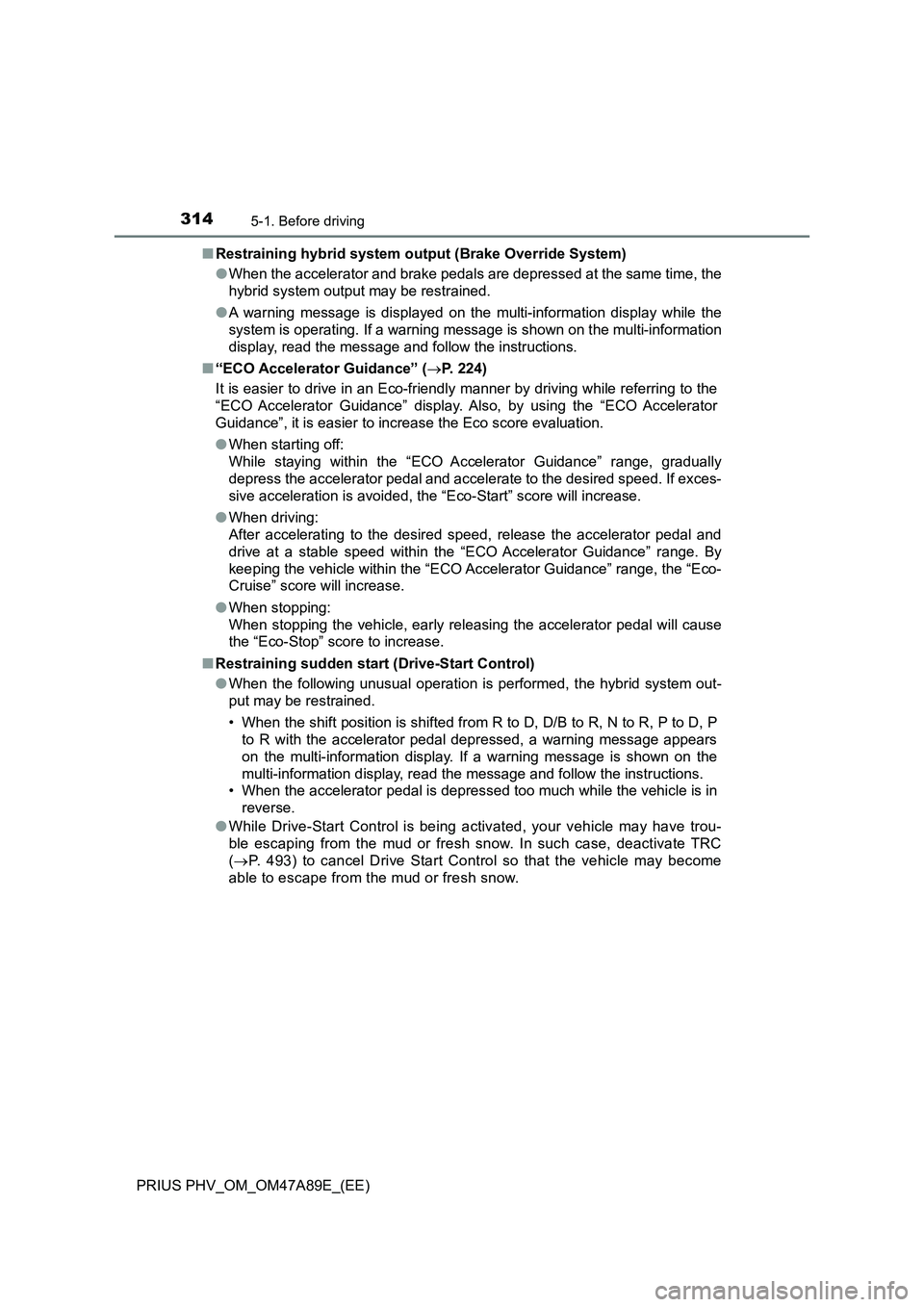
■“ECO Accelerator Guidance” (P. 224)
It is easier to drive in an Eco-friendly manner by driving while referring to the
“ECO Accelerator Guidance” display. Also, by using the “ECO Accelerator
Guidance”, it is easier to increase the Eco score evaluation.
●When starting off:
While staying within the “ECO Accelerator Guidance” range, gradually
depress the accelerator pedal and accelerate to the desired speed. If exces-
sive acceleration is avoided, the “Eco-Start” score will increase.
●When driving:
After accelerating to the desired speed, release the accelerator pedal and
drive at a stable speed within the “ECO Accelerator Guidance” range. By
keeping the vehicle within the “ECO Accelerator Guidance” range, the “Eco-
Cruise” score will increase.
●When stopping:
When stopping the vehicle, early releasing the accelerator pedal will cause
the “Eco-Stop” score to increase.
■Restraining sudden start (Drive-Start Control)
●When the following unusual operation is performed, the hybrid system out-
put may be restrained.
• When the shift position is shifted from R to D, D/B to R, N to R, P to D, P
to R with the accelerator pedal depressed, a warning message appears
on the multi-information display. If a warning message is shown on the
multi-information display, read the message and follow the instructions.
• When the accelerator pedal is depressed too much while the vehicle is in
reverse.
●While Drive-Start Control is being activated, your vehicle may have trou-
ble escaping from the mud or fresh snow. In such case, deactivate TRC
(P. 493) to cancel Drive Start Control so that the vehicle may become
able to escape from the mud or fresh snow.
Page 336 of 744
3365-2. Driving procedures
PRIUS PHV_OM_OM47A89E_(EE)■Reverse warning buzzer
When shifting into R, a buzzer will sound to inform the driver that the shift
position is in R.
■Restraining sudden start (Drive-Start Control)
When the following unusual operation is performed, the hybrid system output
may be restrained.
●When the shift position is shifted from R to D, D/B to R, N to R, P to D, P to
R with the accelerator pedal depressed, a warning message appears on the
multi-information display. If a warning message is shown on the multi-infor-
mation display, read the message and follow the instructions.
●When the accelerator pedal is depressed too much while the vehicle is in
reverse.
■Automatic P position selection function
●If the power switch is on and the shift position is not already P, completely
stopping the vehicle and pressing the power switch causes the shift position
to automatically switch to P and the power switch to turn off
*.
●The shift position may also automatically switch to P if one of the following
conditions is detected while the vehicle is stopped by dynamic radar cruise
control with full-speed range.
• Driver’s seat belt is not fastened
• Driver’s door is opened
• Approximately 3 minutes elapse after the vehicle stopped
*: If the power switch is pressed when driving at very low speeds (for exam-
ple, just before the vehicle stops), the shift position may automatically
switch to P. Press the power switch after completely stopping the vehicle to
prevent unexpected sudden stopping of the vehicle.
■If the shift position cannot be shifted from P
There is a possibility that the 12-volt battery is discharged. Check the 12-volt
battery in this situation. (P. 682)
■About engine braking
When shift position B is selected, releasing the accelerator pedal will apply
engine braking.
●When the vehicle is driven at high speeds, compared to ordinary gasoline-
fueled vehicles, the engine braking deceleration is felt less than that of other
vehicles.
●The vehicle can be accelerated even when shift position B is selected.
If the vehicle is driven continuously in the B position, fuel efficiency will
become low. Usually, select the D position.
■After recharging/reconnecting the 12-volt battery
P. 575
Page 359 of 744
3595-5. Using the driving support systems
PRIUS PHV_OM_OM47A89E_(EE)
5
Driving
Toyota Safety Sense
◆PCS (Pre-Crash Safety system)
P. 3 6 8
◆LDA (Lane Departure Alert with steering control)
P. 3 8 2
◆AHS (Adaptive High-beam System)
P. 3 4 5
◆RSA (Road Sign Assist)
P. 3 9 2
◆Dynamic radar cruise control with full-speed range
P. 3 9 7
The Toyota Safety Sense consists of the following drive assist
systems and contributes to a safe and comfortable driving expe-
rience:
WARNING
■ Toyota Safety Sense
The Toyota Safety Sense is designed to operate under the assumption that
the driver will drive safely, and is designed to help reduce the impact to the
occupants and the vehicle in the case of a collision or assist the driver in
normal driving conditions.
As there is a limit to the degree of recognition accuracy and control perfor-
mance that this system can provide, do not overly rely on this system. The
driver is always responsible for paying attention to the vehicle’s surround-
ings and driving safely.
Page 397 of 744
3975-5. Using the driving support systems
PRIUS PHV_OM_OM47A89E_(EE)
5
Driving
Dynamic radar cruise controlwith full-speed
range
In vehicle-to-vehicle distance control mode, the vehicle automatically
accelerates, decelerates and stops to match the speed changes of the
preceding vehicle even if the accelerator pedal is not depressed. In
constant speed control mode, the vehicle runs at a fixed speed.
Use the dynamic radar cruise control with full-speed range on free-
ways and highways.
●Vehicle-to-vehicle distance control mode (P. 400)
●Constant speed control mode (P. 407)
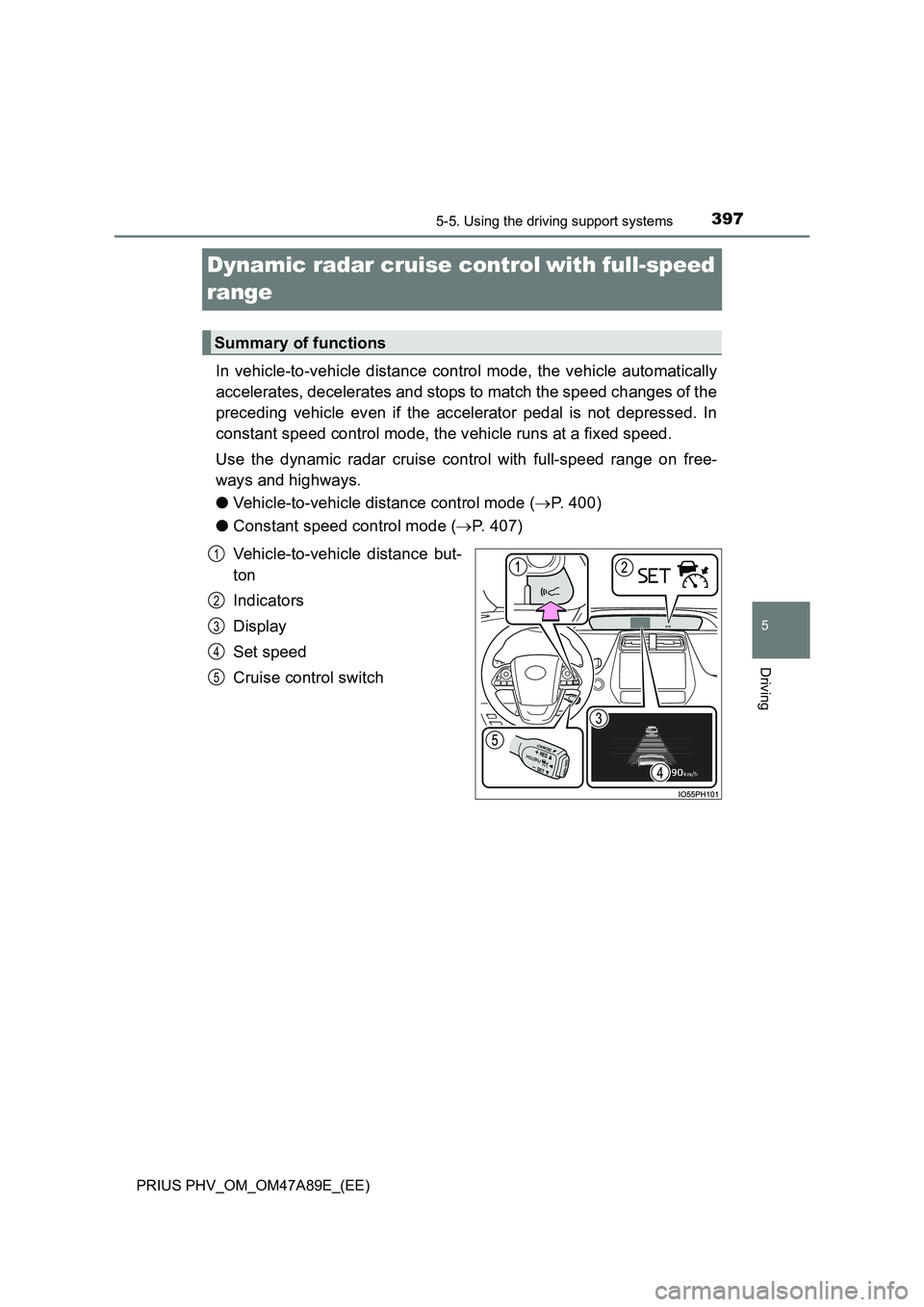
Vehicle-to-vehicle distance but-
ton
Indicators
Display
Set speed
Cruise control switch
Summary of functions
1
2
3
4
5
Page 398 of 744
3985-5. Using the driving support systems
PRIUS PHV_OM_OM47A89E_(EE)
WARNING
■Before using dynamic radar cruise control with full-speed range
Driving safely is the sole responsibility of the driver. Do not rely solely on the
system, and drive safely by always paying careful attention to your sur-
roundings.
The dynamic radar cruise control wi th full-speed range provides driving
assistance to reduce the driver’s burden. However, there are limitations to
the assistance provided.
Even when the system is functioning normally, the condition of the preced-
ing vehicle as detected by the system may differ from the condition
observed by the driver. Therefore, t he driver must always remain alert,
assess the danger of each situation and drive safely. Relying on this system
or assuming the system ensures safety while driving can lead to an acci-
dent, resulting in death or serious injury.
■ Cautions regarding the driving assist systems
Observe the following precautions, as there are limitations to the assistance
provided by the system.
Failure to do so may cause an accident resulting in death or serious injury.
● Assisting the driver to measure following distance
The dynamic radar cruise control with full-speed range is only intended to
help the driver in determining the fo llowing distance between the driver’s
own vehicle and a designated vehicle traveling ahead. It is not a mecha-
nism that allows careless or inattentive driving, and it is not a system that
can assist the driver in low-visibility conditions. It is still necessary for
driver to pay close attention to the vehicle’s surroundings.
● Assisting the driver to judge proper following distance
The dynamic radar cruise control with full-speed range determines
whether the following distance between the driver’s own vehicle and a
designated vehicle traveling ahead is within a set range. It is not capable
of making any other type of judgement. Therefore, it is absolutely neces-
sary for the driver to remain vigila nt and to determine whether or not there
is a possibility of danger in any given situation.
● Assisting the driver to operate the vehicle
The dynamic radar cruise control with full-speed range has limited capabil-
ity to prevent or avoid a collision wi th a vehicle traveling ahead. Therefore,
if there is ever any danger, the driver must take immediate and direct con-
trol of the vehicle and act appropriately in order to ensure the safety of all
involved.
Page 399 of 744
3995-5. Using the driving support systems
PRIUS PHV_OM_OM47A89E_(EE)
5
Driving
WARNING
■To avoid inadvertent dynamic radar cruise control with full-speed
range activation
Switch the dynamic radar cruise control with full-speed range off using the
“ON-OFF” button when not in use.
■ Situations unsuitable for dynamic radar cruise control with full-speed
range
Do not use dynamic radar cruise control with full-speed range in any of the
following situations.
Doing so may result in inappropriate speed control and could cause an acci-
dent resulting in death or serious injury.
● Roads where there are pedestrians, cyclers, etc.
● In heavy traffic
● On roads with sharp bends
● On winding roads
● On slippery roads, such as those covered with rain, ice or snow
● On steep downhills, or where there are sudden changes between sharp up
and down gradients
Vehicle speed may exceed the set speed when driving down a steep hill.
● At entrances to freeways and highways
● When weather conditions are bad enough that they may prevent the sen-
sors from detecting correctly (fog, snow, sandstorm, heavy rain, etc.)
● When there is rain, snow, etc. on the front surface of the radar sensor or
camera sensor
● In traffic conditions that require frequent repeated acceleration and decel-
eration
● When your vehicle is during emergency towing
● When an approach warning buzzer is heard often
Page 401 of 744
4015-5. Using the driving support systems
PRIUS PHV_OM_OM47A89E_(EE)
5
Driving
Example of constant speed cruising
When there are no vehicles ahead
The vehicle travels at the speed set by the driver. The desired vehicle-to-
vehicle distance can also be set by operating the vehicle-to-vehicle dis-
tance button.
Example of deceleration cruising and follow-up cruising
When a preceding vehicle driving slower than the set speed
appears
When a vehicle is detected running ahead of you, the system automatically
decelerates your vehicle. When a greater reduction in vehicle speed is
necessary, the system applies the brakes (the stop lights will come on at
this time). The system will respond to changes in the speed of the vehicle
ahead in order to maintain the vehicle-to-vehicle distance set by the driver.
Approach warning warns you when the system cannot decelerate suffi-
ciently to prevent your vehicle from closing in on the vehicle ahead.
When the vehicle ahead of you stops, your vehicle will also stop (vehicle is
stopped by system control). After the vehicle ahead starts off, pushing the
cruise control lever up or depressing the accelerator pedal will resume fol-
low-up cruising.
Example of acceleration
When there are no longer any preceding vehicles driving slower
than the set speed
The system accelerates until the set speed is reached. The system then
returns to constant speed cruising.
1
2
3