key TOYOTA PRIUS PLUG-IN HYBRID 2018 User Guide
[x] Cancel search | Manufacturer: TOYOTA, Model Year: 2018, Model line: PRIUS PLUG-IN HYBRID, Model: TOYOTA PRIUS PLUG-IN HYBRID 2018Pages: 772, PDF Size: 107.88 MB
Page 89 of 772
891-3. Theft deterrent system
1
PRIUS PHV_OM_OM47C99E_(EE)
For safety and security
■System maintenance
The vehicle has a maintenance-free type alarm system.
■ Items to check before locking the vehicle
To prevent unexpected triggering of the alarm and vehicle theft, make sure of
the following.
● Nobody is in the vehicle.
● The side windows are closed before the alarm is set.
● No valuables or other personal items are left in the vehicle.
■ Triggering of the alarm
The alarm may be triggered in the following situations:
(Stopping the alarm deactivates the alarm system.)
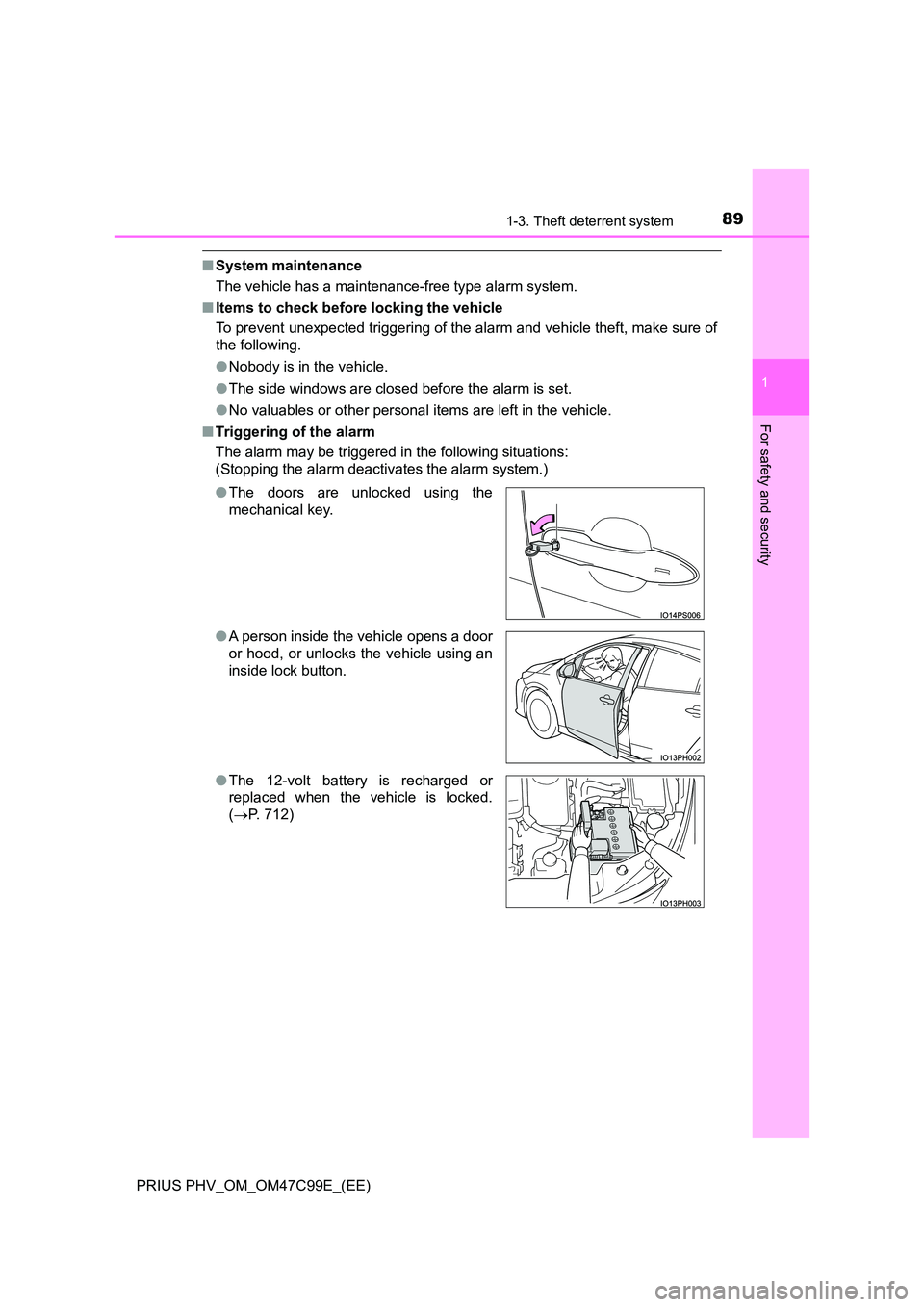
● The doors are unlocked using the
mechanical key.
● A person inside the vehicle opens a door
or hood, or unlocks the vehicle using an
inside lock button.
● The 12-volt battery is recharged or
replaced when the vehicle is locked.
( P. 712)
Page 122 of 772
1222-2. Charging
PRIUS PHV_OM_OM47C99E_(EE)■
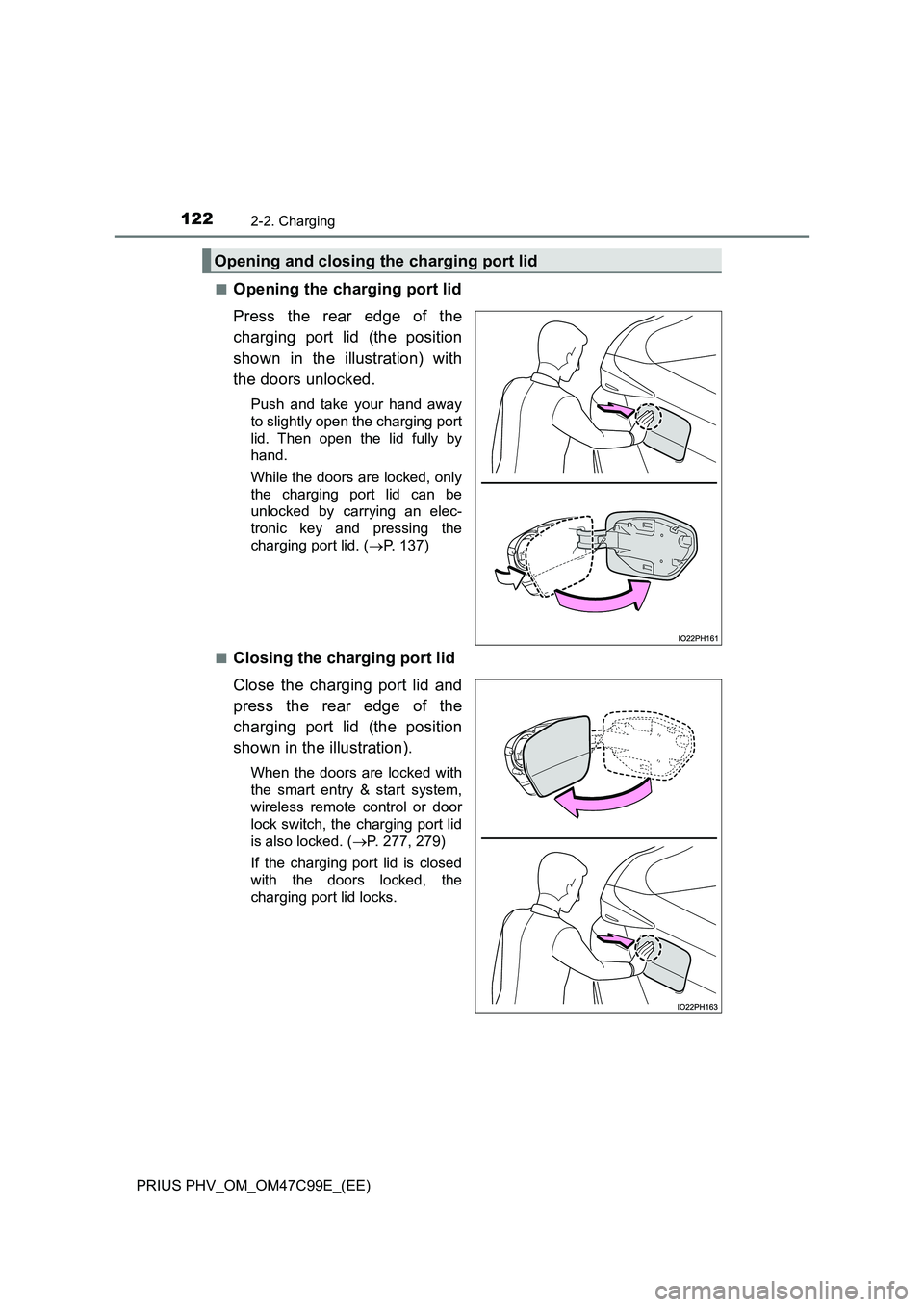
Opening the charging port lid
Press the rear edge of the
charging port lid (the position
shown in the illustration) with
the doors unlocked.
Push and take your hand away
to slightly open the charging port
lid. Then open the lid fully by
hand.
While the doors are locked, only
the charging port lid can be
unlocked by carrying an elec-
tronic key and pressing the
charging port lid. (P. 1 3 7 )
■
Closing the charging port lid
Close the charging port lid and
press the rear edge of the
charging port lid (the position
shown in the illustration).
When the doors are locked with
the smart entry & start system,
wireless remote control or door
lock switch, the charging port lid
is also locked. (P. 277, 279)
If the charging port lid is closed
with the doors locked, the
charging port lid locks.
Opening and closing the charging port lid
Page 124 of 772
1242-2. Charging
PRIUS PHV_OM_OM47C99E_(EE)■
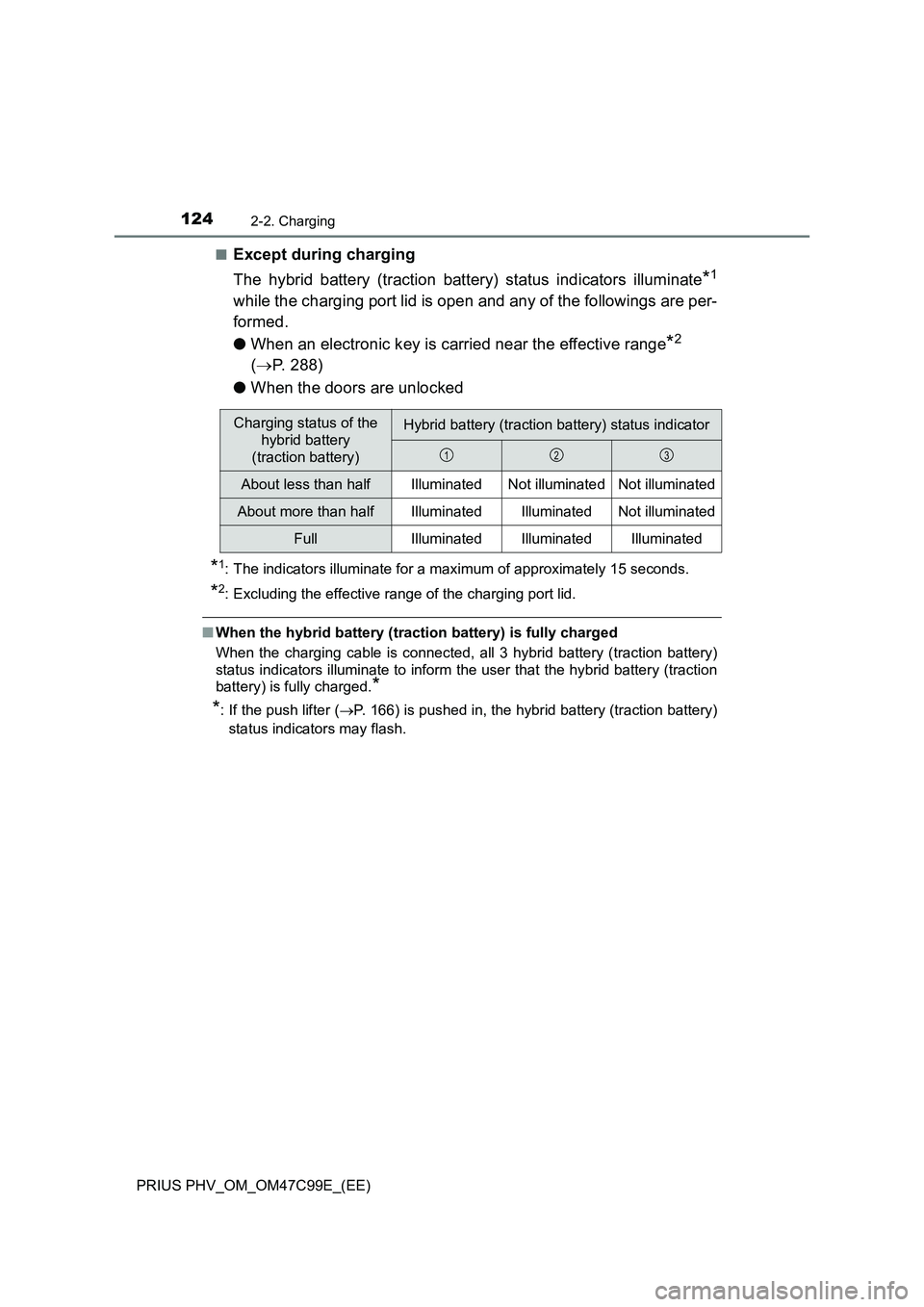
Except during charging
The hybrid battery (traction battery) status indicators illuminate
*1
while the charging port lid is open and any of the followings are per-
formed.
●When an electronic key is carried near the effective range
*2
(P. 288)
●When the doors are unlocked
*1: The indicators illuminate for a maximum of approximately 15 seconds.
*2: Excluding the effective range of the charging port lid.
■When the hybrid battery (traction battery) is fully charged
When the charging cable is connected, all 3 hybrid battery (traction battery)
status indicators illuminate to inform the user that the hybrid battery (traction
battery) is fully charged.
*
*
: If the push lifter (P. 166) is pushed in, the hybrid battery (traction battery)
status indicators may flash.
Charging status of the
hybrid battery
(traction battery)Hybrid battery (traction battery) status indicator
About less than halfIlluminatedNot illuminatedNot illuminated
About more than halfIlluminatedIlluminatedNot illuminated
FullIlluminatedIlluminatedIlluminated
123
Page 131 of 772
1312-2. Charging
2
Plug-in hybrid system
PRIUS PHV_OM_OM47C99E_(EE)
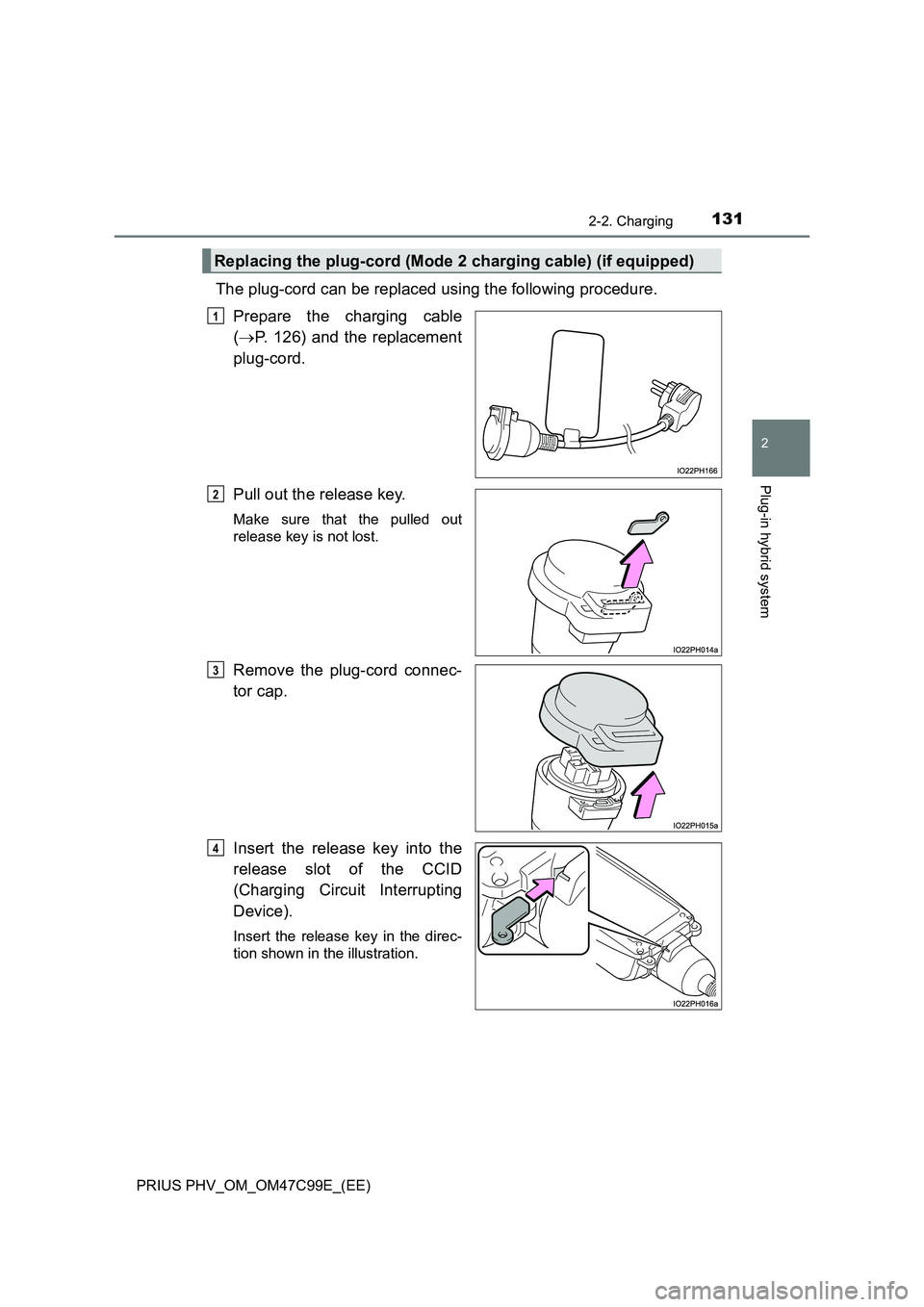
The plug-cord can be replaced using the following procedure.
Prepare the charging cable
( P. 126) and the replacement
plug-cord.
Pull out the release key.
Make sure that the pulled out
release key is not lost.
Remove the plug-cord connec-
tor cap.
Insert the release key into the
release slot of the CCID
(Charging Circuit Interrupting
Device).
Insert the release key in the direc-
tion shown in the illustration.
Replacing the plug-cord (Mode 2 charging cable) (if equipped)
1
2
3
4
Page 132 of 772
1322-2. Charging
PRIUS PHV_OM_OM47C99E_(EE)
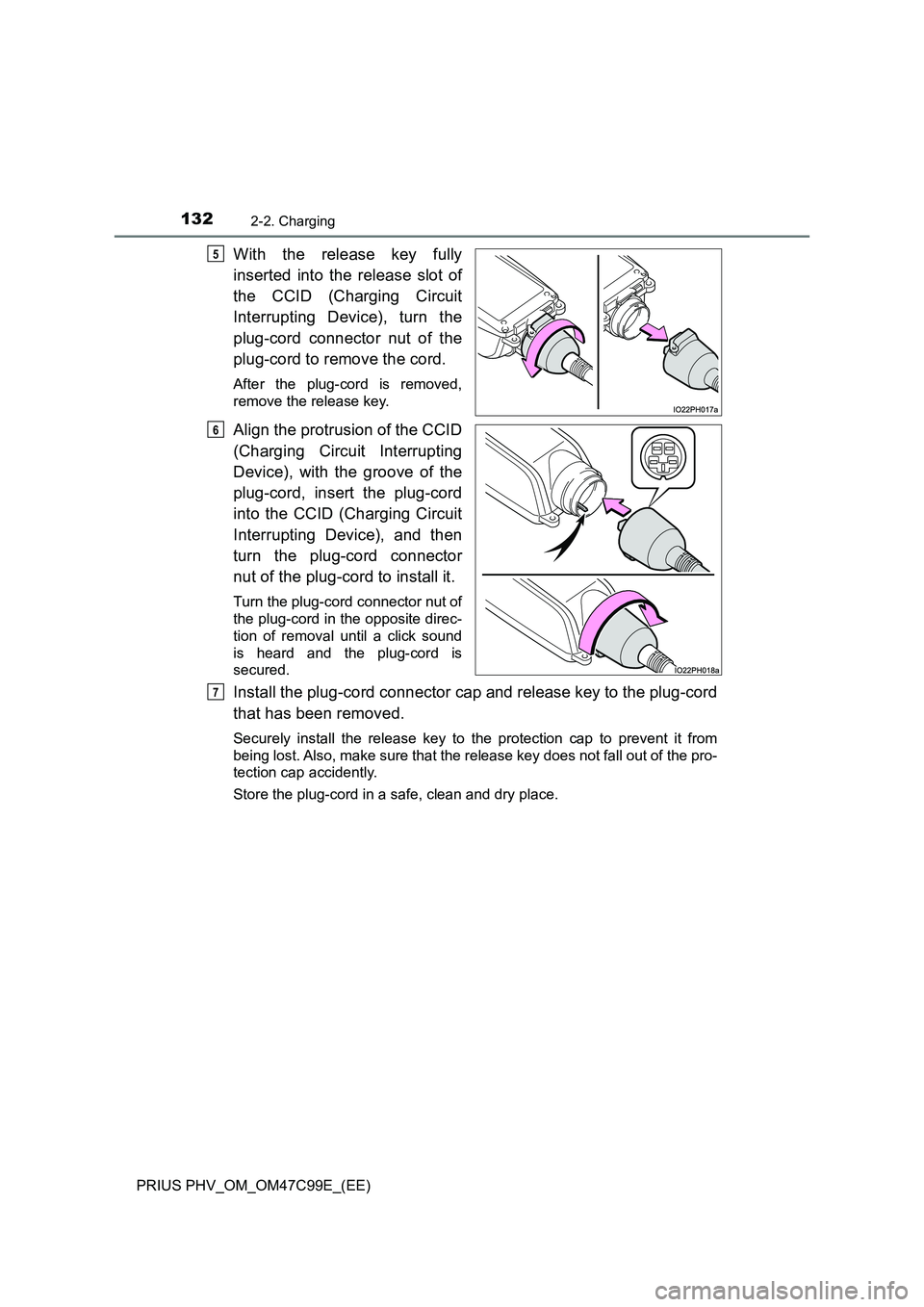
With the release key fully
inserted into the release slot of
the CCID (Charging Circuit
Interrupting Device), turn the
plug-cord connector nut of the
plug-cord to remove the cord.
After the plug-cord is removed,
remove the release key.
Align the protrusion of the CCID
(Charging Circuit Interrupting
Device), with the groove of the
plug-cord, insert the plug-cord
into the CCID (Charging Circuit
Interrupting Device), and then
turn the plug-cord connector
nut of the plug-cord to install it.
Turn the plug-cord connector nut of
the plug-cord in the opposite direc-
tion of removal until a click sound
is heard and the plug-cord is
secured.
Install the plug-cord connector cap and release key to the plug-cord
that has been removed.
Securely install the release key to the protection cap to prevent it from
being lost. Also, make sure that the release key does not fall out of the pro-
tection cap accidently.
Store the plug-cord in a safe, clean and dry place.
5
6
7
Page 136 of 772
1362-2. Charging
PRIUS PHV_OM_OM47C99E_(EE)
Smart lid & connector locking system
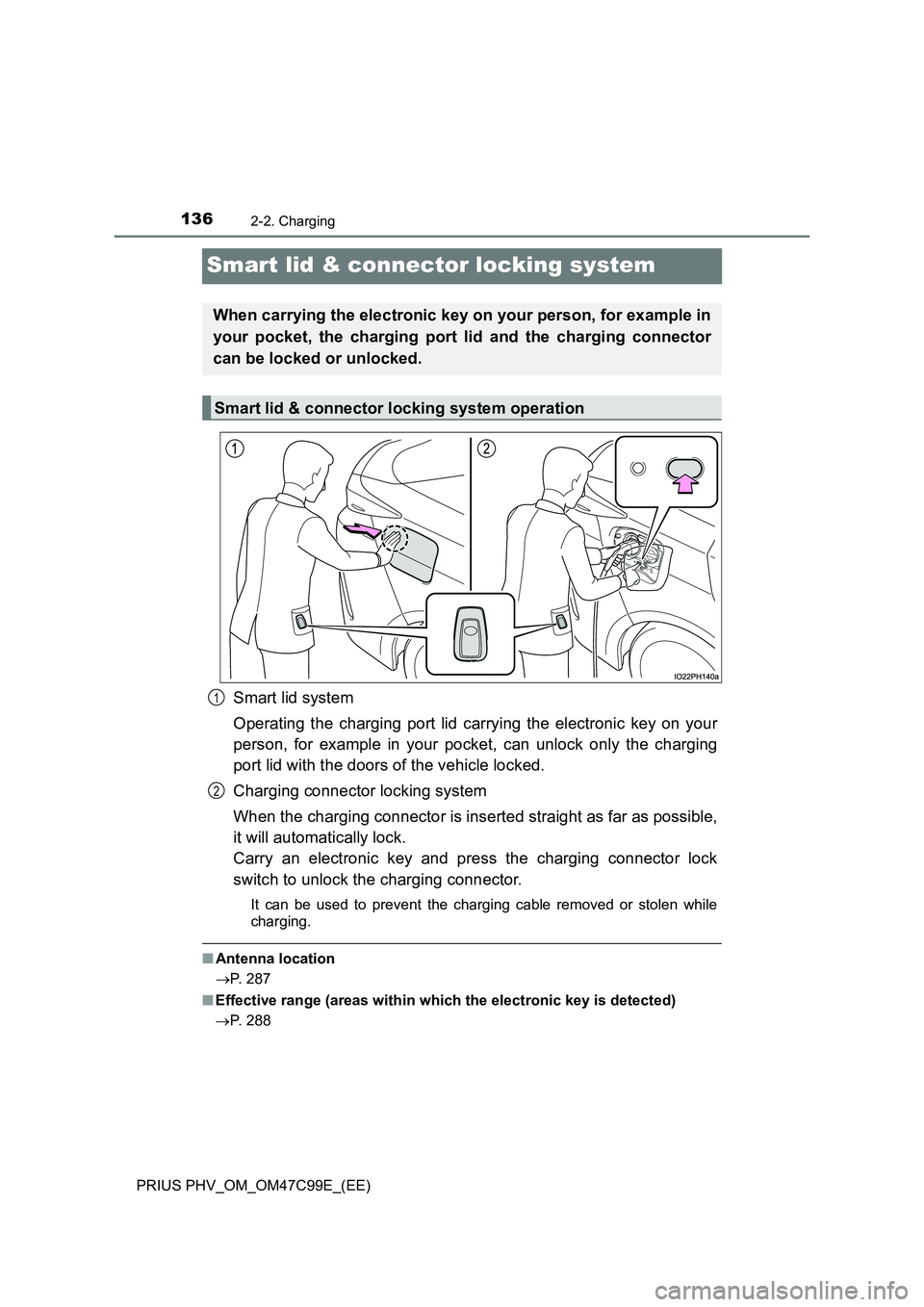
Smart lid system
Operating the charging port lid carrying the electronic key on your
person, for example in your pocket, can unlock only the charging
port lid with the doors of the vehicle locked.
Charging connector locking system
When the charging connector is inserted straight as far as possible,
it will automatically lock.
Carry an electronic key and press the charging connector lock
switch to unlock the charging connector.
It can be used to prevent the charging cable removed or stolen while
charging.
■ Antenna location
P. 287
■ Effective range (areas within which the electronic key is detected)
P. 288
When carrying the electronic key on your person, for example in
your pocket, the charging port lid and the charging connector
can be locked or unlocked.
Smart lid & connector locking system operation
1
2
Page 137 of 772
1372-2. Charging
2
Plug-in hybrid system
PRIUS PHV_OM_OM47C99E_(EE)
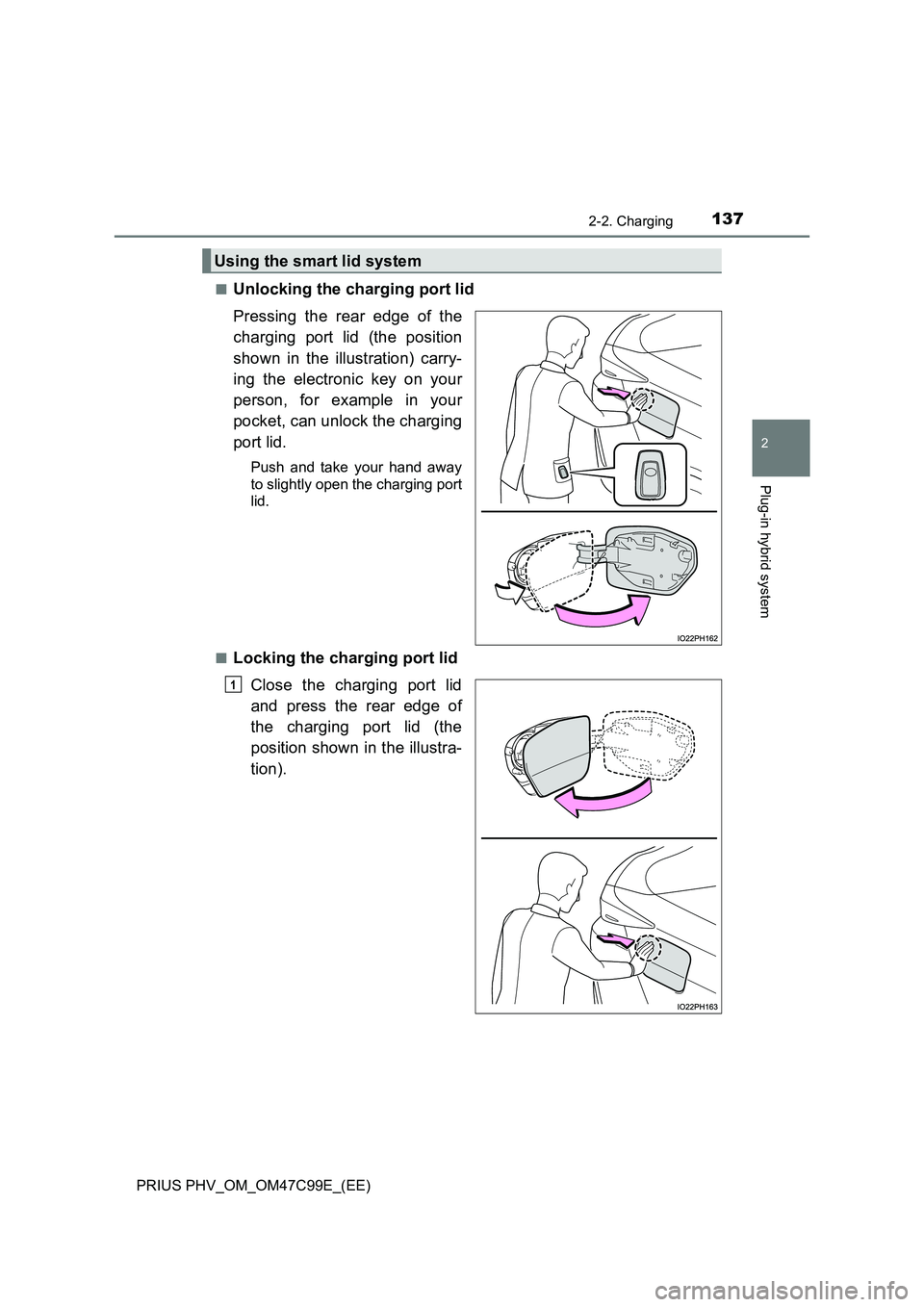
■Unlocking the charging port lid
Pressing the rear edge of the
charging port lid (the position
shown in the illustration) carry-
ing the electronic key on your
person, for example in your
pocket, can unlock the charging
port lid.
Push and take your hand away
to slightly open the charging port
lid.
■Locking the charging port lid
Close the charging port lid
and press the rear edge of
the charging port lid (the
position shown in the illustra-
tion).
Using the smart lid system
1
Page 138 of 772
1382-2. Charging
PRIUS PHV_OM_OM47C99E_(EE)
Locking the doors using the smart entry & start system or wire-
less remote control. (P. 277)
The charging port lid will be locked.
If the charging port lid is closed with the doors locked, the charging port
lid locks.
■Charging port lid
●If the rear edge of the charging port lid (the position shown in the illustra-
tions on P. 122 and 137) is pressed when the doors are locked and you are
not carrying the electronic key, the charging port lid opens slightly, but
remains locked. Carry an electronic key or unlock the doors, and then press
the charging port lid twice to open it.
●If the charging port lid is opened and closed repeatedly, the charging port lid
lock may not operate in order to protect the system. In this case, press the
charging port lid twice after a while.
■If the smart entry & start system has been deactivated in a customized
setting
The smart lid & connector locking system will also be deactivated. If the smart
entry & start system has been deactivated in a customized setting, the
charging port lid can be locked and unlocked by performing the following pro-
cedures.
●Locking the charging port lid
Close the charging port lid. (P. 137)
Locking the doors using the wireless remote control or door lock switch.
(P. 277, 279)
The charging port lid can be locked if the step and is performed in
reverse.
●Unlocking the charging port lid
Unlocking the doors using the wireless remote control or door lock
switch. (P. 277, 279)
Open the charging port lid. (P. 137)
2
1
2
12
1
2
Page 140 of 772
1402-2. Charging
PRIUS PHV_OM_OM47C99E_(EE)
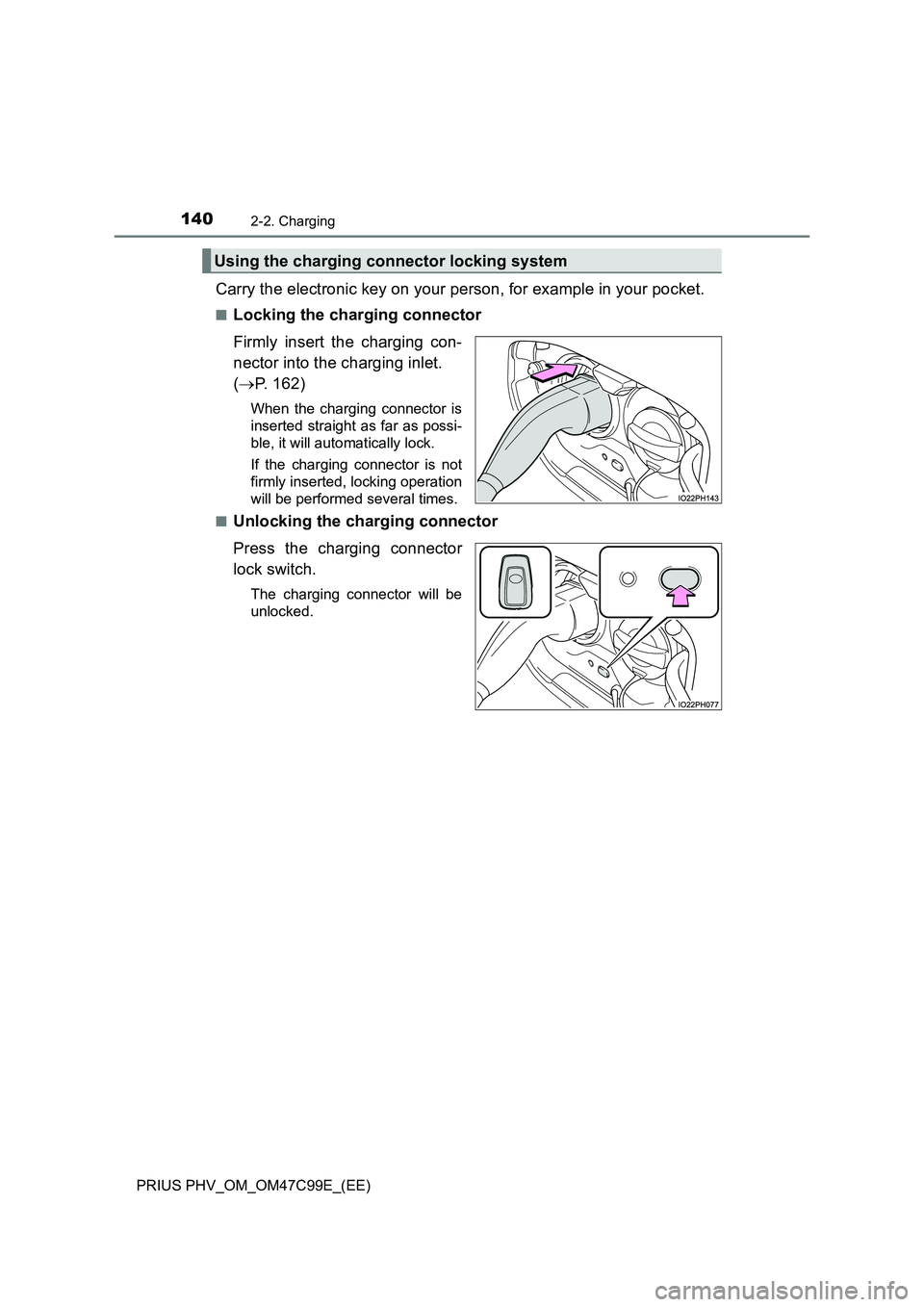
Carry the electronic key on your person, for example in your pocket.
■Locking the charging connector
Firmly insert the charging con-
nector into the charging inlet.
(P. 162)
When the charging connector is
inserted straight as far as possi-
ble, it will automatically lock.
If the charging connector is not
firmly inserted, locking operation
will be performed several times.
■
Unlocking the charging connector
Press the charging connector
lock switch.
The charging connector will be
unlocked.
Using the charging connector locking system
Page 141 of 772
1412-2. Charging
2
Plug-in hybrid system
PRIUS PHV_OM_OM47C99E_(EE)
■Charging connector locking system
● If the charging connector lock switch is operated repeatedly, the connector
locking system may not work to protect the system. In this case, wait for a
while before operating the switch again.
● The charging connector locking system does not guarantee to prevent theft
of the charging cable, and is not necessarily effective for all the situations.
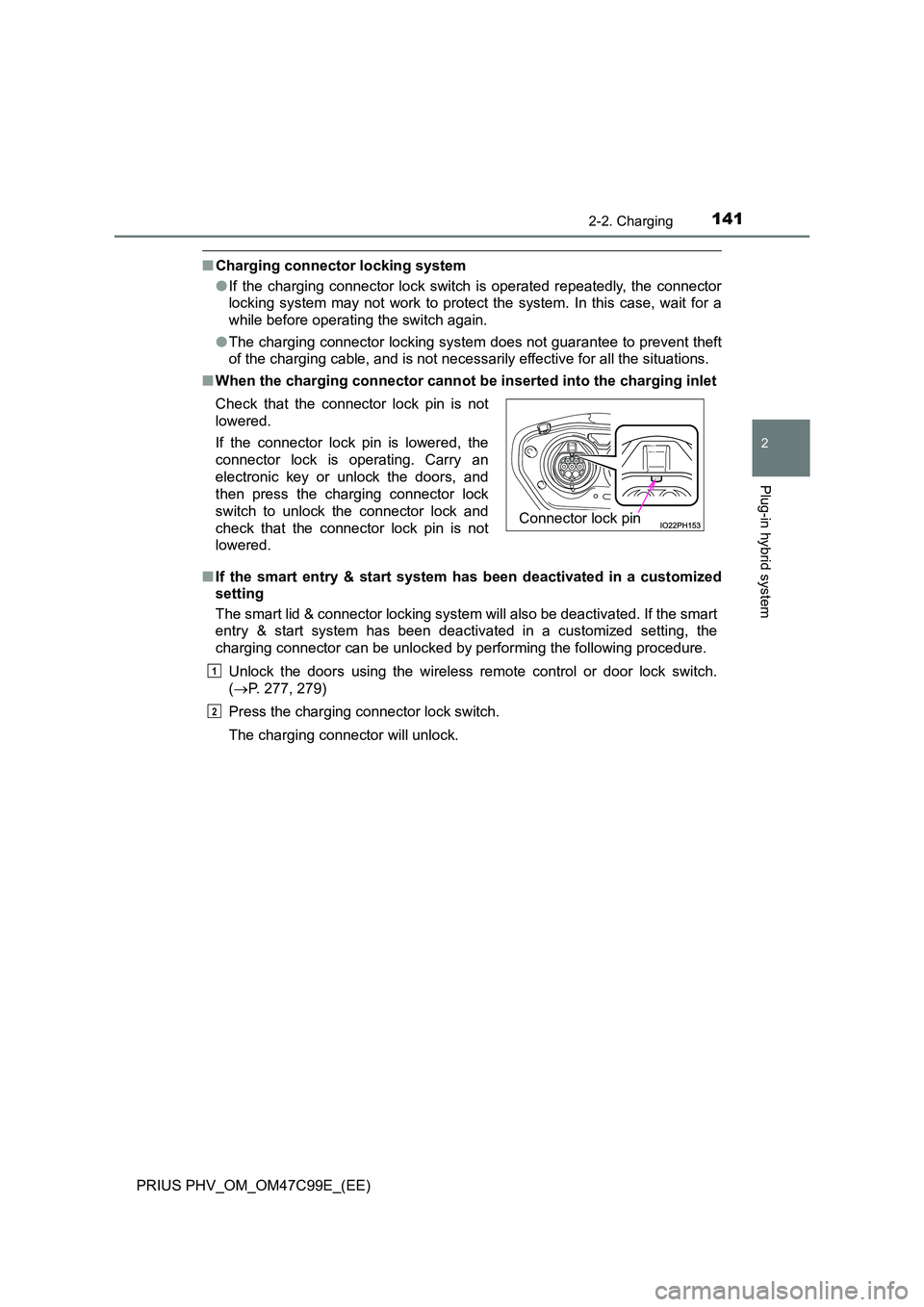
■ When the charging connector cannot be inserted into the charging inlet
■ If the smart entry & start system has been deactivated in a customized
setting
The smart lid & connector locking system will also be deactivated. If the smart
entry & start system has been deactivated in a customized setting, the
charging connector can be unlocked by performing the following procedure.
Unlock the doors using the wireless remote control or door lock switch.
( P. 277, 279)
Press the charging connector lock switch.
The charging connector will unlock.
Check that the connector lock pin is not
lowered.
If the connector lock pin is lowered, the
connector lock is operating. Carry an
electronic key or unlock the doors, and
then press the charging connector lock
switch to unlock the connector lock and
check that the connector lock pin is not
lowered.
Connector lock pin
1
2