key TOYOTA PRIUS PLUG-IN HYBRID 2018 Workshop Manual
[x] Cancel search | Manufacturer: TOYOTA, Model Year: 2018, Model line: PRIUS PLUG-IN HYBRID, Model: TOYOTA PRIUS PLUG-IN HYBRID 2018Pages: 772, PDF Size: 107.88 MB
Page 568 of 772
568
PRIUS PHV_OM_OM47C99E_(EE)
6-4. Using the other interior features
NOTICE
■Conditions in which the function may not operate correctly
In the following conditions, it may not operate correctly
● The portable device is fully charged
● There is foreign matter between the charge area and portable device
● The temperature of the portable device gets higher from charging
● The charging surface of the portable device is facing up
● The placement of the portable device is out of alignment with the charge
area
● Near a TV tower, electric power plant, gas station, radio station, large dis-
play, airport or other facility that gener ates strong radio waves or electrical
noise
● When the electronic key is in contact with, or is covered by the following
metallic objects
• Cards to which aluminum foil is attached
• Cigarette boxes that have aluminum foil inside
• Metallic wallets or bags
• Coins
• Hand warmers made of metal
• Media such as CDs and DVDs
● When other wireless keys (that emit radio waves) are being used nearby
In addition, excluding the above-mentioned, when the charger does not per-
form normally or the operation indicato r light is flashing continuously, it is
considered that the wireless charger is malfunctioning. Contact any autho-
rized Toyota retailer or Toyota authorized repairer, or any reliable repairer.
■ To prevent failure or damage to data
● Do not bring magnetic cards, such as credit cards, or magnetic recording
media, etc., close to the charger while charging, otherwise, data may dis-
appear under the influence of magnetism. Also, do not bring precision
instruments such as wrist watches, etc., close to the charger, as such
objects may break.
● Do not leave portable devices in the cabin. The temperature inside the
cabin may become high, when under the sun, and cause damage to the
device.
■ To prevent 12-volt battery discharge
When the hybrid system is stopped, do not use the wireless charger for a
long time.
Page 571 of 772
571
7Maintenance and care
PRIUS PHV_OM_OM47C99E_(EE)7-1. Maintenance and care
Cleaning and protecting
the vehicle exterior .......... 572
Cleaning and protecting
the vehicle interior ........... 577
7-2. Maintenance
Maintenance
requirements.................... 583
7-3. Do-it-yourself maintenance
Do-it-yourself service
precautions ...................... 586
Hood .................................. 589
Positioning a floor jack ....... 591
Engine compartment.......... 592
Tires ................................... 606
Tire inflation pressure ........ 622
Wheels ............................... 624
Replacing the tire ............... 627
Air conditioning filter .......... 639
Wiper rubber
replacement ..................... 643
Electronic key battery ........ 646
Checking and replacing
fuses ................................ 649
Light bulbs ......................... 653
Page 573 of 772
5737-1. Maintenance and care
PRIUS PHV_OM_OM47C99E_(EE)
7
Maintenance and care
■Note for a smart entry & start system
If the door handle becomes wet while the electronic key is within the effective
range, the door may lock and unlock repeatedly. In that case, follow the fol-
lowing correction procedures to wash the vehicle:
●Place the key in a position 2 m (6 ft.) or more separate from the vehicle
while the vehicle is being washed. (Take care to ensure that the key is not
stolen.)
●Set the electronic key to battery-saving mode to disable the smart entry &
start system. (P. 289)
■Aluminum wheels
●Remove any dirt immediately by using a neutral detergent.
●Wash detergent off with water immediately after use.
●To protect the paint from damage, make sure to observe the following pre-
cautions.
• Do not use acidic, alkaline or abrasive detergent
• Do not use hard brushes
• Do not use detergent on the wheels when they are hot, such as after driv-
ing or parking in hot weather
■Bumpers
Do not scrub with abrasive cleaners.
■Front side windows water-repellent coating
The following precautions can extend the effectiveness of the water-repellent
coating.
●Remove any dirt, etc. from the front side windows regularly.
●Do not allow dirt and dust to accumulate on the windows for a long period.
Clean the windows with a soft, damp cloth as soon as possible.
●Do not use wax or glass cleaners that contain abrasives when cleaning the
windows.
●Do not use any metallic objects to remove condensation build up.
Page 601 of 772
6017-3. Do-it-yourself maintenance
PRIUS PHV_OM_OM47C99E_(EE)
7
Maintenance and care
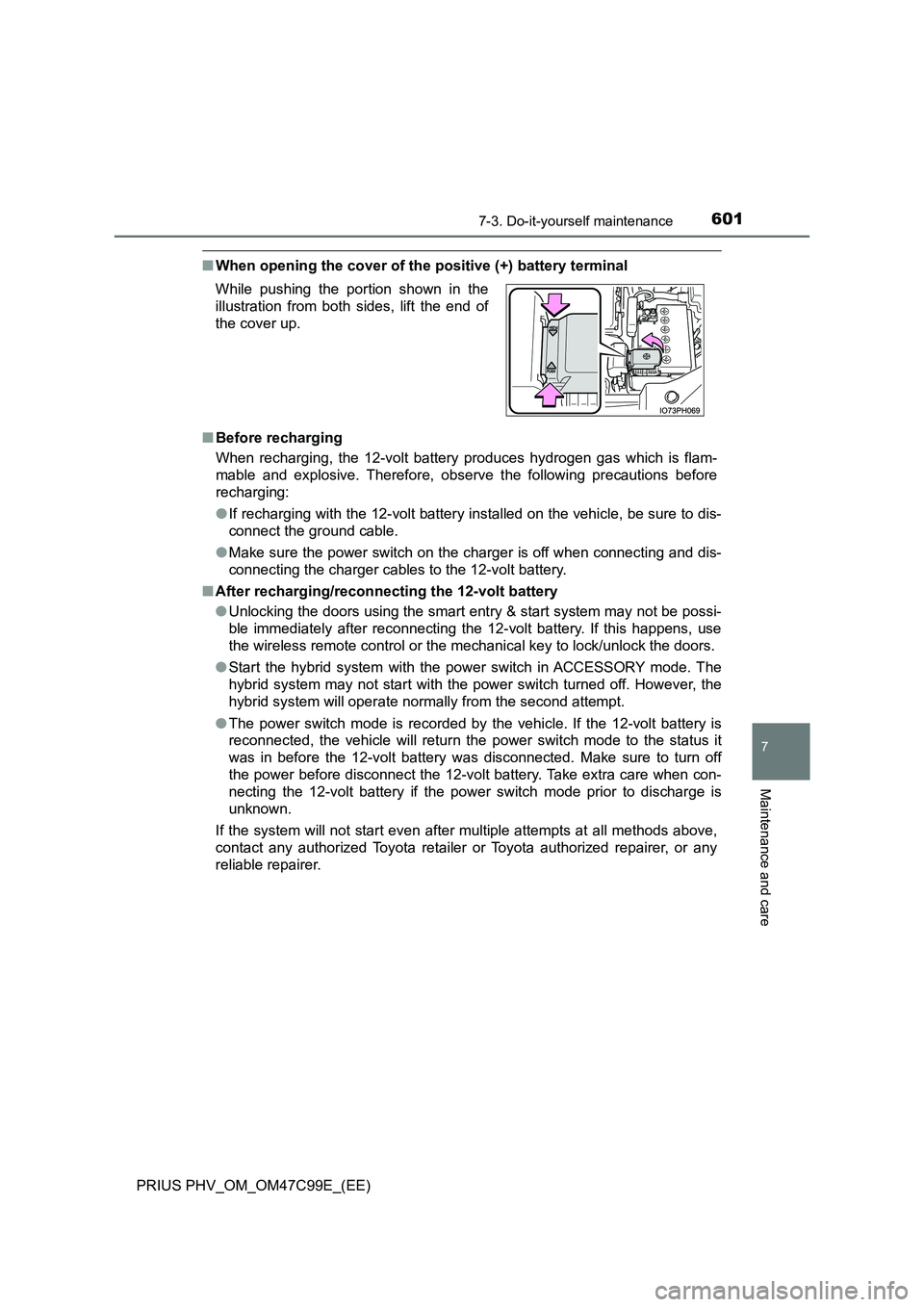
■When opening the cover of the positive (+) battery terminal
■ Before recharging
When recharging, the 12-volt battery produces hydrogen gas which is flam-
mable and explosive. Therefore, obser ve the following precautions before
recharging:
● If recharging with the 12-volt battery installed on the vehicle, be sure to dis-
connect the ground cable.
● Make sure the power switch on the charger is off when connecting and dis-
connecting the charger cables to the 12-volt battery.
■ After recharging/reconnecting the 12-volt battery
● Unlocking the doors using the smart entry & start system may not be possi-
ble immediately after reconnecting the 12-volt battery. If this happens, use
the wireless remote control or the mechanical key to lock/unlock the doors.
● Start the hybrid system with the power switch in ACCESSORY mode. The
hybrid system may not start with the power switch turned off. However, the
hybrid system will operate normally from the second attempt.
● The power switch mode is recorded by the vehicle. If the 12-volt battery is
reconnected, the vehicle will return the power switch mode to the status it
was in before the 12-volt battery was disconnected. Make sure to turn off
the power before disconnect the 12-volt battery. Take extra care when con-
necting the 12-volt battery if the power switch mode prior to discharge is
unknown.
If the system will not start even after multiple attempts at all methods above,
contact any authorized Toyota retailer or Toyota authorized repairer, or any
reliable repairer.
While pushing the portion shown in the
illustration from both sides, lift the end of
the cover up.
Page 646 of 772
6467-3. Do-it-yourself maintenance
PRIUS PHV_OM_OM47C99E_(EE)
Electronic key batter y
●Flathead screwdriver
●Lithium battery CR2032
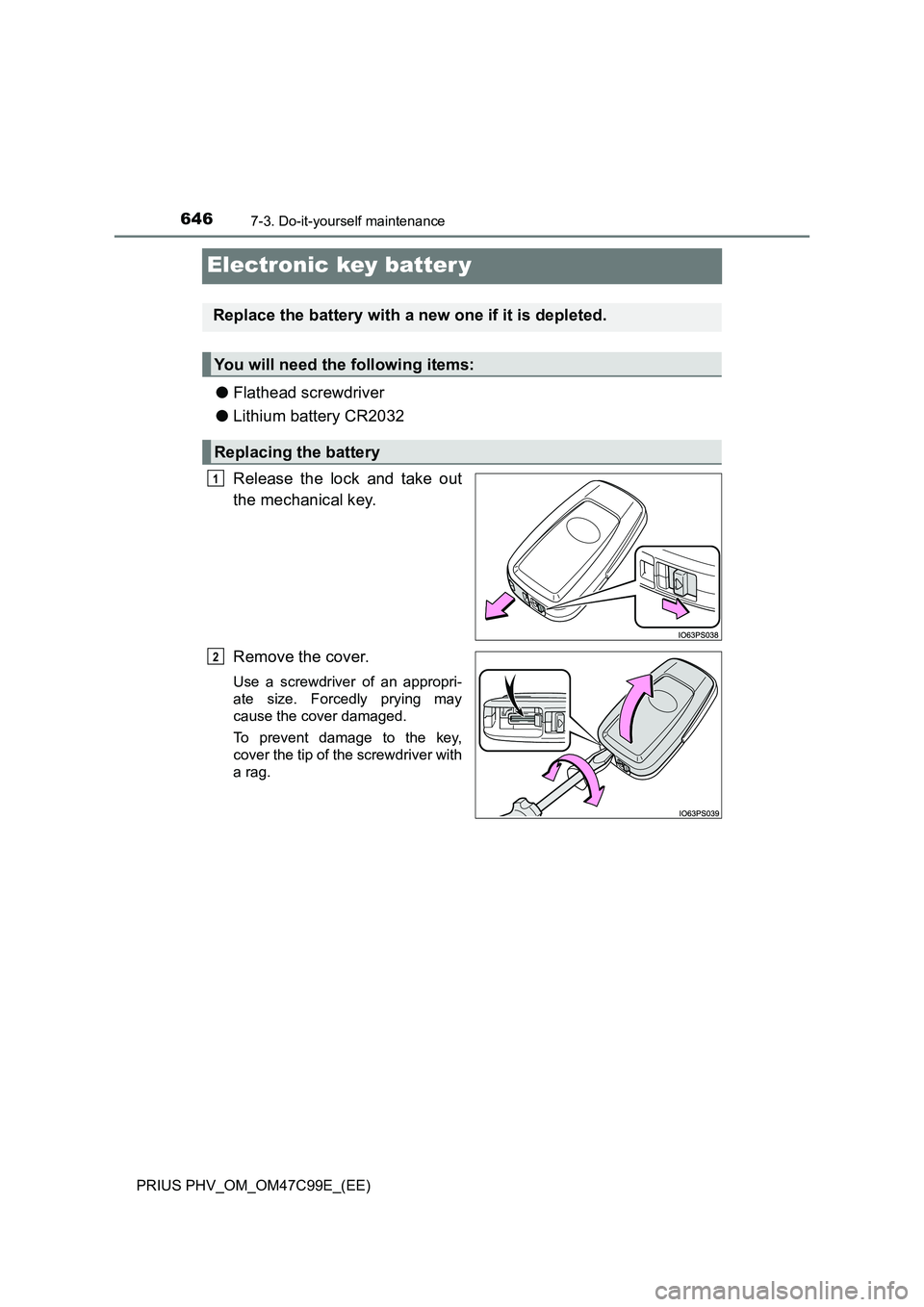
Release the lock and take out
the mechanical key.
Remove the cover.
Use a screwdriver of an appropri-
ate size. Forcedly prying may
cause the cover damaged.
To prevent damage to the key,
cover the tip of the screwdriver with
a rag.
Replace the battery with a new one if it is depleted.
You will need the following items:
Replacing the battery
1
2
Page 647 of 772
6477-3. Do-it-yourself maintenance
PRIUS PHV_OM_OM47C99E_(EE)
7
Maintenance and care
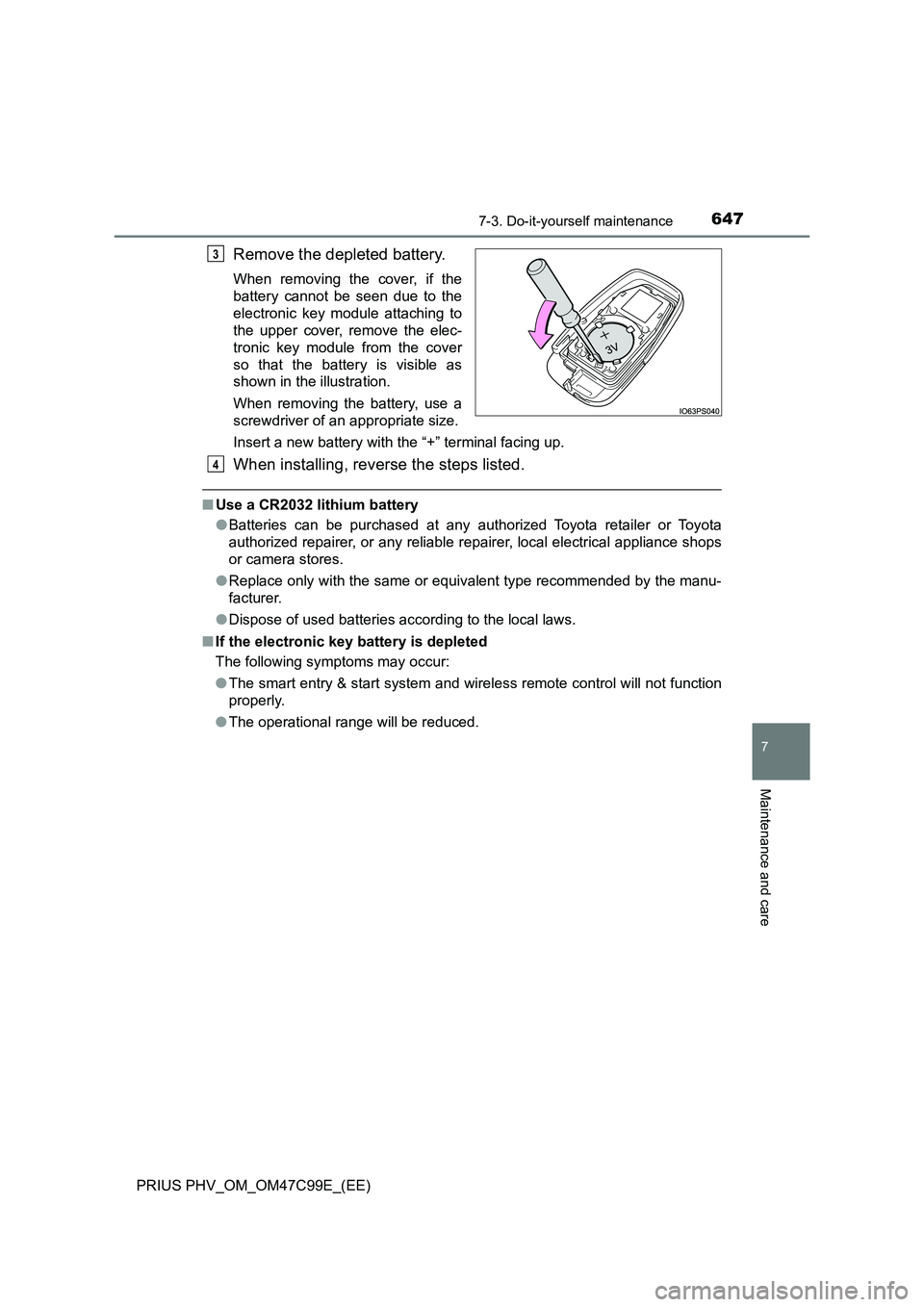
Remove the depleted battery.
When removing the cover, if the
battery cannot be seen due to the
electronic key module attaching to
the upper cover, remove the elec-
tronic key module from the cover
so that the battery is visible as
shown in the illustration.
When removing the battery, use a
screwdriver of an appropriate size.
Insert a new battery with the “+” terminal facing up.
When installing, reverse the steps listed.
■Use a CR2032 lithium battery
●Batteries can be purchased at any authorized Toyota retailer or Toyota
authorized repairer, or any reliable repairer, local electrical appliance shops
or camera stores.
●Replace only with the same or equivalent type recommended by the manu-
facturer.
●Dispose of used batteries according to the local laws.
■If the electronic key battery is depleted
The following symptoms may occur:
●The smart entry & start system and wireless remote control will not function
properly.
●The operational range will be reduced.
3
4
Page 661 of 772
661
8When trouble arises
PRIUS PHV_OM_OM47C99E_(EE)
8-1. Essential information
Emergency flashers ........... 662
If your vehicle has to
be stopped in an
emergency ....................... 663
8-2. Steps to take in an
emergency
If your vehicle needs
to be towed ...................... 664
If you think something is
wrong ............................... 670
If a warning light turns on
or a warning buzzer
sounds ............................. 671
If a warning message is
displayed ......................... 680
If you have a flat tire .......... 688
If the hybrid system will
not start............................ 706
If the electronic key does
not operate properly ........ 708
If the 12-volt battery is
discharged ....................... 712
If your vehicle
overheats ......................... 718
If the vehicle becomes
stuck ................................ 723
Page 706 of 772
7068-2. Steps to take in an emergency
PRIUS PHV_OM_OM47C99E_(EE)
If the hybrid system will not start
One of the following may be the cause of the problem:
● The charging cable may be attached to the vehicle. (P. 160)
● The electronic key may not be functioning properly.* (P. 708)
● There may not be sufficient fuel in the vehicle’s tank.
Refuel the vehicle. ( P. 111 )
● There may be a malfunction in the immobilizer system.* (P. 7 5 )
● There may be a malfunction in the shift control system.*
( P. 354, 686)
● The hybrid system may be malfunctioning due to an electrical prob-
lem such as electronic key battery depletion or a blown fuse. How-
ever, depending on the type of malfunction, an interim measure is
available to start the hybrid system. ( P. 707)
● There is a possibility that the temperature of the hybrid battery
(traction battery) is extremely low (approximately below -30 C
[-22 F]). (P. 111 , 3 5 3 )
*: It may not be possible to shift the shift position other than P.
One of the following may be the cause of the problem:
● The 12-volt battery may be discharged. (P. 712)
● The 12-volt battery terminal connections may be loose or corroded.
( P. 599)
Reasons for the hybrid system not starting vary depending on
the situation. Check the following and perform the appropriate
procedure:
The hybrid system will not start even though the correct starting
procedure is being followed. ( P. 351)
The interior lights and headlights are dim, or the horn does not
sound or sounds at a low volume.
Page 708 of 772
7088-2. Steps to take in an emergency
PRIUS PHV_OM_OM47C99E_(EE)
If the electronic key does not operate
properly
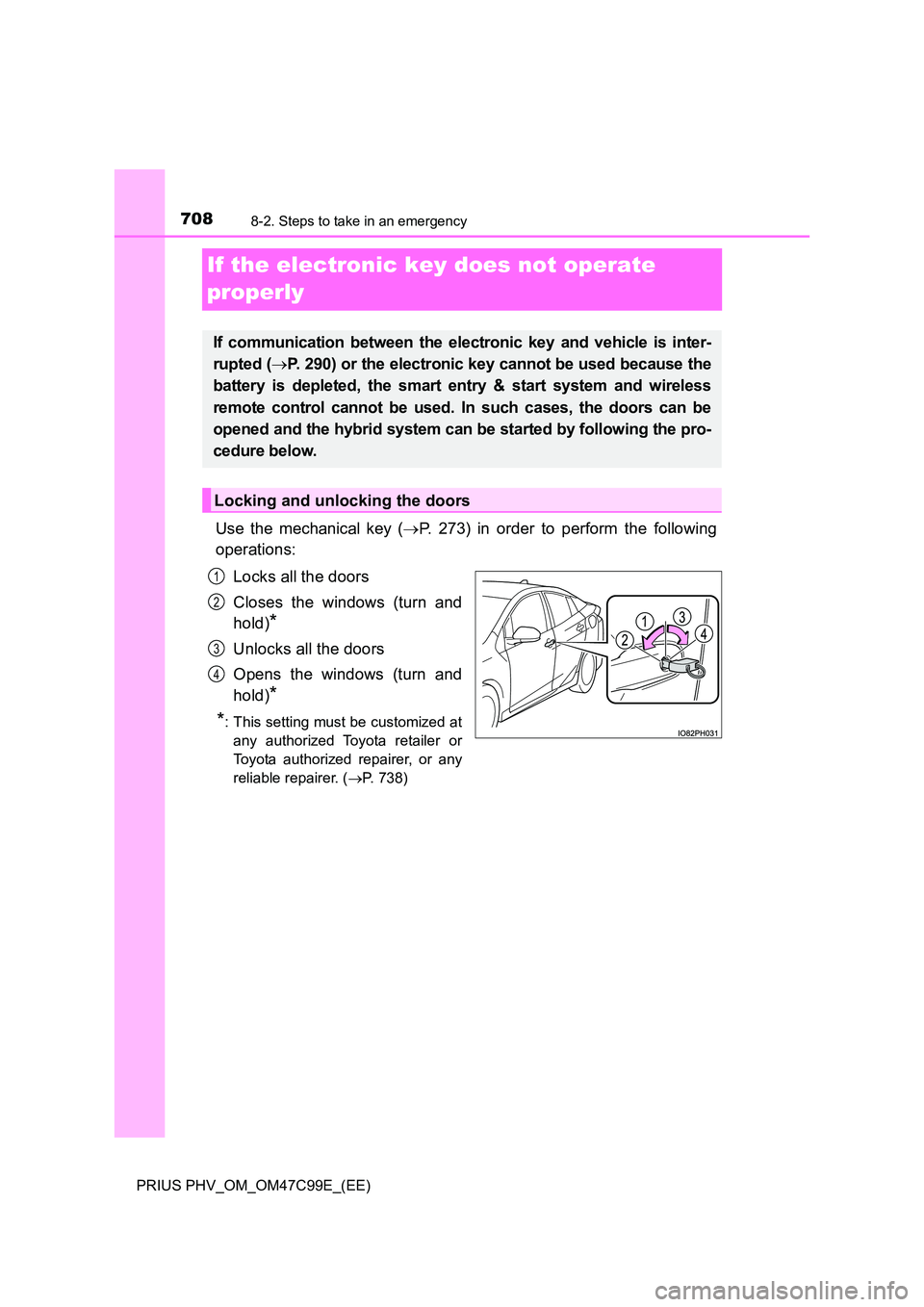
Use the mechanical key ( P. 273) in order to perform the following
operations:
Locks all the doors
Closes the windows (turn and
hold)*
Unlocks all the doors
Opens the windows (turn and
hold)*
*: This setting must be customized at
any authorized Toyota retailer or
Toyota authorized repairer, or any
reliable repairer. ( P. 738)
If communication between the electronic key and vehicle is inter-
rupted ( P. 290) or the electronic key cannot be used because the
battery is depleted, the smart entry & start system and wireless
remote control cannot be used. In such cases, the doors can be
opened and the hybrid system can be started by following the pro-
cedure below.
Locking and unlocking the doors
1
2
3
4
Page 709 of 772
7098-2. Steps to take in an emergency
PRIUS PHV_OM_OM47C99E_(EE)
8
When trouble arises
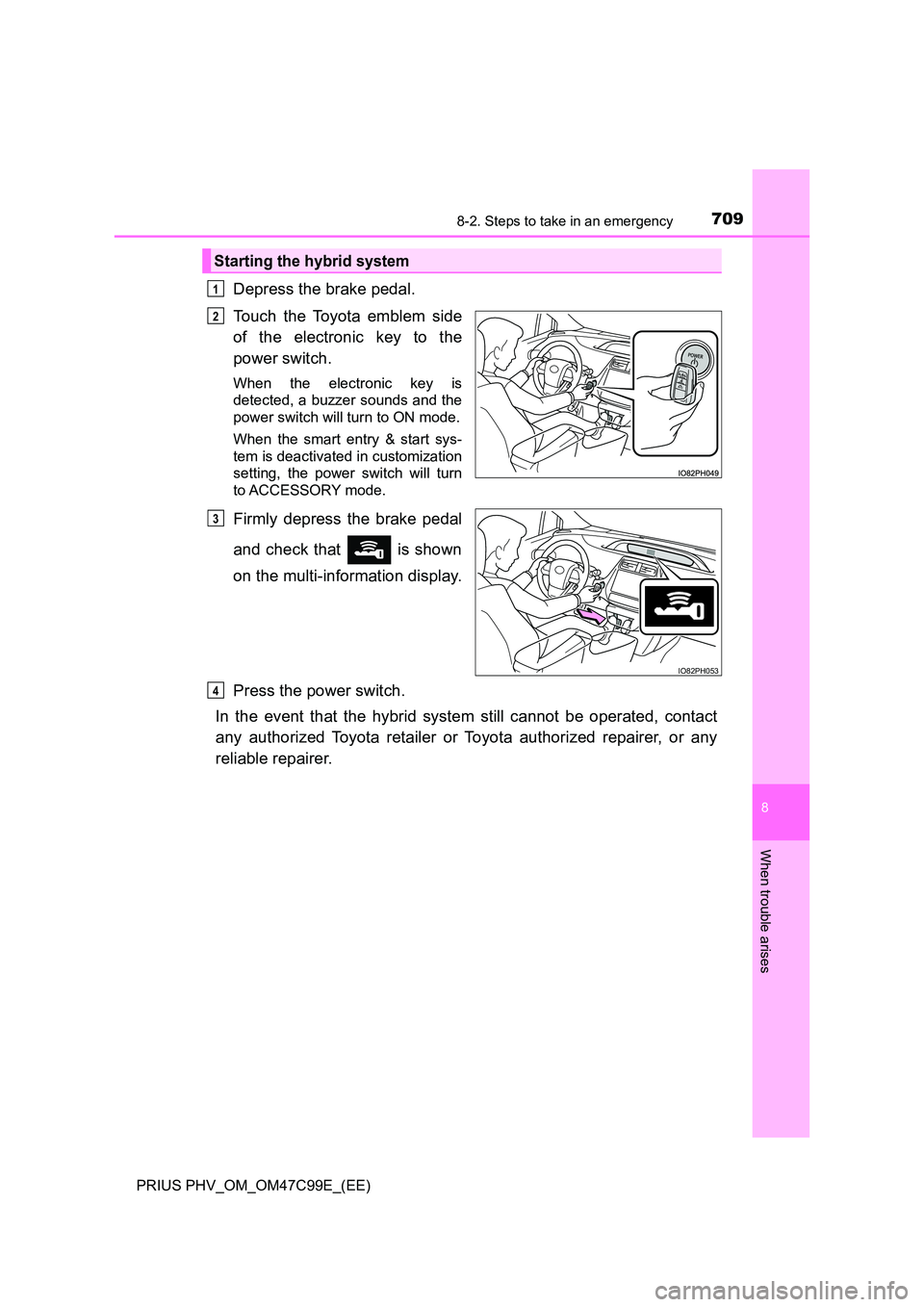
Depress the brake pedal.
Touch the Toyota emblem side
of the electronic key to the
power switch.
When the electronic key is
detected, a buzzer sounds and the
power switch will turn to ON mode.
When the smart entry & start sys-
tem is deactivated in customization
setting, the power switch will turn
to ACCESSORY mode.
Firmly depress the brake pedal
and check that is shown
on the multi-information display.
Press the power switch.
In the event that the hybrid system still cannot be operated, contact
any authorized Toyota retailer or Toyota authorized repairer, or any
reliable repairer.
Starting the hybrid system
1
2
IO82PH053
3
4