remote start TOYOTA PRIUS PLUS 2014 User Guide
[x] Cancel search | Manufacturer: TOYOTA, Model Year: 2014, Model line: PRIUS PLUS, Model: TOYOTA PRIUS PLUS 2014Pages: 496, PDF Size: 21.08 MB
Page 296 of 496
296
PRIUS +_OM_OM47888E_(EE)
5-4. Using the other interior features
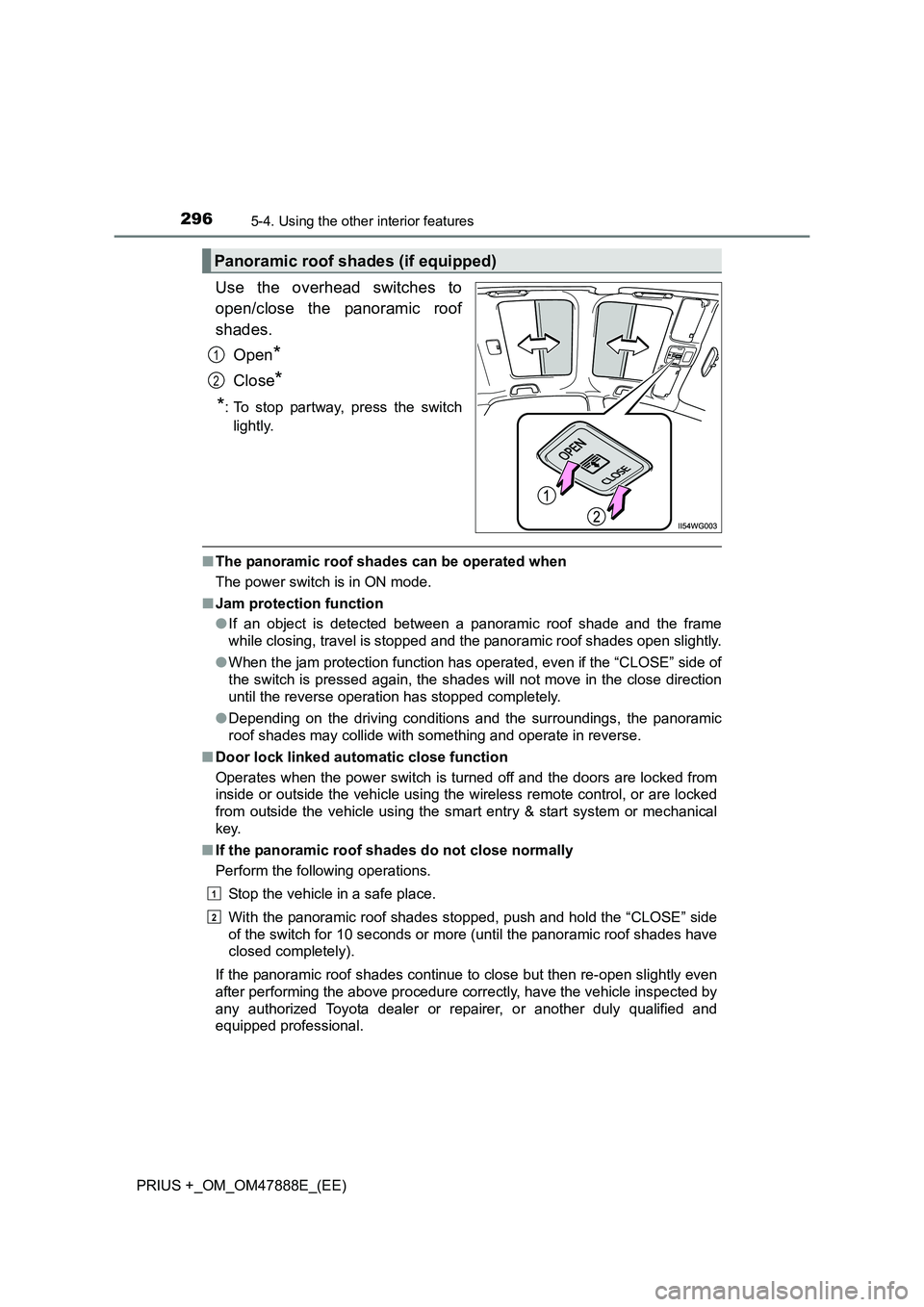
Use the overhead switches to
open/close the panoramic roof
shades.Open
*
Close*
*
: To stop partway, press the switch lightly.
■ The panoramic roof shades can be operated when
The power switch is in ON mode.
■ Jam protection function
●If an object is detected between a panoramic roof shade and the frame
while closing, travel is stopped and the panoramic roof shades open slightly.
● When the jam protection function has operated, even if the “CLOSE” side of
the switch is pressed again, the shades will not move in the close direction
until the reverse operation has stopped completely.
● Depending on the driving conditions and the surroundings, the panoramic
roof shades may collide with something and operate in reverse.
■ Door lock linked automatic close function
Operates when the power switch is turned off and the doors are locked from
inside or outside the vehicle using the wireless remote control, or are locked
from outside the vehicle using the smart entry & start system or mechanical
key.
■ If the panoramic roof shades do not close normally
Perform the following operations.
Stop the vehicle in a safe place.
With the panoramic roof shades stopped, push and hold the “CLOSE” side
of the switch for 10 seconds or more (until the panoramic roof shades have
closed completely).
If the panoramic roof shades continue to close but then re-open slightly even
after performing the above procedure correctly, have the vehicle inspected by
any authorized Toyota dealer or re pairer, or another duly qualified and
equipped professional.
Panoramic roof shades (if equipped)
1
2
1
2
Page 328 of 496
3286-3. Do-it-yourself maintenance
PRIUS +_OM_OM47888E_(EE)
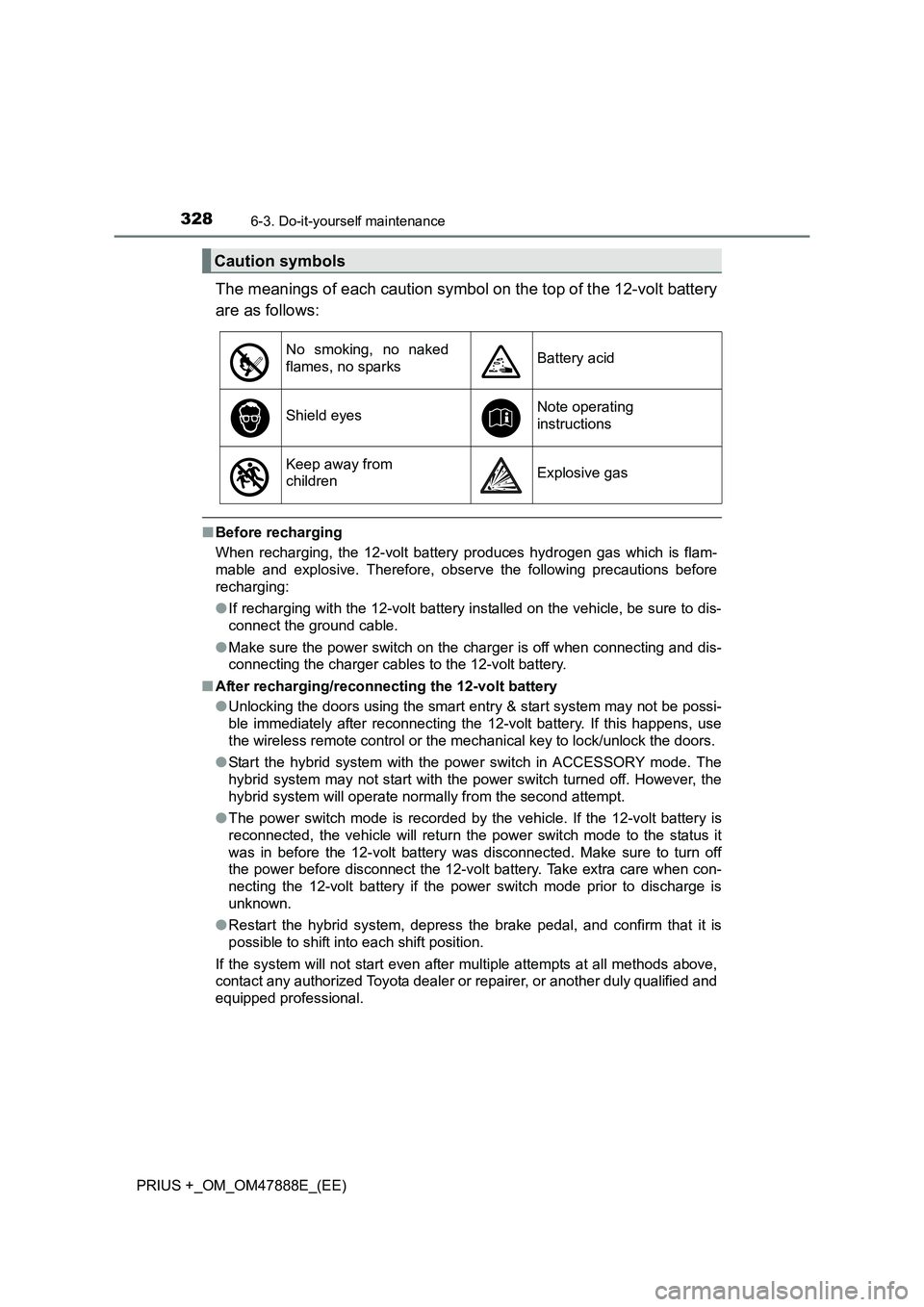
The meanings of each caution symbol on the top of the 12-volt battery
are as follows:
■Before recharging
When recharging, the 12-volt battery produces hydrogen gas which is flam-
mable and explosive. Therefore, obser ve the following precautions before
recharging:
● If recharging with the 12-volt battery installed on the vehicle, be sure to dis-
connect the ground cable.
● Make sure the power switch on the charger is off when connecting and dis-
connecting the charger cables to the 12-volt battery.
■ After recharging/reconnecting the 12-volt battery
●Unlocking the doors using the smart entry & start system may not be possi-
ble immediately after reconnecting the 12-volt battery. If this happens, use
the wireless remote control or the mechanical key to lock/unlock the doors.
● Start the hybrid system with the pow er switch in ACCESSORY mode. The
hybrid system may not start with the power switch turned off. However, the
hybrid system will operate normally from the second attempt.
● The power switch mode is recorded by the vehicle. If the 12-volt battery is
reconnected, the vehicle will return the power switch mode to the status it
was in before the 12-volt battery was disconnected. Make sure to turn off
the power before disconnect the 12-volt battery. Take extra care when con-
necting the 12-volt battery if the power switch mode prior to discharge is
unknown.
● Restart the hybrid system, depress the brake pedal, and confirm that it is
possible to shift into each shift position.
If the system will not start even after multiple attempts at all methods above,
contact any authorized Toyota dealer or repairer, or another duly qualified and
equipped professional.
Caution symbols
No smoking, no naked
flames, no sparksBattery acid
Shield eyesNote operating
instructions
Keep away from
childrenExplosive gas
Page 352 of 496
3526-3. Do-it-yourself maintenance
PRIUS +_OM_OM47888E_(EE)
■Use a CR1632 lithium battery
●Batteries can be purchased at any authorized Toyota dealer or repairer, or
another duly qualified and equipped professional, local electrical appliance
shops or camera stores.
● Replace only with the same or equivalent type recommended by the manu-
facturer.
● Dispose of used batteries according to the local laws.
■ If the electronic key battery is depleted
The following symptoms may occur:
●The smart entry & start system and wireless remote control will not function
properly.
● The operational range will be reduced.
WARNING
■ Removed battery and other parts
These parts are small and if swallowed by a child, they can cause choking.
Keep away from children. Failure to do so could result in death or serious
injury.
■ Certification for the smart entry & start system
RISK OF EXPLOSION IF BATTERY IS REPLACED BY AN INCORRECT
TYPE.
DISPOSE OF USED BATTERIES ACCORDING TO THE INSTRUCTIONS
NOTICE
■For normal operation after replacing the battery
Observe the following precautions to prevent accidents:
●Always work with dry hands.
Moisture may cause the battery to rust.
● Do not touch or move any other component inside the remote control.
● Do not bend either of the battery terminals.
Page 437 of 496
4377-2. Steps to take in an emergency
PRIUS +_OM_OM47888E_(EE)
7
When trouble arises
If the electronic key does not operate
properly
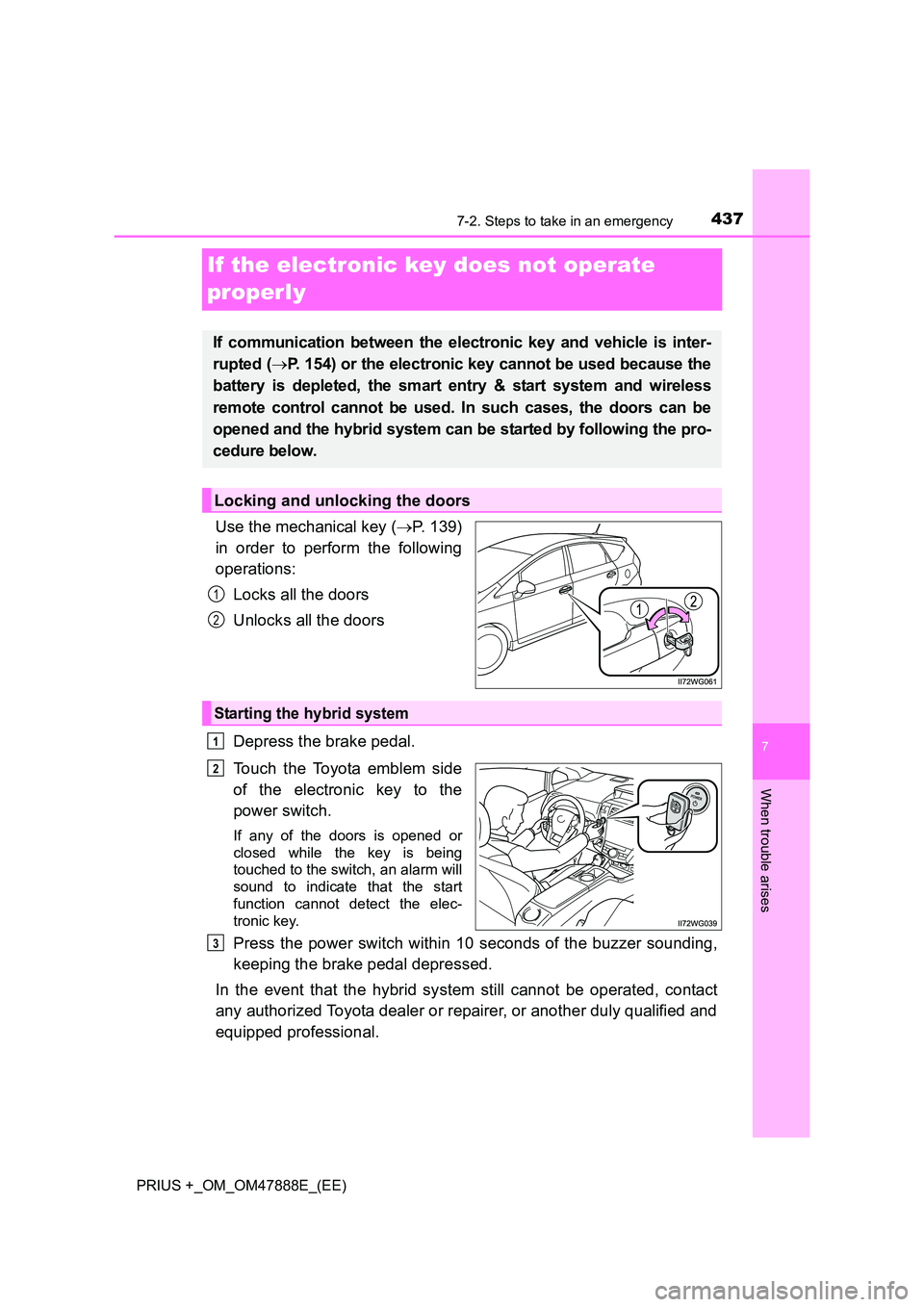
Use the mechanical key (→P. 139)
in order to perform the following
operations:
Locks all the doors
Unlocks all the doors
Depress the brake pedal.
Touch the Toyota emblem side
of the electronic key to the
power switch.
If any of the doors is opened or
closed while the key is being
touched to the switch, an alarm will
sound to indicate that the start
function cannot detect the elec-
tronic key.
Press the power switch within 10 seconds of the buzzer sounding,
keeping the brake pedal depressed.
In the event that the hybrid system still cannot be operated, contact
any authorized Toyota dealer or repairer, or another duly qualified and
equipped professional.
If communication between the electronic key and vehicle is inter-
rupted ( →P. 154) or the electronic key cannot be used because the
battery is depleted, the smart entry & start system and wireless
remote control cannot be used. In such cases, the doors can be
opened and the hybrid system can be started by following the pro-
cedure below.
Locking and unlocking the doors
1
2
Starting the hybrid system
1
2
3
Page 466 of 496
4668-2. Customization
PRIUS +_OM_OM47888E_(EE)
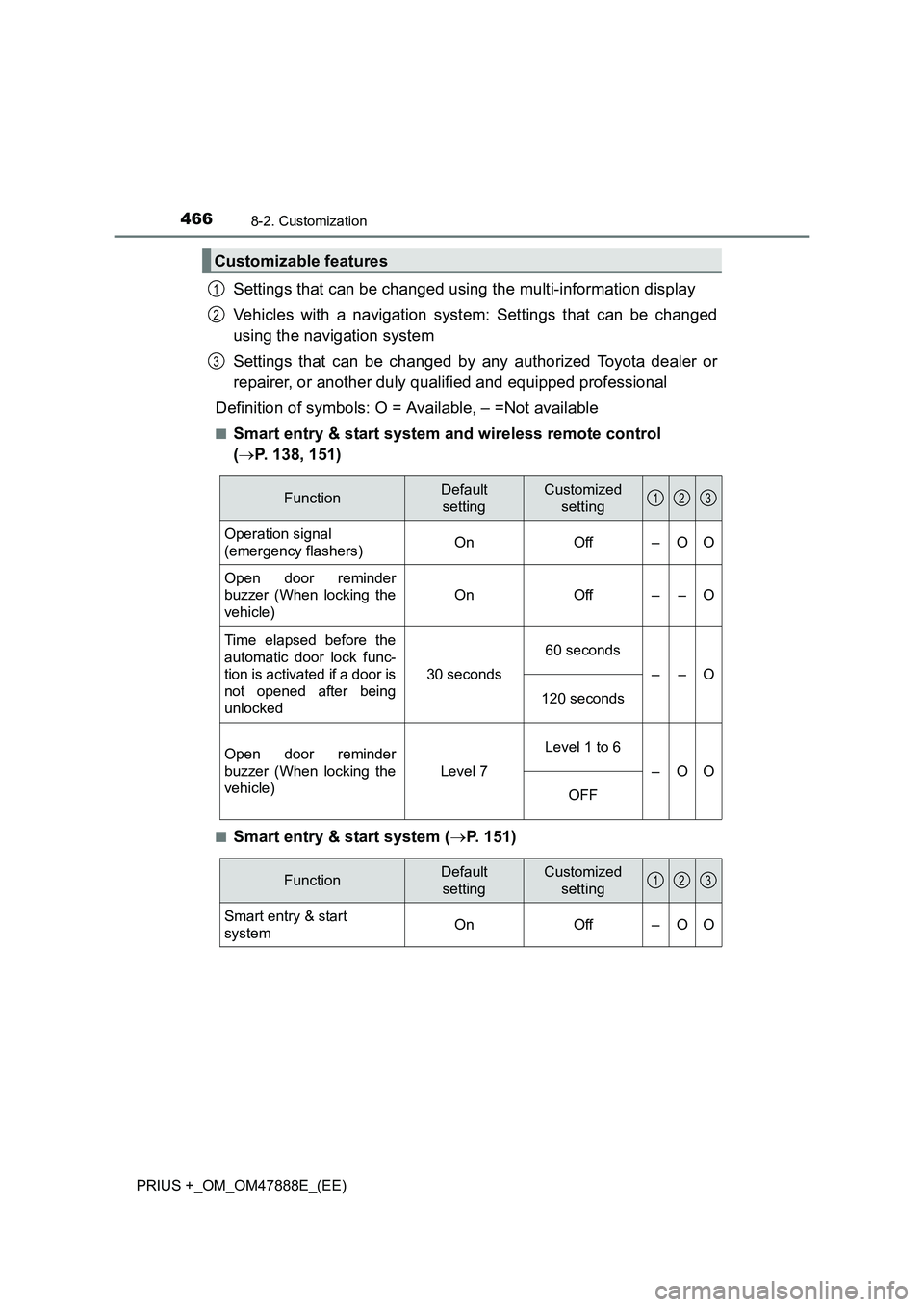
Settings that can be changed using the multi-information display
Vehicles with a navigation system: Settings that can be changed
using the navigation system
Settings that can be changed by any authorized Toyota dealer or
repairer, or another duly qualified and equipped professional
Definition of symbols: O = Available, – =Not available
■Smart entry & start system and wireless remote control
( → P. 138, 151)
■Smart entry & start system ( →P. 151)
Customizable features
1
2
3
FunctionDefault
settingCustomized setting
Operation signal
(emergency flashers)OnOff–OO
Open door reminder
buzzer (When locking the
vehicle)
OnOff––O
Time elapsed before the
automatic door lock func-
tion is activated if a door is
not opened after being
unlocked
30 seconds
60 seconds
––O
120 seconds
Open door reminder
buzzer (When locking the
vehicle)
Level 7
Level 1 to 6
–OO
OFF
123
FunctionDefault settingCustomized setting
Smart entry & start
system On Off – O O
123
Page 467 of 496
4678-2. Customization
PRIUS +_OM_OM47888E_(EE)
8
Vehicle specifications
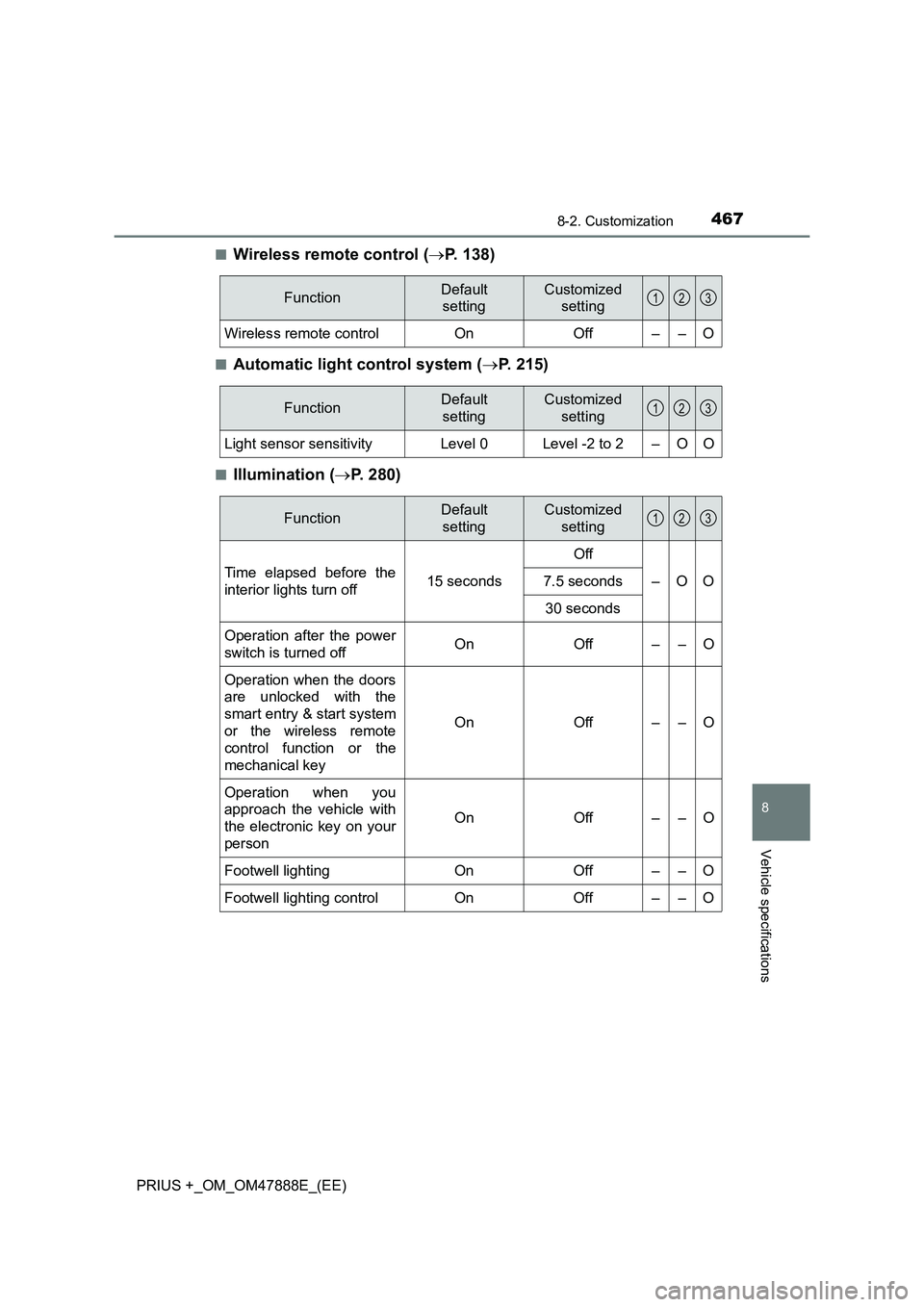
■Wireless remote control (→P. 138)
■Automatic light control system ( →P. 215)
■Illumination ( →P. 280)
FunctionDefault
settingCustomized setting
Wireless remote control On Off – – O
123
FunctionDefault
settingCustomized setting
Light sensor sensitivityLevel 0Level -2 to 2–OO
123
FunctionDefault settingCustomized setting
Time elapsed before the
interior lights turn off 15 secondsOff
–OO
7.5 seconds
30 seconds
Operation after the power
switch is turned offOnOff––O
Operation when the doors
are unlocked with the
smart entry & start system
or the wireless remote
control function or the
mechanical key
OnOff––O
Operation when you
approach the vehicle with
the electronic key on your
person
OnOff––O
Footwell lighting On Off – – O
Footwell lighting control On Off – – O
123
Page 485 of 496

485Alphabetical index
PRIUS +_OM_OM47888E_(EE)
IdentificationEngine ................................... 454
Vehicle .................................. 453
Ignition switch (Power switch) ....................... 201Auto power off function ......... 203
Changing the power switch modes................................. 203
If your vehicle has to be stopped in an emergency ... 369
Starting the hybrid system ................................ 201
Ignition switch light (power switch light)............... 280
Illuminated entry system......... 282
Immobilizer system ................... 91
Indicators.................................. 104
Initialization
Item to initialize ..................... 471
Tire pressure warning system ................................ 333
Inside rear view mirror ............ 182
Instrument cluster light control .................................... 112
Interior lights ............................ 280 Switch ........................... 281, 282
Wattage................................. 462
Intrusion sensor....................... 100
ISOFIX rigid anchors ................. 67 Jack
Positioning a floor jack .......... 315
Vehicle-equipped jack... 405, 419
Jack handle ...................... 405, 419
Jam protection function Panoramic roof shades ......... 296
Power windows ..................... 186
Keyless entry Smart entry & start system ... 151
Wireless remote control ........ 138
Keys .......................................... 138 Electronic key ....................... 138
Engine switch........................ 201
If the electronic key does not operate properly ................. 437
If you lose your keys ............. 141
Key number plate.................. 138
Keyless entry ........................ 138
Keys ...................................... 138
Mechanical key ..................... 138
Power switch......................... 201
Replacing the battery ............ 351
Warning buzzer..................... 152
Wireless remote control
key...................................... 138
Knee airbags .............................. 46
IJ
K