lock TOYOTA PRIUS PLUS 2016 Owners Manual
[x] Cancel search | Manufacturer: TOYOTA, Model Year: 2016, Model line: PRIUS PLUS, Model: TOYOTA PRIUS PLUS 2016Pages: 508, PDF Size: 29.7 MB
Page 407 of 508
4077-2. Steps to take in an emergency
PRIUS +_OM_OM47B24E_(EE)
7
When trouble arises
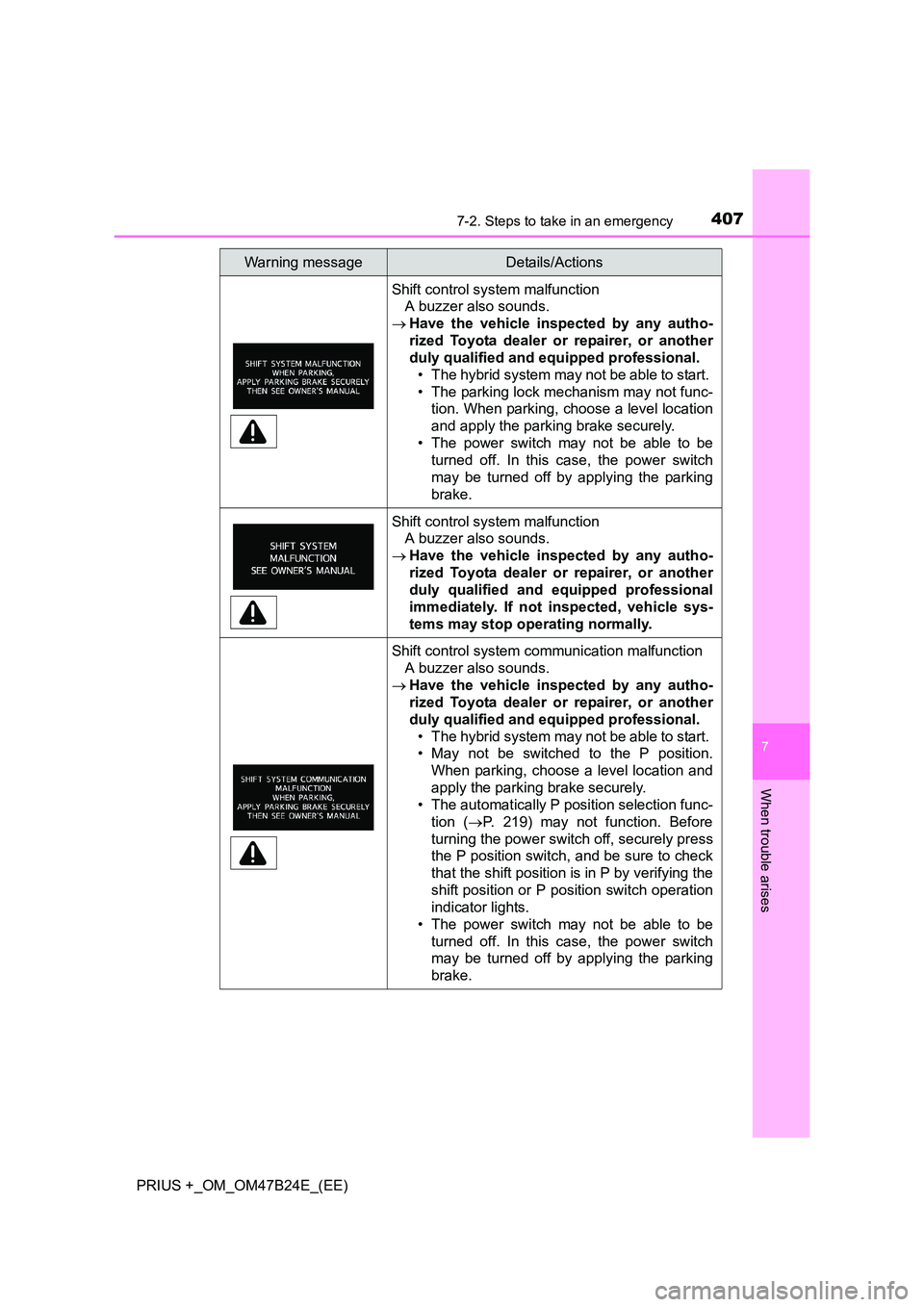
Shift control system malfunction A buzzer also sounds.
→ Have the vehicle inspected by any autho-
rized Toyota dealer or repairer, or another
duly qualified and equipped professional.
• The hybrid system may not be able to start.
• The parking lock mechanism may not func- tion. When parking, choose a level location
and apply the parking brake securely.
• The power switch may not be able to be turned off. In this case, the power switch
may be turned off by applying the parking
brake.
Shift control system malfunction A buzzer also sounds.
→ Have the vehicle inspected by any autho-
rized Toyota dealer or repairer, or another
duly qualified and equipped professional
immediately. If not inspected, vehicle sys-
tems may stop operating normally.
Shift control system communication malfunction
A buzzer also sounds.
→ Have the vehicle inspected by any autho-
rized Toyota dealer or repairer, or another
duly qualified and equipped professional.
• The hybrid system may not be able to start.
• May not be switched to the P position. When parking, choose a level location and
apply the parking brake securely.
• The automatically P position selection func-
tion ( →P. 219) may not function. Before
turning the power switch off, securely press
the P position switch, and be sure to check
that the shift position is in P by verifying the
shift position or P position switch operation
indicator lights.
• The power switch may not be able to be turned off. In this case, the power switch
may be turned off by applying the parking
brake.
Warning messageDetails/Actions
Page 409 of 508
4097-2. Steps to take in an emergency
PRIUS +_OM_OM47B24E_(EE)
7
When trouble arises
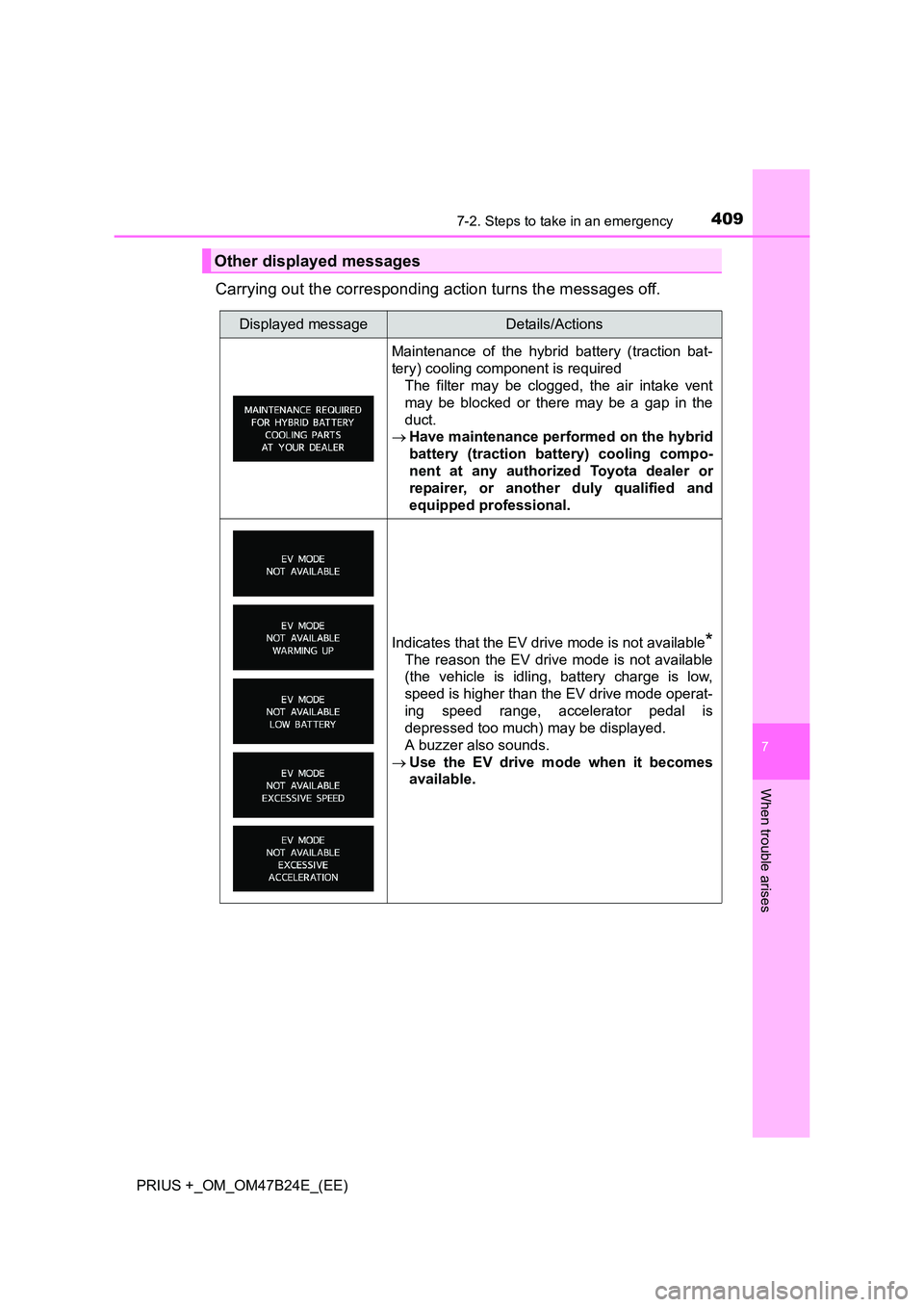
Carrying out the corresponding action turns the messages off.
Other displayed messages
Displayed messageDetails/Actions
Maintenance of the hybrid battery (traction bat-
tery) cooling component is requiredThe filter may be clogged, the air intake vent
may be blocked or there may be a gap in the
duct.
→ Have maintenance performed on the hybrid
battery (traction battery) cooling compo-
nent at any authorized Toyota dealer or
repairer, or another duly qualified and
equipped professional.
Indicates that the EV drive mode is not available*
The reason the EV drive mode is not available
(the vehicle is idling, battery charge is low,
speed is higher than the EV drive mode operat-
ing speed range, accelerator pedal is
depressed too much) may be displayed.
A buzzer also sounds.
→ Use the EV drive mode when it becomes
available.
Page 413 of 508
4137-2. Steps to take in an emergency
PRIUS +_OM_OM47B24E_(EE)
7
When trouble arises
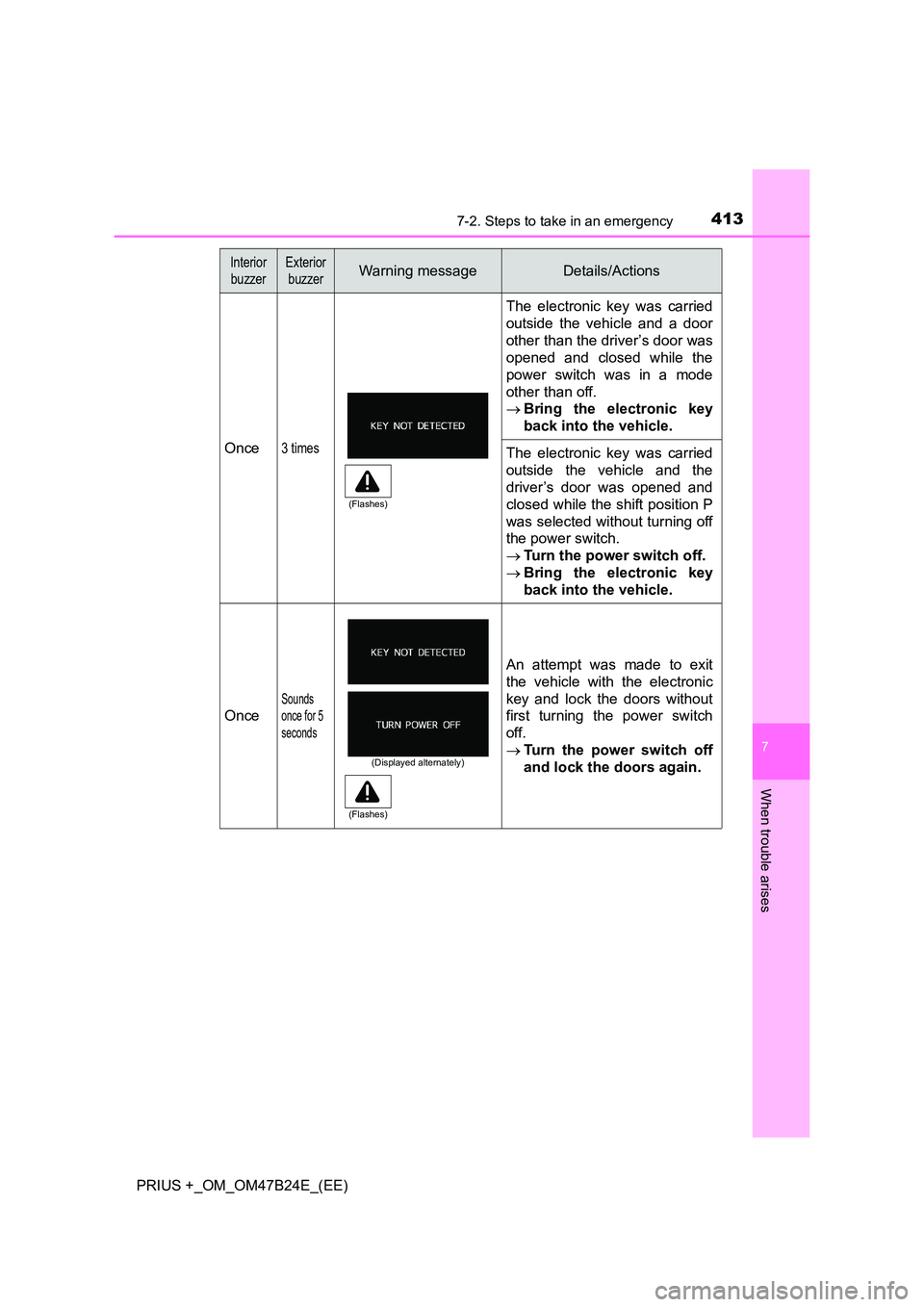
Once3 times
The electronic key was carried
outside the vehicle and a door
other than the driver’s door was
opened and closed while the
power switch was in a mode
other than off.
→Bring the electronic key
back into the vehicle.
The electronic key was carried
outside the vehicle and the
driver’s door was opened and
closed while the shift position P
was selected without turning off
the power switch.
→Turn the power switch off.
→ Bring the electronic key
back into the vehicle.
Once
Sounds
once for 5
seconds
An attempt was made to exit
the vehicle with the electronic
key and lock the doors without
first turning the power switch
off.
→Turn the power switch off
and lock the doors again.
Interior
buzzerExterior buzzerWarning messageDetails/Actions
(Flashes)
(Displayed alternately)
(Flashes)
Page 414 of 508
4147-2. Steps to take in an emergency
PRIUS +_OM_OM47B24E_(EE)
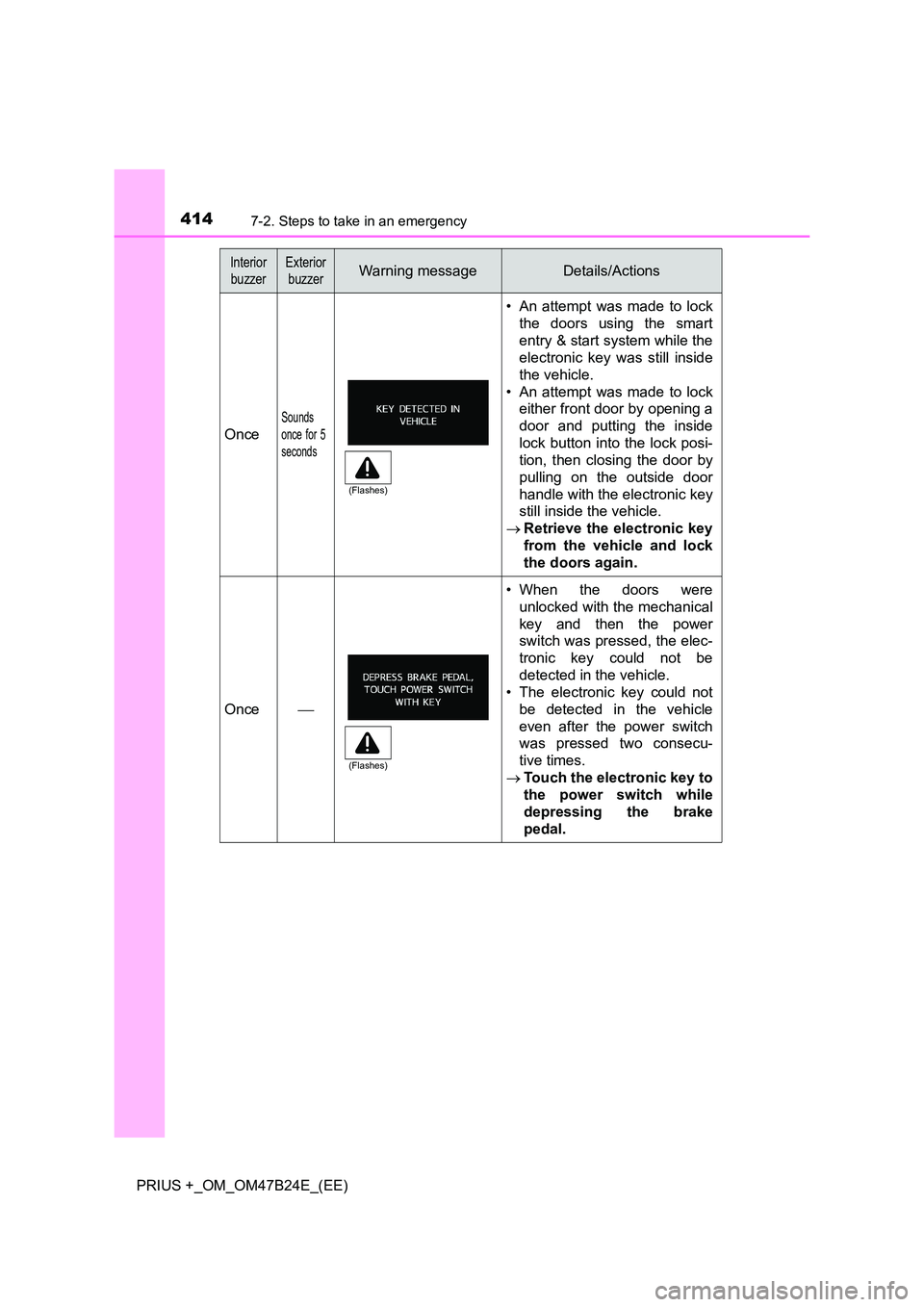
Once
Sounds
once for 5
seconds
• An attempt was made to lockthe doors using the smart
entry & start system while the
electronic key was still inside
the vehicle.
• An attempt was made to lock either front door by opening a
door and putting the inside
lock button into the lock posi-
tion, then closing the door by
pulling on the outside door
handle with the electronic key
still inside the vehicle.
→ Retrieve the electronic key
from the vehicle and lock
the doors again.
Once
• When the doors were
unlocked with the mechanical
key and then the power
switch was pressed, the elec-
tronic key could not be
detected in the vehicle.
• The electronic key could not
be detected in the vehicle
even after the power switch
was pressed two consecu-
tive times.
→ Touch the electronic key to
the power switch while
depressing the brake
pedal.
Interior
buzzerExterior buzzerWarning messageDetails/Actions
(Flashes)
(Flashes)
Page 436 of 508
4367-2. Steps to take in an emergency
PRIUS +_OM_OM47B24E_(EE)
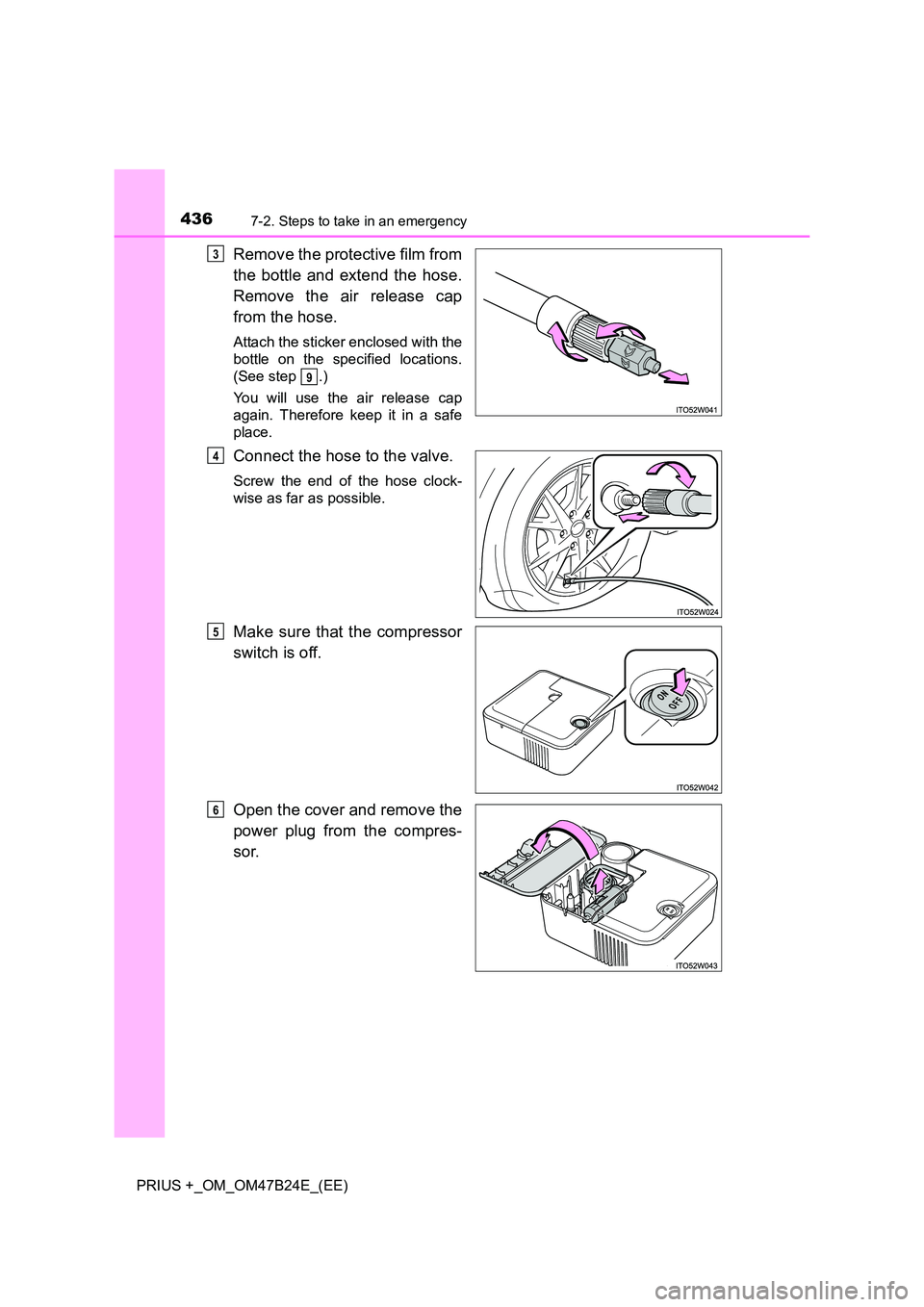
Remove the protective film from
the bottle and extend the hose.
Remove the air release cap
from the hose.
Attach the sticker enclosed with the
bottle on the specified locations.
(See step .)
You will use the air release cap
again. Therefore keep it in a safe
place.
Connect the hose to the valve.
Screw the end of the hose clock-
wise as far as possible.
Make sure that the compressor
switch is off.
Open the cover and remove the
power plug from the compres-
sor.
3
9
4
5
6
Page 450 of 508
4507-2. Steps to take in an emergency
PRIUS +_OM_OM47B24E_(EE)
If the electronic key does not operate
properly
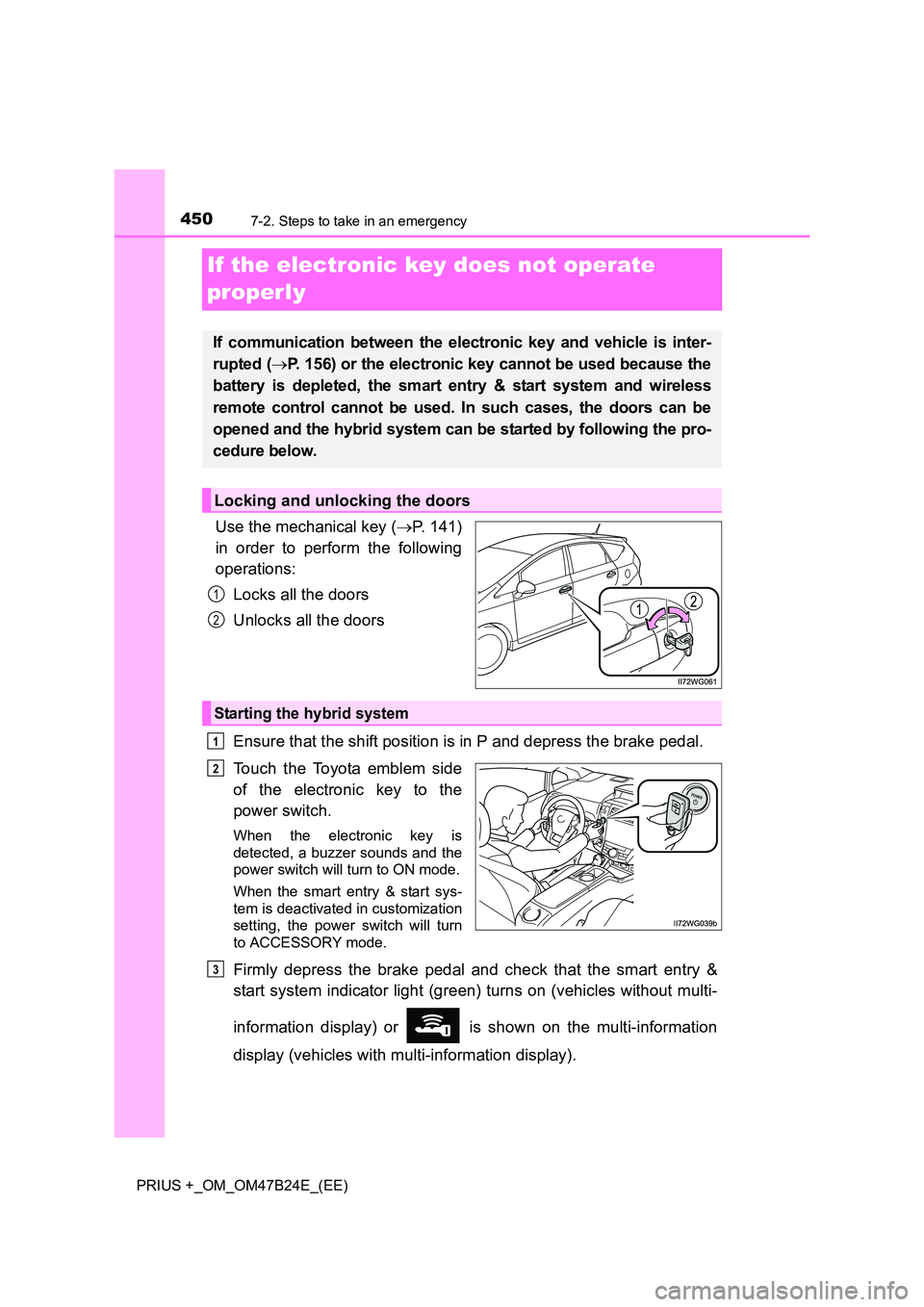
Use the mechanical key (→P. 141)
in order to perform the following
operations:
Locks all the doors
Unlocks all the doors
Ensure that the shift position is in P and depress the brake pedal.
Touch the Toyota emblem side
of the electronic key to the
power switch.
When the electronic key is
detected, a buzzer sounds and the
power switch will turn to ON mode.
When the smart entry & start sys-
tem is deactivated in customization
setting, the power switch will turn
to ACCESSORY mode.
Firmly depress the brake pedal and check that the smart entry &
start system indicator light (green) turns on (vehicles without multi-
information display) or is shown on the multi-information
display (vehicles with multi-information display).
If communication between the electronic key and vehicle is inter-
rupted ( →P. 156) or the electronic key cannot be used because the
battery is depleted, the smart entry & start system and wireless
remote control cannot be used. In such cases, the doors can be
opened and the hybrid system can be started by following the pro-
cedure below.
Locking and unlocking the doors
1
2
Starting the hybrid system
1
2
3
Page 451 of 508
4517-2. Steps to take in an emergency
PRIUS +_OM_OM47B24E_(EE)
7
When trouble arises
Press the power switch.
In the event that the hybrid system still cannot be operated, contact
any authorized Toyota dealer or repairer, or another duly qualified and
equipped professional.
■ Stopping the hybrid system
Set the parking brake, shift the shift position to P and press the power switch
as you normally do when stopping the hybrid system.
■ Replacing the key battery
As the above procedure is a temporary measure, it is recommended that the
electronic key battery be replaced imm ediately when the battery is depleted.
( → P. 361)
■ Alarm (if equipped)
Using the mechanical key to lock the doors will not set the alarm system.
If a door is unlocked using the mechanical key when the alarm system is set,
the alarm may be triggered. ( →P. 98)
■ Changing power switch modes
Release the brake pedal and press the power switch in step
above.
The hybrid system does not start and modes will be changed each time the
switch is pressed. ( →P. 210)
■ When the electronic key does not work properly
●Make sure that the smart entry & start system has not been deactivated in
the customization setting. If it is off, turn the function on.
(Customizable features: →P. 477)
● Check if battery-saving mode is set. If it is set, cancel the function.
(→ P. 155)
4
3
Page 452 of 508
4527-2. Steps to take in an emergency
PRIUS +_OM_OM47B24E_(EE)
If the 12-volt batter y is discharged
If you have a set of jumper (or booster) cables and a second vehicle
with a 12-volt battery, you can jump start your vehicle by following the
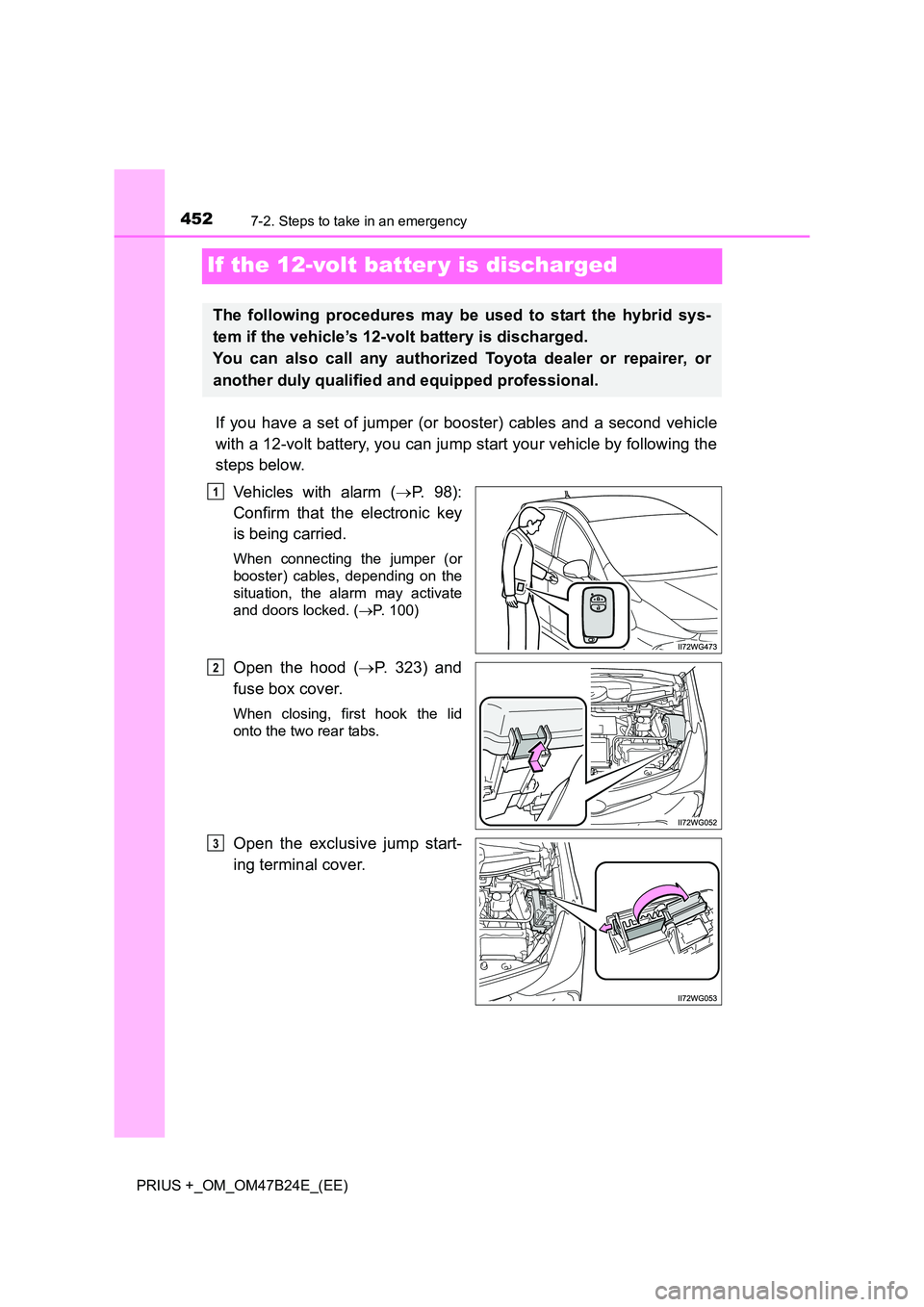
steps below.Vehicles with alarm ( →P. 98):
Confirm that the electronic key
is being carried.
When connecting the jumper (or
booster) cables, depending on the
situation, the alarm may activate
and doors locked. ( →P. 100)
Open the hood ( →P. 323) and
fuse box cover.
When closing, first hook the lid
onto the two rear tabs.
Open the exclusive jump start-
ing terminal cover.
The following procedures may be used to start the hybrid sys-
tem if the vehicle’s 12-volt battery is discharged.
You can also call any authorized Toyota dealer or repairer, or
another duly qualified and equipped professional.
1
2
3
Page 454 of 508
4547-2. Steps to take in an emergency
PRIUS +_OM_OM47B24E_(EE)
Start the engine of the second vehicle. Increase the engine speed
slightly and maintain at that level for approximately 5 minutes to
recharge the 12-volt battery of your vehicle.
Maintain the engine speed of the second vehicle and start the
hybrid system of your vehicle by turning the power switch to ON
mode.
Make sure the “READY” indicator comes on. If the indicator light
does not come on, contact any authorized Toyota dealer or repairer,
or another duly qualified and equipped professional.
Once the hybrid system has started, remove the jumper cables in
the exact reverse order from which they were connected.
Close the exclusive jump starting terminal cover, and reinstall the
fuse box cover to its original position.
When installing, first hook the fuse box cover onto the two rear tabs.
Once the hybrid system starts, have the vehicle inspected at any
authorized Toyota dealer or repairer, or another duly qualified and
equipped professional as soon as possible.
■Starting the hybrid system when the 12-volt battery is discharged
The hybrid system cannot be started by push-starting.
■ To prevent 12-volt battery discharge
●Turn off the headlights and the audio system while the hybrid system is off.
● Turn off any unnecessary electrical components when the vehicle is running
at a low speed for an extended period, such as in heavy traffic.
■ When the 12-volt battery is removed or discharged
●In some cases, it may not be possible to unlock the doors using the smart
entry & start system when the 12-volt battery is discharged. Use the wire-
less remote control or the mechanical key to lock or unlock the doors.
● The hybrid system may not start on the first attempt after the 12-volt battery
has recharged but will start normally after the second attempt. This is not a
malfunction.
● The power switch mode is memorized by the vehicle. When the 12-volt bat-
tery is reconnected, the system will return to the mode it was in before the
12-volt battery was discharged. Before disconnecting the 12-volt battery,
turn the power switch off. If you are unsure what mode the power switch was
in before the 12-volt battery discharged, be especially careful when recon-
necting the 12-volt battery.
5
6
7
8
9
Page 455 of 508
4557-2. Steps to take in an emergency
PRIUS +_OM_OM47B24E_(EE)
7
When trouble arises
●If the 12-volt battery discharges while the shift position is in P, it may not be
possible to shift the shift position to other positions. In this case, the vehicle
cannot be towed without lifting both front wheels because the front wheels
will be locked. ( →P. 380)
● When the 12-volt battery is reconnected, start the hybrid system and con-
firm that the shift position can be changed to each position using the shift
position indicator.
■ Charging the 12-volt battery
The electricity stored in the 12-volt battery will discharge gradually even when
the vehicle is not in use, due to natural discharge and the draining effects of
certain electrical appliances. If the vehicle is left for a long time, the 12-volt
battery may discharge, and the hybrid system may be unable to start. (The
12-volt battery recharges automatically while the hybrid system is operating.)
WARNING
■ Avoiding 12-volt battery fires or explosions
Observe the following precautions to prevent accidentally igniting the flam-
mable gas that may be emitted from the 12-volt battery:
● Make sure each jumper cable is connected to the correct terminal and that
it is not unintentionally in contact with any other than the intended terminal.
● Do not allow the other end of the jumper cable connected to the “+” termi-
nal to come into contact with any other parts or metal surfaces in the area,
such as brackets or unpainted metal.
● Do not allow the + and - clamps of the jumper cables to come into contact
with each other.
● Do not smoke, use matches, cigarette lighters or allow open flame near
the 12-volt battery.
■ 12-volt battery precautions
The 12-volt battery contains poisonous and corrosive acidic electrolyte,
while related parts contain lead and lead compounds. Observe the following
precautions when handling the 12-volt battery:
●When working with the 12-volt battery , always wear safety glasses and
take care not to allow any battery fluids (acid) to come into contact with
skin, clothing or the vehicle body.
● Do not lean over the 12-volt battery.
● In the event that battery fluid comes into contact with the skin or eyes,
immediately wash the affected area with water and seek medical attention.
Place a wet sponge or cloth over the affected area until medical attention
can be received.
● Always wash your hands after handling the 12-volt battery support, termi-
nals, and other battery-related parts.
● Do not allow children near the 12-volt battery.