key battery TOYOTA PRIUS PLUS 2017 User Guide
[x] Cancel search | Manufacturer: TOYOTA, Model Year: 2017, Model line: PRIUS PLUS, Model: TOYOTA PRIUS PLUS 2017Pages: 509, PDF Size: 27.68 MB
Page 212 of 509
2124-2. Driving procedures
PRIUS +_OM_OM47B24E_(EE)■
If the “READY” indicator does not come on
In the event that the “READY” indicator does not come on even after perform-
ing the proper procedures for starting the vehicle, contact any authorized
Toyota dealer or repairer, or another duly qualified and equipped professional
immediately.
■ If the hybrid system is malfunctioning
→ P. 402
■ If the electronic key battery is depleted
→ P. 361
■ Operation of the power switch
●If the switch is not pressed shortly and firmly, the power switch mode may
not change or the hybrid system may not start.
● If attempting to restart the hybrid system immediately after turning the power
switch off, the hybrid system may not start in some cases. After turning the
power switch off, please wait a few seconds before restarting the hybrid sys-
tem.
■ Automatically P position selection function
→ P. 219
■ When the shift control system malfunctions
The power switch will not be able to be turned off. In such a case, the switch
can be turned off after applying the parking brake.
Have the vehicle inspected by any authorized Toyota dealer or repairer, or
another duly qualified and equipped professional immediately.
■ Meter display
When the power switch is turned off, each display will turn off as follows.
●The shift position indicator will turn off after approximately 2 seconds.
● EV driving ratio and average fuel consumption after hybrid system started,
turn off after approximately 6 seconds.
● The odometer, clock, etc. will turn off after approximately 30 seconds.
(Each display will also turn off immediately if a door is locked before 30 sec-
onds has elapsed.)
Page 292 of 509
2925-2. Using the interior lights
PRIUS +_OM_OM47B24E_(EE)
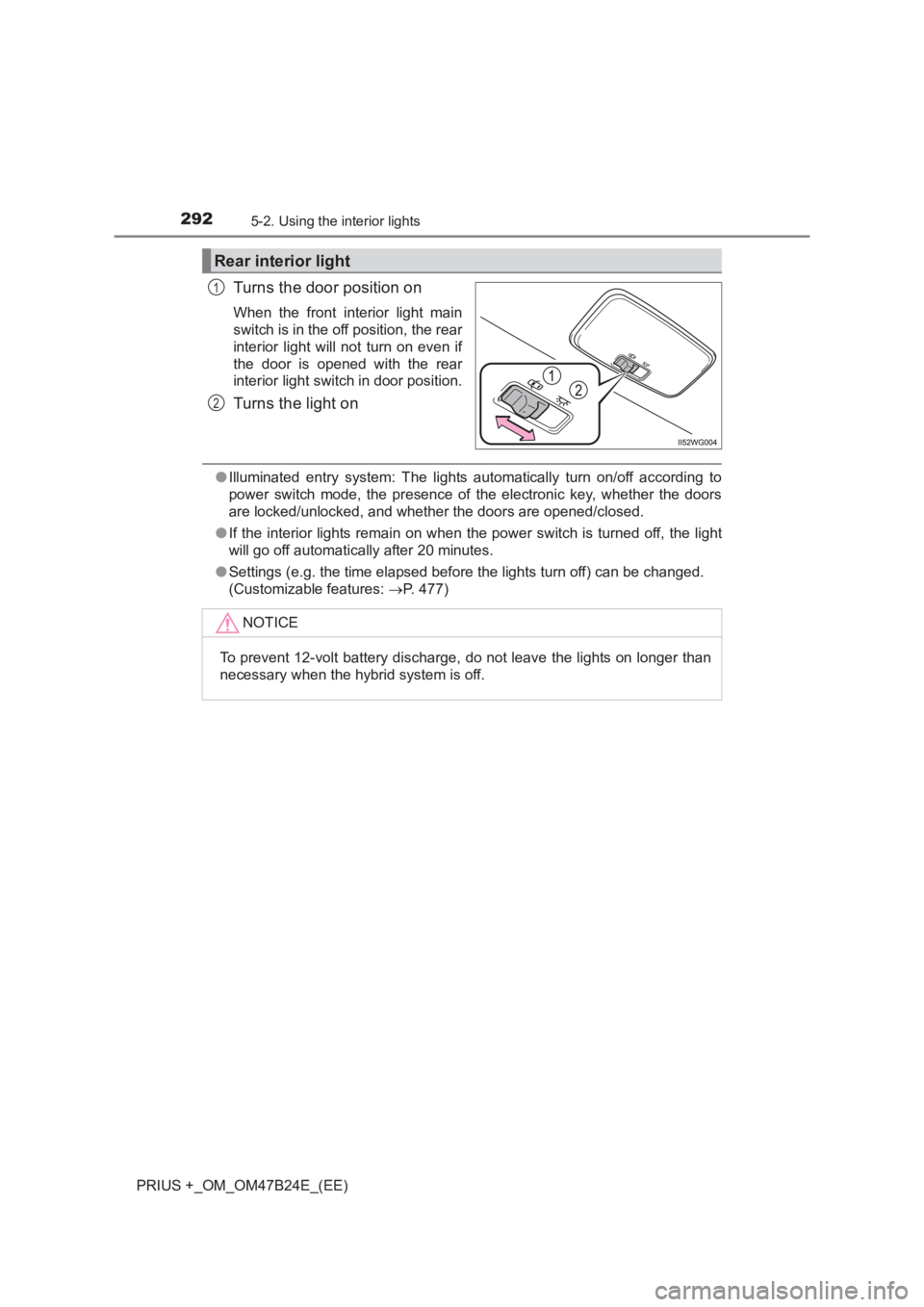
Turns the door position on
When the front interior light main
switch is in the off position, the rear
interior light will not turn on even if
the door is opened with the rear
interior light switch in door position.
Turns the light on
●Illuminated entry system: The lights automatically turn on/off according to
power switch mode, the presence of the electronic key, whether the doors
are locked/unlocked, and whether the doors are opened/closed.
● If the interior lights remain on when the power switch is turned off, the light
will go off automatically after 20 minutes.
● Settings (e.g. the time elapsed before the lights turn off) can be changed.
(Customizable features: →P. 477)
Rear interior light
1
2
NOTICE
To prevent 12-volt battery discharge, do not leave the lights on longer than
necessary when the hybrid system is off.
Page 309 of 509
309
6Maintenance and care
PRIUS +_OM_OM47B24E_(EE)6-1. Maintenance and care
Cleaning and protecting the vehicle exterior .......... 310
Cleaning and protecting the vehicle interior ........... 315
6-2. Maintenance Maintenance requirements.................... 318
6-3. Do-it-yourself maintenance Do-it-yourself service precautions ...................... 321
Hood .................................. 323
Positioning a floor jack ....... 325
Engine compartment.......... 327
12-volt battery .................... 337
Tires ................................... 341
Tire inflation pressure ........ 353
Wheels ............................... 355
Air conditioning filter .......... 357
Wiper rubber replacement ..................... 359
Electronic key battery ........ 361
Checking and replacing fuses ................................ 363
Light bulbs ......................... 367
Page 311 of 509
3116-1. Maintenance and care
PRIUS +_OM_OM47B24E_(EE)
6
Maintenance and care
■Note for a smart entry & start system
If the door handle becomes wet while the electronic key is within the effective
range, the door may lock and unlock repeatedly. In that case, follow the fol-
lowing correction procedures to wash the vehicle:
●Place the key in a position 2 m (6 ft.) or more separate from the vehicle
while the vehicle is being washed. (Take care to ensure that the key is not
stolen.)
● Set the electronic key to battery-saving mode to disable the smart entry &
start system. ( →P. 155)
■ Aluminum wheels
●Remove any dirt immediately by using a neutral detergent. Do not use hard
brushes or abrasive cleaners. Do not use strong or harsh chemical clean-
ers.
Use the same mild detergent and wax as used on the paint.
● Do not use detergent on the wheels when they are hot, for example after
driving for long distance in the hot weather.
● Wash detergent from the wheels immediately after use.
■ Bumpers
Do not scrub with abrasive cleaners.
■ Front side windows water-repe llent coating (if equipped)
● The following precautions can extend the effectiveness of the water-repel-
lent coating.
• Remove any dirt, etc. from the front side windows regularly.
• Do not allow dirt and dust to accumulate on the windows for a long
period.
Clean the windows with a soft, damp cloth as soon as possible.
• Do not use wax or glass cleaners that contain abrasives when cleaning the windows.
• Do not use any metallic objects to remove condensation build up.
● When the water-repellent performance has become insufficient, the coating
can be repaired. Contact any authoriz ed Toyota dealer or repairer, or
another duly qualified and equipped professional.
Page 338 of 509
3386-3. Do-it-yourself maintenance
PRIUS +_OM_OM47B24E_(EE)
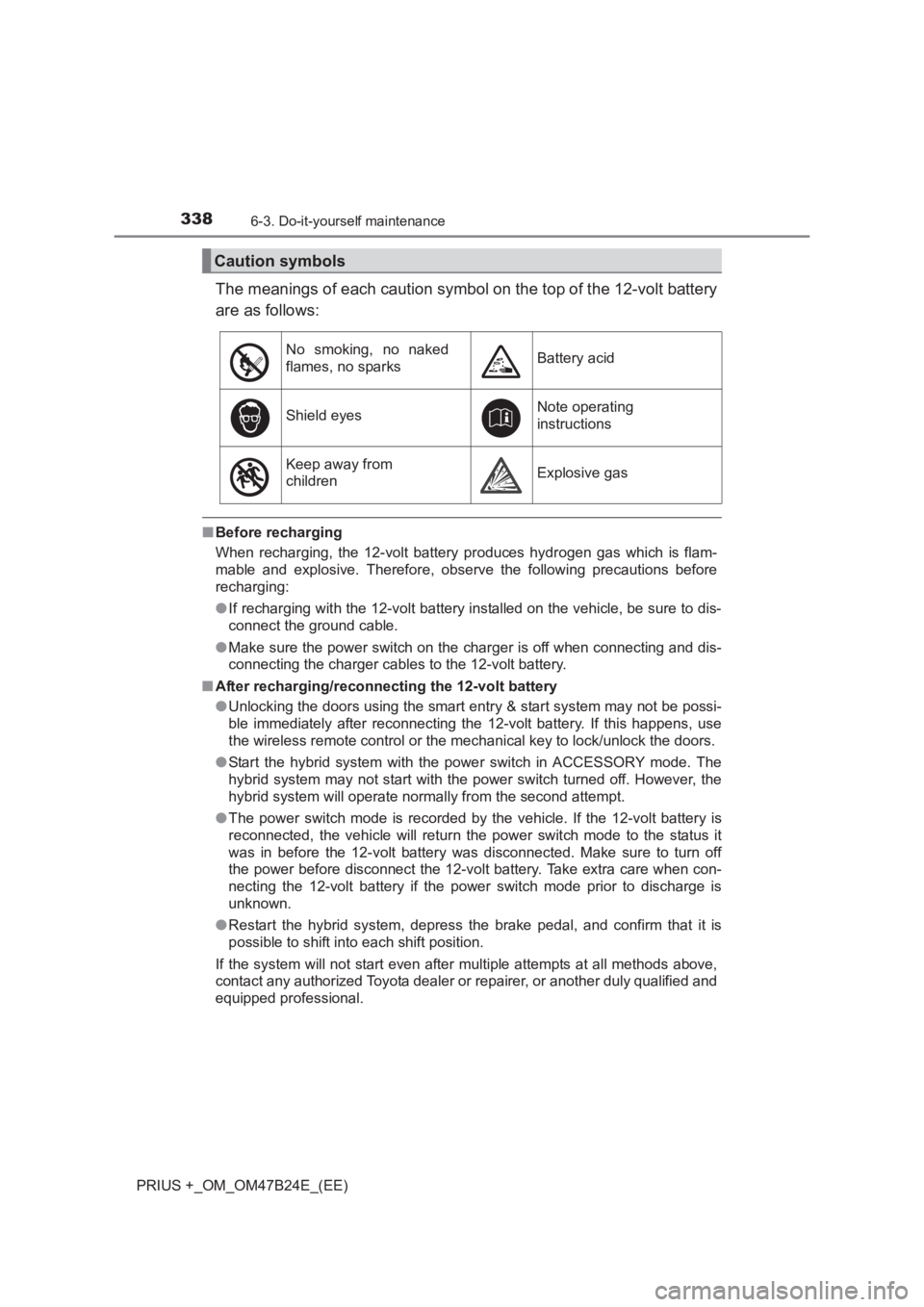
The meanings of each caution symbol on the top of the 12-volt battery
are as follows:
■Before recharging
When recharging, the 12-volt battery produces hydrogen gas which is flam-
mable and explosive. Therefore, obser ve the following precautions before
recharging:
● If recharging with the 12-volt battery installed on the vehicle, be sure to dis-
connect the ground cable.
● Make sure the power switch on the charger is off when connecting and dis-
connecting the charger cables to the 12-volt battery.
■ After recharging/reconnecting the 12-volt battery
●Unlocking the doors using the smart entry & start system may not be possi-
ble immediately after reconnecting the 12-volt battery. If this happens, use
the wireless remote control or the mechanical key to lock/unlock the doors.
● Start the hybrid system with the pow er switch in ACCESSORY mode. The
hybrid system may not start with the power switch turned off. However, the
hybrid system will operate normally from the second attempt.
● The power switch mode is recorded by the vehicle. If the 12-volt battery is
reconnected, the vehicle will return the power switch mode to the status it
was in before the 12-volt battery was disconnected. Make sure to turn off
the power before disconnect the 12-volt battery. Take extra care when con-
necting the 12-volt battery if the power switch mode prior to discharge is
unknown.
● Restart the hybrid system, depress the brake pedal, and confirm that it is
possible to shift into each shift position.
If the system will not start even after multiple attempts at all methods above,
contact any authorized Toyota dealer or repairer, or another duly qualified and
equipped professional.
Caution symbols
No smoking, no naked
flames, no sparksBattery acid
Shield eyesNote operating
instructions
Keep away from
childrenExplosive gas
Page 361 of 509
3616-3. Do-it-yourself maintenance
PRIUS +_OM_OM47B24E_(EE)
6
Maintenance and care
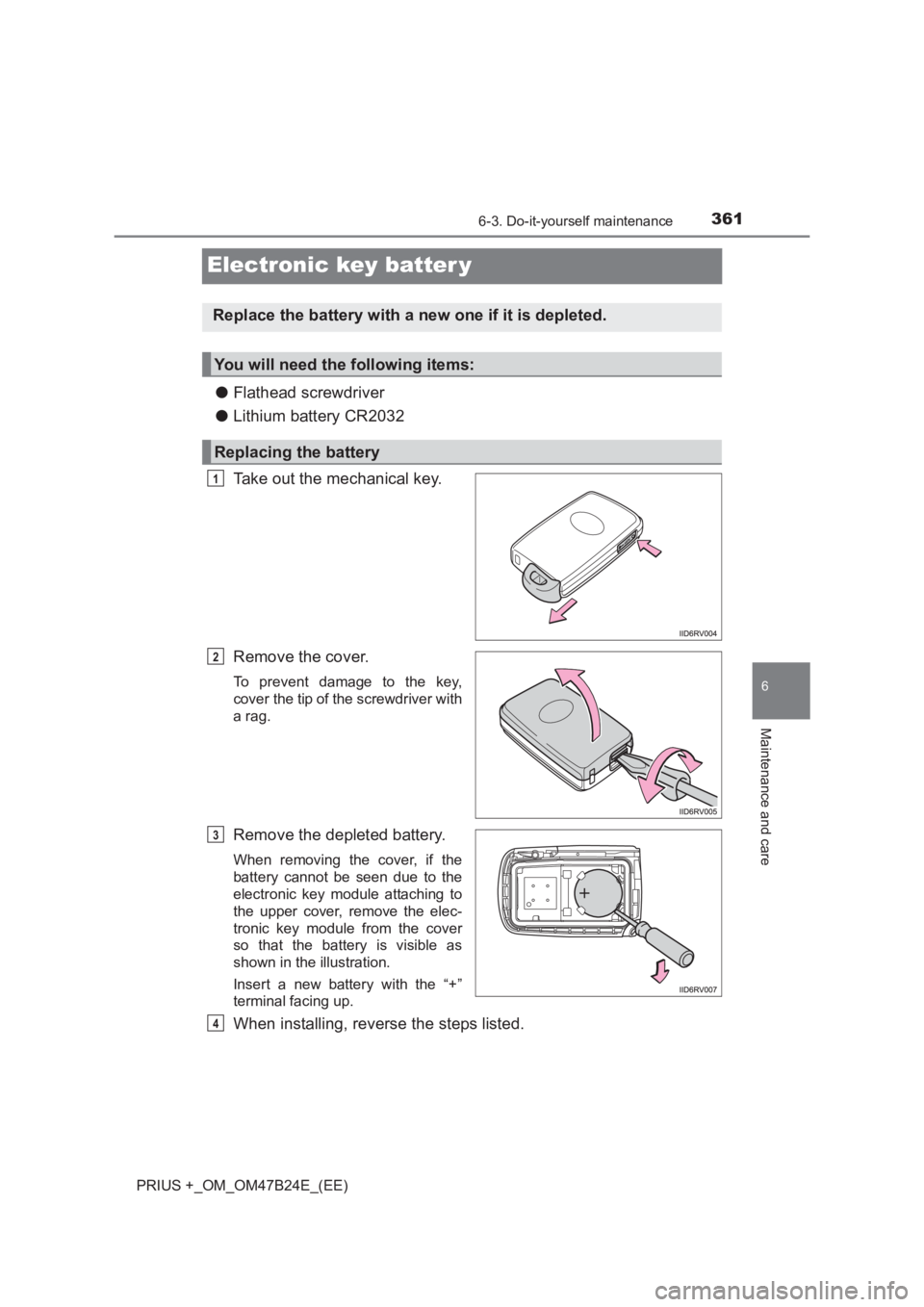
Electronic key batter y
●Flathead screwdriver
● Lithium battery CR2032
Take out the mechanical key.
Remove the cover.
To prevent damage to the key,
cover the tip of the screwdriver with
a rag.
Remove the depleted battery.
When removing the cover, if the
battery cannot be seen due to the
electronic key module attaching to
the upper cover, remove the elec-
tronic key module from the cover
so that the battery is visible as
shown in the illustration.
Insert a new battery with the “+”
terminal facing up.
When installing, reverse the steps listed.
Replace the battery with a new one if it is depleted.
You will need the following items:
Replacing the battery
1
2
3
4
Page 362 of 509
3626-3. Do-it-yourself maintenance
PRIUS +_OM_OM47B24E_(EE)
■Use a CR2032 lithium battery
●Batteries can be purchased at any authorized Toyota dealer or repairer, or
another duly qualified and equipped professional, local electrical appliance
shops or camera stores.
● Replace only with the same or equivalent type recommended by the manu-
facturer.
● Dispose of used batteries according to the local laws.
■ If the electronic key battery is depleted
The following symptoms may occur:
●The smart entry & start system and wireless remote control will not function
properly.
● The operational range will be reduced.
WARNING
■ Removed battery and other parts
These parts are small and if swallowed by a child, they can cause choking.
Keep away from children. Failure to do so could result in death or serious
injury.
■ Certification for the smart entry & start system
RISK OF EXPLOSION IF BATTERY IS REPLACED BY AN INCORRECT
TYPE.
DISPOSE OF USED BATTERIES ACCORDING TO THE INSTRUCTIONS
NOTICE
■For normal operation after replacing the battery
Observe the following precautions to prevent accidents:
●Always work with dry hands.
Moisture may cause the battery to rust.
● Do not touch or move any other component inside the remote control.
● Do not bend either of the battery terminals.
Page 377 of 509
377
7When trouble arises
PRIUS +_OM_OM47B24E_(EE)7-1. Essential information
Emergency flashers ........... 378
If your vehicle has to be stopped in an
emergency ....................... 379 7-2. Steps to take in an
emergency
If your vehicle needs to be towed ...................... 380
If you think something is wrong ............................... 386
If a warning light turns on or a warning buzzer
sounds ............................. 387
If a warning message is displayed ......................... 400
If you have a flat tire (vehicles with spare
tire) .................................. 417
If you have a flat tire (vehicles without spare
tire) .................................. 431
If the hybrid system will not start............................ 448
If the electronic key does not operate properly ........ 450
If the 12-volt battery is discharged ....................... 452
If your vehicle overheats ......................... 457
If the vehicle becomes stuck ................................ 462
Page 399 of 509
3997-2. Steps to take in an emergency
PRIUS +_OM_OM47B24E_(EE)
7
When trouble arises
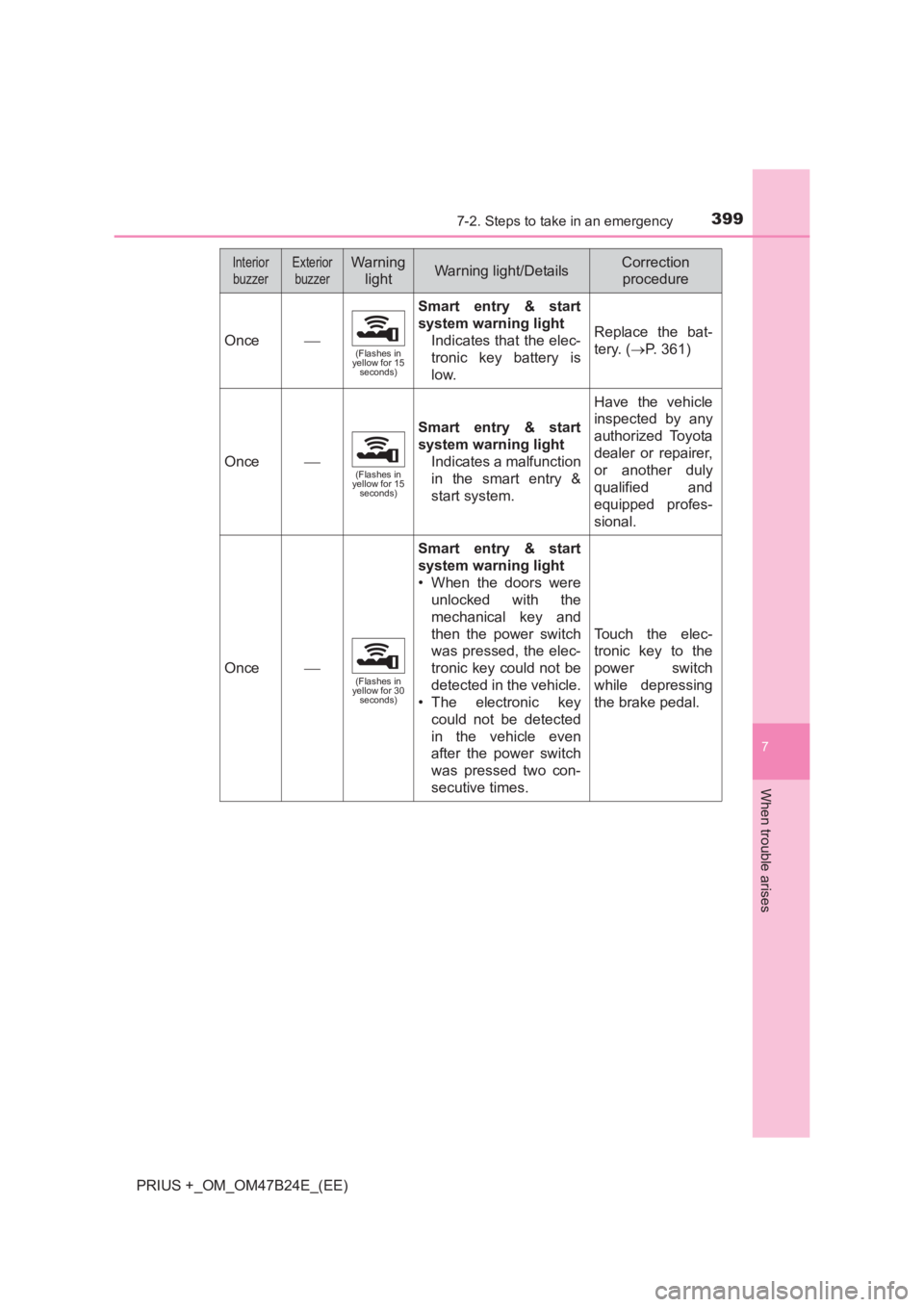
Once(Flashes in
yellow for 15 seconds)
Smart entry & start
system warning light
Indicates that the elec-
tronic key battery is
low.
Replace the bat-
tery. ( →P. 361)
Once(Flashes in
yellow for 15 seconds)
Smart entry & start
system warning light
Indicates a malfunction
in the smart entry &
start system.
Have the vehicle
inspected by any
authorized Toyota
dealer or repairer,
or another duly
qualified and
equipped profes-
sional.
Once(Flashes in
yellow for 30 seconds)
Smart entry & start
system warning light
• When the doors were
unlocked with the
mechanical key and
then the power switch
was pressed, the elec-
tronic key could not be
detected in the vehicle.
• The electronic key
could not be detected
in the vehicle even
after the power switch
was pressed two con-
secutive times.
Touch the elec-
tronic key to the
power switch
while depressing
the brake pedal.
InteriorbuzzerExterior buzzerWarning lightWarning light/DetailsCorrection procedure
Page 415 of 509
4157-2. Steps to take in an emergency
PRIUS +_OM_OM47B24E_(EE)
7
When trouble arises
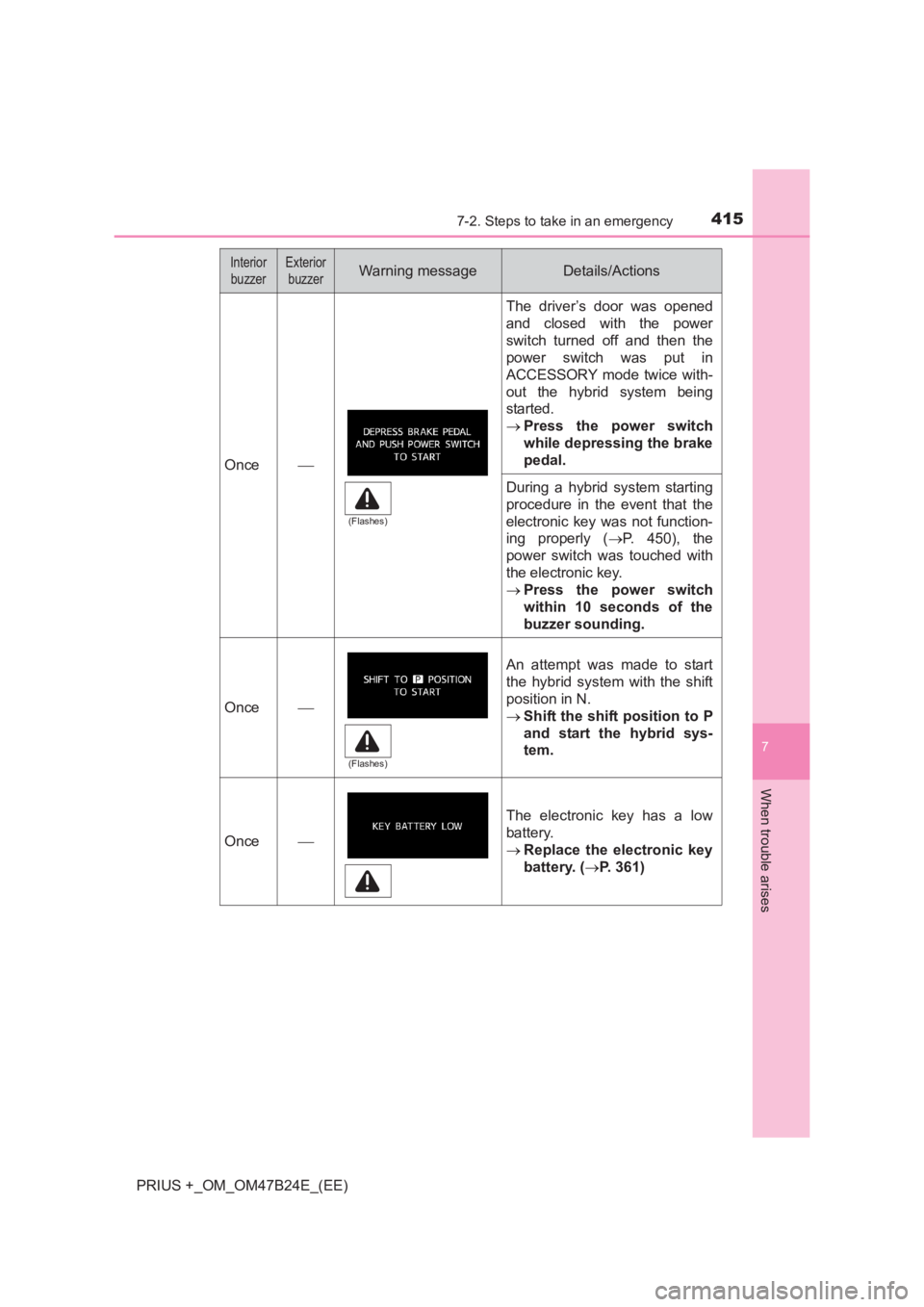
Once
The driver’s door was opened
and closed with the power
switch turned off and then the
power switch was put in
ACCESSORY mode twice with-
out the hybrid system being
started.
→Press the power switch
while depressing the brake
pedal.
During a hybrid system starting
procedure in the event that the
electronic key was not function-
ing properly ( →P. 450), the
power switch was touched with
the electronic key.
→ Press the power switch
within 10 seconds of the
buzzer sounding.
Once
An attempt was made to start
the hybrid system with the shift
position in N.
→Shift the shift position to P
and start the hybrid sys-
tem.
Once
The electronic key has a low
battery.
→Replace the electronic key
battery. ( →P. 361)
Interior
buzzerExterior buzzerWarning messageDetails/Actions
(Flashes)
(Flashes)