ECO mode TOYOTA PRIUS PLUS 2017 Owner's Guide
[x] Cancel search | Manufacturer: TOYOTA, Model Year: 2017, Model line: PRIUS PLUS, Model: TOYOTA PRIUS PLUS 2017Pages: 509, PDF Size: 27.68 MB
Page 351 of 509
3516-3. Do-it-yourself maintenance
PRIUS +_OM_OM47B24E_(EE)
6
Maintenance and care
WARNING
■ When inspecting or replacing tires
Observe the following precautions to prevent accidents.
Failure to do so may cause damage to parts of the drive train as well as
dangerous handling characteristics, which may lead to an accident resulting
in death or serious injury.
●Do not mix tires of different makes, models or tread patterns.
Also, do not mix tires of remarkably different treadwear.
● Do not use tire sizes other than those recommended by Toyota.
● Do not mix differently constructed tires (radial, bias-belted or bias-ply
tires).
● Do not mix summer, all season and snow tires.
● Do not use tires that have been used on another vehicle.
Do not use tires if you do not know how they were used previously.
● Vehicles with compact spare tire: Do not tow if your vehicle has a compact
spare tire installed.
● Vehicles with emergency tire puncture repair kit: Do not tow anything if a
tire that has been repaired using the emergency tire puncture repair kit is
installed. The load on the tire may cause unexpected damage to the tire.
■ When initializing the tire pressure warning system
Do not operate the tire pressure warning reset switch without first adjusting
the tire inflation pressure to the specified level. Otherwise, the tire pressure
warning light may not come on even if the tire inflation pressure is low, or it
may come on when the tire inflation pressure is actually normal.
Page 398 of 509
3987-2. Steps to take in an emergency
PRIUS +_OM_OM47B24E_(EE)
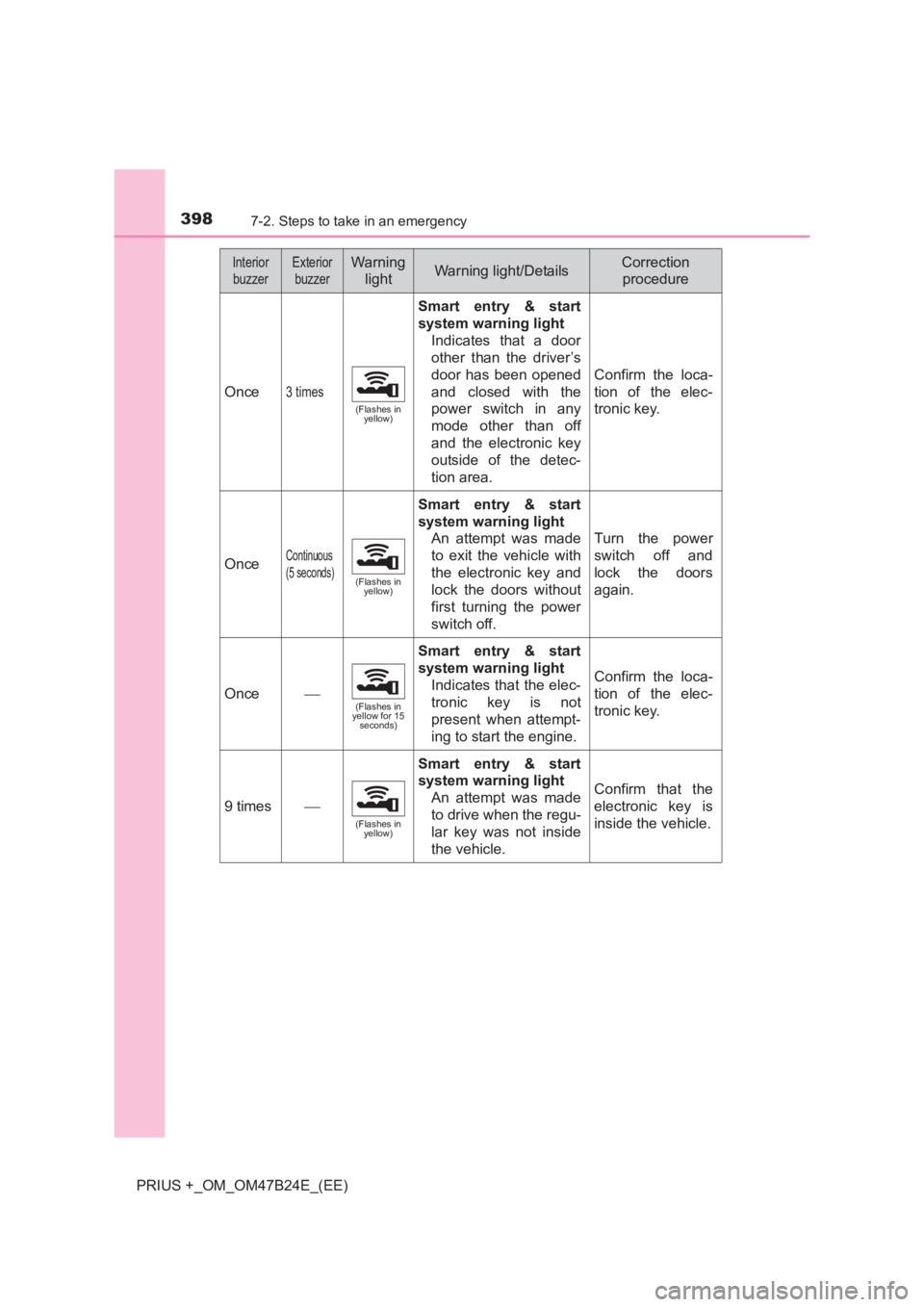
Once3 times
(Flashes in yellow)
Smart entry & start
system warning light
Indicates that a door
other than the driver’s
door has been opened
and closed with the
power switch in any
mode other than off
and the electronic key
outside of the detec-
tion area.
Confirm the loca-
tion of the elec-
tronic key.
OnceContinuous
(5 seconds)
(Flashes in yellow)
Smart entry & start
system warning light
An attempt was made
to exit the vehicle with
the electronic key and
lock the doors without
first turning the power
switch off.
Turn the power
switch off and
lock the doors
again.
Once(Flashes in
yellow for 15 seconds)
Smart entry & start
system warning light
Indicates that the elec-
tronic key is not
present when attempt-
ing to start the engine.
Confirm the loca-
tion of the elec-
tronic key.
9 times
(Flashes in yellow)
Smart entry & start
system warning light
An attempt was made
to drive when the regu-
lar key was not inside
the vehicle.
Confirm that the
electronic key is
inside the vehicle.
InteriorbuzzerExterior buzzerWarning lightWarning light/DetailsCorrection procedure
Page 409 of 509
4097-2. Steps to take in an emergency
PRIUS +_OM_OM47B24E_(EE)
7
When trouble arises
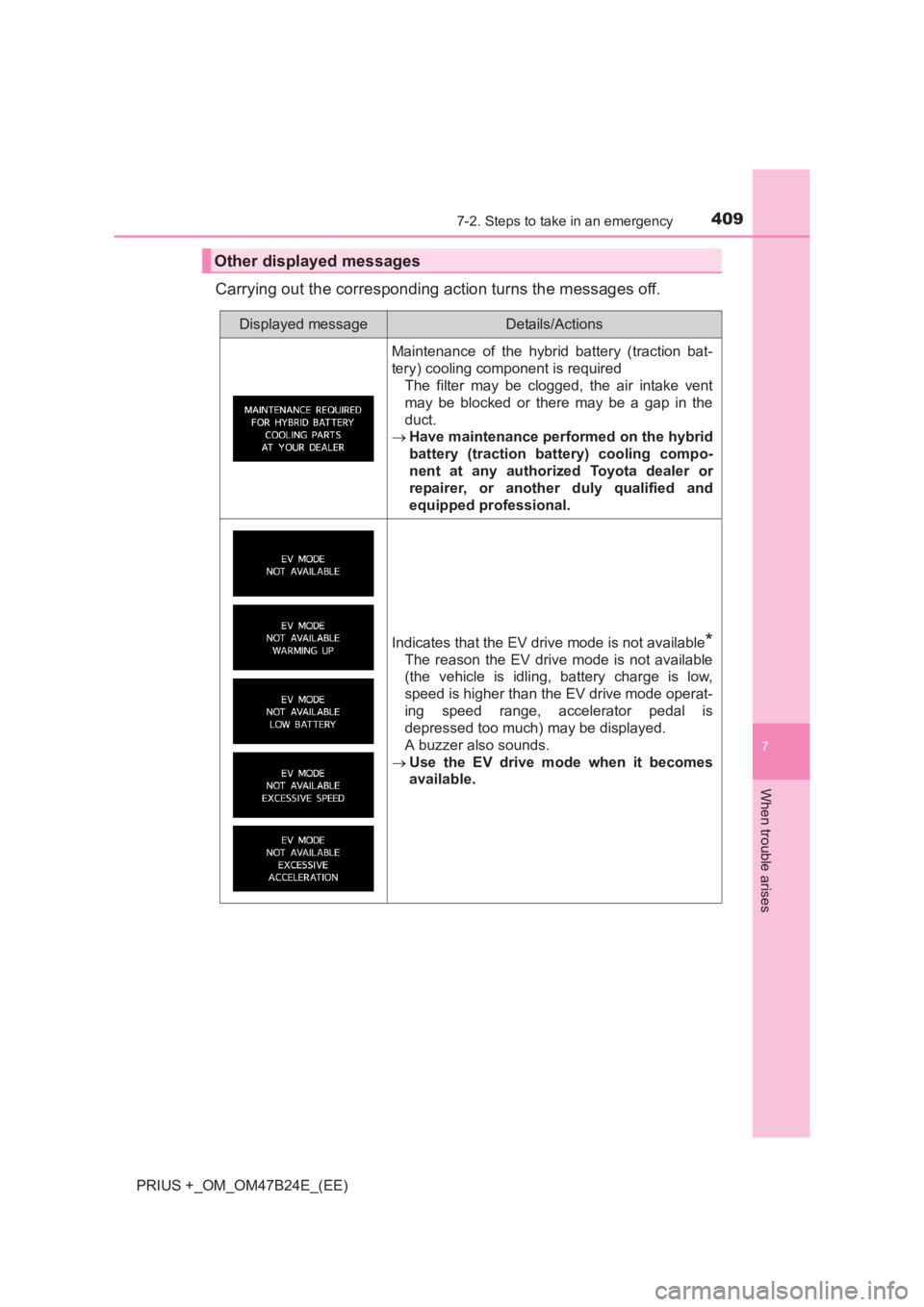
Carrying out the corresponding action turns the messages off.
Other displayed messages
Displayed messageDetails/Actions
Maintenance of the hybrid battery (traction bat-
tery) cooling component is requiredThe filter may be clogged, the air intake vent
may be blocked or there may be a gap in the
duct.
→ Have maintenance performed on the hybrid
battery (traction battery) cooling compo-
nent at any authorized Toyota dealer or
repairer, or another duly qualified and
equipped professional.
Indicates that the EV drive mode is not available*
The reason the EV drive mode is not available
(the vehicle is idling, battery charge is low,
speed is higher than the EV drive mode operat-
ing speed range, accelerator pedal is
depressed too much) may be displayed.
A buzzer also sounds.
→ Use the EV drive mode when it becomes
available.
Page 413 of 509
4137-2. Steps to take in an emergency
PRIUS +_OM_OM47B24E_(EE)
7
When trouble arises
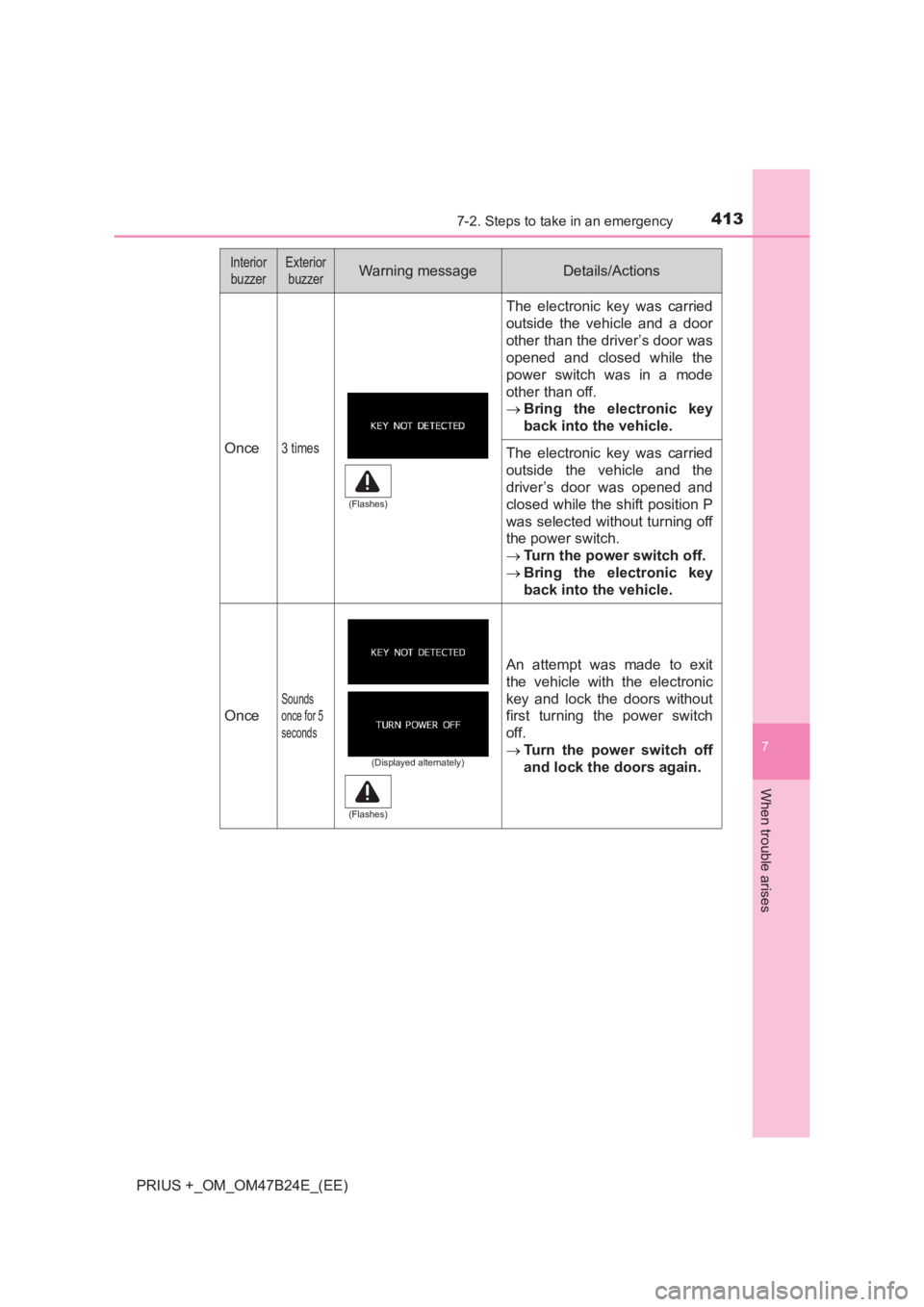
Once3 times
The electronic key was carried
outside the vehicle and a door
other than the driver’s door was
opened and closed while the
power switch was in a mode
other than off.
→Bring the electronic key
back into the vehicle.
The electronic key was carried
outside the vehicle and the
driver’s door was opened and
closed while the shift position P
was selected without turning off
the power switch.
→Turn the power switch off.
→ Bring the electronic key
back into the vehicle.
Once
Sounds
once for 5
seconds
An attempt was made to exit
the vehicle with the electronic
key and lock the doors without
first turning the power switch
off.
→Turn the power switch off
and lock the doors again.
Interior
buzzerExterior buzzerWarning messageDetails/Actions
(Flashes)
(Displayed alternately)
(Flashes)
Page 415 of 509
4157-2. Steps to take in an emergency
PRIUS +_OM_OM47B24E_(EE)
7
When trouble arises
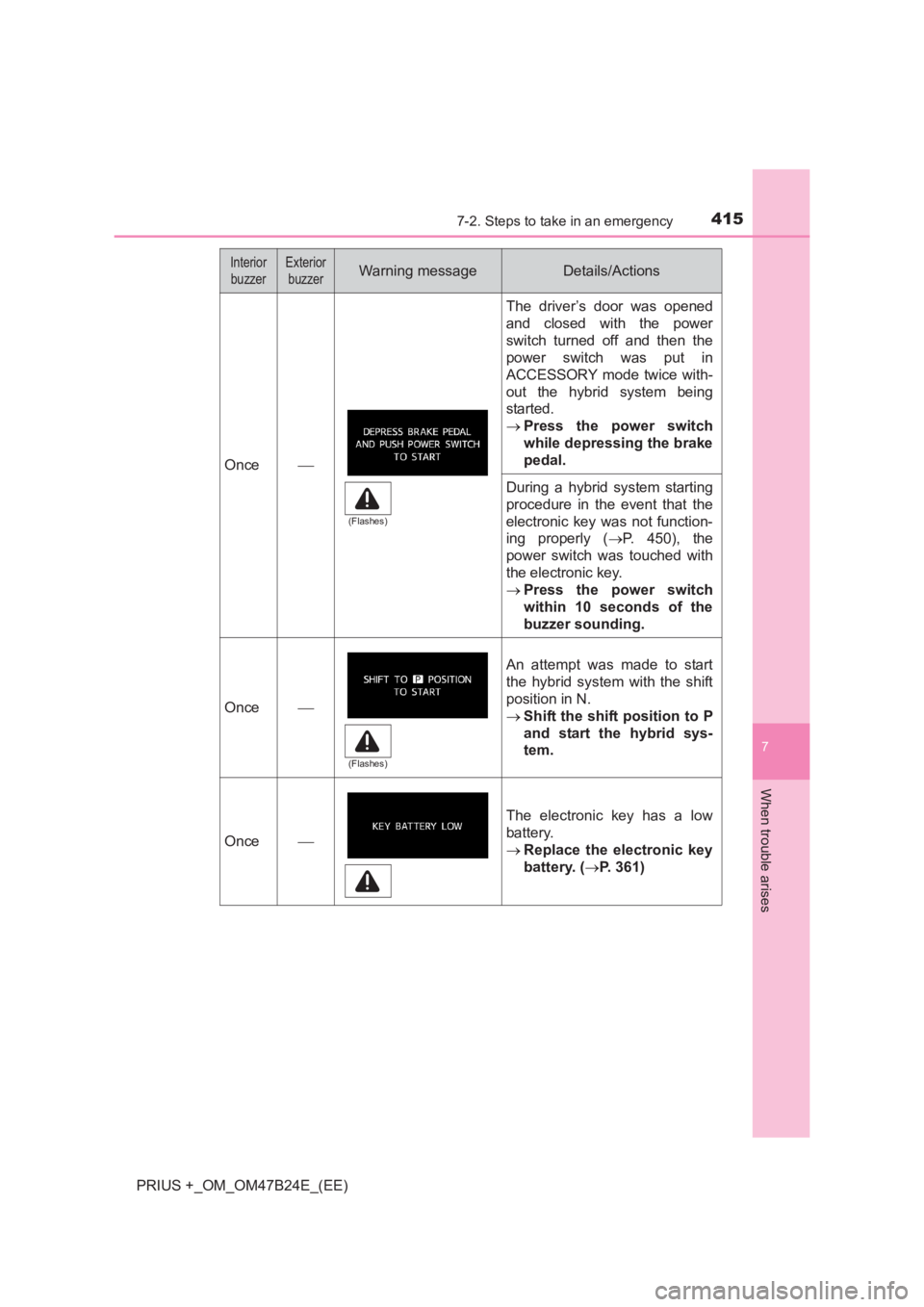
Once
The driver’s door was opened
and closed with the power
switch turned off and then the
power switch was put in
ACCESSORY mode twice with-
out the hybrid system being
started.
→Press the power switch
while depressing the brake
pedal.
During a hybrid system starting
procedure in the event that the
electronic key was not function-
ing properly ( →P. 450), the
power switch was touched with
the electronic key.
→ Press the power switch
within 10 seconds of the
buzzer sounding.
Once
An attempt was made to start
the hybrid system with the shift
position in N.
→Shift the shift position to P
and start the hybrid sys-
tem.
Once
The electronic key has a low
battery.
→Replace the electronic key
battery. ( →P. 361)
Interior
buzzerExterior buzzerWarning messageDetails/Actions
(Flashes)
(Flashes)
Page 449 of 509
4497-2. Steps to take in an emergency
PRIUS +_OM_OM47B24E_(EE)
7
When trouble arises
One of the following may be the cause of the problem:
●The 12-volt battery may be discharged. ( →P. 452)
● One or both of the 12-volt battery terminals may be disconnected.
(→ P. 337)
Contact any authorized Toyota dealer or repairer, or another duly
qualified and equipped professional if the problem cannot be repaired,
or if repair procedures are unknown.
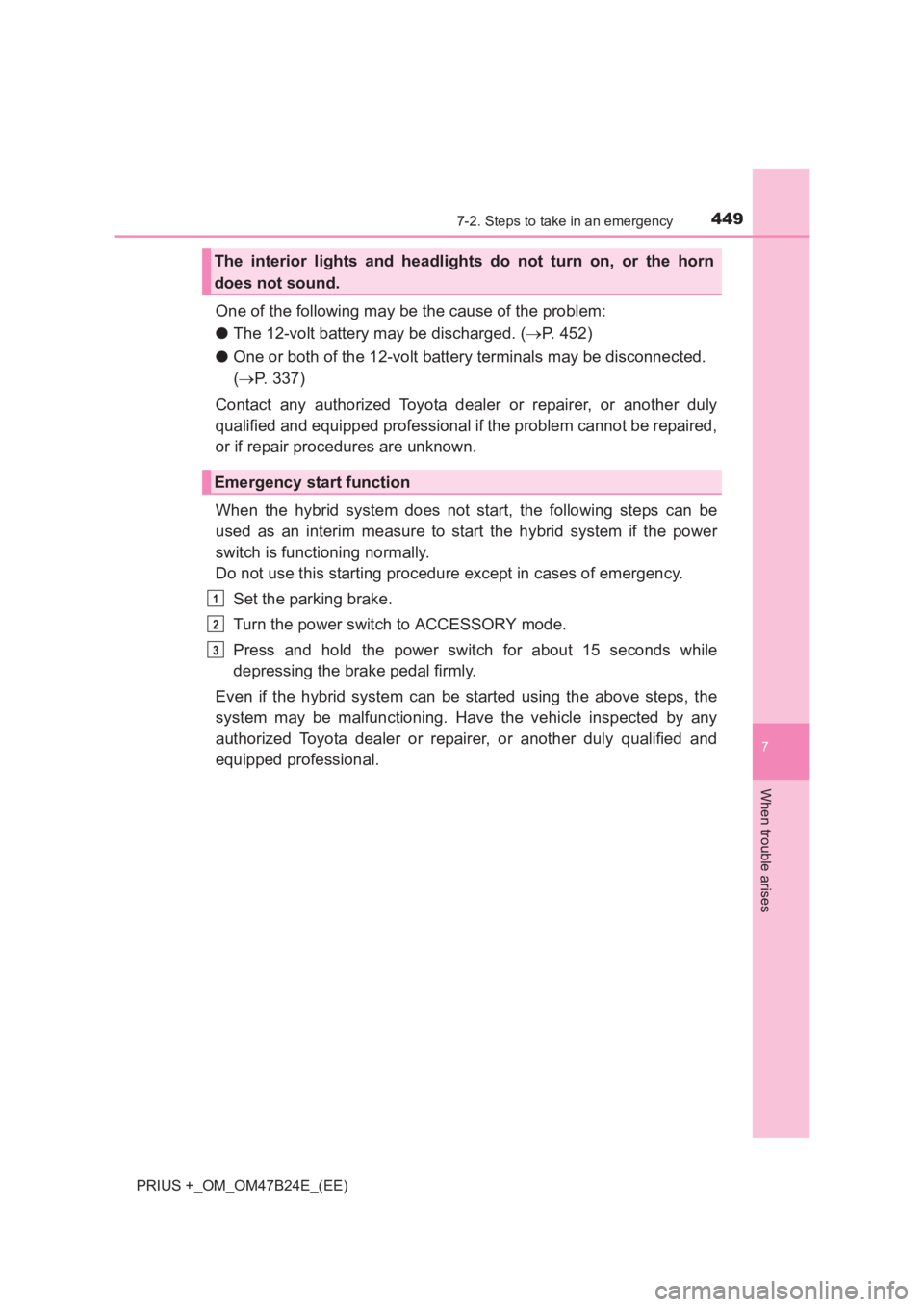
When the hybrid system does not start, the following steps can be
used as an interim measure to start the hybrid system if the power
switch is functioning normally.
Do not use this starting procedure except in cases of emergency. Set the parking brake.
Turn the power switch to ACCESSORY mode.
Press and hold the power switch for about 15 seconds while
depressing the brake pedal firmly.
Even if the hybrid system can be started using the above steps, the
system may be malfunctioning. Have the vehicle inspected by any
authorized Toyota dealer or repairer, or another duly qualified and
equipped professional.
The interior lights and headlights do not turn on, or the horn
does not sound.
Emergency start function
1
2
3
Page 451 of 509
4517-2. Steps to take in an emergency
PRIUS +_OM_OM47B24E_(EE)
7
When trouble arises
Press the power switch.
In the event that the hybrid system still cannot be operated, contact
any authorized Toyota dealer or repairer, or another duly qualified and
equipped professional.
■ Stopping the hybrid system
Set the parking brake, shift the shift position to P and press the power switch
as you normally do when stopping the hybrid system.
■ Replacing the key battery
As the above procedure is a temporary measure, it is recommended that the
electronic key battery be replaced imm ediately when the battery is depleted.
( → P. 361)
■ Alarm (if equipped)
Using the mechanical key to lock the doors will not set the alarm system.
If a door is unlocked using the mechanical key when the alarm system is set,
the alarm may be triggered. ( →P. 98)
■ Changing power switch modes
Release the brake pedal and press the power switch in step
above.
The hybrid system does not start and modes will be changed each time the
switch is pressed. ( →P. 210)
■ When the electronic key does not work properly
●Make sure that the smart entry & start system has not been deactivated in
the customization setting. If it is off, turn the function on.
(Customizable features: →P. 477)
● Check if battery-saving mode is set. If it is set, cancel the function.
(→ P. 155)
4
3
Page 454 of 509
4547-2. Steps to take in an emergency
PRIUS +_OM_OM47B24E_(EE)
Start the engine of the second vehicle. Increase the engine speed
slightly and maintain at that level for approximately 5 minutes to
recharge the 12-volt battery of your vehicle.
Maintain the engine speed of the second vehicle and start the
hybrid system of your vehicle by turning the power switch to ON
mode.
Make sure the “READY” indicator comes on. If the indicator light
does not come on, contact any authorized Toyota dealer or repairer,
or another duly qualified and equipped professional.
Once the hybrid system has started, remove the jumper cables in
the exact reverse order from which they were connected.
Close the exclusive jump starting terminal cover, and reinstall the
fuse box cover to its original position.
When installing, first hook the fuse box cover onto the two rear tabs.
Once the hybrid system starts, have the vehicle inspected at any
authorized Toyota dealer or repairer, or another duly qualified and
equipped professional as soon as possible.
■Starting the hybrid system when the 12-volt battery is discharged
The hybrid system cannot be started by push-starting.
■ To prevent 12-volt battery discharge
●Turn off the headlights and the audio system while the hybrid system is off.
● Turn off any unnecessary electrical components when the vehicle is running
at a low speed for an extended period, such as in heavy traffic.
■ When the 12-volt battery is removed or discharged
●In some cases, it may not be possible to unlock the doors using the smart
entry & start system when the 12-volt battery is discharged. Use the wire-
less remote control or the mechanical key to lock or unlock the doors.
● The hybrid system may not start on the first attempt after the 12-volt battery
has recharged but will start normally after the second attempt. This is not a
malfunction.
● The power switch mode is memorized by the vehicle. When the 12-volt bat-
tery is reconnected, the system will return to the mode it was in before the
12-volt battery was discharged. Before disconnecting the 12-volt battery,
turn the power switch off. If you are unsure what mode the power switch was
in before the 12-volt battery discharged, be especially careful when recon-
necting the 12-volt battery.
5
6
7
8
9
Page 480 of 509
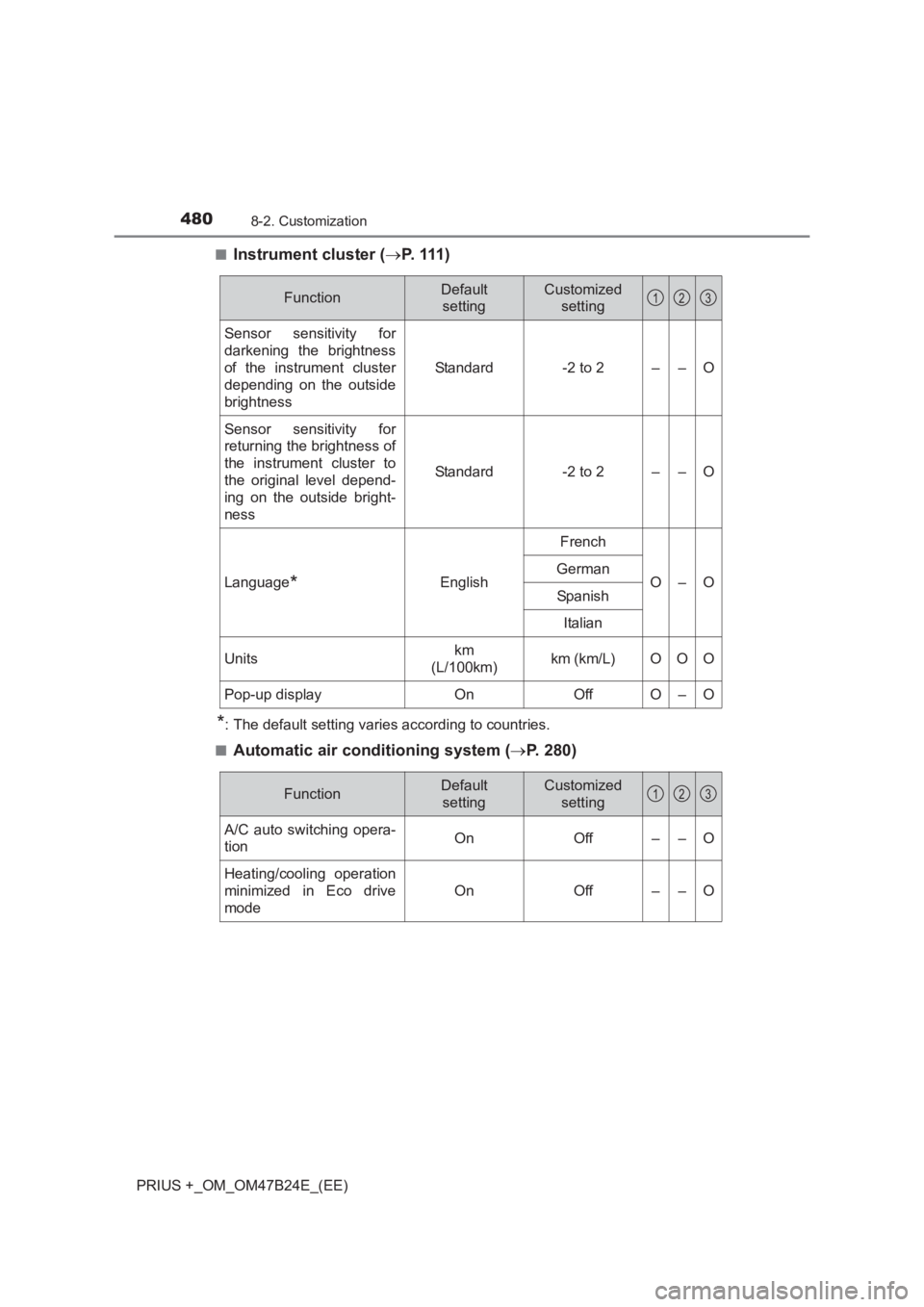
4808-2. Customization
PRIUS +_OM_OM47B24E_(EE)■
Instrument cluster (
→P. 111 )
*: The default setting varies according to countries.
■
Automatic air conditioning system ( →P. 280)
FunctionDefault
settingCustomized setting
Sensor sensitivity for
darkening the brightness
of the instrument cluster
depending on the outside
brightness
Standard-2 to 2––O
Sensor sensitivity for
returning the brightness of
the instrument cluster to
the original level depend-
ing on the outside bright-
ness
Standard-2 to 2––O
Language*English
French
O–OGerman
Spanish
Italian
Unitskm
(L/100km)km (km/L)OOO
Pop-up displayOnOffO–O
123
FunctionDefault settingCustomized setting
A/C auto switching opera-
tionOnOff––O
Heating/cooling operation
minimized in Eco drive
mode
OnOff––O
123
Page 493 of 509
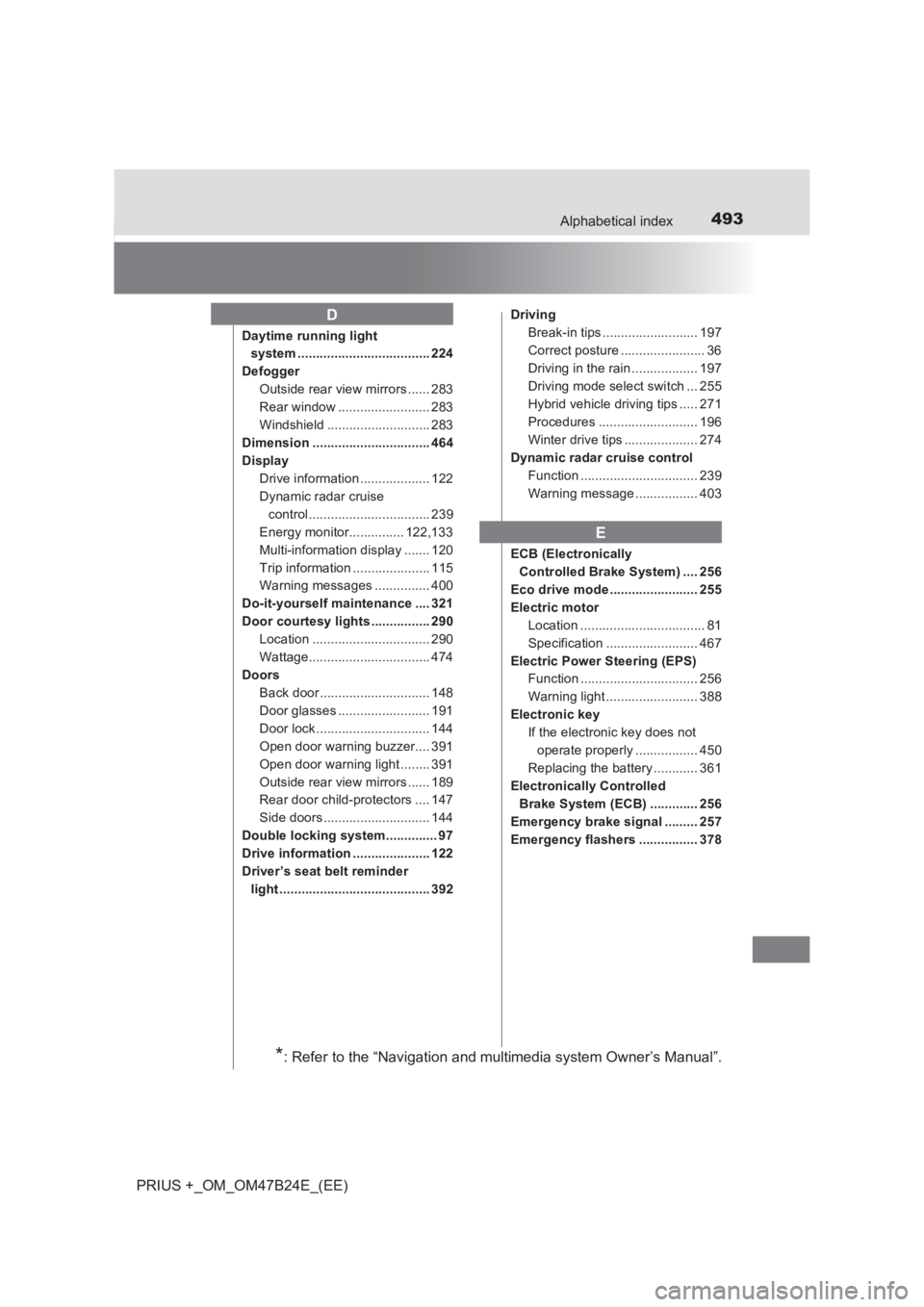
493Alphabetical index
PRIUS +_OM_OM47B24E_(EE)
Daytime running light system .................................... 224
Defogger Outside rear view mirrors ...... 283
Rear window ......................... 283
Windshield ............................ 283
Dimension ................................ 464
Display Drive information ................... 122
Dynamic radar cruise control................................. 239
Energy monitor............... 122,133
Multi-information display ....... 120
Trip information ..................... 115
Warning messages ............... 400
Do-it-yourself maintenance .... 321
Door courtesy lights ................ 290 Location ................................ 290
Wattage................................. 474
Doors Back door .............................. 148
Door glasses ......................... 191
Door lock ............................... 144
Open door warning buzzer.... 391
Open door warning light ........ 391
Outside rear view mirrors ...... 189
Rear door child-protectors .... 147
Side doors ............................. 144
Double locking system.............. 97
Drive information ..................... 122
Driver’s seat belt reminder light ......................................... 392 Driving
Break-in tips .......................... 197
Correct posture ....................... 36
Driving in the rain .................. 197
Driving mode select switch ... 255
Hybrid vehicle driving tips ..... 271
Procedures ........................... 196
Winter drive tips .................... 274
Dynamic radar cruise control Function ................................ 239
Warning message ................. 403
ECB (Electronically Controlled Brake System) .... 256
Eco drive mode ........................ 255
Electric motor Location .................................. 81
Specification ......................... 467
Electric Power Steering (EPS) Function ................................ 256
Warning light ......................... 388
Electronic key If the electronic key does not operate properly ................. 450
Replacing the battery ............ 361
Electronically Controlled
Brake System (ECB) ............. 256
Emergency brake signal ......... 257
Emergency flashers ................ 378
D
E
*: Refer to the “Navigation and multimedia system Owner’s Manual”.