ECO mode TOYOTA PRIUS PLUS 2017 User Guide
[x] Cancel search | Manufacturer: TOYOTA, Model Year: 2017, Model line: PRIUS PLUS, Model: TOYOTA PRIUS PLUS 2017Pages: 509, PDF Size: 27.68 MB
Page 192 of 509
1923-5. Opening and closing the windows
PRIUS +_OM_OM47B24E_(EE)■
Down jam protection function
When the window is opening, if a foreign object becomes caught between the
window and the door, the operation stops.
■ Catch protection function
If an object becomes caught between the door and window while the window
is opening, window movement is stopped.
■ When opening and closing the window cannot be done
When the up or down jam protection f unction operates unusually or the door
window cannot be fully opened and closed, stop the vehicle and perform the
following operations with the power window switch of that door.
● The door window cannot be closed: With the power switch in ON mode,
continually operate the power window switch in the one-touch closing posi-
tion within 4 seconds after the up jam protection function was activated.
The door window cannot be opened: With the power switch in ON mode,
continually operate the power window switch in the one-touch opening posi-
tion within 4 seconds after the down jam protection function was activated.
● If the door window cannot be opened and closed even when performing the
above operations, implement the following procedure for function initializa-
tion.
Turn the power switch to ON mode.
Pull and hold the power window switch in the one-touch closing position
and completely close the door window.
Release the power window switch for a moment and then resume pulling
and holding the switch in the one-touch closing position for approximately
4 seconds.
Press and hold the power window switch in the one-touch opening posi-
tion and after the door window is completely opened, continue holding the
switch for a further 1 second or more.
Pull and hold the power window switch in the one-touch closing position,
once more, and after the door window is completely closed, continue
holding the switch for a further 1 second or more.
If you release the switch while the window is moving, start again from the
beginning.
If the window reverses and cannot be closed or completely open, have the
vehicle inspected by any authorized Toyota dealer or repairer, or another
duly qualified and equipped professional.
1
2
3
4
5
Page 212 of 509
2124-2. Driving procedures
PRIUS +_OM_OM47B24E_(EE)■
If the “READY” indicator does not come on
In the event that the “READY” indicator does not come on even after perform-
ing the proper procedures for starting the vehicle, contact any authorized
Toyota dealer or repairer, or another duly qualified and equipped professional
immediately.
■ If the hybrid system is malfunctioning
→ P. 402
■ If the electronic key battery is depleted
→ P. 361
■ Operation of the power switch
●If the switch is not pressed shortly and firmly, the power switch mode may
not change or the hybrid system may not start.
● If attempting to restart the hybrid system immediately after turning the power
switch off, the hybrid system may not start in some cases. After turning the
power switch off, please wait a few seconds before restarting the hybrid sys-
tem.
■ Automatically P position selection function
→ P. 219
■ When the shift control system malfunctions
The power switch will not be able to be turned off. In such a case, the switch
can be turned off after applying the parking brake.
Have the vehicle inspected by any authorized Toyota dealer or repairer, or
another duly qualified and equipped professional immediately.
■ Meter display
When the power switch is turned off, each display will turn off as follows.
●The shift position indicator will turn off after approximately 2 seconds.
● EV driving ratio and average fuel consumption after hybrid system started,
turn off after approximately 6 seconds.
● The odometer, clock, etc. will turn off after approximately 30 seconds.
(Each display will also turn off immediately if a door is locked before 30 sec-
onds has elapsed.)
Page 213 of 509
2134-2. Driving procedures
4
Driving
PRIUS +_OM_OM47B24E_(EE)
WARNING
■ When starting the hybrid system
Always start the hybrid system while sitting in the driver’s seat. Do not
depress the accelerator pedal while starting the hybrid system under any
circumstances.
Doing so may cause an accident resulting in death or serious injury.
■ Stopping the hybrid system in an emergency
If you want to stop the hybrid system in an emergency while driving the
vehicle, press and hold the power switch for more than 2 seconds, or press
it briefly 3 times or more in succession. ( →P. 379)
However, do not touch the power switch while driving except in an emer-
gency. Turning the hybrid system off while driving will not cause loss of
steering or braking control, however, power assist to the steering will be
lost. This will make it more difficult to steer smoothly, so you should pull over
and stop the vehicle as soon as it is safe to do so.
NOTICE
■To prevent 12-volt battery discharge
●Do not leave the power switch in ACCESSORY or ON mode for long peri-
ods of time without the hybrid system on.
● If the smart entry & start system indicator light (green) is illuminated (vehi-
cles without multi-information display), or “POWER ON” is displayed on
the multi-information display (vehicles with multi-information display) the
hybrid system is not off. When exiting the vehicle, always check that the
power switch is off.
■ When starting the hybrid system
If the hybrid system becomes difficult to start, have your vehicle checked by
any authorized Toyota dealer or repairer, or another duly qualified and
equipped professional immediately.
■ Symptoms indicating a malfunction with the power switch
If the power switch seems to be operating somewhat differently than usual,
such as the switch sticking slightly, there may be a malfunction. Contact any
authorized Toyota dealer or repairer, or another duly qualified and equipped
professional immediately.
Page 215 of 509
2154-2. Driving procedures
4
Driving
PRIUS +_OM_OM47B24E_(EE)■
Switching to EV drive mode when the gasoline engine is cold
If the hybrid system is started while the gasoline engine is cold, the gasoline
engine will start automatically after a short period of time in order to warm up.
In this case, you will become unable to switch to EV drive mode.
After the hybrid system has started and the “READY” indicator has illumi-
nated, press the EV drive mode switch before the gasoline engine starts to
switch to EV drive mode.
■ Automatic cancelation of EV drive mode
When driving in EV drive mode, the gasoline engine may automatically restart
in the following situations. When EV drive mode is canceled, a buzzer will
sound and the EV drive mode indicator will flash and go off.
●The hybrid battery (traction battery) becomes low.
The remaining battery level indicated in the energy monitor display is low.
(→ P. 112, 133)
● Vehicle speed is high.
● The accelerator pedal is depressed firmly or the vehicle is on a hill etc.
When it is possible to inform the driver of automatic cancelation in advance, a
prior notice screen will appear on the multi-information display.
■ Possible driving distance when driving in EV drive mode
EV drive mode’s possible driving distance ranges from a few hundred meters
to approximately 1 km (0.6 mile). However, depending on vehicle conditions,
there are situations when EV drive mode cannot be used. (The distance that
is possible depends on the hybrid battery [traction battery] level and driving
conditions.)
■ Changing a driving mode when in EV drive mode
EV drive mode can be used in conjunction with Eco drive mode and power
mode.
However, EV drive mode may be automatically canceled when used in con-
junction with power mode.
■ Fuel economy
The hybrid system is designed to achieve the best possible fuel economy
during normal driving (using the gasol ine engine and electric motor [traction
motor]). Driving in EV drive mode more than necessary may lower fuel econ-
omy.
WARNING
■ Caution while driving
When driving in EV drive mode, pay s pecial attention to the area around the
vehicle. Because there is no engine noise, pedestrians, people riding bicy-
cles or other people and vehicles in the area may not be aware of the vehi-
cle starting off or approaching them, so take extra care while driving.
Page 217 of 509
2174-2. Driving procedures
4
Driving
PRIUS +_OM_OM47B24E_(EE)
*: For good fuel economy and noise reduction, the D position should usuallybe used.
→ P. 2 5 5
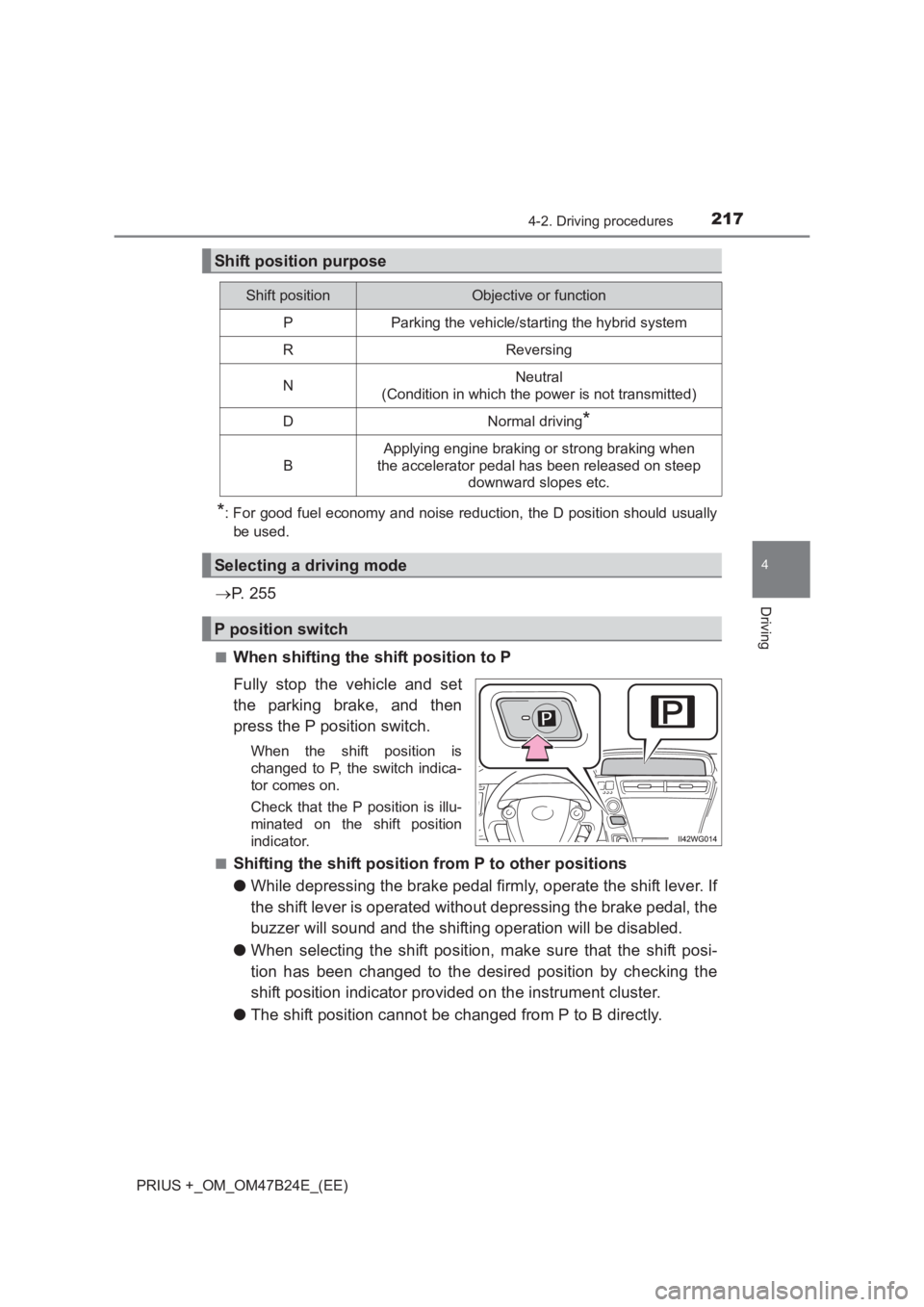
■When shifting the shift position to P
Fully stop the vehicle and set
the parking brake, and then
press the P position switch.
When the shift position is
changed to P, the switch indica-
tor comes on.
Check that the P position is illu-
minated on the shift position
indicator.
■
Shifting the shift position from P to other positions
● While depressing the brake pedal firmly, operate the shift lever. If
the shift lever is operated without depressing the brake pedal, the
buzzer will sound and the shifting operation will be disabled.
● When selecting the shift position, make sure that the shift posi-
tion has been changed to the desired position by checking the
shift position indicator provided on the instrument cluster.
● The shift position cannot be changed from P to B directly.
Shift position purpose
Shift positionObjective or function
PParking the vehicle/starting the hybrid system
RReversing
NNeutral
(Condition in which the power is not transmitted)
DNormal driving*
B
Applying engine braking or strong braking when
the accelerator pedal has been released on steep downward slopes etc.
Selecting a driving mode
P position switch
Page 230 of 509
2304-3. Operating the lights and wipers
PRIUS +_OM_OM47B24E_(EE)
WARNING
■ Caution regarding the use of windshield wipers in AUTO mode (vehi-
cles with rain-sensing windshield wipers)
The windshield wipers may operate unexpectedly if the sensor is touched or
the windshield is subject to vibration in AUTO mode. Take care that your fin-
gers etc. do not become caught in the windshield wipers.
■ Caution regarding the use of washer fluid
When it is cold, do not use the washer fluid until the windshield becomes
warm. The fluid may freeze on the windshield and cause low visibility. This
may lead to an accident, resulting in death or serious injury.
NOTICE
■When the windshield is dry
Do not use the wipers, as they may damage the windshield.
■ When the washer fluid tank is empty
Do not operate the switch continually as the washer fluid pump may over-
heat.
■ When a nozzle becomes blocked
In this case, contact any authorized Toyota dealer or repairer, or another
duly qualified and equipped professional.
Do not try to clear it with a pin or other object. The nozzle will be damaged.
■ To prevent 12-volt battery discharge
Do not leave the wipers on longer than necessary when the hybrid system
is off.
Page 240 of 509
2404-5. Using the driving support systems
PRIUS +_OM_OM47B24E_(EE)
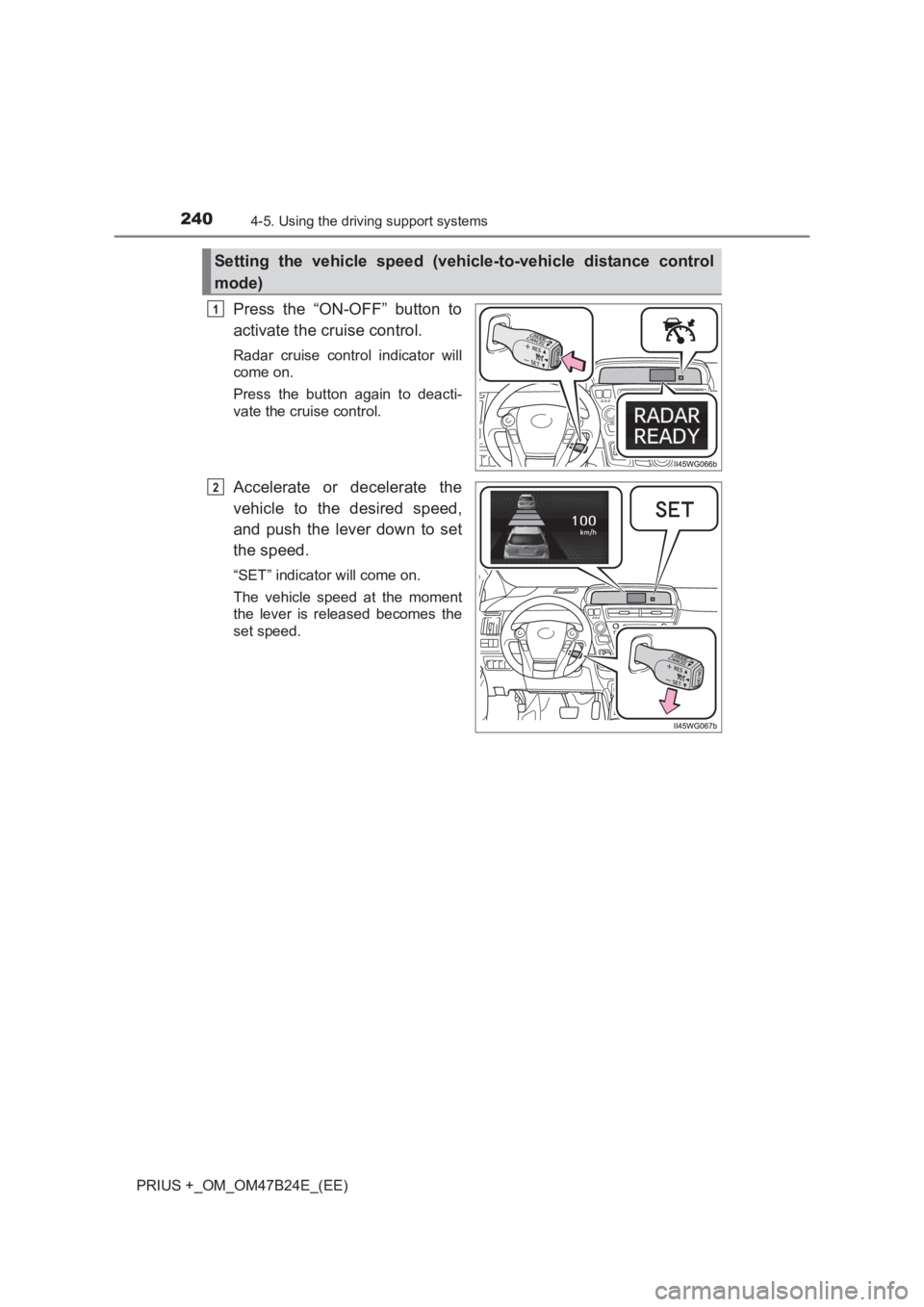
Press the “ON-OFF” button to
activate the cruise control.
Radar cruise control indicator will
come on.
Press the button again to deacti-
vate the cruise control.
Accelerate or decelerate the
vehicle to the desired speed,
and push the lever down to set
the speed.
“SET” indicator will come on.
The vehicle speed at the moment
the lever is released becomes the
set speed.
Setting the vehicle speed (vehicle-to-vehicle distance control
mode)
1
2
Page 241 of 509
2414-5. Using the driving support systems
4
Driving
PRIUS +_OM_OM47B24E_(EE)
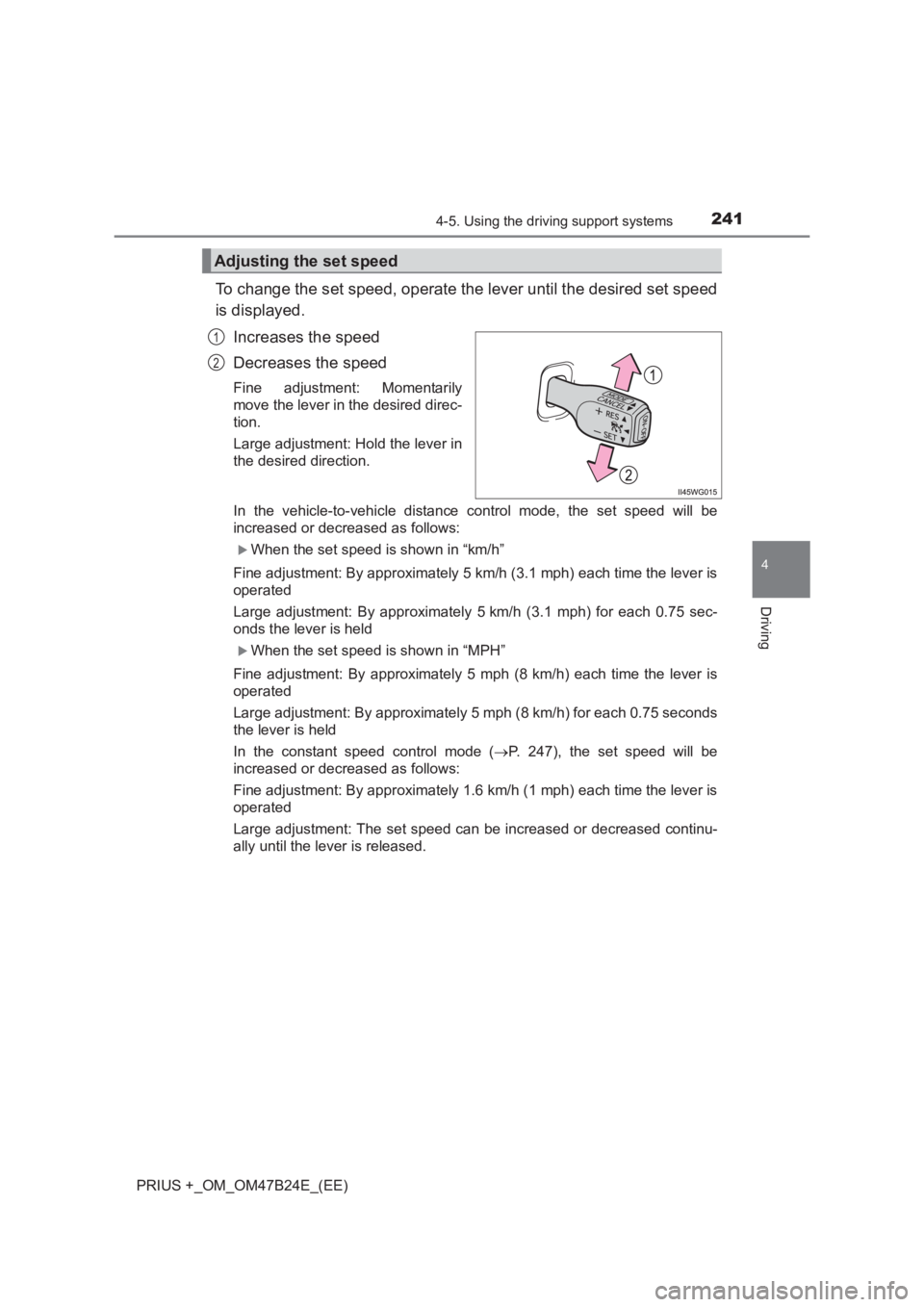
To change the set speed, operate the lever until the desired set speed
is displayed.Increases the speed
Decreases the speed
Fine adjustment: Momentarily
move the lever in the desired direc-
tion.
Large adjustment: Hold the lever in
the desired direction.
In the vehicle-to-vehicle distance control mode, the set speed will be
increased or decreased as follows:
XWhen the set speed is shown in “km/h”
Fine adjustment: By approximately 5 km/h (3.1 mph) each time the lever is
operated
Large adjustment: By approximately 5 km/h (3.1 mph) for each 0.75 sec-
onds the lever is held
XWhen the set speed is shown in “MPH”
Fine adjustment: By approximately 5 mph (8 km/h) each time the lever is
operated
Large adjustment: By approximately 5 mph (8 km/h) for each 0.75 seconds
the lever is held
In the constant speed control mode ( →P. 247), the set speed will be
increased or decreased as follows:
Fine adjustment: By approximately 1.6 km/h (1 mph) each time the lever is
operated
Large adjustment: The set speed can be increased or decreased continu-
ally until the lever is released.
Adjusting the set speed
1
2
Page 247 of 509
2474-5. Using the driving support systems
4
Driving
PRIUS +_OM_OM47B24E_(EE)
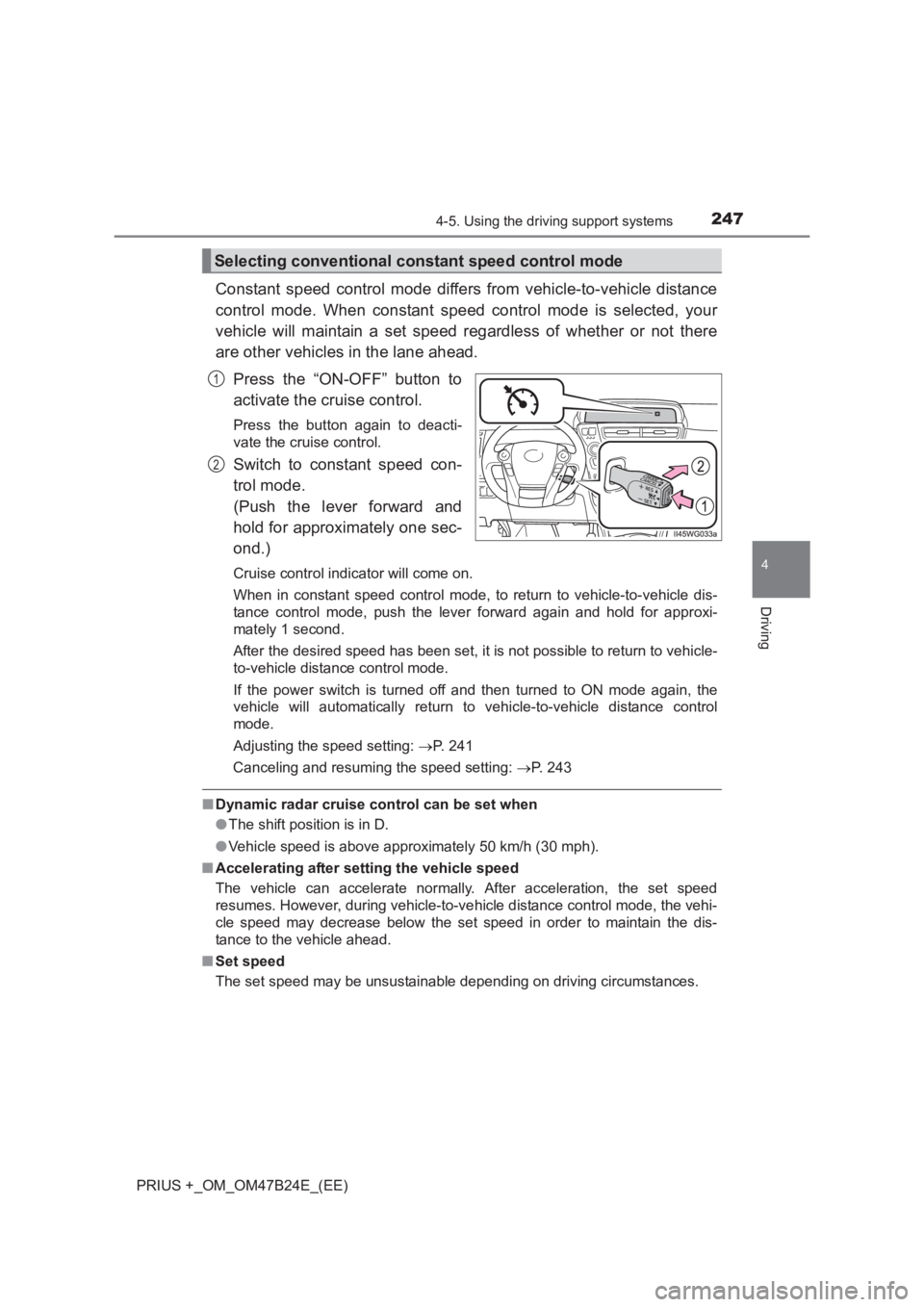
Constant speed control mode differs from vehicle-to-vehicle distance
control mode. When constant speed control mode is selected, your
vehicle will maintain a set speed regardless of whether or not there
are other vehicles in the lane ahead.Press the “ON-OFF” button to
activate the cruise control.
Press the button again to deacti-
vate the cruise control.
Switch to constant speed con-
trol mode.
(Push the lever forward and
hold for approximately one sec-
ond.)
Cruise control indicator will come on.
When in constant speed control mode, to return to vehicle-to-vehicle dis-
tance control mode, push the lever forward again and hold for approxi-
mately 1 second.
After the desired speed has been set, it is not possible to return to vehicle-
to-vehicle distance control mode.
If the power switch is turned off and then turned to ON mode again, the
vehicle will automatically return to vehicle-to-vehicle distance control
mode.
Adjusting the speed setting: →P. 241
Canceling and resuming the speed setting: →P. 243
■Dynamic radar cruise control can be set when
●The shift position is in D.
● Vehicle speed is above approximately 50 km/h (30 mph).
■ Accelerating after setting the vehicle speed
The vehicle can accelerate normally. After acceleration, the set speed
resumes. However, during vehicle-to-v ehicle distance control mode, the vehi-
cle speed may decrease below the set speed in order to maintain the dis-
tance to the vehicle ahead.
■ Set speed
The set speed may be unsustainable depending on driving circumstances.
Selecting conventional constant speed control mode
1
2
Page 255 of 509
255
4
4-5. Using the driving support systems
Driving
PRIUS +_OM_OM47B24E_(EE)
Driving mode select switch
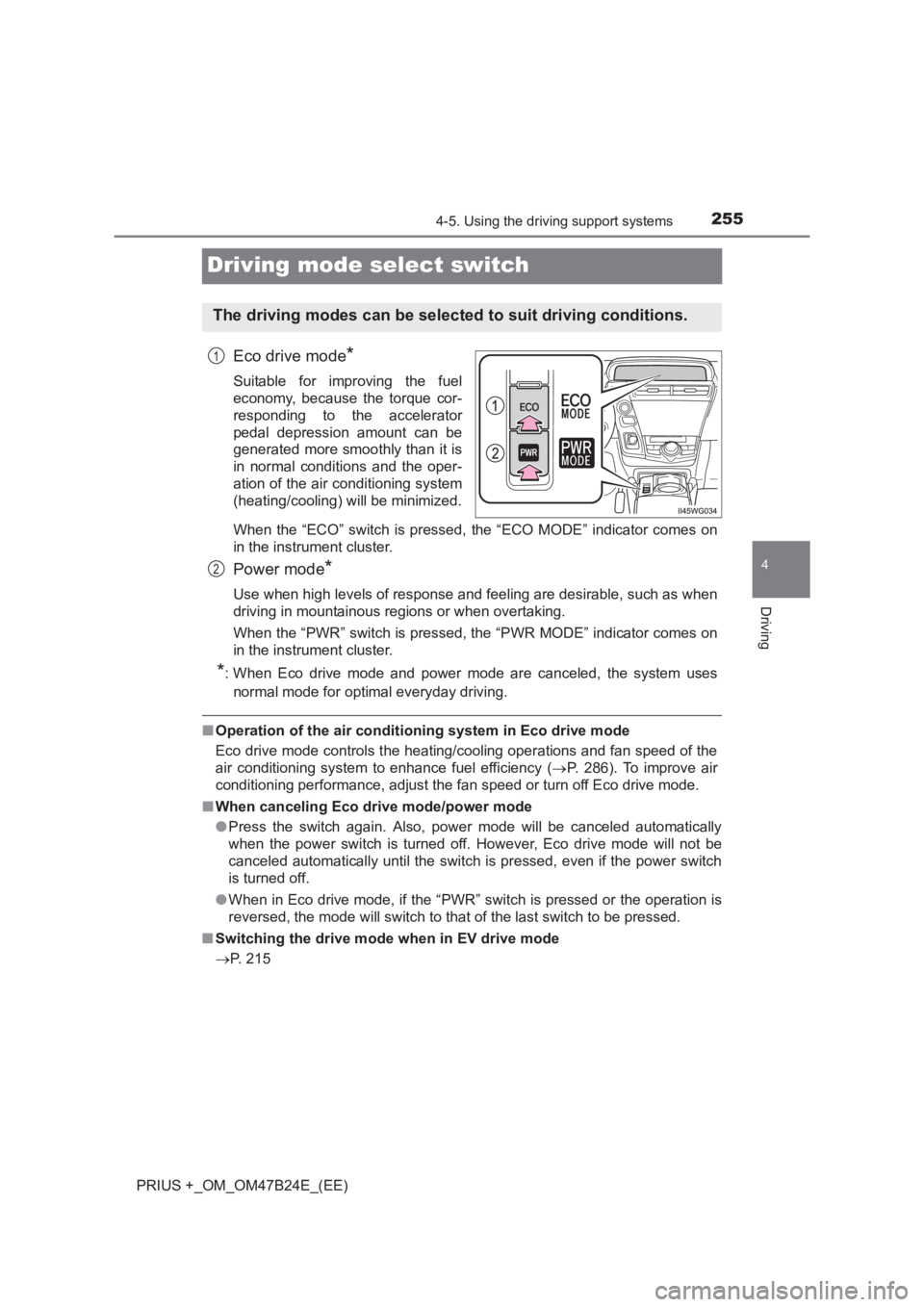
Eco drive mode*
Suitable for improving the fuel
economy, because the torque cor-
responding to the accelerator
pedal depression amount can be
generated more smoothly than it is
in normal conditions and the oper-
ation of the air conditioning system
(heating/cooling) will be minimized.
When the “ECO” switch is pressed, the “ECO MODE” indicator comes on
in the instrument cluster.
Power mode*
Use when high levels of response and feeling are desirable, such as when
driving in mountainous regions or when overtaking.
When the “PWR” switch is pressed, the “PWR MODE” indicator comes on
in the instrument cluster.
*: When Eco drive mode and power mode are canceled, the system uses
normal mode for optimal everyday driving.
■ Operation of the air conditioning system in Eco drive mode
Eco drive mode controls the heating/cooling operations and fan speed of the
air conditioning system to enhance fuel efficiency ( →P. 286). To improve air
conditioning performance, adjust the fan speed or turn off Eco drive mode.
■ When canceling Eco drive mode/power mode
●Press the switch again. Also, power mode will be canceled automatically
when the power switch is turned off. However, Eco drive mode will not be
canceled automatically until the switch is pressed, even if the power switch
is turned off.
● When in Eco drive mode, if the “PWR” switch is pressed or the operation is
reversed, the mode will switch to that of the last switch to be pressed.
■ Switching the drive mode when in EV drive mode
→ P. 215
The driving modes can be selected to suit driving conditions.
1
2